Bottom Up JavaScript


Bottom Up JavaScript

   Provide a JavaScript development foundation.

   The only 3 things you ever do with JavaScript:
        0.    Load Scripts
        1.    Attach Event Listener
        2.    Get or modify Data
        3.    Update the page

   Extra burdens:
        Unusual Language Features
        Multiple Environments and Languages
        Divergent and Competing Libraries
        Unusual Performance Considerations
        Scattered Resources and Development Tools

©Jupiter IT                                    JavaScriptMVC
Bottom Up JavaScript


What We Will Learn

   We will learn 'OF' just about everything:

   The JavaScript (JS) Language
   The Document Object Model (DOM)
   How JS and the DOM cooperate
   Libraries
   Development Tools
   Resources


©Jupiter IT                                    JavaScriptMVC
Bottom Up JavaScript


What We Will Learn

   We will learn 'OF' just about everything:

   The JavaScript (JS) Language
   The Document Object Model (DOM)
   How JS and the DOM cooperate
   Libraries
   Development Tools
   Resources


©Jupiter IT                                    JavaScriptMVC
Bottom Up JavaScript


JavaScript

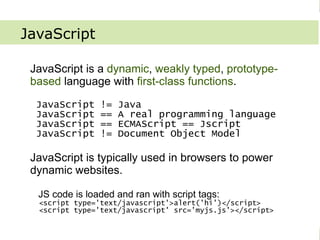
   JavaScript is a dynamic, weakly typed, prototype-
   based language with first-class functions.

     JavaScript        !=   Java
     JavaScript        ==   A real programming language
     JavaScript        ==   ECMAScript == Jscript
     JavaScript        !=   Document Object Model

   JavaScript is typically used in browsers to power
   dynamic websites.

     JS code is loaded and ran with script tags:
      <script type='text/javascript'>alert('hi')</script>
      <script type='text/javascript' src='myjs.js'></script>


©Jupiter IT                                            JavaScriptMVC
Bottom Up JavaScript


JavaScript: Dynamic

   Compilation and execution happen together.

   a = function(){ return 'a' };
   b = function(){ return 'b' };
   if(Math.random() < 0.5)
      c = a;
   else
      c = b;
   a() -> 'a'
   b() -> 'b'
   c() -> ???

   Use these techniques to remove boilerplate
   code.

©Jupiter IT                                     JavaScriptMVC
Bottom Up JavaScript


JavaScript: Weakly Typed

   Type associated with value, not variable.

   var a = 1;
   a = “one”;
   a = [1];
   a = {one: 1};

   Use typeof, instanceof, or other duck typing
   techniques to determine type.

   typeof “abc” -> “string”
   typeof 1 -> “number”
   typeof [] -> “object”

©Jupiter IT                                    JavaScriptMVC
Bottom Up JavaScript


JavaScript: Prototype-based

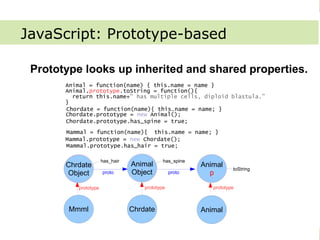
   Prototype looks up inherited and shared properties.
              Animal = function(name) { this.name = name }
              Animal.prototype.toString = function(){
                return this.name+" has multiple cells, diploid blastula."
              }
              Chordate = function(name){ this.name = name; }
              Chordate.prototype = new Animal();
              Chordate.prototype.has_spine = true;
              Mammal = function(name){ this.name = name; }
              Mammal.prototype = new Chordate();
              Mammal.prototype.has_hair = true;

                             has_hair               has_spine
              Chrdate
               Mmml                     Chrdate
                                        Animal                  Animal
                                                                           toString
              Object
                 p           proto      Object
                                           p            proto     p
                 prototype                  prototype              prototype


              Mmml                      Chrdate                 Animal


©Jupiter IT                                                                           JavaScriptMVC
Bottom Up JavaScript


JavaScript: First Class Functions

   Functions are just like objects, except you
   can put a () after them.
   //create
   square1 = new Function(“x”,”return x*x”);
   square2 = function(x){ return x*x};

   mult = function(f1, f2){
     return function(n){                //return
        return f1(n) * f2(n)
      }
   }
   bigF = mult(square1, square2)        //pass
   bigF(2) -> 16;


©Jupiter IT                                  JavaScriptMVC
Bottom Up JavaScript


JavaScript: First Class Functions

   Functions are just like objects, except you
   can put a () after them.
   //create
   square1 = new Function(“x”,”return x*x”);
   square2 = function(x){ return x*x};

   mult = function(f1, f2){
     return function(n){                //return
        return f1(n) * f2(n)
      }
   }
   bigF = mult(square1, square2)        //pass
   bigF(2) -> 16;


©Jupiter IT                                  JavaScriptMVC
Bottom Up JavaScript


JavaScript: Data Types

   Basic data types:
   ●   Undefined       ->   undefined
   ●   Null            ->   null
   ●   Boolean         ->   true, false
   ●   String          ->   “hello”
   ●   Number          ->   2, 0.2
   ●   Object          ->   {name: “value”}
   ●   Function        ->   function(){}
   ●   Array           ->   [1,2,3]
   ●   Date            ->   new Date()
   ●   RegExp          ->   /.*/g, new RegExp(“.*”,”g”)


©Jupiter IT                                        JavaScriptMVC
Bottom Up JavaScript


Document Object Model

   JS Representation of HTML and browser.
   <html>
      <head></head>
      <body>
           <h1>hi</h1>
      </body>
   </html>

   document = {
     documentElement: {
        nodeName: “HTML”
        childNodes: [
          {nodeName: “HEAD”, childNodes: []},
          {
            nodeName : “BODY”
            childNodes: [{nodeName: 'h1', innerHTML: "hi"}]
          }
        ]
     },
     getElementById : function(id){ ... }
   }


©Jupiter IT                                                   JavaScriptMVC
Bottom Up JavaScript


Document Object Model

   JS Representation of HTML and browser.
   Browser
       navigator.userAgent
   Page
        location
   Document
        var el=document.getElementById('eid')
   Ajax
       new XMLHttpRequest()
   Events
       el.attachEventListener('click',f,false)
   Elements
       el.style.backgroundColor = “blue”         Source: Wikipedia


©Jupiter IT                                           JavaScriptMVC
Bottom Up JavaScript


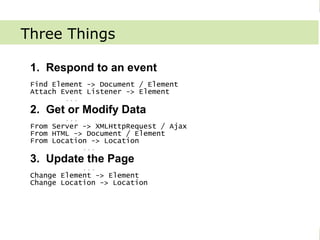
Three Things

   1. Respond to an event
   Find Element -> Document / Element
   Attach Event Listener -> Element
           ...
   2. Get or Modify Data
           ...
   From Server -> XMLHttpRequest / Ajax
   From HTML -> Document / Element
   From Location -> Location
               ...
   3. Update the Page
               ...
   Change Element -> Element
   Change Location -> Location


©Jupiter IT                               JavaScriptMVC
Bottom Up JavaScript


Three Things
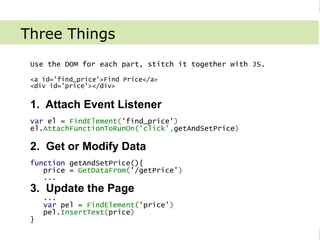
   Use the DOM for each part, stitch it together with JS.

   <a id='find_price'>Find Price</a>
   <div id='price'></div>


   1. Attach Event Listener
   var el = FindElement('find_price')
   el.AttachFunctionToRunOn('click',getAndSetPrice)

   2. Get or Modify Data
   function getAndSetPrice(){
      price = GetDataFrom('/getPrice')
      ...
   3. Update the Page
       ...
       var pel = FindElement('price')
       pel.InsertText(price)
   }

©Jupiter IT                                           JavaScriptMVC
Bottom Up JavaScript


Three Things
   <a id='find_price'>Find Price</a>
   <div id='price'></div>

   1. Attach Event Listener
   var el=document.getElementById('find_price')       //FindElement
   el.attachEventListener('click', getAndSetPrice, false); //attach

   2. Get or Modify Data
   getAndSetPrice = function(event){
      var xhr = new XMLHttpRequest()       //GetDataFrom
      xhr.open("GET", "/getPrice", false); //don't do this!
      xhr.send();
      var price = xhr.responseText;
      ...
   3. Update the Page
       ...
       document.getElementById('price').innerHTML = price;
   }

©Jupiter IT                                            JavaScriptMVC
Bottom Up JavaScript


Libraries

   Exist to make things easier:
   Browser inconsistencies
       attachEvent vs addEventListener
       XMLHttpRequest vs ActiveXObject

   DOM API weaknesses
       $('#sidebar .ul').height()
       document.getElementById('sidebar').
           childNodes[2].offsetHeight

   Common tasks
       Drag/drop, AutoComplete, Slider, Sortable Tables

   Language improvements
       [].each(), “isRed”.startsWith(“is”)

   Do you need a library -> YES!!!
©Jupiter IT                                               JavaScriptMVC
Bottom Up JavaScript


Library Selection


©Jupiter IT            JavaScriptMVC
Bottom Up JavaScript


Tools

   Debugging
       Firebug (FF)
       MS Visual Web Developer (IE)
       DragonFly (Opera)
       Chrome
       Drosera / Web Inspector (Safari)

   Compression
       Dojo Shrink Safe
       YUI
       Dean Edwards Packer / Compress.js

   Performance
        Yslow
        Firebug
        Chrome's development tools


©Jupiter IT                                JavaScriptMVC
Bottom Up JavaScript


Tools Continued ...

   Testing
       In browser (easy) - JSUnit
       Browser Control (comprehensive) - Selenium
       Simulated (fast) – Env.js

   Documentation
      JSDoc – Understands JavaScript, hard to document complex
   features
      Natural Docs – Can document anything
      MVCDoc – Can document anything, understands some JS.


©Jupiter IT                                           JavaScriptMVC
Bottom Up JavaScript


Resources

   Documentation
       Mozilla Development Center
       MSDN Internet Explorer Development Center
       Quirksmode

   Books
       JavaScript - the Definitive Guide. David Flanagan
       JavaScript – the Good Parts. Douglas Crockford

   News
       Ajaxian
       Ejohn.org


©Jupiter IT                                            JavaScriptMVC
Bottom Up JavaScript


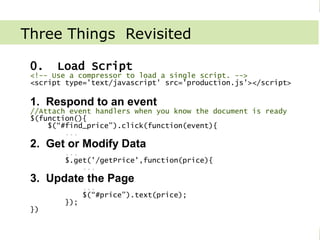
Three Things Revisited

   0.         Load Script
   <!-- Use a compressor to load a single script. -->
   <script type='text/javascript' src='production.js'></script>

   1. Respond to an event
   //Attach event handlers when you know the document is ready
   $(function(){
       $(“#find_price”).click(function(event){
           ...
   2. Get or Modify Data
               ...
               $.get('/getPrice',function(price){
                   ...
   3. Update the Page
                     ...
                     $(“#price”).text(price);
               });
   })


©Jupiter IT                                           JavaScriptMVC
Bottom Up JavaScript


Three Things Revisited Cont...
   MyCo.updatePrice = function(price){
     $(“#price”).text(price);
   }
   MyCo.getAndUpdatePrice = function(){
      $.get('/getPrice',MyCo.updatePrice)
   }
   $(function(){
      $(“#find_price”).click(MyCo.getAndUpdatePrice)
   })
   OR Maybe ...
   $.Controller.extend('MyCo.Controllers.FindPrice',{
     click : function(){
       MyCo.Price.get(this.callback('updatePrice'))
     },
     updatePrice : function(price){
       $(“#price).html({view: 'price',data: {price: price});
     }
   })
   <!-- in views/find_price/price.ejs -->
   Your price is <span class='highlight'><%= price %></span>

©Jupiter IT                                            JavaScriptMVC
Bottom Up JavaScript


What we've learned

   The JavaScript (JS) Language
   The Document Object Model (DOM)
   How JS and the DOM cooperate
   Libraries
   Development Tools
   Resources


©Jupiter IT                          JavaScriptMVC

Bottom Up

  • 1.
    Bottom Up JavaScript BottomUp JavaScript Provide a JavaScript development foundation. The only 3 things you ever do with JavaScript: 0. Load Scripts 1. Attach Event Listener 2. Get or modify Data 3. Update the page Extra burdens: Unusual Language Features Multiple Environments and Languages Divergent and Competing Libraries Unusual Performance Considerations Scattered Resources and Development Tools ©Jupiter IT JavaScriptMVC
  • 2.
    Bottom Up JavaScript WhatWe Will Learn We will learn 'OF' just about everything: The JavaScript (JS) Language The Document Object Model (DOM) How JS and the DOM cooperate Libraries Development Tools Resources ©Jupiter IT JavaScriptMVC
  • 3.
    Bottom Up JavaScript WhatWe Will Learn We will learn 'OF' just about everything: The JavaScript (JS) Language The Document Object Model (DOM) How JS and the DOM cooperate Libraries Development Tools Resources ©Jupiter IT JavaScriptMVC
  • 4.
    Bottom Up JavaScript JavaScript JavaScript is a dynamic, weakly typed, prototype- based language with first-class functions. JavaScript != Java JavaScript == A real programming language JavaScript == ECMAScript == Jscript JavaScript != Document Object Model JavaScript is typically used in browsers to power dynamic websites. JS code is loaded and ran with script tags: <script type='text/javascript'>alert('hi')</script> <script type='text/javascript' src='myjs.js'></script> ©Jupiter IT JavaScriptMVC
  • 5.
    Bottom Up JavaScript JavaScript:Dynamic Compilation and execution happen together. a = function(){ return 'a' }; b = function(){ return 'b' }; if(Math.random() < 0.5) c = a; else c = b; a() -> 'a' b() -> 'b' c() -> ??? Use these techniques to remove boilerplate code. ©Jupiter IT JavaScriptMVC
  • 6.
    Bottom Up JavaScript JavaScript:Weakly Typed Type associated with value, not variable. var a = 1; a = “one”; a = [1]; a = {one: 1}; Use typeof, instanceof, or other duck typing techniques to determine type. typeof “abc” -> “string” typeof 1 -> “number” typeof [] -> “object” ©Jupiter IT JavaScriptMVC
  • 7.
    Bottom Up JavaScript JavaScript:Prototype-based Prototype looks up inherited and shared properties. Animal = function(name) { this.name = name } Animal.prototype.toString = function(){ return this.name+" has multiple cells, diploid blastula." } Chordate = function(name){ this.name = name; } Chordate.prototype = new Animal(); Chordate.prototype.has_spine = true; Mammal = function(name){ this.name = name; } Mammal.prototype = new Chordate(); Mammal.prototype.has_hair = true; has_hair has_spine Chrdate Mmml Chrdate Animal Animal toString Object p proto Object p proto p prototype prototype prototype Mmml Chrdate Animal ©Jupiter IT JavaScriptMVC
  • 8.
    Bottom Up JavaScript JavaScript:First Class Functions Functions are just like objects, except you can put a () after them. //create square1 = new Function(“x”,”return x*x”); square2 = function(x){ return x*x}; mult = function(f1, f2){ return function(n){ //return return f1(n) * f2(n) } } bigF = mult(square1, square2) //pass bigF(2) -> 16; ©Jupiter IT JavaScriptMVC
  • 9.
    Bottom Up JavaScript JavaScript:First Class Functions Functions are just like objects, except you can put a () after them. //create square1 = new Function(“x”,”return x*x”); square2 = function(x){ return x*x}; mult = function(f1, f2){ return function(n){ //return return f1(n) * f2(n) } } bigF = mult(square1, square2) //pass bigF(2) -> 16; ©Jupiter IT JavaScriptMVC
  • 10.
    Bottom Up JavaScript JavaScript:Data Types Basic data types: ● Undefined -> undefined ● Null -> null ● Boolean -> true, false ● String -> “hello” ● Number -> 2, 0.2 ● Object -> {name: “value”} ● Function -> function(){} ● Array -> [1,2,3] ● Date -> new Date() ● RegExp -> /.*/g, new RegExp(“.*”,”g”) ©Jupiter IT JavaScriptMVC
  • 11.
    Bottom Up JavaScript DocumentObject Model JS Representation of HTML and browser. <html> <head></head> <body> <h1>hi</h1> </body> </html> document = { documentElement: { nodeName: “HTML” childNodes: [ {nodeName: “HEAD”, childNodes: []}, { nodeName : “BODY” childNodes: [{nodeName: 'h1', innerHTML: "hi"}] } ] }, getElementById : function(id){ ... } } ©Jupiter IT JavaScriptMVC
  • 12.
    Bottom Up JavaScript DocumentObject Model JS Representation of HTML and browser. Browser navigator.userAgent Page location Document var el=document.getElementById('eid') Ajax new XMLHttpRequest() Events el.attachEventListener('click',f,false) Elements el.style.backgroundColor = “blue” Source: Wikipedia ©Jupiter IT JavaScriptMVC
  • 13.
    Bottom Up JavaScript ThreeThings 1. Respond to an event Find Element -> Document / Element Attach Event Listener -> Element ... 2. Get or Modify Data ... From Server -> XMLHttpRequest / Ajax From HTML -> Document / Element From Location -> Location ... 3. Update the Page ... Change Element -> Element Change Location -> Location ©Jupiter IT JavaScriptMVC
  • 14.
    Bottom Up JavaScript ThreeThings Use the DOM for each part, stitch it together with JS. <a id='find_price'>Find Price</a> <div id='price'></div> 1. Attach Event Listener var el = FindElement('find_price') el.AttachFunctionToRunOn('click',getAndSetPrice) 2. Get or Modify Data function getAndSetPrice(){ price = GetDataFrom('/getPrice') ... 3. Update the Page ... var pel = FindElement('price') pel.InsertText(price) } ©Jupiter IT JavaScriptMVC
  • 15.
    Bottom Up JavaScript ThreeThings <a id='find_price'>Find Price</a> <div id='price'></div> 1. Attach Event Listener var el=document.getElementById('find_price') //FindElement el.attachEventListener('click', getAndSetPrice, false); //attach 2. Get or Modify Data getAndSetPrice = function(event){ var xhr = new XMLHttpRequest() //GetDataFrom xhr.open("GET", "/getPrice", false); //don't do this! xhr.send(); var price = xhr.responseText; ... 3. Update the Page ... document.getElementById('price').innerHTML = price; } ©Jupiter IT JavaScriptMVC
  • 16.
    Bottom Up JavaScript Libraries Exist to make things easier: Browser inconsistencies attachEvent vs addEventListener XMLHttpRequest vs ActiveXObject DOM API weaknesses $('#sidebar .ul').height() document.getElementById('sidebar'). childNodes[2].offsetHeight Common tasks Drag/drop, AutoComplete, Slider, Sortable Tables Language improvements [].each(), “isRed”.startsWith(“is”) Do you need a library -> YES!!! ©Jupiter IT JavaScriptMVC
  • 17.
    Bottom Up JavaScript LibrarySelection ©Jupiter IT JavaScriptMVC
  • 18.
    Bottom Up JavaScript Tools Debugging Firebug (FF) MS Visual Web Developer (IE) DragonFly (Opera) Chrome Drosera / Web Inspector (Safari) Compression Dojo Shrink Safe YUI Dean Edwards Packer / Compress.js Performance Yslow Firebug Chrome's development tools ©Jupiter IT JavaScriptMVC
  • 19.
    Bottom Up JavaScript ToolsContinued ... Testing In browser (easy) - JSUnit Browser Control (comprehensive) - Selenium Simulated (fast) – Env.js Documentation JSDoc – Understands JavaScript, hard to document complex features Natural Docs – Can document anything MVCDoc – Can document anything, understands some JS. ©Jupiter IT JavaScriptMVC
  • 20.
    Bottom Up JavaScript Resources Documentation Mozilla Development Center MSDN Internet Explorer Development Center Quirksmode Books JavaScript - the Definitive Guide. David Flanagan JavaScript – the Good Parts. Douglas Crockford News Ajaxian Ejohn.org ©Jupiter IT JavaScriptMVC
  • 21.
    Bottom Up JavaScript ThreeThings Revisited 0. Load Script <!-- Use a compressor to load a single script. --> <script type='text/javascript' src='production.js'></script> 1. Respond to an event //Attach event handlers when you know the document is ready $(function(){ $(“#find_price”).click(function(event){ ... 2. Get or Modify Data ... $.get('/getPrice',function(price){ ... 3. Update the Page ... $(“#price”).text(price); }); }) ©Jupiter IT JavaScriptMVC
  • 22.
    Bottom Up JavaScript ThreeThings Revisited Cont... MyCo.updatePrice = function(price){ $(“#price”).text(price); } MyCo.getAndUpdatePrice = function(){ $.get('/getPrice',MyCo.updatePrice) } $(function(){ $(“#find_price”).click(MyCo.getAndUpdatePrice) }) OR Maybe ... $.Controller.extend('MyCo.Controllers.FindPrice',{ click : function(){ MyCo.Price.get(this.callback('updatePrice')) }, updatePrice : function(price){ $(“#price).html({view: 'price',data: {price: price}); } }) <!-- in views/find_price/price.ejs --> Your price is <span class='highlight'><%= price %></span> ©Jupiter IT JavaScriptMVC
  • 23.
    Bottom Up JavaScript Whatwe've learned The JavaScript (JS) Language The Document Object Model (DOM) How JS and the DOM cooperate Libraries Development Tools Resources ©Jupiter IT JavaScriptMVC