Stefan Geißler – Kairntech
AI-SDV, 5-6 Oct 2020
The AI-Powered NLP platform for everyone
Fast, Accurate and Fun!
The challenge
 A lot of valuable information is hidden in documents
 Business processes need to access and analyse this
type of information
 The more these documents are unstructured, the
more difficult, lengthy error-prone and costly
document analysis gets
 Thanks to AI it is now possible to extract data with
high quality … but not everyone masters
sophisticated AI algorithms
The Kairntech SaaS platform makes document analysis processes accessible
to domain experts, not only data scientists and programmer:
accessible to all, fast, accurate and fun to use !
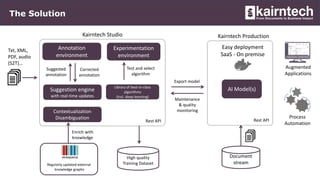
The Solution
Kairntech Studio
Corrected
annotation
Suggested
annotation
Annotation
environment
Suggestion engine
with real-time updates
Experimentation
environment
Txt, XML,
PDF, audio
(S2T)…
Library of best-in-class
algorithms
(incl. deep learning)
Test and select
algorithm
Contextualization
Disambiguation
High quality
Training Dataset
Augmented
Applications
Process
Automation
Kairntech Production
Regularly updated external
knowledge graphs
Document
stream
Easy deployment
SaaS - On premise
Enrich with
knowledge
AI Model(s)
Rest API
Maintenance
& quality
monitoring
Export model
Rest API
How it works, Kairntech Studio
Each sticker corresponds to a
project (a use case)
Multiple languages supported
Projects are either based on
named-entity recognition or on
categorization (more to come).
Categorization use-cases
 Filter items (emails, web reviews,
support tickets...) of interest (yes/no)
 Distribute per theme
 Associate with an action (a reply..)
Entity extraction use-cases
 Extract data from content (contracts,
regulations, scientific papers…)
 Disambiguate & Normalize data (attach
to an external reference)
 Add information to Knowledge base
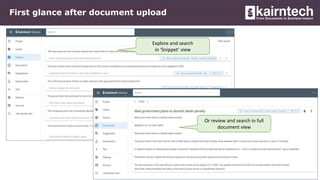
First glance after document upload
Explore and search
in ‘Snippet’ view
Or review and search in full
document view
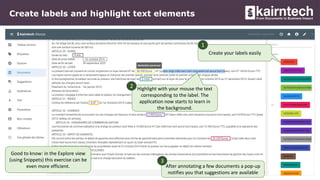
Create labels and highlight text elements
Create your labels easily
Highlight with your mouse the text
corresponding to the label. The
application now starts to learn in
the background.
After annotating a few documents a pop-up
notifies you that suggestions are available
Good to know: in the Explore view
(using Snippets) this exercise can be
even more efficient.
1
2
3
Fun and easy-to-use real-time suggestions
Once suggestions approved,
(while checking missing labels)
then validate the segment to
enrich quickly the dataset
Accept / Refuse / Correct suggestions.
The trick is to validate the ‘positives’
and eliminate the ‘false-positives’
Filter by defined label
or category
Check the quality of what you have done
Filter on all segments /documents
within the dataset (yes/no) and on
labels to check coherence and quality
Check the distribution of the
labels
Experiment with different ML techniques
Training and hyper
parameter finetuning
Select the algorithm among
best-of-class frameworks
Start Model training
Monitor execution
(on CPU or GPU)
Compare the results on test
data set, select the best model
Download the model for
production.
1
2
3
4
5
6
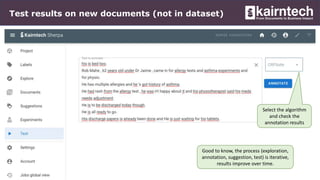
Test results on new documents (not in dataset)
Select the algorithm
and check the
annotation results
Good to know, the process (exploration,
annotation, suggestion, test) is iterative,
results improve over time.
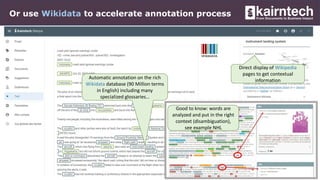
Or use Wikidata to accelerate annotation process
Direct display of Wikipedia
pages to get contextual
information
Automatic annotation on the rich
Wikidata database (90 Million terms
in English) including many
specialized glossaries…
Good to know: words are
analyzed and put in the right
context (disambiguation),
see example NHL
Use case: audit report acceleration
Search to access new annotated
agreements
Visualize the extractions
Filter with labels or label values
Produce a list of all detected
elements allowing auditors to
focus on important information
1
2
3
4
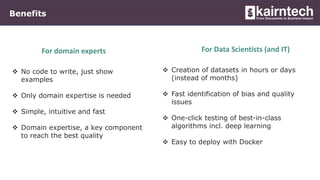
Benefits
 No code to write, just show
examples
 Only domain expertise is needed
 Simple, intuitive and fast
 Domain expertise, a key component
to reach the best quality
For domain experts
 Creation of datasets in hours or days
(instead of months)
 Fast identification of bias and quality
issues
 One-click testing of best-in-class
algorithms incl. deep learning
 Easy to deploy with Docker
For Data Scientists (and IT)
Next steps
Describe your use-case
Thank you!
info@kairntech.com
www.kairntech.com
1
3 Kairntech creates a demo
environment
4
One-hour onboarding (free)
One month usage (free)5
Select a representative
set of documents
2

AI-SDV 2020: Kairntech

  • 1.
    Stefan Geißler –Kairntech AI-SDV, 5-6 Oct 2020 The AI-Powered NLP platform for everyone Fast, Accurate and Fun!
  • 2.
    The challenge  Alot of valuable information is hidden in documents  Business processes need to access and analyse this type of information  The more these documents are unstructured, the more difficult, lengthy error-prone and costly document analysis gets  Thanks to AI it is now possible to extract data with high quality … but not everyone masters sophisticated AI algorithms The Kairntech SaaS platform makes document analysis processes accessible to domain experts, not only data scientists and programmer: accessible to all, fast, accurate and fun to use !
  • 3.
    The Solution Kairntech Studio Corrected annotation Suggested annotation Annotation environment Suggestionengine with real-time updates Experimentation environment Txt, XML, PDF, audio (S2T)… Library of best-in-class algorithms (incl. deep learning) Test and select algorithm Contextualization Disambiguation High quality Training Dataset Augmented Applications Process Automation Kairntech Production Regularly updated external knowledge graphs Document stream Easy deployment SaaS - On premise Enrich with knowledge AI Model(s) Rest API Maintenance & quality monitoring Export model Rest API
  • 4.
    How it works,Kairntech Studio Each sticker corresponds to a project (a use case) Multiple languages supported Projects are either based on named-entity recognition or on categorization (more to come). Categorization use-cases  Filter items (emails, web reviews, support tickets...) of interest (yes/no)  Distribute per theme  Associate with an action (a reply..) Entity extraction use-cases  Extract data from content (contracts, regulations, scientific papers…)  Disambiguate & Normalize data (attach to an external reference)  Add information to Knowledge base
  • 5.
    First glance afterdocument upload Explore and search in ‘Snippet’ view Or review and search in full document view
  • 6.
    Create labels andhighlight text elements Create your labels easily Highlight with your mouse the text corresponding to the label. The application now starts to learn in the background. After annotating a few documents a pop-up notifies you that suggestions are available Good to know: in the Explore view (using Snippets) this exercise can be even more efficient. 1 2 3
  • 7.
    Fun and easy-to-usereal-time suggestions Once suggestions approved, (while checking missing labels) then validate the segment to enrich quickly the dataset Accept / Refuse / Correct suggestions. The trick is to validate the ‘positives’ and eliminate the ‘false-positives’ Filter by defined label or category
  • 8.
    Check the qualityof what you have done Filter on all segments /documents within the dataset (yes/no) and on labels to check coherence and quality Check the distribution of the labels
  • 9.
    Experiment with differentML techniques Training and hyper parameter finetuning Select the algorithm among best-of-class frameworks Start Model training Monitor execution (on CPU or GPU) Compare the results on test data set, select the best model Download the model for production. 1 2 3 4 5 6
  • 10.
    Test results onnew documents (not in dataset) Select the algorithm and check the annotation results Good to know, the process (exploration, annotation, suggestion, test) is iterative, results improve over time.
  • 11.
    Or use Wikidatato accelerate annotation process Direct display of Wikipedia pages to get contextual information Automatic annotation on the rich Wikidata database (90 Million terms in English) including many specialized glossaries… Good to know: words are analyzed and put in the right context (disambiguation), see example NHL
  • 12.
    Use case: auditreport acceleration Search to access new annotated agreements Visualize the extractions Filter with labels or label values Produce a list of all detected elements allowing auditors to focus on important information 1 2 3 4
  • 13.
    Benefits  No codeto write, just show examples  Only domain expertise is needed  Simple, intuitive and fast  Domain expertise, a key component to reach the best quality For domain experts  Creation of datasets in hours or days (instead of months)  Fast identification of bias and quality issues  One-click testing of best-in-class algorithms incl. deep learning  Easy to deploy with Docker For Data Scientists (and IT)
  • 14.
    Next steps Describe youruse-case Thank you! info@kairntech.com www.kairntech.com 1 3 Kairntech creates a demo environment 4 One-hour onboarding (free) One month usage (free)5 Select a representative set of documents 2