PostGIS,
OS MasterMap CoU
&
“Point in Time Snapshots”
OS MasterMap Topography Layer,
PostGIS,
AstunLoader,
PostgreSQL HSTORE,
&
PostgreSQL Audit trigger 91plus
Sorry it is going to be rather technical ....
PostGIS is a spatial database extender for PostgreSQL object-relational database.
It adds support for geographic objects allowing location queries to be run in SQL.
http://postgis.net/
OS MasterMap
A continually updated database, OS MasterMap contains 450 million geographic features found in the real world, from
individual addresses to roads and buildings. Every feature has a unique common reference (a TOID), which enables the
layers to be used together and combined with your own information.
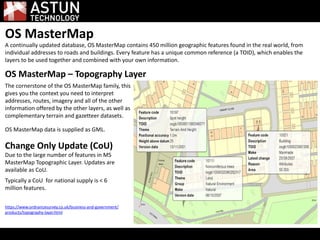
OS MasterMap – Topography Layer
The cornerstone of the OS MasterMap family, this
gives you the context you need to interpret
addresses, routes, imagery and all of the other
information offered by the other layers, as well as
complementary terrain and gazetteer datasets.
OS MasterMap data is supplied as GML.
Change Only Update (CoU)
Due to the large number of features in MS
MasterMap Topographic Layer. Updates are
available as CoU.
Typically a CoU for national supply is < 6
million features.
https://www.ordnancesurvey.co.uk/business-and-government/
products/topography-layer.html
Astun Loader
A very simple GML loader (and translator) written in Python that makes use of OGR 1.9.
Source data can be in GML or GZip (.gz) format and can be output to any of the formats supported by OGR.
Technology
OGR - Library and utilities for reading and writing vector data
Python - Dynamic programming language
Why?
Need to load OS MasterMap for client projects and for Astun Data Services (https://astuntechnology.com/services/) .
Easier to take the raw data.
Made sense to have an open source loader to allow adoption of OS MasterMap under PMA.
How?
Read GZ or GML
Manipulate it
Make life easy on OGR (expose the fid, update SRS, define output schema)
Some 'value add' (profiles and configuration files for specific use cases or software)
OGR does the loading/translation (broad format support)
Currently command line driven.
Who?
Astun Technology - several clients inc. Eden, Surrey Heath, DORIC Partnership etc.
Faunalia's QGIS Plugin
Ordnance Survey
GeoPlace
http://github.com/AstunTechnology/Loader
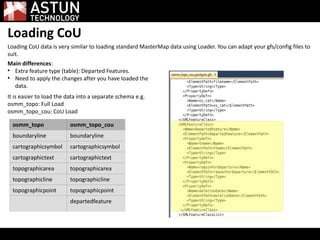
Loading CoU
Loading CoU data is very similar to loading standard MasterMap data using Loader. You can adapt your gfs/config files to
suit.
osmm_topo osmm_topo_cou
boundaryline boundaryline
cartographicsymbol cartographicsymbol
cartographictext cartographictext
topographicarea topographicarea
topographicline topographicline
topographicpoint topographicpoint
departedfeature
Main differences:
●
Extra feature type (table): Departed Features.
●
Need to apply the changes after you have loaded the
data.
It is easier to load the data into a separate schema e.g.
osmm_topo: Full Load
osmm_topo_cou: CoU Load
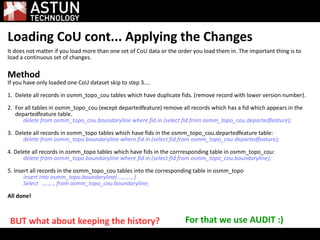
Loading CoU cont... Applying the Changes
It does not matter if you load more than one set of CoU data or the order you load them in. The important thing is to
load a continuous set of changes.
Method
If you have only loaded one CoU dataset skip to step 3....
1. Delete all records in osmm_topo_cou tables which have duplicate fids. (remove record with lower version number).
2. For all tables in osmm_topo_cou (except departedfeature) remove all records which has a fid which appears in the
departedfeature table.
delete from osmm_topo_cou.boundaryline where fid in (select fid from osmm_topo_cou.departedfeature);
3. Delete all records in osmm_topo tables which have fids in the osmm_topo_cou.departedfeature table:
delete from osmm_topo.boundaryline where fid in (select fid from osmm_topo_cou.departedfeature);
4. Delete all records in osmm_topo tables which have fids in the corrresponding table in osmm_topo_cou:
delete from osmm_topo.boundaryline where fid in (select fid from osmm_topo_cou.boundaryline);
5. Insert all records in the osmm_topo_cou tables into the corresponding table in osmm_topo
insert into osmm_topo.boundaryline( ..,..,.., )
Select ..,..,.., from osmm_topo_cou.boundaryline;
All done!
BUT what about keeping the history? For that we use AUDIT :)
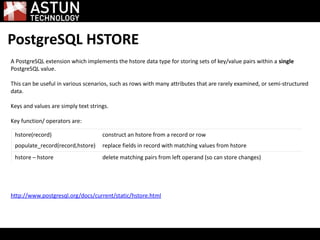
PostgreSQL HSTORE
A PostgreSQL extension which implements the hstore data type for storing sets of key/value pairs within a single
PostgreSQL value.
This can be useful in various scenarios, such as rows with many attributes that are rarely examined, or semi-structured
data.
Keys and values are simply text strings.
Key function/ operators are:
http://www.postgresql.org/docs/current/static/hstore.html
hstore(record) construct an hstore from a record or row
populate_record(record,hstore) replace fields in record with matching values from hstore
hstore – hstore delete matching pairs from left operand (so can store changes)
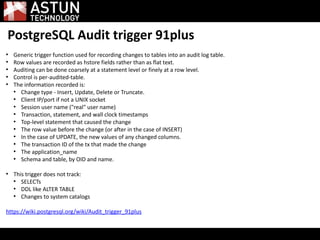
PostgreSQL Audit trigger 91plus
●
Generic trigger function used for recording changes to tables into an audit log table.
●
Row values are recorded as hstore fields rather than as flat text.
●
Auditing can be done coarsely at a statement level or finely at a row level.
●
Control is per-audited-table.
●
The information recorded is:
●
Change type - Insert, Update, Delete or Truncate.
●
Client IP/port if not a UNIX socket
●
Session user name ("real" user name)
●
Transaction, statement, and wall clock timestamps
●
Top-level statement that caused the change
●
The row value before the change (or after in the case of INSERT)
●
In the case of UPDATE, the new values of any changed columns.
●
The transaction ID of the tx that made the change
●
The application_name
●
Schema and table, by OID and name.
●
This trigger does not track:
●
SELECTs
●
DDL like ALTER TABLE
●
Changes to system catalogs
https://wiki.postgresql.org/wiki/Audit_trigger_91plus
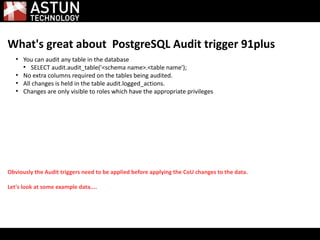
What's great about PostgreSQL Audit trigger 91plus
●
You can audit any table in the database
●
SELECT audit.audit_table('<schema name>.<table name');
●
No extra columns required on the tables being audited.
●
All changes is held in the table audit.logged_actions.
●
Changes are only visible to roles which have the appropriate privileges
Obviously the Audit triggers need to be applied before applying the CoU changes to the data.
Let's look at some example data....
Demo....
Switch to PostGIS.
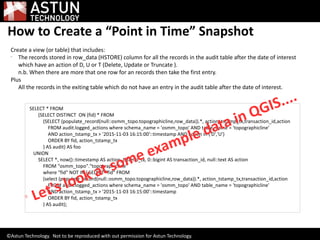
How to Create a “Point in Time” Snapshot
Create a view (or table) that includes:

The records stored in row_data (HSTORE) column for all the records in the audit table after the date of interest
which have an action of D, U or T (Delete, Update or Truncate ).
n.b. When there are more that one row for an records then take the first entry.
Plus
All the records in the exiting table which do not have an entry in the audit table after the date of interest.
SELECT * FROM
(SELECT DISTINCT ON (fid) * FROM
(SELECT (populate_record(null::osmm_topo.topographicline,row_data)).*, action_tstamp_tx,transaction_id,action
FROM audit.logged_actions where schema_name = 'osmm_topo' AND table_name = 'topographicline'
AND action_tstamp_tx > '2015-11-03 16:15:00'::timestamp AND action in ('D','U')
ORDER BY fid, action_tstamp_tx
) AS audit) AS foo
UNION
SELECT *, now()::timestamp AS action_tstamp_tx, 0::bigint AS transaction_id, null::text AS action
FROM "osmm_topo"."topographicline"
where "fid" NOT IN ( SELECT "fid" FROM
(select (populate_record(null::osmm_topo.topographicline,row_data)).*, action_tstamp_tx,transaction_id,action
FROM audit.logged_actions where schema_name = 'osmm_topo' AND table_name = 'topographicline'
AND action_tstamp_tx > '2015-11-03 16:15:00'::timestamp
ORDER BY fid, action_tstamp_tx
) AS audit);

Let's look at some example data in QGIS....
©Astun Technology. Not to be reproduced with out permission for Astun Technology.
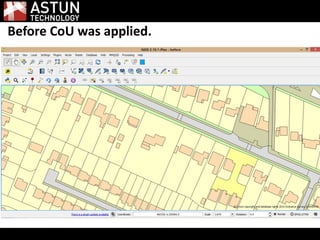
Before CoU was applied.
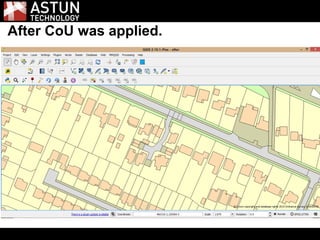
After CoU was applied.
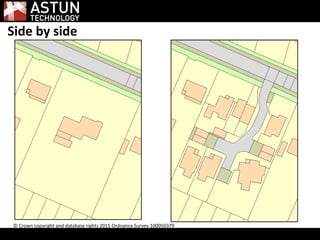
Side by side
© Crown copyright and database rights 2015 Ordnance Survey 100050379
Questions?
Thank you
Astuntechnology.com
AstunTechnology
walkermatt
@astuntech
@aileen_heal

Aileen heal postgis osmm cou

  • 1.
  • 2.
    OS MasterMap TopographyLayer, PostGIS, AstunLoader, PostgreSQL HSTORE, & PostgreSQL Audit trigger 91plus Sorry it is going to be rather technical ....
  • 3.
    PostGIS is aspatial database extender for PostgreSQL object-relational database. It adds support for geographic objects allowing location queries to be run in SQL. http://postgis.net/
  • 4.
    OS MasterMap A continuallyupdated database, OS MasterMap contains 450 million geographic features found in the real world, from individual addresses to roads and buildings. Every feature has a unique common reference (a TOID), which enables the layers to be used together and combined with your own information. OS MasterMap – Topography Layer The cornerstone of the OS MasterMap family, this gives you the context you need to interpret addresses, routes, imagery and all of the other information offered by the other layers, as well as complementary terrain and gazetteer datasets. OS MasterMap data is supplied as GML. Change Only Update (CoU) Due to the large number of features in MS MasterMap Topographic Layer. Updates are available as CoU. Typically a CoU for national supply is < 6 million features. https://www.ordnancesurvey.co.uk/business-and-government/ products/topography-layer.html
  • 5.
    Astun Loader A verysimple GML loader (and translator) written in Python that makes use of OGR 1.9. Source data can be in GML or GZip (.gz) format and can be output to any of the formats supported by OGR. Technology OGR - Library and utilities for reading and writing vector data Python - Dynamic programming language Why? Need to load OS MasterMap for client projects and for Astun Data Services (https://astuntechnology.com/services/) . Easier to take the raw data. Made sense to have an open source loader to allow adoption of OS MasterMap under PMA. How? Read GZ or GML Manipulate it Make life easy on OGR (expose the fid, update SRS, define output schema) Some 'value add' (profiles and configuration files for specific use cases or software) OGR does the loading/translation (broad format support) Currently command line driven. Who? Astun Technology - several clients inc. Eden, Surrey Heath, DORIC Partnership etc. Faunalia's QGIS Plugin Ordnance Survey GeoPlace http://github.com/AstunTechnology/Loader
  • 6.
    Loading CoU Loading CoUdata is very similar to loading standard MasterMap data using Loader. You can adapt your gfs/config files to suit. osmm_topo osmm_topo_cou boundaryline boundaryline cartographicsymbol cartographicsymbol cartographictext cartographictext topographicarea topographicarea topographicline topographicline topographicpoint topographicpoint departedfeature Main differences: ● Extra feature type (table): Departed Features. ● Need to apply the changes after you have loaded the data. It is easier to load the data into a separate schema e.g. osmm_topo: Full Load osmm_topo_cou: CoU Load
  • 7.
    Loading CoU cont...Applying the Changes It does not matter if you load more than one set of CoU data or the order you load them in. The important thing is to load a continuous set of changes. Method If you have only loaded one CoU dataset skip to step 3.... 1. Delete all records in osmm_topo_cou tables which have duplicate fids. (remove record with lower version number). 2. For all tables in osmm_topo_cou (except departedfeature) remove all records which has a fid which appears in the departedfeature table. delete from osmm_topo_cou.boundaryline where fid in (select fid from osmm_topo_cou.departedfeature); 3. Delete all records in osmm_topo tables which have fids in the osmm_topo_cou.departedfeature table: delete from osmm_topo.boundaryline where fid in (select fid from osmm_topo_cou.departedfeature); 4. Delete all records in osmm_topo tables which have fids in the corrresponding table in osmm_topo_cou: delete from osmm_topo.boundaryline where fid in (select fid from osmm_topo_cou.boundaryline); 5. Insert all records in the osmm_topo_cou tables into the corresponding table in osmm_topo insert into osmm_topo.boundaryline( ..,..,.., ) Select ..,..,.., from osmm_topo_cou.boundaryline; All done! BUT what about keeping the history? For that we use AUDIT :)
  • 8.
    PostgreSQL HSTORE A PostgreSQLextension which implements the hstore data type for storing sets of key/value pairs within a single PostgreSQL value. This can be useful in various scenarios, such as rows with many attributes that are rarely examined, or semi-structured data. Keys and values are simply text strings. Key function/ operators are: http://www.postgresql.org/docs/current/static/hstore.html hstore(record) construct an hstore from a record or row populate_record(record,hstore) replace fields in record with matching values from hstore hstore – hstore delete matching pairs from left operand (so can store changes)
  • 9.
    PostgreSQL Audit trigger91plus ● Generic trigger function used for recording changes to tables into an audit log table. ● Row values are recorded as hstore fields rather than as flat text. ● Auditing can be done coarsely at a statement level or finely at a row level. ● Control is per-audited-table. ● The information recorded is: ● Change type - Insert, Update, Delete or Truncate. ● Client IP/port if not a UNIX socket ● Session user name ("real" user name) ● Transaction, statement, and wall clock timestamps ● Top-level statement that caused the change ● The row value before the change (or after in the case of INSERT) ● In the case of UPDATE, the new values of any changed columns. ● The transaction ID of the tx that made the change ● The application_name ● Schema and table, by OID and name. ● This trigger does not track: ● SELECTs ● DDL like ALTER TABLE ● Changes to system catalogs https://wiki.postgresql.org/wiki/Audit_trigger_91plus
  • 10.
    What's great aboutPostgreSQL Audit trigger 91plus ● You can audit any table in the database ● SELECT audit.audit_table('<schema name>.<table name'); ● No extra columns required on the tables being audited. ● All changes is held in the table audit.logged_actions. ● Changes are only visible to roles which have the appropriate privileges Obviously the Audit triggers need to be applied before applying the CoU changes to the data. Let's look at some example data....
  • 11.
  • 12.
    How to Createa “Point in Time” Snapshot Create a view (or table) that includes:  The records stored in row_data (HSTORE) column for all the records in the audit table after the date of interest which have an action of D, U or T (Delete, Update or Truncate ). n.b. When there are more that one row for an records then take the first entry. Plus All the records in the exiting table which do not have an entry in the audit table after the date of interest. SELECT * FROM (SELECT DISTINCT ON (fid) * FROM (SELECT (populate_record(null::osmm_topo.topographicline,row_data)).*, action_tstamp_tx,transaction_id,action FROM audit.logged_actions where schema_name = 'osmm_topo' AND table_name = 'topographicline' AND action_tstamp_tx > '2015-11-03 16:15:00'::timestamp AND action in ('D','U') ORDER BY fid, action_tstamp_tx ) AS audit) AS foo UNION SELECT *, now()::timestamp AS action_tstamp_tx, 0::bigint AS transaction_id, null::text AS action FROM "osmm_topo"."topographicline" where "fid" NOT IN ( SELECT "fid" FROM (select (populate_record(null::osmm_topo.topographicline,row_data)).*, action_tstamp_tx,transaction_id,action FROM audit.logged_actions where schema_name = 'osmm_topo' AND table_name = 'topographicline' AND action_tstamp_tx > '2015-11-03 16:15:00'::timestamp ORDER BY fid, action_tstamp_tx ) AS audit);  Let's look at some example data in QGIS.... ©Astun Technology. Not to be reproduced with out permission for Astun Technology.
  • 13.
  • 14.
    After CoU wasapplied.
  • 15.
    Side by side ©Crown copyright and database rights 2015 Ordnance Survey 100050379
  • 16.
  • 17.