Opportunity Portal 2.0
Welcome to the refreshed customer flow of AIESEC US
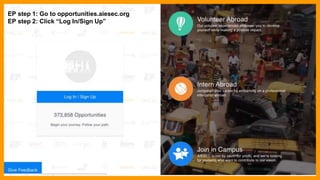
EP step 1: Go to opportunities.aiesec.org
EP step 2: Click “Log In/Sign Up”
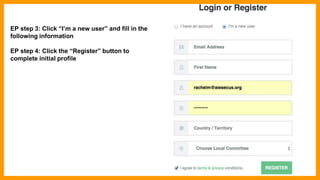
EP step 3: Click “I’m a new user” and fill in the
following information
EP step 4: Click the “Register” button to
complete initial profile
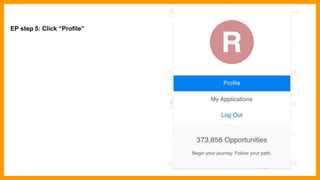
EP step 5: Click “Profile”
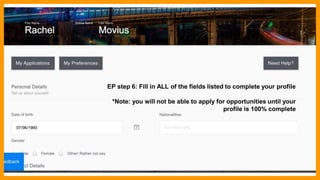
EP step 6: Fill in ALL of the fields listed to complete your profile
*Note: you will not be able to apply for opportunities until your
profile is 100% complete
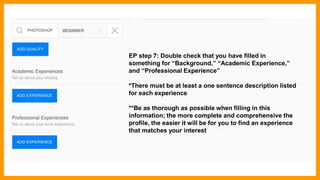
EP step 7: Double check that you have filled in
something for “Background,” “Academic Experience,”
and “Professional Experience”
*There must be at least a one sentence description listed
for each experience
**Be as thorough as possible when filling in this
information; the more complete and comprehensive the
profile, the easier it will be for you to find an experience
that matches your interest
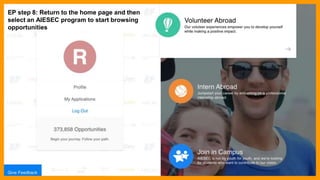
Step 8: Return to the home page toEP step 8: Return to the home page and then
select an AIESEC program to start browsing
opportunities
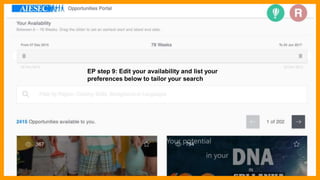
EP step 9: Edit your availability and list your
preferences below to tailor your search
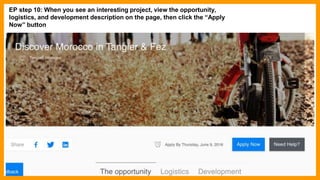
EP step 10: When you see an interesting project, view the opportunity,
logistics, and development description on the page, then click the “Apply
Now” button
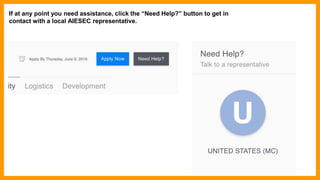
If at any point you need assistance, click the “Need Help?” button to get in
contact with a local AIESEC representative.
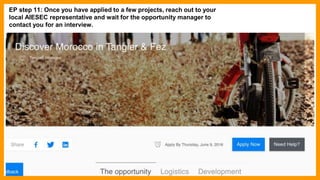
EP step 11: Once you have applied to a few projects, reach out to your
local AIESEC representative and wait for the opportunity manager to
contact you for an interview.
EP step 12: Prepare for and attend video interviews with the opportunity
managers
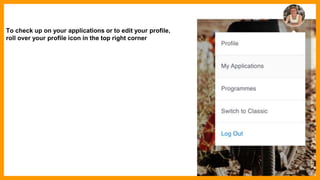
To check up on your applications or to edit your profile,
roll over your profile icon in the top right corner
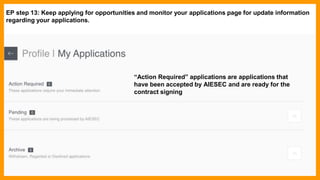
EP step 13: Keep applying for opportunities and monitor your applications page for update information
regarding your applications.
“Action Required” applications are applications that
have been accepted by AIESEC and are ready for the
contract signing
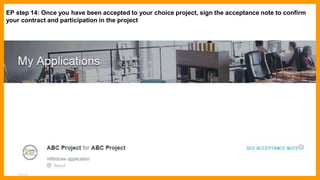
EP step 14: Once you have been accepted to your choice project, sign the acceptance note to confirm
your contract and participation in the project
“Action Required” applications are applications that
have been accepted by AIESEC and are ready for the
contract signing
EP step 15: Make your $500 / $600 / $700 program payment within 7 days of signing your acceptance
note
(Insert wufoo + contract link)
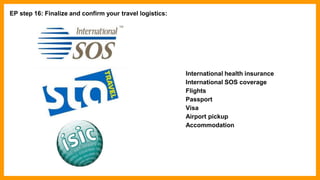
EP step 16: Finalize and confirm your travel logistics:
International health insurance
International SOS coverage
Flights
Passport
Visa
Airport pickup
Accommodation
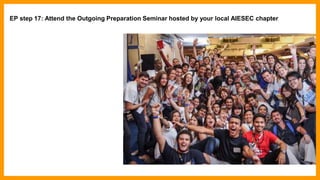
EP step 17: Attend the Outgoing Preparation Seminar hosted by your local AIESEC chapter
EP step 18: Go abroad!

AIESEC Opportunities Portal Guide

  • 1.
    Opportunity Portal 2.0 Welcometo the refreshed customer flow of AIESEC US
  • 2.
    EP step 1:Go to opportunities.aiesec.org EP step 2: Click “Log In/Sign Up”
  • 3.
    EP step 3:Click “I’m a new user” and fill in the following information EP step 4: Click the “Register” button to complete initial profile
  • 4.
    EP step 5:Click “Profile”
  • 5.
    EP step 6:Fill in ALL of the fields listed to complete your profile *Note: you will not be able to apply for opportunities until your profile is 100% complete
  • 6.
    EP step 7:Double check that you have filled in something for “Background,” “Academic Experience,” and “Professional Experience” *There must be at least a one sentence description listed for each experience **Be as thorough as possible when filling in this information; the more complete and comprehensive the profile, the easier it will be for you to find an experience that matches your interest
  • 7.
    Step 8: Returnto the home page toEP step 8: Return to the home page and then select an AIESEC program to start browsing opportunities
  • 8.
    EP step 9:Edit your availability and list your preferences below to tailor your search
  • 9.
    EP step 10:When you see an interesting project, view the opportunity, logistics, and development description on the page, then click the “Apply Now” button
  • 10.
    If at anypoint you need assistance, click the “Need Help?” button to get in contact with a local AIESEC representative.
  • 11.
    EP step 11:Once you have applied to a few projects, reach out to your local AIESEC representative and wait for the opportunity manager to contact you for an interview.
  • 12.
    EP step 12:Prepare for and attend video interviews with the opportunity managers
  • 13.
    To check upon your applications or to edit your profile, roll over your profile icon in the top right corner
  • 14.
    EP step 13:Keep applying for opportunities and monitor your applications page for update information regarding your applications. “Action Required” applications are applications that have been accepted by AIESEC and are ready for the contract signing
  • 15.
    EP step 14:Once you have been accepted to your choice project, sign the acceptance note to confirm your contract and participation in the project “Action Required” applications are applications that have been accepted by AIESEC and are ready for the contract signing
  • 16.
    EP step 15:Make your $500 / $600 / $700 program payment within 7 days of signing your acceptance note (Insert wufoo + contract link)
  • 17.
    EP step 16:Finalize and confirm your travel logistics: International health insurance International SOS coverage Flights Passport Visa Airport pickup Accommodation
  • 18.
    EP step 17:Attend the Outgoing Preparation Seminar hosted by your local AIESEC chapter
  • 19.
    EP step 18:Go abroad!