The Adobe Illustrator:
  Tools of the Day!
                Lesson 1:
 TRIBAL MASK TATTOO DESIGN
                  Step 3:
   Distort, Reflect, Merge, and Gradient
1) The Distort Tools
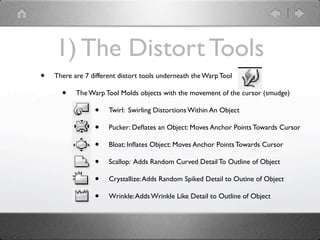
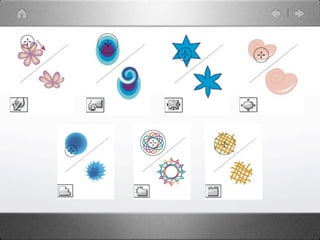
•   There are 7 different distort tools underneath the Warp Tool

      •    The Warp Tool Molds objects with the movement of the cursor (smudge)

                 •    Twirl: Swirling Distortions Within An Object

                 •    Pucker: Deflates an Object: Moves Anchor Points Towards Cursor

                 •    Bloat: Inflates Object: Moves Anchor Points Towards Cursor

                 •    Scallop: Adds Random Curved Detail To Outline of Object

                 •    Crystallize: Adds Random Spiked Detail to Outine of Object

                 •    Wrinkle: Adds Wrinkle Like Detail to Outline of Object
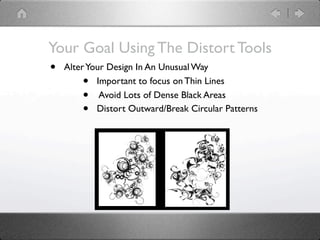
Your Goal Using The Distort Tools
• Alter Your Design In An Unusual Way
       • Important to focus on Thin Lines
       • Avoid Lots of Dense Black Areas
       • Distort Outward/Break Circular Patterns
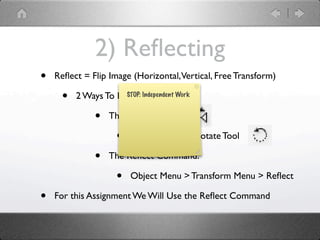
2) Reflecting
•   Reflect = Flip Image (Horizontal, Vertical, Free Transform)

     •   2 Ways To Reflect An Object:
                     STOP: Independent Work


              •   The Reflect Tool

                     •   Underneath the Rotate Tool

              •   The Reflect Command:

                     •   Object Menu > Transform Menu > Reflect

•   For this Assignment We Will Use the Reflect Command
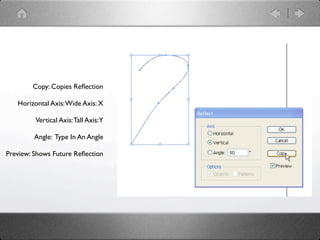
Copy: Copies Reflection

   Horizontal Axis: Wide Axis: X

         Vertical Axis: Tall Axis:Y

         Angle: Type In An Angle

Preview: Shows Future Reflection
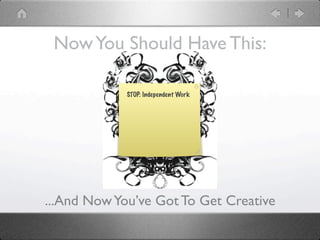
Now You Should Have This:

             STOP: Independent Work


...And Now You’ve Got To Get Creative
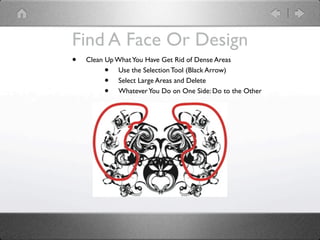
Find A Face Or Design
•   Clean Up What You Have Get Rid of Dense Areas
         •    Use the Selection Tool (Black Arrow)
         •    Select Large Areas and Delete
         •    Whatever You Do on One Side: Do to the Other
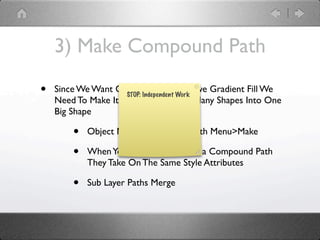
3) Make Compound Path

•   Since We Want Our Black Line WorkHave Gradient Fill We
                     STOP: Independent
                                       To
    Need To Make It All One Path: Turn Many Shapes Into One
    Big Shape

        •   Object Menu>Compound Path Menu>Make

        •   When You Define Objects as a Compound Path
            They Take On The Same Style Attributes

        •   Sub Layer Paths Merge
4) Gradient

Ai tot d-distort,reflect,compound,gradient

  • 1.
    The Adobe Illustrator: Tools of the Day! Lesson 1: TRIBAL MASK TATTOO DESIGN Step 3: Distort, Reflect, Merge, and Gradient
  • 2.
    1) The DistortTools • There are 7 different distort tools underneath the Warp Tool • The Warp Tool Molds objects with the movement of the cursor (smudge) • Twirl: Swirling Distortions Within An Object • Pucker: Deflates an Object: Moves Anchor Points Towards Cursor • Bloat: Inflates Object: Moves Anchor Points Towards Cursor • Scallop: Adds Random Curved Detail To Outline of Object • Crystallize: Adds Random Spiked Detail to Outine of Object • Wrinkle: Adds Wrinkle Like Detail to Outline of Object
  • 4.
    Your Goal UsingThe Distort Tools • Alter Your Design In An Unusual Way • Important to focus on Thin Lines • Avoid Lots of Dense Black Areas • Distort Outward/Break Circular Patterns
  • 5.
    2) Reflecting • Reflect = Flip Image (Horizontal, Vertical, Free Transform) • 2 Ways To Reflect An Object: STOP: Independent Work • The Reflect Tool • Underneath the Rotate Tool • The Reflect Command: • Object Menu > Transform Menu > Reflect • For this Assignment We Will Use the Reflect Command
  • 6.
    Copy: Copies Reflection Horizontal Axis: Wide Axis: X Vertical Axis: Tall Axis:Y Angle: Type In An Angle Preview: Shows Future Reflection
  • 7.
    Now You ShouldHave This: STOP: Independent Work ...And Now You’ve Got To Get Creative
  • 8.
    Find A FaceOr Design • Clean Up What You Have Get Rid of Dense Areas • Use the Selection Tool (Black Arrow) • Select Large Areas and Delete • Whatever You Do on One Side: Do to the Other
  • 9.
    3) Make CompoundPath • Since We Want Our Black Line WorkHave Gradient Fill We STOP: Independent To Need To Make It All One Path: Turn Many Shapes Into One Big Shape • Object Menu>Compound Path Menu>Make • When You Define Objects as a Compound Path They Take On The Same Style Attributes • Sub Layer Paths Merge
  • 10.

Editor's Notes