UIDESIGNPROPOSAL
NextgenerationiOSAppforAmericanEagleOutfitters
Caitlin Depp | Daniel Hanson |Kristen Kuron | Lamont Parker
JMA 308/545 Interactive Design ©2013
Our group decided that a mobile application must have features that are not accessible to the
regular “American Eagle” home page and complement on-the-go shopping.
We discussed features that don’t just allow users to make a purchase, but also inform their
purchase as well. The pinnacle of our revision is a simple built-in social media feature known
as the “AE Virtual Closet.” The “AE Closet” allows users to share their favorite purchases and
outfits from the site, take a “Style Quiz” that gives product suggestions, and categorize
particular selections based on hashtags. Hash-tagging outfits will allow users to search for
clothing based on its tags (example: “#WinterOuterwear,” “#SummerSemi-Formal,” etcetera).
Users can also tag their own clothing line based on outfits they assemble in their own closet
and have others follow these tags (example: #JaneDoeClothes). The benefit of this type of
style sharing may increase sales, as user-created fashion lines within the AE brand gain
popularity while simultaneously increasing AE brand awareness.
Of course, our version will have simple clothing checkout that will allow users to purchase an
item with a single touch (and a following confirmation screen) after his or her buyer credentials
are stored on the profile. Purchases can be delivered to one’s address or picked up in the
store. The app will have a store locator that can alert a user if there is an “American Eagle”
retailer nearby, and give information such as special offers and stock listings for a given
location.
Our creative process was governed at each stage by deep user research and testing.
Our survey is designed to not only learn simple demographic information about users, but
information such as smartphone habits and preferred apps, so that we know what the most
popular interface styles are among possible users. We did several subsequent rounds of
research and testing, including scenario-based task flows complete with personas,
competitor analysis, and interviews with potential AE app users. At each stage, we refined
our assets to complement the preferences of our test subjects.
EXECUTIVE SUMMARY
Based on our research of iOS app users, we feel the key features that are most important from an AE
iOS app perspective are:
1. To design an app that is iOS 7 compliant while maintaining the AE brand and style.
2. To create a unique feature that allows users to customize outfits and get style tips based on
those selections.
3. To increase AE brand awareness by incorporating popular social media sites such as
Facebook, Twitter, and Instagram while simultaneously allowing user-generated feedback
through “hash-tagging.”
iOS 7 COMPLIANT
To become iOS 7 compliant, we stripped away the user interface in an effort to expose the app’s core
functionality; we utilized the iOS themes of deference, clarity, and depth to inform the design and user
experience (UX); we embellished with care while remembering that the content and functionality are at
the core of our design decisions.
How did we do this? We did this by:
1. Emphasizing text and content over icons and other illustrated UI elements. (Ex. Home Page)
2. Creating a simple and consistent color scheme that reflects the AE brand.
3. Creating flat, two-toned buttons with a thin border around the text over heavy gradient colors
to indicate interactivity and functionality.
4. Limiting the usage of drop shadows and text outlines.
5. Utilizing a light and airy san-serif font that is reliable and readable which maximizes ease of
scanning (ex. Helvetica Nueve Font)
6. Maximizing our screen “real estate” by allowing the content and buttons to extend to the
edges while also maximizing white/negative space around UI elements which helps make the
overall APP feel efficient and focused. (Ex. Home Page)
7. Using visual weight and color to show relative importance of on-screen elements such as
Headers, sub-Headers, and body text.
8. Designing our overall navigational scheme to be flat, task-oriented, content-centered, and
experience driven based on some of the newer i0S 7 animations and transitions such as our
“Pop-Out” side-panel and dynamic menus (Ex. See Shop Page Widget). By creating content on
distinct layers, we add depth and flexibility to our design while minimizing clicking and page
loads.
OUR MAJOR GOALS
In an effort to create a unique feature that allows users to customize outfits and get style tips based
on those selections as well as incorporate popular social media sites while simultaneously allowing
user-generated feedback through “hash-tagging”, we would like to introduce the AE Closet feature
with style quiz section.
THE AE CLOSET FEATURE
The AE Closet is a virtual experience where AE shoppers can engage with AE Products in a fun,
dynamic, and meaningful way. One can arrange and rearrange outfits; they can tag outfits, follow
others tags’ and post ideas to social media sites.
The AE virtual closet is also the social side of the AE IOS app, devoted to helping the user find style
tips through these user-generated tags, user-created outfits, and a "style quiz" feature that gives
users product suggestions. The AE closet also allows for news feeds from hash tags of trending items
that you follow. For example, if a user tags a jacket as "hip windbreaker," other users will find that
product by searching for the associated tag. Users are also able to create outfits by combining items
in a virtual canvass, and these outfits are also tag-searchable.
The ultimate goal of the AE closet is to aid AE patrons in finding the products they are looking for, as
well as help them share and learn new style tips, an interactivity that may encourage customers to
explore the AE brand more fully.
THE STYLE QUIZ
The style quiz will randomly choose ten questions from fifty pre-determined questions with the option
to retake the quiz if they don’t like the results, so that each quiz result will be different or unique to the
user. The questions are simple yes or no questions, with only two answer choices. The fifty questions
will ask which style or clothing choice the user prefers. Each answer will have five pre-determined
clothing items, which will combine with all the answer clothing items to create the style quiz clothing
suggestions. If the question is asking about pants—five pants will be generated in the answer. So that
the user doesn’t get asked all pant questions, to get all pant suggestions, the fifty questions will be
sorted into categories: Shirts, Pants & Bottoms, Accessories, Formal & Professional Wear, and
Shoes. Each category will contribute two random questions to the ten question quiz. Since clothing
styles and categories such as formal wear depends on the user’s gender (dress for women, suit for
men), the user will be asked if they are male or female before entering the quiz.
KEY FEATURES
UTIVE SUMMARY
USER RESEARCH
USER RESEARCH
UTIVE SUMMARY
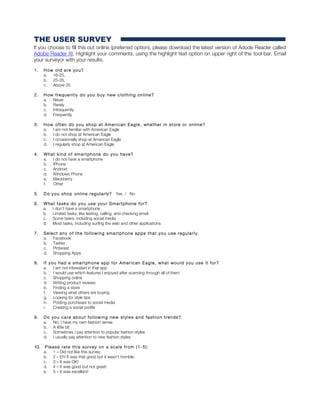
THE USER SURVEY
If you choose to fill this out online (preferred option), please download the latest version of Adode Reader called
Adobe Reader XI. Highlight your comments, using the highlight text option on upper right of the tool bar. Email
your surveyor with your results.
1. How old are you?
a. 16-25,
b. 25-35,
c. Above 35
2. How frequently do you buy new clothing online?
a. Never
b. Rarely
c. Infrequently
d. Frequently
3. How often do you shop at American Eagle, whether in store or online?
a. I am not familiar with American Eagle
b. I do not shop at American Eagle
c. I occasionally shop at American Eagle
d. I regularly shop at American Eagle
4. What kind of smartphone do you have?
a. I do not have a smartphone
b. IPhone
c. Android
d. Windows Phone
e. Blackberry
f. Other
5. Do you shop online regularly? Yes / No
6. What tasks do you use your Smartphone for?
a. I don’t have a smartphone
b. Limited tasks, like texting, calling, and checking email
c. Some tasks, including social media
d. Most tasks, including surfing the web and other applications
7. Select any of the following smartphone apps that you use regularly.
a. Facebook
b. Twitter
c. Pinterest
d. Shopping Apps
8. If you had a smartphone app for American Eagle, what would you use it for?
a. I am not interested in that app
b. I would use which features I enjoyed after scanning through all of them
c. Shopping online
d. Writing product reviews
e. Finding a store
f. Viewing what others are buying
g. Looking for style tips
h. Posting purchases to social media
i. Creating a social profile
9. Do you care about following new styles and fashion trends?
a. No, I have my own fashion sense
b. A little bit
c. Sometimes I pay attention to popular fashion styles
d. I usually pay attention to new fashion styles
10. Please rate this survey on a scale from (1 -5):
a. 1 – Did not like this survey.
b. 2 – Eh! It was that good but it wasn’t horrible.
c. 3 – It was OK!
d. 4 – It was good but not great!
e. 5 – It was excellent!
COMPETITIOR ANALYSIS
UTIVE SUMMARY
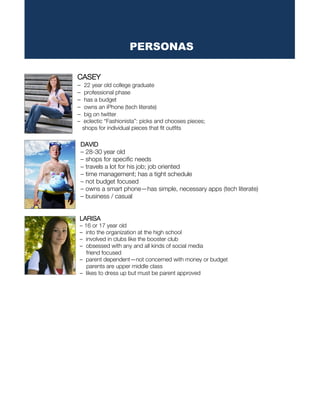
CASEY
– 22 year old college graduate
– professional phase
– has a budget
– owns an iPhone (tech literate)
– big on twitter
– eclectic “Fashionista”: picks and chooses pieces;
shops for individual pieces that fit outfits
DAVID
– 28-30 year old
– shops for specific needs
– travels a lot for his job; job oriented
– time management; has a tight schedule
– not budget focused
– owns a smart phone—has simple, necessary apps (tech literate)
– business / casual
LARISA
– 16 or 17 year old
– into the organization at the high school
– involved in clubs like the booster club
– obsessed with any and all kinds of social media
friend focused
– parent dependent—not concerned with money or budget
parents are upper middle class
– likes to dress up but must be parent approved
PERSONAS
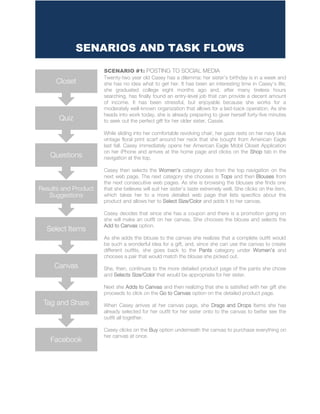
SCENARIO #1: POSTING TO SOCIAL MEDIA
Twenty-two year old Casey has a dilemma: her sister’s birthday is in a week and
she has no idea what to get her. It has been an interesting time in Casey’s life;
she graduated college eight months ago and, after many tireless hours
searching, has finally found an entry-level job that can provide a decent amount
of income. It has been stressful, but enjoyable because she works for a
moderately well-known organization that allows for a laid-back operation. As she
heads into work today, she is already preparing to giver herself forty-five minutes
to seek out the perfect gift for her older sister, Cassie.
While sliding into her comfortable revolving chair, her gaze rests on her navy blue
vintage floral print scarf around her neck that she bought from American Eagle
last fall. Casey immediately opens her American Eagle Mobil Closet Application
on her iPhone and arrives at the home page and clicks on the Shop tab in the
navigation at the top.
Casey then selects the Women’s category also from the top navigation on the
next web page. The next category she chooses is Tops and then Blouses from
the next consecutive web pages. As she is browsing the blouses she finds one
that she believes will suit her sister’s taste extremely well. She clicks on the item,
which takes her to a more detailed web page that lists specifics about the
product and allows her to Select Size/Color and adds it to her canvas.
Casey decides that since she has a coupon and there is a promotion going on
she will make an outfit on her canvas. She chooses the blouse and selects the
Add to Canvas option.
As she adds the blouse to the canvas she realizes that a complete outfit would
be such a wonderful idea for a gift, and, since she can use the canvas to create
different outfits, she goes back to the Pants category under Women’s and
chooses a pair that would match the blouse she picked out.
She, then, continues to the more detailed product page of the pants she chose
and Selects Size/Color that would be appropriate for her sister.
Next she Adds to Canvas and then realizing that she is satisfied with her gift she
proceeds to click on the Go to Canvas option on the detailed product page.
When Casey arrives at her canvas page, she Drags and Drops Items she has
already selected for her outfit for her sister onto to the canvas to better see the
outfit all together.
Casey clicks on the Buy option underneath the canvas to purchase everything on
her canvas at once.
SENARIOS AND TASK FLOWS
Facebook
Tag and Share
Canvas
Select Items
Results and Product
Suggestions
Questions
Quiz
Closet
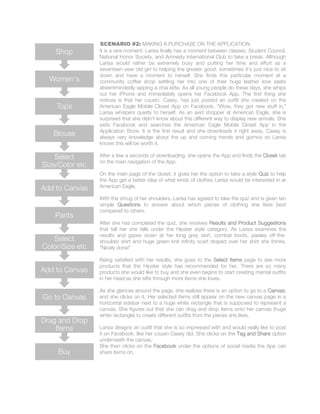
SCENARIO #2: MAKING A PURCHASE ON THE APPLICATION
It is a rare moment: Larisa finally has a moment between classes, Student Council,
National Honor Society, and Amnesty International Club to take a break. Although
Larisa would rather be extremely busy and putting her time and effort as a
seventeen-year old girl to helping the greater good, sometimes it’s just nice to sit
down and have a moment to herself. She finds this particular moment at a
community coffee shop settling her into one of their huge leather love seats
absentmindedly sipping a chai latte. As all young people do these days, she whips
out her iPhone and immediately opens her Facebook App. The first thing she
notices is that her cousin, Casey, has just posted an outfit she created on the
American Eagle Mobile Closet App on Facebook. “Wow, they got new stuff in,”
Larisa whispers quietly to herself. As an avid shopper at American Eagle, she is
surprised that she didn’t know about this different way to display new arrivals. She
exits Facebook and searches the American Eagle Mobile Closet App in the
Application Store. It is the first result and she downloads it right away. Casey is
always very knowledge about the up and coming trends and gizmos so Larisa
knows this will be worth it.
After a few a seconds of downloading, she opens the App and finds the Closet tab
on the main navigation of the App.
On the main page of the closet, it gives her the option to take a style Quiz to help
the App get a better idea of what kinds of clothes Larisa would be interested in at
American Eagle.
With the shrug of her shoulders, Larisa has agreed to take the quiz and is given ten
simple Questions to answer about which pieces of clothing she likes best
compared to others.
After she has completed the quiz, she receives Results and Product Suggestions
that tell her she falls under the Hipster style category. As Larisa examines the
results and gazes down at her long grey skirt, combat boots, paisley off-the-
shoulder shirt and huge green knit infinity scarf draped over her shirt she thinks,
“Nicely done!”
Being satisfied with her results, she goes to the Select Items page to see more
products that the Hipster style has recommended for her. There are so many
products she would like to buy and she even begins to start creating mental outfits
in her head as she sifts through more items she loves.
As she glances around the page, she realizes there is an option to go to a Canvas,
and she clicks on it. Her selected items still appear on the new canvas page in a
horizontal sidebar next to a huge white rectangle that is supposed to represent a
canvas. She figures out that she can drag and drop items onto her canvas (huge
white rectangle) to create different outfits from the pieces she likes.
Larisa designs an outfit that she is so impressed with and would really like to post
it on Facebook, like her cousin Casey did. She clicks on the Tag and Share option
underneath the canvas.
She then clicks on the Facebook under the options of social media the App can
share items on.Buy
Drag and Drop
Items
Go to Canvas
Add to Canvas
Select
Color/Size etc
Pants
Add to Canvas
Select
Size/Color etc
Blouse
Tops
Women's
Shop

AEredesignreport

  • 1.
    UIDESIGNPROPOSAL NextgenerationiOSAppforAmericanEagleOutfitters Caitlin Depp |Daniel Hanson |Kristen Kuron | Lamont Parker JMA 308/545 Interactive Design ©2013
  • 2.
    Our group decidedthat a mobile application must have features that are not accessible to the regular “American Eagle” home page and complement on-the-go shopping. We discussed features that don’t just allow users to make a purchase, but also inform their purchase as well. The pinnacle of our revision is a simple built-in social media feature known as the “AE Virtual Closet.” The “AE Closet” allows users to share their favorite purchases and outfits from the site, take a “Style Quiz” that gives product suggestions, and categorize particular selections based on hashtags. Hash-tagging outfits will allow users to search for clothing based on its tags (example: “#WinterOuterwear,” “#SummerSemi-Formal,” etcetera). Users can also tag their own clothing line based on outfits they assemble in their own closet and have others follow these tags (example: #JaneDoeClothes). The benefit of this type of style sharing may increase sales, as user-created fashion lines within the AE brand gain popularity while simultaneously increasing AE brand awareness. Of course, our version will have simple clothing checkout that will allow users to purchase an item with a single touch (and a following confirmation screen) after his or her buyer credentials are stored on the profile. Purchases can be delivered to one’s address or picked up in the store. The app will have a store locator that can alert a user if there is an “American Eagle” retailer nearby, and give information such as special offers and stock listings for a given location. Our creative process was governed at each stage by deep user research and testing. Our survey is designed to not only learn simple demographic information about users, but information such as smartphone habits and preferred apps, so that we know what the most popular interface styles are among possible users. We did several subsequent rounds of research and testing, including scenario-based task flows complete with personas, competitor analysis, and interviews with potential AE app users. At each stage, we refined our assets to complement the preferences of our test subjects. EXECUTIVE SUMMARY
  • 3.
    Based on ourresearch of iOS app users, we feel the key features that are most important from an AE iOS app perspective are: 1. To design an app that is iOS 7 compliant while maintaining the AE brand and style. 2. To create a unique feature that allows users to customize outfits and get style tips based on those selections. 3. To increase AE brand awareness by incorporating popular social media sites such as Facebook, Twitter, and Instagram while simultaneously allowing user-generated feedback through “hash-tagging.” iOS 7 COMPLIANT To become iOS 7 compliant, we stripped away the user interface in an effort to expose the app’s core functionality; we utilized the iOS themes of deference, clarity, and depth to inform the design and user experience (UX); we embellished with care while remembering that the content and functionality are at the core of our design decisions. How did we do this? We did this by: 1. Emphasizing text and content over icons and other illustrated UI elements. (Ex. Home Page) 2. Creating a simple and consistent color scheme that reflects the AE brand. 3. Creating flat, two-toned buttons with a thin border around the text over heavy gradient colors to indicate interactivity and functionality. 4. Limiting the usage of drop shadows and text outlines. 5. Utilizing a light and airy san-serif font that is reliable and readable which maximizes ease of scanning (ex. Helvetica Nueve Font) 6. Maximizing our screen “real estate” by allowing the content and buttons to extend to the edges while also maximizing white/negative space around UI elements which helps make the overall APP feel efficient and focused. (Ex. Home Page) 7. Using visual weight and color to show relative importance of on-screen elements such as Headers, sub-Headers, and body text. 8. Designing our overall navigational scheme to be flat, task-oriented, content-centered, and experience driven based on some of the newer i0S 7 animations and transitions such as our “Pop-Out” side-panel and dynamic menus (Ex. See Shop Page Widget). By creating content on distinct layers, we add depth and flexibility to our design while minimizing clicking and page loads. OUR MAJOR GOALS
  • 4.
    In an effortto create a unique feature that allows users to customize outfits and get style tips based on those selections as well as incorporate popular social media sites while simultaneously allowing user-generated feedback through “hash-tagging”, we would like to introduce the AE Closet feature with style quiz section. THE AE CLOSET FEATURE The AE Closet is a virtual experience where AE shoppers can engage with AE Products in a fun, dynamic, and meaningful way. One can arrange and rearrange outfits; they can tag outfits, follow others tags’ and post ideas to social media sites. The AE virtual closet is also the social side of the AE IOS app, devoted to helping the user find style tips through these user-generated tags, user-created outfits, and a "style quiz" feature that gives users product suggestions. The AE closet also allows for news feeds from hash tags of trending items that you follow. For example, if a user tags a jacket as "hip windbreaker," other users will find that product by searching for the associated tag. Users are also able to create outfits by combining items in a virtual canvass, and these outfits are also tag-searchable. The ultimate goal of the AE closet is to aid AE patrons in finding the products they are looking for, as well as help them share and learn new style tips, an interactivity that may encourage customers to explore the AE brand more fully. THE STYLE QUIZ The style quiz will randomly choose ten questions from fifty pre-determined questions with the option to retake the quiz if they don’t like the results, so that each quiz result will be different or unique to the user. The questions are simple yes or no questions, with only two answer choices. The fifty questions will ask which style or clothing choice the user prefers. Each answer will have five pre-determined clothing items, which will combine with all the answer clothing items to create the style quiz clothing suggestions. If the question is asking about pants—five pants will be generated in the answer. So that the user doesn’t get asked all pant questions, to get all pant suggestions, the fifty questions will be sorted into categories: Shirts, Pants & Bottoms, Accessories, Formal & Professional Wear, and Shoes. Each category will contribute two random questions to the ten question quiz. Since clothing styles and categories such as formal wear depends on the user’s gender (dress for women, suit for men), the user will be asked if they are male or female before entering the quiz. KEY FEATURES UTIVE SUMMARY
  • 5.
  • 6.
    THE USER SURVEY Ifyou choose to fill this out online (preferred option), please download the latest version of Adode Reader called Adobe Reader XI. Highlight your comments, using the highlight text option on upper right of the tool bar. Email your surveyor with your results. 1. How old are you? a. 16-25, b. 25-35, c. Above 35 2. How frequently do you buy new clothing online? a. Never b. Rarely c. Infrequently d. Frequently 3. How often do you shop at American Eagle, whether in store or online? a. I am not familiar with American Eagle b. I do not shop at American Eagle c. I occasionally shop at American Eagle d. I regularly shop at American Eagle 4. What kind of smartphone do you have? a. I do not have a smartphone b. IPhone c. Android d. Windows Phone e. Blackberry f. Other 5. Do you shop online regularly? Yes / No 6. What tasks do you use your Smartphone for? a. I don’t have a smartphone b. Limited tasks, like texting, calling, and checking email c. Some tasks, including social media d. Most tasks, including surfing the web and other applications 7. Select any of the following smartphone apps that you use regularly. a. Facebook b. Twitter c. Pinterest d. Shopping Apps 8. If you had a smartphone app for American Eagle, what would you use it for? a. I am not interested in that app b. I would use which features I enjoyed after scanning through all of them c. Shopping online d. Writing product reviews e. Finding a store f. Viewing what others are buying g. Looking for style tips h. Posting purchases to social media i. Creating a social profile 9. Do you care about following new styles and fashion trends? a. No, I have my own fashion sense b. A little bit c. Sometimes I pay attention to popular fashion styles d. I usually pay attention to new fashion styles 10. Please rate this survey on a scale from (1 -5): a. 1 – Did not like this survey. b. 2 – Eh! It was that good but it wasn’t horrible. c. 3 – It was OK! d. 4 – It was good but not great! e. 5 – It was excellent!
  • 7.
  • 8.
    CASEY – 22 yearold college graduate – professional phase – has a budget – owns an iPhone (tech literate) – big on twitter – eclectic “Fashionista”: picks and chooses pieces; shops for individual pieces that fit outfits DAVID – 28-30 year old – shops for specific needs – travels a lot for his job; job oriented – time management; has a tight schedule – not budget focused – owns a smart phone—has simple, necessary apps (tech literate) – business / casual LARISA – 16 or 17 year old – into the organization at the high school – involved in clubs like the booster club – obsessed with any and all kinds of social media friend focused – parent dependent—not concerned with money or budget parents are upper middle class – likes to dress up but must be parent approved PERSONAS
  • 9.
    SCENARIO #1: POSTINGTO SOCIAL MEDIA Twenty-two year old Casey has a dilemma: her sister’s birthday is in a week and she has no idea what to get her. It has been an interesting time in Casey’s life; she graduated college eight months ago and, after many tireless hours searching, has finally found an entry-level job that can provide a decent amount of income. It has been stressful, but enjoyable because she works for a moderately well-known organization that allows for a laid-back operation. As she heads into work today, she is already preparing to giver herself forty-five minutes to seek out the perfect gift for her older sister, Cassie. While sliding into her comfortable revolving chair, her gaze rests on her navy blue vintage floral print scarf around her neck that she bought from American Eagle last fall. Casey immediately opens her American Eagle Mobil Closet Application on her iPhone and arrives at the home page and clicks on the Shop tab in the navigation at the top. Casey then selects the Women’s category also from the top navigation on the next web page. The next category she chooses is Tops and then Blouses from the next consecutive web pages. As she is browsing the blouses she finds one that she believes will suit her sister’s taste extremely well. She clicks on the item, which takes her to a more detailed web page that lists specifics about the product and allows her to Select Size/Color and adds it to her canvas. Casey decides that since she has a coupon and there is a promotion going on she will make an outfit on her canvas. She chooses the blouse and selects the Add to Canvas option. As she adds the blouse to the canvas she realizes that a complete outfit would be such a wonderful idea for a gift, and, since she can use the canvas to create different outfits, she goes back to the Pants category under Women’s and chooses a pair that would match the blouse she picked out. She, then, continues to the more detailed product page of the pants she chose and Selects Size/Color that would be appropriate for her sister. Next she Adds to Canvas and then realizing that she is satisfied with her gift she proceeds to click on the Go to Canvas option on the detailed product page. When Casey arrives at her canvas page, she Drags and Drops Items she has already selected for her outfit for her sister onto to the canvas to better see the outfit all together. Casey clicks on the Buy option underneath the canvas to purchase everything on her canvas at once. SENARIOS AND TASK FLOWS Facebook Tag and Share Canvas Select Items Results and Product Suggestions Questions Quiz Closet
  • 10.
    SCENARIO #2: MAKINGA PURCHASE ON THE APPLICATION It is a rare moment: Larisa finally has a moment between classes, Student Council, National Honor Society, and Amnesty International Club to take a break. Although Larisa would rather be extremely busy and putting her time and effort as a seventeen-year old girl to helping the greater good, sometimes it’s just nice to sit down and have a moment to herself. She finds this particular moment at a community coffee shop settling her into one of their huge leather love seats absentmindedly sipping a chai latte. As all young people do these days, she whips out her iPhone and immediately opens her Facebook App. The first thing she notices is that her cousin, Casey, has just posted an outfit she created on the American Eagle Mobile Closet App on Facebook. “Wow, they got new stuff in,” Larisa whispers quietly to herself. As an avid shopper at American Eagle, she is surprised that she didn’t know about this different way to display new arrivals. She exits Facebook and searches the American Eagle Mobile Closet App in the Application Store. It is the first result and she downloads it right away. Casey is always very knowledge about the up and coming trends and gizmos so Larisa knows this will be worth it. After a few a seconds of downloading, she opens the App and finds the Closet tab on the main navigation of the App. On the main page of the closet, it gives her the option to take a style Quiz to help the App get a better idea of what kinds of clothes Larisa would be interested in at American Eagle. With the shrug of her shoulders, Larisa has agreed to take the quiz and is given ten simple Questions to answer about which pieces of clothing she likes best compared to others. After she has completed the quiz, she receives Results and Product Suggestions that tell her she falls under the Hipster style category. As Larisa examines the results and gazes down at her long grey skirt, combat boots, paisley off-the- shoulder shirt and huge green knit infinity scarf draped over her shirt she thinks, “Nicely done!” Being satisfied with her results, she goes to the Select Items page to see more products that the Hipster style has recommended for her. There are so many products she would like to buy and she even begins to start creating mental outfits in her head as she sifts through more items she loves. As she glances around the page, she realizes there is an option to go to a Canvas, and she clicks on it. Her selected items still appear on the new canvas page in a horizontal sidebar next to a huge white rectangle that is supposed to represent a canvas. She figures out that she can drag and drop items onto her canvas (huge white rectangle) to create different outfits from the pieces she likes. Larisa designs an outfit that she is so impressed with and would really like to post it on Facebook, like her cousin Casey did. She clicks on the Tag and Share option underneath the canvas. She then clicks on the Facebook under the options of social media the App can share items on.Buy Drag and Drop Items Go to Canvas Add to Canvas Select Color/Size etc Pants Add to Canvas Select Size/Color etc Blouse Tops Women's Shop