BennettDining Database
SubmittedBy:
Akshay Arora (A20101619)
Ankit Singh (A20111177)
Chirag Bilimoria (A20099258)
Ishan Malpotra (A20104861)
Table of Contents
1. Introduction:......................................................................................................................................................4
2. Problem Statement:............................................................................................................................................4
3. Recommended Solution:.....................................................................................................................................4
4. Business Rules:...................................................................................................................................................5
5. ER Diagram and relationship model:....................................................................................................................5
6. Final Code:..........................................................................................................................................................7
7. Normalized Tables:...........................................................................................................................................11
8. Data Dictionary:................................................................................................................................................12
9. Reporting Queries:............................................................................................................................................14
10. Conclusion:.......................................................................................................................................................18
1. Introduction
This project deals with designing and implementing a system for handling the information of
Bennett Dinning from a manager’s perspective. The café’s manager has the job to handle its 2
units i.e., Café Libro and Fast Break.
Bennett dining is one of the biggest dining services in the Oklahoma State University. In both
the café’s, they have various employees working at different categories such as Stocker, Coffee,
Hot food, Cashier and Supervisor. These employees work in different shifts with shift ID 1,2,3
etc and with time varying from 7:00 am in the morning to 3:00 pm in the evening.
Likewise, the details of all the employees such as their first name, last name etc, their leave
details, schedule for all the days, vacant positions available in both the café’s, sales of both the
café’s and inventory details of both the café’s needs to be managed by the manager.
To make the manager’s job easier, we design a database in SQL Server which contains various
tables containing the above-mentioned values and we would run several SQL queries which will
help the manager to generate several reports about both the café’s.
2. ProblemStatement
Before the database was built, the manager had a tedious task in finding out various details like
for hiring new employees, finding out the number of open positions, finding out the stock to be
ordered to be kept in the inventory.
It used to get very difficult for the manager for situations if he had to hire some new employees
by maintaining all the data in the software such as Microsoft Excel etc.
All the calculations regarding the sales the 2 different dates and other operations had to be
done either using calculator or manually.
3. RecommendedSolution
The recommended solution we have come up for the manager is by creating a database in SQL
Server which contains various tables containing the above-mentioned values and we would run
several SQL queries which would help the manager in finding out several details about both the
café’s.
This would reduce the manager’s workload by excluding the work to be done using Microsoft
Excel and by even helping him perform calculations and various other operations on the data
using the database model itself.
4. Business Rules
 For each unit there should be only one supervisor.
 Employee can work many shifts but for a particular shift on a particular day there is only one
Employee.
 An employee can work for more than one unit.
 At least one employee should be there in each of the categories for any particular shift.
 For any particular shift, one employee can be assigned to one position only.
 Salary of the employee is calculated as (No of hours worked*8).
 Value taken by the gender in the employee table can be either M or F only.
 One unit can sell multiple things.
 One unit can have many items in inventory.
 An employee can apply for multiple leaves.
 A unit can have more than one vacancies.
 Other than supervisor no employee can work for more than 40 hours a week.
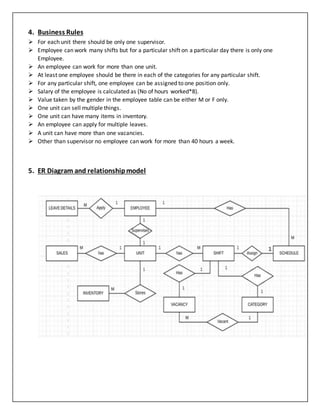
5. ER Diagram and relationshipmodel
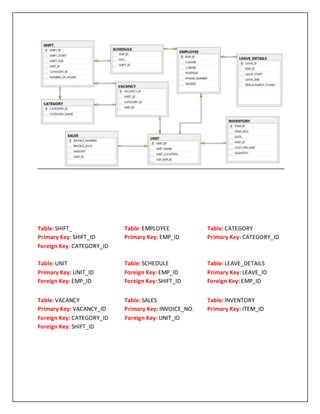
Table: SHIFT_ Table: EMPLOYEE Table: CATEGORY
Primary Key: SHIFT_ID Primary Key: EMP_ID Primary Key: CATEGORY_ID
Foreign Key: CATEGORY_ID
Table: UNIT Table: SCHEDULE Table: LEAVE_DETAILS
Primary Key: UNIT_ID Foreign Key: EMP_ID Primary Key: LEAVE_ID
Foreign Key: EMP_ID Foreign Key: SHIFT_ID Foreign Key: EMP_ID
Table: VACANCY Table: SALES Table: INVENTORY
Primary Key: VACANCY_ID Primary Key: INVOICE_NO. Primary Key: ITEM_ID
Foreign Key: CATEGORY_ID Foreign Key: UNIT_ID
Foreign Key: SHIFT_ID
6. Final Code
Create Code:
CREATE TABLE EMPLOYEE(
EMP_ID NUMERIC IDENTITY (1,1) NOT NULL PRIMARY KEY,
F_NAME VARCHAR (50),
L_NAME VARCHAR (50),
POSITION VARCHAR (50)NOT NULL,
PHONE_NUMBER VARCHAR (50),
GENDER VARCHAR (1)CONSTRAINT GENDER CHECK (GENDER IN('M','F'))
)
CREATE TABLE CATEGORY(
CATEGORY_ID NUMERIC IDENTITY (1,1) NOT NULL PRIMARY KEY,
CATEGORY_NAME VARCHAR (20)
)
CREATE TABLE SHIFT_(
SHIFT_ID NUMERIC IDENTITY (1,1) NOT NULL PRIMARY KEY,
SHIFT_START TIME,
SHIFT_END TIME,
UNIT_ID NUMERIC NOT NULL,
CATEGORY_ID NUMERIC NOT NULL FOREIGN KEY REFERENCES CATEGORY(CATEGORY_ID),
NUMBER_OF_HOURS NUMERIC
)
CREATE TABLE UNIT(
UNIT_ID NUMERIC IDENTITY (1,1) NOT NULL PRIMARY KEY,
UNIT_NAME VARCHAR (20),
UNIT_LOCATION VARCHAR (20),
SUP_EMP_ID NUMERIC NOT NULL FOREIGN KEY REFERENCES EMPLOYEE(EMP_ID)
)
CREATE TABLE SCHEDULE(
EMP_ID NUMERIC NOT NULL FOREIGN KEY REFERENCES EMPLOYEE(EMP_ID),
DAY_ VARCHAR (3),
SHIFT_ID NUMERIC NOT NULL FOREIGN KEY REFERENCES SHIFT_(SHIFT_ID)
)
CREATE TABLE LEAVE_DETAILS(
LEAVE_ID NUMERIC IDENTITY (1,1) PRIMARY KEY,
EMP_ID NUMERIC NOT NULL FOREIGN KEY REFERENCES EMPLOYEE(EMP_ID),
LEAVE_START DATETIME,
LEAVE_END DATETIME,
REPLACEMENT_FOUND VARCHAR (1)CONSTRAINT REPLACEMENT_FOUND CHECK (REPLACEMENT_FOUND IN('Y','N',
Null))
)
CREATE TABLE INVENTORY(
ITEM_ID NUMERIC NOT NULL IDENTITY (1,1) PRIMARY KEY,
ITEM_DESC VARCHAR (20),
DATE_ DATETIME,
UNIT_ID NUMERIC NOT NULL FOREIGN KEY REFERENCES UNIT (UNIT_ID),
COST_PER_UNIT NUMERIC,
QUANTITY NUMERIC (3)
)
CREATE TABLE SALES(
INVOICE_NUMBER NUMERIC IDENTITY (1,1) NOT NULL PRIMARY KEY,
INVOICE_DATE DATETIME,
AMOUNT NUMERIC NOT NULL,
UNIT_ID NUMERIC NOT NULL FOREIGN KEY REFERENCES UNIT(UNIT_ID)
)
CREATE TABLE VACANCY(
VACANCY_ID NUMERIC IDENTITY (1,1) PRIMARY KEY,
SHIFT_ID NUMERIC NOT NULL FOREIGN KEY REFERENCES SHIFT_(SHIFT_ID),
CATEGORY_ID NUMERIC NOT NULL FOREIGN KEY REFERENCES
CATEGORY(CATEGORY_ID),
UNIT_ID NUMERIC NOT NULL FOREIGN KEY REFERENCES UNIT(UNIT_ID)
)
INSERT CODE
INSERT INTO EMPLOYEE(F_NAME, L_NAME, POSITION, PHONE_NUMBER, GENDER)
VALUES ('Chirag','Bilimoria','Supervisor','405-614-9950','M'),('Akshay','Arora','Hot Food','405-
614-9951','M'),
('Ankit','Singh','Supervisor','405-614-9952','M'),('Mudassir','Ahmad','Cashier','405-614-
9953','M'),
('Adithya','Popuri','Stocker','405-614-9954','M'),('Gaurav','Khatri','Cashier','405-614-9955','M'),
('Kartik','Josyula','Stocker','405-614-9956','M'),('Sophia','Dsouza','Coffee','405-614-9957','F'),
('Kinsey','McCool','Hot Food','405-614-9958','F'),('Bijoy','Thomas','Cashier','405-614-9957','M'),
('Devika','Kale','Cashier','405-614-9960','F'),('Ishan','Malpotra','Hot Food','405-614-9961','M'),
('Aman','Tayal','Coffee','405-614-9962','M'),('Prachiti','Garg','Stocker','405-614-9963','F'),
('Adrian','Lee','Stocker','405-614-9964','F'),('Grace','Bowman','Hot Food','405-614-9965','F'),
('Steph','Curry','Coffee','405-614-9966','M'),('Lauren','Phillips','Coffee','405-614-9967','F'),
('Brett','Hart','Coffee','405-614-9968','M'),('Paige','Jackson','Hot Food','405-614-9969','F')
INSERT INTO CATEGORY(CATEGORY_NAME)
VALUES('SUPERVISOR'),('CASHIER'),('COFFEE'),('STOCKER'),('HOT FOOD')
INSERT INTO SHIFT_(SHIFT_START, SHIFT_END, UNIT_ID, CATEGORY_ID, NUMBER_OF_HOURS)
VALUES ('07:00:00','11:00:00', 1, 2, 4),('11:00:00','15:00:00', 1, 2, 4),
('07:00:00','11:00:00', 1, 4, 4),('11:00:00','15:00:00', 1, 4, 4),('07:00:00','11:00:00', 1, 3, 4),
('11:00:00','15:00:00', 1, 3, 4),('07:00:00','11:00:00', 1, 5, 4),('11:00:00','15:00:00', 1, 5, 4),
('07:00:00','11:00:00', 2, 2, 4),('11:00:00','15:00:00', 2, 2, 4),('07:00:00','11:00:00', 2, 4, 4),
('11:00:00','15:00:00', 2, 4, 4),('07:00:00','11:00:00', 2, 3, 4),('11:00:00','15:00:00', 2, 3, 4),
('07:00:00','11:00:00', 2, 5, 4),('11:00:00','15:00:00', 2, 5, 4),('07:00:00','15:00:00', 1, 1, 8),
('07:00:00','15:00:00', 2, 1, 8),('07:00:00','11:00:00', 1, 2, 4),('11:00:00','15:00:00', 1, 3, 4),
('07:00:00','11:00:00', 2, 4, 4),('11:00:00','15:00:00', 2, 5, 4)
INSERT INTO UNIT(UNIT_NAME, UNIT_LOCATION, SUP_EMP_ID)
VALUES ('Cafe Libro','Library','1'),('Fast Break','Bennett Hall','3')
INSERT INTO SCHEDULE(EMP_ID, DAY_, SHIFT_ID)
VALUES (1,'Mon',17),(1,'Tue',17),(1,'Wed', 17),
(1,'Thu',17),(1,'Fri',17),(1,'Sat',17),
(3,'Mon',18),(3,'Tue', 18),(3,'Wed', 18),(3,'Thu', 18),
(3,'Fri',18),(3,'Sat', 18),(4,'Mon', 1),(4,'Tue', 1),
(4,'Wed', 1),(4,'Thu', 1),(19,'Fri',1),(19,'Sat', 1),
(5,'Mon', 3),(5,'Tue', 3),(5,'Wed', 3),
(5,'Thu', 3),(5,'Fri', 3),(5,'Sat', 3),
(8,'Mon', 5),(8,'Tue', 5),(8,'Wed', 5),(8,'Thu', 5),
(8,'Fri', 5),(8,'Sat', 5),(9,'Mon', 7),
(9,'Tue', 7),(9,'Wed', 7),(9,'Thu', 7),
(9,'Fri', 7),(9,'Sat', 7),(19,'Mon', 2),(6,'Tue', 2),
(19,'Wed', 2),(6,'Thu', 2),(6,'Fri', 2),(6,'Sat', 2),
(14,'Mon', 4),(14,'Tue', 4),(14,'Wed', 4),
(14,'Thu', 4),(14,'Fri', 4),(14,'Sat', 4),
(13,'Mon', 6),(13,'Tue', 6),(13,'Wed', 6),(13,'Thu', 6),
(13,'Fri', 6),(13,'Sat', 6),(2,'Mon',8),(2,'Tue', 8),
(2,'Wed', 8),(2,'Thu', 8),(2,'Fri', 8),(2,'Sat', 8),
(10,'Mon', 9),(10,'Tue', 9),(10,'Wed', 9),(10,'Thu', 9),
(10,'Fri', 9),(10,'Sat', 9),(7,'Mon',11),(7,'Tue', 11),
(7,'Wed', 11),(7,'Thu',11),(20,'Fri', 11),
(7,'Sat', 11),(20,'Mon', 13),(17,'Tue', 13),(17,'Wed',13),
(17,'Thu',13),(17,'Fri', 13),(20,'Sat', 13),
(12,'Mon',15),(12,'Tue',15),(12,'Wed', 15),
(20,'Thu', 15),(12,'Fri', 15),(20,'Sat', 15),
(11,'Mon', 10),(11,'Tue', 10),(11,'Wed', 10),
(11,'Thu', 10),(11,'Fri', 10),(11,'Sat', 10),
(15,'Mon', 12),(15,'Tue', 12),(15,'Wed', 12),
(20,'Thu',12),(20,'Fri', 12),(20,'Sat', 12),
(18,'Mon', 14),(18,'Tue', 14),(9,'Wed', 14),
(9,'Thu', 14),(18,'Fri', 14),(19,'Sat',14),
(16,'Mon', 16),(16,'Tue',16),(5,'Wed', 16),
(5,'Thu',16),(16,'Fri', 16),(19,'Sat', 16)
INSERT INTO LEAVE_DETAILS(EMP_ID, LEAVE_START, LEAVE_END, REPLACEMENT_FOUND)
VALUES ('4','2017-08-30','2017-08-30','Y'),('5','2017-09-03','2017-09-04',Null),('7','2017-09-
09','2017-09-09','Y'),
('8','2017-09-15','2017-09-16','N'),('9','2017-09-24','2017-09-24',Null),('14','2017-10-5','2017-
10-6','Y'),
('16','2017-10-30','2017-10-30',Null),('18','2017-11-11','2017-11-11',Null)
INSERT INTO INVENTORY(ITEM_DESC, DATE_, UNIT_ID, COST_PER_UNIT, QUANTITY)
VALUES ('Milk','2017-08-11', 1, 4, 20),('Coffee Beans','2017-08-14', 1, 12, 10),('Sugar
Pack','2017-08-08', 1, 1.25, 100),
('Coffee Sleaves','2017-08-21', 1, 2,100),('Soft Drinks','2017-08-28', 1, 1.19, 50),('Milk','2017-
08-05', 2, 5, 25),
('Coffee Beans','2017-08-01', 2, 14,12),('Sugar Pack','2017-08-16', 2, 1.32, 94),
('Coffee Sleaves','2017-08-22', 2, 2.23,100),('Soft Drinks','2017-08-29', 2, 1.25, 51),
('Milk','2017-09-13', 1, 4, 22),('Coffee Beans','2017-09-11', 1, 12, 12),('Sugar Packs','2017-09-
28', 1, 1.25, 102),
('Coffee Sleaves','2017-09-09', 1, 2,98),('Soft Drinks','2017-09-21', 1, 1.19, 45),
('Milk','2017-09-02', 2, 3.75,20),('Coffee Beans','2017-09-10', 2, 12, 12),
('Sugar Packs','2017-09-21', 2, 1.47,105),('Coffee Sleaves','2017-09-28', 2, 2.20, 100),
('Soft Drinks','2017-09-15', 2, 1.19,66),
('Milk','2017-10-05', 1, 3.75,22),('Coffee Beans','2017-10-13', 1, 12, 18),
('Sugar Packs','2017-10-19', 1, 1.47,10),('Coffee Sleaves','2017-10-24', 1, 2.20, 90),
('Soft Drinks','2017-10-27', 1, 1.19,70),('Milk','2017-10-01', 2, 3.75, 25),
('Coffee Beans','2017-10-10', 2, 12,15),('Sugar Packs','2017-10-20', 2, 1.47, 20),
('Coffee Sleaves','2017-10-29', 2, 2.2,20),('Soft Drinks','2017-10-31', 2, 1.19, 35),
('Milk','2017-11-06', 1, 3.75,26),('Coffee Beans','2017-11-10', 1, 12, 43),
('Sugar Packs','2017-11-21', 1, 1.47,50),('Coffee Sleaves','2017-11-26', 1, 2.20, 200),
('Soft Drinks','2017-11-30', 1, 1.19,24),('Milk','2017-11-25', 2, 3.75, 65),
('Coffee Beans','2017-11-02', 2, 12,79),('Sugar Packs','2017-11-03', 2, 1.47, 100),
('Coffee Sleaves','2017-11-28', 2, 2.20,205),('Soft Drinks','2017-11-30', 2, 1.19, 100)
INSERT INTO SALES(INVOICE_DATE, UNIT_ID, AMOUNT)
VALUES ('2017-08-08', 1, 30),('2017-08-12', 1, 45),('2017-08-16', 1, 37),('2017-08-25', 1, 27),
('2017-08-13', 2, 52),('2017-08-17', 2, 42),('2017-08-22', 2, 33),('2017-08-27', 2, 27),
('2017-09-09', 1, 22),('2017-09-13', 1, 34),('2017-09-17', 1, 42),('2017-09-26', 1, 29),
('2017-09-11', 2, 63),('2017-09-12', 2, 53),('2017-09-20', 2, 47),('2017-09-27', 2, 26),
('2017-10-10', 1, 82),('2017-10-17', 1, 65),('2017-10-21', 1, 43),('2017-10-28', 1, 46),
('2017-10-07', 2, 27),('2017-10-11', 2, 31),('2017-10-19', 2, 63),('2017-10-23', 2, 34)
INSERT INTO VACANCY(SHIFT_ID, CATEGORY_ID, UNIT_ID)
VALUES (19,2,1),(20,3,1),(21,4,2),(22,5,2)
7. NormalizedTables
: Denotes primary key
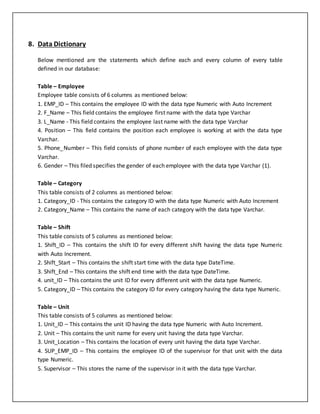
8. Data Dictionary
Below mentioned are the statements which define each and every column of every table
defined in our database:
Table – Employee
Employee table consists of 6 columns as mentioned below:
1. EMP_ID – This contains the employee ID with the data type Numeric with Auto Increment
2. F_Name – This field contains the employee first name with the data type Varchar
3. L_Name - This field contains the employee last name with the data type Varchar
4. Position – This field contains the position each employee is working at with the data type
Varchar.
5. Phone_Number – This field consists of phone number of each employee with the data type
Varchar.
6. Gender – This filed specifies the gender of each employee with the data type Varchar (1).
Table – Category
This table consists of 2 columns as mentioned below:
1. Category_ID - This contains the category ID with the data type Numeric with Auto Increment
2. Category_Name – This contains the name of each category with the data type Varchar.
Table – Shift
This table consists of 5 columns as mentioned below:
1. Shift_ID – This contains the shift ID for every different shift having the data type Numeric
with Auto Increment.
2. Shift_Start – This contains the shift start time with the data type DateTime.
3. Shift_End – This contains the shift end time with the data type DateTime.
4. unit_ID – This contains the unit ID for every different unit with the data type Numeric.
5. Category_ID – This contains the category ID for every category having the data type Numeric.
Table – Unit
This table consists of 5 columns as mentioned below:
1. Unit_ID – This contains the unit ID having the data type Numeric with Auto Increment.
2. Unit – This contains the unit name for every unit having the data type Varchar.
3. Unit_Location – This contains the location of every unit having the data type Varchar.
4. SUP_EMP_ID – This contains the employee ID of the supervisor for that unit with the data
type Numeric.
5. Supervisor – This stores the name of the supervisor in it with the data type Varchar.
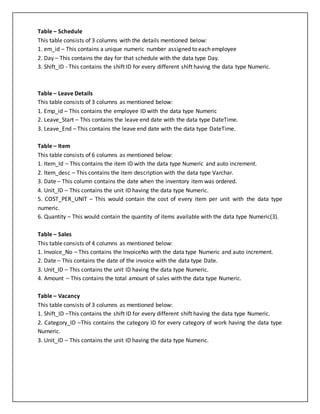
Table – Schedule
This table consists of 3 columns with the details mentioned below:
1. em_id – This contains a unique numeric number assigned to each employee
2. Day – This contains the day for that schedule with the data type Day.
3. Shift_ID - This contains the shift ID for every different shift having the data type Numeric.
Table – Leave Details
This table consists of 3 columns as mentioned below:
1. Emp_id – This contains the employee ID with the data type Numeric
2. Leave_Start – This contains the leave end date with the data type DateTime.
3. Leave_End – This contains the leave end date with the data type DateTime.
Table – Item
This table consists of 6 columns as mentioned below:
1. Item_Id – This contains the item ID with the data type Numeric and auto increment.
2. Item_desc – This contains the item description with the data type Varchar.
3. Date – This column contains the date when the inventory item was ordered.
4. Unit_ID – This contains the unit ID having the data type Numeric.
5. COST_PER_UNIT – This would contain the cost of every item per unit with the data type
numeric.
6. Quantity – This would contain the quantity of items available with the data type Numeric(3).
Table – Sales
This table consists of 4 columns as mentioned below:
1. Invoice_No – This contains the InvoiceNo with the data type Numeric and auto increment.
2. Date – This contains the date of the invoice with the data type Date.
3. Unit_ID – This contains the unit ID having the data type Numeric.
4. Amount – This contains the total amount of sales with the data type Numeric.
Table – Vacancy
This table consists of 3 columns as mentioned below:
1. Shift_ID –This contains the shift ID for every different shift having the data type Numeric.
2. Category_ID –This contains the category ID for every category of work having the data type
Numeric.
3. Unit_ID – This contains the unit ID having the data type Numeric.
9. Reporting Queries
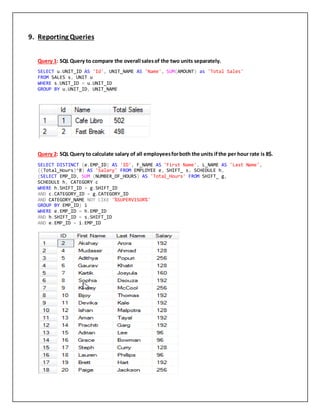
Query 1: SQL Query to compare the overall salesof the two units separately.
SELECT u.UNIT_ID AS 'Id', UNIT_NAME AS 'Name', SUM(AMOUNT) as 'Total Sales'
FROM SALES s, UNIT u
WHERE s.UNIT_ID = u.UNIT_ID
GROUP BY u.UNIT_ID, UNIT_NAME
Query 2: SQL Query to calculate salary of all employeesforboth the units ifthe per hour rate is 8$.
SELECT DISTINCT (e.EMP_ID) AS 'ID', F_NAME AS 'First Name', L_NAME AS 'Last Name',
((Total_Hours)*8) AS 'Salary' FROM EMPLOYEE e, SHIFT_ s, SCHEDULE h,
(SELECT EMP_ID, SUM (NUMBER_OF_HOURS) AS 'Total_Hours' FROM SHIFT_ g,
SCHEDULE h, CATEGORY c
WHERE h.SHIFT_ID = g.SHIFT_ID
AND c.CATEGORY_ID = g.CATEGORY_ID
AND CATEGORY_NAME NOT LIKE '%SUPERVISOR%'
GROUP BY EMP_ID) i
WHERE e.EMP_ID = h.EMP_ID
AND h.SHIFT_ID = s.SHIFT_ID
AND e.EMP_ID = i.EMP_ID
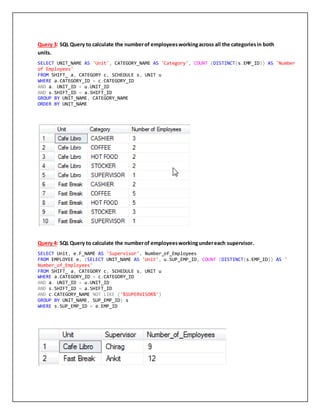
Query 3: SQL Query to calculate the numberof employeesworkingacross all the categoriesin both
units.
SELECT UNIT_NAME AS 'Unit', CATEGORY_NAME AS 'Category', COUNT (DISTINCT(s.EMP_ID)) AS 'Number
of Employees'
FROM SHIFT_ a, CATEGORY c, SCHEDULE s, UNIT u
WHERE a.CATEGORY_ID = c.CATEGORY_ID
AND a. UNIT_ID = u.UNIT_ID
AND s.SHIFT_ID = a.SHIFT_ID
GROUP BY UNIT_NAME, CATEGORY_NAME
ORDER BY UNIT_NAME
Query 4: SQL Query to calculate the numberof employeesworkingundereach supervisor.
SELECT Unit, e.F_NAME AS 'Supervisor', Number_of_Employees
FROM EMPLOYEE e, (SELECT UNIT_NAME AS 'Unit', u.SUP_EMP_ID, COUNT (DISTINCT(s.EMP_ID)) AS '
Number_of_Employees'
FROM SHIFT_ a, CATEGORY c, SCHEDULE s, UNIT u
WHERE a.CATEGORY_ID = c.CATEGORY_ID
AND a. UNIT_ID = u.UNIT_ID
AND s.SHIFT_ID = a.SHIFT_ID
AND c.CATEGORY_NAME NOT LIKE ('%SUPERVISOR%')
GROUP BY UNIT_NAME, SUP_EMP_ID) s
WHERE s.SUP_EMP_ID = e.EMP_ID
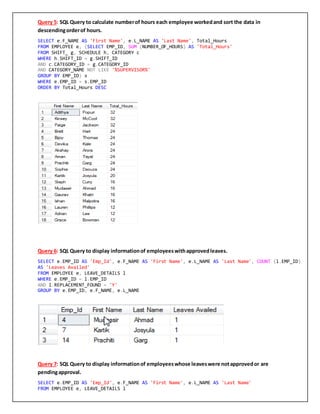
Query 5: SQL Query to calculate numberof hours each employee workedand sort the data in
descendingorderof hours.
SELECT e.F_NAME AS 'First Name', e.L_NAME AS 'Last Name', Total_Hours
FROM EMPLOYEE e, (SELECT EMP_ID, SUM (NUMBER_OF_HOURS) AS 'Total_Hours'
FROM SHIFT_ g, SCHEDULE h, CATEGORY c
WHERE h.SHIFT_ID = g.SHIFT_ID
AND c.CATEGORY_ID = g.CATEGORY_ID
AND CATEGORY_NAME NOT LIKE '%SUPERVISOR%'
GROUP BY EMP_ID) s
WHERE e.EMP_ID = s.EMP_ID
ORDER BY Total_Hours DESC
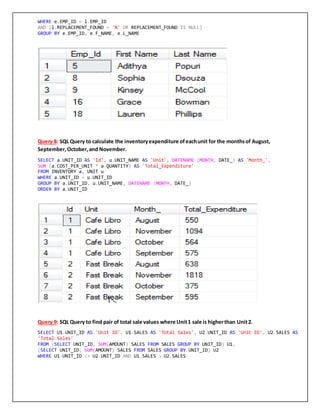
Query 6: SQL Query to display informationof employeeswithapprovedleaves.
SELECT e.EMP_ID AS 'Emp_Id', e.F_NAME AS 'First Name', e.L_NAME AS 'Last Name', COUNT (l.EMP_ID)
AS 'Leaves Availed'
FROM EMPLOYEE e, LEAVE_DETAILS l
WHERE e.EMP_ID = l.EMP_ID
AND l.REPLACEMENT_FOUND = 'Y'
GROUP BY e.EMP_ID, e.F_NAME, e.L_NAME
Query 7: SQL Query to display informationof employeeswhose leaveswere notapprovedor are
pendingapproval.
SELECT e.EMP_ID AS 'Emp_Id', e.F_NAME AS 'First Name', e.L_NAME AS 'Last Name'
FROM EMPLOYEE e, LEAVE_DETAILS l
WHERE e.EMP_ID = l.EMP_ID
AND (l.REPLACEMENT_FOUND = 'N' OR REPLACEMENT_FOUND IS NULL)
GROUP BY e.EMP_ID, e.F_NAME, e.L_NAME
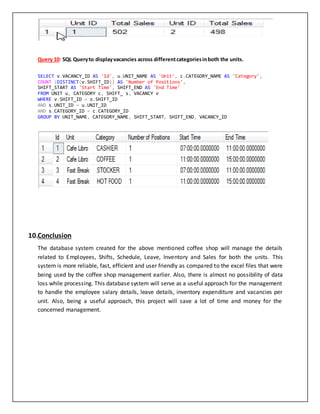
Query 8: SQL Query to calculate the inventoryexpenditure ofeachunit for the monthsof August,
September,October,and November.
SELECT a.UNIT_ID AS 'Id', u.UNIT_NAME AS 'Unit', DATENAME (MONTH, DATE_) AS 'Month_',
SUM (a.COST_PER_UNIT * a.QUANTITY) AS 'Total_Expenditure'
FROM INVENTORY a, UNIT u
WHERE a.UNIT_ID = u.UNIT_ID
GROUP BY a.UNIT_ID, u.UNIT_NAME, DATENAME (MONTH, DATE_)
ORDER BY a.UNIT_ID
Query 9: SQL Query to find pair of total sale values where Unit1 sale is higherthan Unit2.
SELECT U1.UNIT_ID AS 'Unit ID', U1.SALES AS 'Total Sales', U2.UNIT_ID AS 'Unit ID', U2.SALES AS
'Total Sales'
FROM (SELECT UNIT_ID, SUM(AMOUNT) SALES FROM SALES GROUP BY UNIT_ID) U1,
(SELECT UNIT_ID, SUM(AMOUNT) SALES FROM SALES GROUP BY UNIT_ID) U2
WHERE U1.UNIT_ID <> U2.UNIT_ID AND U1.SALES > U2.SALES
Query 10: SQL Queryto displayvacancies across differentcategoriesinboth the units.
SELECT v.VACANCY_ID AS 'Id', u.UNIT_NAME AS 'Unit', c.CATEGORY_NAME AS 'Category',
COUNT (DISTINCT(v.SHIFT_ID)) AS 'Number of Positions',
SHIFT_START AS 'Start Time', SHIFT_END AS 'End Time'
FROM UNIT u, CATEGORY c, SHIFT_ s, VACANCY v
WHERE v.SHIFT_ID = s.SHIFT_ID
AND s.UNIT_ID = u.UNIT_ID
AND s.CATEGORY_ID = c.CATEGORY_ID
GROUP BY UNIT_NAME, CATEGORY_NAME, SHIFT_START, SHIFT_END, VACANCY_ID
10.Conclusion
The database system created for the above mentioned coffee shop will manage the details
related to Employees, Shifts, Schedule, Leave, Inventory and Sales for both the units. This
system is more reliable, fast, efficient and user friendly as compared to the excel files that were
being used by the coffee shop management earlier. Also, there is almost no possibility of data
loss while processing. This database system will serve as a useful approach for the management
to handle the employee salary details, leave details, inventory expenditure and vacancies per
unit. Also, being a useful approach, this project will save a lot of time and money for the
concerned management.

Advanced Database Management Systems Project Report

  • 1.
    BennettDining Database SubmittedBy: Akshay Arora(A20101619) Ankit Singh (A20111177) Chirag Bilimoria (A20099258) Ishan Malpotra (A20104861)
  • 3.
    Table of Contents 1.Introduction:......................................................................................................................................................4 2. Problem Statement:............................................................................................................................................4 3. Recommended Solution:.....................................................................................................................................4 4. Business Rules:...................................................................................................................................................5 5. ER Diagram and relationship model:....................................................................................................................5 6. Final Code:..........................................................................................................................................................7 7. Normalized Tables:...........................................................................................................................................11 8. Data Dictionary:................................................................................................................................................12 9. Reporting Queries:............................................................................................................................................14 10. Conclusion:.......................................................................................................................................................18
  • 4.
    1. Introduction This projectdeals with designing and implementing a system for handling the information of Bennett Dinning from a manager’s perspective. The café’s manager has the job to handle its 2 units i.e., Café Libro and Fast Break. Bennett dining is one of the biggest dining services in the Oklahoma State University. In both the café’s, they have various employees working at different categories such as Stocker, Coffee, Hot food, Cashier and Supervisor. These employees work in different shifts with shift ID 1,2,3 etc and with time varying from 7:00 am in the morning to 3:00 pm in the evening. Likewise, the details of all the employees such as their first name, last name etc, their leave details, schedule for all the days, vacant positions available in both the café’s, sales of both the café’s and inventory details of both the café’s needs to be managed by the manager. To make the manager’s job easier, we design a database in SQL Server which contains various tables containing the above-mentioned values and we would run several SQL queries which will help the manager to generate several reports about both the café’s. 2. ProblemStatement Before the database was built, the manager had a tedious task in finding out various details like for hiring new employees, finding out the number of open positions, finding out the stock to be ordered to be kept in the inventory. It used to get very difficult for the manager for situations if he had to hire some new employees by maintaining all the data in the software such as Microsoft Excel etc. All the calculations regarding the sales the 2 different dates and other operations had to be done either using calculator or manually. 3. RecommendedSolution The recommended solution we have come up for the manager is by creating a database in SQL Server which contains various tables containing the above-mentioned values and we would run several SQL queries which would help the manager in finding out several details about both the café’s. This would reduce the manager’s workload by excluding the work to be done using Microsoft Excel and by even helping him perform calculations and various other operations on the data using the database model itself.
  • 5.
    4. Business Rules For each unit there should be only one supervisor.  Employee can work many shifts but for a particular shift on a particular day there is only one Employee.  An employee can work for more than one unit.  At least one employee should be there in each of the categories for any particular shift.  For any particular shift, one employee can be assigned to one position only.  Salary of the employee is calculated as (No of hours worked*8).  Value taken by the gender in the employee table can be either M or F only.  One unit can sell multiple things.  One unit can have many items in inventory.  An employee can apply for multiple leaves.  A unit can have more than one vacancies.  Other than supervisor no employee can work for more than 40 hours a week. 5. ER Diagram and relationshipmodel
  • 6.
    Table: SHIFT_ Table:EMPLOYEE Table: CATEGORY Primary Key: SHIFT_ID Primary Key: EMP_ID Primary Key: CATEGORY_ID Foreign Key: CATEGORY_ID Table: UNIT Table: SCHEDULE Table: LEAVE_DETAILS Primary Key: UNIT_ID Foreign Key: EMP_ID Primary Key: LEAVE_ID Foreign Key: EMP_ID Foreign Key: SHIFT_ID Foreign Key: EMP_ID Table: VACANCY Table: SALES Table: INVENTORY Primary Key: VACANCY_ID Primary Key: INVOICE_NO. Primary Key: ITEM_ID Foreign Key: CATEGORY_ID Foreign Key: UNIT_ID Foreign Key: SHIFT_ID
  • 7.
    6. Final Code CreateCode: CREATE TABLE EMPLOYEE( EMP_ID NUMERIC IDENTITY (1,1) NOT NULL PRIMARY KEY, F_NAME VARCHAR (50), L_NAME VARCHAR (50), POSITION VARCHAR (50)NOT NULL, PHONE_NUMBER VARCHAR (50), GENDER VARCHAR (1)CONSTRAINT GENDER CHECK (GENDER IN('M','F')) ) CREATE TABLE CATEGORY( CATEGORY_ID NUMERIC IDENTITY (1,1) NOT NULL PRIMARY KEY, CATEGORY_NAME VARCHAR (20) ) CREATE TABLE SHIFT_( SHIFT_ID NUMERIC IDENTITY (1,1) NOT NULL PRIMARY KEY, SHIFT_START TIME, SHIFT_END TIME, UNIT_ID NUMERIC NOT NULL, CATEGORY_ID NUMERIC NOT NULL FOREIGN KEY REFERENCES CATEGORY(CATEGORY_ID), NUMBER_OF_HOURS NUMERIC ) CREATE TABLE UNIT( UNIT_ID NUMERIC IDENTITY (1,1) NOT NULL PRIMARY KEY, UNIT_NAME VARCHAR (20), UNIT_LOCATION VARCHAR (20), SUP_EMP_ID NUMERIC NOT NULL FOREIGN KEY REFERENCES EMPLOYEE(EMP_ID) ) CREATE TABLE SCHEDULE( EMP_ID NUMERIC NOT NULL FOREIGN KEY REFERENCES EMPLOYEE(EMP_ID), DAY_ VARCHAR (3), SHIFT_ID NUMERIC NOT NULL FOREIGN KEY REFERENCES SHIFT_(SHIFT_ID) ) CREATE TABLE LEAVE_DETAILS( LEAVE_ID NUMERIC IDENTITY (1,1) PRIMARY KEY, EMP_ID NUMERIC NOT NULL FOREIGN KEY REFERENCES EMPLOYEE(EMP_ID), LEAVE_START DATETIME, LEAVE_END DATETIME, REPLACEMENT_FOUND VARCHAR (1)CONSTRAINT REPLACEMENT_FOUND CHECK (REPLACEMENT_FOUND IN('Y','N', Null)) ) CREATE TABLE INVENTORY( ITEM_ID NUMERIC NOT NULL IDENTITY (1,1) PRIMARY KEY, ITEM_DESC VARCHAR (20), DATE_ DATETIME, UNIT_ID NUMERIC NOT NULL FOREIGN KEY REFERENCES UNIT (UNIT_ID), COST_PER_UNIT NUMERIC, QUANTITY NUMERIC (3) ) CREATE TABLE SALES( INVOICE_NUMBER NUMERIC IDENTITY (1,1) NOT NULL PRIMARY KEY,
  • 8.
    INVOICE_DATE DATETIME, AMOUNT NUMERICNOT NULL, UNIT_ID NUMERIC NOT NULL FOREIGN KEY REFERENCES UNIT(UNIT_ID) ) CREATE TABLE VACANCY( VACANCY_ID NUMERIC IDENTITY (1,1) PRIMARY KEY, SHIFT_ID NUMERIC NOT NULL FOREIGN KEY REFERENCES SHIFT_(SHIFT_ID), CATEGORY_ID NUMERIC NOT NULL FOREIGN KEY REFERENCES CATEGORY(CATEGORY_ID), UNIT_ID NUMERIC NOT NULL FOREIGN KEY REFERENCES UNIT(UNIT_ID) ) INSERT CODE INSERT INTO EMPLOYEE(F_NAME, L_NAME, POSITION, PHONE_NUMBER, GENDER) VALUES ('Chirag','Bilimoria','Supervisor','405-614-9950','M'),('Akshay','Arora','Hot Food','405- 614-9951','M'), ('Ankit','Singh','Supervisor','405-614-9952','M'),('Mudassir','Ahmad','Cashier','405-614- 9953','M'), ('Adithya','Popuri','Stocker','405-614-9954','M'),('Gaurav','Khatri','Cashier','405-614-9955','M'), ('Kartik','Josyula','Stocker','405-614-9956','M'),('Sophia','Dsouza','Coffee','405-614-9957','F'), ('Kinsey','McCool','Hot Food','405-614-9958','F'),('Bijoy','Thomas','Cashier','405-614-9957','M'), ('Devika','Kale','Cashier','405-614-9960','F'),('Ishan','Malpotra','Hot Food','405-614-9961','M'), ('Aman','Tayal','Coffee','405-614-9962','M'),('Prachiti','Garg','Stocker','405-614-9963','F'), ('Adrian','Lee','Stocker','405-614-9964','F'),('Grace','Bowman','Hot Food','405-614-9965','F'), ('Steph','Curry','Coffee','405-614-9966','M'),('Lauren','Phillips','Coffee','405-614-9967','F'), ('Brett','Hart','Coffee','405-614-9968','M'),('Paige','Jackson','Hot Food','405-614-9969','F') INSERT INTO CATEGORY(CATEGORY_NAME) VALUES('SUPERVISOR'),('CASHIER'),('COFFEE'),('STOCKER'),('HOT FOOD') INSERT INTO SHIFT_(SHIFT_START, SHIFT_END, UNIT_ID, CATEGORY_ID, NUMBER_OF_HOURS) VALUES ('07:00:00','11:00:00', 1, 2, 4),('11:00:00','15:00:00', 1, 2, 4), ('07:00:00','11:00:00', 1, 4, 4),('11:00:00','15:00:00', 1, 4, 4),('07:00:00','11:00:00', 1, 3, 4), ('11:00:00','15:00:00', 1, 3, 4),('07:00:00','11:00:00', 1, 5, 4),('11:00:00','15:00:00', 1, 5, 4), ('07:00:00','11:00:00', 2, 2, 4),('11:00:00','15:00:00', 2, 2, 4),('07:00:00','11:00:00', 2, 4, 4), ('11:00:00','15:00:00', 2, 4, 4),('07:00:00','11:00:00', 2, 3, 4),('11:00:00','15:00:00', 2, 3, 4), ('07:00:00','11:00:00', 2, 5, 4),('11:00:00','15:00:00', 2, 5, 4),('07:00:00','15:00:00', 1, 1, 8), ('07:00:00','15:00:00', 2, 1, 8),('07:00:00','11:00:00', 1, 2, 4),('11:00:00','15:00:00', 1, 3, 4), ('07:00:00','11:00:00', 2, 4, 4),('11:00:00','15:00:00', 2, 5, 4) INSERT INTO UNIT(UNIT_NAME, UNIT_LOCATION, SUP_EMP_ID) VALUES ('Cafe Libro','Library','1'),('Fast Break','Bennett Hall','3') INSERT INTO SCHEDULE(EMP_ID, DAY_, SHIFT_ID) VALUES (1,'Mon',17),(1,'Tue',17),(1,'Wed', 17), (1,'Thu',17),(1,'Fri',17),(1,'Sat',17), (3,'Mon',18),(3,'Tue', 18),(3,'Wed', 18),(3,'Thu', 18), (3,'Fri',18),(3,'Sat', 18),(4,'Mon', 1),(4,'Tue', 1), (4,'Wed', 1),(4,'Thu', 1),(19,'Fri',1),(19,'Sat', 1), (5,'Mon', 3),(5,'Tue', 3),(5,'Wed', 3), (5,'Thu', 3),(5,'Fri', 3),(5,'Sat', 3), (8,'Mon', 5),(8,'Tue', 5),(8,'Wed', 5),(8,'Thu', 5), (8,'Fri', 5),(8,'Sat', 5),(9,'Mon', 7), (9,'Tue', 7),(9,'Wed', 7),(9,'Thu', 7), (9,'Fri', 7),(9,'Sat', 7),(19,'Mon', 2),(6,'Tue', 2), (19,'Wed', 2),(6,'Thu', 2),(6,'Fri', 2),(6,'Sat', 2), (14,'Mon', 4),(14,'Tue', 4),(14,'Wed', 4), (14,'Thu', 4),(14,'Fri', 4),(14,'Sat', 4), (13,'Mon', 6),(13,'Tue', 6),(13,'Wed', 6),(13,'Thu', 6),
  • 9.
    (13,'Fri', 6),(13,'Sat', 6),(2,'Mon',8),(2,'Tue',8), (2,'Wed', 8),(2,'Thu', 8),(2,'Fri', 8),(2,'Sat', 8), (10,'Mon', 9),(10,'Tue', 9),(10,'Wed', 9),(10,'Thu', 9), (10,'Fri', 9),(10,'Sat', 9),(7,'Mon',11),(7,'Tue', 11), (7,'Wed', 11),(7,'Thu',11),(20,'Fri', 11), (7,'Sat', 11),(20,'Mon', 13),(17,'Tue', 13),(17,'Wed',13), (17,'Thu',13),(17,'Fri', 13),(20,'Sat', 13), (12,'Mon',15),(12,'Tue',15),(12,'Wed', 15), (20,'Thu', 15),(12,'Fri', 15),(20,'Sat', 15), (11,'Mon', 10),(11,'Tue', 10),(11,'Wed', 10), (11,'Thu', 10),(11,'Fri', 10),(11,'Sat', 10), (15,'Mon', 12),(15,'Tue', 12),(15,'Wed', 12), (20,'Thu',12),(20,'Fri', 12),(20,'Sat', 12), (18,'Mon', 14),(18,'Tue', 14),(9,'Wed', 14), (9,'Thu', 14),(18,'Fri', 14),(19,'Sat',14), (16,'Mon', 16),(16,'Tue',16),(5,'Wed', 16), (5,'Thu',16),(16,'Fri', 16),(19,'Sat', 16) INSERT INTO LEAVE_DETAILS(EMP_ID, LEAVE_START, LEAVE_END, REPLACEMENT_FOUND) VALUES ('4','2017-08-30','2017-08-30','Y'),('5','2017-09-03','2017-09-04',Null),('7','2017-09- 09','2017-09-09','Y'), ('8','2017-09-15','2017-09-16','N'),('9','2017-09-24','2017-09-24',Null),('14','2017-10-5','2017- 10-6','Y'), ('16','2017-10-30','2017-10-30',Null),('18','2017-11-11','2017-11-11',Null) INSERT INTO INVENTORY(ITEM_DESC, DATE_, UNIT_ID, COST_PER_UNIT, QUANTITY) VALUES ('Milk','2017-08-11', 1, 4, 20),('Coffee Beans','2017-08-14', 1, 12, 10),('Sugar Pack','2017-08-08', 1, 1.25, 100), ('Coffee Sleaves','2017-08-21', 1, 2,100),('Soft Drinks','2017-08-28', 1, 1.19, 50),('Milk','2017- 08-05', 2, 5, 25), ('Coffee Beans','2017-08-01', 2, 14,12),('Sugar Pack','2017-08-16', 2, 1.32, 94), ('Coffee Sleaves','2017-08-22', 2, 2.23,100),('Soft Drinks','2017-08-29', 2, 1.25, 51), ('Milk','2017-09-13', 1, 4, 22),('Coffee Beans','2017-09-11', 1, 12, 12),('Sugar Packs','2017-09- 28', 1, 1.25, 102), ('Coffee Sleaves','2017-09-09', 1, 2,98),('Soft Drinks','2017-09-21', 1, 1.19, 45), ('Milk','2017-09-02', 2, 3.75,20),('Coffee Beans','2017-09-10', 2, 12, 12), ('Sugar Packs','2017-09-21', 2, 1.47,105),('Coffee Sleaves','2017-09-28', 2, 2.20, 100), ('Soft Drinks','2017-09-15', 2, 1.19,66), ('Milk','2017-10-05', 1, 3.75,22),('Coffee Beans','2017-10-13', 1, 12, 18), ('Sugar Packs','2017-10-19', 1, 1.47,10),('Coffee Sleaves','2017-10-24', 1, 2.20, 90), ('Soft Drinks','2017-10-27', 1, 1.19,70),('Milk','2017-10-01', 2, 3.75, 25), ('Coffee Beans','2017-10-10', 2, 12,15),('Sugar Packs','2017-10-20', 2, 1.47, 20), ('Coffee Sleaves','2017-10-29', 2, 2.2,20),('Soft Drinks','2017-10-31', 2, 1.19, 35), ('Milk','2017-11-06', 1, 3.75,26),('Coffee Beans','2017-11-10', 1, 12, 43), ('Sugar Packs','2017-11-21', 1, 1.47,50),('Coffee Sleaves','2017-11-26', 1, 2.20, 200), ('Soft Drinks','2017-11-30', 1, 1.19,24),('Milk','2017-11-25', 2, 3.75, 65), ('Coffee Beans','2017-11-02', 2, 12,79),('Sugar Packs','2017-11-03', 2, 1.47, 100), ('Coffee Sleaves','2017-11-28', 2, 2.20,205),('Soft Drinks','2017-11-30', 2, 1.19, 100) INSERT INTO SALES(INVOICE_DATE, UNIT_ID, AMOUNT) VALUES ('2017-08-08', 1, 30),('2017-08-12', 1, 45),('2017-08-16', 1, 37),('2017-08-25', 1, 27), ('2017-08-13', 2, 52),('2017-08-17', 2, 42),('2017-08-22', 2, 33),('2017-08-27', 2, 27), ('2017-09-09', 1, 22),('2017-09-13', 1, 34),('2017-09-17', 1, 42),('2017-09-26', 1, 29), ('2017-09-11', 2, 63),('2017-09-12', 2, 53),('2017-09-20', 2, 47),('2017-09-27', 2, 26), ('2017-10-10', 1, 82),('2017-10-17', 1, 65),('2017-10-21', 1, 43),('2017-10-28', 1, 46), ('2017-10-07', 2, 27),('2017-10-11', 2, 31),('2017-10-19', 2, 63),('2017-10-23', 2, 34) INSERT INTO VACANCY(SHIFT_ID, CATEGORY_ID, UNIT_ID) VALUES (19,2,1),(20,3,1),(21,4,2),(22,5,2)
  • 11.
  • 12.
    8. Data Dictionary Belowmentioned are the statements which define each and every column of every table defined in our database: Table – Employee Employee table consists of 6 columns as mentioned below: 1. EMP_ID – This contains the employee ID with the data type Numeric with Auto Increment 2. F_Name – This field contains the employee first name with the data type Varchar 3. L_Name - This field contains the employee last name with the data type Varchar 4. Position – This field contains the position each employee is working at with the data type Varchar. 5. Phone_Number – This field consists of phone number of each employee with the data type Varchar. 6. Gender – This filed specifies the gender of each employee with the data type Varchar (1). Table – Category This table consists of 2 columns as mentioned below: 1. Category_ID - This contains the category ID with the data type Numeric with Auto Increment 2. Category_Name – This contains the name of each category with the data type Varchar. Table – Shift This table consists of 5 columns as mentioned below: 1. Shift_ID – This contains the shift ID for every different shift having the data type Numeric with Auto Increment. 2. Shift_Start – This contains the shift start time with the data type DateTime. 3. Shift_End – This contains the shift end time with the data type DateTime. 4. unit_ID – This contains the unit ID for every different unit with the data type Numeric. 5. Category_ID – This contains the category ID for every category having the data type Numeric. Table – Unit This table consists of 5 columns as mentioned below: 1. Unit_ID – This contains the unit ID having the data type Numeric with Auto Increment. 2. Unit – This contains the unit name for every unit having the data type Varchar. 3. Unit_Location – This contains the location of every unit having the data type Varchar. 4. SUP_EMP_ID – This contains the employee ID of the supervisor for that unit with the data type Numeric. 5. Supervisor – This stores the name of the supervisor in it with the data type Varchar.
  • 13.
    Table – Schedule Thistable consists of 3 columns with the details mentioned below: 1. em_id – This contains a unique numeric number assigned to each employee 2. Day – This contains the day for that schedule with the data type Day. 3. Shift_ID - This contains the shift ID for every different shift having the data type Numeric. Table – Leave Details This table consists of 3 columns as mentioned below: 1. Emp_id – This contains the employee ID with the data type Numeric 2. Leave_Start – This contains the leave end date with the data type DateTime. 3. Leave_End – This contains the leave end date with the data type DateTime. Table – Item This table consists of 6 columns as mentioned below: 1. Item_Id – This contains the item ID with the data type Numeric and auto increment. 2. Item_desc – This contains the item description with the data type Varchar. 3. Date – This column contains the date when the inventory item was ordered. 4. Unit_ID – This contains the unit ID having the data type Numeric. 5. COST_PER_UNIT – This would contain the cost of every item per unit with the data type numeric. 6. Quantity – This would contain the quantity of items available with the data type Numeric(3). Table – Sales This table consists of 4 columns as mentioned below: 1. Invoice_No – This contains the InvoiceNo with the data type Numeric and auto increment. 2. Date – This contains the date of the invoice with the data type Date. 3. Unit_ID – This contains the unit ID having the data type Numeric. 4. Amount – This contains the total amount of sales with the data type Numeric. Table – Vacancy This table consists of 3 columns as mentioned below: 1. Shift_ID –This contains the shift ID for every different shift having the data type Numeric. 2. Category_ID –This contains the category ID for every category of work having the data type Numeric. 3. Unit_ID – This contains the unit ID having the data type Numeric.
  • 14.
    9. Reporting Queries Query1: SQL Query to compare the overall salesof the two units separately. SELECT u.UNIT_ID AS 'Id', UNIT_NAME AS 'Name', SUM(AMOUNT) as 'Total Sales' FROM SALES s, UNIT u WHERE s.UNIT_ID = u.UNIT_ID GROUP BY u.UNIT_ID, UNIT_NAME Query 2: SQL Query to calculate salary of all employeesforboth the units ifthe per hour rate is 8$. SELECT DISTINCT (e.EMP_ID) AS 'ID', F_NAME AS 'First Name', L_NAME AS 'Last Name', ((Total_Hours)*8) AS 'Salary' FROM EMPLOYEE e, SHIFT_ s, SCHEDULE h, (SELECT EMP_ID, SUM (NUMBER_OF_HOURS) AS 'Total_Hours' FROM SHIFT_ g, SCHEDULE h, CATEGORY c WHERE h.SHIFT_ID = g.SHIFT_ID AND c.CATEGORY_ID = g.CATEGORY_ID AND CATEGORY_NAME NOT LIKE '%SUPERVISOR%' GROUP BY EMP_ID) i WHERE e.EMP_ID = h.EMP_ID AND h.SHIFT_ID = s.SHIFT_ID AND e.EMP_ID = i.EMP_ID
  • 15.
    Query 3: SQLQuery to calculate the numberof employeesworkingacross all the categoriesin both units. SELECT UNIT_NAME AS 'Unit', CATEGORY_NAME AS 'Category', COUNT (DISTINCT(s.EMP_ID)) AS 'Number of Employees' FROM SHIFT_ a, CATEGORY c, SCHEDULE s, UNIT u WHERE a.CATEGORY_ID = c.CATEGORY_ID AND a. UNIT_ID = u.UNIT_ID AND s.SHIFT_ID = a.SHIFT_ID GROUP BY UNIT_NAME, CATEGORY_NAME ORDER BY UNIT_NAME Query 4: SQL Query to calculate the numberof employeesworkingundereach supervisor. SELECT Unit, e.F_NAME AS 'Supervisor', Number_of_Employees FROM EMPLOYEE e, (SELECT UNIT_NAME AS 'Unit', u.SUP_EMP_ID, COUNT (DISTINCT(s.EMP_ID)) AS ' Number_of_Employees' FROM SHIFT_ a, CATEGORY c, SCHEDULE s, UNIT u WHERE a.CATEGORY_ID = c.CATEGORY_ID AND a. UNIT_ID = u.UNIT_ID AND s.SHIFT_ID = a.SHIFT_ID AND c.CATEGORY_NAME NOT LIKE ('%SUPERVISOR%') GROUP BY UNIT_NAME, SUP_EMP_ID) s WHERE s.SUP_EMP_ID = e.EMP_ID
  • 16.
    Query 5: SQLQuery to calculate numberof hours each employee workedand sort the data in descendingorderof hours. SELECT e.F_NAME AS 'First Name', e.L_NAME AS 'Last Name', Total_Hours FROM EMPLOYEE e, (SELECT EMP_ID, SUM (NUMBER_OF_HOURS) AS 'Total_Hours' FROM SHIFT_ g, SCHEDULE h, CATEGORY c WHERE h.SHIFT_ID = g.SHIFT_ID AND c.CATEGORY_ID = g.CATEGORY_ID AND CATEGORY_NAME NOT LIKE '%SUPERVISOR%' GROUP BY EMP_ID) s WHERE e.EMP_ID = s.EMP_ID ORDER BY Total_Hours DESC Query 6: SQL Query to display informationof employeeswithapprovedleaves. SELECT e.EMP_ID AS 'Emp_Id', e.F_NAME AS 'First Name', e.L_NAME AS 'Last Name', COUNT (l.EMP_ID) AS 'Leaves Availed' FROM EMPLOYEE e, LEAVE_DETAILS l WHERE e.EMP_ID = l.EMP_ID AND l.REPLACEMENT_FOUND = 'Y' GROUP BY e.EMP_ID, e.F_NAME, e.L_NAME Query 7: SQL Query to display informationof employeeswhose leaveswere notapprovedor are pendingapproval. SELECT e.EMP_ID AS 'Emp_Id', e.F_NAME AS 'First Name', e.L_NAME AS 'Last Name' FROM EMPLOYEE e, LEAVE_DETAILS l
  • 17.
    WHERE e.EMP_ID =l.EMP_ID AND (l.REPLACEMENT_FOUND = 'N' OR REPLACEMENT_FOUND IS NULL) GROUP BY e.EMP_ID, e.F_NAME, e.L_NAME Query 8: SQL Query to calculate the inventoryexpenditure ofeachunit for the monthsof August, September,October,and November. SELECT a.UNIT_ID AS 'Id', u.UNIT_NAME AS 'Unit', DATENAME (MONTH, DATE_) AS 'Month_', SUM (a.COST_PER_UNIT * a.QUANTITY) AS 'Total_Expenditure' FROM INVENTORY a, UNIT u WHERE a.UNIT_ID = u.UNIT_ID GROUP BY a.UNIT_ID, u.UNIT_NAME, DATENAME (MONTH, DATE_) ORDER BY a.UNIT_ID Query 9: SQL Query to find pair of total sale values where Unit1 sale is higherthan Unit2. SELECT U1.UNIT_ID AS 'Unit ID', U1.SALES AS 'Total Sales', U2.UNIT_ID AS 'Unit ID', U2.SALES AS 'Total Sales' FROM (SELECT UNIT_ID, SUM(AMOUNT) SALES FROM SALES GROUP BY UNIT_ID) U1, (SELECT UNIT_ID, SUM(AMOUNT) SALES FROM SALES GROUP BY UNIT_ID) U2 WHERE U1.UNIT_ID <> U2.UNIT_ID AND U1.SALES > U2.SALES
  • 18.
    Query 10: SQLQueryto displayvacancies across differentcategoriesinboth the units. SELECT v.VACANCY_ID AS 'Id', u.UNIT_NAME AS 'Unit', c.CATEGORY_NAME AS 'Category', COUNT (DISTINCT(v.SHIFT_ID)) AS 'Number of Positions', SHIFT_START AS 'Start Time', SHIFT_END AS 'End Time' FROM UNIT u, CATEGORY c, SHIFT_ s, VACANCY v WHERE v.SHIFT_ID = s.SHIFT_ID AND s.UNIT_ID = u.UNIT_ID AND s.CATEGORY_ID = c.CATEGORY_ID GROUP BY UNIT_NAME, CATEGORY_NAME, SHIFT_START, SHIFT_END, VACANCY_ID 10.Conclusion The database system created for the above mentioned coffee shop will manage the details related to Employees, Shifts, Schedule, Leave, Inventory and Sales for both the units. This system is more reliable, fast, efficient and user friendly as compared to the excel files that were being used by the coffee shop management earlier. Also, there is almost no possibility of data loss while processing. This database system will serve as a useful approach for the management to handle the employee salary details, leave details, inventory expenditure and vacancies per unit. Also, being a useful approach, this project will save a lot of time and money for the concerned management.