JMU GenCyber Boot Camp
Summer, 2015
Network Sniffing
• Sometimes it is possible observe/record traffic
traveling on a network
• Network traffic may contain valuable information:
– Usernames and passwords
•Encrypted
•Unencrypted
– E-mail, web requests (and replies), data files
– Etc.
• A sniffer is a piece of software that captures
network traffic
Analogy - Wiretapping
• The FBI conducts wiretaps
– Go to a judge and get a court order authorizing the
wiretap
•Who?
•What?
•When?
•Why?
– With the help of the phone company, can listen
to/record a suspect’s phone conversations to obtain
evidence
Analogy – Wiretapping (cont)
• Sniffer allows an administrator (or attacker) to
record/listen in on conversations between
computers
– May need authorization to monitor network traffic
–Electronic Communications Privacy Act
–https://www.cdt.org/issue/wiretap-ecpa
– May not need authorization to monitor network traffic
–“Trap and Trace”/”Pen register”
–Consent
– May not care - attackers
Sniffing - Environment
• Some networks use shared media so passive
sniffing is very easy
– Network interface cards can be placed in
“promiscuous” mode so that they do not ignore
traffic to other hosts
• Wireless network traffic can also be
captured (but may be encrypted)
• Sniffing is more difficult (but not
impossible) in switched environments
Protocol Analysis
• Captured network packets contain binary
data which is difficult to interpret
• Most sniffers include a protocol analysis
component which organizes and displays
the (human-readable) contents of the traffic
– Example: Wireshark
Example – An Nmap Port Scan
• Target host: 192.168.78.141
– Start Wireshark
• Source host: 192.168.78.142
– Perform a TCP-connect scan
•nmap –sT <target host>
• View results
Example – A Web Connection
• Target host: 192.168.78.141
– Start Wireshark
• Source host: 192.168.78.142
– Open a text-based web browser
•Get default web page on the target host
• View results
Example – An FTP Connection
• Target host: 192.168.78.141
– Start Wireshark
• Source host: 192.168.78.142
– Use the ftp client
•ftp <target host>
• View results
Example – An SFTP Connection
• Target host 192.168.78.142
• Source host 192.168.78.141
– Use the sftp client
•sftp guest@<target host>
• View results
Man-in-the-Middle
• In a switched environment a host only
receives:
– Traffic destine for itself
– Broadcast traffic
• Cannot see traffic between other hosts
• Man-in-the-middle = insert yourself as an
(undetected) intermediary between
communicating hosts
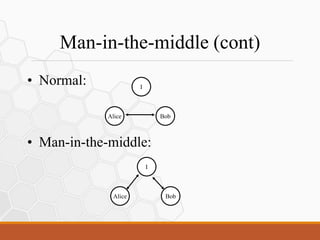
Man-in-the-middle (cont)
• Normal:
• Man-in-the-middle:
Alice Bob
I
Alice Bob
I
Man-in-the-middle (cont)
• How to achieve man-in-the-middle in a
switched environment?
• Exploit address resolution protocols
Address Resolution
• All network communications must be carried out
over physical networks
– Each machine has a unique physical address
• Programs (and humans) use IP addresses to
specify the machine to which a message is sent
• The address resolution problem – need to map IP
address to physical address
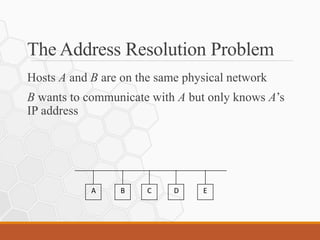
The Address Resolution Problem
Hosts A and B are on the same physical network
B wants to communicate with A but only knows A’s
IP address
E
D
C
B
A
The Address Resolution Protocol (ARP)
Host A wants to resolve the IP address IB
Host A broadcasts a special (ARP) packet that asks
the host with IP address IB to respond with its
physical address
All hosts receive the request
Host B recognizes its IP address
Host B sends a reply containing its physical address
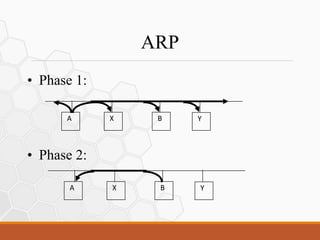
ARP
• Phase 1:
• Phase 2:
A X B Y
A X B Y
ARP Caches
• Each host maintains a cache of recently-
used mappings
– Information in the cache expires after a set time
has elapsed
• When sending an ARP request a host
includes its IP-to-physical address binding
• All machines on a physical network
“snoop” ARP packets for mappings
Demo – ARP Cache
• Host.141 has not communicated with .143
– .141’s ARP cache probably doesn’t contain an
entry for .143
• Host .141 makes a web request to .143
– ARP for .143’s physical address
•Added to .141’s cache
– Web request sent and reply received
ARP Cache Poisoning
• Broadcast ARP replies associating your
physical address with a given IP address
– Other hosts receive this message and put the
mapping into their ARP cache
– When a machine wants to communicate with
the given IP address it sends the frame to your
physical address
– You read the frame and then forward it on to
the real destination host
Cain and Abel
• A man-in-the-middle LAN attack tool
– Sniffer
– Protocol analyzer
• URL: http://www.oxid.it/cain.html
• Can be used to poison hosts ARP caches
Demo – ARP Cache Poisoning
• Hosts .142 and .143 may or may not have
communicated
– ARP caches may or may not contain entries for
each other
• Start Cain (on .141) and poison both .142
and .143’s ARP caches:
– .142’s HW address associated with .141’s IP
– .143’s HW address associated with .141’s IP
ARP Cache Poisoning - Result
• .142 and .143 will communicate with each other
– May not realize that their communications are flowing through a
third-party
• All communications will flow through .141
– .141 can read/store traffic
– .141 forwards between the two hosts
Example – An FTP Connection
• Switched Environment
– Source host: .143
– Destination host: .142
– Attacker: .141
• Using:
– Cain and Abel
ARP Poisoning
• Can:
• Read traffic
• Modify traffic
Example – DNS Spoofing
• Switched Environment
– Source host: .143
– Destination host: Google
– Attacker: .141
• Using:
– Cain and Abel
Example – SSH Downgrade
• Switched Environment
– Source host: my laptop
– Destination host: .147
– Attacker: .141
• Using:
– Cain and Abel
ARP Poisoning
• What attackers look for:
– Sensitive, unencrypted communications
•Web requests/replies, e-mail, FTP
– Weakly-encrypted communications
•Old versions of SSH, RDC
ARP Poisoning - Countermeasures
• Static ARP tables/smart switch
• ARPwatch
• IDS
Summary
• Network traffic may contain valuable information:
– Usernames and passwords
•Encrypted
•Unencrypted
– E-mail, web requests (and replies), data files
– Etc.
• ARP poisoning can allow an attacker to capture and
modify network traffic as a man-in-the-middle:
– Cain and Abel

Address Resolution Protocol Cache Poisoning

  • 1.
    JMU GenCyber BootCamp Summer, 2015
  • 2.
    Network Sniffing • Sometimesit is possible observe/record traffic traveling on a network • Network traffic may contain valuable information: – Usernames and passwords •Encrypted •Unencrypted – E-mail, web requests (and replies), data files – Etc. • A sniffer is a piece of software that captures network traffic
  • 3.
    Analogy - Wiretapping •The FBI conducts wiretaps – Go to a judge and get a court order authorizing the wiretap •Who? •What? •When? •Why? – With the help of the phone company, can listen to/record a suspect’s phone conversations to obtain evidence
  • 4.
    Analogy – Wiretapping(cont) • Sniffer allows an administrator (or attacker) to record/listen in on conversations between computers – May need authorization to monitor network traffic –Electronic Communications Privacy Act –https://www.cdt.org/issue/wiretap-ecpa – May not need authorization to monitor network traffic –“Trap and Trace”/”Pen register” –Consent – May not care - attackers
  • 5.
    Sniffing - Environment •Some networks use shared media so passive sniffing is very easy – Network interface cards can be placed in “promiscuous” mode so that they do not ignore traffic to other hosts • Wireless network traffic can also be captured (but may be encrypted) • Sniffing is more difficult (but not impossible) in switched environments
  • 6.
    Protocol Analysis • Capturednetwork packets contain binary data which is difficult to interpret • Most sniffers include a protocol analysis component which organizes and displays the (human-readable) contents of the traffic – Example: Wireshark
  • 7.
    Example – AnNmap Port Scan • Target host: 192.168.78.141 – Start Wireshark • Source host: 192.168.78.142 – Perform a TCP-connect scan •nmap –sT <target host> • View results
  • 8.
    Example – AWeb Connection • Target host: 192.168.78.141 – Start Wireshark • Source host: 192.168.78.142 – Open a text-based web browser •Get default web page on the target host • View results
  • 9.
    Example – AnFTP Connection • Target host: 192.168.78.141 – Start Wireshark • Source host: 192.168.78.142 – Use the ftp client •ftp <target host> • View results
  • 10.
    Example – AnSFTP Connection • Target host 192.168.78.142 • Source host 192.168.78.141 – Use the sftp client •sftp guest@<target host> • View results
  • 11.
    Man-in-the-Middle • In aswitched environment a host only receives: – Traffic destine for itself – Broadcast traffic • Cannot see traffic between other hosts • Man-in-the-middle = insert yourself as an (undetected) intermediary between communicating hosts
  • 12.
    Man-in-the-middle (cont) • Normal: •Man-in-the-middle: Alice Bob I Alice Bob I
  • 13.
    Man-in-the-middle (cont) • Howto achieve man-in-the-middle in a switched environment? • Exploit address resolution protocols
  • 14.
    Address Resolution • Allnetwork communications must be carried out over physical networks – Each machine has a unique physical address • Programs (and humans) use IP addresses to specify the machine to which a message is sent • The address resolution problem – need to map IP address to physical address
  • 15.
    The Address ResolutionProblem Hosts A and B are on the same physical network B wants to communicate with A but only knows A’s IP address E D C B A
  • 16.
    The Address ResolutionProtocol (ARP) Host A wants to resolve the IP address IB Host A broadcasts a special (ARP) packet that asks the host with IP address IB to respond with its physical address All hosts receive the request Host B recognizes its IP address Host B sends a reply containing its physical address
  • 17.
    ARP • Phase 1: •Phase 2: A X B Y A X B Y
  • 18.
    ARP Caches • Eachhost maintains a cache of recently- used mappings – Information in the cache expires after a set time has elapsed • When sending an ARP request a host includes its IP-to-physical address binding • All machines on a physical network “snoop” ARP packets for mappings
  • 19.
    Demo – ARPCache • Host.141 has not communicated with .143 – .141’s ARP cache probably doesn’t contain an entry for .143 • Host .141 makes a web request to .143 – ARP for .143’s physical address •Added to .141’s cache – Web request sent and reply received
  • 20.
    ARP Cache Poisoning •Broadcast ARP replies associating your physical address with a given IP address – Other hosts receive this message and put the mapping into their ARP cache – When a machine wants to communicate with the given IP address it sends the frame to your physical address – You read the frame and then forward it on to the real destination host
  • 21.
    Cain and Abel •A man-in-the-middle LAN attack tool – Sniffer – Protocol analyzer • URL: http://www.oxid.it/cain.html • Can be used to poison hosts ARP caches
  • 22.
    Demo – ARPCache Poisoning • Hosts .142 and .143 may or may not have communicated – ARP caches may or may not contain entries for each other • Start Cain (on .141) and poison both .142 and .143’s ARP caches: – .142’s HW address associated with .141’s IP – .143’s HW address associated with .141’s IP
  • 23.
    ARP Cache Poisoning- Result • .142 and .143 will communicate with each other – May not realize that their communications are flowing through a third-party • All communications will flow through .141 – .141 can read/store traffic – .141 forwards between the two hosts
  • 24.
    Example – AnFTP Connection • Switched Environment – Source host: .143 – Destination host: .142 – Attacker: .141 • Using: – Cain and Abel
  • 25.
    ARP Poisoning • Can: •Read traffic • Modify traffic
  • 26.
    Example – DNSSpoofing • Switched Environment – Source host: .143 – Destination host: Google – Attacker: .141 • Using: – Cain and Abel
  • 27.
    Example – SSHDowngrade • Switched Environment – Source host: my laptop – Destination host: .147 – Attacker: .141 • Using: – Cain and Abel
  • 28.
    ARP Poisoning • Whatattackers look for: – Sensitive, unencrypted communications •Web requests/replies, e-mail, FTP – Weakly-encrypted communications •Old versions of SSH, RDC
  • 29.
    ARP Poisoning -Countermeasures • Static ARP tables/smart switch • ARPwatch • IDS
  • 30.
    Summary • Network trafficmay contain valuable information: – Usernames and passwords •Encrypted •Unencrypted – E-mail, web requests (and replies), data files – Etc. • ARP poisoning can allow an attacker to capture and modify network traffic as a man-in-the-middle: – Cain and Abel