Accelerated Reader Training Aug 2010
How AR Works Student selects and reads a book Student takes AR Reading Practice Quiz Computer adds quiz results to database; student gives report to teacher Students accumulate points Students MUST have Internet permission to use AR
Login - Teachers Go to https://hosted82.renlearn.com/ Login as Teacher/Administrator Login using your first and last name  ex. denisesumida Password sharks1 er reports available
Key AR Reports for Teachers TOPS - Three Opportunites to Praise the Student Should be printed out after each quiz taken Keep in folder? Diagnostic Report Run weekly (recommended) Tons of other reports available
ZPD from STAR test Zone of Proximal Development Scores above 85% on quizzes means reading in right “ZONE” ZPD is a wide range, start at low end Use the Goal Setting Chart to help determine the ZPD of students Nonfiction books should be 0.5-1.0 below the ZPD STAR test will be administered quarterly during computer appointments
Taking AR Quizzes Should be done 1-2 days after child has finished the book Library will be available for quiz taking from 8:15-9:00 Students may also take quizzes on your classroom computers or NEO2s Students should not take the quizzes at home
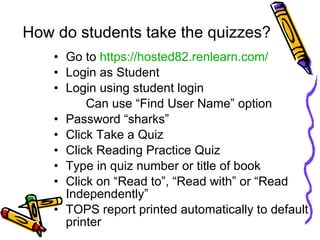
How do students take the quizzes? Go to  https://hosted82.renlearn.com/ Login as Student Login using student login  Can use “Find User Name” option Password “sharks” Click Take a Quiz Click Reading Practice Quiz Type in quiz number or title of book Click on “Read to”, “Read with” or “Read Independently” TOPS report printed automatically to default printer
Clearing Lockouts Student accounts are locked out if they login incorrectly 3 times Under Renaissance Place tab, click on Personnel, Students, and Parents Click on Clear Locked Students Click on blue “clear” next to student’s name Or you can email Denise
Problems you may encounter In the beginning, most problems occur because book is too high in ZPD range and/or too long Student may need instruction and guidance on book selection Graphic organizers for students when reading?
AR Goal Setting Point Goals Book-Level Goals PHES Incentives
AR Student Folders Student Reading Log TOPS reports from quizzes Student reading plan/goals
New Students Linda will add new students to your class Denise will prepare introductory AR packet for each student
So what do I do next? Students should choose books at the lower end of the ZPD  ex. ZPD range 1.9-2.8 Student choose books in 1.9-2.2 range When they pass 3 quizzes with 85% or better then move them up the ZPD  Try the 2.3-2.6 range If they fail 3 quizzes in a row, move them down  1.6-1.8 range
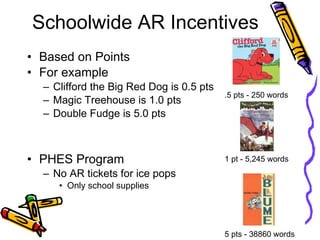
Schoolwide AR Incentives Based on Points For example Clifford the Big Red Dog is 0.5 pts Magic Treehouse is 1.0 pts Double Fudge is 5.0 pts PHES Program No AR tickets for ice pops Only school supplies 5 pts - 38860 words 1 pt - 5,245 words .5 pts - 250 words
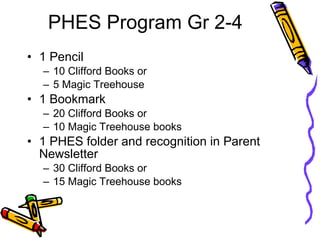
PHES Program Gr 2-4 1 Pencil  10 Clifford Books or  5 Magic Treehouse 1 Bookmark  20 Clifford Books or  10 Magic Treehouse books 1 PHES folder and recognition in Parent Newsletter 30 Clifford Books or 15 Magic Treehouse books
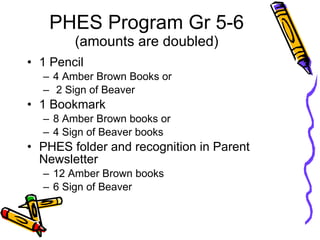
PHES Program Gr 5-6  (amounts are doubled) 1 Pencil  4 Amber Brown Books or 2 Sign of Beaver 1 Bookmark  8 Amber Brown books or 4 Sign of Beaver books PHES folder and recognition in Parent Newsletter 12 Amber Brown books 6 Sign of Beaver
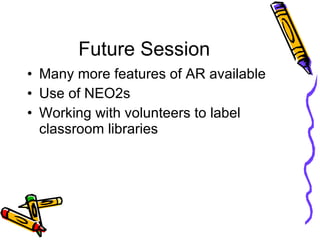
Future Session Many more features of AR available Use of NEO2s  Working with volunteers to label classroom libraries

Accelerated Reader Teacher Training

  • 1.
  • 2.
    How AR WorksStudent selects and reads a book Student takes AR Reading Practice Quiz Computer adds quiz results to database; student gives report to teacher Students accumulate points Students MUST have Internet permission to use AR
  • 3.
    Login - TeachersGo to https://hosted82.renlearn.com/ Login as Teacher/Administrator Login using your first and last name ex. denisesumida Password sharks1 er reports available
  • 4.
    Key AR Reportsfor Teachers TOPS - Three Opportunites to Praise the Student Should be printed out after each quiz taken Keep in folder? Diagnostic Report Run weekly (recommended) Tons of other reports available
  • 5.
    ZPD from STARtest Zone of Proximal Development Scores above 85% on quizzes means reading in right “ZONE” ZPD is a wide range, start at low end Use the Goal Setting Chart to help determine the ZPD of students Nonfiction books should be 0.5-1.0 below the ZPD STAR test will be administered quarterly during computer appointments
  • 6.
    Taking AR QuizzesShould be done 1-2 days after child has finished the book Library will be available for quiz taking from 8:15-9:00 Students may also take quizzes on your classroom computers or NEO2s Students should not take the quizzes at home
  • 7.
    How do studentstake the quizzes? Go to https://hosted82.renlearn.com/ Login as Student Login using student login Can use “Find User Name” option Password “sharks” Click Take a Quiz Click Reading Practice Quiz Type in quiz number or title of book Click on “Read to”, “Read with” or “Read Independently” TOPS report printed automatically to default printer
  • 8.
    Clearing Lockouts Studentaccounts are locked out if they login incorrectly 3 times Under Renaissance Place tab, click on Personnel, Students, and Parents Click on Clear Locked Students Click on blue “clear” next to student’s name Or you can email Denise
  • 9.
    Problems you mayencounter In the beginning, most problems occur because book is too high in ZPD range and/or too long Student may need instruction and guidance on book selection Graphic organizers for students when reading?
  • 10.
    AR Goal SettingPoint Goals Book-Level Goals PHES Incentives
  • 11.
    AR Student FoldersStudent Reading Log TOPS reports from quizzes Student reading plan/goals
  • 12.
    New Students Lindawill add new students to your class Denise will prepare introductory AR packet for each student
  • 13.
    So what doI do next? Students should choose books at the lower end of the ZPD ex. ZPD range 1.9-2.8 Student choose books in 1.9-2.2 range When they pass 3 quizzes with 85% or better then move them up the ZPD Try the 2.3-2.6 range If they fail 3 quizzes in a row, move them down 1.6-1.8 range
  • 14.
    Schoolwide AR IncentivesBased on Points For example Clifford the Big Red Dog is 0.5 pts Magic Treehouse is 1.0 pts Double Fudge is 5.0 pts PHES Program No AR tickets for ice pops Only school supplies 5 pts - 38860 words 1 pt - 5,245 words .5 pts - 250 words
  • 15.
    PHES Program Gr2-4 1 Pencil 10 Clifford Books or 5 Magic Treehouse 1 Bookmark 20 Clifford Books or 10 Magic Treehouse books 1 PHES folder and recognition in Parent Newsletter 30 Clifford Books or 15 Magic Treehouse books
  • 16.
    PHES Program Gr5-6 (amounts are doubled) 1 Pencil 4 Amber Brown Books or 2 Sign of Beaver 1 Bookmark 8 Amber Brown books or 4 Sign of Beaver books PHES folder and recognition in Parent Newsletter 12 Amber Brown books 6 Sign of Beaver
  • 17.
    Future Session Manymore features of AR available Use of NEO2s Working with volunteers to label classroom libraries