Safari Montage Training
August 2013
What is it?
• Database of DVDs
and Videos
• Server on campus
• Accessible from home
• No buffering issues
like on the Internet
How do I Access it?
• At School
http://165.248.123.91
• At Home
http://safari.k12.hi.us
• Login is teacher’s first &
last name (no spaces)
denisesumida
• Password is sharks1
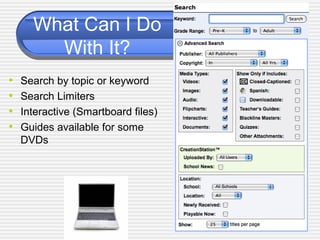
What Can I Do
With It?
• Search by topic or keyword
• Search Limiters
• Interactive (Smartboard files)
• Guides available for some
DVDs
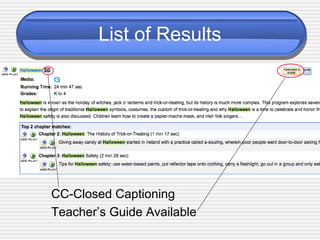
List of Results
CC-Closed Captioning
Teacher’s Guide Available
Play & Add to Playlist
• Play button
• Add to Playlist
 Whole DVD
 By Chapter
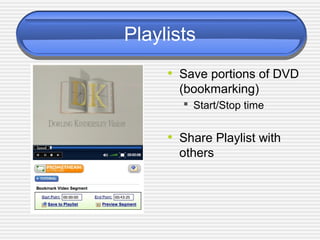
Playlists
• Save portions of DVD
(bookmarking)
 Start/Stop time
• Share Playlist with
others
What Do I Need to Start?
• Download new media player to
your computers
(Go to Safari Montage)
• Find your speakers
(Ask Linda if you don’t have)
• Hook up laptop to projector and
speakers
• Make sure external speakers
are selected on your computer
(System Preferences - Sound -Output
- External Speakers)
• More advanced topics in
Safari Montage tutorials

Safari montage training 2010

  • 1.
  • 2.
    What is it? •Database of DVDs and Videos • Server on campus • Accessible from home • No buffering issues like on the Internet
  • 3.
    How do IAccess it? • At School http://165.248.123.91 • At Home http://safari.k12.hi.us • Login is teacher’s first & last name (no spaces) denisesumida • Password is sharks1
  • 4.
    What Can IDo With It? • Search by topic or keyword • Search Limiters • Interactive (Smartboard files) • Guides available for some DVDs
  • 5.
    List of Results CC-ClosedCaptioning Teacher’s Guide Available
  • 6.
    Play & Addto Playlist • Play button • Add to Playlist  Whole DVD  By Chapter
  • 7.
    Playlists • Save portionsof DVD (bookmarking)  Start/Stop time • Share Playlist with others
  • 8.
    What Do INeed to Start? • Download new media player to your computers (Go to Safari Montage) • Find your speakers (Ask Linda if you don’t have) • Hook up laptop to projector and speakers • Make sure external speakers are selected on your computer (System Preferences - Sound -Output - External Speakers) • More advanced topics in Safari Montage tutorials