Source versioning with GIT
p e n t a l

www.pentalog.fr

o g . f r
About Version Control
"Revision control, version control and source control (and an
aspect of software configuration management), is the
management of changes to documents, computer programs,
large web sites, and other collections of information. Changes
are usually identified by a number or letter code, termed the
"revision number", "revision level", or simply "revision". For
example, an initial set of files is "revision 1". When the first
change is made, the resulting set is "revision 2", and so on.
Each revision is associated with a timestamp and the person
making the change. Revisions can be compared, restored, and
with some types of files, merged."
Wikipedia.org

May 2013

pentalog.fr

2
Why Git ?
Benefits :
Distributed version control
Work offline
Everebody has a complete copy
Simple Branching
Commits quickly
Simple Merging

May 2013

pentalog.fr

3
Distributed VCS Example

May 2013

pentalog.fr

4
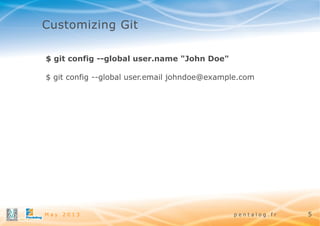
Customizing Git
$ git config --global user.name "John Doe"
$ git config --global user.email johndoe@example.com

May 2013

pentalog.fr

5
Starting a REPO
Setup :
~$ git init
~$ git add remote origin ssh://some-git-repository.git
~$ git checkout master

Clonning project :
~$ git clone ssh://some-git-repository.git

May 2013

pentalog.fr

6
Recording Changes to the Repository

May 2013

pentalog.fr

7
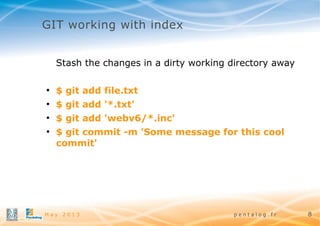
GIT working with index
Stash the changes in a dirty working directory away
●

$ git add file.txt

●

$ git add '*.txt'

●

$ git add 'webv6/*.inc'

●

$ git commit -m 'Some message for this cool
commit'

May 2013

pentalog.fr

8
GIT working with remote
Git can work with a set of repositories
$ git remote add remote_name remote_host
Manipulation with remote repositories
●

$ git pull origin master

//update local repository index from

tracked branch
●

$ git fetch remote_name -p

●

$ git merge origin/master

//update local repository index

//merge remote master to the local

branch
●

$ git push origin branch_name

//send local branch to

remote repository

May 2013

pentalog.fr

9
GIT branching

●

$ git checkout -b b_name source_branch

●

$ git branch (-r/-a)

●

$ git branch (-m / -M)

●

$ git branch (-d/-D)

●

$ git merge branch_name

●

$ git push origin :b_name

May 2013

pentalog.fr

10
Undoing Things
●

$ git reset octofamily/octodog.txt

//removing just from

stage
●

$ git reset --hard HEAD~5 (5 commits back)

●

$ git reset --hard HEAD

●

$ git checkout -- octocat.txt

●

$ git rm '*.txt'

May 2013

//reset all project to the HEAD state

//revert to the last commit/HEAD

//removed files are deleted and staged

pentalog.fr

11
Git useful commands

●

$ git status

●

$ git log

●

$ git diff HEAD (--staged)

●

$ git reflog

●

$ git cherry-pick

May 2013

//Show the working tree status

//Show commit logs

// diff between HEAD or Staged files

//show local history

//Apply the changes introduced by some existing commits

pentalog.fr

12
GIT Stash
Stash the changes in a dirty working directory away
●

$ git stash save

●

$ git stash apply

●

$ git stash pop

●

$ git stash list / show

●

$ git stash drop / clear

May 2013

pentalog.fr

13
Debugging with GIT

●

$ git blame file.php

●

$ git bisect start

●

$ git bisect bad

●

$ git bisect good SHA-1

May 2013

pentalog.fr

14
Tricks and Tips
●

Git UI colors :
[color]
ui = true
[color "branch"]
current = white
local = yellow
remote = green
[color "diff"]
meta = yellow bold
frag = magenta bold
old = red bold
new = green bold
color.branch
color.diff
color.interactive
color.status
May 2013

pentalog.fr

15
Tricks and Tips
$ git push origin branch_name
$ git push origin HEAD =>
$ git push -u origin HEAD => git push
External Merge and Diff Tools
[merge]
tool = tortoise
[mergetool "tortoise"]
cmd = "TortoiseMerge.exe" -base:"$BASE"
-theirs:"$REMOTE" -mine:"$LOCAL" -merged:"$MERGED"
[diff]
external = "TortoiseMerge.exe" -base:"$2" -mine:"$5"

May 2013

pentalog.fr

16
Tricks and Tips
Git alias system :
[alias]
nb = checkout -b
rh = reset --hard HEAD
mm = merge origin/master
st = status
stat = status

May 2013

pentalog.fr

17
Hooks
special scripts that run for various source-control events to
enforce policy.
●

hooks are within the .git directory and not therefore under
source control, i.e., not cloned from remote repositories.
●

●

Client-side Hooks :
●
Pre-commit //inspect the snapshot that’s about to be
committed
●
Prepare-commit-msg // edit commit. Usefull for
automatic commits like mege commits
●
Commit-msg //use for some message validations
●
Post-commit //is used for notification or something
similar

Server-side Hooks

●

May 2013

pentalog.fr

18
www.pentalog.fr

Dmitrii Raev
draev@pentalog.fr

About GIT

  • 1.
    Source versioning withGIT p e n t a l www.pentalog.fr o g . f r
  • 2.
    About Version Control "Revisioncontrol, version control and source control (and an aspect of software configuration management), is the management of changes to documents, computer programs, large web sites, and other collections of information. Changes are usually identified by a number or letter code, termed the "revision number", "revision level", or simply "revision". For example, an initial set of files is "revision 1". When the first change is made, the resulting set is "revision 2", and so on. Each revision is associated with a timestamp and the person making the change. Revisions can be compared, restored, and with some types of files, merged." Wikipedia.org May 2013 pentalog.fr 2
  • 3.
    Why Git ? Benefits: Distributed version control Work offline Everebody has a complete copy Simple Branching Commits quickly Simple Merging May 2013 pentalog.fr 3
  • 4.
    Distributed VCS Example May2013 pentalog.fr 4
  • 5.
    Customizing Git $ gitconfig --global user.name "John Doe" $ git config --global user.email johndoe@example.com May 2013 pentalog.fr 5
  • 6.
    Starting a REPO Setup: ~$ git init ~$ git add remote origin ssh://some-git-repository.git ~$ git checkout master Clonning project : ~$ git clone ssh://some-git-repository.git May 2013 pentalog.fr 6
  • 7.
    Recording Changes tothe Repository May 2013 pentalog.fr 7
  • 8.
    GIT working withindex Stash the changes in a dirty working directory away ● $ git add file.txt ● $ git add '*.txt' ● $ git add 'webv6/*.inc' ● $ git commit -m 'Some message for this cool commit' May 2013 pentalog.fr 8
  • 9.
    GIT working withremote Git can work with a set of repositories $ git remote add remote_name remote_host Manipulation with remote repositories ● $ git pull origin master //update local repository index from tracked branch ● $ git fetch remote_name -p ● $ git merge origin/master //update local repository index //merge remote master to the local branch ● $ git push origin branch_name //send local branch to remote repository May 2013 pentalog.fr 9
  • 10.
    GIT branching ● $ gitcheckout -b b_name source_branch ● $ git branch (-r/-a) ● $ git branch (-m / -M) ● $ git branch (-d/-D) ● $ git merge branch_name ● $ git push origin :b_name May 2013 pentalog.fr 10
  • 11.
    Undoing Things ● $ gitreset octofamily/octodog.txt //removing just from stage ● $ git reset --hard HEAD~5 (5 commits back) ● $ git reset --hard HEAD ● $ git checkout -- octocat.txt ● $ git rm '*.txt' May 2013 //reset all project to the HEAD state //revert to the last commit/HEAD //removed files are deleted and staged pentalog.fr 11
  • 12.
    Git useful commands ● $git status ● $ git log ● $ git diff HEAD (--staged) ● $ git reflog ● $ git cherry-pick May 2013 //Show the working tree status //Show commit logs // diff between HEAD or Staged files //show local history //Apply the changes introduced by some existing commits pentalog.fr 12
  • 13.
    GIT Stash Stash thechanges in a dirty working directory away ● $ git stash save ● $ git stash apply ● $ git stash pop ● $ git stash list / show ● $ git stash drop / clear May 2013 pentalog.fr 13
  • 14.
    Debugging with GIT ● $git blame file.php ● $ git bisect start ● $ git bisect bad ● $ git bisect good SHA-1 May 2013 pentalog.fr 14
  • 15.
    Tricks and Tips ● GitUI colors : [color] ui = true [color "branch"] current = white local = yellow remote = green [color "diff"] meta = yellow bold frag = magenta bold old = red bold new = green bold color.branch color.diff color.interactive color.status May 2013 pentalog.fr 15
  • 16.
    Tricks and Tips $git push origin branch_name $ git push origin HEAD => $ git push -u origin HEAD => git push External Merge and Diff Tools [merge] tool = tortoise [mergetool "tortoise"] cmd = "TortoiseMerge.exe" -base:"$BASE" -theirs:"$REMOTE" -mine:"$LOCAL" -merged:"$MERGED" [diff] external = "TortoiseMerge.exe" -base:"$2" -mine:"$5" May 2013 pentalog.fr 16
  • 17.
    Tricks and Tips Gitalias system : [alias] nb = checkout -b rh = reset --hard HEAD mm = merge origin/master st = status stat = status May 2013 pentalog.fr 17
  • 18.
    Hooks special scripts thatrun for various source-control events to enforce policy. ● hooks are within the .git directory and not therefore under source control, i.e., not cloned from remote repositories. ● ● Client-side Hooks : ● Pre-commit //inspect the snapshot that’s about to be committed ● Prepare-commit-msg // edit commit. Usefull for automatic commits like mege commits ● Commit-msg //use for some message validations ● Post-commit //is used for notification or something similar Server-side Hooks ● May 2013 pentalog.fr 18
  • 19.