Git Operation 101
Kyohei Moriyama
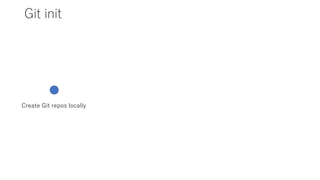
Git init
Create Git repos locally
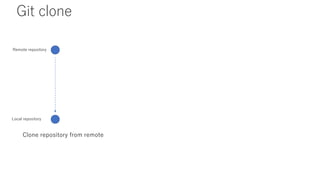
Git clone
Clone repository from remote
Remote repository
Local repository
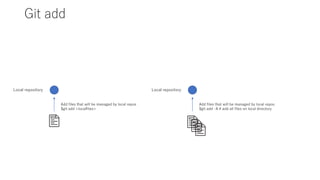
Git add
Local repository
Add files that will be managed by local repos
$git add <localfiles>
Local repository
Add files that will be managed by local repos
$git add –A # add all files on local directory
.gitignore # special file for git
If you don’t want to add some specific files to git repository,
you can use .gitignore special files on your git repos.
<.gitignore>
.env
.xxx
.oooo
.bashrc … etc…
You can refer to the following url to find your .gitignore that you may like for your programming language…
https://github.com/github/gitignore
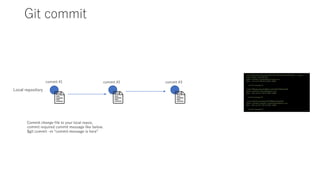
Git commit
Local repository
commit 8aeaasdfasdfasdfasdf614739a73a570730edefa8 (HEAD -> master,
origin/master, origin/HEAD)
Author: dasfsad <asdfasdf@microsoft.com>
Date: Tue Jul 21 09:45:10 2020 +0800
commit message #3
commit f8f3a8asdfasdfad85b3cc4b3c38af75006aaf348
Author: asdfasdf <hlkasjdf@gmail.com>
Date: Mon Jul 20 17:42:23 2020 +0800
commit message #2
commit 042101asdfasdfasdfdf7f086a42c96e0d2a
Author: asdfaker sadfajlke <asdfasdfasdf@gmail.com>
Date: Mon Jul 20 17:02:32 2020 +0800
commit message #1
Commit change file to your local repos,
commit required commit message like below.
$git commit –m “commit message is here”
commit #1 commit #2 commit #3
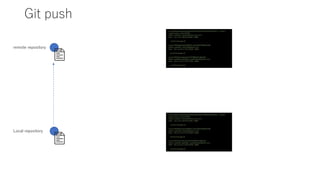
Git push
remote repository
commit 8aeaasdfasdfasdfasdf614739a73a570730edefa8 (HEAD -> master,
origin/master, origin/HEAD)
Author: dasfsad <asdfasdf@microsoft.com>
Date: Tue Jul 21 09:45:10 2020 +0800
commit message #3
commit f8f3a8asdfasdfad85b3cc4b3c38af75006aaf348
Author: asdfasdf <hlkasjdf@gmail.com>
Date: Mon Jul 20 17:42:23 2020 +0800
commit message #2
commit 042101asdfasdfasdfdf7f086a42c96e0d2a
Author: asdfaker sadfajlke <asdfasdfasdf@gmail.com>
Date: Mon Jul 20 17:02:32 2020 +0800
commit message #1
Local repository
commit 8aeaasdfasdfasdfasdf614739a73a570730edefa8 (HEAD -> master,
origin/master, origin/HEAD)
Author: dasfsad <asdfasdf@microsoft.com>
Date: Tue Jul 21 09:45:10 2020 +0800
commit message #3
commit f8f3a8asdfasdfad85b3cc4b3c38af75006aaf348
Author: asdfasdf <hlkasjdf@gmail.com>
Date: Mon Jul 20 17:42:23 2020 +0800
commit message #2
commit 042101asdfasdfasdfdf7f086a42c96e0d2a
Author: asdfaker sadfajlke <asdfasdfasdf@gmail.com>
Date: Mon Jul 20 17:02:32 2020 +0800
commit message #1
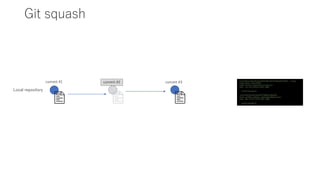
Git squash
Local repository
commit 8aeaasdfasdfasdfasdf614739a73a570730edefa8 (HEAD -> master,
origin/master, origin/HEAD)
Author: dasfsad <asdfasdf@microsoft.com>
Date: Tue Jul 21 09:45:10 2020 +0800
commit message #3
commit 042101asdfasdfasdfdf7f086a42c96e0d2a
Author: asdfaker sadfajlke <asdfasdfasdf@gmail.com>
Date: Mon Jul 20 17:02:32 2020 +0800
commit message #1
commit #1 commit #2 commit #3
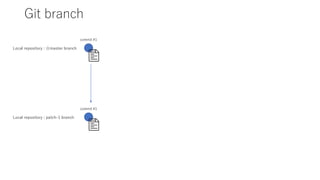
Git branch
Local repository : ☆master branch
commit #1
Local repository : patch-1 branch
commit #1
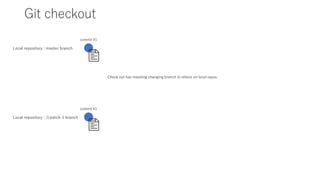
Git checkout
Local repository : master branch
commit #1
Local repository : ☆patch-1 branch
commit #1
Check out has meaning changing branch to others on local repos.
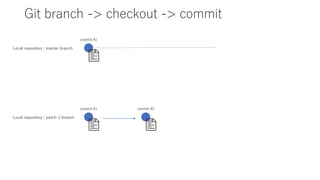
Git branch -> checkout -> commit
Local repository : master branch
commit #1
Local repository : patch-1 branch
commit #1 commit #2
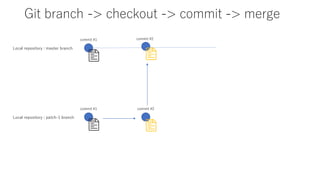
Git branch -> checkout -> commit -> merge
Local repository : master branch
commit #1
Local repository : patch-1 branch
commit #1 commit #2
commit #2
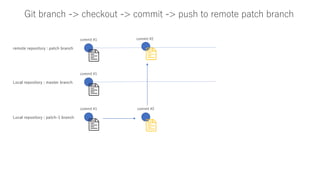
Git branch -> checkout -> commit -> push to remote patch branch
remote repository : patch branch
commit #1
Local repository : patch-1 branch
commit #1 commit #2
commit #2
Local repository : master branch
commit #1
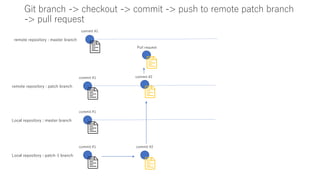
Git branch -> checkout -> commit -> push to remote patch branch
-> pull request
remote repository : patch branch
commit #1
Local repository : patch-1 branch
commit #1 commit #2
commit #2
Local repository : master branch
commit #1
remote repository : master branch
commit #1
Pull request
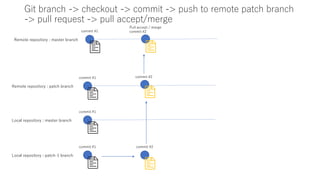
Git branch -> checkout -> commit -> push to remote patch branch
-> pull request -> pull accept/merge
Remote repository : patch branch
commit #1
Local repository : patch-1 branch
commit #1 commit #2
commit #2
Local repository : master branch
commit #1
Remote repository : master branch
commit #1
Pull accept / marge
commit #2

Git operation 101

  • 1.
  • 2.
    Git init Create Gitrepos locally
  • 3.
    Git clone Clone repositoryfrom remote Remote repository Local repository
  • 4.
    Git add Local repository Addfiles that will be managed by local repos $git add <localfiles> Local repository Add files that will be managed by local repos $git add –A # add all files on local directory
  • 5.
    .gitignore # specialfile for git If you don’t want to add some specific files to git repository, you can use .gitignore special files on your git repos. <.gitignore> .env .xxx .oooo .bashrc … etc… You can refer to the following url to find your .gitignore that you may like for your programming language… https://github.com/github/gitignore
  • 6.
    Git commit Local repository commit8aeaasdfasdfasdfasdf614739a73a570730edefa8 (HEAD -> master, origin/master, origin/HEAD) Author: dasfsad <asdfasdf@microsoft.com> Date: Tue Jul 21 09:45:10 2020 +0800 commit message #3 commit f8f3a8asdfasdfad85b3cc4b3c38af75006aaf348 Author: asdfasdf <hlkasjdf@gmail.com> Date: Mon Jul 20 17:42:23 2020 +0800 commit message #2 commit 042101asdfasdfasdfdf7f086a42c96e0d2a Author: asdfaker sadfajlke <asdfasdfasdf@gmail.com> Date: Mon Jul 20 17:02:32 2020 +0800 commit message #1 Commit change file to your local repos, commit required commit message like below. $git commit –m “commit message is here” commit #1 commit #2 commit #3
  • 7.
    Git push remote repository commit8aeaasdfasdfasdfasdf614739a73a570730edefa8 (HEAD -> master, origin/master, origin/HEAD) Author: dasfsad <asdfasdf@microsoft.com> Date: Tue Jul 21 09:45:10 2020 +0800 commit message #3 commit f8f3a8asdfasdfad85b3cc4b3c38af75006aaf348 Author: asdfasdf <hlkasjdf@gmail.com> Date: Mon Jul 20 17:42:23 2020 +0800 commit message #2 commit 042101asdfasdfasdfdf7f086a42c96e0d2a Author: asdfaker sadfajlke <asdfasdfasdf@gmail.com> Date: Mon Jul 20 17:02:32 2020 +0800 commit message #1 Local repository commit 8aeaasdfasdfasdfasdf614739a73a570730edefa8 (HEAD -> master, origin/master, origin/HEAD) Author: dasfsad <asdfasdf@microsoft.com> Date: Tue Jul 21 09:45:10 2020 +0800 commit message #3 commit f8f3a8asdfasdfad85b3cc4b3c38af75006aaf348 Author: asdfasdf <hlkasjdf@gmail.com> Date: Mon Jul 20 17:42:23 2020 +0800 commit message #2 commit 042101asdfasdfasdfdf7f086a42c96e0d2a Author: asdfaker sadfajlke <asdfasdfasdf@gmail.com> Date: Mon Jul 20 17:02:32 2020 +0800 commit message #1
  • 8.
    Git squash Local repository commit8aeaasdfasdfasdfasdf614739a73a570730edefa8 (HEAD -> master, origin/master, origin/HEAD) Author: dasfsad <asdfasdf@microsoft.com> Date: Tue Jul 21 09:45:10 2020 +0800 commit message #3 commit 042101asdfasdfasdfdf7f086a42c96e0d2a Author: asdfaker sadfajlke <asdfasdfasdf@gmail.com> Date: Mon Jul 20 17:02:32 2020 +0800 commit message #1 commit #1 commit #2 commit #3
  • 9.
    Git branch Local repository: ☆master branch commit #1 Local repository : patch-1 branch commit #1
  • 10.
    Git checkout Local repository: master branch commit #1 Local repository : ☆patch-1 branch commit #1 Check out has meaning changing branch to others on local repos.
  • 11.
    Git branch ->checkout -> commit Local repository : master branch commit #1 Local repository : patch-1 branch commit #1 commit #2
  • 12.
    Git branch ->checkout -> commit -> merge Local repository : master branch commit #1 Local repository : patch-1 branch commit #1 commit #2 commit #2
  • 13.
    Git branch ->checkout -> commit -> push to remote patch branch remote repository : patch branch commit #1 Local repository : patch-1 branch commit #1 commit #2 commit #2 Local repository : master branch commit #1
  • 14.
    Git branch ->checkout -> commit -> push to remote patch branch -> pull request remote repository : patch branch commit #1 Local repository : patch-1 branch commit #1 commit #2 commit #2 Local repository : master branch commit #1 remote repository : master branch commit #1 Pull request
  • 15.
    Git branch ->checkout -> commit -> push to remote patch branch -> pull request -> pull accept/merge Remote repository : patch branch commit #1 Local repository : patch-1 branch commit #1 commit #2 commit #2 Local repository : master branch commit #1 Remote repository : master branch commit #1 Pull accept / marge commit #2