Unit 1: Flow of an ABAP Program
• In this lesson you will learn how a simple dialog program is executed by
the SAP NetWeaver Application Server.
Lesson Overview
• You will learn the architecture of the SAP NetWeaver Application Servers
as well as the execution of ABAP programs.
Business Example
System Architecture and ABAP program
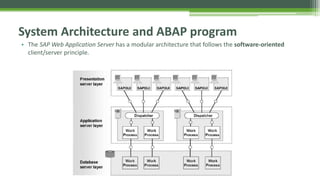
• The SAP Web Application Server has a modular architecture that follows the software-oriented
client/server principle.
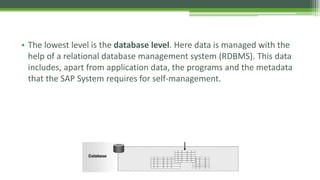
• The lowest level is the database level. Here data is managed with the
help of a relational database management system (RDBMS). This data
includes, apart from application data, the programs and the metadata
that the SAP System requires for self-management.
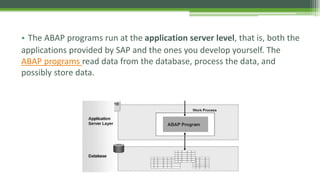
• The ABAP programs run at the application server level, that is, both the
applications provided by SAP and the ones you develop yourself. The
ABAP programs read data from the database, process the data, and
possibly store data.
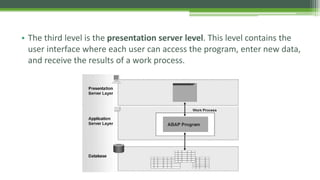
• The third level is the presentation server level. This level contains the
user interface where each user can access the program, enter new data,
and receive the results of a work process.
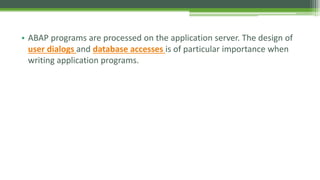
• ABAP programs are processed on the application server. The design of
user dialogs and database accesses is of particular importance when
writing application programs.
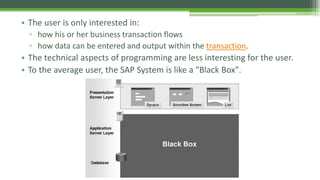
• The user is only interested in:
▫ how his or her business transaction flows
▫ how data can be entered and output within the transaction.
• The technical aspects of programming are less interesting for the user.
• To the average user, the SAP System is like a "Black Box".
• There are three different types of screens:
▫ Standard screens
▫ Selection screens
▫ Lists.
• Each type of screen provides different services to the user.
Runtime Architecture of a Program with Selection
Screen and List
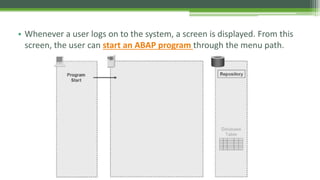
• Whenever a user logs on to the system, a screen is displayed. From this
screen, the user can start an ABAP program through the menu path.
System Loads Program Context
• The program context contains memory
areas for variables and complex data
objects, information on the screens for user
dialogs, and ABAP processing blocks.
• The runtime system gets all this program
information from the Repository, which
is a special part of the database.
• The sample program has a selection screen
as the user dialog, a variable and a
structure as data objects, and one ABAP
processing block. The list used to display
the data is created dynamically at runtime.
Runtime System Sends Selection Screen
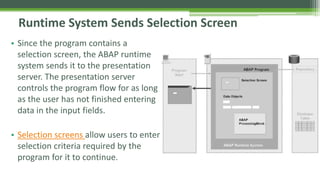
• Since the program contains a
selection screen, the ABAP runtime
system sends it to the presentation
server. The presentation server
controls the program flow for as long
as the user has not finished entering
data in the input fields.
• Selection screens allow users to enter
selection criteria required by the
program for it to continue.
Input Values Are Inserted into Data Objects
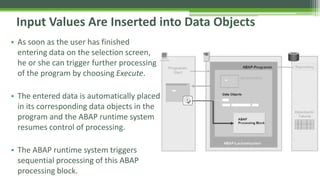
• As soon as the user has finished
entering data on the selection screen,
he or she can trigger further processing
of the program by choosing Execute.
• The entered data is automatically placed
in its corresponding data objects in the
program and the ABAP runtime system
resumes control of processing.
• The ABAP runtime system triggers
sequential processing of this ABAP
processing block.
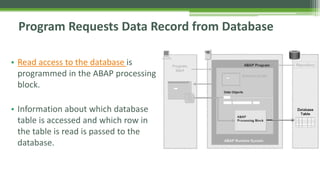
Program Requests Data Record from Database
• Read access to the database is
programmed in the ABAP processing
block.
• Information about which database
table is accessed and which row in
the table is read is passed to the
database.
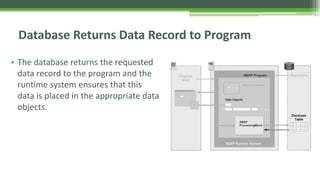
Database Returns Data Record to Program
• The database returns the requested
data record to the program and the
runtime system ensures that this
data is placed in the appropriate data
objects.
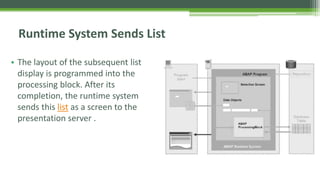
Runtime System Sends List
• The layout of the subsequent list
display is programmed into the
processing block. After its
completion, the runtime system
sends this list as a screen to the
presentation server .
• Describe the principles of the architecture of the SAP NetWeaver
ApplicationServer
• Describe how a simple dialog program is executed by the ABAP runtime
system.
You should now be able to:

Unit 1 - SAP System Architecture

  • 1.
    Unit 1: Flowof an ABAP Program
  • 2.
    • In thislesson you will learn how a simple dialog program is executed by the SAP NetWeaver Application Server. Lesson Overview
  • 3.
    • You willlearn the architecture of the SAP NetWeaver Application Servers as well as the execution of ABAP programs. Business Example
  • 4.
    System Architecture andABAP program • The SAP Web Application Server has a modular architecture that follows the software-oriented client/server principle.
  • 5.
    • The lowestlevel is the database level. Here data is managed with the help of a relational database management system (RDBMS). This data includes, apart from application data, the programs and the metadata that the SAP System requires for self-management.
  • 6.
    • The ABAPprograms run at the application server level, that is, both the applications provided by SAP and the ones you develop yourself. The ABAP programs read data from the database, process the data, and possibly store data.
  • 7.
    • The thirdlevel is the presentation server level. This level contains the user interface where each user can access the program, enter new data, and receive the results of a work process.
  • 8.
    • ABAP programsare processed on the application server. The design of user dialogs and database accesses is of particular importance when writing application programs.
  • 9.
    • The useris only interested in: ▫ how his or her business transaction flows ▫ how data can be entered and output within the transaction. • The technical aspects of programming are less interesting for the user. • To the average user, the SAP System is like a "Black Box".
  • 10.
    • There arethree different types of screens: ▫ Standard screens ▫ Selection screens ▫ Lists. • Each type of screen provides different services to the user.
  • 11.
    Runtime Architecture ofa Program with Selection Screen and List
  • 12.
    • Whenever auser logs on to the system, a screen is displayed. From this screen, the user can start an ABAP program through the menu path.
  • 13.
    System Loads ProgramContext • The program context contains memory areas for variables and complex data objects, information on the screens for user dialogs, and ABAP processing blocks. • The runtime system gets all this program information from the Repository, which is a special part of the database. • The sample program has a selection screen as the user dialog, a variable and a structure as data objects, and one ABAP processing block. The list used to display the data is created dynamically at runtime.
  • 14.
    Runtime System SendsSelection Screen • Since the program contains a selection screen, the ABAP runtime system sends it to the presentation server. The presentation server controls the program flow for as long as the user has not finished entering data in the input fields. • Selection screens allow users to enter selection criteria required by the program for it to continue.
  • 15.
    Input Values AreInserted into Data Objects • As soon as the user has finished entering data on the selection screen, he or she can trigger further processing of the program by choosing Execute. • The entered data is automatically placed in its corresponding data objects in the program and the ABAP runtime system resumes control of processing. • The ABAP runtime system triggers sequential processing of this ABAP processing block.
  • 16.
    Program Requests DataRecord from Database • Read access to the database is programmed in the ABAP processing block. • Information about which database table is accessed and which row in the table is read is passed to the database.
  • 17.
    Database Returns DataRecord to Program • The database returns the requested data record to the program and the runtime system ensures that this data is placed in the appropriate data objects.
  • 18.
    Runtime System SendsList • The layout of the subsequent list display is programmed into the processing block. After its completion, the runtime system sends this list as a screen to the presentation server .
  • 19.
    • Describe theprinciples of the architecture of the SAP NetWeaver ApplicationServer • Describe how a simple dialog program is executed by the ABAP runtime system. You should now be able to:

Editor's Notes

  • #3 How presentation will benefit audience: Adult learners are more interested in a subject if they know how or why it is important to them. Presenter’s level of expertise in the subject: Briefly state your credentials in this area, or explain why participants should listen to you.
  • #4 Lesson descriptions should be brief.