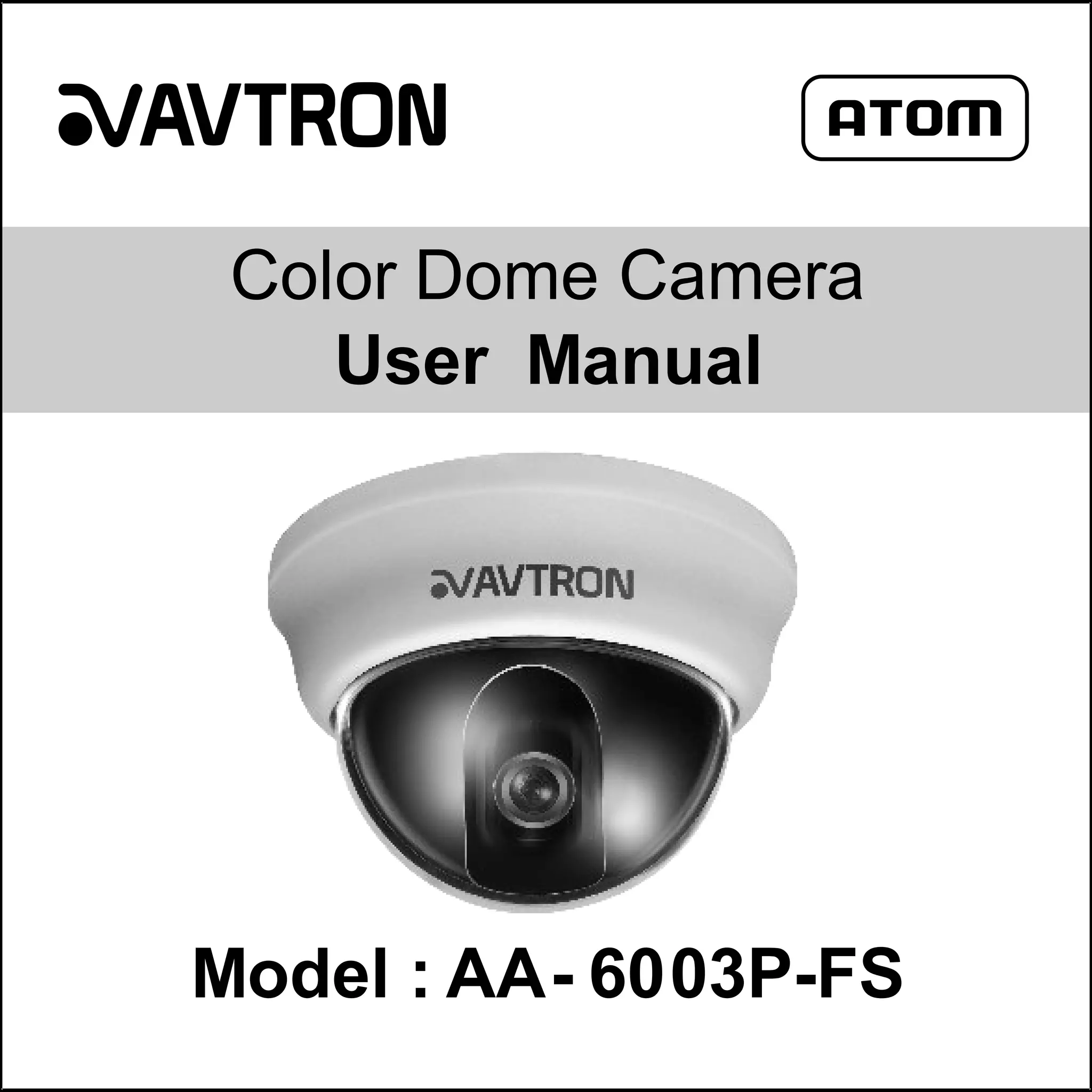
Color Dome Camera
User Manual

Model : AA- 6003P-FS
CAUTION
RISK OF ELECTRIC SHOCK
DO NOT OPEN

CAUTION : TO REDUCE THE RISK OF
ELECTRIC SHOCK
DO NOT REMOVE COVER (OR BACK)
NO USER-SERVICEABLE PARTS
INSIDE REFER SERVICING TO
QUALIFIED SERVICE PERSONNEL.

This lighting flash with arrowhead symbol within an equilateral triangle is
intended to alert the user to the presence of uninsulated dangerous voltage within
the product’s enclosure that may be of sufficient magnitude to constitute a risk
of electric shock to persons.
The exclamation point within an equilateral triangle is intend to alert the user to
the presence of important operating and maintenance instruction in the literature
accompanying the product.
This equipment may generate or use radio frequency energy. Changes or modifications to
this equipment may cause harmful interference unless the modifications are expressly
approved in the user manual. The user could lose the authority to operate this equipment if
an unauthorized change or modification is made
This equipment has been tested and found to comply with the limits for a class A digital
device, pursuant to part 15 of the FCC Rules. These limits are designed to provide
reasonable protection against harmful interference when the equipment is operated in a
commercial environment

02
This equipment generates, uses, and can radiate radio frequency energy and, if not
installed and use in accordance with the instruction manual, may cause harmful
interference to radio communications.
Operation of this equipment in a residential area is likely to cause harmful interference in
which cause the user will be required to correct the interference at his own expenses.
A suitable conduit entries, knock-outs or glands shall be provided in the cable entries of this
product in the end user.
Caution: Danger of explosion if battery is incorrectly replaced. Replaced only with the
same or equivalent type recommended by the manufacturer. Dispose of used batteries
according to the manufacturer’s instructions.
Holes in meta, through which insulated wires pass, shall have smooth well rounded
surfaces or shall be provided with brushing.
WARNING: Do not install this equipment in a confined space such as a bookcase or
similar unit.
WARNING: Wiring methods shall be in accordance with the National Electric Code,
ANSI/NFPA 70.
WARNING: This is a class A product. In a domestic environment this product may cause
radio interference in which case the user may be required to take adequate measures.
WARNING: To reduce a risk of fire or electric shock, do not expose this product to rain or
moisture.
Caution: This installation should be made by a qualified service person and should confirm
to all local codes.
Caution: To avoid electrical shock, do not open the cabinet. Refer servicing to qualified
personnel only.

03
Caution: The apparatus should not be exposed to water and no objects filled with liquids, such as
vases, should be placed on the apparatus.
Disposal of your old appliance
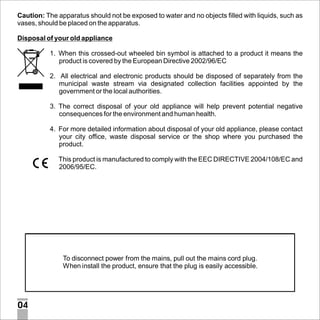
1. When this crossed-out wheeled bin symbol is attached to a product it means the
product is covered by the European Directive 2002/96/EC
2. All electrical and electronic products should be disposed of separately from the
municipal waste stream via designated collection facilities appointed by the
government or the local authorities.
3. The correct disposal of your old appliance will help prevent potential negative
consequences for the environment and human health.
4. For more detailed information about disposal of your old appliance, please contact
your city office, waste disposal service or the shop where you purchased the
product.
This product is manufactured to comply with the EEC DIRECTIVE 2004/108/EC and
2006/95/EC.

To disconnect power from the mains, pull out the mains cord plug.
When install the product, ensure that the plug is easily accessible.

04
Important Safety Instructions
1. Read this instructions.-All these safety and user instructions should be read before the product
is operated.
2. Keep these instructions:- The safety, operating and user instructions should be retained for
future references.
3. Heed all warnings :- All warnings on the product and in the operating instructions should be
adhered to.
4. Follow all instructions:- All operating and user instructions should be followed.
5. Do not use this apparatus near water :- e.g near swimming pool ,Bathroom, wet walls.
6. Clean Only with dry cloth:- Unplug the power supply and then clean with dry cloth.
7. Do not block any ventilation openings, install in accordance with the mfg instructions:- Kindly
provide some air ventilation in any form. The opening should never be blocked by placing the
product on a bed, sofa, fug or other similar surface.
8. Do not install near any heat sources such as radiators, heat registers, stoves or other
apparatus that produce heat.
9. Protect the power cord from being walked on or pinched particularly at plugs, convenience
receptacles, and the pint where they exit from the apparatus.
10. Only use attachments/accessories specified by the manufacturer.
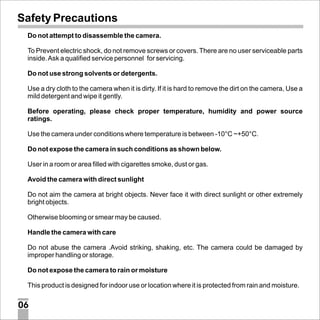
11. Use only with the cart, stand, tripod, bracket, or table specified by the
manufacturer, or sold with the apparatus. When a cart is used use caution
when moving the cart/apparatus combination to avoid injury from tip over.
12. Unplug this apparatus during lighting storms or when unused for long periods
of time.
13. Refer all servicing to qualified service personal. Servicing is required when the apparatus has
been damaged in any way, such as power supply cord or plug is damaged.

05
Safety Precautions
Do not attempt to disassemble the camera.
To Prevent electric shock, do not remove screws or covers. There are no user serviceable parts
inside. Ask a qualified service personnel for servicing.
Do not use strong solvents or detergents.
Use a dry cloth to the camera when it is dirty. If it is hard to remove the dirt on the camera, Use a
mild detergent and wipe it gently.
Before operating, please check proper temperature, humidity and power source
ratings.
Use the camera under conditions where temperature is between -10°C ~+50°C.
Do not expose the camera in such conditions as shown below.
User in a room or area filled with cigarettes smoke, dust or gas.
Avoid the camera with direct sunlight
Do not aim the camera at bright objects. Never face it with direct sunlight or other extremely
bright objects.
Otherwise blooming or smear may be caused.
Handle the camera with care
Do not abuse the camera .Avoid striking, shaking, etc. The camera could be damaged by
improper handling or storage.
Do not expose the camera to rain or moisture
This product is designed for indoor use or location where it is protected from rain and moisture.

06
Contents
Cautions for Safe Operation ........................................................ 08
Box contains ............................................................................... 09
Construction ............................................................................... 10
Installation .................................................................................. 12
Troubleshooting .......................................................................... 14
Specification ............................................................................... 15

07
Cautions for Safe Operation
Power Supply
This camera must always be operated a DC 12V only.
Handling of the unit
Be careful not to spill water or other liquids on the unit. Be cautions not to
get combustible or metallic material inside the body. If used with foreign
Matter inside, the camera is liable to fail or to get a cause of fire or electric
shock.
Operating and storage location
Avoid viewing a very bright object during an extended period. Avoid
operating or storing the unit in the following locations.
Extremely hot or cold places( -10ºC ~+50°C We recommended to use unit
in between 0ºC ~+45°C)
Damp or dust place
Places exposed to rain
Places subject to strong vibration
Close to generators of powerful electromagnetic radiation such as radio
or TV transmitters.
08
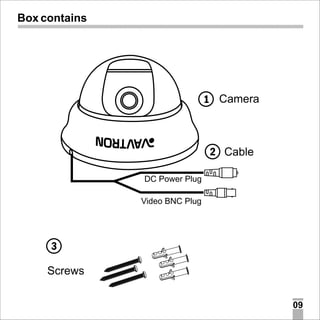
Box contains

1 Camera

2 Cable
DC Power Plug
Video BNC Plug

3
Screws
09
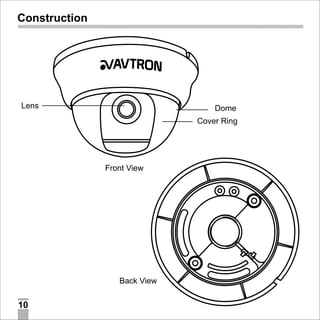
Construction

Lens

Dome
Cover Ring

Front View

Back View

10
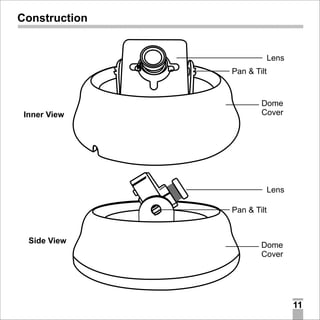
Construction

Lens
Pan & Tilt

Inner View

Dome
Cover

Lens
Pan & Tilt

Side View

Dome
Cover

11
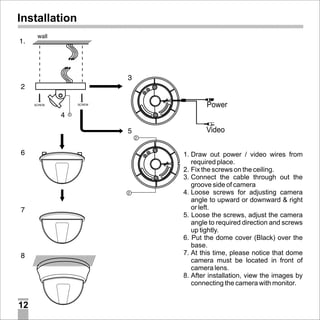
Installation

Power
Video
1. Draw out power / video wires from
required place.
2. Fix the screws on the ceiling.
3. Connect the cable through out the
groove side of camera
4. Loose screws for adjusting camera
angle to upward or downward & right
or left.
5. Loose the screws, adjust the camera
angle to required direction and screws
up tightly.
6. Put the dome cover (Black) over the
base.
7. At this time, please notice that dome
camera must be located in front of
camera lens.
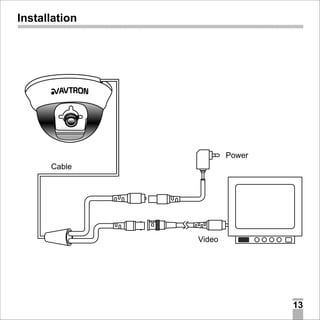
8. After installation, view the images by
connecting the camera with monitor.

12
Installation

Power
Cable

Video

13
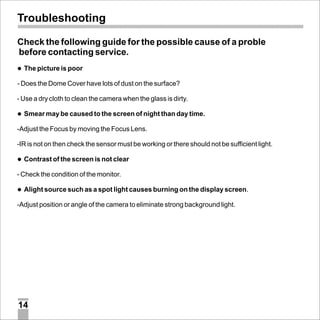
Troubleshooting
Check the following guide for the possible cause of a proble
before contacting service.
l
The picture is poor

- Does the Dome Cover have lots of dust on the surface?
- Use a dry cloth to clean the camera when the glass is dirty.
l may be caused to the screen of night than day time.
Smear

-Adjust the Focus by moving the Focus Lens.
-IR is not on then check the sensor must be working or there should not be sufficient light.
l
Contrast of the screen is not clear

- Check the condition of the monitor.
l source such as a spot light causes burning on the display screen.
Alight

-Adjust position or angle of the camera to eliminate strong background light.

14
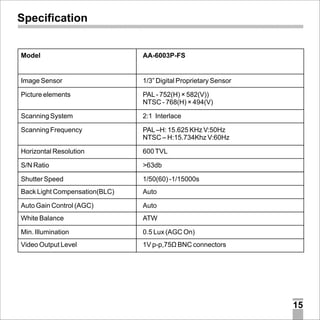
Specification

Model

AA-6003P-FS

Image Sensor

1/3” Digital Proprietary Sensor

Picture elements

PAL - 752(H) × 582(V))
NTSC - 768(H) × 494(V)

Scanning System

2:1 Interlace

Scanning Frequency

PAL –H: 15.625 KHz V:50Hz
NTSC – H:15.734Khz V:60Hz

Horizontal Resolution

600 TVL

S/N Ratio

>63db

Shutter Speed

1/50(60) -1/15000s

Back Light Compensation(BLC)

Auto

Auto Gain Control (AGC)

Auto

White Balance

ATW

Min. Illumination

0.5 Lux (AGC On)

Video Output Level

1V p-p,75Ù BNC connectors

15
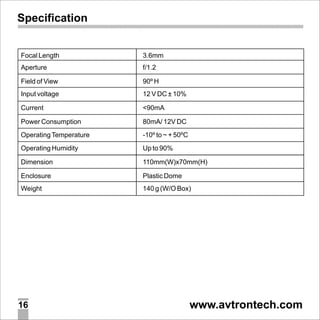
Specification

Focal Length

3.6mm

Aperture

f/1.2

Field of View

90º H

Input voltage

12 V DC ± 10%

Current

<90mA

Power Consumption

80mA/ 12V DC

Operating Temperature

-10º to ~ + 50ºC

Operating Humidity

Up to 90%

Dimension

110mm(W)x70mm(H)

Enclosure

Plastic Dome

Weight

140 g (W/O Box)

16

www.avtrontech.com

Avtron Dome Camera Aa 6003-fs-manual

  • 1.
    Color Dome Camera UserManual Model : AA- 6003P-FS
  • 2.
    CAUTION RISK OF ELECTRICSHOCK DO NOT OPEN CAUTION : TO REDUCE THE RISK OF ELECTRIC SHOCK DO NOT REMOVE COVER (OR BACK) NO USER-SERVICEABLE PARTS INSIDE REFER SERVICING TO QUALIFIED SERVICE PERSONNEL. This lighting flash with arrowhead symbol within an equilateral triangle is intended to alert the user to the presence of uninsulated dangerous voltage within the product’s enclosure that may be of sufficient magnitude to constitute a risk of electric shock to persons. The exclamation point within an equilateral triangle is intend to alert the user to the presence of important operating and maintenance instruction in the literature accompanying the product. This equipment may generate or use radio frequency energy. Changes or modifications to this equipment may cause harmful interference unless the modifications are expressly approved in the user manual. The user could lose the authority to operate this equipment if an unauthorized change or modification is made This equipment has been tested and found to comply with the limits for a class A digital device, pursuant to part 15 of the FCC Rules. These limits are designed to provide reasonable protection against harmful interference when the equipment is operated in a commercial environment 02
  • 3.
    This equipment generates,uses, and can radiate radio frequency energy and, if not installed and use in accordance with the instruction manual, may cause harmful interference to radio communications. Operation of this equipment in a residential area is likely to cause harmful interference in which cause the user will be required to correct the interference at his own expenses. A suitable conduit entries, knock-outs or glands shall be provided in the cable entries of this product in the end user. Caution: Danger of explosion if battery is incorrectly replaced. Replaced only with the same or equivalent type recommended by the manufacturer. Dispose of used batteries according to the manufacturer’s instructions. Holes in meta, through which insulated wires pass, shall have smooth well rounded surfaces or shall be provided with brushing. WARNING: Do not install this equipment in a confined space such as a bookcase or similar unit. WARNING: Wiring methods shall be in accordance with the National Electric Code, ANSI/NFPA 70. WARNING: This is a class A product. In a domestic environment this product may cause radio interference in which case the user may be required to take adequate measures. WARNING: To reduce a risk of fire or electric shock, do not expose this product to rain or moisture. Caution: This installation should be made by a qualified service person and should confirm to all local codes. Caution: To avoid electrical shock, do not open the cabinet. Refer servicing to qualified personnel only. 03
  • 4.
    Caution: The apparatusshould not be exposed to water and no objects filled with liquids, such as vases, should be placed on the apparatus. Disposal of your old appliance 1. When this crossed-out wheeled bin symbol is attached to a product it means the product is covered by the European Directive 2002/96/EC 2. All electrical and electronic products should be disposed of separately from the municipal waste stream via designated collection facilities appointed by the government or the local authorities. 3. The correct disposal of your old appliance will help prevent potential negative consequences for the environment and human health. 4. For more detailed information about disposal of your old appliance, please contact your city office, waste disposal service or the shop where you purchased the product. This product is manufactured to comply with the EEC DIRECTIVE 2004/108/EC and 2006/95/EC. To disconnect power from the mains, pull out the mains cord plug. When install the product, ensure that the plug is easily accessible. 04
  • 5.
    Important Safety Instructions 1.Read this instructions.-All these safety and user instructions should be read before the product is operated. 2. Keep these instructions:- The safety, operating and user instructions should be retained for future references. 3. Heed all warnings :- All warnings on the product and in the operating instructions should be adhered to. 4. Follow all instructions:- All operating and user instructions should be followed. 5. Do not use this apparatus near water :- e.g near swimming pool ,Bathroom, wet walls. 6. Clean Only with dry cloth:- Unplug the power supply and then clean with dry cloth. 7. Do not block any ventilation openings, install in accordance with the mfg instructions:- Kindly provide some air ventilation in any form. The opening should never be blocked by placing the product on a bed, sofa, fug or other similar surface. 8. Do not install near any heat sources such as radiators, heat registers, stoves or other apparatus that produce heat. 9. Protect the power cord from being walked on or pinched particularly at plugs, convenience receptacles, and the pint where they exit from the apparatus. 10. Only use attachments/accessories specified by the manufacturer. 11. Use only with the cart, stand, tripod, bracket, or table specified by the manufacturer, or sold with the apparatus. When a cart is used use caution when moving the cart/apparatus combination to avoid injury from tip over. 12. Unplug this apparatus during lighting storms or when unused for long periods of time. 13. Refer all servicing to qualified service personal. Servicing is required when the apparatus has been damaged in any way, such as power supply cord or plug is damaged. 05
  • 6.
    Safety Precautions Do notattempt to disassemble the camera. To Prevent electric shock, do not remove screws or covers. There are no user serviceable parts inside. Ask a qualified service personnel for servicing. Do not use strong solvents or detergents. Use a dry cloth to the camera when it is dirty. If it is hard to remove the dirt on the camera, Use a mild detergent and wipe it gently. Before operating, please check proper temperature, humidity and power source ratings. Use the camera under conditions where temperature is between -10°C ~+50°C. Do not expose the camera in such conditions as shown below. User in a room or area filled with cigarettes smoke, dust or gas. Avoid the camera with direct sunlight Do not aim the camera at bright objects. Never face it with direct sunlight or other extremely bright objects. Otherwise blooming or smear may be caused. Handle the camera with care Do not abuse the camera .Avoid striking, shaking, etc. The camera could be damaged by improper handling or storage. Do not expose the camera to rain or moisture This product is designed for indoor use or location where it is protected from rain and moisture. 06
  • 7.
    Contents Cautions for SafeOperation ........................................................ 08 Box contains ............................................................................... 09 Construction ............................................................................... 10 Installation .................................................................................. 12 Troubleshooting .......................................................................... 14 Specification ............................................................................... 15 07
  • 8.
    Cautions for SafeOperation Power Supply This camera must always be operated a DC 12V only. Handling of the unit Be careful not to spill water or other liquids on the unit. Be cautions not to get combustible or metallic material inside the body. If used with foreign Matter inside, the camera is liable to fail or to get a cause of fire or electric shock. Operating and storage location Avoid viewing a very bright object during an extended period. Avoid operating or storing the unit in the following locations. Extremely hot or cold places( -10ºC ~+50°C We recommended to use unit in between 0ºC ~+45°C) Damp or dust place Places exposed to rain Places subject to strong vibration Close to generators of powerful electromagnetic radiation such as radio or TV transmitters. 08
  • 9.
    Box contains 1 Camera 2Cable DC Power Plug Video BNC Plug 3 Screws 09
  • 10.
  • 11.
    Construction Lens Pan & Tilt InnerView Dome Cover Lens Pan & Tilt Side View Dome Cover 11
  • 12.
    Installation Power Video 1. Draw outpower / video wires from required place. 2. Fix the screws on the ceiling. 3. Connect the cable through out the groove side of camera 4. Loose screws for adjusting camera angle to upward or downward & right or left. 5. Loose the screws, adjust the camera angle to required direction and screws up tightly. 6. Put the dome cover (Black) over the base. 7. At this time, please notice that dome camera must be located in front of camera lens. 8. After installation, view the images by connecting the camera with monitor. 12
  • 13.
  • 14.
    Troubleshooting Check the followingguide for the possible cause of a proble before contacting service. l The picture is poor - Does the Dome Cover have lots of dust on the surface? - Use a dry cloth to clean the camera when the glass is dirty. l may be caused to the screen of night than day time. Smear -Adjust the Focus by moving the Focus Lens. -IR is not on then check the sensor must be working or there should not be sufficient light. l Contrast of the screen is not clear - Check the condition of the monitor. l source such as a spot light causes burning on the display screen. Alight -Adjust position or angle of the camera to eliminate strong background light. 14
  • 15.
    Specification Model AA-6003P-FS Image Sensor 1/3” DigitalProprietary Sensor Picture elements PAL - 752(H) × 582(V)) NTSC - 768(H) × 494(V) Scanning System 2:1 Interlace Scanning Frequency PAL –H: 15.625 KHz V:50Hz NTSC – H:15.734Khz V:60Hz Horizontal Resolution 600 TVL S/N Ratio >63db Shutter Speed 1/50(60) -1/15000s Back Light Compensation(BLC) Auto Auto Gain Control (AGC) Auto White Balance ATW Min. Illumination 0.5 Lux (AGC On) Video Output Level 1V p-p,75Ù BNC connectors 15
  • 16.
    Specification Focal Length 3.6mm Aperture f/1.2 Field ofView 90º H Input voltage 12 V DC ± 10% Current <90mA Power Consumption 80mA/ 12V DC Operating Temperature -10º to ~ + 50ºC Operating Humidity Up to 90% Dimension 110mm(W)x70mm(H) Enclosure Plastic Dome Weight 140 g (W/O Box) 16 www.avtrontech.com