UNIT 5: DATA
MODELLING
By Kordo Ahmed
Introduction
1. Identifying the inputs required for the model
2. The range of outputs that can be produced
3. Benefits and limitations of alternative solutions
4. Impact and consequences of alternative solutions
5. Identifying the alternative solutions that produce the best decision or
compromise
A3 Using data modelling to consider
alternatives
When a data model hasbeen set up, it can be used by the data
modeller to identify possible alternativesand to choose the best of
them. This is usuallydone by testing different input values.
Identifying the inputs required for the model
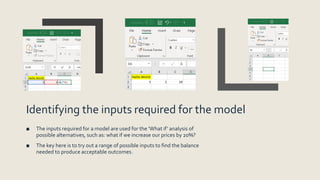
■ The inputs required for a model are used for the ‘What if’ analysis of
possible alternatives, such as: what if we increase our prices by 20%?
■ The key here is to try out a range of possible inputs to find the balance
needed to produce acceptable outcomes.
The range of outputs that can be produced
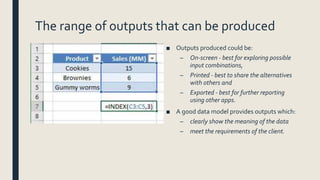
■ Outputs produced could be:
– On-screen - best for exploring possible
input combinations,
– Printed - best to share the alternatives
with others and
– Exported - best for further reporting
using other apps.
■ A good data model provides outputs which:
– clearly show the meaning of the data
– meet the requirements of the client.
Benefits and limitations of alternative solutions
■ A good data model will be able to generate several possible solutions.
– Each of these should be clearly identified.
– What they do and how they do it.
■ What are the benefits and limitations?
– What are the characteristics you identify?
– Consider these characteristics for all possible solutions.
– A table allows comparison of the characteristics of each alternative.
Impact and consequences of alternative
solutions
Factors to consider are:
■ Risk (does a solution produce more or less)
■ Differences in timescales
■ Differences in costs.
Identifying the alternative solutions that
produce the best decision or compromise
Your data model may not be able to find a perfect solution.
You need to weigh up the benefits and limitations of the alternative solutions.
You may need to compromise.
The “best” solution may have negative characteristics, (Time, technical etc).
The “proposed” solution may not be the “best”
Review MinimumViable Product
Activity (Questions?)
■ Class discussion
■ Write up your notes
■ Explain how the features of spreadsheet software are used to support the decision-
making process. (Link to Moodle activity)

A3 using data modelling to consider alternatives updated

  • 1.
  • 2.
    Introduction 1. Identifying theinputs required for the model 2. The range of outputs that can be produced 3. Benefits and limitations of alternative solutions 4. Impact and consequences of alternative solutions 5. Identifying the alternative solutions that produce the best decision or compromise
  • 3.
    A3 Using datamodelling to consider alternatives When a data model hasbeen set up, it can be used by the data modeller to identify possible alternativesand to choose the best of them. This is usuallydone by testing different input values.
  • 4.
    Identifying the inputsrequired for the model ■ The inputs required for a model are used for the ‘What if’ analysis of possible alternatives, such as: what if we increase our prices by 20%? ■ The key here is to try out a range of possible inputs to find the balance needed to produce acceptable outcomes.
  • 5.
    The range ofoutputs that can be produced ■ Outputs produced could be: – On-screen - best for exploring possible input combinations, – Printed - best to share the alternatives with others and – Exported - best for further reporting using other apps. ■ A good data model provides outputs which: – clearly show the meaning of the data – meet the requirements of the client.
  • 6.
    Benefits and limitationsof alternative solutions ■ A good data model will be able to generate several possible solutions. – Each of these should be clearly identified. – What they do and how they do it. ■ What are the benefits and limitations? – What are the characteristics you identify? – Consider these characteristics for all possible solutions. – A table allows comparison of the characteristics of each alternative.
  • 7.
    Impact and consequencesof alternative solutions Factors to consider are: ■ Risk (does a solution produce more or less) ■ Differences in timescales ■ Differences in costs.
  • 8.
    Identifying the alternativesolutions that produce the best decision or compromise Your data model may not be able to find a perfect solution. You need to weigh up the benefits and limitations of the alternative solutions. You may need to compromise. The “best” solution may have negative characteristics, (Time, technical etc). The “proposed” solution may not be the “best” Review MinimumViable Product
  • 9.
    Activity (Questions?) ■ Classdiscussion ■ Write up your notes ■ Explain how the features of spreadsheet software are used to support the decision- making process. (Link to Moodle activity)