LUND INSTITUTE OF TECHNOLOGY C++ Programming 
Department of Computer Science 2013/14 
Laboratory Exercises, C++ Programming 
General information: 
 The course has four compulsory laboratory exercises. 
 You shall work in groups of two people. Sign up for the labs at sam.cs.lth.se/Labs (see 
the course plan for instructions). 
 The labs are mostly homework. Before each lab session, you must have done the assignments 
(A1, A2, . . . ) in the lab, written and tested the programs, and so on. Reasonable attempts at 
solutions count; the lab assistant is the judge of what’s reasonable. Contact a teacher if you 
have problems solving the assignments. 
 Smaller problems with the assignments, e.g., details that do not function correctly, can be 
solved with the help of the lab assistant during the lab session. 
 Extra labs are organized only for students who cannot attend a lab because of illness. Notify 
Per Holm (Per.Holm@cs.lth.se) if you fall ill, before the lab. 
The labs are about: 
1. Basic C++ programming, compiling, linking. 
2. Introduction to the standard library. 
3. Strings and streams. 
4. Standard containers and algorithms. 
Practical information: 
 You will use many half-written “program skeletons” during the lab. You must download the 
necessary files from the course homepage before you start working on the lab assignments. 
 The lab files are in separate directories lab[ 1-4] and are available in gzipped tar format. 
Download the tar file and unpack it like this: 
tar xzf lab1.tar.gz 
This creates a directory lab1 in the current directory. 
Good sources of information about C++: 
 http://www.cplusplus.com 
 http://www.cppreference.com
Basic C++ Programming, Compiling, Linking 3 
1 Basic C++ Programming, Compiling, Linking 
Objective: to introduce C++ programming in a Unix environment. 
Read: 
 Book: basic C++, variables and types including pointers, expressions, statements, functions, 
simple classes, ifstream, ofstream. 
 Manpages for gcc, g++, and ld. 
 GNU make: http://www.gnu.org/software/make/manual/ 
 Valgrind: http://www.valgrind.org 
1 Introduction 
Different C++ compilers are available for use in a Unix environment, for example g++ from GNU 
(see http://gcc.gnu.org/) and clang++ from the Clang project (see http://clang.llvm.org/). 
The GNU Compiler Collection, GCC, includes compilers for many languages, the Clang collection 
only for “C-style” languages. g++ and clang++ are mostly compatible and used in the same way 
(same compiler options, etc.). In the remainder of the lab we mention only g++, but everything 
holds for clang++ as well. 
Actually, g++ is not a compiler but a “driver” that invokes other programs: 
Preprocessor (cpp): takes a C++ source file and handles preprocessor directives (#include files, 
#define macros, conditional compilation with #ifdef). 
Compiler: the actual compiler that translates the input file into assembly language. 
Assembler (as): translates the assembly code into machine code, which is stored in object files. 
Linker (ld): collects object files into an executable file. 
A C++ source code file is recognized by its extension. We will use .cc, which is the extension 
recommended by GNU. Another commonly used extension is .cpp. 
In C++ (and in C) declarations are collected in header files with the extension .h . To distinguish 
C++ headers from C headers other extensions are sometimes used, such as .hpp or .hh . We will 
use the .h extension. 
A C++ program normally consists of many classes that are defined in separate files. It should 
be possible to compile the files separately. The program source code should be organized like 
this (a main program that uses a class List): 
 Define the list class in a file list.h: 
#ifndef LIST_H // include guard 
#define LIST_H 
// include necessary headers here 
class List { 
public: 
List(); 
int size() const; 
... 
private: 
... 
}; 
#endif
4 Basic C++ Programming, Compiling, Linking 
 Define the member functions in a file list.cc: 
#include list.h 
// include other necessary headers 
List::List() { ... } 
int List::size() const { ... } 
... 
 Define the main function in a file ltest.cc: 
#include list.h 
int main() { 
List list; 
std::cout  Size:   list.size()  std::endl; 
... 
} 
The include guard is necessary to prevent multiple definitions of names. Do not write function 
definitions in a header file (except for inline functions and template functions). 
The g++ command line looks like this: 
g++ [options] [-o outfile] infile1 [infile2 ...] 
The .cc files are compiled separately. The resulting object files are linked into an executable file 
ltest , which is then executed: 
g++ -c list.cc -std=c++11 
g++ -c ltest.cc -std=c++11 
g++ -o ltest ltest.o list.o 
./ltest 
The -c option directs the driver to stop before the linking phase and produce an object file, named 
as the source file but with the extension .o instead of .cc. 
A1. Write a “Hello, world!” program in a file hello.cc, compile and test it. 
2 Options and messages 
There are many options to the g++ command that we didn’t mention in the previous section. In 
the future, we will require that your source files compile correctly using the following command 
line: 
g++ -c -O2 -Wall -Wextra -pedantic-errors -Wold-style-cast -std=c++11 file.cc 
Short explanations (you can read more about these and other options on the gcc and g++ 
manpages):
Basic C++ Programming, Compiling, Linking 5 
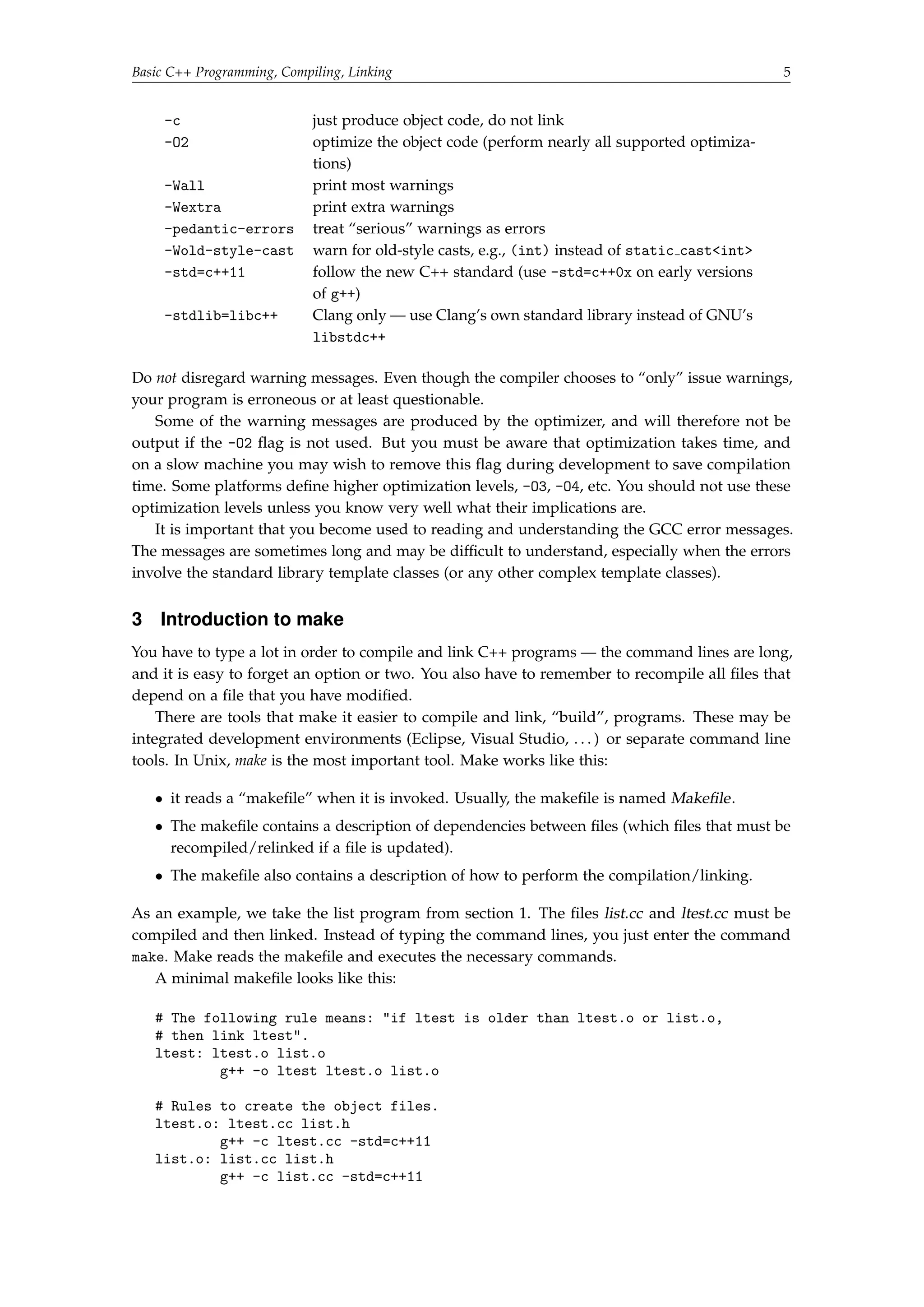
-c just produce object code, do not link 
-O2 optimize the object code (perform nearly all supported optimiza-tions) 
-Wall print most warnings 
-Wextra print extra warnings 
-pedantic-errors treat “serious” warnings as errors 
-Wold-style-cast warn for old-style casts, e.g., (int) instead of static castint 
-std=c++11 follow the new C++ standard (use -std=c++0x on early versions 
of g++) 
-stdlib=libc++ Clang only — use Clang’s own standard library instead of GNU’s 
libstdc++ 
Do not disregard warning messages. Even though the compiler chooses to “only” issue warnings, 
your program is erroneous or at least questionable. 
Some of the warning messages are produced by the optimizer, and will therefore not be 
output if the -O2 flag is not used. But you must be aware that optimization takes time, and 
on a slow machine you may wish to remove this flag during development to save compilation 
time. Some platforms define higher optimization levels, -O3, -O4, etc. You should not use these 
optimization levels unless you know very well what their implications are. 
It is important that you become used to reading and understanding the GCC error messages. 
The messages are sometimes long and may be difficult to understand, especially when the errors 
involve the standard library template classes (or any other complex template classes). 
3 Introduction to make 
You have to type a lot in order to compile and link C++ programs — the command lines are long, 
and it is easy to forget an option or two. You also have to remember to recompile all files that 
depend on a file that you have modified. 
There are tools that make it easier to compile and link, “build”, programs. These may be 
integrated development environments (Eclipse, Visual Studio, . . . ) or separate command line 
tools. In Unix, make is the most important tool. Make works like this: 
 it reads a “makefile” when it is invoked. Usually, the makefile is named Makefile. 
 The makefile contains a description of dependencies between files (which files that must be 
recompiled/relinked if a file is updated). 
 The makefile also contains a description of how to perform the compilation/linking. 
As an example, we take the list program from section 1. The files list.cc and ltest.cc must be 
compiled and then linked. Instead of typing the command lines, you just enter the command 
make. Make reads the makefile and executes the necessary commands. 
A minimal makefile looks like this: 
# The following rule means: if ltest is older than ltest.o or list.o, 
# then link ltest. 
ltest: ltest.o list.o 
g++ -o ltest ltest.o list.o 
# Rules to create the object files. 
ltest.o: ltest.cc list.h 
g++ -c ltest.cc -std=c++11 
list.o: list.cc list.h 
g++ -c list.cc -std=c++11
6 Basic C++ Programming, Compiling, Linking 
A rule specifies how a file (the target), which is to be generated, depends on some other file(s) (the 
prerequisites). On the line following the rule you write a shell command (a recipe) that generates 
the target. The recipe is executed if any of the prerequisites are older than the target. It must be 
preceded by a tab character, not eight spaces. 
A2. The file Makefile in the lab1 directory contains the makefile described above. The files 
list.h, list.cc, and ltest.cc are in the same directory. Experiment: 
Run make. Run make again. Delete the executable program and run make again. 
Change one or more of the source files (it is sufficient to touch them) and see what 
happens. Run make ltest.o. Run make notarget. Read the manpage and try other 
options. 
4 More Advanced Makefiles 
4.1 Implicit Rules 
Make has implicit rules for many common tasks, for example for producing .o-files from .cc-files. 
The recipe is: 
$(CXX) $(CPPFLAGS) $(CXXFLAGS) -c -o $@ $ 
CXX, CPPFLAGS, and CXXFLAGS are variables that the user can define. The syntax $(VARIABLE) is 
used to evaluate a variable, returning its value. CXX is the name of the C++ compiler, CPPFLAGS 
are the options to the preprocessor, CXXFLAGS are the options to the compiler. $@ expands to the 
name of the target, $ expands to the first of the prerequisites. 
There is also an implicit rule for linking, where the recipe (after some variable expansions) 
looks like this: 
$(CC) $(LDFLAGS) $^ $(LOADLIBES) $(LDLIBS) -o $@ 
LDFLAGS are options to the linker, such as -Ldirectory. LOADLIBES and LDLIBS1 are variables 
intended to contain libraries, such as -llab1. $^ expands to all prerequisites. So this is a good 
rule, except for one thing: it uses $(CC) to link, and CC is by default the C compiler gcc, not g++. 
But if you change the definition of CC, the implicit rule works also for C++: 
# Define the linker 
CC = g++ 
4.2 Generating Prerequisites Automatically 
While you’re working with a project the prerequisites are often changed. New #include directives 
are added and others are removed. In order for make to have correct information about the 
dependencies, the makefile must be modified accordingly. This is a tedious task, and it is easy to 
forget a dependency. 
The C++ preprocessor can be used to generate prerequisites automatically. The option -MM 
makes the preprocessor look at all #include directives and produce a file with the extension .d 
which contains the corresponding prerequisite. Suppose the file ltest.cc contains the following 
#include directive: 
#include list.h 
1 There doesn’t seem to be any difference between LOADLIBES and LDLIBS — they always appear together and are 
concatenated. Use LDLIBS.
Basic C++ Programming, Compiling, Linking 7 
The compiler produces a file ltest.d with the following contents: 
ltest.o : ltest.cc list.h 
This file must be processed with a sed command that adds the file itself as a target (see section 4.4). 
After this, the .d file looks like this: 
ltest.o ltest.d : ltest.cc list.h 
The .d files are included in the makefile, so it functions the same way as if we had written the 
rules ourselves. 
4.3 Phony Targets 
Make by default creates the first target that it finds in the makefile. By convention, the first 
target should be named all , and it should make all the targets. But suppose that a file all is 
created in the directory that contains the makefile. If that file is newer than the ltest file, a make 
invocation will do nothing but say make: Nothing to be done for `all'., which is not the 
desired behavior. The solution is to specify the target all as a phony target, like this: 
all: ltest 
.PHONY: all 
Another common phony target is clean. Its purpose is to remove intermediate files, such as object 
files, and it has no prerequisites. It typically looks like this: 
.PHONY: clean 
clean: 
rm -f *.o ltest 
4.4 Putting It All Together 
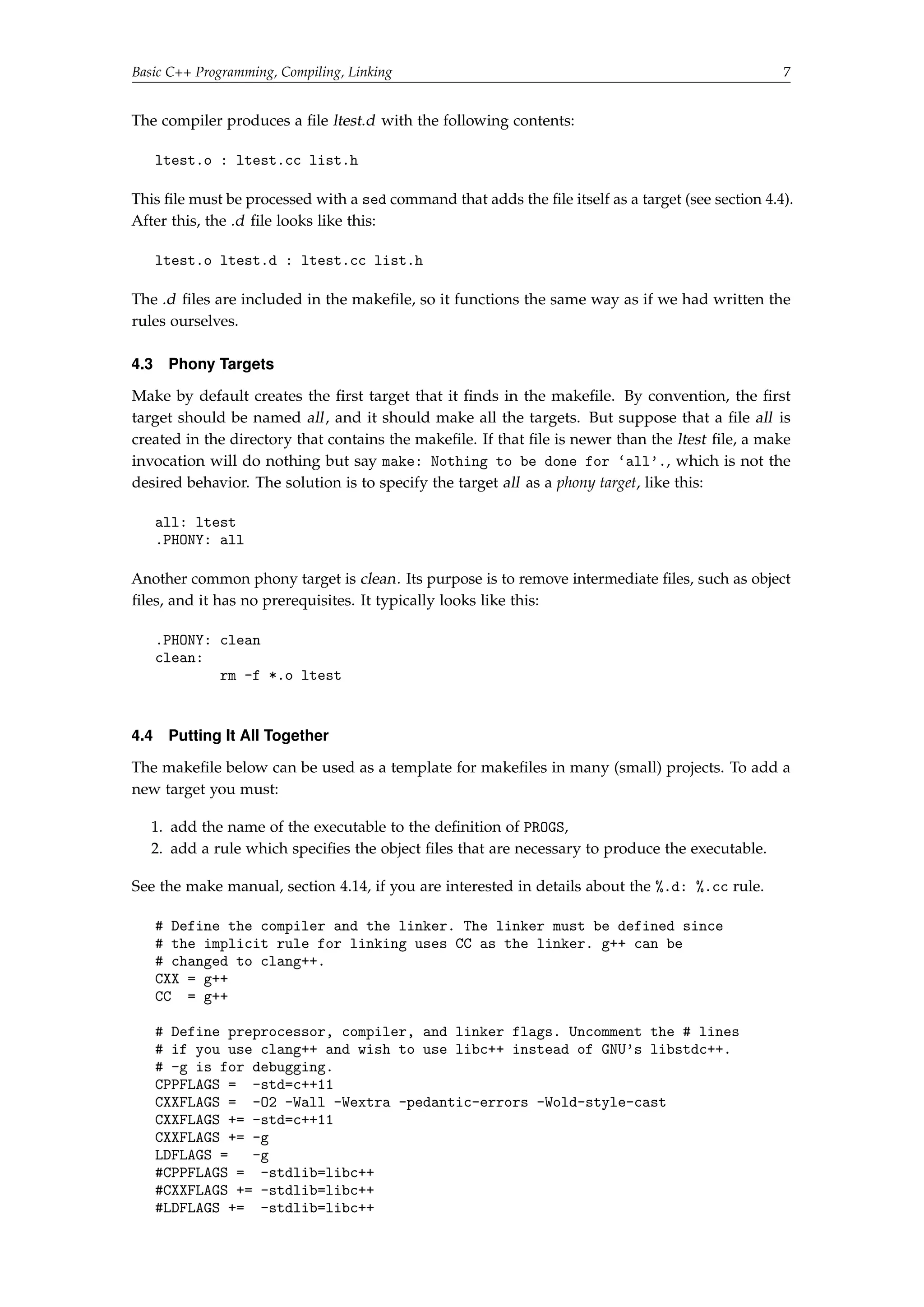
The makefile below can be used as a template for makefiles in many (small) projects. To add a 
new target you must: 
1. add the name of the executable to the definition of PROGS, 
2. add a rule which specifies the object files that are necessary to produce the executable. 
See the make manual, section 4.14, if you are interested in details about the %.d: %.cc rule. 
# Define the compiler and the linker. The linker must be defined since 
# the implicit rule for linking uses CC as the linker. g++ can be 
# changed to clang++. 
CXX = g++ 
CC = g++ 
# Define preprocessor, compiler, and linker flags. Uncomment the # lines 
# if you use clang++ and wish to use libc++ instead of GNU's libstdc++. 
# -g is for debugging. 
CPPFLAGS = -std=c++11 
CXXFLAGS = -O2 -Wall -Wextra -pedantic-errors -Wold-style-cast 
CXXFLAGS += -std=c++11 
CXXFLAGS += -g 
LDFLAGS = -g 
#CPPFLAGS = -stdlib=libc++ 
#CXXFLAGS += -stdlib=libc++ 
#LDFLAGS += -stdlib=libc++
8 Basic C++ Programming, Compiling, Linking 
# Targets 
PROGS = ltest 
all: $(PROGS) 
# Targets rely on implicit rules for compiling and linking 
ltest: ltest.o list.o 
# Phony targets 
.PHONY: all clean 
# Standard clean 
clean: 
rm -f *.o $(PROGS) 
# Generate dependencies in *.d files 
%.d: %.cc 
@set -e; rm -f $@;  
$(CPP) -MM $(CPPFLAGS) $  $@.$$$$;  
sed 's,($*).o[ :]*,1.o $@ : ,g'  $@.$$$$  $@;  
rm -f $@.$$$$ 
# Include the *.d files 
SRC = $(wildcard *.cc) 
include $(SRC:.cc=.d) 
A3. The better makefile is in the file BetterMakefile. Rename this file to Makefile, experiment. 
The first time you run make you will get warnings about .d -files that don’t exist. This 
is normal. Also, the compiler will warn about unused parameters. These warnings will 
disappear when you implement the member functions. 
Look at the generated .d files. Add a rule to generate your “Hello world!” program. 
5 A List Class 
A4. The class List describes a linked list of integers.2 The numbers are stored in nodes. A 
node has a pointer to the next node (nullptr in the last node). 
In this assignment you shall use raw pointers and manual memory allocation and 
deletion. This is common in “library classes” which must be very efficient and are assumed 
to be error free. In an application you would use one of the safe pointer types that were 
introduced in the new standard. 
class List { 
public: 
/* creates an empty list */ 
List(); 
/* destroys this list */ 
~List(); 
/* returns true if d is in the list */ 
bool exists(int d) const; 
/* returns the size of the list */ 
int size() const; 
2 In practice, you would never write your own list class. There are several alternatives in the standard library.
Basic C++ Programming, Compiling, Linking 9 
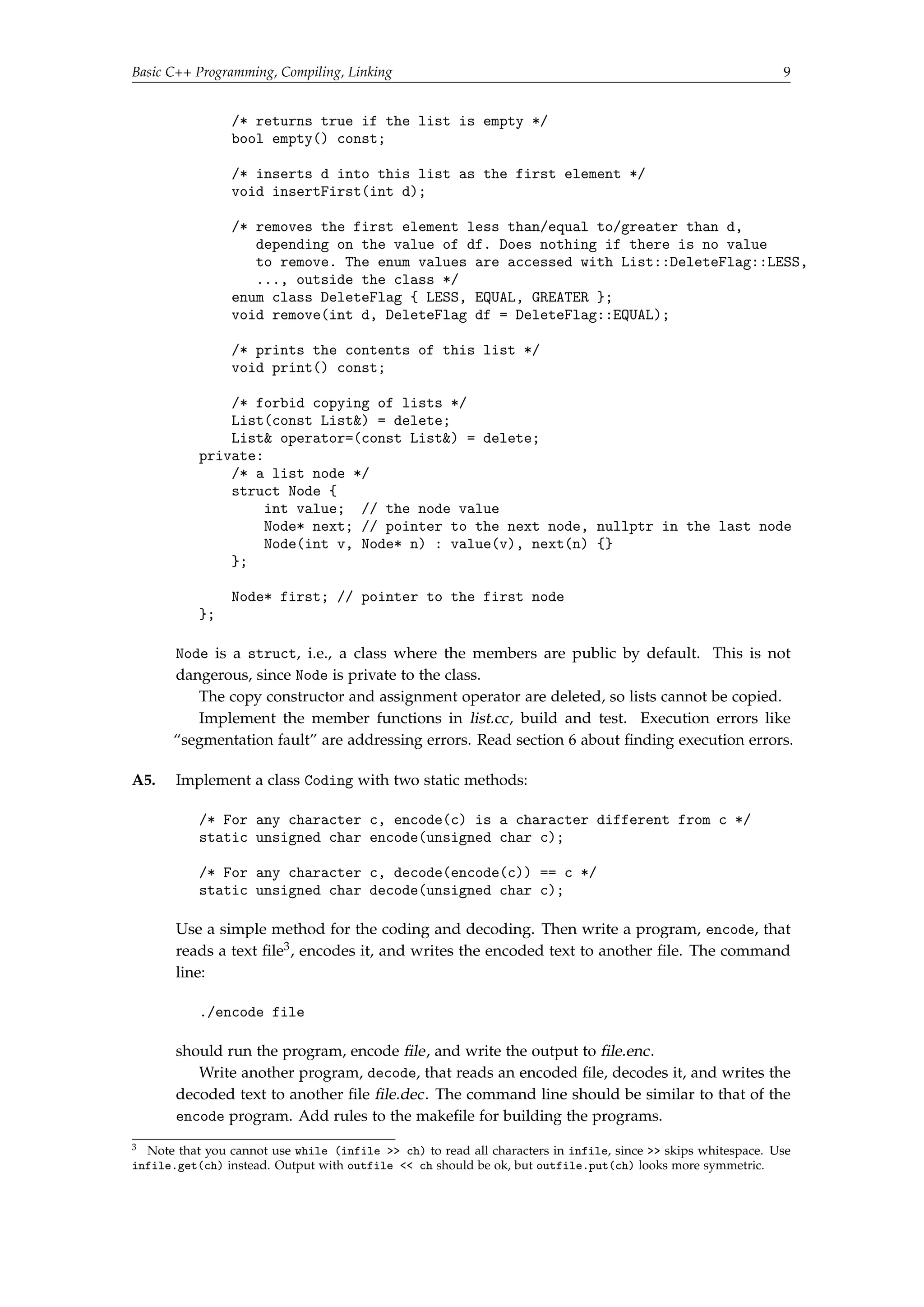
/* returns true if the list is empty */ 
bool empty() const; 
/* inserts d into this list as the first element */ 
void insertFirst(int d); 
/* removes the first element less than/equal to/greater than d, 
depending on the value of df. Does nothing if there is no value 
to remove. The enum values are accessed with List::DeleteFlag::LESS, 
..., outside the class */ 
enum class DeleteFlag { LESS, EQUAL, GREATER }; 
void remove(int d, DeleteFlag df = DeleteFlag::EQUAL); 
/* prints the contents of this list */ 
void print() const; 
/* forbid copying of lists */ 
List(const List) = delete; 
List operator=(const List) = delete; 
private: 
/* a list node */ 
struct Node { 
int value; // the node value 
Node* next; // pointer to the next node, nullptr in the last node 
Node(int v, Node* n) : value(v), next(n) {} 
}; 
Node* first; // pointer to the first node 
}; 
Node is a struct, i.e., a class where the members are public by default. This is not 
dangerous, since Node is private to the class. 
The copy constructor and assignment operator are deleted, so lists cannot be copied. 
Implement the member functions in list.cc, build and test. Execution errors like 
“segmentation fault” are addressing errors. Read section 6 about finding execution errors. 
A5. Implement a class Coding with two static methods: 
/* For any character c, encode(c) is a character different from c */ 
static unsigned char encode(unsigned char c); 
/* For any character c, decode(encode(c)) == c */ 
static unsigned char decode(unsigned char c); 
Use a simple method for the coding and decoding. Then write a program, encode, that 
reads a text file3, encodes it, and writes the encoded text to another file. The command 
line: 
./encode file 
should run the program, encode file, and write the output to file.enc. 
Write another program, decode, that reads an encoded file, decodes it, and writes the 
decoded text to another file file.dec. The command line should be similar to that of the 
encode program. Add rules to the makefile for building the programs. 
3 Note that you cannot use while (infile  ch) to read all characters in infile, since  skips whitespace. Use 
infile.get(ch) instead. Output with outfile  ch should be ok, but outfile.put(ch) looks more symmetric.
10 Basic C++ Programming, Compiling, Linking 
Test your programs and check that a file that is first encoded and then decoded is 
identical to the original. Use the Unix diff command. 
Note: the programs will work also for files that are UTF8-encoded. In UTF8 characters 
outside the “ASCII range” are encoded in two bytes, and the encode and decode functions 
will be called twice for each such character. 
6 Finding Errors 
6.1 Debugging 
With the GNU debugger, gdb, you can control a running program (step through the program, 
set breakpoints, inspect variable values, etc.). Debug information is inserted into the executable 
program when you compile and link with the option -g. Preferably you should also turn off 
optimization (no -O2 option). From g++ version 4.8 there is a new option -Og, which turns on all 
optimizations that do not conflict with debugging. 
A program is executed under control of gdb like this: 
gdb ./ltest 
Some useful commands: 
help [command] Get help about gdb commands. 
run [args...] Run the program (with arguments). 
continue Continue execution. 
next Step to the next line over function calls. 
step Step to the next line into function calls. 
where Print the call stack. 
list [nbr] List 10 lines around the current line or around line nbr (the 
following lines if repeated). 
break func Set a breakpoint on the first line of a function func. 
break nbr Set a breakpoint at line nbr in the current file. 
print expr Print the value of the expression expr. 
watch var Set a watchpoint, i.e., watch all modifications of a variable. Can 
be very slow but can be the best solution to find some bugs. 
A6. (Optional) Run ltest under control of gdb, try the commands. 
6.2 Memory-Related Errors 
In Java, many errors are caught by the compiler (use of uninitialized variables) or by the runtime 
system (addressing outside array bounds, dereferencing null pointers, etc.). In C++, errors of this 
kind are not caught, instead they result in erroneous results or traps during program execution. 
Furthermore, you get no information about where in the program the error occurred. Since 
deallocation of dynamic memory in C++ is manual, you also have a whole new class of errors 
(dangling pointers, double delete, memory leaks). 
Valgrind is a tool (available under Linux and Mac OS X) that helps you find memory-related 
errors at the precise locations at which they occur. It does this by emulating an x86 processor 
and supplying each data bit with information about the usage of the bit. This results in slower 
program execution, but this is more than compensated for by the reduced time spent in hunting 
bugs. 
Valgrind is easy to use. Compare and link as usual, then execute like this: 
valgrind ./ltest
Basic C++ Programming, Compiling, Linking 11 
When an error occurs, you get an error message and a stack trace (and a lot of other information). 
At the end of execution, valgrind prints a “leak summary” which indicates the amount of dynamic 
memory that hasn’t been deleted. 
A7. Run ltest under control of valgrind. The leak summary should show that 0 bytes have 
been lost. If it doesn’t, the List destructor probably contains an error. 
Introduce an addressing error in one of the List member functions (e.g., remove the 
check for end-of-list in exists). Run the program, first as usual, then under valgrind. 
Introduce an error in the List destructor (e.g., delete all nodes but one). Run the 
program, first as usual, then under valgrind. Remove the errors that you introduced before 
continuing. 
7 Object Code Libraries 
A lot of software is shipped in the form of libraries, e.g., class packages. In order to use a library, a 
developer does not need the source code, only the object files and the headers. Object file libraries 
may contain thousands of files and cannot reasonably be shipped as separate files. Instead, the 
files are collected into library files that are directly usable by the linker. 
7.1 Static Libraries 
The simplest kind of library is a static library. The linker treats the object files in a static library in 
the same way as other object files, i.e., all code is linked into the executable files. In Unix, a static 
library is an archive file, lib hnamei.a. In addition to the object files, an archive contains an index 
of the symbols that are defined in the object files. 
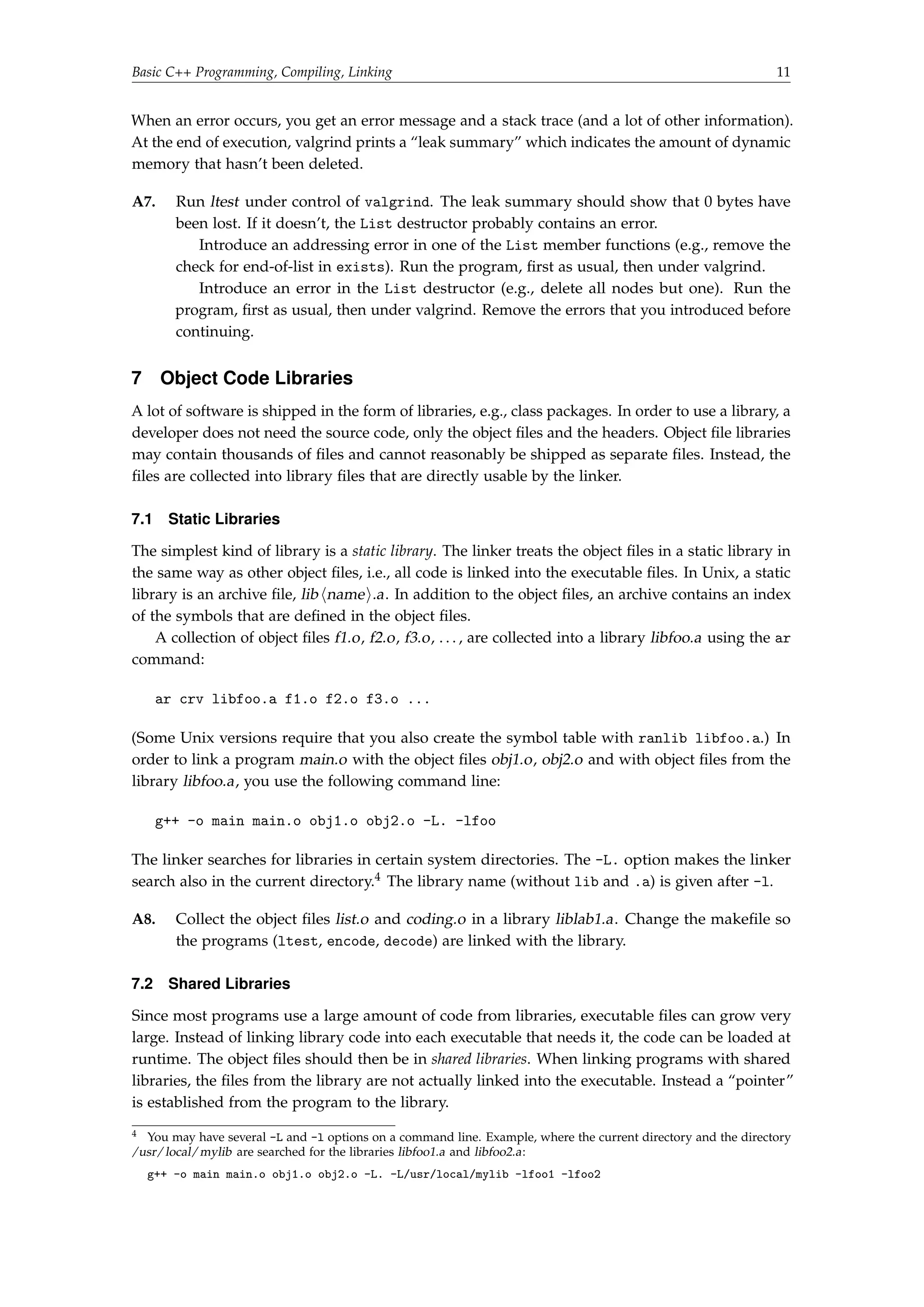
A collection of object files f1.o, f2.o, f3.o, . . . , are collected into a library libfoo.a using the ar 
command: 
ar crv libfoo.a f1.o f2.o f3.o ... 
(Some Unix versions require that you also create the symbol table with ranlib libfoo.a.) In 
order to link a program main.o with the object files obj1.o, obj2.o and with object files from the 
library libfoo.a, you use the following command line: 
g++ -o main main.o obj1.o obj2.o -L. -lfoo 
The linker searches for libraries in certain system directories. The -L. option makes the linker 
search also in the current directory.4 The library name (without lib and .a) is given after -l. 
A8. Collect the object files list.o and coding.o in a library liblab1.a. Change the makefile so 
the programs (ltest, encode, decode) are linked with the library. 
7.2 Shared Libraries 
Since most programs use a large amount of code from libraries, executable files can grow very 
large. Instead of linking library code into each executable that needs it, the code can be loaded at 
runtime. The object files should then be in shared libraries. When linking programs with shared 
libraries, the files from the library are not actually linked into the executable. Instead a “pointer” 
is established from the program to the library. 
4 You may have several -L and -l options on a command line. Example, where the current directory and the directory 
/usr/local/mylib are searched for the libraries libfoo1.a and libfoo2.a: 
g++ -o main main.o obj1.o obj2.o -L. -L/usr/local/mylib -lfoo1 -lfoo2
12 Basic C++ Programming, Compiling, Linking 
In Unix shared library files are named lib hnamei.so[ .x.y.z] (.so for shared objects, .x.y.z is 
an optional version number). The linker uses the environment variable LD LIBRARY PATH as the 
search path for shared libraries. In Microsoft Windows shared libraries are known as DLL files 
(dynamically loadable libraries). 
A9. (Advanced, optional) Create a shared library with the object files list.o and coding.o. Link 
the executables using the shared library. Make sure they run correctly. Compare the sizes 
of the dynamically linked executables to the statically linked (there will not be a big size 
difference, since the size of the library code is small). 
Use the command ldd (list dynamic dependencies) to inspect the linkage of your 
programs. Shared libraries are created by the linker, not the ar archiver. Use the gcc 
and ld manpages (and, if needed, other manpages) to explain the following sequence of 
operations: 
g++ -fPIC -std=c++11 -c *.cc 
g++ -shared -Wl,-soname,liblab1.so.1 -o liblab1.so.1.0 list.o coding.o 
ln -s liblab1.so.1.0 liblab1.so.1 
ln -s liblab1.so.1 liblab1.so 
You then link with -L. -llab1 as before. The linker merely checks that all referenced 
symbols are in the shared library. Before you execute the program, you must define 
LD LIBRARY PATH so it includes the current directory. You do this with the following 
command (on the command line): 
export LD_LIBRARY_PATH=.:$LD_LIBRARY_PATH
Introduction to the Standard Library 13 
2 Introduction to the Standard Library 
Objective: to solve a moderately large problem using C++. Some parts of the standard library that 
haven’t yet been introduced in the course will be used. Information about these is given last in 
the text. 
1 Spelling Correction 
Most word processors can check the spelling of a document and suggest corrections to misspelled 
words. Often, a dictionary is used — words that aren’t in the dictionary are considered to be 
misspelled. The suggested corrections are the words in the dictionary that are “similar” to the 
misspelled word. 
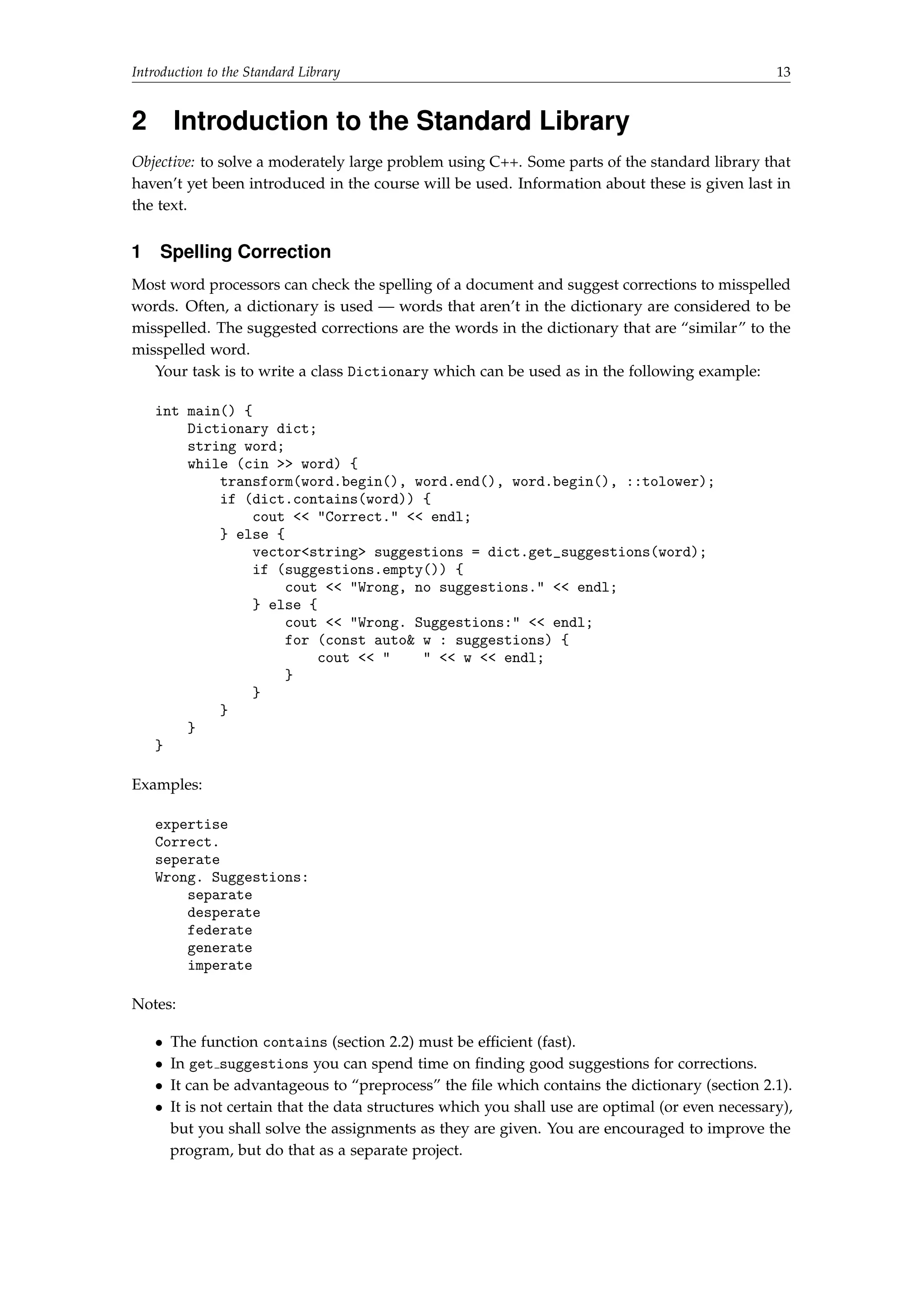
Your task is to write a class Dictionary which can be used as in the following example: 
int main() { 
Dictionary dict; 
string word; 
while (cin  word) { 
transform(word.begin(), word.end(), word.begin(), ::tolower); 
if (dict.contains(word)) { 
cout  Correct.  endl; 
} else { 
vectorstring suggestions = dict.get_suggestions(word); 
if (suggestions.empty()) { 
cout  Wrong, no suggestions.  endl; 
} else { 
cout  Wrong. Suggestions:  endl; 
for (const auto w : suggestions) { 
cout     w  endl; 
} 
} 
} 
} 
} 
Examples: 
expertise 
Correct. 
seperate 
Wrong. Suggestions: 
separate 
desperate 
federate 
generate 
imperate 
Notes: 
 The function contains (section 2.2) must be efficient (fast). 
 In get suggestions you can spend time on finding good suggestions for corrections. 
 It can be advantageous to “preprocess” the file which contains the dictionary (section 2.1). 
 It is not certain that the data structures which you shall use are optimal (or even necessary), 
but you shall solve the assignments as they are given. You are encouraged to improve the 
program, but do that as a separate project.
14 Introduction to the Standard Library 
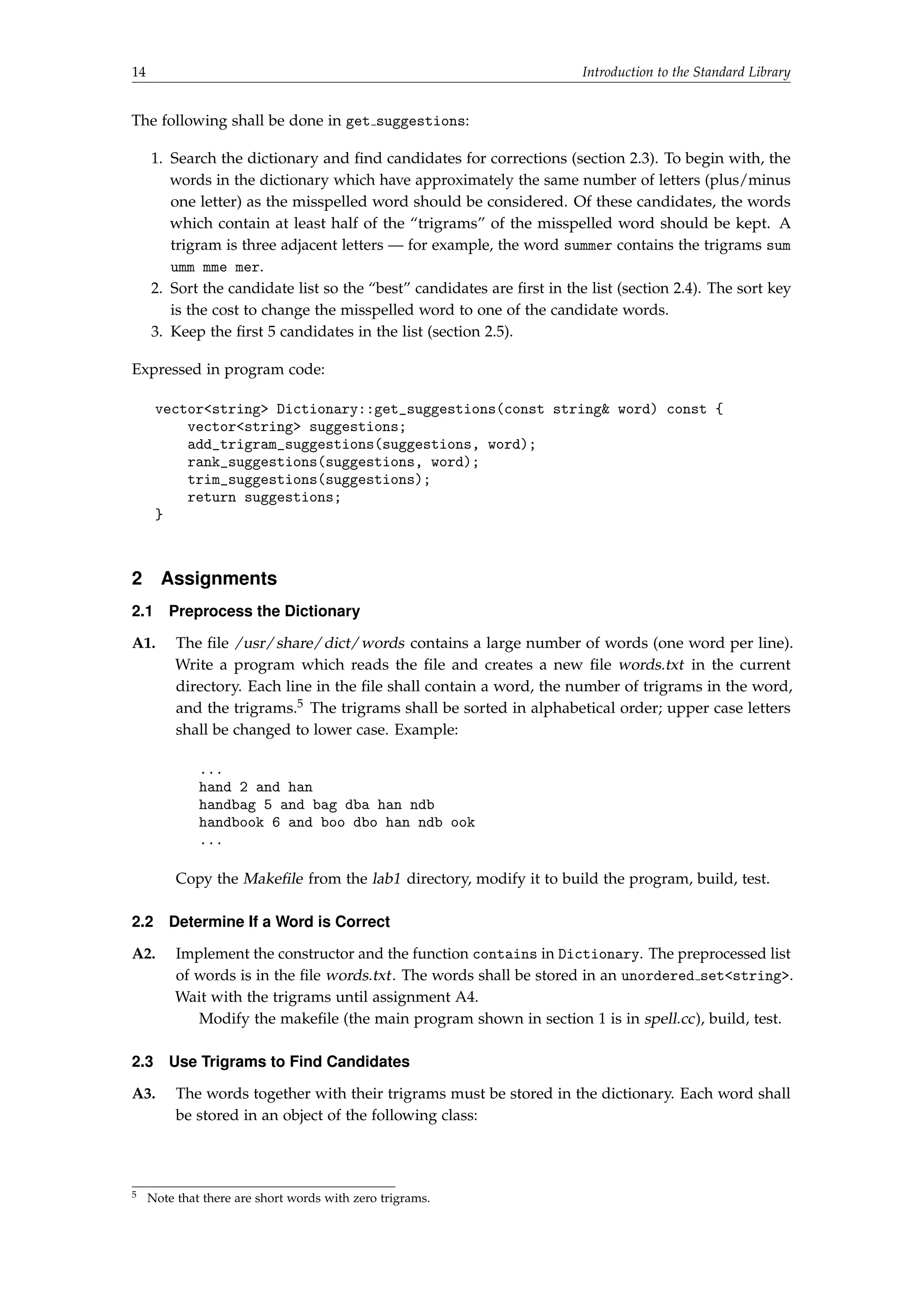
The following shall be done in get suggestions: 
1. Search the dictionary and find candidates for corrections (section 2.3). To begin with, the 
words in the dictionary which have approximately the same number of letters (plus/minus 
one letter) as the misspelled word should be considered. Of these candidates, the words 
which contain at least half of the “trigrams” of the misspelled word should be kept. A 
trigram is three adjacent letters — for example, the word summer contains the trigrams sum 
umm mme mer. 
2. Sort the candidate list so the “best” candidates are first in the list (section 2.4). The sort key 
is the cost to change the misspelled word to one of the candidate words. 
3. Keep the first 5 candidates in the list (section 2.5). 
Expressed in program code: 
vectorstring Dictionary::get_suggestions(const string word) const { 
vectorstring suggestions; 
add_trigram_suggestions(suggestions, word); 
rank_suggestions(suggestions, word); 
trim_suggestions(suggestions); 
return suggestions; 
} 
2 Assignments 
2.1 Preprocess the Dictionary 
A1. The file /usr/share/dict/words contains a large number of words (one word per line). 
Write a program which reads the file and creates a new file words.txt in the current 
directory. Each line in the file shall contain a word, the number of trigrams in the word, 
and the trigrams.5 The trigrams shall be sorted in alphabetical order; upper case letters 
shall be changed to lower case. Example: 
... 
hand 2 and han 
handbag 5 and bag dba han ndb 
handbook 6 and boo dbo han ndb ook 
... 
Copy the Makefile from the lab1 directory, modify it to build the program, build, test. 
2.2 Determine If a Word is Correct 
A2. Implement the constructor and the function contains in Dictionary. The preprocessed list 
of words is in the file words.txt . The words shall be stored in an unordered setstring. 
Wait with the trigrams until assignment A4. 
Modify the makefile (the main program shown in section 1 is in spell.cc), build, test. 
2.3 Use Trigrams to Find Candidates 
A3. The words together with their trigrams must be stored in the dictionary. Each word shall 
be stored in an object of the following class: 
5 Note that there are short words with zero trigrams.
Introduction to the Standard Library 15 
class Word { 
public: 
/* Creates a word w with the sorted trigrams t */ 
Word(const std::string w, const std::vectorstd::string t); 
/* Returns the word */ 
std::string get_word() const; 
/* Returns how many of the trigrams in t that are present 
in this word's trigram vector */ 
unsigned int get_matches(const std::vectorstd::string t) const; 
}; 
Implement this class. The trigram vector given to the constructor is sorted in alphabetical 
order (see assignment A1). The function get matches counts how many of the trigrams in 
the parameter vector that are present in the word’s trigram vector.6 You may assume that 
the trigrams in the parameter vector also are sorted in alphabetical order. Use this fact to 
write an efficient implementation of get matches. 
A4. The class Dictionary shall have a member variable that contains all words with their 
trigrams. It must be possible to quickly find words which have approximately the same 
length as the misspelled word. Therefore, the words shall be stored in the following array: 
vectorWord words[25]; // words[i] = the words with i letters, 
// ignore words longer than 25 letters 
Modify the Dictionary constructor so the Word objects are created and stored in words, 
implement the function add trigram suggestions. Use a constant instead of the number 
25. 
2.4 Sort the Candidate List 
After add trigram suggestions the suggestion list can contain a large number of candidate 
words. Some of the candidates are “better” than others. The list shall be sorted so the best 
candidates appear first. The sorting condition shall be the “edit distance” (also called “Levenshtein 
distance”) from the misspelled word to the candidate word. 
The cost d(i, j) to change the i first characters in a word p to the j first characters in another 
word q can be computed with the following formula (i and j start from 1): 
d(i, 0) = i 
d(0, j) = j 
d(i, j) = minimum of 
8 
: 
if pi = qj then d(i  1, j  1) else d(i  1, j  1) + 1, 
d(i  1, j) + 1, 
d(i, j  1) + 1. 
The minimum computation considers the cost for replacing a character, inserting a character and 
deleting a character. The cost to change p to q, that is the edit distance, is d(p.length, q.length). 
A5. Implement the function rank suggestions. Do not write a recursive function, it would be 
very inefficient. Instead, let d be a matrix (with d(i, 0) = i and d(0, j) = j) and compute the 
elements in row order (dynamic programming). Declare d with the type int[26][26] to 
avoid problems with a dynamically allocated matrix. 
6 You don’t have to consider multiple occurrences of the same trigram.
16 Introduction to the Standard Library 
2.5 Keep the Best Candidates 
A6. Implement the function trim suggestions. 
3 More Information About the Assignments 
 In the main program in spell.cc, the call to transform applies the function tolower to all 
the characters in a string (between begin() and end()), and stores the function result in 
the same place. tolower converts a character from upper case to lower case. The scope 
operator :: is necessary to get the right version of the overloaded tolower function. 
 To sort a vector v, call sort(v.begin(), v.end()). 
 The standard library class unordered set is in header unordered set. An element is 
inserted in a set with the function insert(element). The function count(element) returns 
the number of occurrences of an element (0 or 1). 
 Here’s one way to sort the suggested candidates in edit distance order (another way is to 
use a map): 
– Define a vector with elements that are pairs with the first component an int, the 
second a string: vectorpairint, string. 
– Compute the edit distance for each candidate word, insert the distance and the word 
in the vector: push back(make pair(dist, word)). 
– Sort the vector (pairs have an operator that first compares the first component, so 
the elements will be sorted according to increasing edit distance). 
– For a pair p, p.first is the first component, p.second the second component. 
 Read more about computing edit distance on the web. You may also consider using the 
Damerau–Levenshtein distance. 
 A vector can be resized to size n with resize(n).
Strings and Streams 17 
3 Strings and Streams 
Objective: to practice using the standard library string and stream classes. 
Read: 
 Book: strings, streams, function templates. 
1 Class string 
1.1 Introduction 
In C, a string is a null-terminated array of characters. This representation is the cause of many 
errors: overwriting array bounds, trying to access arrays through uninitialized or incorrect 
pointers, and leaving dangling pointers after an array has been deallocated. The cstring 
library contains operations on C-style strings, such as copying and comparing strings. 
C++ strings hide the physical representation of the sequence of characters. The exact im-plementation 
of the string class is not defined by the C++ standard. The specification in the 
standard is intended to be flexible enough to allow different implementations, yet guarantee 
predictable behavior. 
The string identifier is not actually a class, but a typedef for a specialized template: 
typedef std::basic_stringchar string; 
This means that string is a string containing characters of type char. There are other string 
specializations for strings containing “wide characters”. We will ignore all “internationalization” 
issues and assume that all characters fit in one byte. 
string::size type is a type used for indexing in a string. string::npos (“no position”) is a 
value indicating a position beyond the end of the string; it is returned by functions that search for 
characters when the characters aren’t found. 
1.2 Operations on Strings 
The following class specification shows most of the operations on strings: 
class string { 
public: 
/*** construction ***/ 
string(); // creates an empty string 
string(const string s); // creates a copy, also has move constructor 
string(const char* cs); // creates a string with the characters from cs 
string(size_type n, char ch); // creates a string with n copies of ch 
/*** information ***/ 
size_type size(); // number of characters 
/*** character access ***/ 
const char operator[](size_type pos) const; 
char operator[](size_type pos); 
/*** substrings */ 
string substr(size_type start, size_type n = npos); // the substring starting 
// at position start containing n characters
18 Strings and Streams 
/*** finding things ***/ 
// see below 
/*** inserting, replacing, and removing ***/ 
void insert(size_type pos, const string s); // inserts s at position pos 
void append(const string s); // appends s at the end 
void replace(size_type start, size_type n, const string s); // replaces n 
// characters starting at pos with s 
void erase(size_type start = 0, size_type n = npos); // removes n 
// characters starting at pos 
/*** assignment and concatenation ***/ 
string operator=(const string s); // also move assignment 
string operator=(const char* cs); 
string operator=(char ch); 
string operator+=(const string s); // also const char* and char 
/*** access to C-style string representation ***/ 
const char* c_str(); 
} 
 Note that there is no constructor string(char). Use string(1, char) instead. 
 The subscript functions operator[] do not check for a valid index. There are similar at() 
functions that do check, and that throw out of range if the index is not valid. 
 The substr() member function takes a starting position as its first argument and the number 
of characters as the second argument. This is different from the substring() method in 
java.lang.String, where the second argument is the end position of the substring. 
 There are overloads of most of the functions. You can use C-style strings or characters as 
parameters instead of strings. 
 Strings have iterators like library vectors. 
 There is a bewildering variety of member functions for finding strings, C-style strings 
or characters. They all return npos if the search fails. The functions have the following 
signature (the string parameter may also be a C-style string or a character): 
size_type FIND_VARIANT(const string s, size_type pos = 0) const; 
s is the string to search for, pos is the starting position. (The default value for pos is npos, 
not 0, in the functions that search backwards). 
The “find variants” are find (find a string, forwards), rfind (find a string, backwards), 
find first of and find last of (find one of the characters in a string, forwards or back-wards), 
find first not of and find last not of (find a character that is not one of the 
characters in a string, forwards or backwards). 
Example: 
void f() { 
string s = accdcde; 
auto i1 = s.find(cd); // i1 = 2 (s[2]=='c'  s[3]=='d') 
auto i2 = s.rfind(cd); // i2 = 4 (s[4]=='c'  s[5]=='d') 
auto i3 = s.find_first_of(cd); // i3 = 1 (s[1]=='c') 
auto i4 = s.find_last_of(cd); // i4 = 5 (s[5]=='d') 
auto i5 = s.find_first_not_of(cd); // i5 = 0 (s[0]!='c'  s[0]!='d') 
auto i6 = s.find_last_not_of(cd); // i6 = 6 (s[6]!='c'  s[6]!='d') 
}
Strings and Streams 19 
The global overloaded operator functions are for concatenation (operator+) and for comparison 
(operator==, operator, etc.). They all have the expected meaning. You cannot use + to 
concatenate a string with a number, only with another string, C-style string or character (this is 
unlike Java). 
In the new standard, there are functions that convert strings to numbers and vice versa: 
stod(123.45) = double, to string(123) = 123. 
A1. Write a class that reads a file and removes HTML tags and translates HTML-encoded 
special characters. The class should be used like this: 
int main() { 
TagRemover tr(cin); // read from cin 
tr.print(cout); // print on cout 
} 
 All tags should be removed from the output. A tag starts with a  and ends with a . 
 You can assume that there are no nested tags. 
 Tags may start on one line and end on another line. 
 Line separators should be kept in the output. 
 You don’t have to handle all special characters, only lt;, gt;, nbsp;, amp; 
(corresponding to   space ). 
 Assignments like this should be a good fit for regular expressions. Study and use the 
C++ regex library if you’re interested. 
Copy the makefile from one of the previous labs, modify it, build. Test your program on 
the file test.html. 
A2. The Sieve of Eratosthenes is an ancient method for finding all prime numbers less than 
some fixed number M. It starts by enumerating all numbers in the interval [0,M] and 
assuming they are all primes. The first two numbers, 0 and 1 are marked, as they are not 
primes. The algorithm then starts with the number 2, marks all subsequent multiples of 2 
as composites, finds the next prime, marks all multiples, . . . When the initial sequence is 
exhausted, the numbers not marked as composites are the primes in [0,M]. 
In this assignment you shall use a string for the enumeration. Initialize a string of 
appropriate length to PPPPP...PPP. The characters at positions that are not prime numbers 
should be changed to C. Write a program that prints the prime numbers between 1 and 200 
and also the largest prime that is less than 100,000. 
Example with the numbers 0–35: 
1 2 3 
012345678901234567890123456789012345 
Initial: CCPPPPPPPPPPPPPPPPPPPPPPPPPPPPPPPPPP 
Find 2, mark 4,6,8,...: CCPPCPCPCPCPCPCPCPCPCPCPCPCPCPCPCPCP 
Find 3, mark 6,9,12,...: CCPPCPCPCCCPCPCCCPCPCCCPCPCCCPCPCCCP 
Find 5, mark 10,15,20,...: CCPPCPCPCCCPCPCCCPCPCCCPCCCCCPCPCCCC 
Find 7, mark 14,21,28,35: CCPPCPCPCCCPCPCCCPCPCCCPCCCCCPCPCCCC 
Find 11, mark 22,33: CCPPCPCPCCCPCPCCCPCPCCCPCCCCCPCPCCCC 
...
20 Strings and Streams 
2 The iostream Library 
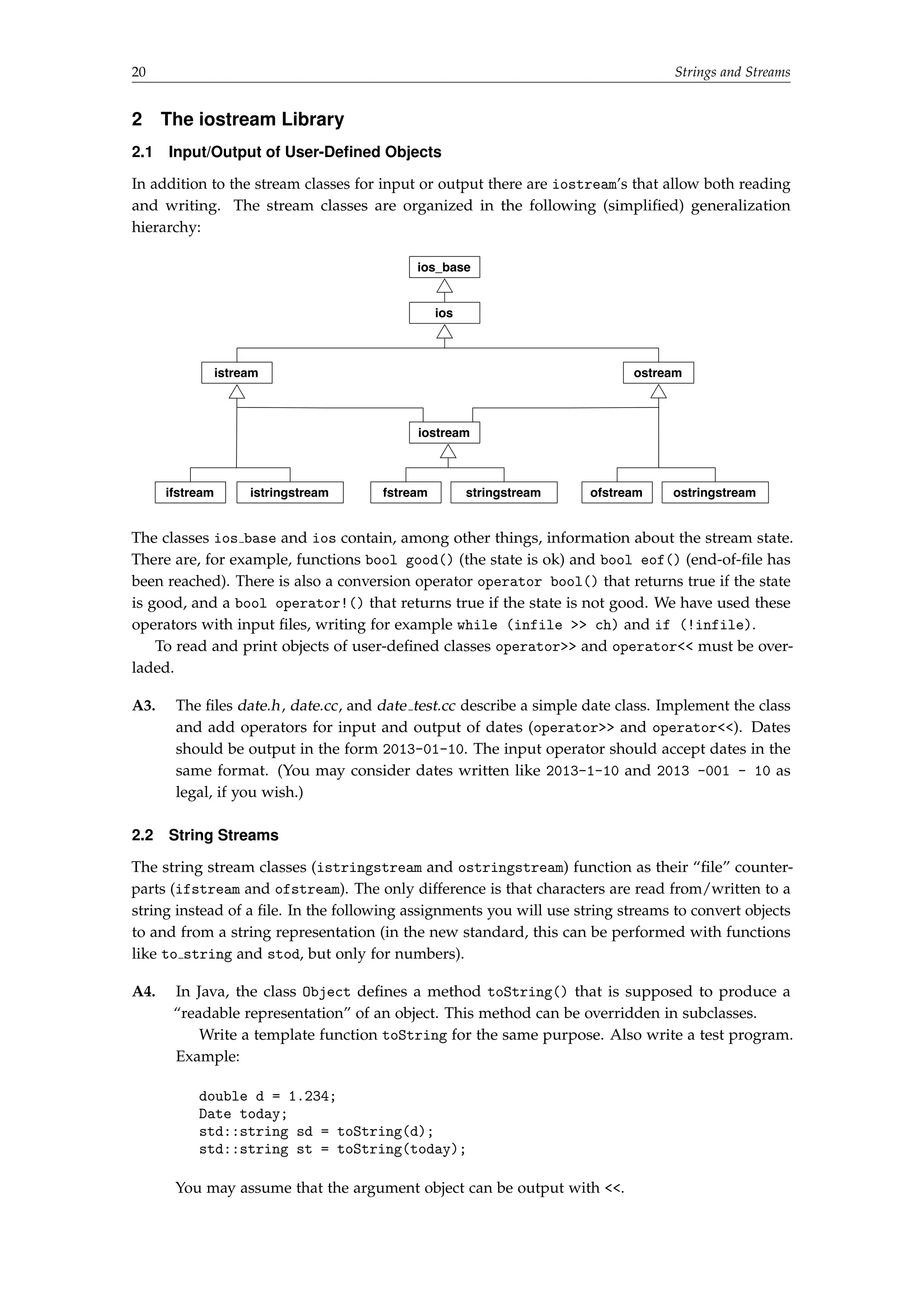
2.1 Input/Output of User-Defined Objects 
In addition to the stream classes for input or output there are iostream’s that allow both reading 
and writing. The stream classes are organized in the following (simplified) generalization 
hierarchy: 
ios_base 
ios 
istream ostream 
iostream 
ifstream istringstream fstream stringstream ofstream ostringstream 
The classes ios base and ios contain, among other things, information about the stream state. 
There are, for example, functions bool good() (the state is ok) and bool eof() (end-of-file has 
been reached). There is also a conversion operator operator bool() that returns true if the state 
is good, and a bool operator!() that returns true if the state is not good. We have used these 
operators with input files, writing for example while (infile  ch) and if (!infile). 
To read and print objects of user-defined classes operator and operator must be over-laded. 
A3. The files date.h, date.cc, and date test.cc describe a simple date class. Implement the class 
and add operators for input and output of dates (operator and operator). Dates 
should be output in the form 2013-01-10. The input operator should accept dates in the 
same format. (You may consider dates written like 2013-1-10 and 2013 -001 - 10 as 
legal, if you wish.) 
2.2 String Streams 
The string stream classes (istringstream and ostringstream) function as their “file” counter-parts 
(ifstream and ofstream). The only difference is that characters are read from/written to a 
string instead of a file. In the following assignments you will use string streams to convert objects 
to and from a string representation (in the new standard, this can be performed with functions 
like to string and stod, but only for numbers). 
A4. In Java, the class Object defines a method toString() that is supposed to produce a 
“readable representation” of an object. This method can be overridden in subclasses. 
Write a template function toString for the same purpose. Also write a test program. 
Example: 
double d = 1.234; 
Date today; 
std::string sd = toString(d); 
std::string st = toString(today); 
You may assume that the argument object can be output with .
Strings and Streams 21 
A5. Type casting in C++ can be performed with, for example, the static cast operator. 
Casting from a string to a numeric value is not supported, since this involves executing 
code that converts a sequence of characters to a number. 
Write a function string cast that can be used to cast a string to an object of another 
type. Examples of usage: 
try { 
int i = string_castint(123); 
double d = string_castdouble(12.34); 
Date date = string_castDate(2013-01-10); 
} catch (std::invalid_argument e) { 
cout  Error:   e.what()  endl; 
} 
You may assume that the argument object can be input with . The function should 
throw std::invalid argument (defined in header stdexcept) if the string could not be 
converted.
22 Standard Containers and Algorithms 
4 Standard Containers and Algorithms 
Objective: to practice using the standard library container classes and algorithms, with emphasis 
on efficiency. To learn more about operator overloading and iterators. 
Read: 
 Book: containers and algorithms. Operator overloading, iterators. 
1 Name Servers and the Container Classes 
On the web, computers are identified by IP addresses (32- or 128-bit numbers). Humans identify 
computers by symbolic names. A name server is a component in the Domain Name System 
(DNS) that translates a symbolic name to the corresponding IP address. The DNS is a very 
large distributed database that contains billions (or at least many millions) of IP addresses and 
that receives billions of lookup requests every day. Furthermore, the database is continuously 
updated. 
In this lab, you will implement a local name server in C++. With “local” we mean that the 
name server does not communicate with other name servers; it can only perform translations 
using its own database. The goal is to develop a time-efficient name server. You shall implement 
four versions of the name server, using different container classes. All four classes implement the 
interface NameServerInterface: 
using HostName = std::string; 
using IPAddress = unsigned int; 
const IPAddress NON_EXISTING_ADDRESS = 0; 
class NameServerInterface { 
public: 
virtual ~NameServerInterface() = default; 
virtual void insert(const HostName, const IPAddress) = 0; 
virtual bool remove(const HostName) = 0; 
virtual IPAddress lookup(const HostName) const = 0; 
}; 
insert() inserts a name/address pair into the database, without checking if the name already 
exists. remove() removes a name/address pair and returns true if the name exists; it does 
nothing and returns false if the name doesn’t exist. lookup() returns the IP address for a 
specified name, or NON EXISTING ADDRESS if the name doesn’t exist. 
You shall use library containers and algorithms as much as possible. This means, for example, 
that you are not allowed to use any for or while statements in your solutions. (There is one 
exception: you may use a for or while statement in the hash function, see assignment A1d.) 
A1. The definition of the class NameServerInterface is in the file nameserverinterface.h. 
a) Implement a class VNS (vector name server) that uses an unsorted vector to store the 
name/address pairs. Use the find if algorithm to search for a host name. The third 
parameter to the algorithm should be a lambda. 
This implementation is clearly inefficient. A sorted vector would be a good alternative, 
but not for a name server with many insertions and deletions. 
b) Implement a class MNS (map name server) that uses a map to store the name/address 
pairs. The average search time in this implementation will be considerably better than 
that for the vector implementation.
Standard Containers and Algorithms 23 
c) Implement a class UMNS (unordered map name server) that uses an unordered map to 
store the name/address pairs. 
d) An unordered map is implemented using a hash table. You shall compare this 
implementation with your own implementation of a hash table. Implement a class 
HNS (hash name server) that uses a hash table — a vector of vector’s — to store the 
name/address pairs. 
The hash table implementation is open for experimentation: you must select an 
appropriate size for the hash table (given as an argument to the constructor) and 
a suitable hash function.7 It can also be worthwhile to exploit the fact that most 
computer names start with “www.”. You should be able to obtain approximately the 
same search times as for the unordered map implementation. 
Copy the makefile from one of the previous labs, modify it. Use the program nstest.cc 
to verify that the insert/remove/lookup functions work correctly. Then, use the program 
nstime.cc to measure and print the search times for the four different implementations, 
using the file nameserverdata.txt as input (the file contains 290,024 name/address pairs8). 
A2. Examples of average search times in milliseconds for a name server with 290,024 names 
are in the following table. 
290,024 1,000,000 
vector 0.667 
map 0.00096 
unordered 0.00036 
hash 0.00031 
Search the Internet for information about efficiency of searching in different data structures, 
or use your knowledge from the algorithms and data structures course, and fill in the 
blanks in the table. Write a similar table for your own implementation. 
2 Bitsets, Subscripting, and Iterators 
2.1 Bitsets 
To manipulate individual bits in a word, C++ provides the bitwise operators  (and), | (or), 
^ (exclusive or), and the shift operators  (shift left) and  (shift right). The standard class 
bitsetN generalizes this notion and provides operations on sets of N bits indexed from 0 
through N-1. N may be arbitrary large, so the bitset may occupy many words. 
For historical reasons, bitset doesn’t provide any iterators. We will develop a simplified 
version of the bitset class where all the bits fit in one word, and extend the class with iterators so 
it becomes possible to use the standard library algorithms with the class. Our goal is to provide 
enough functionality to make the following program work correctly: 
int main() { 
// Define an empty bitset, set every third bit, print 
Bitset bs; 
for (size_t i = 0; i  bs.size(); i += 3) { 
bs[i] = true; 
} 
7 Note that a good hash function should take all (or at least many) of the characters of a string into account and that 
abc and cba should have different hash codes. For instance, a hash function that merely adds the first and last 
characters of a string is not acceptable. 
8 The computer names are from http://httparchive.org. The IP addresses are running numbers.
24 Standard Containers and Algorithms 
copy(bs.begin(), bs.end(), ostream_iteratorbool(cout)); 
cout  endl; 
// Find the first five bits that are set, complement them, print 
size_t cleared = 0; 
auto it = bs.begin(); 
while (it != bs.end()  cleared != 5) { 
it = find(it, bs.end(), true); 
if (it != bs.end()) { 
*it = !*it; 
++cleared; 
++it; 
} 
} 
copy(bs.begin(), bs.end(), ostream_iteratorbool(cout)); 
cout  endl; 
// Count the number of set bits, print 
cout  Number of set bits:   count(bs.begin(), bs.end(), true)  endl; 
} 
The output from the program should be (on a 64-bit computer): 
1001001001001001001001001001001001001001001001001001001001001001 
0000000000000001001001001001001001001001001001001001001001001001 
Number of set bits: 17 
An iterator for bitsets has to support both reading and writing, so it must be a model of Forward- 
Iterator. Actually, it is not difficult to make it a model of RandomAccessIterator, but this 
would mean that we had to supply more functions. 
The solution will be developed in several steps: 
 Implement the “bit fiddling” methods necessary to set, clear, and test an individual bit in a 
word (this we have done for you). 
 Implement operator[]. This is rather difficult. 
 Implement the bitset iterator. This turns out to be relatively simple. 
A3. The files simplebitset.h and simplebitset.cc contain the implementation of a simple version 
of the bitset class, with get and set functions instead of a subscripting operator. Study the 
class and convince yourself that you understand how the bits are manipulated. Copy the 
makefile from one of the previous labs, modify it. Use the program in simplebitsettest.cc 
to check the function of the class. 
2.2 Subscripting 
Subscripting is handled by operator[]. In order to allow subscripting to be used on the 
left hand side of an assignment operator, operator[] must return a reference (e.g., like int 
operator[](int i) in a vector class). But then a reference to an individual bit in a word is 
needed, and there are no “pointers to bits” in C++. We must write a “proxy class”, BitReference, 
to represent the reference. This class contains a reference to the word that contains the bits and 
an integer that is the position of the bit in the word.
Standard Containers and Algorithms 25 
Outline of the class (BitsetStorage is the type of the word that contains the bits): 
class BitReference { 
public: 
BitReference(Bitset::BitStorage pb, size_t p) : p_bits(pb), pos(p) {} 
// ... operations will be added later 
private: 
Bitset::BitStorage p_bits; // reference to the word containing bits 
size_t pos; // position of the bit in the word 
}; 
The Bitset class looks like this: 
class Bitset { 
friend class BitReference; 
public: 
... 
bool operator[](size_t pos) const; 
BitReference operator[](size_t pos); 
... 
private: 
using BitStorage = unsigned long; 
BitStorage bits; 
static const size_t 
BPW = std::numeric_limitsBitStorage::digits; // Bits per word 
}; 
The const version of operator[] is easy: it is identical to the get function in SimpleBitset. The 
non-const version should be defined as follows: 
BitReference operator[](size_t pos) { 
return BitReference(bits, pos); 
} 
The actual bit fiddling is performed in the BitReference class. In order to see what we need to 
implement in this class, we study the results of expressions involving operator[]: 
bs[3] = true; // bs.operator[](3) = true; = 
// BitReference(bs.bits,3) = true; = 
// BitReference(bs.bits,3).operator=(true); 
From this follows that the following operator function must be implemented in BitReference: 
BitReference operator=(bool b); // for bs[i] = b 
This function should set the bit referenced by the BitReference object to the value of b (just like 
the set function in the SimpleBitset class). There are two other possibilities to use operator[]: 
bool b = bs[6]; // b = bs.operator[](6); = 
// b = BitReference(bs.bits,6); = 
// b = BitReference(bs.bits,6).operator bool(); 
A conversion function must be implemented: 
operator bool() const; // for b = bs[i]
26 Standard Containers and Algorithms 
The last use case: 
bs[3] = bs[6]; // bs.operator[](3) = bs.operator[](6); = 
// BitReference(bs.bits,3) = BitReference(bs.bits,6); = 
// BitReference(bs.bits,3).operator=(BitReference(bs.bits,6)); 
Another assignment operator must be implemented: 
BitReference operator=(const BitReference rhs); // for bs[i] = bs[j] 
A4. Use the files bitset.h, bitset.cc, bitreference.h, bitreference.cc, and bitsettest1.cc. Imple-ment 
the functions in bitreference.cc and test. 
2.3 Iterators 
From one of the OH slides: “An iterator “points” to a value. All iterators are DefaultConstruct- 
ible and Assignable and support ++it and it++.” A ForwardIterator should additionally be 
EqualityComparable and support *it for both reading and writing via the iterator. 
The most important requirement is that an iterator should point to a value. A BitsetIterator 
should point to a Boolean value, and we already have something that does this: the class 
BitReference. The additional requirements (++, equality test, and *) are easy to implement in 
the iterator class. It will look like this:9 
class BitsetIterator : public std::iteratorstd::forward_iterator_tag, bool { 
public: 
BitsetIterator(Bitset::BitsetStorage pb, size_t p) : ref(pb, p) {} 
bool operator!=(const BitsetIterator bsi) const { ... } 
BitsetIterator operator++() { ... } 
BitReference operator*() { ... } 
BitsetIterator operator=(const BitsetIterator rhs) { 
ref.p_bits = rhs.ref.p_bits; 
ref.pos = rhs.ref.pos; 
return *this; 
} 
private: 
BitReference ref; 
}; 
The base class iterator contains some type aliases, for example value type, and the iterator tag 
forward iterator tag, which informs the compiler that the iterator is a forward iterator. The 
assignment operator is redefined so it makes a memberwise copy of the BitReference object, 
rather than using the assignment operator in BitReference which sets a bit in the bitset. 
A5. Uncomment the lines in bitreference.h, bitset.h and bitset.cc that have to do with itera-tors, 
implement the begin() and end() functions. Implement the member functions in 
bitsetiterator.h. Use the program bitsettest2.cc to test your classes. 
9 This class only contains the constructs that are necessary for the test program. For example, we have not implemented 
postfix ++ and comparison with ==.

A05

  • 1.
    LUND INSTITUTE OFTECHNOLOGY C++ Programming Department of Computer Science 2013/14 Laboratory Exercises, C++ Programming General information: The course has four compulsory laboratory exercises. You shall work in groups of two people. Sign up for the labs at sam.cs.lth.se/Labs (see the course plan for instructions). The labs are mostly homework. Before each lab session, you must have done the assignments (A1, A2, . . . ) in the lab, written and tested the programs, and so on. Reasonable attempts at solutions count; the lab assistant is the judge of what’s reasonable. Contact a teacher if you have problems solving the assignments. Smaller problems with the assignments, e.g., details that do not function correctly, can be solved with the help of the lab assistant during the lab session. Extra labs are organized only for students who cannot attend a lab because of illness. Notify Per Holm (Per.Holm@cs.lth.se) if you fall ill, before the lab. The labs are about: 1. Basic C++ programming, compiling, linking. 2. Introduction to the standard library. 3. Strings and streams. 4. Standard containers and algorithms. Practical information: You will use many half-written “program skeletons” during the lab. You must download the necessary files from the course homepage before you start working on the lab assignments. The lab files are in separate directories lab[ 1-4] and are available in gzipped tar format. Download the tar file and unpack it like this: tar xzf lab1.tar.gz This creates a directory lab1 in the current directory. Good sources of information about C++: http://www.cplusplus.com http://www.cppreference.com
  • 3.
    Basic C++ Programming,Compiling, Linking 3 1 Basic C++ Programming, Compiling, Linking Objective: to introduce C++ programming in a Unix environment. Read: Book: basic C++, variables and types including pointers, expressions, statements, functions, simple classes, ifstream, ofstream. Manpages for gcc, g++, and ld. GNU make: http://www.gnu.org/software/make/manual/ Valgrind: http://www.valgrind.org 1 Introduction Different C++ compilers are available for use in a Unix environment, for example g++ from GNU (see http://gcc.gnu.org/) and clang++ from the Clang project (see http://clang.llvm.org/). The GNU Compiler Collection, GCC, includes compilers for many languages, the Clang collection only for “C-style” languages. g++ and clang++ are mostly compatible and used in the same way (same compiler options, etc.). In the remainder of the lab we mention only g++, but everything holds for clang++ as well. Actually, g++ is not a compiler but a “driver” that invokes other programs: Preprocessor (cpp): takes a C++ source file and handles preprocessor directives (#include files, #define macros, conditional compilation with #ifdef). Compiler: the actual compiler that translates the input file into assembly language. Assembler (as): translates the assembly code into machine code, which is stored in object files. Linker (ld): collects object files into an executable file. A C++ source code file is recognized by its extension. We will use .cc, which is the extension recommended by GNU. Another commonly used extension is .cpp. In C++ (and in C) declarations are collected in header files with the extension .h . To distinguish C++ headers from C headers other extensions are sometimes used, such as .hpp or .hh . We will use the .h extension. A C++ program normally consists of many classes that are defined in separate files. It should be possible to compile the files separately. The program source code should be organized like this (a main program that uses a class List): Define the list class in a file list.h: #ifndef LIST_H // include guard #define LIST_H // include necessary headers here class List { public: List(); int size() const; ... private: ... }; #endif
  • 4.
    4 Basic C++Programming, Compiling, Linking Define the member functions in a file list.cc: #include list.h // include other necessary headers List::List() { ... } int List::size() const { ... } ... Define the main function in a file ltest.cc: #include list.h int main() { List list; std::cout Size: list.size() std::endl; ... } The include guard is necessary to prevent multiple definitions of names. Do not write function definitions in a header file (except for inline functions and template functions). The g++ command line looks like this: g++ [options] [-o outfile] infile1 [infile2 ...] The .cc files are compiled separately. The resulting object files are linked into an executable file ltest , which is then executed: g++ -c list.cc -std=c++11 g++ -c ltest.cc -std=c++11 g++ -o ltest ltest.o list.o ./ltest The -c option directs the driver to stop before the linking phase and produce an object file, named as the source file but with the extension .o instead of .cc. A1. Write a “Hello, world!” program in a file hello.cc, compile and test it. 2 Options and messages There are many options to the g++ command that we didn’t mention in the previous section. In the future, we will require that your source files compile correctly using the following command line: g++ -c -O2 -Wall -Wextra -pedantic-errors -Wold-style-cast -std=c++11 file.cc Short explanations (you can read more about these and other options on the gcc and g++ manpages):
  • 5.
    Basic C++ Programming,Compiling, Linking 5 -c just produce object code, do not link -O2 optimize the object code (perform nearly all supported optimiza-tions) -Wall print most warnings -Wextra print extra warnings -pedantic-errors treat “serious” warnings as errors -Wold-style-cast warn for old-style casts, e.g., (int) instead of static castint -std=c++11 follow the new C++ standard (use -std=c++0x on early versions of g++) -stdlib=libc++ Clang only — use Clang’s own standard library instead of GNU’s libstdc++ Do not disregard warning messages. Even though the compiler chooses to “only” issue warnings, your program is erroneous or at least questionable. Some of the warning messages are produced by the optimizer, and will therefore not be output if the -O2 flag is not used. But you must be aware that optimization takes time, and on a slow machine you may wish to remove this flag during development to save compilation time. Some platforms define higher optimization levels, -O3, -O4, etc. You should not use these optimization levels unless you know very well what their implications are. It is important that you become used to reading and understanding the GCC error messages. The messages are sometimes long and may be difficult to understand, especially when the errors involve the standard library template classes (or any other complex template classes). 3 Introduction to make You have to type a lot in order to compile and link C++ programs — the command lines are long, and it is easy to forget an option or two. You also have to remember to recompile all files that depend on a file that you have modified. There are tools that make it easier to compile and link, “build”, programs. These may be integrated development environments (Eclipse, Visual Studio, . . . ) or separate command line tools. In Unix, make is the most important tool. Make works like this: it reads a “makefile” when it is invoked. Usually, the makefile is named Makefile. The makefile contains a description of dependencies between files (which files that must be recompiled/relinked if a file is updated). The makefile also contains a description of how to perform the compilation/linking. As an example, we take the list program from section 1. The files list.cc and ltest.cc must be compiled and then linked. Instead of typing the command lines, you just enter the command make. Make reads the makefile and executes the necessary commands. A minimal makefile looks like this: # The following rule means: if ltest is older than ltest.o or list.o, # then link ltest. ltest: ltest.o list.o g++ -o ltest ltest.o list.o # Rules to create the object files. ltest.o: ltest.cc list.h g++ -c ltest.cc -std=c++11 list.o: list.cc list.h g++ -c list.cc -std=c++11
  • 6.
    6 Basic C++Programming, Compiling, Linking A rule specifies how a file (the target), which is to be generated, depends on some other file(s) (the prerequisites). On the line following the rule you write a shell command (a recipe) that generates the target. The recipe is executed if any of the prerequisites are older than the target. It must be preceded by a tab character, not eight spaces. A2. The file Makefile in the lab1 directory contains the makefile described above. The files list.h, list.cc, and ltest.cc are in the same directory. Experiment: Run make. Run make again. Delete the executable program and run make again. Change one or more of the source files (it is sufficient to touch them) and see what happens. Run make ltest.o. Run make notarget. Read the manpage and try other options. 4 More Advanced Makefiles 4.1 Implicit Rules Make has implicit rules for many common tasks, for example for producing .o-files from .cc-files. The recipe is: $(CXX) $(CPPFLAGS) $(CXXFLAGS) -c -o $@ $ CXX, CPPFLAGS, and CXXFLAGS are variables that the user can define. The syntax $(VARIABLE) is used to evaluate a variable, returning its value. CXX is the name of the C++ compiler, CPPFLAGS are the options to the preprocessor, CXXFLAGS are the options to the compiler. $@ expands to the name of the target, $ expands to the first of the prerequisites. There is also an implicit rule for linking, where the recipe (after some variable expansions) looks like this: $(CC) $(LDFLAGS) $^ $(LOADLIBES) $(LDLIBS) -o $@ LDFLAGS are options to the linker, such as -Ldirectory. LOADLIBES and LDLIBS1 are variables intended to contain libraries, such as -llab1. $^ expands to all prerequisites. So this is a good rule, except for one thing: it uses $(CC) to link, and CC is by default the C compiler gcc, not g++. But if you change the definition of CC, the implicit rule works also for C++: # Define the linker CC = g++ 4.2 Generating Prerequisites Automatically While you’re working with a project the prerequisites are often changed. New #include directives are added and others are removed. In order for make to have correct information about the dependencies, the makefile must be modified accordingly. This is a tedious task, and it is easy to forget a dependency. The C++ preprocessor can be used to generate prerequisites automatically. The option -MM makes the preprocessor look at all #include directives and produce a file with the extension .d which contains the corresponding prerequisite. Suppose the file ltest.cc contains the following #include directive: #include list.h 1 There doesn’t seem to be any difference between LOADLIBES and LDLIBS — they always appear together and are concatenated. Use LDLIBS.
  • 7.
    Basic C++ Programming,Compiling, Linking 7 The compiler produces a file ltest.d with the following contents: ltest.o : ltest.cc list.h This file must be processed with a sed command that adds the file itself as a target (see section 4.4). After this, the .d file looks like this: ltest.o ltest.d : ltest.cc list.h The .d files are included in the makefile, so it functions the same way as if we had written the rules ourselves. 4.3 Phony Targets Make by default creates the first target that it finds in the makefile. By convention, the first target should be named all , and it should make all the targets. But suppose that a file all is created in the directory that contains the makefile. If that file is newer than the ltest file, a make invocation will do nothing but say make: Nothing to be done for `all'., which is not the desired behavior. The solution is to specify the target all as a phony target, like this: all: ltest .PHONY: all Another common phony target is clean. Its purpose is to remove intermediate files, such as object files, and it has no prerequisites. It typically looks like this: .PHONY: clean clean: rm -f *.o ltest 4.4 Putting It All Together The makefile below can be used as a template for makefiles in many (small) projects. To add a new target you must: 1. add the name of the executable to the definition of PROGS, 2. add a rule which specifies the object files that are necessary to produce the executable. See the make manual, section 4.14, if you are interested in details about the %.d: %.cc rule. # Define the compiler and the linker. The linker must be defined since # the implicit rule for linking uses CC as the linker. g++ can be # changed to clang++. CXX = g++ CC = g++ # Define preprocessor, compiler, and linker flags. Uncomment the # lines # if you use clang++ and wish to use libc++ instead of GNU's libstdc++. # -g is for debugging. CPPFLAGS = -std=c++11 CXXFLAGS = -O2 -Wall -Wextra -pedantic-errors -Wold-style-cast CXXFLAGS += -std=c++11 CXXFLAGS += -g LDFLAGS = -g #CPPFLAGS = -stdlib=libc++ #CXXFLAGS += -stdlib=libc++ #LDFLAGS += -stdlib=libc++
  • 8.
    8 Basic C++Programming, Compiling, Linking # Targets PROGS = ltest all: $(PROGS) # Targets rely on implicit rules for compiling and linking ltest: ltest.o list.o # Phony targets .PHONY: all clean # Standard clean clean: rm -f *.o $(PROGS) # Generate dependencies in *.d files %.d: %.cc @set -e; rm -f $@; $(CPP) -MM $(CPPFLAGS) $ $@.$$$$; sed 's,($*).o[ :]*,1.o $@ : ,g' $@.$$$$ $@; rm -f $@.$$$$ # Include the *.d files SRC = $(wildcard *.cc) include $(SRC:.cc=.d) A3. The better makefile is in the file BetterMakefile. Rename this file to Makefile, experiment. The first time you run make you will get warnings about .d -files that don’t exist. This is normal. Also, the compiler will warn about unused parameters. These warnings will disappear when you implement the member functions. Look at the generated .d files. Add a rule to generate your “Hello world!” program. 5 A List Class A4. The class List describes a linked list of integers.2 The numbers are stored in nodes. A node has a pointer to the next node (nullptr in the last node). In this assignment you shall use raw pointers and manual memory allocation and deletion. This is common in “library classes” which must be very efficient and are assumed to be error free. In an application you would use one of the safe pointer types that were introduced in the new standard. class List { public: /* creates an empty list */ List(); /* destroys this list */ ~List(); /* returns true if d is in the list */ bool exists(int d) const; /* returns the size of the list */ int size() const; 2 In practice, you would never write your own list class. There are several alternatives in the standard library.
  • 9.
    Basic C++ Programming,Compiling, Linking 9 /* returns true if the list is empty */ bool empty() const; /* inserts d into this list as the first element */ void insertFirst(int d); /* removes the first element less than/equal to/greater than d, depending on the value of df. Does nothing if there is no value to remove. The enum values are accessed with List::DeleteFlag::LESS, ..., outside the class */ enum class DeleteFlag { LESS, EQUAL, GREATER }; void remove(int d, DeleteFlag df = DeleteFlag::EQUAL); /* prints the contents of this list */ void print() const; /* forbid copying of lists */ List(const List) = delete; List operator=(const List) = delete; private: /* a list node */ struct Node { int value; // the node value Node* next; // pointer to the next node, nullptr in the last node Node(int v, Node* n) : value(v), next(n) {} }; Node* first; // pointer to the first node }; Node is a struct, i.e., a class where the members are public by default. This is not dangerous, since Node is private to the class. The copy constructor and assignment operator are deleted, so lists cannot be copied. Implement the member functions in list.cc, build and test. Execution errors like “segmentation fault” are addressing errors. Read section 6 about finding execution errors. A5. Implement a class Coding with two static methods: /* For any character c, encode(c) is a character different from c */ static unsigned char encode(unsigned char c); /* For any character c, decode(encode(c)) == c */ static unsigned char decode(unsigned char c); Use a simple method for the coding and decoding. Then write a program, encode, that reads a text file3, encodes it, and writes the encoded text to another file. The command line: ./encode file should run the program, encode file, and write the output to file.enc. Write another program, decode, that reads an encoded file, decodes it, and writes the decoded text to another file file.dec. The command line should be similar to that of the encode program. Add rules to the makefile for building the programs. 3 Note that you cannot use while (infile ch) to read all characters in infile, since skips whitespace. Use infile.get(ch) instead. Output with outfile ch should be ok, but outfile.put(ch) looks more symmetric.
  • 10.
    10 Basic C++Programming, Compiling, Linking Test your programs and check that a file that is first encoded and then decoded is identical to the original. Use the Unix diff command. Note: the programs will work also for files that are UTF8-encoded. In UTF8 characters outside the “ASCII range” are encoded in two bytes, and the encode and decode functions will be called twice for each such character. 6 Finding Errors 6.1 Debugging With the GNU debugger, gdb, you can control a running program (step through the program, set breakpoints, inspect variable values, etc.). Debug information is inserted into the executable program when you compile and link with the option -g. Preferably you should also turn off optimization (no -O2 option). From g++ version 4.8 there is a new option -Og, which turns on all optimizations that do not conflict with debugging. A program is executed under control of gdb like this: gdb ./ltest Some useful commands: help [command] Get help about gdb commands. run [args...] Run the program (with arguments). continue Continue execution. next Step to the next line over function calls. step Step to the next line into function calls. where Print the call stack. list [nbr] List 10 lines around the current line or around line nbr (the following lines if repeated). break func Set a breakpoint on the first line of a function func. break nbr Set a breakpoint at line nbr in the current file. print expr Print the value of the expression expr. watch var Set a watchpoint, i.e., watch all modifications of a variable. Can be very slow but can be the best solution to find some bugs. A6. (Optional) Run ltest under control of gdb, try the commands. 6.2 Memory-Related Errors In Java, many errors are caught by the compiler (use of uninitialized variables) or by the runtime system (addressing outside array bounds, dereferencing null pointers, etc.). In C++, errors of this kind are not caught, instead they result in erroneous results or traps during program execution. Furthermore, you get no information about where in the program the error occurred. Since deallocation of dynamic memory in C++ is manual, you also have a whole new class of errors (dangling pointers, double delete, memory leaks). Valgrind is a tool (available under Linux and Mac OS X) that helps you find memory-related errors at the precise locations at which they occur. It does this by emulating an x86 processor and supplying each data bit with information about the usage of the bit. This results in slower program execution, but this is more than compensated for by the reduced time spent in hunting bugs. Valgrind is easy to use. Compare and link as usual, then execute like this: valgrind ./ltest
  • 11.
    Basic C++ Programming,Compiling, Linking 11 When an error occurs, you get an error message and a stack trace (and a lot of other information). At the end of execution, valgrind prints a “leak summary” which indicates the amount of dynamic memory that hasn’t been deleted. A7. Run ltest under control of valgrind. The leak summary should show that 0 bytes have been lost. If it doesn’t, the List destructor probably contains an error. Introduce an addressing error in one of the List member functions (e.g., remove the check for end-of-list in exists). Run the program, first as usual, then under valgrind. Introduce an error in the List destructor (e.g., delete all nodes but one). Run the program, first as usual, then under valgrind. Remove the errors that you introduced before continuing. 7 Object Code Libraries A lot of software is shipped in the form of libraries, e.g., class packages. In order to use a library, a developer does not need the source code, only the object files and the headers. Object file libraries may contain thousands of files and cannot reasonably be shipped as separate files. Instead, the files are collected into library files that are directly usable by the linker. 7.1 Static Libraries The simplest kind of library is a static library. The linker treats the object files in a static library in the same way as other object files, i.e., all code is linked into the executable files. In Unix, a static library is an archive file, lib hnamei.a. In addition to the object files, an archive contains an index of the symbols that are defined in the object files. A collection of object files f1.o, f2.o, f3.o, . . . , are collected into a library libfoo.a using the ar command: ar crv libfoo.a f1.o f2.o f3.o ... (Some Unix versions require that you also create the symbol table with ranlib libfoo.a.) In order to link a program main.o with the object files obj1.o, obj2.o and with object files from the library libfoo.a, you use the following command line: g++ -o main main.o obj1.o obj2.o -L. -lfoo The linker searches for libraries in certain system directories. The -L. option makes the linker search also in the current directory.4 The library name (without lib and .a) is given after -l. A8. Collect the object files list.o and coding.o in a library liblab1.a. Change the makefile so the programs (ltest, encode, decode) are linked with the library. 7.2 Shared Libraries Since most programs use a large amount of code from libraries, executable files can grow very large. Instead of linking library code into each executable that needs it, the code can be loaded at runtime. The object files should then be in shared libraries. When linking programs with shared libraries, the files from the library are not actually linked into the executable. Instead a “pointer” is established from the program to the library. 4 You may have several -L and -l options on a command line. Example, where the current directory and the directory /usr/local/mylib are searched for the libraries libfoo1.a and libfoo2.a: g++ -o main main.o obj1.o obj2.o -L. -L/usr/local/mylib -lfoo1 -lfoo2
  • 12.
    12 Basic C++Programming, Compiling, Linking In Unix shared library files are named lib hnamei.so[ .x.y.z] (.so for shared objects, .x.y.z is an optional version number). The linker uses the environment variable LD LIBRARY PATH as the search path for shared libraries. In Microsoft Windows shared libraries are known as DLL files (dynamically loadable libraries). A9. (Advanced, optional) Create a shared library with the object files list.o and coding.o. Link the executables using the shared library. Make sure they run correctly. Compare the sizes of the dynamically linked executables to the statically linked (there will not be a big size difference, since the size of the library code is small). Use the command ldd (list dynamic dependencies) to inspect the linkage of your programs. Shared libraries are created by the linker, not the ar archiver. Use the gcc and ld manpages (and, if needed, other manpages) to explain the following sequence of operations: g++ -fPIC -std=c++11 -c *.cc g++ -shared -Wl,-soname,liblab1.so.1 -o liblab1.so.1.0 list.o coding.o ln -s liblab1.so.1.0 liblab1.so.1 ln -s liblab1.so.1 liblab1.so You then link with -L. -llab1 as before. The linker merely checks that all referenced symbols are in the shared library. Before you execute the program, you must define LD LIBRARY PATH so it includes the current directory. You do this with the following command (on the command line): export LD_LIBRARY_PATH=.:$LD_LIBRARY_PATH
  • 13.
    Introduction to theStandard Library 13 2 Introduction to the Standard Library Objective: to solve a moderately large problem using C++. Some parts of the standard library that haven’t yet been introduced in the course will be used. Information about these is given last in the text. 1 Spelling Correction Most word processors can check the spelling of a document and suggest corrections to misspelled words. Often, a dictionary is used — words that aren’t in the dictionary are considered to be misspelled. The suggested corrections are the words in the dictionary that are “similar” to the misspelled word. Your task is to write a class Dictionary which can be used as in the following example: int main() { Dictionary dict; string word; while (cin word) { transform(word.begin(), word.end(), word.begin(), ::tolower); if (dict.contains(word)) { cout Correct. endl; } else { vectorstring suggestions = dict.get_suggestions(word); if (suggestions.empty()) { cout Wrong, no suggestions. endl; } else { cout Wrong. Suggestions: endl; for (const auto w : suggestions) { cout w endl; } } } } } Examples: expertise Correct. seperate Wrong. Suggestions: separate desperate federate generate imperate Notes: The function contains (section 2.2) must be efficient (fast). In get suggestions you can spend time on finding good suggestions for corrections. It can be advantageous to “preprocess” the file which contains the dictionary (section 2.1). It is not certain that the data structures which you shall use are optimal (or even necessary), but you shall solve the assignments as they are given. You are encouraged to improve the program, but do that as a separate project.
  • 14.
    14 Introduction tothe Standard Library The following shall be done in get suggestions: 1. Search the dictionary and find candidates for corrections (section 2.3). To begin with, the words in the dictionary which have approximately the same number of letters (plus/minus one letter) as the misspelled word should be considered. Of these candidates, the words which contain at least half of the “trigrams” of the misspelled word should be kept. A trigram is three adjacent letters — for example, the word summer contains the trigrams sum umm mme mer. 2. Sort the candidate list so the “best” candidates are first in the list (section 2.4). The sort key is the cost to change the misspelled word to one of the candidate words. 3. Keep the first 5 candidates in the list (section 2.5). Expressed in program code: vectorstring Dictionary::get_suggestions(const string word) const { vectorstring suggestions; add_trigram_suggestions(suggestions, word); rank_suggestions(suggestions, word); trim_suggestions(suggestions); return suggestions; } 2 Assignments 2.1 Preprocess the Dictionary A1. The file /usr/share/dict/words contains a large number of words (one word per line). Write a program which reads the file and creates a new file words.txt in the current directory. Each line in the file shall contain a word, the number of trigrams in the word, and the trigrams.5 The trigrams shall be sorted in alphabetical order; upper case letters shall be changed to lower case. Example: ... hand 2 and han handbag 5 and bag dba han ndb handbook 6 and boo dbo han ndb ook ... Copy the Makefile from the lab1 directory, modify it to build the program, build, test. 2.2 Determine If a Word is Correct A2. Implement the constructor and the function contains in Dictionary. The preprocessed list of words is in the file words.txt . The words shall be stored in an unordered setstring. Wait with the trigrams until assignment A4. Modify the makefile (the main program shown in section 1 is in spell.cc), build, test. 2.3 Use Trigrams to Find Candidates A3. The words together with their trigrams must be stored in the dictionary. Each word shall be stored in an object of the following class: 5 Note that there are short words with zero trigrams.
  • 15.
    Introduction to theStandard Library 15 class Word { public: /* Creates a word w with the sorted trigrams t */ Word(const std::string w, const std::vectorstd::string t); /* Returns the word */ std::string get_word() const; /* Returns how many of the trigrams in t that are present in this word's trigram vector */ unsigned int get_matches(const std::vectorstd::string t) const; }; Implement this class. The trigram vector given to the constructor is sorted in alphabetical order (see assignment A1). The function get matches counts how many of the trigrams in the parameter vector that are present in the word’s trigram vector.6 You may assume that the trigrams in the parameter vector also are sorted in alphabetical order. Use this fact to write an efficient implementation of get matches. A4. The class Dictionary shall have a member variable that contains all words with their trigrams. It must be possible to quickly find words which have approximately the same length as the misspelled word. Therefore, the words shall be stored in the following array: vectorWord words[25]; // words[i] = the words with i letters, // ignore words longer than 25 letters Modify the Dictionary constructor so the Word objects are created and stored in words, implement the function add trigram suggestions. Use a constant instead of the number 25. 2.4 Sort the Candidate List After add trigram suggestions the suggestion list can contain a large number of candidate words. Some of the candidates are “better” than others. The list shall be sorted so the best candidates appear first. The sorting condition shall be the “edit distance” (also called “Levenshtein distance”) from the misspelled word to the candidate word. The cost d(i, j) to change the i first characters in a word p to the j first characters in another word q can be computed with the following formula (i and j start from 1): d(i, 0) = i d(0, j) = j d(i, j) = minimum of 8 : if pi = qj then d(i 1, j 1) else d(i 1, j 1) + 1, d(i 1, j) + 1, d(i, j 1) + 1. The minimum computation considers the cost for replacing a character, inserting a character and deleting a character. The cost to change p to q, that is the edit distance, is d(p.length, q.length). A5. Implement the function rank suggestions. Do not write a recursive function, it would be very inefficient. Instead, let d be a matrix (with d(i, 0) = i and d(0, j) = j) and compute the elements in row order (dynamic programming). Declare d with the type int[26][26] to avoid problems with a dynamically allocated matrix. 6 You don’t have to consider multiple occurrences of the same trigram.
  • 16.
    16 Introduction tothe Standard Library 2.5 Keep the Best Candidates A6. Implement the function trim suggestions. 3 More Information About the Assignments In the main program in spell.cc, the call to transform applies the function tolower to all the characters in a string (between begin() and end()), and stores the function result in the same place. tolower converts a character from upper case to lower case. The scope operator :: is necessary to get the right version of the overloaded tolower function. To sort a vector v, call sort(v.begin(), v.end()). The standard library class unordered set is in header unordered set. An element is inserted in a set with the function insert(element). The function count(element) returns the number of occurrences of an element (0 or 1). Here’s one way to sort the suggested candidates in edit distance order (another way is to use a map): – Define a vector with elements that are pairs with the first component an int, the second a string: vectorpairint, string. – Compute the edit distance for each candidate word, insert the distance and the word in the vector: push back(make pair(dist, word)). – Sort the vector (pairs have an operator that first compares the first component, so the elements will be sorted according to increasing edit distance). – For a pair p, p.first is the first component, p.second the second component. Read more about computing edit distance on the web. You may also consider using the Damerau–Levenshtein distance. A vector can be resized to size n with resize(n).
  • 17.
    Strings and Streams17 3 Strings and Streams Objective: to practice using the standard library string and stream classes. Read: Book: strings, streams, function templates. 1 Class string 1.1 Introduction In C, a string is a null-terminated array of characters. This representation is the cause of many errors: overwriting array bounds, trying to access arrays through uninitialized or incorrect pointers, and leaving dangling pointers after an array has been deallocated. The cstring library contains operations on C-style strings, such as copying and comparing strings. C++ strings hide the physical representation of the sequence of characters. The exact im-plementation of the string class is not defined by the C++ standard. The specification in the standard is intended to be flexible enough to allow different implementations, yet guarantee predictable behavior. The string identifier is not actually a class, but a typedef for a specialized template: typedef std::basic_stringchar string; This means that string is a string containing characters of type char. There are other string specializations for strings containing “wide characters”. We will ignore all “internationalization” issues and assume that all characters fit in one byte. string::size type is a type used for indexing in a string. string::npos (“no position”) is a value indicating a position beyond the end of the string; it is returned by functions that search for characters when the characters aren’t found. 1.2 Operations on Strings The following class specification shows most of the operations on strings: class string { public: /*** construction ***/ string(); // creates an empty string string(const string s); // creates a copy, also has move constructor string(const char* cs); // creates a string with the characters from cs string(size_type n, char ch); // creates a string with n copies of ch /*** information ***/ size_type size(); // number of characters /*** character access ***/ const char operator[](size_type pos) const; char operator[](size_type pos); /*** substrings */ string substr(size_type start, size_type n = npos); // the substring starting // at position start containing n characters
  • 18.
    18 Strings andStreams /*** finding things ***/ // see below /*** inserting, replacing, and removing ***/ void insert(size_type pos, const string s); // inserts s at position pos void append(const string s); // appends s at the end void replace(size_type start, size_type n, const string s); // replaces n // characters starting at pos with s void erase(size_type start = 0, size_type n = npos); // removes n // characters starting at pos /*** assignment and concatenation ***/ string operator=(const string s); // also move assignment string operator=(const char* cs); string operator=(char ch); string operator+=(const string s); // also const char* and char /*** access to C-style string representation ***/ const char* c_str(); } Note that there is no constructor string(char). Use string(1, char) instead. The subscript functions operator[] do not check for a valid index. There are similar at() functions that do check, and that throw out of range if the index is not valid. The substr() member function takes a starting position as its first argument and the number of characters as the second argument. This is different from the substring() method in java.lang.String, where the second argument is the end position of the substring. There are overloads of most of the functions. You can use C-style strings or characters as parameters instead of strings. Strings have iterators like library vectors. There is a bewildering variety of member functions for finding strings, C-style strings or characters. They all return npos if the search fails. The functions have the following signature (the string parameter may also be a C-style string or a character): size_type FIND_VARIANT(const string s, size_type pos = 0) const; s is the string to search for, pos is the starting position. (The default value for pos is npos, not 0, in the functions that search backwards). The “find variants” are find (find a string, forwards), rfind (find a string, backwards), find first of and find last of (find one of the characters in a string, forwards or back-wards), find first not of and find last not of (find a character that is not one of the characters in a string, forwards or backwards). Example: void f() { string s = accdcde; auto i1 = s.find(cd); // i1 = 2 (s[2]=='c' s[3]=='d') auto i2 = s.rfind(cd); // i2 = 4 (s[4]=='c' s[5]=='d') auto i3 = s.find_first_of(cd); // i3 = 1 (s[1]=='c') auto i4 = s.find_last_of(cd); // i4 = 5 (s[5]=='d') auto i5 = s.find_first_not_of(cd); // i5 = 0 (s[0]!='c' s[0]!='d') auto i6 = s.find_last_not_of(cd); // i6 = 6 (s[6]!='c' s[6]!='d') }
  • 19.
    Strings and Streams19 The global overloaded operator functions are for concatenation (operator+) and for comparison (operator==, operator, etc.). They all have the expected meaning. You cannot use + to concatenate a string with a number, only with another string, C-style string or character (this is unlike Java). In the new standard, there are functions that convert strings to numbers and vice versa: stod(123.45) = double, to string(123) = 123. A1. Write a class that reads a file and removes HTML tags and translates HTML-encoded special characters. The class should be used like this: int main() { TagRemover tr(cin); // read from cin tr.print(cout); // print on cout } All tags should be removed from the output. A tag starts with a and ends with a . You can assume that there are no nested tags. Tags may start on one line and end on another line. Line separators should be kept in the output. You don’t have to handle all special characters, only lt;, gt;, nbsp;, amp; (corresponding to space ). Assignments like this should be a good fit for regular expressions. Study and use the C++ regex library if you’re interested. Copy the makefile from one of the previous labs, modify it, build. Test your program on the file test.html. A2. The Sieve of Eratosthenes is an ancient method for finding all prime numbers less than some fixed number M. It starts by enumerating all numbers in the interval [0,M] and assuming they are all primes. The first two numbers, 0 and 1 are marked, as they are not primes. The algorithm then starts with the number 2, marks all subsequent multiples of 2 as composites, finds the next prime, marks all multiples, . . . When the initial sequence is exhausted, the numbers not marked as composites are the primes in [0,M]. In this assignment you shall use a string for the enumeration. Initialize a string of appropriate length to PPPPP...PPP. The characters at positions that are not prime numbers should be changed to C. Write a program that prints the prime numbers between 1 and 200 and also the largest prime that is less than 100,000. Example with the numbers 0–35: 1 2 3 012345678901234567890123456789012345 Initial: CCPPPPPPPPPPPPPPPPPPPPPPPPPPPPPPPPPP Find 2, mark 4,6,8,...: CCPPCPCPCPCPCPCPCPCPCPCPCPCPCPCPCPCP Find 3, mark 6,9,12,...: CCPPCPCPCCCPCPCCCPCPCCCPCPCCCPCPCCCP Find 5, mark 10,15,20,...: CCPPCPCPCCCPCPCCCPCPCCCPCCCCCPCPCCCC Find 7, mark 14,21,28,35: CCPPCPCPCCCPCPCCCPCPCCCPCCCCCPCPCCCC Find 11, mark 22,33: CCPPCPCPCCCPCPCCCPCPCCCPCCCCCPCPCCCC ...
  • 20.
    20 Strings andStreams 2 The iostream Library 2.1 Input/Output of User-Defined Objects In addition to the stream classes for input or output there are iostream’s that allow both reading and writing. The stream classes are organized in the following (simplified) generalization hierarchy: ios_base ios istream ostream iostream ifstream istringstream fstream stringstream ofstream ostringstream The classes ios base and ios contain, among other things, information about the stream state. There are, for example, functions bool good() (the state is ok) and bool eof() (end-of-file has been reached). There is also a conversion operator operator bool() that returns true if the state is good, and a bool operator!() that returns true if the state is not good. We have used these operators with input files, writing for example while (infile ch) and if (!infile). To read and print objects of user-defined classes operator and operator must be over-laded. A3. The files date.h, date.cc, and date test.cc describe a simple date class. Implement the class and add operators for input and output of dates (operator and operator). Dates should be output in the form 2013-01-10. The input operator should accept dates in the same format. (You may consider dates written like 2013-1-10 and 2013 -001 - 10 as legal, if you wish.) 2.2 String Streams The string stream classes (istringstream and ostringstream) function as their “file” counter-parts (ifstream and ofstream). The only difference is that characters are read from/written to a string instead of a file. In the following assignments you will use string streams to convert objects to and from a string representation (in the new standard, this can be performed with functions like to string and stod, but only for numbers). A4. In Java, the class Object defines a method toString() that is supposed to produce a “readable representation” of an object. This method can be overridden in subclasses. Write a template function toString for the same purpose. Also write a test program. Example: double d = 1.234; Date today; std::string sd = toString(d); std::string st = toString(today); You may assume that the argument object can be output with .
  • 21.
    Strings and Streams21 A5. Type casting in C++ can be performed with, for example, the static cast operator. Casting from a string to a numeric value is not supported, since this involves executing code that converts a sequence of characters to a number. Write a function string cast that can be used to cast a string to an object of another type. Examples of usage: try { int i = string_castint(123); double d = string_castdouble(12.34); Date date = string_castDate(2013-01-10); } catch (std::invalid_argument e) { cout Error: e.what() endl; } You may assume that the argument object can be input with . The function should throw std::invalid argument (defined in header stdexcept) if the string could not be converted.
  • 22.
    22 Standard Containersand Algorithms 4 Standard Containers and Algorithms Objective: to practice using the standard library container classes and algorithms, with emphasis on efficiency. To learn more about operator overloading and iterators. Read: Book: containers and algorithms. Operator overloading, iterators. 1 Name Servers and the Container Classes On the web, computers are identified by IP addresses (32- or 128-bit numbers). Humans identify computers by symbolic names. A name server is a component in the Domain Name System (DNS) that translates a symbolic name to the corresponding IP address. The DNS is a very large distributed database that contains billions (or at least many millions) of IP addresses and that receives billions of lookup requests every day. Furthermore, the database is continuously updated. In this lab, you will implement a local name server in C++. With “local” we mean that the name server does not communicate with other name servers; it can only perform translations using its own database. The goal is to develop a time-efficient name server. You shall implement four versions of the name server, using different container classes. All four classes implement the interface NameServerInterface: using HostName = std::string; using IPAddress = unsigned int; const IPAddress NON_EXISTING_ADDRESS = 0; class NameServerInterface { public: virtual ~NameServerInterface() = default; virtual void insert(const HostName, const IPAddress) = 0; virtual bool remove(const HostName) = 0; virtual IPAddress lookup(const HostName) const = 0; }; insert() inserts a name/address pair into the database, without checking if the name already exists. remove() removes a name/address pair and returns true if the name exists; it does nothing and returns false if the name doesn’t exist. lookup() returns the IP address for a specified name, or NON EXISTING ADDRESS if the name doesn’t exist. You shall use library containers and algorithms as much as possible. This means, for example, that you are not allowed to use any for or while statements in your solutions. (There is one exception: you may use a for or while statement in the hash function, see assignment A1d.) A1. The definition of the class NameServerInterface is in the file nameserverinterface.h. a) Implement a class VNS (vector name server) that uses an unsorted vector to store the name/address pairs. Use the find if algorithm to search for a host name. The third parameter to the algorithm should be a lambda. This implementation is clearly inefficient. A sorted vector would be a good alternative, but not for a name server with many insertions and deletions. b) Implement a class MNS (map name server) that uses a map to store the name/address pairs. The average search time in this implementation will be considerably better than that for the vector implementation.
  • 23.
    Standard Containers andAlgorithms 23 c) Implement a class UMNS (unordered map name server) that uses an unordered map to store the name/address pairs. d) An unordered map is implemented using a hash table. You shall compare this implementation with your own implementation of a hash table. Implement a class HNS (hash name server) that uses a hash table — a vector of vector’s — to store the name/address pairs. The hash table implementation is open for experimentation: you must select an appropriate size for the hash table (given as an argument to the constructor) and a suitable hash function.7 It can also be worthwhile to exploit the fact that most computer names start with “www.”. You should be able to obtain approximately the same search times as for the unordered map implementation. Copy the makefile from one of the previous labs, modify it. Use the program nstest.cc to verify that the insert/remove/lookup functions work correctly. Then, use the program nstime.cc to measure and print the search times for the four different implementations, using the file nameserverdata.txt as input (the file contains 290,024 name/address pairs8). A2. Examples of average search times in milliseconds for a name server with 290,024 names are in the following table. 290,024 1,000,000 vector 0.667 map 0.00096 unordered 0.00036 hash 0.00031 Search the Internet for information about efficiency of searching in different data structures, or use your knowledge from the algorithms and data structures course, and fill in the blanks in the table. Write a similar table for your own implementation. 2 Bitsets, Subscripting, and Iterators 2.1 Bitsets To manipulate individual bits in a word, C++ provides the bitwise operators (and), | (or), ^ (exclusive or), and the shift operators (shift left) and (shift right). The standard class bitsetN generalizes this notion and provides operations on sets of N bits indexed from 0 through N-1. N may be arbitrary large, so the bitset may occupy many words. For historical reasons, bitset doesn’t provide any iterators. We will develop a simplified version of the bitset class where all the bits fit in one word, and extend the class with iterators so it becomes possible to use the standard library algorithms with the class. Our goal is to provide enough functionality to make the following program work correctly: int main() { // Define an empty bitset, set every third bit, print Bitset bs; for (size_t i = 0; i bs.size(); i += 3) { bs[i] = true; } 7 Note that a good hash function should take all (or at least many) of the characters of a string into account and that abc and cba should have different hash codes. For instance, a hash function that merely adds the first and last characters of a string is not acceptable. 8 The computer names are from http://httparchive.org. The IP addresses are running numbers.
  • 24.
    24 Standard Containersand Algorithms copy(bs.begin(), bs.end(), ostream_iteratorbool(cout)); cout endl; // Find the first five bits that are set, complement them, print size_t cleared = 0; auto it = bs.begin(); while (it != bs.end() cleared != 5) { it = find(it, bs.end(), true); if (it != bs.end()) { *it = !*it; ++cleared; ++it; } } copy(bs.begin(), bs.end(), ostream_iteratorbool(cout)); cout endl; // Count the number of set bits, print cout Number of set bits: count(bs.begin(), bs.end(), true) endl; } The output from the program should be (on a 64-bit computer): 1001001001001001001001001001001001001001001001001001001001001001 0000000000000001001001001001001001001001001001001001001001001001 Number of set bits: 17 An iterator for bitsets has to support both reading and writing, so it must be a model of Forward- Iterator. Actually, it is not difficult to make it a model of RandomAccessIterator, but this would mean that we had to supply more functions. The solution will be developed in several steps: Implement the “bit fiddling” methods necessary to set, clear, and test an individual bit in a word (this we have done for you). Implement operator[]. This is rather difficult. Implement the bitset iterator. This turns out to be relatively simple. A3. The files simplebitset.h and simplebitset.cc contain the implementation of a simple version of the bitset class, with get and set functions instead of a subscripting operator. Study the class and convince yourself that you understand how the bits are manipulated. Copy the makefile from one of the previous labs, modify it. Use the program in simplebitsettest.cc to check the function of the class. 2.2 Subscripting Subscripting is handled by operator[]. In order to allow subscripting to be used on the left hand side of an assignment operator, operator[] must return a reference (e.g., like int operator[](int i) in a vector class). But then a reference to an individual bit in a word is needed, and there are no “pointers to bits” in C++. We must write a “proxy class”, BitReference, to represent the reference. This class contains a reference to the word that contains the bits and an integer that is the position of the bit in the word.
  • 25.
    Standard Containers andAlgorithms 25 Outline of the class (BitsetStorage is the type of the word that contains the bits): class BitReference { public: BitReference(Bitset::BitStorage pb, size_t p) : p_bits(pb), pos(p) {} // ... operations will be added later private: Bitset::BitStorage p_bits; // reference to the word containing bits size_t pos; // position of the bit in the word }; The Bitset class looks like this: class Bitset { friend class BitReference; public: ... bool operator[](size_t pos) const; BitReference operator[](size_t pos); ... private: using BitStorage = unsigned long; BitStorage bits; static const size_t BPW = std::numeric_limitsBitStorage::digits; // Bits per word }; The const version of operator[] is easy: it is identical to the get function in SimpleBitset. The non-const version should be defined as follows: BitReference operator[](size_t pos) { return BitReference(bits, pos); } The actual bit fiddling is performed in the BitReference class. In order to see what we need to implement in this class, we study the results of expressions involving operator[]: bs[3] = true; // bs.operator[](3) = true; = // BitReference(bs.bits,3) = true; = // BitReference(bs.bits,3).operator=(true); From this follows that the following operator function must be implemented in BitReference: BitReference operator=(bool b); // for bs[i] = b This function should set the bit referenced by the BitReference object to the value of b (just like the set function in the SimpleBitset class). There are two other possibilities to use operator[]: bool b = bs[6]; // b = bs.operator[](6); = // b = BitReference(bs.bits,6); = // b = BitReference(bs.bits,6).operator bool(); A conversion function must be implemented: operator bool() const; // for b = bs[i]
  • 26.
    26 Standard Containersand Algorithms The last use case: bs[3] = bs[6]; // bs.operator[](3) = bs.operator[](6); = // BitReference(bs.bits,3) = BitReference(bs.bits,6); = // BitReference(bs.bits,3).operator=(BitReference(bs.bits,6)); Another assignment operator must be implemented: BitReference operator=(const BitReference rhs); // for bs[i] = bs[j] A4. Use the files bitset.h, bitset.cc, bitreference.h, bitreference.cc, and bitsettest1.cc. Imple-ment the functions in bitreference.cc and test. 2.3 Iterators From one of the OH slides: “An iterator “points” to a value. All iterators are DefaultConstruct- ible and Assignable and support ++it and it++.” A ForwardIterator should additionally be EqualityComparable and support *it for both reading and writing via the iterator. The most important requirement is that an iterator should point to a value. A BitsetIterator should point to a Boolean value, and we already have something that does this: the class BitReference. The additional requirements (++, equality test, and *) are easy to implement in the iterator class. It will look like this:9 class BitsetIterator : public std::iteratorstd::forward_iterator_tag, bool { public: BitsetIterator(Bitset::BitsetStorage pb, size_t p) : ref(pb, p) {} bool operator!=(const BitsetIterator bsi) const { ... } BitsetIterator operator++() { ... } BitReference operator*() { ... } BitsetIterator operator=(const BitsetIterator rhs) { ref.p_bits = rhs.ref.p_bits; ref.pos = rhs.ref.pos; return *this; } private: BitReference ref; }; The base class iterator contains some type aliases, for example value type, and the iterator tag forward iterator tag, which informs the compiler that the iterator is a forward iterator. The assignment operator is redefined so it makes a memberwise copy of the BitReference object, rather than using the assignment operator in BitReference which sets a bit in the bitset. A5. Uncomment the lines in bitreference.h, bitset.h and bitset.cc that have to do with itera-tors, implement the begin() and end() functions. Implement the member functions in bitsetiterator.h. Use the program bitsettest2.cc to test your classes. 9 This class only contains the constructs that are necessary for the test program. For example, we have not implemented postfix ++ and comparison with ==.