9 Essential Types of
Video for Business
A Guide to Using Them Throughout the Buyer’s Journey
Table of Contents
Introduction
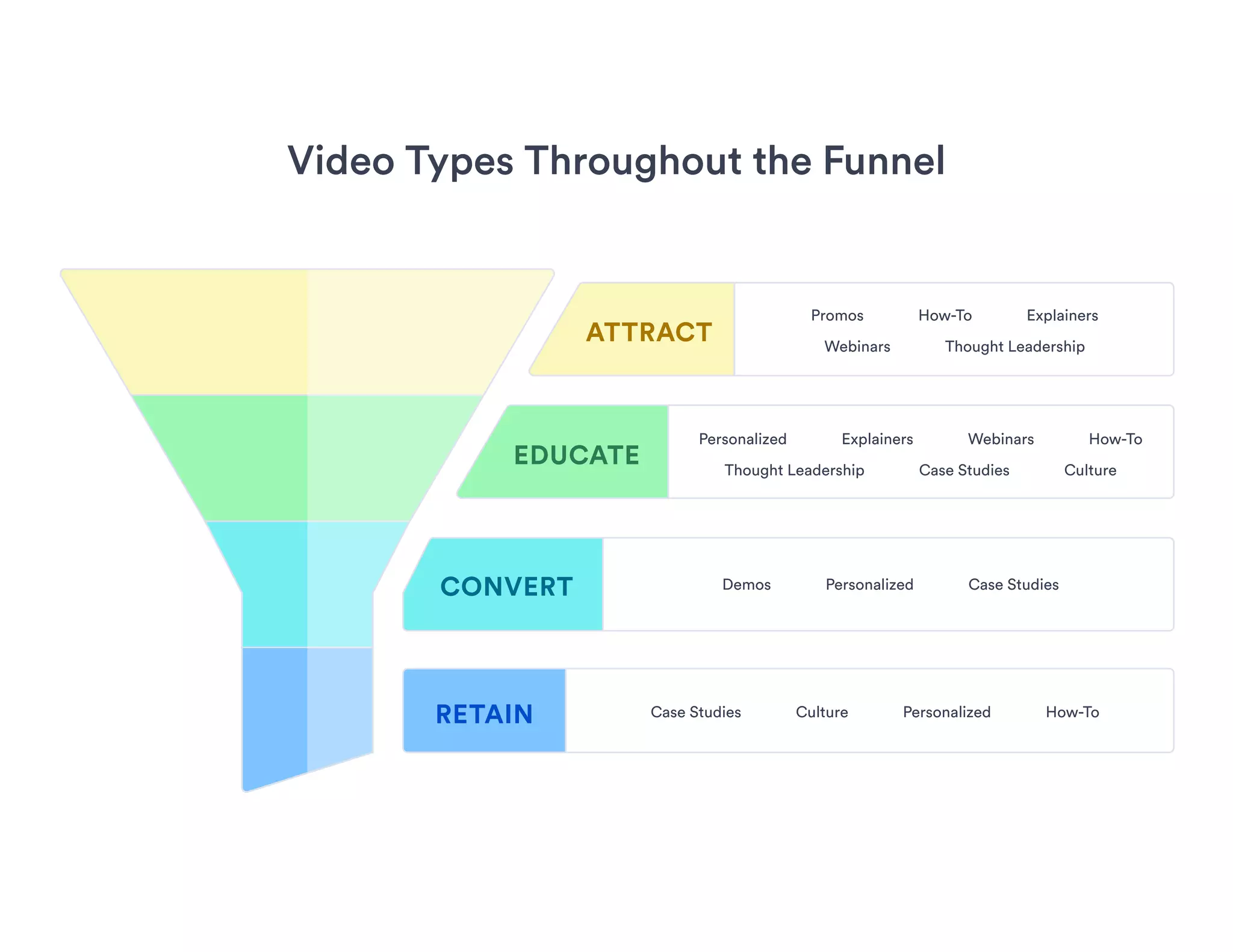
Video Types Throughout the Funnel
Explainer Videos
How-To Videos
Promo Videos
Thought Leadership Videos
03
04
05
06
07
08
Webinars
Case Study Videos
Culture Videos
Demo Videos
Personalized Videos
09
10
11
12
13
Introduction
Odds are, your brand is going to need more than one video.
Why? Because different types of video serve different purposes
and help your business achieve different goals.
A well-rounded video strategy—one that attracts, educates,
converts, and retains your prospects and customers—includes
videos that meet different needs across the buyer’s journey.
Some of the most popular video types for business are:
Explainers, promos, demos, how to, case studies, culture,
thought leadership, webinars, and personalized.
Each one can be made at varying production levels and used
in myriad ways. Some work best when they’re more polished,
others shine when they’re scrappy. Some are great for the top of
the funnel, others help you retain existing customers. Some can
be used throughout.
But with virtually endless possibilities, how do you decide which
type to start with or know what to create next?
That’ll depend not only on where your video fits in your buyer’s
journey and what goal you want to achieve with it, but also on the
amount of time, energy, and resources you’ll have to produce it.
Learn more about where each type of video fits in the marketing
funnel, what channels you can share them on, how long they
should be, their expected production value, and things you
should consider when making them.
Video Types Throughout the Funnel
Promos How-To Explainers
Webinars Thought Leadership
Personalized Explainers Webinars How-To
Thought Leadership Case Studies Culture
Demos Personalized Case Studies
Case Studies Culture Personalized How-To
ATTRACT
EDUCATE
CONVERT
RETAIN
Explainer Videos
An explainer video is a short, powerful
video that captures your brand promise
and shows potential customers what you
do and why they should care. Think of it as
an elevator pitch in video form.
Checklist for Creating Explainer Videos
Stick to one or two key messages
Focus on your audience and how you help them
Start strong to capture attention straight away
Address viewers directly using words like “you”
Keep it short and entertaining
Match the narration to the video’s tone
Answer your audience’s questions
End with a strong call to action
Funnel Stage Length
Channel Options
Production
Value
Attract/Educate
Website Email YouTube AdsSocial Media
60 to 90 secondsStandard/Polished
youtube bullhornbrowser envelope thumbs-up
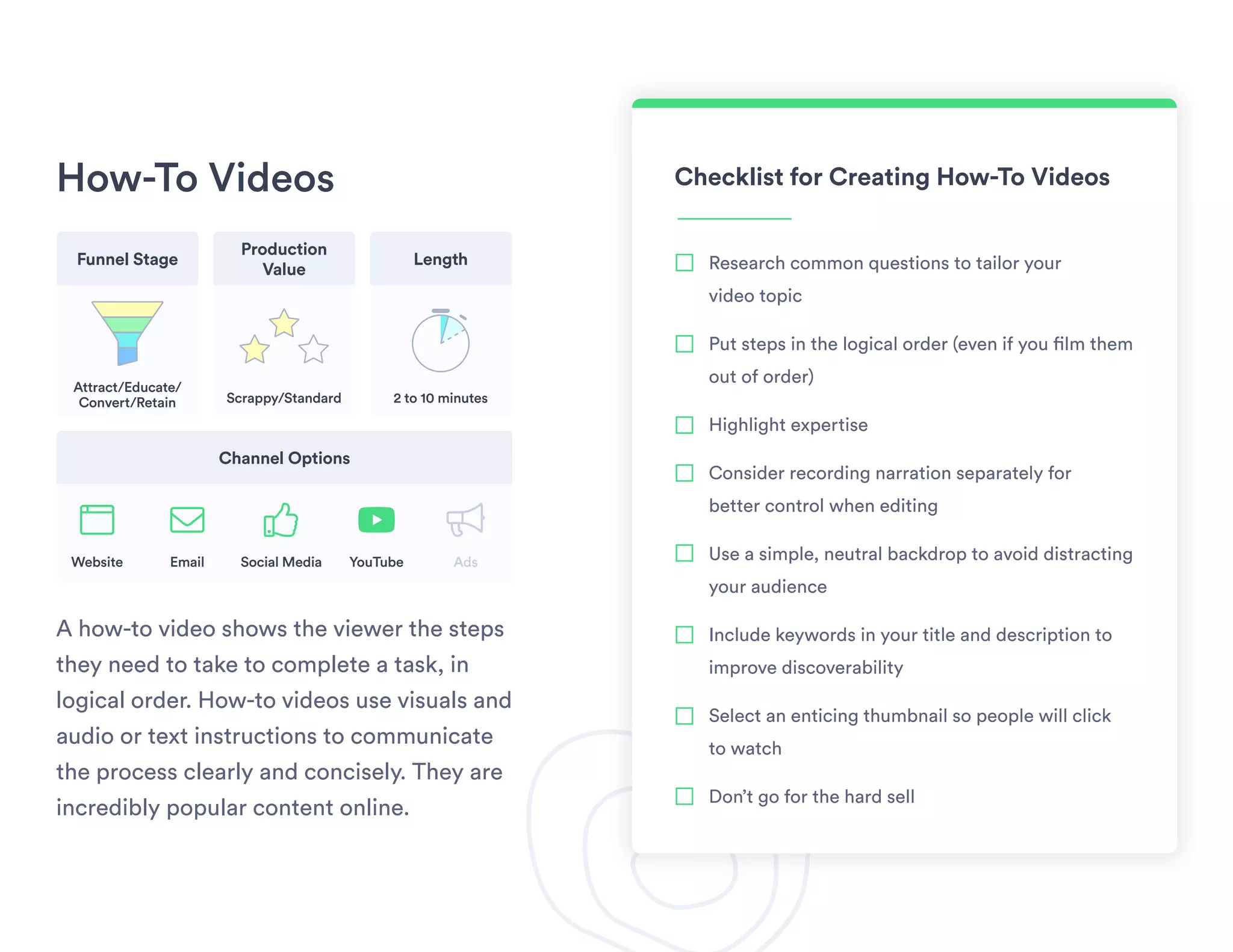
How-To Videos
A how-to video shows the viewer the steps
they need to take to complete a task, in
logical order. How-to videos use visuals and
audio or text instructions to communicate
the process clearly and concisely. They are
incredibly popular content online.
Checklist for Creating How-To Videos
Research common questions to tailor your
video topic
Put steps in the logical order (even if you film them
out of order)
Highlight expertise
Consider recording narration separately for
better control when editing
Use a simple, neutral backdrop to avoid distracting
your audience
Include keywords in your title and description to
improve discoverability
Select an enticing thumbnail so people will click
to watch
Don’t go for the hard sell
Funnel Stage Length
Channel Options
Production
Value
Attract/Educate/
Convert/Retain
Website Email YouTube AdsSocial Media
2 to 10 minutesScrappy/Standard
youtube bullhornbrowser envelope thumbs-up
Promo Videos
A promo video is designed to promote
something: a content asset, a product, a
service, or a brand. Promo videos, or hype
videos, are like movie trailers for businesses.
Checklist for Creating Promo Videos
Keep it short
Script it in advance to keep things succinct
Practice before shooting to nail your dialogue
Focus on emotion
Don’t give it all away in the video: Aim to
spark curiosity
Consider using stock footage
Pump up the excitement with music
Include a strong CTA to whatever it is
you’re promoting
Funnel Stage Length
Channel Options
Production
Value
Attract
Website Email YouTube AdsSocial Media
30 to 60 secondsStandard/Polished
youtube bullhornbrowser envelope thumbs-up
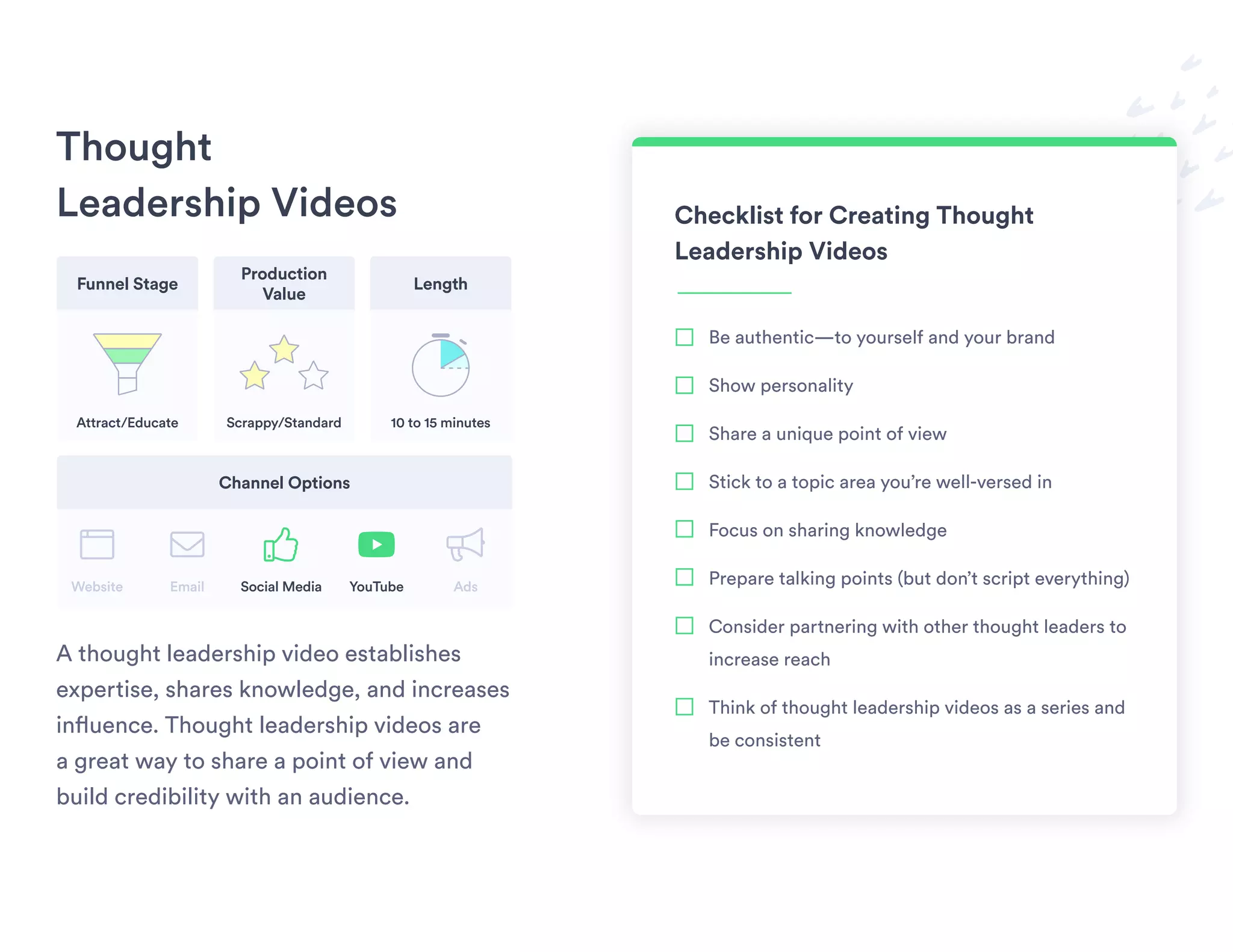
Thought
Leadership Videos
A thought leadership video establishes
expertise, shares knowledge, and increases
influence. Thought leadership videos are
a great way to share a point of view and
build credibility with an audience.
Checklist for Creating Thought
Leadership Videos
Be authentic—to yourself and your brand
Show personality
Share a unique point of view
Stick to a topic area you’re well-versed in
Focus on sharing knowledge
Prepare talking points (but don’t script everything)
Consider partnering with other thought leaders to
increase reach
Think of thought leadership videos as a series and
be consistent
Funnel Stage Length
Channel Options
Production
Value
Attract/Educate
Website Email YouTube AdsSocial Media
10 to 15 minutesScrappy/Standard
youtube bullhornbrowser envelope thumbs-up
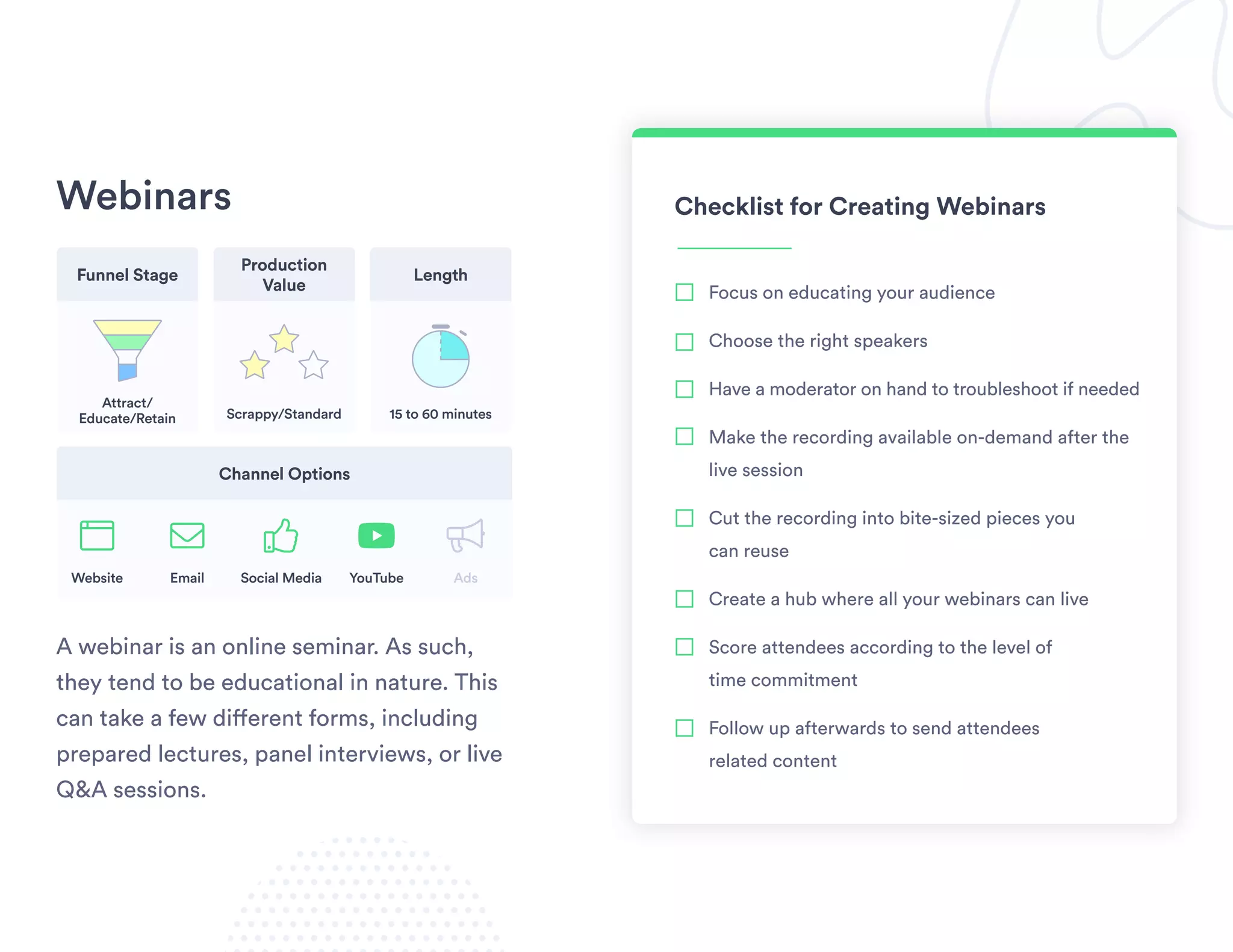
Webinars
A webinar is an online seminar. As such,
they tend to be educational in nature. This
can take a few different forms, including
prepared lectures, panel interviews, or live
Q&A sessions.
Checklist for Creating Webinars
Focus on educating your audience
Choose the right speakers
Have a moderator on hand to troubleshoot if needed
Make the recording available on-demand after the
live session
Cut the recording into bite-sized pieces you
can reuse
Create a hub where all your webinars can live
Score attendees according to the level of
time commitment
Follow up afterwards to send attendees
related content
Funnel Stage Length
Channel Options
Production
Value
Attract/
Educate/Retain
Website Email YouTube AdsSocial Media
15 to 60 minutesScrappy/Standard
youtube bullhornbrowser envelope thumbs-up
Case Study Videos
A case study video tells the story of how a
real customer uses your product to achieve
their goals. Case study videos illustrate the
value of a product by providing third-party
validation from real people enjoying its
benefits.
Checklist for Creating Case
Study Videos
Conduct background interviews
Plot your story arc and plan your questions ahead
of the shoot day
Choose a shoot location that fits the tone of the story
Get your customer on camera to tell their own story
Ask your customer to include part of the question
in their answer
Focus on benefits rather than features
Back up the story with metrics and stats
Shoot B-roll footage to add visual variety to your
final video
Funnel Stage Length
Channel Options
Production
Value
Educate/
Convert/Retain
Website Email YouTube AdsSocial Media
5 to 10 minutes
Scrappy/
Standard/Polished
youtube bullhornbrowser envelope thumbs-up
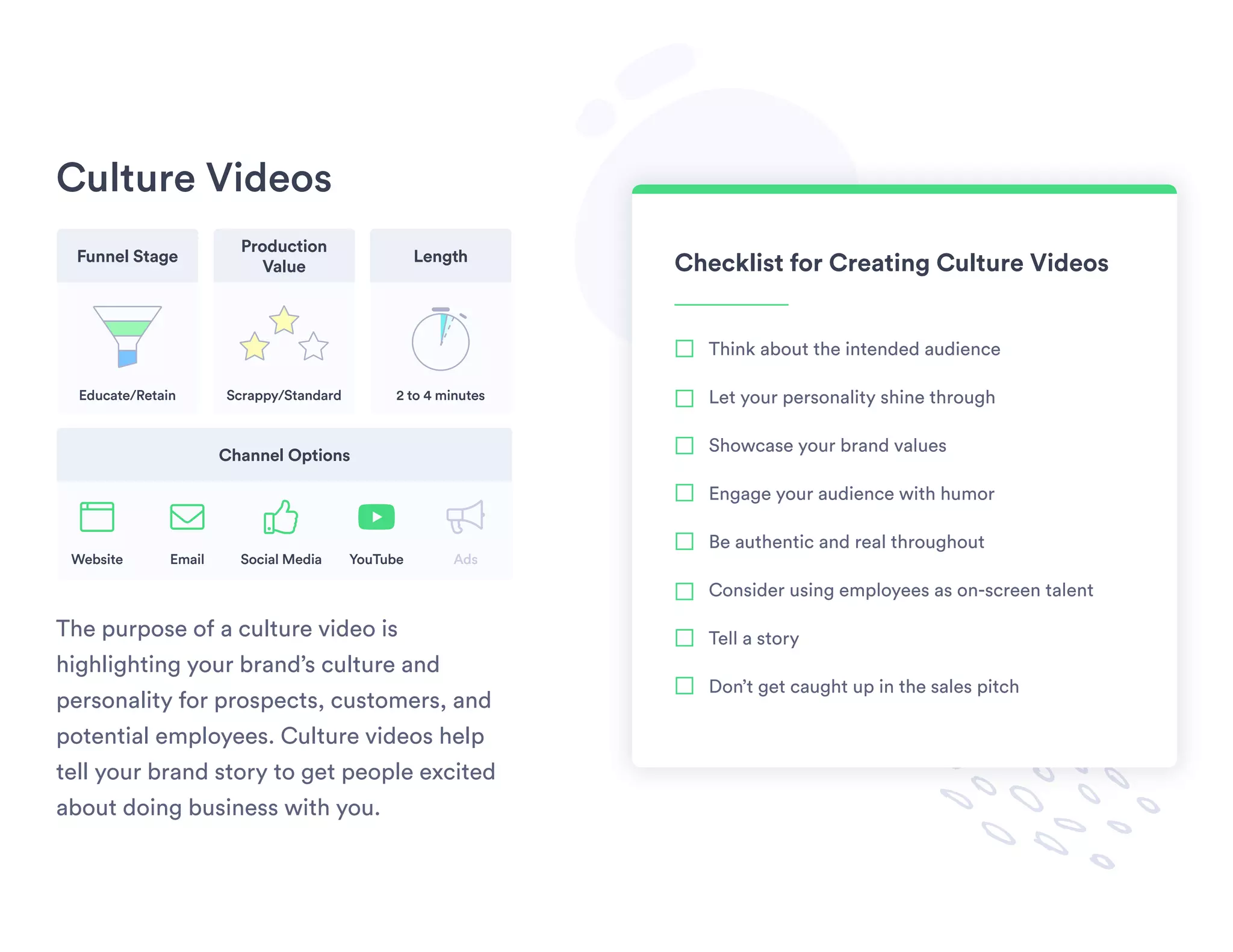
Culture Videos
The purpose of a culture video is
highlighting your brand’s culture and
personality for prospects, customers, and
potential employees. Culture videos help
tell your brand story to get people excited
about doing business with you.
Checklist for Creating Culture Videos
Think about the intended audience
Let your personality shine through
Showcase your brand values
Engage your audience with humor
Be authentic and real throughout
Consider using employees as on-screen talent
Tell a story
Don’t get caught up in the sales pitch
Funnel Stage Length
Channel Options
Production
Value
Educate/Retain
Website Email YouTube AdsSocial Media
2 to 4 minutesScrappy/Standard
youtube bullhornbrowser envelope thumbs-up
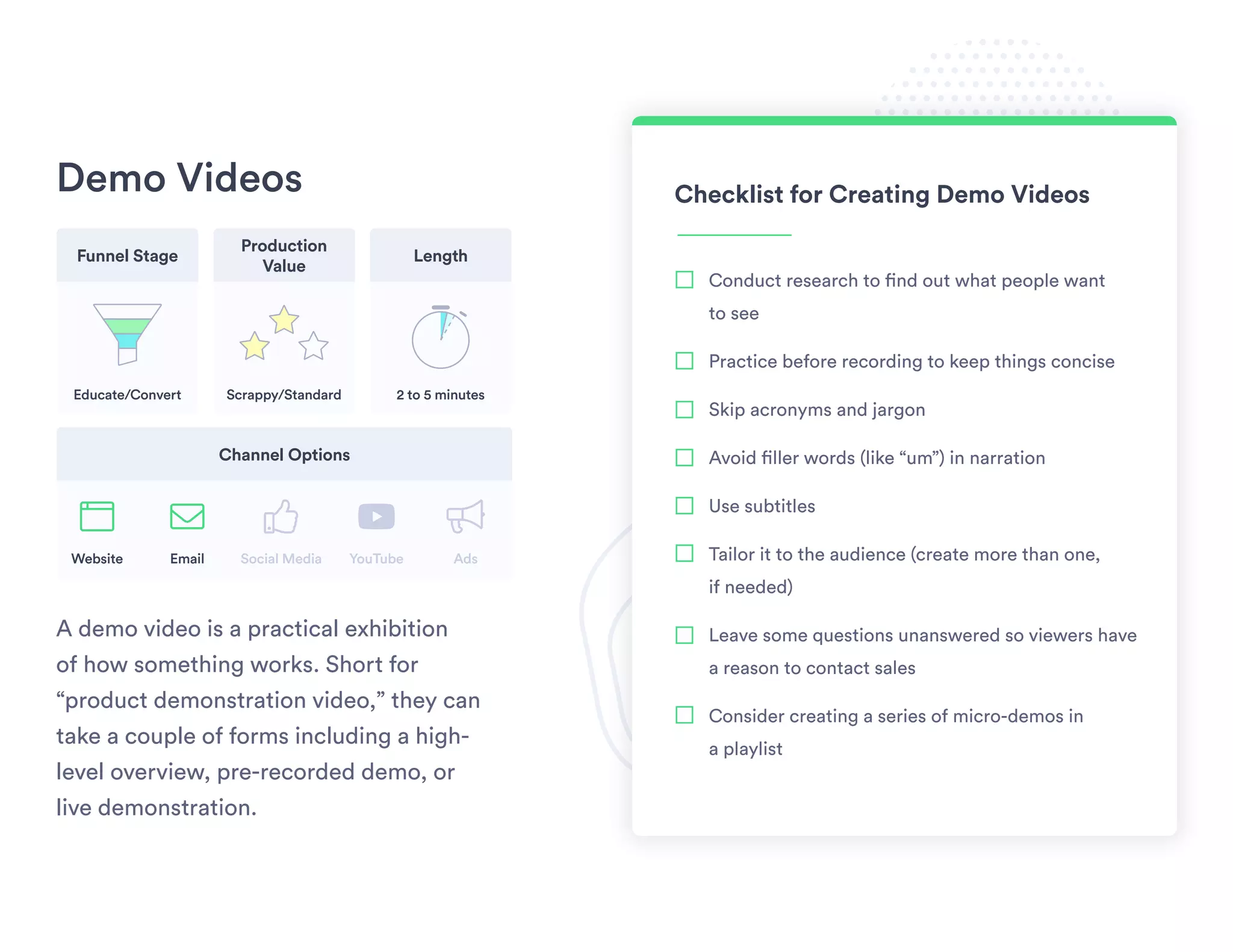
Demo Videos
A demo video is a practical exhibition
of how something works. Short for
“product demonstration video,” they can
take a couple of forms including a high-
level overview, pre-recorded demo, or
live demonstration.
Checklist for Creating Demo Videos
Conduct research to find out what people want
to see
Practice before recording to keep things concise
Skip acronyms and jargon
Avoid filler words (like “um”) in narration
Use subtitles
Tailor it to the audience (create more than one,
if needed)
Leave some questions unanswered so viewers have
a reason to contact sales
Consider creating a series of micro-demos in
a playlist
Funnel Stage Length
Channel Options
Production
Value
Educate/Convert
Website Email YouTube AdsSocial Media
2 to 5 minutesScrappy/Standard
youtube bullhornbrowser envelope thumbs-up
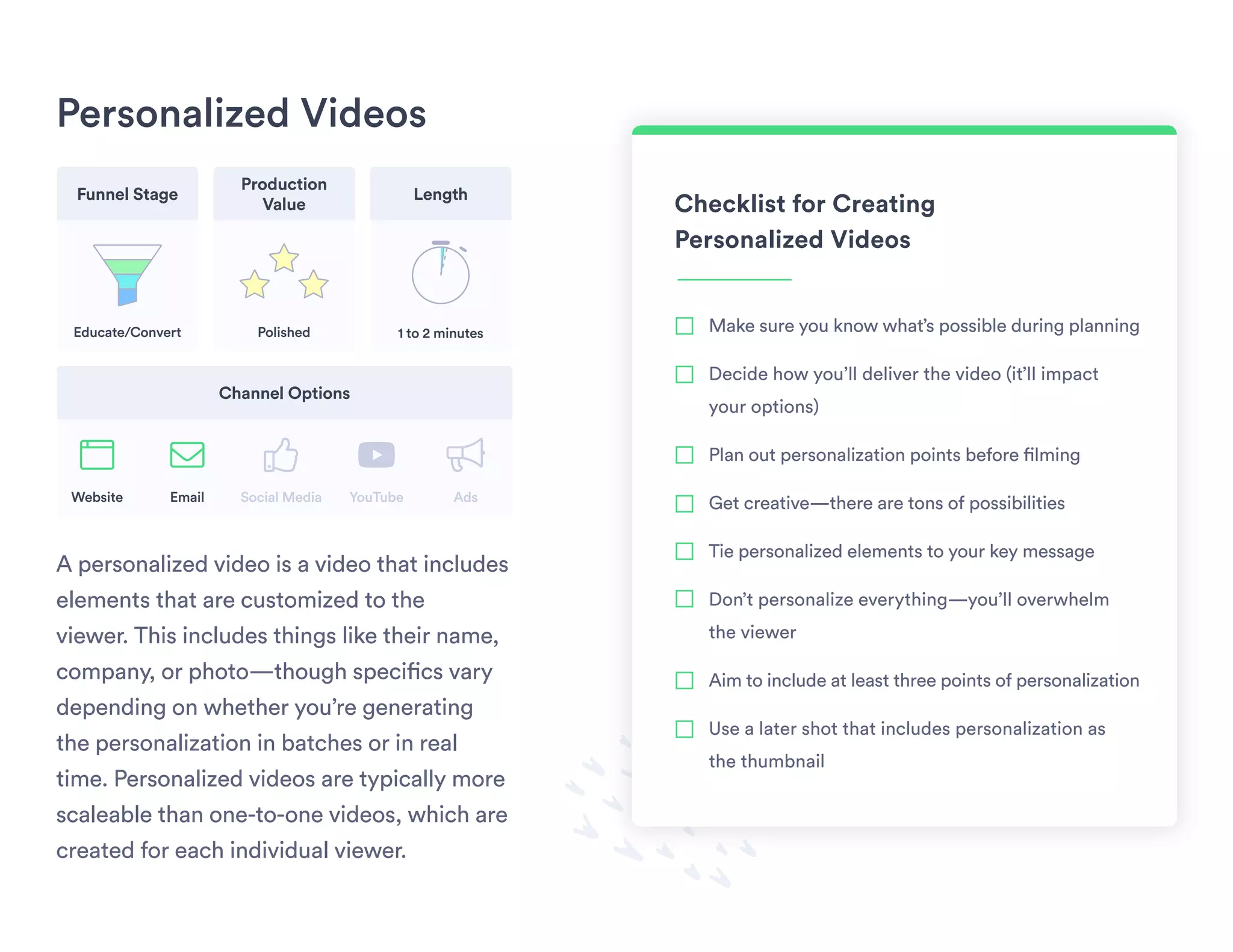
Personalized Videos
A personalized video is a video that includes
elements that are customized to the
viewer. This includes things like their name,
company, or photo—though specifics vary
depending on whether you’re generating
the personalization in batches or in real
time. Personalized videos are typically more
scaleable than one-to-one videos, which are
created for each individual viewer.
Checklist for Creating
Personalized Videos
Make sure you know what’s possible during planning
Decide how you’ll deliver the video (it’ll impact
your options)
Plan out personalization points before filming
Get creative—there are tons of possibilities
Tie personalized elements to your key message
Don’t personalize everything—you’ll overwhelm
the viewer
Aim to include at least three points of personalization
Use a later shot that includes personalization as
the thumbnail
Funnel Stage Length
Channel Options
Production
Value
Educate/Convert
Website Email YouTube AdsSocial Media
1 to 2 minutesPolished
youtube bullhornbrowser envelope thumbs-up
Smart businesses know that people want
video. Everyone craves it, relates to it, and
most importantly, presses play. But smart
businesses also know that you need more
than just eyeballs on your content. That’s
where Vidyard, the video platform for
business, comes in. Simply put, Vidyard
gives you the power to create better,
stronger business results, like more
(and better!) leads, more pipeline, and
more customers.
About Us
www.vidyard.com
Get Started for Free
Vidyard is the fastest way for
businesses to create and share
video—for free. Put your
videos to work.
www.vidyard.com/start-free

9 Types of Video for Business

  • 1.
    9 Essential Typesof Video for Business A Guide to Using Them Throughout the Buyer’s Journey
  • 2.
    Table of Contents Introduction VideoTypes Throughout the Funnel Explainer Videos How-To Videos Promo Videos Thought Leadership Videos 03 04 05 06 07 08 Webinars Case Study Videos Culture Videos Demo Videos Personalized Videos 09 10 11 12 13
  • 3.
    Introduction Odds are, yourbrand is going to need more than one video. Why? Because different types of video serve different purposes and help your business achieve different goals. A well-rounded video strategy—one that attracts, educates, converts, and retains your prospects and customers—includes videos that meet different needs across the buyer’s journey. Some of the most popular video types for business are: Explainers, promos, demos, how to, case studies, culture, thought leadership, webinars, and personalized. Each one can be made at varying production levels and used in myriad ways. Some work best when they’re more polished, others shine when they’re scrappy. Some are great for the top of the funnel, others help you retain existing customers. Some can be used throughout. But with virtually endless possibilities, how do you decide which type to start with or know what to create next? That’ll depend not only on where your video fits in your buyer’s journey and what goal you want to achieve with it, but also on the amount of time, energy, and resources you’ll have to produce it. Learn more about where each type of video fits in the marketing funnel, what channels you can share them on, how long they should be, their expected production value, and things you should consider when making them.
  • 4.
    Video Types Throughoutthe Funnel Promos How-To Explainers Webinars Thought Leadership Personalized Explainers Webinars How-To Thought Leadership Case Studies Culture Demos Personalized Case Studies Case Studies Culture Personalized How-To ATTRACT EDUCATE CONVERT RETAIN
  • 5.
    Explainer Videos An explainervideo is a short, powerful video that captures your brand promise and shows potential customers what you do and why they should care. Think of it as an elevator pitch in video form. Checklist for Creating Explainer Videos Stick to one or two key messages Focus on your audience and how you help them Start strong to capture attention straight away Address viewers directly using words like “you” Keep it short and entertaining Match the narration to the video’s tone Answer your audience’s questions End with a strong call to action Funnel Stage Length Channel Options Production Value Attract/Educate Website Email YouTube AdsSocial Media 60 to 90 secondsStandard/Polished youtube bullhornbrowser envelope thumbs-up
  • 6.
    How-To Videos A how-tovideo shows the viewer the steps they need to take to complete a task, in logical order. How-to videos use visuals and audio or text instructions to communicate the process clearly and concisely. They are incredibly popular content online. Checklist for Creating How-To Videos Research common questions to tailor your video topic Put steps in the logical order (even if you film them out of order) Highlight expertise Consider recording narration separately for better control when editing Use a simple, neutral backdrop to avoid distracting your audience Include keywords in your title and description to improve discoverability Select an enticing thumbnail so people will click to watch Don’t go for the hard sell Funnel Stage Length Channel Options Production Value Attract/Educate/ Convert/Retain Website Email YouTube AdsSocial Media 2 to 10 minutesScrappy/Standard youtube bullhornbrowser envelope thumbs-up
  • 7.
    Promo Videos A promovideo is designed to promote something: a content asset, a product, a service, or a brand. Promo videos, or hype videos, are like movie trailers for businesses. Checklist for Creating Promo Videos Keep it short Script it in advance to keep things succinct Practice before shooting to nail your dialogue Focus on emotion Don’t give it all away in the video: Aim to spark curiosity Consider using stock footage Pump up the excitement with music Include a strong CTA to whatever it is you’re promoting Funnel Stage Length Channel Options Production Value Attract Website Email YouTube AdsSocial Media 30 to 60 secondsStandard/Polished youtube bullhornbrowser envelope thumbs-up
  • 8.
    Thought Leadership Videos A thoughtleadership video establishes expertise, shares knowledge, and increases influence. Thought leadership videos are a great way to share a point of view and build credibility with an audience. Checklist for Creating Thought Leadership Videos Be authentic—to yourself and your brand Show personality Share a unique point of view Stick to a topic area you’re well-versed in Focus on sharing knowledge Prepare talking points (but don’t script everything) Consider partnering with other thought leaders to increase reach Think of thought leadership videos as a series and be consistent Funnel Stage Length Channel Options Production Value Attract/Educate Website Email YouTube AdsSocial Media 10 to 15 minutesScrappy/Standard youtube bullhornbrowser envelope thumbs-up
  • 9.
    Webinars A webinar isan online seminar. As such, they tend to be educational in nature. This can take a few different forms, including prepared lectures, panel interviews, or live Q&A sessions. Checklist for Creating Webinars Focus on educating your audience Choose the right speakers Have a moderator on hand to troubleshoot if needed Make the recording available on-demand after the live session Cut the recording into bite-sized pieces you can reuse Create a hub where all your webinars can live Score attendees according to the level of time commitment Follow up afterwards to send attendees related content Funnel Stage Length Channel Options Production Value Attract/ Educate/Retain Website Email YouTube AdsSocial Media 15 to 60 minutesScrappy/Standard youtube bullhornbrowser envelope thumbs-up
  • 10.
    Case Study Videos Acase study video tells the story of how a real customer uses your product to achieve their goals. Case study videos illustrate the value of a product by providing third-party validation from real people enjoying its benefits. Checklist for Creating Case Study Videos Conduct background interviews Plot your story arc and plan your questions ahead of the shoot day Choose a shoot location that fits the tone of the story Get your customer on camera to tell their own story Ask your customer to include part of the question in their answer Focus on benefits rather than features Back up the story with metrics and stats Shoot B-roll footage to add visual variety to your final video Funnel Stage Length Channel Options Production Value Educate/ Convert/Retain Website Email YouTube AdsSocial Media 5 to 10 minutes Scrappy/ Standard/Polished youtube bullhornbrowser envelope thumbs-up
  • 11.
    Culture Videos The purposeof a culture video is highlighting your brand’s culture and personality for prospects, customers, and potential employees. Culture videos help tell your brand story to get people excited about doing business with you. Checklist for Creating Culture Videos Think about the intended audience Let your personality shine through Showcase your brand values Engage your audience with humor Be authentic and real throughout Consider using employees as on-screen talent Tell a story Don’t get caught up in the sales pitch Funnel Stage Length Channel Options Production Value Educate/Retain Website Email YouTube AdsSocial Media 2 to 4 minutesScrappy/Standard youtube bullhornbrowser envelope thumbs-up
  • 12.
    Demo Videos A demovideo is a practical exhibition of how something works. Short for “product demonstration video,” they can take a couple of forms including a high- level overview, pre-recorded demo, or live demonstration. Checklist for Creating Demo Videos Conduct research to find out what people want to see Practice before recording to keep things concise Skip acronyms and jargon Avoid filler words (like “um”) in narration Use subtitles Tailor it to the audience (create more than one, if needed) Leave some questions unanswered so viewers have a reason to contact sales Consider creating a series of micro-demos in a playlist Funnel Stage Length Channel Options Production Value Educate/Convert Website Email YouTube AdsSocial Media 2 to 5 minutesScrappy/Standard youtube bullhornbrowser envelope thumbs-up
  • 13.
    Personalized Videos A personalizedvideo is a video that includes elements that are customized to the viewer. This includes things like their name, company, or photo—though specifics vary depending on whether you’re generating the personalization in batches or in real time. Personalized videos are typically more scaleable than one-to-one videos, which are created for each individual viewer. Checklist for Creating Personalized Videos Make sure you know what’s possible during planning Decide how you’ll deliver the video (it’ll impact your options) Plan out personalization points before filming Get creative—there are tons of possibilities Tie personalized elements to your key message Don’t personalize everything—you’ll overwhelm the viewer Aim to include at least three points of personalization Use a later shot that includes personalization as the thumbnail Funnel Stage Length Channel Options Production Value Educate/Convert Website Email YouTube AdsSocial Media 1 to 2 minutesPolished youtube bullhornbrowser envelope thumbs-up
  • 14.
    Smart businesses knowthat people want video. Everyone craves it, relates to it, and most importantly, presses play. But smart businesses also know that you need more than just eyeballs on your content. That’s where Vidyard, the video platform for business, comes in. Simply put, Vidyard gives you the power to create better, stronger business results, like more (and better!) leads, more pipeline, and more customers. About Us www.vidyard.com Get Started for Free Vidyard is the fastest way for businesses to create and share video—for free. Put your videos to work. www.vidyard.com/start-free