7 Ways to Make
Websites More
Accessible
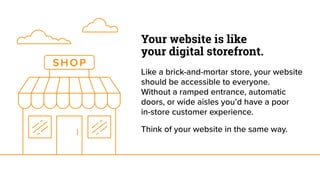
Your website is like
your digital storefront. 
Like a brick-and-mortar store, your website
should be accessible to everyone.
Without a ramped entrance, automatic
doors, or wide aisles you’d have a poor
in-store customer experience.
Think of your website in the same way.
What do we mean by
accessibility?
Accessibility refers to how easily a person
can interact with your website regardless
of their abilities or impairments. It’s about
empathy and considering your audience
with each decision you make.
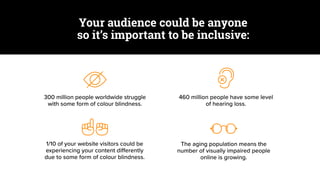
300 million people worldwide struggle
with some form of colour blindness.
460 million people have some level
of hearing loss.
1/10 of your website visitors could be
experiencing your content differently
due to some form of colour blindness.
The aging population means the
number of visually impaired people
online is growing.
Your audience could be anyone
so it’s important to be inclusive:
So, what can you do address
the digital accessibility of
your brand?
Visual Tips
It’s important to have enough contrast
between text and background colours so
your content is legible. Visitors with
colour blindness can see the difference
between bright colours better than they
can between dull colours, which tend to
blur into one another.
Here are some ways that you can
increase contrast
Lorem ipsum dolor sit amet, consectetur
adipiscing elit, sed do eiusmod tempor
incididunt ut labore et dolore magna
aliqua ut enim ad minim.
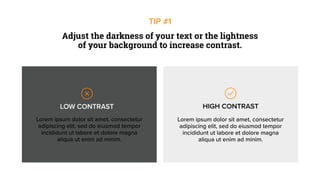
LOW CONTRAST
Lorem ipsum dolor sit amet, consectetur
adipiscing elit, sed do eiusmod tempor
incididunt ut labore et dolore magna
aliqua ut enim ad minim.
HIGH CONTRAST
Adjust the darkness of your text or the lightness
of your background to increase contrast.
TIP #1
Lorem ipsum dolor sit amet, consectetur
adipiscing elit, sed do eiusmod tempor
incididunt ut labore et dolore magna
aliqua ut enim ad minim.
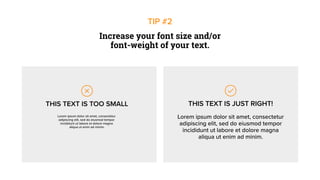
Increase your font size and/or
font-weight of your text.
TIP #2
THIS TEXT IS TOO SMALL
Lorem ipsum dolor sit amet, consectetur
adipiscing elit, sed do eiusmod tempor
incididunt ut labore et dolore magna
aliqua ut enim ad minim.
THIS TEXT IS JUST RIGHT!
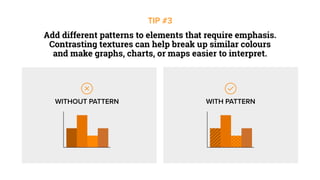
Add different patterns to elements that require emphasis.
Contrasting textures can help break up similar colours
and make graphs, charts, or maps easier to interpret.
TIP #3
WITHOUT PATTERN WITH PATTERN
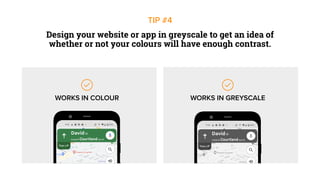
Design your website or app in greyscale to get an idea of
whether or not your colours will have enough contrast.
TIP #4
WORKS IN COLOUR WORKS IN GREYSCALE
Text Tips
Make your website compatible with
screen readers to assist those with visual
impairments. Screen readers are assistive
devices that go through the flow of your
webpage and convert text to speech.
Here are some ways that you can
improve text on your website
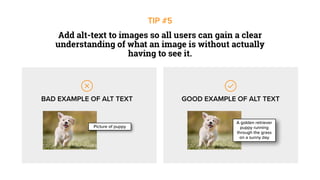
Picture of puppy
A golden retriever
puppy running
through the grass
on a sunny day
BAD EXAMPLE OF ALT TEXT GOOD EXAMPLE OF ALT TEXT
Add alt-text to images so all users can gain a clear
understanding of what an image is without actually
having to see it.
TIP #5
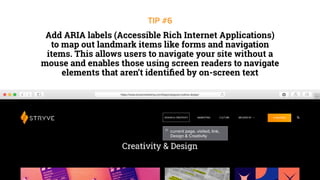
current page, visited, link,
Design & Creativity
Add ARIA labels (Accessible Rich Internet Applications)
to map out landmark items like forms and navigation
items. This allows users to navigate your site without a
mouse and enables those using screen readers to navigate
elements that aren’t identified by on-screen text
TIP #6
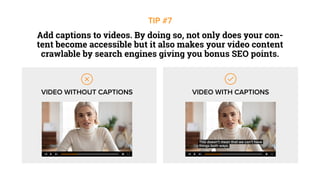
Add captions to videos. By doing so, not only does your con-
tent become accessible but it also makes your video content
crawlable by search engines giving you bonus SEO points.
TIP #7
VIDEO WITHOUT CAPTIONS VIDEO WITH CAPTIONS
This doesn’t mean that we can’t have
things both ways.
Accessibility Benefits
All Users
While the focus is put on those with
impairments, accessible design actually
makes a website easier for everyone to
use. It even addresses the needs of
users in different contexts such as
those using devices in bright sunlight.
The more you’re able to reduce barriers
for users in different contexts, the
easier and more likely customers
can engage with your brand.
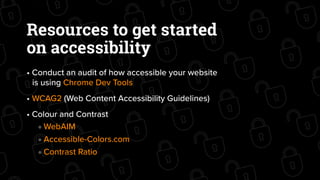
Resources to get started
on accessibility
• Conduct an audit of how accessible your website
is using Chrome Dev Tools
• WCAG2 (Web Content Accessibility Guidelines)
• Colour and Contrast
WebAIM
Accessible-Colors.com
Contrast Ratio
Subscribe to our
content hub!
Get the latest digital marketing
and design trends sent straight to
your inbox.
Click here to subscribe
7 Ways To Make Websites More Accessible

7 Ways To Make Websites More Accessible

  • 1.
    7 Ways toMake Websites More Accessible
  • 2.
    Your website islike your digital storefront.  Like a brick-and-mortar store, your website should be accessible to everyone. Without a ramped entrance, automatic doors, or wide aisles you’d have a poor in-store customer experience. Think of your website in the same way.
  • 3.
    What do wemean by accessibility? Accessibility refers to how easily a person can interact with your website regardless of their abilities or impairments. It’s about empathy and considering your audience with each decision you make.
  • 4.
    300 million peopleworldwide struggle with some form of colour blindness. 460 million people have some level of hearing loss. 1/10 of your website visitors could be experiencing your content differently due to some form of colour blindness. The aging population means the number of visually impaired people online is growing. Your audience could be anyone so it’s important to be inclusive:
  • 5.
    So, what canyou do address the digital accessibility of your brand?
  • 6.
    Visual Tips It’s importantto have enough contrast between text and background colours so your content is legible. Visitors with colour blindness can see the difference between bright colours better than they can between dull colours, which tend to blur into one another. Here are some ways that you can increase contrast
  • 7.
    Lorem ipsum dolorsit amet, consectetur adipiscing elit, sed do eiusmod tempor incididunt ut labore et dolore magna aliqua ut enim ad minim. LOW CONTRAST Lorem ipsum dolor sit amet, consectetur adipiscing elit, sed do eiusmod tempor incididunt ut labore et dolore magna aliqua ut enim ad minim. HIGH CONTRAST Adjust the darkness of your text or the lightness of your background to increase contrast. TIP #1
  • 8.
    Lorem ipsum dolorsit amet, consectetur adipiscing elit, sed do eiusmod tempor incididunt ut labore et dolore magna aliqua ut enim ad minim. Increase your font size and/or font-weight of your text. TIP #2 THIS TEXT IS TOO SMALL Lorem ipsum dolor sit amet, consectetur adipiscing elit, sed do eiusmod tempor incididunt ut labore et dolore magna aliqua ut enim ad minim. THIS TEXT IS JUST RIGHT!
  • 9.
    Add different patternsto elements that require emphasis. Contrasting textures can help break up similar colours and make graphs, charts, or maps easier to interpret. TIP #3 WITHOUT PATTERN WITH PATTERN
  • 10.
    Design your websiteor app in greyscale to get an idea of whether or not your colours will have enough contrast. TIP #4 WORKS IN COLOUR WORKS IN GREYSCALE
  • 11.
    Text Tips Make yourwebsite compatible with screen readers to assist those with visual impairments. Screen readers are assistive devices that go through the flow of your webpage and convert text to speech. Here are some ways that you can improve text on your website
  • 12.
    Picture of puppy Agolden retriever puppy running through the grass on a sunny day BAD EXAMPLE OF ALT TEXT GOOD EXAMPLE OF ALT TEXT Add alt-text to images so all users can gain a clear understanding of what an image is without actually having to see it. TIP #5
  • 13.
    current page, visited,link, Design & Creativity Add ARIA labels (Accessible Rich Internet Applications) to map out landmark items like forms and navigation items. This allows users to navigate your site without a mouse and enables those using screen readers to navigate elements that aren’t identified by on-screen text TIP #6
  • 14.
    Add captions tovideos. By doing so, not only does your con- tent become accessible but it also makes your video content crawlable by search engines giving you bonus SEO points. TIP #7 VIDEO WITHOUT CAPTIONS VIDEO WITH CAPTIONS This doesn’t mean that we can’t have things both ways.
  • 15.
    Accessibility Benefits All Users Whilethe focus is put on those with impairments, accessible design actually makes a website easier for everyone to use. It even addresses the needs of users in different contexts such as those using devices in bright sunlight. The more you’re able to reduce barriers for users in different contexts, the easier and more likely customers can engage with your brand.
  • 16.
    Resources to getstarted on accessibility • Conduct an audit of how accessible your website is using Chrome Dev Tools • WCAG2 (Web Content Accessibility Guidelines) • Colour and Contrast WebAIM Accessible-Colors.com Contrast Ratio
  • 17.
    Subscribe to our contenthub! Get the latest digital marketing and design trends sent straight to your inbox. Click here to subscribe