Migrating Your Learning
Management System
Webinar originally aired on itslearning.com
November 2015
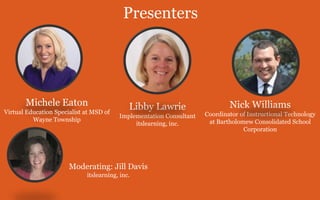
Moderating: Jill Davis
itslearning, inc.
Presenters
Libby Lawrie
Implementation Consultant
itslearning, inc.
Nick Williams
Coordinator of Instructional Technology
at Bartholomew Consolidated School
Corporation
Michele Eaton
Virtual Education Specialist at MSD of
Wayne Township
1
Define
Your Goals
Step 1: Define Your Goals
Do you want to:
• Make it easier for teachers to do their jobs?
• Improve communication and collaboration?
• More effectively manage curriculum/assets?
2
Assemble
Your Team
Step 2: Assemble Your Team
Gather champions from:
• IT and SIS
• Curriculum experts
• Project managers
• Database administrators
• Solution provider
3
Review Course
Design
Step 3: Review Current Course Design,
Document Improvements
What can your new LMS do beyond your current
platform?
• Align content, resources to learning objectives
• Assessment (offline activities, ePortfolios)
• Facilitating the Four C’s
4
Review Your IT
Policies
Step 4: Review Your IT Policies
Is your new LMS in compliance?
• Testing environment (sandbox)
• Security, user profiles, permissions
• Dashboard design guidelines
• SIS integration, single sign on (SSO)
Step 5: Define Scope/Plan for Data, Content
and Course Migration
• How do you manage your curriculum?
• Use course templates and planners
• Let teachers work with sandbox courses
5
Define Your
Scope
Real-World Migrations
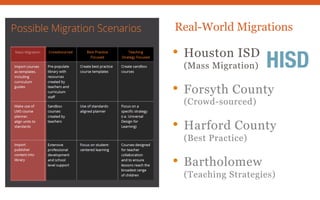
• Houston ISD
(Mass Migration)
• Forsyth County
(Crowd-sourced)
• Harford County
(Best Practice)
• Bartholomew
(Teaching Strategies)
Real-World Migrations
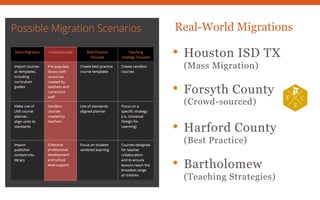
• Houston ISD TX
(Mass Migration)
• Forsyth County
(Crowd-sourced)
• Harford County
(Best Practice)
• Bartholomew
(Teaching Strategies)
Real-World Migrations
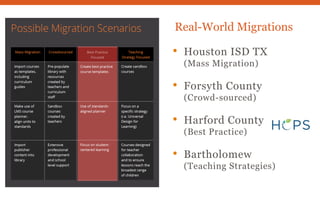
• Houston ISD TX
(Mass Migration)
• Forsyth County
(Crowd-sourced)
• Harford County
(Best Practice)
• Bartholomew
(Teaching Strategies)
Real-World Migrations
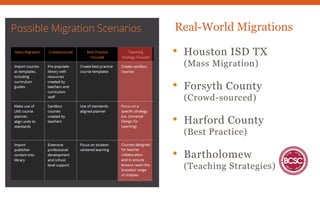
• Houston ISD TX
(Mass Migration)
• Forsyth County
(Crowd-sourced)
• Harford County
(Best Practice)
• Bartholomew
(Teaching Strategies)
6
Develop
Communication,
PD Plans
Step 6: Develop Communications and
Professional Development Plans
Professional Development
• Collaboration, school-level support
• Use your LMS to manage and deliver
• Let teachers try it out
Step 6: Develop Communications and
Professional Development Plans
Communications Plan
• Define your message (type, approach, format)
• Who will deliver? To which audience?
• Create a schedule
• Identify resources needed
• Measure success
7
Test &
Troubleshoot
Step 7: Test and Troubleshoot to Ensure
Go-Live Readiness
• Define your testing criteria
• Develop feedback process
• Prioritize and act on feedback
• Communicate changes made
Learn more about Learning Management Systems at:
itslearning.com/k-12/resources
Webinar originally aired on itslearning.com
November 2015

7 Steps to Migrating to Your Learning Management System (LMS)

  • 1.
    Migrating Your Learning ManagementSystem Webinar originally aired on itslearning.com November 2015
  • 2.
    Moderating: Jill Davis itslearning,inc. Presenters Libby Lawrie Implementation Consultant itslearning, inc. Nick Williams Coordinator of Instructional Technology at Bartholomew Consolidated School Corporation Michele Eaton Virtual Education Specialist at MSD of Wayne Township
  • 3.
  • 4.
    Step 1: DefineYour Goals Do you want to: • Make it easier for teachers to do their jobs? • Improve communication and collaboration? • More effectively manage curriculum/assets?
  • 5.
  • 6.
    Step 2: AssembleYour Team Gather champions from: • IT and SIS • Curriculum experts • Project managers • Database administrators • Solution provider
  • 7.
  • 8.
    Step 3: ReviewCurrent Course Design, Document Improvements What can your new LMS do beyond your current platform? • Align content, resources to learning objectives • Assessment (offline activities, ePortfolios) • Facilitating the Four C’s
  • 9.
  • 10.
    Step 4: ReviewYour IT Policies Is your new LMS in compliance? • Testing environment (sandbox) • Security, user profiles, permissions • Dashboard design guidelines • SIS integration, single sign on (SSO)
  • 11.
    Step 5: DefineScope/Plan for Data, Content and Course Migration • How do you manage your curriculum? • Use course templates and planners • Let teachers work with sandbox courses
  • 12.
  • 13.
    Real-World Migrations • HoustonISD (Mass Migration) • Forsyth County (Crowd-sourced) • Harford County (Best Practice) • Bartholomew (Teaching Strategies)
  • 14.
    Real-World Migrations • HoustonISD TX (Mass Migration) • Forsyth County (Crowd-sourced) • Harford County (Best Practice) • Bartholomew (Teaching Strategies)
  • 15.
    Real-World Migrations • HoustonISD TX (Mass Migration) • Forsyth County (Crowd-sourced) • Harford County (Best Practice) • Bartholomew (Teaching Strategies)
  • 16.
    Real-World Migrations • HoustonISD TX (Mass Migration) • Forsyth County (Crowd-sourced) • Harford County (Best Practice) • Bartholomew (Teaching Strategies)
  • 17.
  • 18.
    Step 6: DevelopCommunications and Professional Development Plans Professional Development • Collaboration, school-level support • Use your LMS to manage and deliver • Let teachers try it out
  • 19.
    Step 6: DevelopCommunications and Professional Development Plans Communications Plan • Define your message (type, approach, format) • Who will deliver? To which audience? • Create a schedule • Identify resources needed • Measure success
  • 20.
  • 21.
    Step 7: Testand Troubleshoot to Ensure Go-Live Readiness • Define your testing criteria • Develop feedback process • Prioritize and act on feedback • Communicate changes made
  • 22.
    Learn more aboutLearning Management Systems at: itslearning.com/k-12/resources Webinar originally aired on itslearning.com November 2015