Unit 57: Photography and
     Photographic Practice
Task 4 Selection of final images &
              review
Aim of Shoot

For Unit 57 I went to Salford Quays to
take landscape photos of the urban
environment. In total I took 79 photos
of the Quays. I walked through the
quays looking for structures that are
eye catching and would make the
perfect shot for the project. Once I
captured the various photos I chose
10 that I would edit. These final 10
images were edited in Photoshop.
Description of shoot


I walked around the Quays and looked
for different types of structures and
‘landmarks’ which people know the
quays for. I took photos of the different
‘landmarks’ from different angles and
with different shots. I then chose my
favourites and edited them.
Editing effects

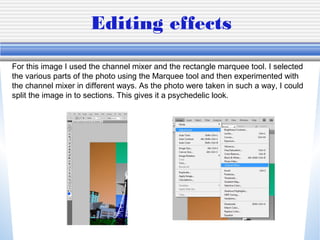
For this image I used the channel mixer and the rectangle marquee tool. I selected
the various parts of the photo using the Marquee tool and then experimented with
the channel mixer in different ways. As the photo were taken in such a way, I could
split the image in to sections. This gives it a psychedelic look.
Final Images

In the foreground of this picture there
is the quays with the bridge above. In
the background there are various
buildings. The buildings are close to
the well known Lowry Theater and
Outlet Mall. When taking this picture I
considered the rule of thirds and
made sure the main building in the
photo was off to the side.
Unfortunately the photo has been
taken from a strange angle.
Capture log

For my project I used DMC-F4. The shutter speed for all
photos taken was 1/256 secs. The lens aperture is F/6.7. The
ISO speed is ISO-80. Each photo is 4000 pixels wide and is
3000 pixels in height.
Editing effects

For these two images I simply used
the adjustment ‘Shadow/ Highlights’. I
them moved the colours around so
that the darkness of the adjustment
wasn’t too white or black. The first
picture contained a lot of light so I
made the image a lot darker. In the
second image I made it so that the
sky was black and building was very
light so that the building would stand
out. I believe that these pictures make
Salford Quays look very gloomy so
the pictures should really be edited in
away which makes the colour stand
out more.
Final Images
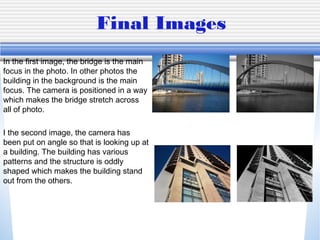
In the first image, the bridge is the main
focus in the photo. In other photos the
building in the background is the main
focus. The camera is positioned in a way
which makes the bridge stretch across
all of photo.

I the second image, the camera has
been put on angle so that is looking up at
a building. The building has various
patterns and the structure is oddly
shaped which makes the building stand
out from the others.
Capture log

For my project I used DMC-F4. The shutter speed for all
photos taken was 1/256 secs. The lens aperture is F/6.7. The
ISO speed is ISO-80. Each photo is 4000 pixels wide and is
3000 pixels in height.
Editing effects


Using the exposure tool I edited the
photo so that it looks like a water
colour painting. I set the exposure to
+0.08, the offset to -0.0137 and the
gamma correction to 1.20.
Final Images

•   Paste the final images here
    and discuss their strengths /
    weaknesses e.g. say why
    you liked them / why you
    chose them
•   Mention focus, depth of
    field, rule of thirds,
    composition,
Capture log

For my project I used DMC-F4. The shutter speed for all photos
taken was 1/256 secs. The lens aperture is F/6.7. The ISO
speed is ISO-80. Each photo is 4000 pixels wide and is 3000
pixels in height.
Editing effects

For this photo I have used the shadow and highlights tool. I set the shadow to 29%
and highlights to 0%. This gave the image a silhouetted feel. The black and white
shows of the light within the image.
Final Images

When I took this photo I found that the trees would make some nice shadows. The
  shadows against the white make it seem silhouetted.
Capture log

For my project I used DMC-F4. The shutter speed for all photos
taken was 1/256 secs. The lens aperture is F/6.7. The ISO speed
is ISO-80. Each photo is 4000 pixels wide and is 3000 pixels in
height.
Editing effects

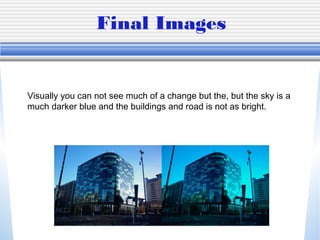
For this image I simply used the brightness and contrast adjustment tool. I
set the brightness to 17 and contrast to -24.
Final Images


Visually you can not see much of a change but the, but the sky is a
much darker blue and the buildings and road is not as bright.
Capture log

For my project I used DMC-F4. The shutter speed for all photos
taken was 1/256 secs. The lens aperture is F/6.7. The ISO speed is
ISO-80. Each photo is 4000 pixels wide and is 3000 pixels in height.
Rejected Images

In my opinion the first photo is very
plain and is at a strange angle. The
second image had a lot going on but
it didn’t show an technical skill such
as rule of thirds. The third image I
found to be quite boring and similarly
to the first image is at a strange
angle.
Aims for next project

For my next project I will take my time when composing a photo and consider
the rule of thirds. I will also take more photos so that I have a wider range to
choose from. When editing I will consider lighting and shadows. I will also
consider the rule of thirds more.
Final 12 Images

57review

  • 1.
    Unit 57: Photographyand Photographic Practice Task 4 Selection of final images & review
  • 2.
    Aim of Shoot ForUnit 57 I went to Salford Quays to take landscape photos of the urban environment. In total I took 79 photos of the Quays. I walked through the quays looking for structures that are eye catching and would make the perfect shot for the project. Once I captured the various photos I chose 10 that I would edit. These final 10 images were edited in Photoshop.
  • 3.
    Description of shoot Iwalked around the Quays and looked for different types of structures and ‘landmarks’ which people know the quays for. I took photos of the different ‘landmarks’ from different angles and with different shots. I then chose my favourites and edited them.
  • 4.
    Editing effects For thisimage I used the channel mixer and the rectangle marquee tool. I selected the various parts of the photo using the Marquee tool and then experimented with the channel mixer in different ways. As the photo were taken in such a way, I could split the image in to sections. This gives it a psychedelic look.
  • 5.
    Final Images In theforeground of this picture there is the quays with the bridge above. In the background there are various buildings. The buildings are close to the well known Lowry Theater and Outlet Mall. When taking this picture I considered the rule of thirds and made sure the main building in the photo was off to the side. Unfortunately the photo has been taken from a strange angle.
  • 6.
    Capture log For myproject I used DMC-F4. The shutter speed for all photos taken was 1/256 secs. The lens aperture is F/6.7. The ISO speed is ISO-80. Each photo is 4000 pixels wide and is 3000 pixels in height.
  • 7.
    Editing effects For thesetwo images I simply used the adjustment ‘Shadow/ Highlights’. I them moved the colours around so that the darkness of the adjustment wasn’t too white or black. The first picture contained a lot of light so I made the image a lot darker. In the second image I made it so that the sky was black and building was very light so that the building would stand out. I believe that these pictures make Salford Quays look very gloomy so the pictures should really be edited in away which makes the colour stand out more.
  • 8.
    Final Images In thefirst image, the bridge is the main focus in the photo. In other photos the building in the background is the main focus. The camera is positioned in a way which makes the bridge stretch across all of photo. I the second image, the camera has been put on angle so that is looking up at a building. The building has various patterns and the structure is oddly shaped which makes the building stand out from the others.
  • 9.
    Capture log For myproject I used DMC-F4. The shutter speed for all photos taken was 1/256 secs. The lens aperture is F/6.7. The ISO speed is ISO-80. Each photo is 4000 pixels wide and is 3000 pixels in height.
  • 10.
    Editing effects Using theexposure tool I edited the photo so that it looks like a water colour painting. I set the exposure to +0.08, the offset to -0.0137 and the gamma correction to 1.20.
  • 11.
    Final Images • Paste the final images here and discuss their strengths / weaknesses e.g. say why you liked them / why you chose them • Mention focus, depth of field, rule of thirds, composition,
  • 12.
    Capture log For myproject I used DMC-F4. The shutter speed for all photos taken was 1/256 secs. The lens aperture is F/6.7. The ISO speed is ISO-80. Each photo is 4000 pixels wide and is 3000 pixels in height.
  • 13.
    Editing effects For thisphoto I have used the shadow and highlights tool. I set the shadow to 29% and highlights to 0%. This gave the image a silhouetted feel. The black and white shows of the light within the image.
  • 14.
    Final Images When Itook this photo I found that the trees would make some nice shadows. The shadows against the white make it seem silhouetted.
  • 15.
    Capture log For myproject I used DMC-F4. The shutter speed for all photos taken was 1/256 secs. The lens aperture is F/6.7. The ISO speed is ISO-80. Each photo is 4000 pixels wide and is 3000 pixels in height.
  • 16.
    Editing effects For thisimage I simply used the brightness and contrast adjustment tool. I set the brightness to 17 and contrast to -24.
  • 17.
    Final Images Visually youcan not see much of a change but the, but the sky is a much darker blue and the buildings and road is not as bright.
  • 18.
    Capture log For myproject I used DMC-F4. The shutter speed for all photos taken was 1/256 secs. The lens aperture is F/6.7. The ISO speed is ISO-80. Each photo is 4000 pixels wide and is 3000 pixels in height.
  • 19.
    Rejected Images In myopinion the first photo is very plain and is at a strange angle. The second image had a lot going on but it didn’t show an technical skill such as rule of thirds. The third image I found to be quite boring and similarly to the first image is at a strange angle.
  • 20.
    Aims for nextproject For my next project I will take my time when composing a photo and consider the rule of thirds. I will also take more photos so that I have a wider range to choose from. When editing I will consider lighting and shadows. I will also consider the rule of thirds more.
  • 21.