EDTECH 554 (FA10)
Susan Ferdon
Session Six: Software Evaluation Rubric
Collaborators: Susan Ferdon and Steve Poast
Task
The principal at your building is aware you are in Boise State's Ed Tech Master's
program. She was just given the opportunity to apply for a grant that will fund site
licenses for three new software applications for the building. She would like you to
develop a rubric that will provide clear and comprehensive criteria for judgment of this
new software. The funding for this grant is negotiable. Your job is to provide her that
rubric. Unfortunately the deadline for the grant is approaching. So, you and a partner
will design an original rubric that she can use to justify her selections for this grant. She
must have the final copy in three weeks.
Your rubric must include the following:
1. You must highlight clear and comprehensive criteria to score the software.
2. You will sample two different software applications and evaluate them to the rubric
you designed. (The principal has requested this so she can demonstrate to the board
this rubric is clearly thought out)
3. You must include a reference list for the software reviewed and research used.
Introduction
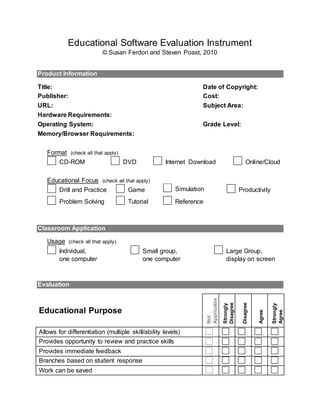
Users of this tool, created in Word, enter product information and respond to statements
describing software characteristics. The use of checkboxes and expanding form fields
are intended to make the tool flexible and easy to use. When used as a stand-alone
tool, the Word document is locked, which allows the user to check boxes and enter text
without danger of accidentally altering the form. When locked, form fields are shaded
which provides emphasis needed for new users to become aware of the various places
where text may be added. While text field content is somewhat difficult to read in this
mode, shading is not present when printed or saved as a PDF.
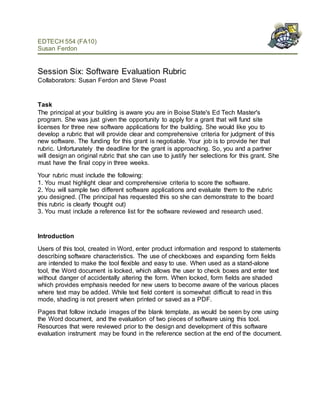
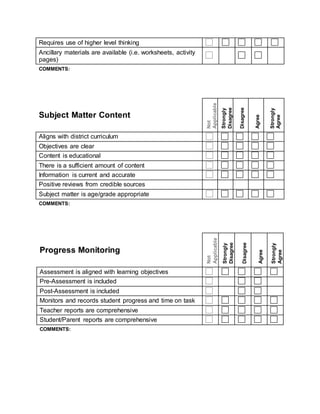
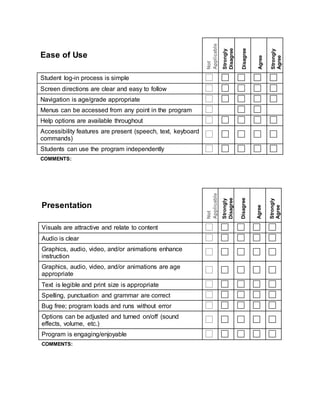
Pages that follow include images of the blank template, as would be seen by one using
the Word document, and the evaluation of two pieces of software using this tool.
Resources that were reviewed prior to the design and development of this software
evaluation instrument may be found in the reference section at the end of the document.
Educational Software Evaluation Instrument
© Susan Ferdon and Steven Poast, 2010
Product Information
Title: Date of Copyright:
Publisher: Cost:
URL: Subject Area:
Hardware Requirements:
Operating System: Grade Level:
Memory/Browser Requirements:
Format (check all that apply)
CD-ROM DVD Internet Download Online/Cloud
Educational Focus (check all that apply)
Drill and Practice Game Simulation Productivity
Problem Solving Tutorial Reference
Classroom Application
Usage (check all that apply)
Individual,
one computer
Small group,
one computer
Large Group,
display on screen
Evaluation
Educational Purpose
Not
Applicable
Strongly
Disagree
Disagree
Agree
Strongly
Agree
Allows for differentiation (multiple skill/ability levels)
Provides opportunity to review and practice skills
Provides immediate feedback
Branches based on student response
Work can be saved
Requires use of higher level thinking
Ancillary materials are available (i.e. worksheets, activity
pages)
COMMENTS:
Subject Matter Content
Not
Applicable
Strongly
Disagree
Disagree
Agree
Strongly
Agree
Aligns with district curriculum
Objectives are clear
Content is educational
There is a sufficient amount of content
Information is current and accurate
Positive reviews from credible sources
Subject matter is age/grade appropriate
COMMENTS:
Progress Monitoring
Not
Applicable
Strongly
Disagree
Disagree
Agree
Strongly
Agree
Assessment is aligned with learning objectives
Pre-Assessment is included
Post-Assessment is included
Monitors and records student progress and time on task
Teacher reports are comprehensive
Student/Parent reports are comprehensive
COMMENTS:
Ease of Use
Not
Applicable
Strongly
Disagree
Disagree
Agree
Strongly
Agree
Student log-in process is simple
Screen directions are clear and easy to follow
Navigation is age/grade appropriate
Menus can be accessed from any point in the program
Help options are available throughout
Accessibility features are present (speech, text, keyboard
commands)
Students can use the program independently
COMMENTS:
Presentation Not
Applicable
Strongly
Disagree
Disagree
Agree
Strongly
Agree
Visuals are attractive and relate to content
Audio is clear
Graphics, audio, video, and/or animations enhance
instruction
Graphics, audio, video, and/or animations are age
appropriate
Text is legible and print size is appropriate
Spelling, punctuation and grammar are correct
Bug free; program loads and runs without error
Options can be adjusted and turned on/off (sound
effects, volume, etc.)
Program is engaging/enjoyable
COMMENTS:
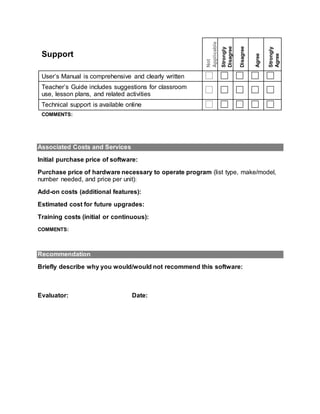
Support
Not
Applicable
Strongly
Disagree
Disagree
Agree
Strongly
Agree
User’s Manual is comprehensive and clearly written
Teacher’s Guide includes suggestions for classroom
use, lesson plans, and related activities
Technical support is available online
COMMENTS:
Associated Costs and Services
Initial purchase price of software:
Purchase price of hardware necessary to operate program (list type, make/model,
number needed, and price per unit):
Add-on costs (additional features):
Estimated cost for future upgrades:
Training costs (initial or continuous):
COMMENTS:
Recommendation
Briefly describe why you would/would not recommend this software:
Evaluator: Date:
References:
Children’s software evaluation instrument. (1998). Children’s Technology Review.
Retrieved from http://api.ning.com/files/YGI6OCOwuUhumL-
63bL4OabN7uJszEEoI-
AsbLDhu1dW9e7FJLCB12FrZAZ*6*F0kfvD8MZsXcb7IdFdE*6oEvAQs*k4FgFy/c
tr_software_evaluation.pdf
Craig, C.F. (n.d.). Teachers software evaluation rubric. Retrieved from
http://www.celestecraig.us/teacher%20evaluation.htm
Computer software evaluation form. (n.d.). Retrieved from
http://waynesville.k12.mo.us/fileadmin/wps/home/District/Media/software_eval_fo
rm.pdf
Criteria for evaluating computer courseware. (n.d.). Retrieved from
http://www.evalutech.sreb.org/criteria/courseware.asp
Elementary School Success [Computer software]. Renton, WA: TOPICS Entertainment,
Inc.
EMC300: Software evaluation form. (n.d.). Retrieved from
http://seamonkey.ed.asu.edu/emc300/software/evalform.html
Schrock, K. (2007). Software evaluation form. Retrieved from
http://kathyschrock.net/1computer/page4.htm
Software Evaluation Center: Software vendor evaluation form. (n.d.), Retrieved from
http://www.software-evaluation.co.uk/software_vendor_evaluation.htm
TypingMaster Pro Typing Tutor (7.01) [Computer software]. Helsinki, Finland:
TypingMaster Finland, Inc. Retrieved from
http://www.typingmaster.com/education/

554ferdonpoast software

  • 1.
    EDTECH 554 (FA10) SusanFerdon Session Six: Software Evaluation Rubric Collaborators: Susan Ferdon and Steve Poast Task The principal at your building is aware you are in Boise State's Ed Tech Master's program. She was just given the opportunity to apply for a grant that will fund site licenses for three new software applications for the building. She would like you to develop a rubric that will provide clear and comprehensive criteria for judgment of this new software. The funding for this grant is negotiable. Your job is to provide her that rubric. Unfortunately the deadline for the grant is approaching. So, you and a partner will design an original rubric that she can use to justify her selections for this grant. She must have the final copy in three weeks. Your rubric must include the following: 1. You must highlight clear and comprehensive criteria to score the software. 2. You will sample two different software applications and evaluate them to the rubric you designed. (The principal has requested this so she can demonstrate to the board this rubric is clearly thought out) 3. You must include a reference list for the software reviewed and research used. Introduction Users of this tool, created in Word, enter product information and respond to statements describing software characteristics. The use of checkboxes and expanding form fields are intended to make the tool flexible and easy to use. When used as a stand-alone tool, the Word document is locked, which allows the user to check boxes and enter text without danger of accidentally altering the form. When locked, form fields are shaded which provides emphasis needed for new users to become aware of the various places where text may be added. While text field content is somewhat difficult to read in this mode, shading is not present when printed or saved as a PDF. Pages that follow include images of the blank template, as would be seen by one using the Word document, and the evaluation of two pieces of software using this tool. Resources that were reviewed prior to the design and development of this software evaluation instrument may be found in the reference section at the end of the document.
  • 2.
    Educational Software EvaluationInstrument © Susan Ferdon and Steven Poast, 2010 Product Information Title: Date of Copyright: Publisher: Cost: URL: Subject Area: Hardware Requirements: Operating System: Grade Level: Memory/Browser Requirements: Format (check all that apply) CD-ROM DVD Internet Download Online/Cloud Educational Focus (check all that apply) Drill and Practice Game Simulation Productivity Problem Solving Tutorial Reference Classroom Application Usage (check all that apply) Individual, one computer Small group, one computer Large Group, display on screen Evaluation Educational Purpose Not Applicable Strongly Disagree Disagree Agree Strongly Agree Allows for differentiation (multiple skill/ability levels) Provides opportunity to review and practice skills Provides immediate feedback Branches based on student response Work can be saved
  • 3.
    Requires use ofhigher level thinking Ancillary materials are available (i.e. worksheets, activity pages) COMMENTS: Subject Matter Content Not Applicable Strongly Disagree Disagree Agree Strongly Agree Aligns with district curriculum Objectives are clear Content is educational There is a sufficient amount of content Information is current and accurate Positive reviews from credible sources Subject matter is age/grade appropriate COMMENTS: Progress Monitoring Not Applicable Strongly Disagree Disagree Agree Strongly Agree Assessment is aligned with learning objectives Pre-Assessment is included Post-Assessment is included Monitors and records student progress and time on task Teacher reports are comprehensive Student/Parent reports are comprehensive COMMENTS:
  • 4.
    Ease of Use Not Applicable Strongly Disagree Disagree Agree Strongly Agree Studentlog-in process is simple Screen directions are clear and easy to follow Navigation is age/grade appropriate Menus can be accessed from any point in the program Help options are available throughout Accessibility features are present (speech, text, keyboard commands) Students can use the program independently COMMENTS: Presentation Not Applicable Strongly Disagree Disagree Agree Strongly Agree Visuals are attractive and relate to content Audio is clear Graphics, audio, video, and/or animations enhance instruction Graphics, audio, video, and/or animations are age appropriate Text is legible and print size is appropriate Spelling, punctuation and grammar are correct Bug free; program loads and runs without error Options can be adjusted and turned on/off (sound effects, volume, etc.) Program is engaging/enjoyable COMMENTS:
  • 5.
    Support Not Applicable Strongly Disagree Disagree Agree Strongly Agree User’s Manual iscomprehensive and clearly written Teacher’s Guide includes suggestions for classroom use, lesson plans, and related activities Technical support is available online COMMENTS: Associated Costs and Services Initial purchase price of software: Purchase price of hardware necessary to operate program (list type, make/model, number needed, and price per unit): Add-on costs (additional features): Estimated cost for future upgrades: Training costs (initial or continuous): COMMENTS: Recommendation Briefly describe why you would/would not recommend this software: Evaluator: Date:
  • 6.
    References: Children’s software evaluationinstrument. (1998). Children’s Technology Review. Retrieved from http://api.ning.com/files/YGI6OCOwuUhumL- 63bL4OabN7uJszEEoI- AsbLDhu1dW9e7FJLCB12FrZAZ*6*F0kfvD8MZsXcb7IdFdE*6oEvAQs*k4FgFy/c tr_software_evaluation.pdf Craig, C.F. (n.d.). Teachers software evaluation rubric. Retrieved from http://www.celestecraig.us/teacher%20evaluation.htm Computer software evaluation form. (n.d.). Retrieved from http://waynesville.k12.mo.us/fileadmin/wps/home/District/Media/software_eval_fo rm.pdf Criteria for evaluating computer courseware. (n.d.). Retrieved from http://www.evalutech.sreb.org/criteria/courseware.asp Elementary School Success [Computer software]. Renton, WA: TOPICS Entertainment, Inc. EMC300: Software evaluation form. (n.d.). Retrieved from http://seamonkey.ed.asu.edu/emc300/software/evalform.html Schrock, K. (2007). Software evaluation form. Retrieved from http://kathyschrock.net/1computer/page4.htm Software Evaluation Center: Software vendor evaluation form. (n.d.), Retrieved from http://www.software-evaluation.co.uk/software_vendor_evaluation.htm TypingMaster Pro Typing Tutor (7.01) [Computer software]. Helsinki, Finland: TypingMaster Finland, Inc. Retrieved from http://www.typingmaster.com/education/