Reference Guide ­ GarageBand Lessons 4­6 
                                    
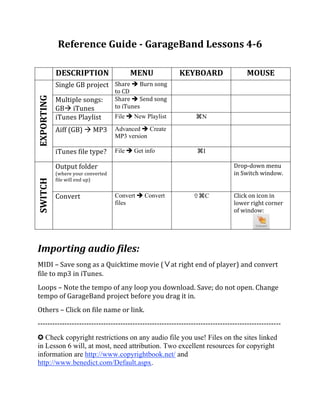
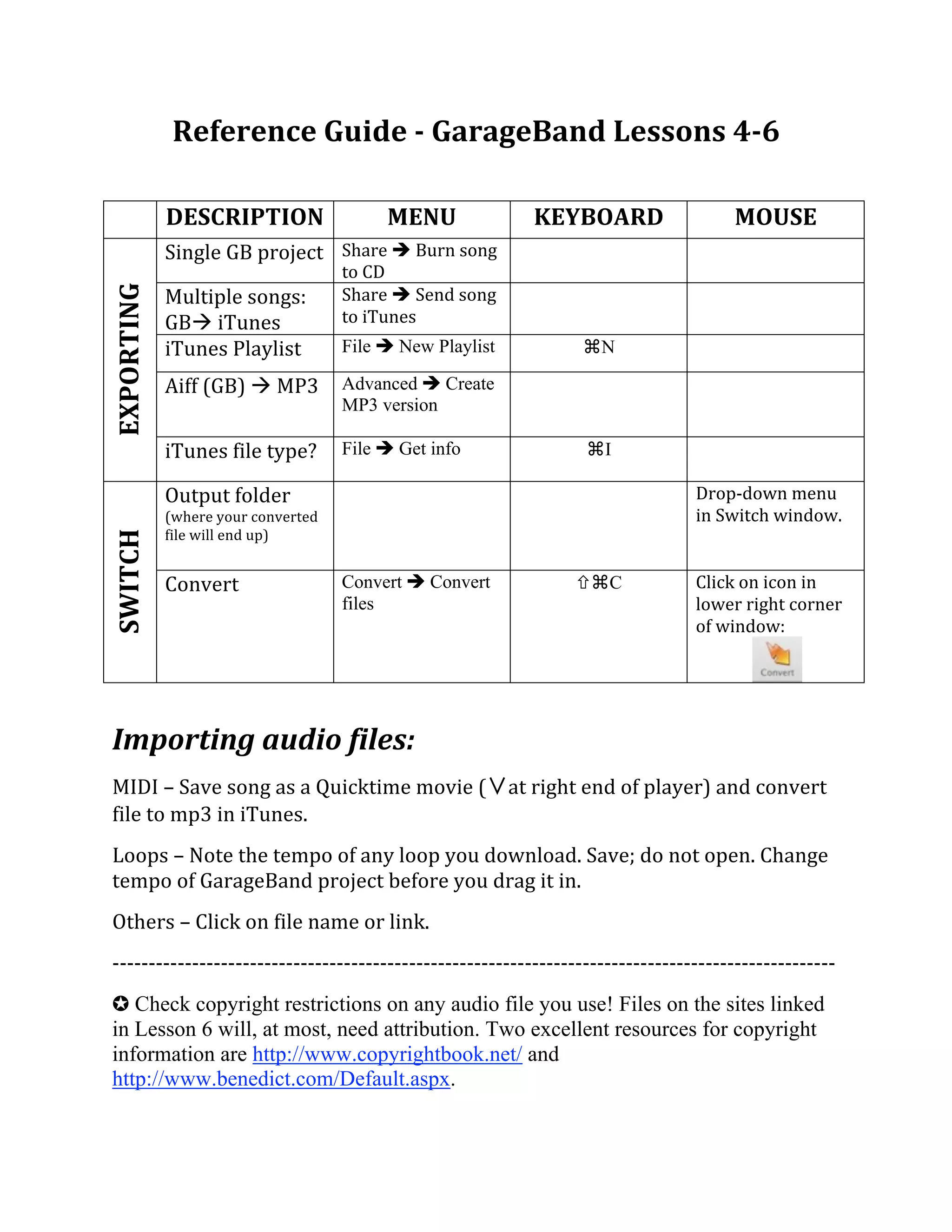
             DESCRIPTION                   MENU                KEYBOARD               MOUSE 
             Single GB project  Share  Burn song 
                                      to CD 
                                                                                  
EXPORTING 


             Multiple songs:          Share  Send song 
                                      to iTunes 
                                                                                  
             GB iTunes 
             iTunes Playlist          File  New Playlist            ⌘N           
             Aiff (GB)  MP3  Advanced  Create
                                      MP3 version                                 
             iTunes file type?  File  Get info                      ⌘I
                                                                                  
             Output folder                                                       Drop‐down menu 
             (where your converted                                               in Switch window. 
             file will end up) 
SWITCH 


             Convert                  Convert  Convert             ⌘C          Click on icon in 
                                      files                                      lower right corner 
                                                                                 of window: 


Importing audio files: 
MIDI – Save song as a Quicktime movie (                      at right end of player) and convert 
file to mp3 in iTunes. 
Loops – Note the tempo of any loop you download. Save; do not open. Change 
tempo of GarageBand project before you drag it in. 
Others – Click on file name or link. 
‐‐‐‐‐‐‐‐‐‐‐‐‐‐‐‐‐‐‐‐‐‐‐‐‐‐‐‐‐‐‐‐‐‐‐‐‐‐‐‐‐‐‐‐‐‐‐‐‐‐‐‐‐‐‐‐‐‐‐‐‐‐‐‐‐‐‐‐‐‐‐‐‐‐‐‐‐‐‐‐‐‐‐‐‐‐‐‐‐‐‐‐‐‐‐‐‐‐‐‐ 
✪ Check copyright restrictions on any audio file you use! Files on the sites linked
in Lesson 6 will, at most, need attribution. Two excellent resources for copyright
information are http://www.copyrightbook.net/ and
http://www.benedict.com/Default.aspx.

503ferdon referenceguide456

  • 1.
    Reference Guide ­ GarageBand Lessons 4­6      DESCRIPTION  MENU  KEYBOARD  MOUSE  Single GB project  Share  Burn song  to CD      EXPORTING  Multiple songs:  Share  Send song  to iTunes      GB iTunes  iTunes Playlist  File  New Playlist  ⌘N     Aiff (GB)  MP3  Advanced  Create MP3 version   iTunes file type?  File  Get info ⌘I   Output folder  Drop‐down menu  (where your converted  in Switch window.  file will end up)  SWITCH  Convert  Convert  Convert ⌘C Click on icon in  files lower right corner  of window:      Importing audio files:  MIDI – Save song as a Quicktime movie ( at right end of player) and convert  file to mp3 in iTunes.  Loops – Note the tempo of any loop you download. Save; do not open. Change  tempo of GarageBand project before you drag it in.  Others – Click on file name or link.  ‐‐‐‐‐‐‐‐‐‐‐‐‐‐‐‐‐‐‐‐‐‐‐‐‐‐‐‐‐‐‐‐‐‐‐‐‐‐‐‐‐‐‐‐‐‐‐‐‐‐‐‐‐‐‐‐‐‐‐‐‐‐‐‐‐‐‐‐‐‐‐‐‐‐‐‐‐‐‐‐‐‐‐‐‐‐‐‐‐‐‐‐‐‐‐‐‐‐‐‐  ✪ Check copyright restrictions on any audio file you use! Files on the sites linked in Lesson 6 will, at most, need attribution. Two excellent resources for copyright information are http://www.copyrightbook.net/ and http://www.benedict.com/Default.aspx.