
Applied Shell Scripting
Shoaib Sufi
(part of assignment 5.5 SWC instructors course)
Background
• SWC instructors course
• 10 minutes of instruction (maybe more)
• Feedback
• About novice to competence (not expertise)
• Thanks for taking the time
Motivation
• To use shell scripting skills learned
• To build something interesting …
• …. That is open for iterative improvement
• Try to follow the data driven research cycle
– Build dataset
– Process data
– analyse results (in this example we only display)
• Area of investigation
• Scenic webcam stills to a time-lapse video
Caveats
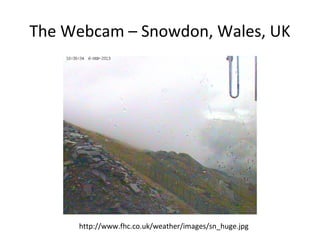
• Not the clearest webcam
– Perhaps more interesting to try to improve
• Not the most perfect of scripts
– Future steps might include functions/config etc.
• Not using version control
– An example for github left for the user
• As said earlier this is a system that can be
iteratively improved
• Aimed at someone who knows the basic scripting
commands and interested to see it in practice
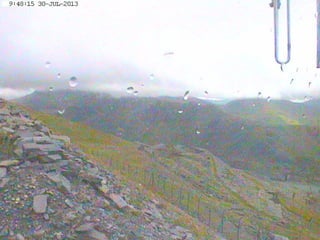
The Webcam – Snowdon, Wales, UK
http://www.fhc.co.uk/weather/images/sn_huge.jpg
Building a dataset
• Script
#!/bin/bash
while [ 1 -lt 3 ]
do
curl -o sn_huge_`date +%F-%T`.jpg http://www.fhc.co.uk/weather/images/sn_huge.jpg
sleep 60
done
• Running as a background task
#get_data.sh
#Ctrl-z
#bg %1
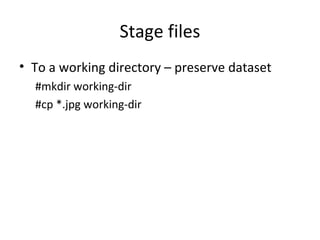
Stage files
• To a working directory – preserve dataset
#mkdir working-dir
#cp *.jpg working-dir
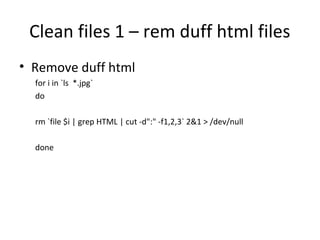
Clean files 1 – rem duff html files
• Remove duff html
for i in `ls *.jpg`
do
rm `file $i | grep HTML | cut -d":" -f1,2,3` 2&1 > /dev/null
done
Clean files 2 - duplicates
#!/bin/bash
# running this script twice should not produce any 'is a duplicate' output
declare -a SHA1BEFORE
count=0
current_sum_is_duplicate=0
#for all of the files that are pictures
for i in `ls *.jpg`
do
#get the sha1 sum of the current file
sum=`sha1sum $i | cut -d" " -f1`
echo sha1sum of file $i is $sum
#if sha1sum seen before then delete the file as it's a duplicate
for j in ${SHA1BEFORE[@]}
do
if [ $sum == $j ]
then
echo $i is a duplicate and will be deleted
rm $i
current_sum_is_duplicate=1
break
fi
done
#collect sha1sums if not seen before (if you collect all comparisons will slow down quicker)
if [ $current_sum_is_duplicate == 0 ]
then
SHA1BEFORE[$count]=$sum
count=$(( $count + 1 ))
fi
# reset the sha1sum seen before flag
current_sum_is_duplicate=0
done
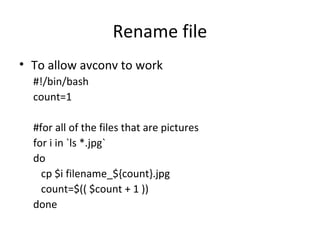
Rename file
• To allow avconv to work
#!/bin/bash
count=1
#for all of the files that are pictures
for i in `ls *.jpg`
do
cp $i filename_${count}.jpg
count=$(( $count + 1 ))
done
Making the video
#!/bin/bash
avconv -i filename_%d.jpg -q:v 1 -aspect:v 4:3 output.mp4
# some problems/solutions – default command actions not always best
# video quality seems poor - blocky in parts [fixed -q:v 1 -v is the stream
specifier which is the video in this case]
# image seems stretched - i.e. not same aspect ratio as images - seems
widescreen [fixed with -aspect:v 4:3]
# not sure why frames are being dropped during encoding and no matter
what frame rate I choose the video seems to be the same length in time
to play – weird
An Example video
• Post on vimeo ?
Further directions
(aim:to get a nice as video as possible from stills)
• Histogram – flicker
– Could be a simple fix for files over 100K
– Nicer to do mathematically/analytically
• Lots of red green colour noise
– How much can this be reduced without decreasing
image sharpness
• Would morphing make for a better video
– Worth exploring maybe
• Investigate better encoder
– Better quality and smaller filesize
Research ?
• Possible research questions
– Anything useful about
• Erosion
• Weather
• Sunrise/sunset time detection – possible cf. HMNAO times
• Contentions
– Perhaps it’s all been done before
– Should have done a literature review
• Still useful and fun
– Applied to a nice task
– Lot’s of room for iterative improvement
• Better scripts, version control
• Interesting problems to fix (as mentioned in further directions)

Applied Shell Scripting - stills to time-lapse

  • 1.
    Applied Shell Scripting ShoaibSufi (part of assignment 5.5 SWC instructors course)
  • 2.
    Background • SWC instructorscourse • 10 minutes of instruction (maybe more) • Feedback • About novice to competence (not expertise) • Thanks for taking the time
  • 3.
    Motivation • To useshell scripting skills learned • To build something interesting … • …. That is open for iterative improvement • Try to follow the data driven research cycle – Build dataset – Process data – analyse results (in this example we only display) • Area of investigation • Scenic webcam stills to a time-lapse video
  • 4.
    Caveats • Not theclearest webcam – Perhaps more interesting to try to improve • Not the most perfect of scripts – Future steps might include functions/config etc. • Not using version control – An example for github left for the user • As said earlier this is a system that can be iteratively improved • Aimed at someone who knows the basic scripting commands and interested to see it in practice
  • 5.
    The Webcam –Snowdon, Wales, UK http://www.fhc.co.uk/weather/images/sn_huge.jpg
  • 6.
    Building a dataset •Script #!/bin/bash while [ 1 -lt 3 ] do curl -o sn_huge_`date +%F-%T`.jpg http://www.fhc.co.uk/weather/images/sn_huge.jpg sleep 60 done • Running as a background task #get_data.sh #Ctrl-z #bg %1
  • 7.
    Stage files • Toa working directory – preserve dataset #mkdir working-dir #cp *.jpg working-dir
  • 8.
    Clean files 1– rem duff html files • Remove duff html for i in `ls *.jpg` do rm `file $i | grep HTML | cut -d":" -f1,2,3` 2&1 > /dev/null done
  • 9.
    Clean files 2- duplicates #!/bin/bash # running this script twice should not produce any 'is a duplicate' output declare -a SHA1BEFORE count=0 current_sum_is_duplicate=0 #for all of the files that are pictures for i in `ls *.jpg` do #get the sha1 sum of the current file sum=`sha1sum $i | cut -d" " -f1` echo sha1sum of file $i is $sum #if sha1sum seen before then delete the file as it's a duplicate for j in ${SHA1BEFORE[@]} do if [ $sum == $j ] then echo $i is a duplicate and will be deleted rm $i current_sum_is_duplicate=1 break fi done #collect sha1sums if not seen before (if you collect all comparisons will slow down quicker) if [ $current_sum_is_duplicate == 0 ] then SHA1BEFORE[$count]=$sum count=$(( $count + 1 )) fi # reset the sha1sum seen before flag current_sum_is_duplicate=0 done
  • 10.
    Rename file • Toallow avconv to work #!/bin/bash count=1 #for all of the files that are pictures for i in `ls *.jpg` do cp $i filename_${count}.jpg count=$(( $count + 1 )) done
  • 11.
    Making the video #!/bin/bash avconv-i filename_%d.jpg -q:v 1 -aspect:v 4:3 output.mp4 # some problems/solutions – default command actions not always best # video quality seems poor - blocky in parts [fixed -q:v 1 -v is the stream specifier which is the video in this case] # image seems stretched - i.e. not same aspect ratio as images - seems widescreen [fixed with -aspect:v 4:3] # not sure why frames are being dropped during encoding and no matter what frame rate I choose the video seems to be the same length in time to play – weird
  • 12.
    An Example video •Post on vimeo ?
  • 13.
    Further directions (aim:to geta nice as video as possible from stills) • Histogram – flicker – Could be a simple fix for files over 100K – Nicer to do mathematically/analytically • Lots of red green colour noise – How much can this be reduced without decreasing image sharpness • Would morphing make for a better video – Worth exploring maybe • Investigate better encoder – Better quality and smaller filesize
  • 14.
    Research ? • Possibleresearch questions – Anything useful about • Erosion • Weather • Sunrise/sunset time detection – possible cf. HMNAO times • Contentions – Perhaps it’s all been done before – Should have done a literature review • Still useful and fun – Applied to a nice task – Lot’s of room for iterative improvement • Better scripts, version control • Interesting problems to fix (as mentioned in further directions)

Editor's Notes

  • #6 Joke about the NSA ?
  • #7 Talk through what the script is doing and why
  • #9 Discussion about the types of problems – can’t just rely on slides – perhaps voice over of a video needed to make this as a standalone tutorial