Digital
Communications:
Strategy, Messaging,
Methods & Tools
Workshop for 501 Commons
August 17, 2017
Introductions
501 Commons - Thank you!
Presenters:
● Tyler LePard - Wondershop Communications
● Joel Meyers - Fuse IQ, Owner, Director of Business Development
Introduce yourselves!
● Name
● Organization
● Position/role
● What do you hope to get out of this workshop?
Event intro
This workshop is structured to help you understand what digital
communications is, what are some strategies and tactics you can use to
communicate your organizational mission, reach the right people, maximize
your time and resources, and amplify your impact.
1. Strategy
2. Messaging
3. Tactics & Best Practices
4. 15 Minute break
5. Leveraging Technology
Digital Communications Strategy
● Why is it important?
● Essentials:
○ Objectives
○ Audiences
○ Messaging
○ Tactics
○ Measurement
Digital Communications Strategy
1. What is your objective?
2. Who is your audience/community?
3. What are you going to say?
4. How are you going to reach them?
5. How will you know if you succeeded?
6
Example Digital Strategy
Objective: Increase attention for Echoing Green’s announcement of new Fellows
Audiences: Funders, Current Fellows, Potential Fellows
Messages: Not Just Another List: Our 2015 Fellows aren’t just another group of interesting
entrepreneurs—their ideas and commitment are changing lives and communities. But it doesn’t stop
there. Echoing Green brings them together to go ALL IN and actually change the world.
Tactics:
● Website: launch new Fellows page and toolkits
● Email Newsletter: send announcement emails to segmented lists
● Facebook: post graphics that feature Fellows and encourage the community to share and
comment
● Twitter: reach out to influencers to participate in the campaign and amplify it to their networks7
Messaging
1. Identify your audience
2. Calls to action
3. The psychology
4. Exercise
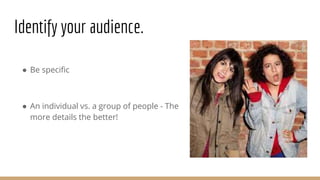
● Be specific
● An individual vs. a group of people - The
more details the better!
Identify your audience.
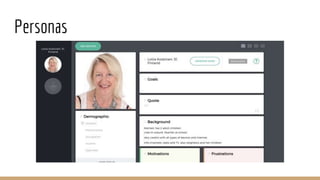
Personas
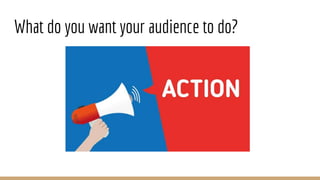
What do you want your audience to do?
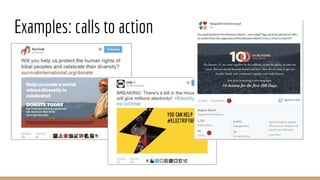
Examples: calls to action
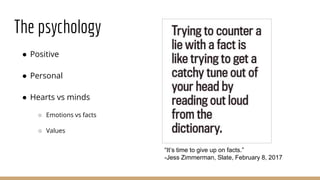
The psychology
● Positive
● Personal
● Hearts vs minds
○ Emotions vs facts
○ Values
“It’s time to give up on facts.”
-Jess Zimmerman, Slate, February 8, 2017
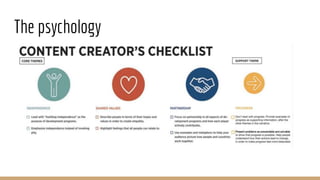
The psychology
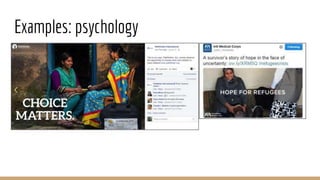
Examples: psychology
Messaging Exercise
● Who is someone you want to communicate to?
● What do you want to say to them?
Tactics & Best Practices
1. Social media
2. Blogs
3. Email newsletters
4. Editorial calendars
5. Discussion
Social media
20
Social media tips
1. Be genuine and authentic
2. Listen and learn from others
3. Be generous
4. Don’t delete
5. Be grateful
6. Content is king
7. You can’t possibly read/do it all
21
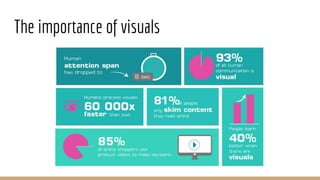
The importance of visuals
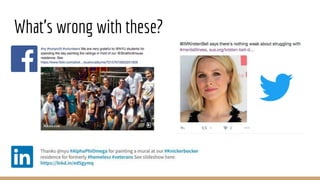
What’s wrong with these?
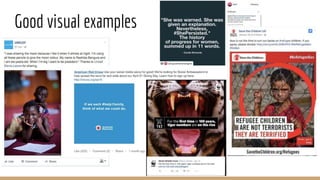
Good visual examples
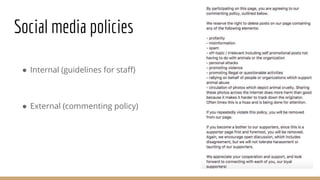
Social media policies
● Internal (guidelines for staff)
● External (commenting policy)
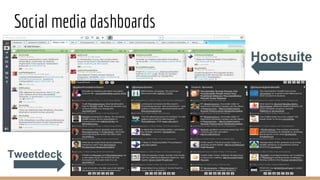
Social media dashboards
26
Tweetdeck
Hootsuite
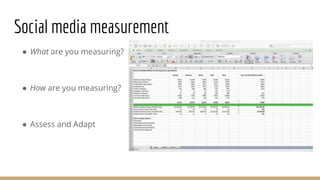
Social media measurement
● What are you measuring?
● How are you measuring?
● Assess and Adapt
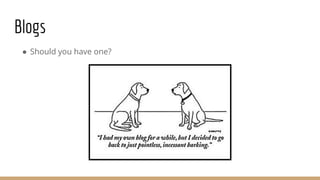
Blogs
● Should you have one?
Email newsletters
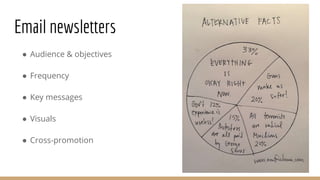
● Audience & objectives
● Frequency
● Key messages
● Visuals
● Cross-promotion
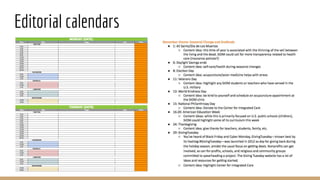
Editorial calendars
Discussion
● What channels are you leveraging?
● What are the hold-ups, the challenges?
● What can be done differently?
● How do you get more engagement/build the community?
“40 percent of your time should be spent creating content, while the remaining 60 percent
should be spent promoting content.” Garth Moore, U.S. Digital Director of ONE
Tons of free tools
● UXPressia.com
● techreport.ngo
● Working Narratives’ Storytelling and Social Change
● Spitfire Strategies’ Smartchart
● Lightbox Collaborative Editorial Calendar
● Hashtagify and Tweriod
● Canva and PicMonkey
● Nonprofit & Comms Blogs
○ Kivi Leroux Miller’s Nonprofit Communications Blog
○ Beth’s blog (Beth Kanter)
○ Vu Ley’s NonprofitAF (formerly Nonprofit with Balls)
○ John Hayden’s blog
○ Nonprofit Tech for Good
○ Nonprofit Technology Network (NTEN)
Break!
Leveraging Technology for Communication
1. Your Website: Layout & Design
2. Search Engine Optimization
3. Video
4. Email Tools
5. CRM’s
6. Text/SMS
7. Exercise
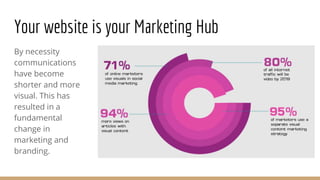
By necessity
communications
have become
shorter and more
visual. This has
resulted in a
fundamental
change in
marketing and
branding.
Your website is your Marketing Hub
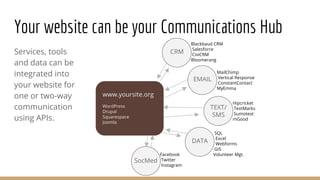
Services, tools
and data can be
integrated into
your website for
one or two-way
communication
using APIs.
Your website can be your Communications Hub
www.yoursite.org
WordPress
Drupal
Squarespace
Joomla
CRM
EMAIL
TEXT/
SMS
DATA
SocMed
Blackbaud CRM
Salesforce
CiviCRM
Bloomerang
MailChimp
Vertical Response
ConstantContact
MyEmma
Hipcricket
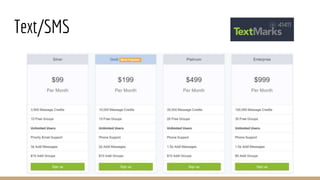
TextMarks
Sumotext
mGood
SQL
Excel
Webforms
GIS
Volunteer Mgt.Facebook
Twitter
Instagram
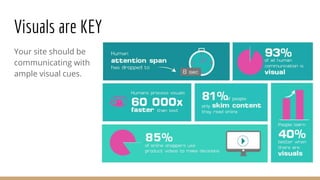
Your site should be
communicating with
ample visual cues.
Visuals are KEY
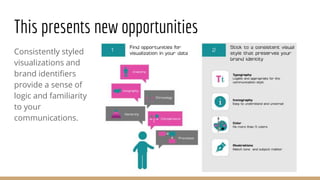
Consistently styled
visualizations and
brand identifiers
provide a sense of
logic and familiarity
to your
communications.
This presents new opportunities
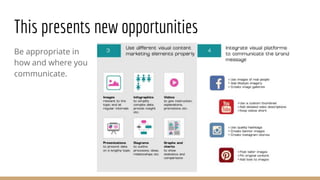
Be appropriate in
how and where you
communicate.
This presents new opportunities
Website standards optimizing communication
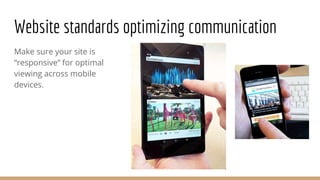
Make sure your site is
“responsive” for optimal
viewing across mobile
devices.
Website standards optimizing communication
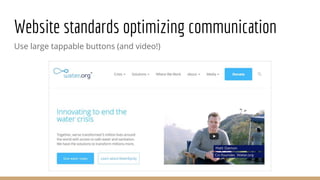
Use large tappable buttons (and video!)
Website standards optimizing communication
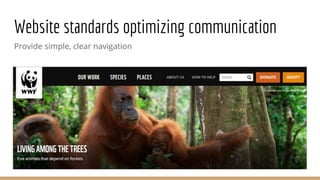
Provide simple, clear navigation
Website standards optimizing communication
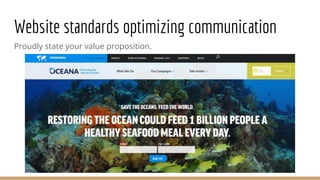
Proudly state your value proposition.
Website standards optimizing communication
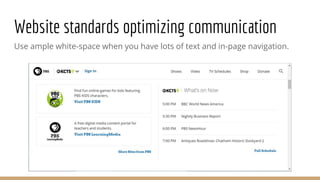
Use ample white-space when you have lots of text and in-page navigation.
Website standards optimizing communication
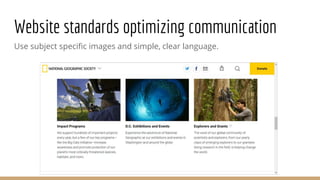
Use subject specific images and simple, clear language.
Website standards, optimizing communication
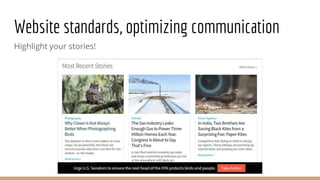
Highlight your stories!
Website standards, optimizing communication
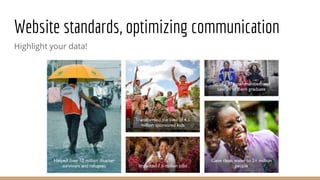
Highlight your data!
Website standards, optimizing communication
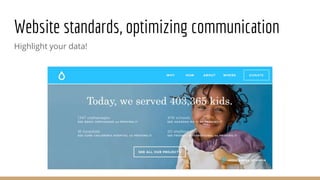
Highlight your data!
Website standards, optimizing communication
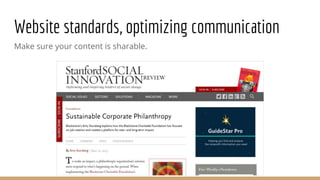
Make sure your content is sharable.
Search Engine Optimization (SEO)
SEO is the process of maximizing the number of visitors to a particular
website by ensuring that the site appears high on the list of results returned
by a search engine.
SEM (search engine marketing) is a form of Internet marketing that involves
the promotion of websites by increasing their visibility in search engine results
pages (SERPs) primarily through paid advertising.
One key to getting more traffic lies in integrating content with search engine
optimization and social media marketing.
Search Engine Optimization (SEO)
The process of optimizing your website is comprised of these essential
elements.
1. Competitor / Market Analysis
2. Keyword Research and Development
3. Content Optimization and Submission
4. Continuous Testing and Measuring
Search Engine Optimization (SEO)
● Minimum SEO one should do
● Importance of YouTube video in your strategy
● Blogging and other strategies for keywords
● Google Grants, why and how to do it
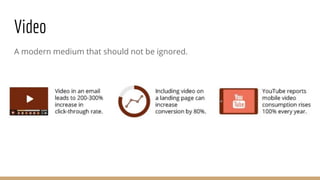
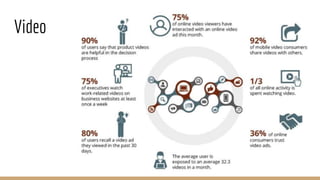
Video
A modern medium that should not be ignored.
Video
Email
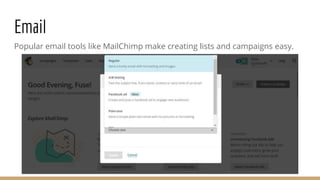
Popular email tools like MailChimp make creating lists and campaigns easy.
Email
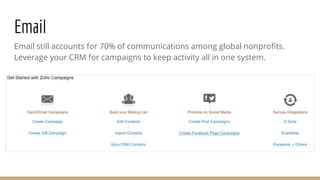
Email still accounts for 70% of communications among global nonprofits.
Leverage your CRM for campaigns to keep activity all in one system.
Text/SMS
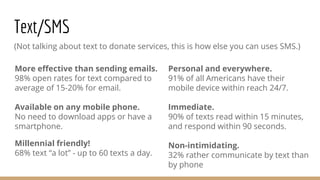
(Not talking about text to donate services, this is how else you can uses SMS.)
Personal and everywhere.
91% of all Americans have their
mobile device within reach 24/7.
Immediate.
90% of texts read within 15 minutes,
and respond within 90 seconds.
Non-intimidating.
32% rather communicate by text than
by phone
More effective than sending emails.
98% open rates for text compared to
average of 15-20% for email.
Available on any mobile phone.
No need to download apps or have a
smartphone.
Millennial friendly!
68% text “a lot” - up to 60 texts a day.
Text/SMS
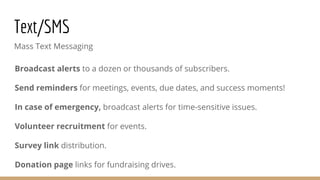
Mass Text Messaging
Broadcast alerts to a dozen or thousands of subscribers.
Send reminders for meetings, events, due dates, and success moments!
In case of emergency, broadcast alerts for time-sensitive issues.
Volunteer recruitment for events.
Survey link distribution.
Donation page links for fundraising drives.
Text/SMS
Exercise
● What content management system does your nonprofit use?
● Is it easy to update?
● Do you think you are communicating your cause, the benefits of
contributing (time/money), the success stories and your data effectively?
Why, why not? What could you do better?
● Do your users have a clear path to the actions you would like them to take?
Questions? Comments? Contact us.
Joel Meyers
● FuseIQ.com | joel@fuseiq.com
Tyler LePard
● WondershopCommunications.com | tylepard@gmail.com
Geoff Purkis
● SeattleWebSearch.com | geoff@seattlewebsearch.com

Digital Communications for Nonprofits (August 17, 11:30am - 3pm)

  • 1.
    Digital Communications: Strategy, Messaging, Methods &Tools Workshop for 501 Commons August 17, 2017
  • 2.
    Introductions 501 Commons -Thank you! Presenters: ● Tyler LePard - Wondershop Communications ● Joel Meyers - Fuse IQ, Owner, Director of Business Development
  • 3.
    Introduce yourselves! ● Name ●Organization ● Position/role ● What do you hope to get out of this workshop?
  • 4.
    Event intro This workshopis structured to help you understand what digital communications is, what are some strategies and tactics you can use to communicate your organizational mission, reach the right people, maximize your time and resources, and amplify your impact. 1. Strategy 2. Messaging 3. Tactics & Best Practices 4. 15 Minute break 5. Leveraging Technology
  • 5.
    Digital Communications Strategy ●Why is it important? ● Essentials: ○ Objectives ○ Audiences ○ Messaging ○ Tactics ○ Measurement
  • 6.
    Digital Communications Strategy 1.What is your objective? 2. Who is your audience/community? 3. What are you going to say? 4. How are you going to reach them? 5. How will you know if you succeeded? 6
  • 7.
    Example Digital Strategy Objective:Increase attention for Echoing Green’s announcement of new Fellows Audiences: Funders, Current Fellows, Potential Fellows Messages: Not Just Another List: Our 2015 Fellows aren’t just another group of interesting entrepreneurs—their ideas and commitment are changing lives and communities. But it doesn’t stop there. Echoing Green brings them together to go ALL IN and actually change the world. Tactics: ● Website: launch new Fellows page and toolkits ● Email Newsletter: send announcement emails to segmented lists ● Facebook: post graphics that feature Fellows and encourage the community to share and comment ● Twitter: reach out to influencers to participate in the campaign and amplify it to their networks7
  • 8.
    Messaging 1. Identify youraudience 2. Calls to action 3. The psychology 4. Exercise
  • 9.
    ● Be specific ●An individual vs. a group of people - The more details the better! Identify your audience.
  • 10.
  • 12.
    What do youwant your audience to do?
  • 13.
  • 14.
    The psychology ● Positive ●Personal ● Hearts vs minds ○ Emotions vs facts ○ Values “It’s time to give up on facts.” -Jess Zimmerman, Slate, February 8, 2017
  • 15.
  • 16.
  • 17.
    Messaging Exercise ● Whois someone you want to communicate to? ● What do you want to say to them?
  • 18.
    Tactics & BestPractices 1. Social media 2. Blogs 3. Email newsletters 4. Editorial calendars 5. Discussion
  • 19.
  • 20.
  • 21.
    Social media tips 1.Be genuine and authentic 2. Listen and learn from others 3. Be generous 4. Don’t delete 5. Be grateful 6. Content is king 7. You can’t possibly read/do it all 21
  • 22.
  • 23.
  • 24.
  • 25.
    Social media policies ●Internal (guidelines for staff) ● External (commenting policy)
  • 26.
  • 27.
    Social media measurement ●What are you measuring? ● How are you measuring? ● Assess and Adapt
  • 28.
  • 29.
    Email newsletters ● Audience& objectives ● Frequency ● Key messages ● Visuals ● Cross-promotion
  • 30.
  • 32.
    Discussion ● What channelsare you leveraging? ● What are the hold-ups, the challenges? ● What can be done differently? ● How do you get more engagement/build the community? “40 percent of your time should be spent creating content, while the remaining 60 percent should be spent promoting content.” Garth Moore, U.S. Digital Director of ONE
  • 33.
    Tons of freetools ● UXPressia.com ● techreport.ngo ● Working Narratives’ Storytelling and Social Change ● Spitfire Strategies’ Smartchart ● Lightbox Collaborative Editorial Calendar ● Hashtagify and Tweriod ● Canva and PicMonkey ● Nonprofit & Comms Blogs ○ Kivi Leroux Miller’s Nonprofit Communications Blog ○ Beth’s blog (Beth Kanter) ○ Vu Ley’s NonprofitAF (formerly Nonprofit with Balls) ○ John Hayden’s blog ○ Nonprofit Tech for Good ○ Nonprofit Technology Network (NTEN)
  • 34.
  • 35.
    Leveraging Technology forCommunication 1. Your Website: Layout & Design 2. Search Engine Optimization 3. Video 4. Email Tools 5. CRM’s 6. Text/SMS 7. Exercise
  • 36.
    By necessity communications have become shorterand more visual. This has resulted in a fundamental change in marketing and branding. Your website is your Marketing Hub
  • 37.
    Services, tools and datacan be integrated into your website for one or two-way communication using APIs. Your website can be your Communications Hub www.yoursite.org WordPress Drupal Squarespace Joomla CRM EMAIL TEXT/ SMS DATA SocMed Blackbaud CRM Salesforce CiviCRM Bloomerang MailChimp Vertical Response ConstantContact MyEmma Hipcricket TextMarks Sumotext mGood SQL Excel Webforms GIS Volunteer Mgt.Facebook Twitter Instagram
  • 38.
    Your site shouldbe communicating with ample visual cues. Visuals are KEY
  • 39.
    Consistently styled visualizations and brandidentifiers provide a sense of logic and familiarity to your communications. This presents new opportunities
  • 40.
    Be appropriate in howand where you communicate. This presents new opportunities
  • 41.
    Website standards optimizingcommunication Make sure your site is “responsive” for optimal viewing across mobile devices.
  • 42.
    Website standards optimizingcommunication Use large tappable buttons (and video!)
  • 43.
    Website standards optimizingcommunication Provide simple, clear navigation
  • 44.
    Website standards optimizingcommunication Proudly state your value proposition.
  • 45.
    Website standards optimizingcommunication Use ample white-space when you have lots of text and in-page navigation.
  • 46.
    Website standards optimizingcommunication Use subject specific images and simple, clear language.
  • 47.
    Website standards, optimizingcommunication Highlight your stories!
  • 48.
    Website standards, optimizingcommunication Highlight your data!
  • 49.
    Website standards, optimizingcommunication Highlight your data!
  • 50.
    Website standards, optimizingcommunication Make sure your content is sharable.
  • 51.
    Search Engine Optimization(SEO) SEO is the process of maximizing the number of visitors to a particular website by ensuring that the site appears high on the list of results returned by a search engine. SEM (search engine marketing) is a form of Internet marketing that involves the promotion of websites by increasing their visibility in search engine results pages (SERPs) primarily through paid advertising. One key to getting more traffic lies in integrating content with search engine optimization and social media marketing.
  • 52.
    Search Engine Optimization(SEO) The process of optimizing your website is comprised of these essential elements. 1. Competitor / Market Analysis 2. Keyword Research and Development 3. Content Optimization and Submission 4. Continuous Testing and Measuring
  • 53.
    Search Engine Optimization(SEO) ● Minimum SEO one should do ● Importance of YouTube video in your strategy ● Blogging and other strategies for keywords ● Google Grants, why and how to do it
  • 54.
    Video A modern mediumthat should not be ignored.
  • 55.
  • 56.
    Email Popular email toolslike MailChimp make creating lists and campaigns easy.
  • 57.
    Email Email still accountsfor 70% of communications among global nonprofits. Leverage your CRM for campaigns to keep activity all in one system.
  • 58.
    Text/SMS (Not talking abouttext to donate services, this is how else you can uses SMS.) Personal and everywhere. 91% of all Americans have their mobile device within reach 24/7. Immediate. 90% of texts read within 15 minutes, and respond within 90 seconds. Non-intimidating. 32% rather communicate by text than by phone More effective than sending emails. 98% open rates for text compared to average of 15-20% for email. Available on any mobile phone. No need to download apps or have a smartphone. Millennial friendly! 68% text “a lot” - up to 60 texts a day.
  • 59.
    Text/SMS Mass Text Messaging Broadcastalerts to a dozen or thousands of subscribers. Send reminders for meetings, events, due dates, and success moments! In case of emergency, broadcast alerts for time-sensitive issues. Volunteer recruitment for events. Survey link distribution. Donation page links for fundraising drives.
  • 60.
  • 61.
    Exercise ● What contentmanagement system does your nonprofit use? ● Is it easy to update? ● Do you think you are communicating your cause, the benefits of contributing (time/money), the success stories and your data effectively? Why, why not? What could you do better? ● Do your users have a clear path to the actions you would like them to take?
  • 62.
    Questions? Comments? Contactus. Joel Meyers ● FuseIQ.com | joel@fuseiq.com Tyler LePard ● WondershopCommunications.com | tylepard@gmail.com Geoff Purkis ● SeattleWebSearch.com | geoff@seattlewebsearch.com

Editor's Notes

  • #3 BRIEF intros by each presenter
  • #6 Unify communications overall, raise awareness about the organization and mission, promote community engagement (as ambassadors, volunteers, donors, members), develop, and raise money. Maximize resources (time and money) by clarifying objectives, audiences, and messages; leveraging the right channels at the right times; measuring efforts to show what works and what doesn’t, so you can adjust as needed Keep you focused so you don’t juggle a bunch of tactics without a plan for achieving clear goal Gives you cover for considering new tactics, being creative, and experimenting
  • #7 All good communications strategies start with a goal: What are you trying to accomplish via your communications? More than just “increase number of Twitter followers or FB likes” -- More specifically with social media, what do you want the reaction to be when someone reads your blog, or Facebook status update, or tweet? Who are you trying to reach (unawares, observers, supporters, advocates)? What will motivate them to take action? Do, Think, Feel Define your target audience. Demographics (age, sex, location), what sites do they use, etc. Tactics -- channels, content, etc. In the wrap-up session next month, we’ll discuss setting goals and measuring success.
  • #8 *And evaluation: what worked and what needs to change? Who is most engaged and who is least? *Measurement: good to look at progress over time as well (did you gain followers?)
  • #10 Identifying specific audiences help us to be strategic and increase effectiveness. It also helps us to set goals, decide which tactics and channels to use, and measure effectiveness. Identifying audiences helps us identify their motivations and tailor content to increase their engagement The more specific we can be (gender, age, income, location, family size, interests, etc.), the better w/in audience groups. Being specific can help you understand more about the members of your audiences: where they hang out, what they read, what they enjoy, what they value. Easier for us to keep our audience in mind if we think of an individual person with specific attributes, rather than a group of vague/faceless people
  • #11 https://uxpressia.com/templates Lotta is 51 years old and lives in New Hampshire. She is married with two children: ages 8 and 10 years old. Those children go to public school. She reads the New York Times in print and is active on Facebook but not Twitter or Instagram. She donates to Planned Parenthood, NPR, and? Audience Group (donor/supporter, advocate, policymaker, influential), Age, Gender, Ethnicity, Location, Occupation, Education, Personal online behavior, Motivation and objectives, Organizational objectives
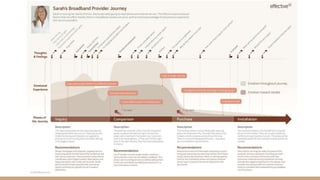
  • #12 Journey mapping
  • #13 Actions depend upon your target audience: Follow us on Twitter Share this infographic upload your own story/share your photo with a specific hashtag. social media supporters can share content/amplify your message on a social media platform or share their own stories/photos/videos on a bespoke platform, donors can crowdfund a project, beneficiaries can tell stories about how they’ve been impacted by your work that you can share on your web site or on social media
  • #14 Donate Use a hashtag Sign up for CTAs Watch our video
  • #17 Shared values: “All women deserve the opportunity to choose when and whether to have children.” and Independence: “A survivor’s story of hope in the face of uncertainty.”
  • #18 Let’s go around the room and see if people want to share either general messaging about their organization or messaging about a particular campaign they are running or want to run. Have them share who they want to talk to and what they want to say in a couple of sentences. Ask the rest of participants: 1) did you understand this? and 2) do you want to learn more?
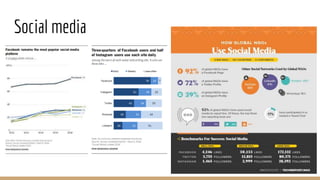
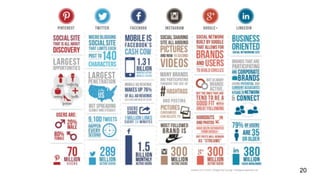
  • #20 Facebook: 79% of online US adults use Facebook Instagram: 32% of online US adults use Instagram Twitter: 21% of online US adults use Twitter LinkedIn: 25% of all U.S. adults use LinkedIn (but the demographics of LinkedIn make it an excellent platform for nonprofits to reach donors!) - almost half of all LinkedIn users make $75,000 and above.
  • #22 Social media isn’t really about tools & technology, it’s about human interaction/building relationships/sharing information Not *transaction* but *interaction* - long-term, sustained engagement Share other people’s content more than your own content (80/20 or 3:1 rule). If you make a mistake, acknowledge, apologize, and move on (don’t delete). Thank people explicitly or by sharing their content Quality of content is more important than quantity Re-use content/Reshare content that does well (just look at last month because it might be overwhelming to look at more) but don’t copy and paste tweets/FB posts/Instagram posts (rewrite just a bit differently) Don’t open a new social media account/new platform unless you have the resources to share content regularly
  • #23 Tweets with photos perform better! And don’t forget about GIFs if it’s right for your brand/tone/voice. Infographics Videos
  • #24 Facebook: starting with hashtags, using too many hashtags, not deleting the URL Tweet: Kristen Bell (not Kirsten), starting with an @mention LinkedIN: @nyu isn’t linking/not correct, hashtags only recently started working, not deleting the url
  • #25 Highlighting the stories of beneficiaries, using LinkedIn to find ambassadors (reaching out to young professionals), using positivity/progress as a message, being relevant and timely! Use hashtags for Instagram and Twitter No hashtags needed on Facebook Don’t forget about LinkedIn Twitter chats Facebook Live
  • #26 What’s appropriate for your brand -- voice/tone -- connected to style guide Confirm terminology Encouraging your staff to share their work/amplify your messages to their networks Having a clear commenting policy about what you’ll allow on your page and what you’ll delete
  • #27 Maximize time/efficiency Schedule tweets Monitor conversations , leverage Twitter lists
  • #28 WHAT: qualitative/quantative: # of followers/likes/shares/RTs but also what time of day works best? HOW: Tools - native (Google, FB, Twitter, Instagram) in addition to Twitonomy, Tweetreach, etc. ASSESS and ADAPT: monitor how channels are performing and change things up if something isn’t working!
  • #29 Where should it be hosted? Frequency of posting Cross-promotion of content Guest bloggers/Reposting Timely/relevant but also keep your community in mind Follow-up on stories Great for SEO, especially if you cross-link to other sections of your site.
  • #33 10 minute share, then one spokesperson last 5 minutes
  • #41 Nowadays you can easily integrate social media feeds on your site and even publish from your site to these feeds.
  • #42 If people can’t comfortably read your site, you are not communicating effectively.
  • #43 This site is very clean and simple to use. Has clear calls to action with multiple levels of navigation (menu, buttons, search, scroll)
  • #44 Use terms your users will understand. Use common conventions users have come to expect. Note the obvious Donate and Adopt buttons
  • #45 Use terms your users will understand. Use common conventions users have come to expect. Note the obvious Donate and Adopt buttons
  • #47 Think from THEIR point of view - what would make it easiest for a user to understand your subject matter.
  • #48 Audubon
  • #49 World Vision - Notice the wonderful and optimistic images
  • #50 Splash - another happy kid served
  • #55 hubspot
  • #56 Hubspot - though this is targeted at for-profit businesses, you could easily substitute “products” for services, etc.
  • #62 Discuss amongst yourselves, we will walk around and observe and answer questions