LinkedIn:
Top 5 Tips


November 2011
5 Reason to Join LinkedIn

       • Before we start with our 5 tips for making your LinkedIn
         profile the best it can be, Meltwater wanted to remind
         you the top 5 reasons to get an account with LinkedIn in
         the first place:
           1. Reconnect with old coworkers
           2. Introductions to new contacts
           3. Recruiters can find you, possible new opportunity
           4. Strengthening professional relationships
           5. Network, network, network


1
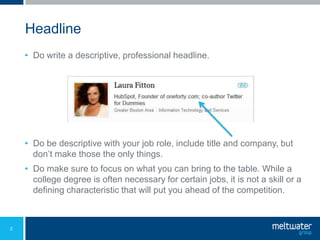
Headline
    • Do write a descriptive, professional headline.


    • Do be descriptive with your job role, include title and company, but
      don’t make those the only things.
    • Do make sure to focus on what you can bring to the table. While a
      college degree is often necessary for certain jobs, it is not a skill or a
      defining characteristic that will put you ahead of the competition.


2
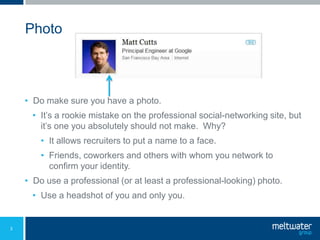
Photo


    • Do make sure you have a photo.
      • It’s a rookie mistake on the professional social-networking site, but
        it’s one you absolutely should not make. Why?
        • It allows recruiters to put a name to a face.
        • Friends, coworkers and others with whom you network to
          confirm your identity.
    • Do use a professional (or at least a professional-looking) photo.
      • Use a headshot of you and only you.


3
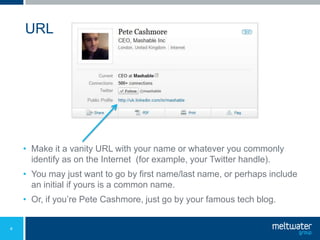
URL


    • Make it a vanity URL with your name or whatever you commonly
      identify as on the Internet (for example, your Twitter handle).
    • You may just want to go by first name/last name, or perhaps include
      an initial if yours is a common name.
    • Or, if you’re Pete Cashmore, just go by your famous tech blog.


4
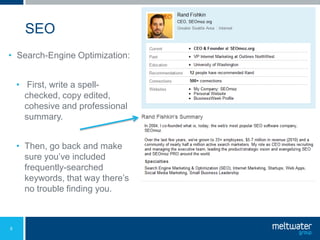
SEO
• Search-Engine Optimization:


    • First, write a spell-
      checked, copy edited,
      cohesive and professional
      summary.


    • Then, go back and make
      sure you’ve included
      frequently-searched
      keywords, that way there’s
      no trouble finding you.


5
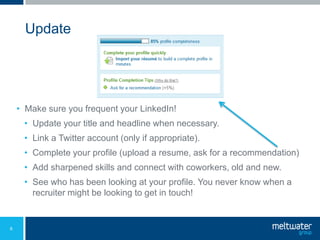
Update


    • Make sure you frequent your LinkedIn!
     • Update your title and headline when necessary.
     • Link a Twitter account (only if appropriate).
     • Complete your profile (upload a resume, ask for a recommendation)
     • Add sharpened skills and connect with coworkers, old and new.
     • See who has been looking at your profile. You never know when a
       recruiter might be looking to get in touch!


6
Helpful Links


     • LinkedIn
     • New User Start-Guide
     • VIDEO: What’s LinkedIn
     • Meltwater Group’s LinkedIn Page


7

LinkedIn: Top 5 Tips

  • 1.
  • 2.
    5 Reason toJoin LinkedIn • Before we start with our 5 tips for making your LinkedIn profile the best it can be, Meltwater wanted to remind you the top 5 reasons to get an account with LinkedIn in the first place: 1. Reconnect with old coworkers 2. Introductions to new contacts 3. Recruiters can find you, possible new opportunity 4. Strengthening professional relationships 5. Network, network, network 1
  • 3.
    Headline • Do write a descriptive, professional headline. • Do be descriptive with your job role, include title and company, but don’t make those the only things. • Do make sure to focus on what you can bring to the table. While a college degree is often necessary for certain jobs, it is not a skill or a defining characteristic that will put you ahead of the competition. 2
  • 4.
    Photo • Do make sure you have a photo. • It’s a rookie mistake on the professional social-networking site, but it’s one you absolutely should not make. Why? • It allows recruiters to put a name to a face. • Friends, coworkers and others with whom you network to confirm your identity. • Do use a professional (or at least a professional-looking) photo. • Use a headshot of you and only you. 3
  • 5.
    URL • Make it a vanity URL with your name or whatever you commonly identify as on the Internet (for example, your Twitter handle). • You may just want to go by first name/last name, or perhaps include an initial if yours is a common name. • Or, if you’re Pete Cashmore, just go by your famous tech blog. 4
  • 6.
    SEO • Search-Engine Optimization: • First, write a spell- checked, copy edited, cohesive and professional summary. • Then, go back and make sure you’ve included frequently-searched keywords, that way there’s no trouble finding you. 5
  • 7.
    Update • Make sure you frequent your LinkedIn! • Update your title and headline when necessary. • Link a Twitter account (only if appropriate). • Complete your profile (upload a resume, ask for a recommendation) • Add sharpened skills and connect with coworkers, old and new. • See who has been looking at your profile. You never know when a recruiter might be looking to get in touch! 6
  • 8.
    Helpful Links • LinkedIn • New User Start-Guide • VIDEO: What’s LinkedIn • Meltwater Group’s LinkedIn Page 7