Zero-Downtime
deployments with
Kubernetes
Mateusz Dymiński
Nokia
Whoami
Mateusz Dymiński
• Software Developer at Nokia
• 8+ exp with Java
• 4+ exp with Go
• One of the organizer GoWroc - GolangWroclaw Meetup
• Github: github.com/mateuszdyminski
• Twitter: @m_dyminski
• LinkedIn: linkedin.com/in/mdyminski
• Zero Downtime Deployment
• Kubernetes
• Demo Application
• Graceful Shutdown
• Deployments demo
• Summary
Agenda
github.com/mateuszdyminski/zero
apki u
What is this zero downtime deployment?
• Deploy application to production
• End user can’t notice any errors/problems during the
deployment
• Monitoring tools shouldn’t even notice that deployment is
ongoing/done
• Bugs can be fixed without any outage.
• New features can be introduced without any outage.
• Required for Continuous Delivery - CD
Zero downtime deployment types
• Rolling Updates deployment
• Blue/Green deployment
• Canary deployment
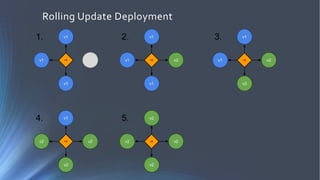
Rolling Update Deployment
• Rolling Update deployment is when you run new version of
the application next to the old one
• Have proxy or load balancer in front of your applications
• One by one new application is deployed and old one is
shutdown
• Problem – client needs handle old and new application in
the same time
Rolling Update Deployment
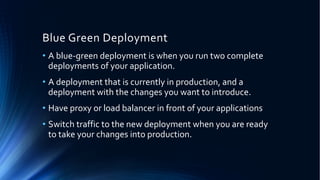
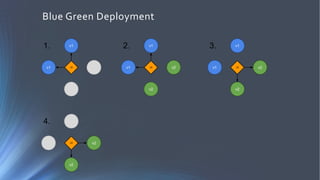
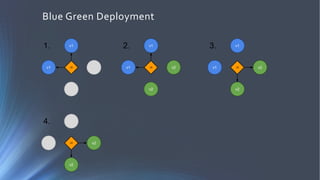
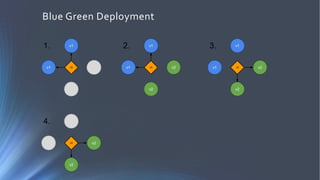
Blue Green Deployment
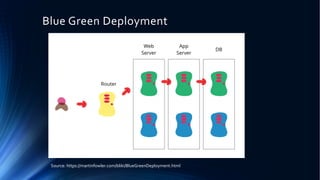
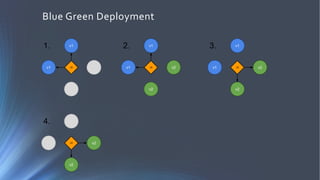
• A blue-green deployment is when you run two complete
deployments of your application.
• A deployment that is currently in production, and a
deployment with the changes you want to introduce.
• Have proxy or load balancer in front of your applications
• Switch traffic to the new deployment when you are ready
to take your changes into production.
Blue Green Deployment
Source: https://martinfowler.com/bliki/BlueGreenDeployment.html
Blue Green Deployment
Canary Deployment
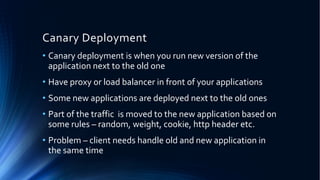
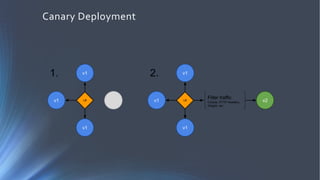
• Canary deployment is when you run new version of the
application next to the old one
• Have proxy or load balancer in front of your applications
• Some new applications are deployed next to the old ones
• Part of the traffic is moved to the new application based on
some rules – random, weight, cookie, http header etc.
• Problem – client needs handle old and new application in
the same time
Canary Deployment
• Who of you hears about Kubernetes?
• Who of you play with Kubernetes?
• Who of you is using Kubernetes on production?
Kubernetes
Kubernetes
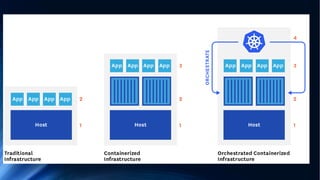
• Open source platform that automates Linux container operations.
• Eliminates many of the manual processes involved in deploying
and scaling containerized applications.
• Groups hosts running Linux containers
• Kubernetes helps you easily and efficiently manage those clusters.
• These clusters can span hosts across public, private, or hybrid
clouds
Why Kubernetes
• Orchestrate containers across multiple hosts.
• Make better use of hardware to maximize resources needed to run
your enterprise apps.
• Control and automate application deployments and updates.
• Mount and add storage to run stateful apps.
• Scale containerized applications and their resources on the fly.
• Declaratively manage services, which guarantees the deployed
applications are always running how you deployed them.
• Health-check and self-heal your apps with autoplacement,
autorestart, autoreplication, and autoscaling.
Demo
Demo Application
Demo Application
• Users Service
• REST API
• Storage: MySQL
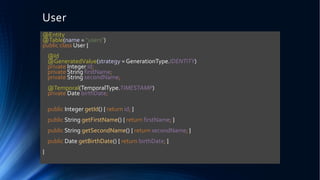
User
@Entity
@Table(name = "users")
public class User {
@Id
@GeneratedValue(strategy = GenerationType.IDENTITY)
private Integer id;
private String firstName;
private String secondName;
@Temporal(TemporalType.TIMESTAMP)
private Date birthDate;
public Integer getId() { return id; }
public String getFirstName() { return firstName; }
public String getSecondName() { return secondName; }
public Date getBirthDate() { return birthDate; }
}
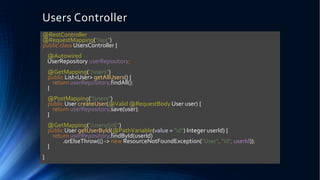
Users Controller
@RestController
@RequestMapping("/api")
public class UsersController {
@Autowired
UserRepository userRepository;
@GetMapping("/users")
public List<User> getAllUsers() {
return userRepository.findAll();
}
@PostMapping("/users")
public User createUser(@Valid @RequestBody User user) {
return userRepository.save(user);
}
@GetMapping("/users/{id}")
public User getUserById(@PathVariable(value = "id") Integer userId) {
return userRepository.findById(userId)
.orElseThrow(() -> new ResourceNotFoundException("User", "id", userId));
}
}
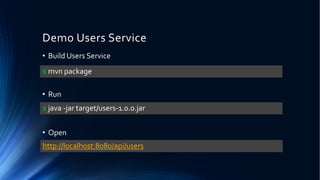
Demo Users Service
• Build Users Service
• Run
• Open
$ mvn package
$ java -jar target/users-1.0.0.jar
http://localhost:8080/api/users
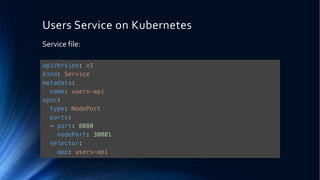
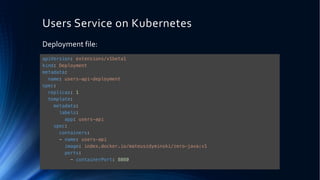
Users Service on Kubernetes
Service file:
apiVersion: v1
kind: Service
metadata:
name: users-api
spec:
type: NodePort
ports:
- port: 8080
nodePort: 30001
selector:
app: users-api
Users Service on Kubernetes
Deployment file:
apiVersion: extensions/v1beta1
kind: Deployment
metadata:
name: users-api-deployment
spec:
replicas: 1
template:
metadata:
labels:
app: users-api
spec:
containers:
- name: users-api
image: index.docker.io/mateuszdyminski/zero-java:v1
ports:
- containerPort: 8080
Demo Users Service on Kubernetes
• Create MySQL
• Create service
• Create Deployment
• Open
$ kubectl apply –f 01_users_srv.yaml
$ kubectl apply –f 02_deployment.yaml
http://192.168.99.100:30001/api/users
$ helm install stable/mysql
Rolling update deployment
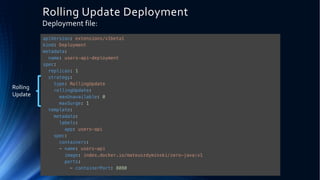
Rolling Update Deployment
Deployment file:
apiVersion: extensions/v1beta1
kind: Deployment
metadata:
name: users-api-deployment
spec:
replicas: 1
strategy:
type: RollingUpdate
rollingUpdate:
maxUnavailable: 0
maxSurge: 1
template:
metadata:
labels:
app: users-api
spec:
containers:
- name: users-api
image: index.docker.io/mateuszdyminski/zero-java:v1
ports:
- containerPort: 8080
Rolling
Update
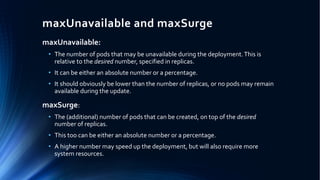
maxUnavailable and maxSurge
maxUnavailable:
• The number of pods that may be unavailable during the deployment.This is
relative to the desired number, specified in replicas.
• It can be either an absolute number or a percentage.
• It should obviously be lower than the number of replicas, or no pods may remain
available during the update.
maxSurge:
• The (additional) number of pods that can be created, on top of the desired
number of replicas.
• This too can be either an absolute number or a percentage.
• A higher number may speed up the deployment, but will also require more
system resources.
Rolling update deployment
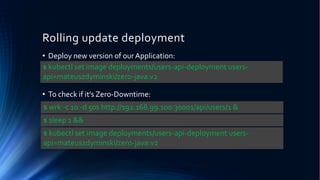
• Deploy new version of our Application:
• To check if it’s Zero-Downtime:
$ kubectl set image deployments/users-api-deployment users-
api=mateuszdyminski/zero-java:v2
$ wrk -c 10 -d 50s http://192.168.99.100:30001/api/users/1 &
$ kubectl set image deployments/users-api-deployment users-
api=mateuszdyminski/zero-java:v2
$ sleep 1 &&
Graceful Shutdown
Graceful Shutdown
We can speak about the graceful shutdown of our
application, when all of the resources it used and all
of the traffic and/or data processing what it handled
are closed and released properly.
It means that no database connection remains open
and no ongoing request fails because we stop our
application.
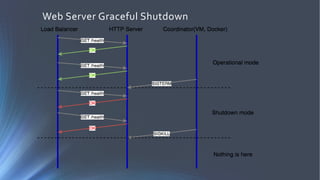
Scenario for a graceful web server shutdown
• App gets notification to stop (received SIGTERM)
• App lets know the load balancer that it’s not ready for
newer requests
• App served all the ongoing requests
• App releases all of the resources correctly: DB, queue, etc.
• App exits with "success" status code - usually ”0” - zero
Graceful Shutdown with Kubernetes
• App receives SIGTERM signal because Kubernetes wants to stop it
• App (pod) starts to return 500 for GET /health to
let readinessProbe(Service) know that it's not ready to receive more
requests.
• Kubernetes readinessProbe checks GET /health and it stops
redirecting traffic to the app (because it continuously returns 500)
• App waits before it starts to shutdown - to make sure that the Service
is getting notified via readinessProbe fail
• App starts graceful shutdown
• App first closes server with live working DB connections
• App exits process
• Kubernetes force kills the application after 30s (SIGKILL) if it's still
running (in an optimal case it doesn't happen)
Web Server Graceful Shutdown
Graceful shutdown with Spring
Instead of:
We need to use:
Where GracefulshutdownSpringApplication looks like:
public static void main(String[] args) {
SpringApplication.run(UsersApplication.class, args);
}
public static void main(String[] args) {
GracefulshutdownSpringApplication.run(UsersApplication.class, args);
}
public class GracefulshutdownSpringApplication {
public static void run(Class<?> appClazz, String... args) {
SpringApplication app = new SpringApplication(appClazz);
app.setRegisterShutdownHook(false);
ConfigurableApplicationContext applicationContext = app.run(args);
Runtime.getRuntime().addShutdownHook(newThread(new GracefulShutdownHook(applicationContext)));
}
}
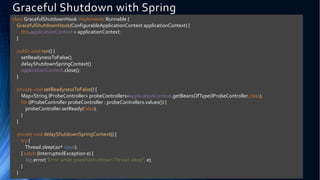
Graceful Shutdown with Spring
class GracefulShutdownHook implements Runnable {
GracefulShutdownHook(ConfigurableApplicationContext applicationContext) {
this.applicationContext = applicationContext;
}
public void run() {
setReadynessToFalse();
delayShutdownSpringContext();
applicationContext.close();
}
private void setReadynessToFalse() {
Map<String,IProbeController> probeControllers=applicationContext.getBeansOfType(IProbeController.class);
for (IProbeController probeController : probeControllers.values()) {
probeController.setReady(false);
}
}
private void delayShutdownSpringContext() {
try {
Thread.sleep(20* 1000);
} catch (InterruptedException e) {
log.error("Error while gracefulshutdownThread.sleep", e);
}
}
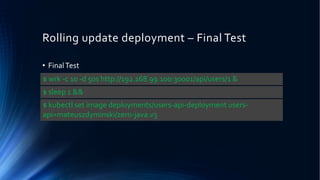
Rolling update deployment – Final Test
• FinalTest
$ wrk -c 10 -d 50s http://192.168.99.100:30001/api/users/1 &
$ kubectl set image deployments/users-api-deployment users-
api=mateuszdyminski/zero-java:v3
$ sleep 1 &&
Blue Green Deployment
Users Service on Kubernetes
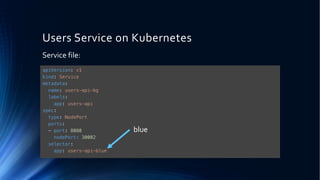
Service file:
apiVersion: v1
kind: Service
metadata:
name: users-api-bg
labels:
app: users-api
spec:
type: NodePort
ports:
- port: 8080
nodePort: 30002
selector:
app: users-api-blue
blue
Users Service on Kubernetes
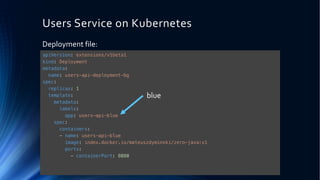
Deployment file:
apiVersion: extensions/v1beta1
kind: Deployment
metadata:
name: users-api-deployment-bg
spec:
replicas: 1
template:
metadata:
labels:
app: users-api-blue
spec:
containers:
- name: users-api-blue
image: index.docker.io/mateuszdyminski/zero-java:v1
ports:
- containerPort: 8080
blue
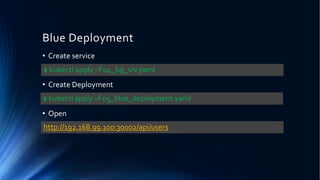
Blue Deployment
• Create service
• Create Deployment
• Open
$ kubectl apply –f 04_bg_srv.yaml
$ kubectl apply –f 05_blue_deployment.yaml
http://192.168.99.100:30002/api/users
Blue Green Deployment
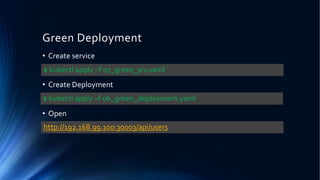
Green Deployment
• Create service
• Create Deployment
• Open
$ kubectl apply –f 07_green_srv.yaml
$ kubectl apply –f 06_green_deployment.yaml
http://192.168.99.100:30003/api/users
Blue Green Deployment
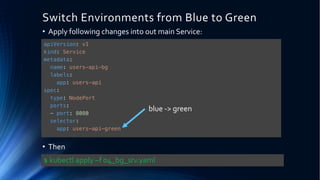
Switch Environments from Blue to Green
• Apply following changes into out main Service:
• Then
apiVersion: v1
kind: Service
metadata:
name: users-api-bg
labels:
app: users-api
spec:
type: NodePort
ports:
- port: 8080
selector:
app: users-api-green
$ kubectl apply –f 04_bg_srv.yaml
blue -> green
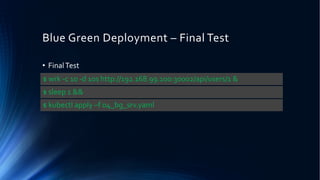
Blue Green Deployment – Final Test
• FinalTest
$ wrk -c 10 -d 10s http://192.168.99.100:30002/api/users/1 &
$ kubectl apply –f 04_bg_srv.yaml
$ sleep 1 &&
Summary
Summary
• Zero Downtime Deployments are really easy with Kubernetes
• Remember to check if your Server/App handles SIGTERM properly
• Always remember about Graceful Shutdown
Thank you!

4Developers 2018: Zero-Downtime deployments with Kubernetes (Mateusz Dymiński)

  • 1.
  • 2.
    Whoami Mateusz Dymiński • SoftwareDeveloper at Nokia • 8+ exp with Java • 4+ exp with Go • One of the organizer GoWroc - GolangWroclaw Meetup • Github: github.com/mateuszdyminski • Twitter: @m_dyminski • LinkedIn: linkedin.com/in/mdyminski
  • 3.
    • Zero DowntimeDeployment • Kubernetes • Demo Application • Graceful Shutdown • Deployments demo • Summary Agenda
  • 4.
  • 6.
  • 8.
    What is thiszero downtime deployment? • Deploy application to production • End user can’t notice any errors/problems during the deployment • Monitoring tools shouldn’t even notice that deployment is ongoing/done • Bugs can be fixed without any outage. • New features can be introduced without any outage. • Required for Continuous Delivery - CD
  • 9.
    Zero downtime deploymenttypes • Rolling Updates deployment • Blue/Green deployment • Canary deployment
  • 10.
    Rolling Update Deployment •Rolling Update deployment is when you run new version of the application next to the old one • Have proxy or load balancer in front of your applications • One by one new application is deployed and old one is shutdown • Problem – client needs handle old and new application in the same time
  • 11.
  • 12.
    Blue Green Deployment •A blue-green deployment is when you run two complete deployments of your application. • A deployment that is currently in production, and a deployment with the changes you want to introduce. • Have proxy or load balancer in front of your applications • Switch traffic to the new deployment when you are ready to take your changes into production.
  • 13.
    Blue Green Deployment Source:https://martinfowler.com/bliki/BlueGreenDeployment.html
  • 14.
  • 15.
    Canary Deployment • Canarydeployment is when you run new version of the application next to the old one • Have proxy or load balancer in front of your applications • Some new applications are deployed next to the old ones • Part of the traffic is moved to the new application based on some rules – random, weight, cookie, http header etc. • Problem – client needs handle old and new application in the same time
  • 16.
  • 17.
    • Who ofyou hears about Kubernetes? • Who of you play with Kubernetes? • Who of you is using Kubernetes on production?
  • 18.
  • 19.
    Kubernetes • Open sourceplatform that automates Linux container operations. • Eliminates many of the manual processes involved in deploying and scaling containerized applications. • Groups hosts running Linux containers • Kubernetes helps you easily and efficiently manage those clusters. • These clusters can span hosts across public, private, or hybrid clouds
  • 21.
    Why Kubernetes • Orchestratecontainers across multiple hosts. • Make better use of hardware to maximize resources needed to run your enterprise apps. • Control and automate application deployments and updates. • Mount and add storage to run stateful apps. • Scale containerized applications and their resources on the fly. • Declaratively manage services, which guarantees the deployed applications are always running how you deployed them. • Health-check and self-heal your apps with autoplacement, autorestart, autoreplication, and autoscaling.
  • 22.
  • 23.
  • 24.
    Demo Application • UsersService • REST API • Storage: MySQL
  • 25.
    User @Entity @Table(name = "users") publicclass User { @Id @GeneratedValue(strategy = GenerationType.IDENTITY) private Integer id; private String firstName; private String secondName; @Temporal(TemporalType.TIMESTAMP) private Date birthDate; public Integer getId() { return id; } public String getFirstName() { return firstName; } public String getSecondName() { return secondName; } public Date getBirthDate() { return birthDate; } }
  • 26.
    Users Controller @RestController @RequestMapping("/api") public classUsersController { @Autowired UserRepository userRepository; @GetMapping("/users") public List<User> getAllUsers() { return userRepository.findAll(); } @PostMapping("/users") public User createUser(@Valid @RequestBody User user) { return userRepository.save(user); } @GetMapping("/users/{id}") public User getUserById(@PathVariable(value = "id") Integer userId) { return userRepository.findById(userId) .orElseThrow(() -> new ResourceNotFoundException("User", "id", userId)); } }
  • 27.
    Demo Users Service •Build Users Service • Run • Open $ mvn package $ java -jar target/users-1.0.0.jar http://localhost:8080/api/users
  • 28.
    Users Service onKubernetes Service file: apiVersion: v1 kind: Service metadata: name: users-api spec: type: NodePort ports: - port: 8080 nodePort: 30001 selector: app: users-api
  • 29.
    Users Service onKubernetes Deployment file: apiVersion: extensions/v1beta1 kind: Deployment metadata: name: users-api-deployment spec: replicas: 1 template: metadata: labels: app: users-api spec: containers: - name: users-api image: index.docker.io/mateuszdyminski/zero-java:v1 ports: - containerPort: 8080
  • 30.
    Demo Users Serviceon Kubernetes • Create MySQL • Create service • Create Deployment • Open $ kubectl apply –f 01_users_srv.yaml $ kubectl apply –f 02_deployment.yaml http://192.168.99.100:30001/api/users $ helm install stable/mysql
  • 31.
  • 32.
    Rolling Update Deployment Deploymentfile: apiVersion: extensions/v1beta1 kind: Deployment metadata: name: users-api-deployment spec: replicas: 1 strategy: type: RollingUpdate rollingUpdate: maxUnavailable: 0 maxSurge: 1 template: metadata: labels: app: users-api spec: containers: - name: users-api image: index.docker.io/mateuszdyminski/zero-java:v1 ports: - containerPort: 8080 Rolling Update
  • 33.
    maxUnavailable and maxSurge maxUnavailable: •The number of pods that may be unavailable during the deployment.This is relative to the desired number, specified in replicas. • It can be either an absolute number or a percentage. • It should obviously be lower than the number of replicas, or no pods may remain available during the update. maxSurge: • The (additional) number of pods that can be created, on top of the desired number of replicas. • This too can be either an absolute number or a percentage. • A higher number may speed up the deployment, but will also require more system resources.
  • 34.
    Rolling update deployment •Deploy new version of our Application: • To check if it’s Zero-Downtime: $ kubectl set image deployments/users-api-deployment users- api=mateuszdyminski/zero-java:v2 $ wrk -c 10 -d 50s http://192.168.99.100:30001/api/users/1 & $ kubectl set image deployments/users-api-deployment users- api=mateuszdyminski/zero-java:v2 $ sleep 1 &&
  • 35.
  • 36.
    Graceful Shutdown We canspeak about the graceful shutdown of our application, when all of the resources it used and all of the traffic and/or data processing what it handled are closed and released properly. It means that no database connection remains open and no ongoing request fails because we stop our application.
  • 37.
    Scenario for agraceful web server shutdown • App gets notification to stop (received SIGTERM) • App lets know the load balancer that it’s not ready for newer requests • App served all the ongoing requests • App releases all of the resources correctly: DB, queue, etc. • App exits with "success" status code - usually ”0” - zero
  • 38.
    Graceful Shutdown withKubernetes • App receives SIGTERM signal because Kubernetes wants to stop it • App (pod) starts to return 500 for GET /health to let readinessProbe(Service) know that it's not ready to receive more requests. • Kubernetes readinessProbe checks GET /health and it stops redirecting traffic to the app (because it continuously returns 500) • App waits before it starts to shutdown - to make sure that the Service is getting notified via readinessProbe fail • App starts graceful shutdown • App first closes server with live working DB connections • App exits process • Kubernetes force kills the application after 30s (SIGKILL) if it's still running (in an optimal case it doesn't happen)
  • 39.
  • 40.
    Graceful shutdown withSpring Instead of: We need to use: Where GracefulshutdownSpringApplication looks like: public static void main(String[] args) { SpringApplication.run(UsersApplication.class, args); } public static void main(String[] args) { GracefulshutdownSpringApplication.run(UsersApplication.class, args); } public class GracefulshutdownSpringApplication { public static void run(Class<?> appClazz, String... args) { SpringApplication app = new SpringApplication(appClazz); app.setRegisterShutdownHook(false); ConfigurableApplicationContext applicationContext = app.run(args); Runtime.getRuntime().addShutdownHook(newThread(new GracefulShutdownHook(applicationContext))); } }
  • 41.
    Graceful Shutdown withSpring class GracefulShutdownHook implements Runnable { GracefulShutdownHook(ConfigurableApplicationContext applicationContext) { this.applicationContext = applicationContext; } public void run() { setReadynessToFalse(); delayShutdownSpringContext(); applicationContext.close(); } private void setReadynessToFalse() { Map<String,IProbeController> probeControllers=applicationContext.getBeansOfType(IProbeController.class); for (IProbeController probeController : probeControllers.values()) { probeController.setReady(false); } } private void delayShutdownSpringContext() { try { Thread.sleep(20* 1000); } catch (InterruptedException e) { log.error("Error while gracefulshutdownThread.sleep", e); } }
  • 42.
    Rolling update deployment– Final Test • FinalTest $ wrk -c 10 -d 50s http://192.168.99.100:30001/api/users/1 & $ kubectl set image deployments/users-api-deployment users- api=mateuszdyminski/zero-java:v3 $ sleep 1 &&
  • 43.
  • 44.
  • 45.
    Users Service onKubernetes Service file: apiVersion: v1 kind: Service metadata: name: users-api-bg labels: app: users-api spec: type: NodePort ports: - port: 8080 nodePort: 30002 selector: app: users-api-blue blue
  • 46.
    Users Service onKubernetes Deployment file: apiVersion: extensions/v1beta1 kind: Deployment metadata: name: users-api-deployment-bg spec: replicas: 1 template: metadata: labels: app: users-api-blue spec: containers: - name: users-api-blue image: index.docker.io/mateuszdyminski/zero-java:v1 ports: - containerPort: 8080 blue
  • 47.
    Blue Deployment • Createservice • Create Deployment • Open $ kubectl apply –f 04_bg_srv.yaml $ kubectl apply –f 05_blue_deployment.yaml http://192.168.99.100:30002/api/users
  • 48.
  • 49.
    Green Deployment • Createservice • Create Deployment • Open $ kubectl apply –f 07_green_srv.yaml $ kubectl apply –f 06_green_deployment.yaml http://192.168.99.100:30003/api/users
  • 50.
  • 51.
    Switch Environments fromBlue to Green • Apply following changes into out main Service: • Then apiVersion: v1 kind: Service metadata: name: users-api-bg labels: app: users-api spec: type: NodePort ports: - port: 8080 selector: app: users-api-green $ kubectl apply –f 04_bg_srv.yaml blue -> green
  • 52.
    Blue Green Deployment– Final Test • FinalTest $ wrk -c 10 -d 10s http://192.168.99.100:30002/api/users/1 & $ kubectl apply –f 04_bg_srv.yaml $ sleep 1 &&
  • 53.
  • 54.
    Summary • Zero DowntimeDeployments are really easy with Kubernetes • Remember to check if your Server/App handles SIGTERM properly • Always remember about Graceful Shutdown
  • 56.