How to accelerate
backup performance
with Dell DR Series
Backup Appliances
Amit Arora
Federal Solutions Architect– Data Protection
Amit_K_Arora@Dell.com
Dell - Restricted - Confidential2
Today’s Agenda
• Who is Dell Software
• Data Protection Solutions
• Dell DR Series Backup Appliances Deep Dive
• Wrap-up + Q&A
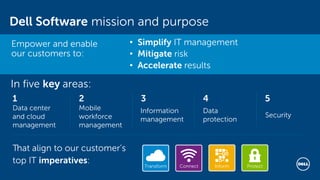
Dell Software mission and purpose
In five key areas:
Data center
and cloud
management
1
Mobile
workforce
management
2
Information
management
3
Data
protection
4 5
Security
That align to our customer’s
top IT imperatives:
• Simplify IT management
• Mitigate risk
• Accelerate results
Empower and enable
our customers to:
Transform ProtectConnect Inform
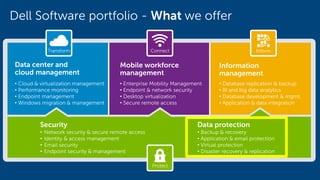
Dell Software portfolio - What we offer
Data center and
cloud management
• Cloud & virtualization management
• Performance monitoring
• Endpoint management
• Windows migration & management
Mobile workforce
management
• Enterprise Mobility Management
• Endpoint & network security
• Desktop virtualization
• Secure remote access
Information
management
• Database replication & backup
• BI and big data analytics
• Database development & mgmt.
• Application & data integration
Security
• Network security & secure remote access
• Identity & access management
• Email security
• Endpoint security & management
Data protection
• Backup & recovery
• Application & email protection
• Virtual protection
• Disaster recovery & replication
Transform
Protect
Connect Inform
Dell Data Protection
Matching backup to your business
Dell - Restricted - Confidential6
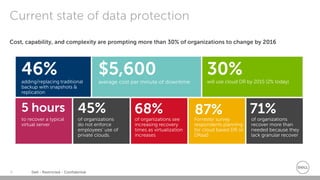
Cost, capability, and complexity are prompting more than 30% of organizations to change by 2016
Current state of data protection
30%will use cloud DR by 2015 (2% today)
46%adding/replacing traditional
backup with snapshots &
replication
$5,600
average cost per minute of downtime
to recover a typical
virtual server
5 hours
of organizations see
increasing recovery
times as virtualization
increases
68%
Forrester survey
respondents planning
for cloud based DR or
DRaaS
87%of organizations
do not enforce
employees’ use of
private clouds.
45%
of organizations
recover more than
needed because they
lack granular recover
71%
Dell - Restricted - Confidential7
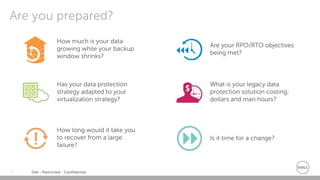
Are you prepared?
How much is your data
growing while your backup
window shrinks?
Are your RPO/RTO objectives
being met?
How long would it take you
to recover from a large
failure?
Is it time for a change?
Has your data protection
strategy adapted to your
virtualization strategy?
What is your legacy data
protection solution costing;
dollars and man hours?
Dell - Restricted - Confidential8
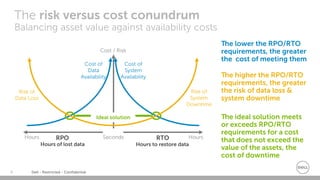
The risk versus cost conundrum
Balancing asset value against availability costs
Cost / Risk
RTORPO
Cost of
Data
Availability
Cost of
System
Availability
Ideal solution
Hours to restore dataHours of lost data
Seconds HoursHours
Risk of
Data Loss
Risk of
System
Downtime
The lower the RPO/RTO
requirements, the greater
the cost of meeting them
The higher the RPO/RTO
requirements, the greater
the risk of data loss &
system downtime
The ideal solution meets
or exceeds RPO/RTO
requirements for a cost
that does not exceed the
value of the assets, the
cost of downtime
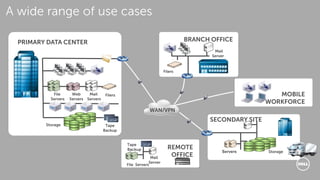
WAN/VPN
SECONDARY SITE
Servers Storage
REMOTE
OFFICE
File Servers
Mail
Server
Tape
Backup
MOBILE
WORKFORCE
BRANCH OFFICE
Filers
Mail
Server
PRIMARY DATA CENTER
File
Servers
Mail
Servers
Tape
Backup
Web
Servers
Storage
Filers
A wide range of use cases
Dell - Restricted - Confidential10
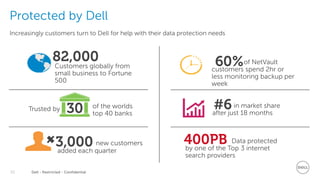
Increasingly customers turn to Dell for help with their data protection needs
Protected by Dell
82,000Customers globally from
small business to Fortune
500
3,000 new customers
added each quarter
30 of the worlds
top 40 banks
Trusted by #6in market share
after just 18 months
60%of NetVault
customers spend 2hr or
less monitoring backup per
week
400PB Data protected
by one of the Top 3 internet
search providers
Dell - Restricted - Confidential11
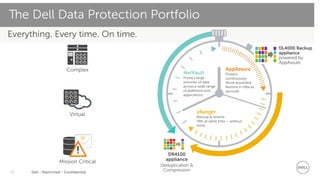
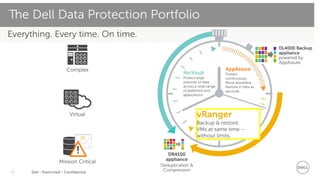
Everything. Every time. On time.
The Dell Data Protection Portfolio
Complex
Virtual
Mission Critical
@
! DR4100
appliance
Deduplication &
Compression
NetVault
Protect large
volumes of data
across a wide range
of platforms and
applications.
vRanger
Backup & restore.
VMs at same time – without
limits.
DL4000 Backup
appliance
powered by
AppAssure
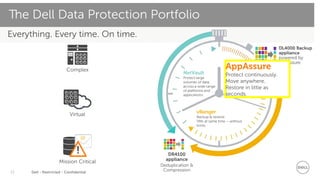
AppAssure
Protect
continuously.
Move anywhere.
Restore in little as
seconds.
Dell - Restricted - Confidential12
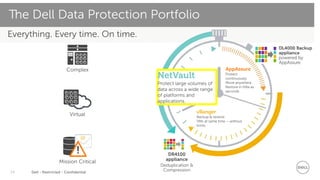
Everything. Every time. On time.
The Dell Data Protection Portfolio
Complex
Virtual
Mission Critical
@
! DR4100
appliance
Deduplication &
Compression
NetVault
Protect large
volumes of data
across a wide range
of platforms and
applications.
vRanger
Backup & restore.
VMs at same time – without
limits.
DL4000 Backup
appliance
powered by
AppAssure
AppAssure
Protect continuously.
Move anywhere.
Restore in little as
seconds.
Dell - Restricted - Confidential13
Everything. Every time. On time.
The Dell Data Protection Portfolio
Complex
Virtual
Mission Critical
@
! DR4100
appliance
Deduplication &
Compression
NetVault
Protect large
volumes of data
across a wide range
of platforms and
applications.
vRanger
Backup & restore.
VMs at same time –
without limits.
DL4000 Backup
appliance
powered by
AppAssure
AppAssure
Protect
continuously.
Move anywhere.
Restore in little as
seconds.
Dell - Restricted - Confidential14
Everything. Every time. On time.
The Dell Data Protection Portfolio
Complex
Virtual
Mission Critical
@
! DR4100
appliance
Deduplication &
Compression
NetVault
Protect large volumes of
data across a wide range
of platforms and
applications.
vRanger
Backup & restore.
VMs at same time – without
limits.
DL4000 Backup
appliance
powered by
AppAssure
AppAssure
Protect
continuously.
Move anywhere.
Restore in little as
seconds.
Dell - Restricted - Confidential15
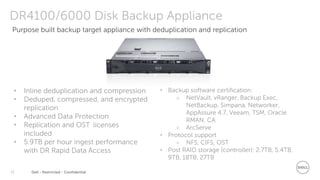
DR4100/6000 Disk Backup Appliance
• Inline deduplication and compression
• Deduped, compressed, and encrypted
replication
• Advanced Data Protection
• Replication and OST licenses
included
• 5.9TB per hour ingest performance
with DR Rapid Data Access
• Backup software certification:
 NetVault, vRanger, Backup Exec,
NetBackup, Simpana, Networker,
AppAssure 4.7, Veeam, TSM, Oracle
RMAN, CA
 ArcServe
• Protocol support
 NFS, CIFS, OST
• Post RAID storage (controller): 2.7TB, 5.4TB,
9TB, 18TB, 27TB
Purpose built backup target appliance with deduplication and replication
Dell - Restricted - Confidential16
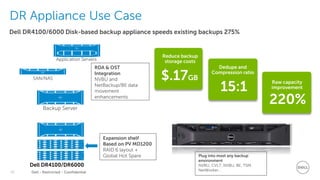
Dell DR4100/6000 Disk-based backup appliance speeds existing backups 275%
DR Appliance Use Case
Reduce backup
storage costs
$.17GB
Dedupe and
Compression ratio
15:1
Raw capacity
improvement
220%
Dell DR4100/DR6000
Backup Server
Application Servers
SAN/NAS
Expansion shelf
Based on PV MD1200
RAID 6 layout +
Global Hot Spare Plug into most any backup
environment
NVBU, CVLT, NVBU, BE, TSM,
NetWorker…
RDA & OST
Integration
NVBU and
NetBackup/BE data
movement
enhancements
Dell - Restricted - Confidential17
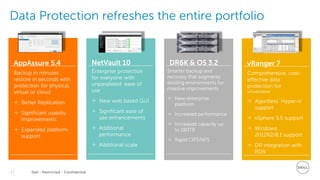
Data Protection refreshes the entire portfolio
AppAssure 5.4
Backup in minutes ,
restore in seconds with
protection for physical,
virtual or cloud
 Better Replication
 Significant usability
improvements
 Expanded platform
support
Enterprise protection
for everyone with
unparalleled ease of
use
 New web based GUI
 Significant ease of
use enhancements
 Additional
performance
 Additional scale
NetVault 10
Smarter backup and
recovery that augments
existing environments for
massive improvements
 New enterprise
platform
 Increased performance
 Increased capacity up
to 180TB
 Rapid CIFS/NFS
DR6K & OS 3.2 vRanger 7
Comprehensive, cost-
effective data
protection for
virtualization
 Agentless Hyper-V
support
 vSphere 5.5 support
 Windows
2012R2/8.1 support
 DR integration with
RDA
Confidential training material for use by Dell PartnerDirect Partners only ©2014 Dell
Thank you!
Q&A
Amit Arora
Federal Solutions Architect
Data Protection
Amit_K_Arora@Dell.com

How to Accelerate Backup Performance with Dell DR Series Backup Appliances

  • 1.
    How to accelerate backupperformance with Dell DR Series Backup Appliances Amit Arora Federal Solutions Architect– Data Protection Amit_K_Arora@Dell.com
  • 2.
    Dell - Restricted- Confidential2 Today’s Agenda • Who is Dell Software • Data Protection Solutions • Dell DR Series Backup Appliances Deep Dive • Wrap-up + Q&A
  • 3.
    Dell Software missionand purpose In five key areas: Data center and cloud management 1 Mobile workforce management 2 Information management 3 Data protection 4 5 Security That align to our customer’s top IT imperatives: • Simplify IT management • Mitigate risk • Accelerate results Empower and enable our customers to: Transform ProtectConnect Inform
  • 4.
    Dell Software portfolio- What we offer Data center and cloud management • Cloud & virtualization management • Performance monitoring • Endpoint management • Windows migration & management Mobile workforce management • Enterprise Mobility Management • Endpoint & network security • Desktop virtualization • Secure remote access Information management • Database replication & backup • BI and big data analytics • Database development & mgmt. • Application & data integration Security • Network security & secure remote access • Identity & access management • Email security • Endpoint security & management Data protection • Backup & recovery • Application & email protection • Virtual protection • Disaster recovery & replication Transform Protect Connect Inform
  • 5.
    Dell Data Protection Matchingbackup to your business
  • 6.
    Dell - Restricted- Confidential6 Cost, capability, and complexity are prompting more than 30% of organizations to change by 2016 Current state of data protection 30%will use cloud DR by 2015 (2% today) 46%adding/replacing traditional backup with snapshots & replication $5,600 average cost per minute of downtime to recover a typical virtual server 5 hours of organizations see increasing recovery times as virtualization increases 68% Forrester survey respondents planning for cloud based DR or DRaaS 87%of organizations do not enforce employees’ use of private clouds. 45% of organizations recover more than needed because they lack granular recover 71%
  • 7.
    Dell - Restricted- Confidential7 Are you prepared? How much is your data growing while your backup window shrinks? Are your RPO/RTO objectives being met? How long would it take you to recover from a large failure? Is it time for a change? Has your data protection strategy adapted to your virtualization strategy? What is your legacy data protection solution costing; dollars and man hours?
  • 8.
    Dell - Restricted- Confidential8 The risk versus cost conundrum Balancing asset value against availability costs Cost / Risk RTORPO Cost of Data Availability Cost of System Availability Ideal solution Hours to restore dataHours of lost data Seconds HoursHours Risk of Data Loss Risk of System Downtime The lower the RPO/RTO requirements, the greater the cost of meeting them The higher the RPO/RTO requirements, the greater the risk of data loss & system downtime The ideal solution meets or exceeds RPO/RTO requirements for a cost that does not exceed the value of the assets, the cost of downtime
  • 9.
    WAN/VPN SECONDARY SITE Servers Storage REMOTE OFFICE FileServers Mail Server Tape Backup MOBILE WORKFORCE BRANCH OFFICE Filers Mail Server PRIMARY DATA CENTER File Servers Mail Servers Tape Backup Web Servers Storage Filers A wide range of use cases
  • 10.
    Dell - Restricted- Confidential10 Increasingly customers turn to Dell for help with their data protection needs Protected by Dell 82,000Customers globally from small business to Fortune 500 3,000 new customers added each quarter 30 of the worlds top 40 banks Trusted by #6in market share after just 18 months 60%of NetVault customers spend 2hr or less monitoring backup per week 400PB Data protected by one of the Top 3 internet search providers
  • 11.
    Dell - Restricted- Confidential11 Everything. Every time. On time. The Dell Data Protection Portfolio Complex Virtual Mission Critical @ ! DR4100 appliance Deduplication & Compression NetVault Protect large volumes of data across a wide range of platforms and applications. vRanger Backup & restore. VMs at same time – without limits. DL4000 Backup appliance powered by AppAssure AppAssure Protect continuously. Move anywhere. Restore in little as seconds.
  • 12.
    Dell - Restricted- Confidential12 Everything. Every time. On time. The Dell Data Protection Portfolio Complex Virtual Mission Critical @ ! DR4100 appliance Deduplication & Compression NetVault Protect large volumes of data across a wide range of platforms and applications. vRanger Backup & restore. VMs at same time – without limits. DL4000 Backup appliance powered by AppAssure AppAssure Protect continuously. Move anywhere. Restore in little as seconds.
  • 13.
    Dell - Restricted- Confidential13 Everything. Every time. On time. The Dell Data Protection Portfolio Complex Virtual Mission Critical @ ! DR4100 appliance Deduplication & Compression NetVault Protect large volumes of data across a wide range of platforms and applications. vRanger Backup & restore. VMs at same time – without limits. DL4000 Backup appliance powered by AppAssure AppAssure Protect continuously. Move anywhere. Restore in little as seconds.
  • 14.
    Dell - Restricted- Confidential14 Everything. Every time. On time. The Dell Data Protection Portfolio Complex Virtual Mission Critical @ ! DR4100 appliance Deduplication & Compression NetVault Protect large volumes of data across a wide range of platforms and applications. vRanger Backup & restore. VMs at same time – without limits. DL4000 Backup appliance powered by AppAssure AppAssure Protect continuously. Move anywhere. Restore in little as seconds.
  • 15.
    Dell - Restricted- Confidential15 DR4100/6000 Disk Backup Appliance • Inline deduplication and compression • Deduped, compressed, and encrypted replication • Advanced Data Protection • Replication and OST licenses included • 5.9TB per hour ingest performance with DR Rapid Data Access • Backup software certification:  NetVault, vRanger, Backup Exec, NetBackup, Simpana, Networker, AppAssure 4.7, Veeam, TSM, Oracle RMAN, CA  ArcServe • Protocol support  NFS, CIFS, OST • Post RAID storage (controller): 2.7TB, 5.4TB, 9TB, 18TB, 27TB Purpose built backup target appliance with deduplication and replication
  • 16.
    Dell - Restricted- Confidential16 Dell DR4100/6000 Disk-based backup appliance speeds existing backups 275% DR Appliance Use Case Reduce backup storage costs $.17GB Dedupe and Compression ratio 15:1 Raw capacity improvement 220% Dell DR4100/DR6000 Backup Server Application Servers SAN/NAS Expansion shelf Based on PV MD1200 RAID 6 layout + Global Hot Spare Plug into most any backup environment NVBU, CVLT, NVBU, BE, TSM, NetWorker… RDA & OST Integration NVBU and NetBackup/BE data movement enhancements
  • 17.
    Dell - Restricted- Confidential17 Data Protection refreshes the entire portfolio AppAssure 5.4 Backup in minutes , restore in seconds with protection for physical, virtual or cloud  Better Replication  Significant usability improvements  Expanded platform support Enterprise protection for everyone with unparalleled ease of use  New web based GUI  Significant ease of use enhancements  Additional performance  Additional scale NetVault 10 Smarter backup and recovery that augments existing environments for massive improvements  New enterprise platform  Increased performance  Increased capacity up to 180TB  Rapid CIFS/NFS DR6K & OS 3.2 vRanger 7 Comprehensive, cost- effective data protection for virtualization  Agentless Hyper-V support  vSphere 5.5 support  Windows 2012R2/8.1 support  DR integration with RDA
  • 18.
    Confidential training materialfor use by Dell PartnerDirect Partners only ©2014 Dell Thank you! Q&A Amit Arora Federal Solutions Architect Data Protection Amit_K_Arora@Dell.com

Editor's Notes

  • #4 Here at Dell, we believe complexity and risk prevent companies from unlocking the power of technology. We enable IT to meet the challenges of today’s IT imperatives and to exploit the opportunities they can provide. We make software that simplifies IT management, mitigates security risks, and accelerates results: We make the complex simple and the powerful easy to use. We drive out inefficiency and risk. We enable organizations to seamlessly integrate and scale. We deliver superior results more quickly.
  • #5 Here we’ve defined our technology capabilities under the major IT imperatives – Transform, Connect, Inform, and Protect. Transform: Things like embracing the cloud, doing the same things but in different ways. Anything transformational. Connect is all about the mobile workforce, getting people access to data when they need it, how they need it, and with what devices they want and it’s also the ability to connect different systems together. Inform is about turning large volumes of diverse data into actionable insight. And lastly, Protect is all about Data Protection and Security. Today, as you know, we will be focusing on the Protect imperative, specifically our Data Protection solutions. Let’s get started…
  • #7 46% $5,600 30% 5 hours 71%
  • #8 These are the questions businesses, organizations, government agencies and the IT professionals within them need to ask themselves when it comes to backup and disaster recovery.
  • #10 There is wide range of use cases when it comes to Data Protection ranging from your Primary Data Center to a Branch Office, your Mobile Workforce, a Secondary Site and even a Remote Office. The bottom line is everything needs to be backed up, and everything needs to be protected.
  • #12 Simple, powerful data protection. Protecting the business-critical data in your physical, virtual, application and cloud environments is fast, easy and cost-effective with our unrivaled software solutions. Back up and recover any object – from complete systems down to individual files – with our vast portfolio. The superior scalability and broad platform support of our solutions allow you to simplify data protection, minimize risk and get your systems up and running faster – whether you’re an enterprise or a small-to-medium-sized business. From rapid local recovery and total bare metal restores from remote application sites, to continuous data protection and deduplication, you can rely on Dell for a complete backup and recovery solution that reduces both upfront and ongoing administration costs.