XML Data Exchange using ABAP
Tobias Trapp


Contents

1   Introduction          ................................................   5        3.4   Rendering XML Documents and
            XML in E-Business ................................               5              Encodings .............................................          17
            XML in Application Integration ............                      5        3.5   Validating Against DTDs .......................                  17
            Exchanging Data and Documents ........                           5        3.6   Pitfalls Regarding Namespaces .............                      20
            Structure of this Book ...........................               6              Namespace Support of the
            System Requirements ...........................                  6              XML Library ..........................................           21
            Acknowledgements ..............................                  6              Identifying Elements with
                                                                                            Namespaces ..........................................            23
2   XML Technologies and                                                              3.7   Event-Based Parsing ..............................               23
    Data Exchange ...........................................                7              SAX Interface ........................................           24
    2.1     Important Standards of the                                                      Pitfalls ...................................................     25
            XML Family ...........................................           7              Using Rule Sets .....................................            25
            XML 1.0 ................................................         7        3.8   Useful Tips ............................................         26
            XML Transformation Using XSLT ..........                         7
            XML Schema for Data Modeling ..........                          8    4   XSL Transformations                 ................................   29
            XML Framework in E-Business .............                        8        4.1   Integrating XSLT into the
    2.2     Data Exchange in Business Processes ...                          9              ABAP Workbench .................................                 29
            XML in Integration Scenarios ...............                     9        4.2   Integrating XSLT in ABAP ......................                  31
            Data Exchange with                                                              Calling XSLT from ABAP .......................                   32
            External Partners ...................................            9              Calling ABAP from XSLT .......................                   32
            Conclusion ............................................          9              Exception Handling in ABAP Calls
    2.3     Using XML Technologies in                                                       from XSLT ..............................................         35
            SAP Systems ..........................................           10       4.3   Transforming ABAP Data ......................                    36
            Application Integration .........................                10             Serializing ABAP Data ...........................                36
                                                                                            Sample Deserialization .........................                 37
3   XML Library          .................................................   13             Realistic Scenarios ................................             43
    3.1     Important Interfaces .............................               13       4.4   SAP-Specific Extensions ........................                  43
    3.2     Data Sources .........................................           14             Numeric Functions ...............................                44
            Encodings .............................................          14             String Functions ....................................            44
            Unicode ................................................         15             XPath Operators and Path Expressions
    3.3     DOM API ..............................................           15             from XPath 2.0 .....................................             44
            Response Scenario for a                                                         Commands for Nodesets ......................                     45
            cXML Interface .....................................             16             Other Functions ....................................             45
                                                                                            SAP-Specific Restrictions ......................                  45


                                                                                                                                  www.sap-press.com           1
Contents


               4.5     XSLT 2.0 Support ..................................           46       5.7   Miscellaneous .......................................           77
                       Grouping XML Elements ......................                  46             Literal Contents ....................................           77
                       Definitions of XPath Functions and                                            Namespaces ..........................................           77
                       Conditional XPath Expressions .............                   46       5.8   Useful Tips ............................................        79
                       Several Input and Output
                       Documents ...........................................         48   6   Java Integration          .........................................   81
                       Output Formatting ...............................             48       6.1   Validation Using JAXP ...........................               81
               4.6     Generating Code ..................................            50       6.2   J2EE Infrastructure ................................            84
                       Text Templates ......................................         50             Session Beans ........................................          84
                       Abstract Syntax Trees of XPath                                               Restrictions to the Use of Beans ..........                     84
                       Expressions ...........................................       51             ABAP-Java Integration ..........................                84
               4.7     Useful Tips ............................................      52             Web Services ........................................           84
                                                                                              6.3   Creating a Web Service for
           5   Simple Transformations                   ..........................   55             Validating XML Documents ..................                     85
               5.1     Basic Structure ......................................        55             Creating a Session Bean for the
                       Subroutines and Parameters .................                  56             Validation ..............................................       85
               5.2     Accessing Data Objects ........................               56             Handling System Errors ........................                 86
                       Accessing Elementary Data Objects .....                       56             Using JAXP 1.2 ......................................           89
                       Data Roots and Data Nodes .................                   57             Deploying and Testing the
                       Attributes ..............................................     58             Web Service ..........................................          90
                       Structures ..............................................     58             Registering the Web Service .................                   93
                       Internal Tables .......................................       59       6.4   Using Web Services through ABAP ......                          93
                       XML Representation of ABAP Data ......                        61             Generating a Proxy Object ...................                   94
               5.3     Variables and Parameters ......................               61             Creating a Logical Port ..........................              95
                       Assigning Variables and Parameters .....                      62             ABAP Program for Calling the
                       Case Distinctions Using Variables .........                   62             Web Service ..........................................          95
               5.4     Conditional Transformations ................                  62       6.5   Discussing the Solution ........................                96
                       Optional Elements and Attributes ........                     62
                       Preconditions, Conditions, and                                     7   Real-Life Scenarios             ...................................   99
                       Assertions .............................................      63       7.1   Designing Technical Processes ..............                    99
                       tt:cond in Detail ...................................         65             Data Exchange in the Conflicting Areas
                       Case Distinction ....................................         66             of B2B and EAI ......................................           99
                       Grouping ...............................................      69             Message Services ..................................             99
               5.5     Mappings ..............................................       72             Using Established E-Business
                       Mapping Attribute ................................            72             Standards .............................................. 100
                       Mapping with Case Distinctions ..........                     72             Proprietary Interface Formats ............... 101
                       Conditional Transformations with                                             Quality of the User Data ...................... 101
                       Variables ...............................................     73             Further Development and Versioning
                       Structural Mappings .............................             74             of Interfaces .......................................... 101
               5.6     Modular Transformation Programs .......                       76             Risk Management ................................. 102
                       Subtemplates ........................................         76       7.2   DP Concept of the Process ................... 102
                       Including Transformations ....................                77             Using the Strengths and Weaknesses
                       Calling External ST Programs ................                 77             of XML Processes .................................. 102
                                                                                                    Choosing the Right Technology ............ 102


           2   © Galileo Press 2006. All rights reserved.
Contents


          Files as Data Sources ............................ 103                         Note on the Design of
          Communication Protocols .................... 103                               the Sample File ..................................... 108
          Storing and Displaying XML                                                     Part of the SPFLI Flight Data Model ..... 112
          Documents ........................................... 104              A.2     Invoicing via cXML ............................... 113
          Structure of the Data Transfer                                                 Acknowledgement of an
          Interface ................................................ 104                 Invoice Receipt ..................................... 113
    7.3   Regression Tests .................................... 105                      cXML-Based Sample Invoice ................ 113
                                                                                         On the Probability of our Example ...... 113
A   Sample Scenarios            ...................................... 107
    A.1   Sample Master Data Exchange                                        B   Bibliography          ................................................ 117
          Process .................................................. 107
          Catalog of Offerings for Flight Meals ... 107                          Index    .............................................................. 119
          Sample BMEcat Catalog ....................... 108


                                                                                                                             www.sap-press.com            3
4 XSL Transformations


Since Release 6.10 of the SAP Web Application Server         ( http://www.w3.org/TR/xpath ). In the following sections,
( SAP Web AS ), XSL Transformations ( XSLT ) have been       we’ll assume that you’re familiar with XPath 1.0 and we’ll
integrated in ABAP via the CALL TRANSFORMATION com-          discuss only those extensions that SAP has implemented
mand. When the XSLT processor was implemented, the           in the XSLT processor. Some of those extensions are only
current XSLT 2.0 specification was still under discussion.    available as of SAP Kernel Release 6.20.
For this reason, a version was implemented that is based
on the “W3C Working Draft,” on April 30, 2002 ( http://
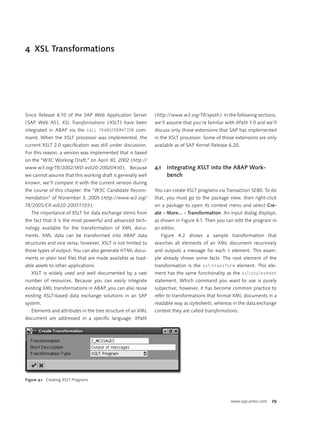
www.w3.org/TR/2002/WD-xslt20-20020430 ). Because             4.1   Integrating XSLT into the ABAP Work-
we cannot assume that this working draft is generally well         bench
known, we’ll compare it with the current version during
the course of this chapter: the “W3C Candidate Recom-        You can create XSLT programs via Transaction SE80. To do
mendation” of November 3, 2005 ( http://www.w3.org/          that, you must go to the package view, then right-click
TR/2005/CR-xslt20-20051103 ).                                on a package to open its context menu and select Cre-
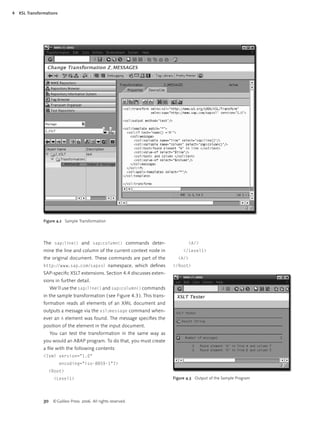
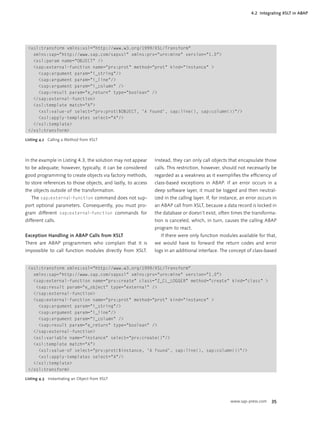
   The importance of XSLT for data exchange stems from       ate · More... · Transformation. An input dialog displays,
the fact that it is the most powerful and advanced tech-     as shown in Figure 4.1. Then you can edit the program in
nology available for the transformation of XML docu-         an editor.
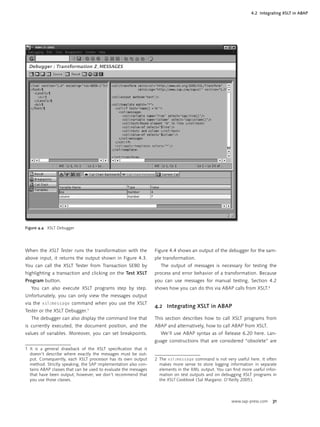
ments. XML data can be transformed into ABAP data              Figure 4.2 shows a sample transformation that
structures and vice versa; however, XSLT is not limited to   searches all elements of an XML document recursively
those types of output. You can also generate HTML docu-      and outputs a message for each A element. This exam-
ments or plain text files that are made available as load-    ple already shows some facts: The root element of the
able assets to other applications.                           transformation is the xsl:transform element. This ele-
   XSLT is widely used and well documented by a vast         ment has the same functionality as the xsl:stylesheet
number of resources. Because you can easily integrate        statement. Which command you want to use is purely
existing XML transformations in ABAP, you can also reuse     subjective; however, it has become common practice to
existing XSLT-based data exchange solutions in an SAP        refer to transformations that format XML documents in a
system.                                                      readable way as stylesheets, whereas in the data exchange
   Elements and attributes in the tree structure of an XML   context they are called transformations.
document are addressed in a specific language: XPath


Figure 4.1 Creating XSLT Programs


                                                                                                 www.sap-press.com   29
4   XSL Transformations


                Figure 4.2 Sample Transformation


                The sap:line() and sap:column() commands deter-                       <A/>
                mine the line and column of the current context node in             </Level1>
                the original document. These commands are part of the            <A/>
                http://www.sap.com/sapxsl namespace, which defines              </Root>
                SAP-specific XSLT extensions. Section 4.4 discusses exten-
                sions in further detail.
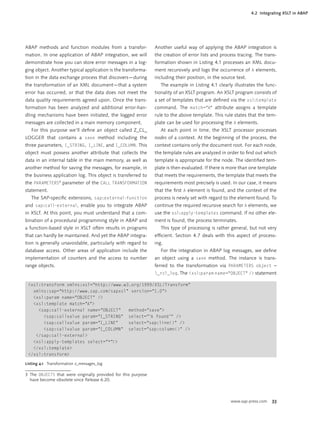
                   We’ll use the sap:line() and sap:column() commands
                in the sample transformation ( see Figure 4.3 ). This trans-
                formation reads all elements of an XML document and
                outputs a message via the xsl:message command when-
                ever an A element was found. The message specifies the
                position of the element in the input document.
                   You can test the transformation in the same way as
                you would an ABAP program. To do that, you must create
                a file with the following contents:
                <?xml version="1.0"
                          encoding="iso-8859-1"?>
                  <Root>
                     <Level1>                                                  Figure 4.3 Output of the Sample Program


                30 © Galileo Press 2006. All rights reserved.
4.2 Integrating XSLT in ABAP


Figure 4.4 XSLT Debugger


When the XSLT Tester runs the transformation with the            Figure 4.4 shows an output of the debugger for the sam-
above input, it returns the output shown in Figure 4.3.          ple transformation.
You can call the XSLT Tester from Transaction SE80 by               The output of messages is necessary for testing the
highlighting a transaction and clicking on the Test XSLT         process and error behavior of a transformation. Because
Program button.                                                  you can use messages for manual testing, Section 4.2
   You can also execute XSLT programs step by step.              shows how you can do this via ABAP calls from XSLT.2
Unfortunately, you can only view the messages output
via the xsl:message command when you use the XSLT
                                                                 4.2 Integrating XSLT in ABAP
Tester or the XSLT Debugger.1
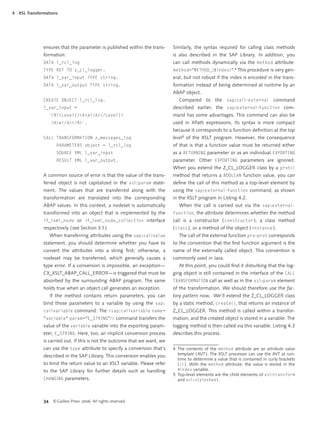
   The debugger can also display the command line that           This section describes how to call XSLT programs from
is currently executed, the document position, and the            ABAP and alternatively, how to call ABAP from XSLT.
values of variables. Moreover, you can set breakpoints.             We’ll use ABAP syntax as of Release 6.20 here. Lan-
                                                                 guage constructions that are considered “obsolete” are
1 It is a general drawback of the XSLT specification that it
  doesn’t describe where exactly the messages must be out-
  put. Consequently, each XSLT processor has its own output      2 The xsl:message command is not very useful here. It often
  method. Strictly speaking, the SAP implementation also con-      makes more sense to store logging information in separate
  tains ABAP classes that can be used to evaluate the messages     elements in the XML output. You can find more useful infor-
  that have been output; however, we don’t recommend that          mation on test outputs and on debugging XSLT programs in
  you use those classes.                                           the XSLT Cookbook ( Sal Margano: O’Reilly 2005 ).


                                                                                                      www.sap-press.com   31
4   XSL Transformations


                still supported for reasons of downward compatibility,         things, this parameter can be used for output formatting
                however, they should no longer be used because there           of XML documents.
                are better options available. Not only did the upgrade
                from Release 6.10 to 6.20 involve adding new concepts,             Don’t forget exception handling!
                but it also required the standardization of existing con-          The CALL TRANSFORMATION command can trigger ex-
                cepts. Developers should study these advanced develop-             ceptions Since Release 6.40, the common basic class
                ments so they can reduce the degree of complexity in the           CX_TRANSFORMATION_ERROR, is available for XSLT
                set of commands.                                                   programs and simple transformations ( see Chapter 5 ).
                                                                                   Even though the listings shown here don’t contain the
                Calling XSLT from ABAP                                             handling of system errors due to space limitations, this
                You can call an XSLT program via the CALL TRANSFORMATION           is an indispensable component of a robust and defen-
                command. At this point, we only want to briefly describe            sive kind of programming. You will note that especially
                the general syntax of the call. For further details such as        when transforming XML data into ABAP data, the as-
                exception handling, you should refer to The Official ABAP           signment of an alphanumeric value to a numeric ABAP
                Reference ( Horst Keller: SAP PRESS 2004 ).                        data type, for instance, triggers an exception that must
                CALL TRANSFORMATION transformation                                 be handled.
                        [PARAMETERS parameters]
                        SOURCE source                                          The following lines show the structure of the CATCH block
                        RESULT result.                                         that contains a transformation error:
                                                                               DATA: l_rif_ex TYPE REF TO
                The transformation source can be specified both stati-                      cx_xslt_runtime_error,
                cally and dynamically. You can transfer ABAP data objects                l_var_text TYPE string,
                to the transformation via PARAMETERS. Within the trans-                  l_var_source_line TYPE i,
                formation, one of the following type specifications can                   l_var_program_name TYPE syrepid,
                be used for the parameter: string, xstring, number,                      l_var_include_name TYPE syrepid.
                boolean, object, or nodeset. The following section pro-
                vides examples of how to transfer objects and use meth-               CATCH cx_xslt_runtime_error INTO l_rif_ex.
                ods. To transfer nodesets, you must use an object of the                 l_var_text = l_rif_ex->get_text( ).
                if_ixml_node or if_ixml_collection type. This XML              *      Determine error position
                library interface was described in detail in Chapter 3.               CALL METHOD
                     Both the source and the result of a transformation con-             l_rif_ex->get_source_position
                sist of either ABAP data, which is available in the asXML                IMPORTING
                view in the transformation, or XML documents.                              source_line     = l_var_source_line
                     The CALL TRANSFORMATION command enables you to                        program_name = l_var_program_name
                transform ABAP data into ABAP data, XML documents                          include_name = l_var_include_name.
                into XML documents, and ABAP data to XML and vice              *      Log error
                versa. In the data source ( SOURCE parameter ) and tar-               IF l_var_text IS NOT INITIAL.
                get ( RESULT parameter ), XML documents are available as                 WRITE: / l_var_text.
                string, xstrings, or as reference variables of one of the                WRITE: / 'The error exists in line:',
                following types: if_ixml_istream, if_ixml_ostream,                                    l_var_source_line.
                if_ixml_document, if_ixml_node. You can also trans-                   ENDIF.
                fer ABAP data dynamically by using a variable of the type
                ABAP_TRANS_RESBIND_TAB.                                        Calling ABAP from XSLT
                     Since Release 6.40 the OPTIONS parameter is available     To a certain extent, every XSLT processor supports exten-
                for the CALL TRANSFORMATION command. Among other               sion mechanisms. For example, in our case, we can call


                32    © Galileo Press 2006. All rights reserved.
4.2 Integrating XSLT in ABAP


ABAP methods and function modules from a transfor-             Another useful way of applying the ABAP integration is
mation. In one application of ABAP integration, we will        the creation of error lists and process tracing. The trans-
demonstrate how you can store error messages in a log-         formation shown in Listing 4.1 processes an XML docu-
ging object. Another typical application is the transforma-    ment recursively and logs the occurrence of A elements,
tion in the data exchange process that discovers—during        including their position, in the source text.
the transformation of an XML document—that a system               The example in Listing 4.1 clearly illustrates the func-
error has occurred, or that the data does not meet the         tionality of an XSLT program. An XSLT program consists of
data quality requirements agreed upon. Once the trans-         a set of templates that are defined via the xsl:template
formation has been analyzed and additional error-han-          command. The match="A" attribute assigns a template
dling mechanisms have been initiated, the logged error         rule to the above template. This rule states that the tem-
messages are collected in a main memory component.             plate can be used for processing the A elements.
   For this purpose we’ll define an object called Z_CL_            At each point in time, the XSLT processor processes
LOGGER that contains a save method including the               nodes of a context. At the beginning of the process, the
three parameters, I_STRING, I_LINE, and I_COLUMN. This         context contains only the document root. For each node,
object must possess another attribute that collects the        the template rules are analyzed in order to find out which
data in an internal table in the main memory, as well as       template is appropriate for the node. The identified tem-
another method for saving the messages, for example, in        plate is then evaluated. If there is more than one template
the business application log. This object is transferred to    that meets the requirements, the template that meets the
the PARAMETERS3 parameter of the CALL TRANSFORMATION           requirements most precisely is used. In our case, it means
statement.                                                     that the first A element is found, and the context of the
   The SAP-specific extensions, sap:external-function           process is newly set with regard to the element found. To
and sap:call-external, enable you to integrate ABAP            continue the required recursive search for A elements, we
in XSLT. At this point, you must understand that a com-        use the xsl:apply-templates command. If no other ele-
bination of a procedural programming style in ABAP and         ment is found, the process terminates.
a function-based style in XSLT often results in programs          This type of processing is rather general, but not very
that can hardly be maintained. And yet the ABAP integra-       efficient. Section 4.7 deals with this aspect of process-
tion is generally unavoidable, particularly with regard to     ing.
database access. Other areas of application include the           For the integration in ABAP log messages, we define
implementation of counters and the access to number            an object using a save method. The instance is trans-
range objects.                                                 ferred to the transformation via PARAMETERS object =
                                                               l_rcl_log. The <xsl:param name="OBJECT" /> statement

 <xsl:transform xmlns:xsl="http://www.w3.org/1999/XSL/Transform"
   xmlns:sap="http://www.sap.com/sapxsl" version="1.0">
   <xsl:param name="OBJECT" />
   <xsl:template match="A">
     <sap:call-external name="OBJECT"   method="save">
       <sap:callvalue param="I_STRING" select="'A found'" />
       <sap:callvalue param="I_LINE"    select="sap:line()" />
       <sap:callvalue param="I_COLUMN" select="sap:column()" />
    </sap:call-external>
   <xsl:apply-templates select="*"/>
   </xsl:template>
 </xsl:transform>

Listing 4.1 Transformation z_messages_log

3 The OBJECTS that were originally provided for this purpose
  have become obsolete since Release 6.20.


                                                                                                    www.sap-press.com    33
4   XSL Transformations


                ensures that the parameter is published within the trans-     Similarly, the syntax required for calling class methods
                formation:                                                    is also described in the SAP Library. In addition, you
                DATA l_rcl_log                                                can call methods dynamically via the method attribute:
                TYPE REF TO z_cl_logger.                                      method="METHOD_{$index}".4 This procedure is very gen-
                DATA l_var_input TYPE string.                                 eral, but not robust if the index is encoded in the trans-
                DATA l_var_output TYPE string.                                formation instead of being determined at runtime by an
                                                                              ABAP object.
                CREATE OBJECT l_rcl_log.                                         Compared to the sap:call-external command
                l_var_input =                                                 described earlier, the sap:external-function com-
                  `<R><Level1><A>a</A></Level1>                               mand has some advantages. This command can also be
                    <A>a</A></R>`.                                            used in XPath expressions. Its syntax is more compact
                                                                              because it corresponds to a function definition at the top
                CALL TRANSFORMATION z_messages_log                            level5 of the XSLT program. However, the consequence
                       PARAMETERS object = l_rcl_log                          of that is that a function value must be returned either
                       SOURCE XML l_var_input                                 as a RETURNING parameter or as an individual EXPORTING
                       RESULT XML l_var_output.                               parameter. Other EXPORTING parameters are ignored.
                                                                              When you extend the Z_CL_LOGGER class by a prot()
                A common source of error is that the value of the trans-      method that returns a BOOLEAN function value, you can
                ferred object is not capitalized in the xsl:param state-      define the call of this method as a top-level element by
                ment. The values that are transferred along with the          using the sap:external-function command, as shown
                transformation are translated into the corresponding          in the XSLT program in Listing 4.2.
                ABAP values. In this context, a nodeset is automatically         When the call is carried out via the sap:external-
                transformed into an object that is implemented by the         function, the attribute determines whether the method
                if_ixml_node or if_ixml_node_collection interface             call is a constructor ( constructor ), a class method
                respectively ( see Section 3.1 ).                             ( class ), or a method of the object ( instance ).
                   When transferring attributes using the sap:callvalue          The call of the external function prv:prot corresponds
                statement, you should determine whether you have to           to the convention that the first function argument is the
                convert the attributes into a string first; otherwise, a       name of the externally called object. This convention is
                nodeset may be transferred, which generally causes a          commonly used in Java.
                type error. If a conversion is impossible, an exception—         At this point, you could find it disturbing that the log-
                CX_XSLT_ABAP_CALL_ERROR—is triggered that must be             ging object is still contained in the interface of the CALL
                absorbed by the surrounding ABAP program. The same            TRANSFORMATION call as well as in the xsl:param element
                holds true when an object call generates an exception.        of the transformation. We should therefore use the fac-
                   If the method contains return parameters, you can          tory pattern now. We’ll extend the Z_CL_LOGGER class
                bind those parameters to a variable by using the sap:         by a static method, create(), that returns an instance of
                callvariable command: The <sap:callvariable name=             Z_CL_LOGGER. This method is called within a transfor-
                "variable" param="E_STRING"/> command transfers the           mation, and the created object is stored in a variable. The
                value of the variable variable into the exporting param-      logging method is then called via this variable. Listing 4.3
                eter, E_STRING . Here, too, an implicit conversion process    describes this process.
                is carried out. If this is not the outcome that we want, we
                can use the type attribute to specify a conversion that’s     4 The contents of the method attribute are an attribute value
                described in the SAP Library. This conversion enables you       template ( AVT ). The XSLT processor can use the AVT at run-
                                                                                time to determine a value that is contained in curly brackets
                to bind the return value to an XSLT variable. Please refer      ( {} ). With the method attribute, the value is stored in the
                to the SAP Library for further details such as handling         $index variable.
                                                                              5 Top-level elements are the child elements of xsl:transform
                CHANGING parameters.                                            and xsl:stylesheet.


                34 © Galileo Press 2006. All rights reserved.
4.2 Integrating XSLT in ABAP


 <xsl:transform xmlns:xsl="http://www.w3.org/1999/XSL/Transform"
   xmlns:sap="http://www.sap.com/sapxsl" xmlns:prv="urn:mine" version="1.0">
   <xsl:param name="OBJECT" />
   <sap:external-function name="prv:prot" method="prot" kind="instance" >
     <sap:argument param="i_string"/>
     <sap:argument param="i_line"/>
     <sap:argument param="i_column" />
     <sap:result param="e_return" type="boolean" />
   </sap:external-function>
   <xsl:template match="A">
     <xsl:value-of select="prv:prot($OBJECT, 'A found', sap:line(), sap:column())"/>
     <xsl:apply-templates select="A"/>
   </xsl:template>
 </xsl:transform>

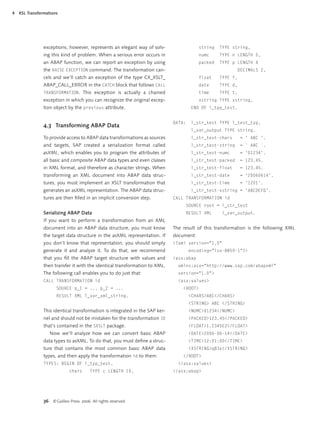
Listing 4.2 Calling a Method from XSLT


In the example in Listing 4.3, the solution may not appear    Instead, they can only call objects that encapsulate those
to be adequate; however, typically, it can be considered      calls. This restriction, however, should not necessarily be
good programming to create objects via factory methods,       regarded as a weakness as it exemplifies the efficiency of
to store references to those objects, and lastly, to access   class-based exceptions in ABAP. If an error occurs in a
the objects outside of the transformation.                    deep software layer, it must be logged and then neutral-
   The sap:external-function command does not sup-            ized in the calling layer. If, for instance, an error occurs in
port optional parameters. Consequently, you must pro-         an ABAP call from XSLT, because a data record is locked in
gram different sap:external-function commands for             the database or doesn’t exist, often times the transforma-
different calls.                                              tion is canceled, which, in turn, causes the calling ABAP
                                                              program to react.
Exception Handling in ABAP Calls from XSLT                       If there were only function modules available for that,
There are ABAP programmers who complain that it is            we would have to forward the return codes and error
impossible to call function modules directly from XSLT.       logs in an additional interface. The concept of class-based


 <xsl:transform xmlns:xsl="http://www.w3.org/1999/XSL/Transform"
   xmlns:sap="http://www.sap.com/sapxsl" xmlns:prv="urn:mine" version="1.0">
   <sap:external-function name="prv:create" class="Z_CL_LOGGER" method="create" kind="class" >
    <sap:result param="e_object" type="external" />
   </sap:external-function>
   <sap:external-function name="prv:prot" method="prot" kind="instance" >
     <sap:argument param="i_string"/>
     <sap:argument param="i_line"/>
     <sap:argument param="i_column" />
     <sap:result param="e_return" type="boolean" />
   </sap:external-function>
   <xsl:variable name="instance" select="prv:create()"/>
   <xsl:template match="A">
     <xsl:value-of select="prv:prot($instance, 'A found', sap:line(), sap:column())"/>
     <xsl:apply-templates select="A"/>
   </xsl:template>
 </xsl:transform>

Listing 4.3 Instantiating an Object from XSLT


                                                                                                     www.sap-press.com    35
4   XSL Transformations


                exceptions, however, represents an elegant way of solv-                    string   TYPE string,
                ing this kind of problem. When a serious error occurs in                   numc     TYPE n LENGTH 5,
                an ABAP function, we can report an exception by using                      packed   TYPE p LENGTH 4
                the RAISE EXCEPTION command. The transformation can-                                       DECIMALS 2,
                cels and we’ll catch an exception of the type CX_XSLT_                     float    TYPE f,
                ABAP_CALL_ERROR in the CATCH block that follows CALL                       date     TYPE d,
                TRANSFORMATION. This exception is actually a chained                       time     TYPE t,
                exception in which you can recognize the original excep-                   xstring TYPE xstring,
                tion object by the previous attribute.                                 END OF l_typ_test.


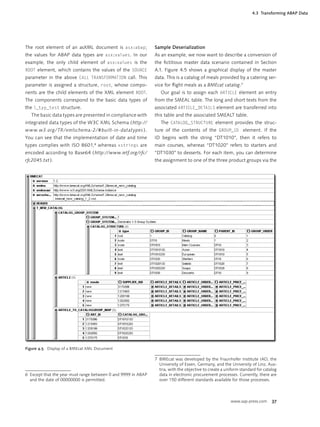
                                                                              DATA:    l_str_test TYPE l_test_typ,
                4.3 Transforming ABAP Data
                                                                                       l_var_output TYPE string.
                To provide access to ABAP data transformations as sources              l_str_test-chars       = ' ABC '.
                and targets, SAP created a serialization format called                 l_str_test-string      = ` ABC `.
                asXML, which enables you to program the attributes of                  l_str_test-numc        = '01234'.
                all basic and composite ABAP data types and even classes               l_str_test-packed      = 123.45.
                in XML format, and therefore as character strings. When                l_str_test-float       = 123.45.
                transforming an XML document into ABAP data struc-                     l_str_test-date        = '20060614'.
                tures, you must implement an XSLT transformation that                  l_str_test-time        = '1201'.
                generates an asXML representation. The ABAP data struc-                l_str_test-xstring = 'ABCDEFG'.
                tures are then filled in an implicit conversion step.          CALL TRANSFORMATION id
                                                                                   SOURCE root = l_str_test
                Serializing ABAP Data                                              RESULT XML        l_var_output.
                If you want to perform a transformation from an XML
                document into an ABAP data structure, you must know           The result of this transformation is the following XML
                the target data structure in the asXML representation. If     document:
                you don’t know that representation, you should simply         <?xml version="1.0"
                generate it and analyze it. To do that, we recommend                  encoding="iso-8859-1"?>
                that you fill the ABAP target structure with values and        <asx:abap
                then transfer it with the identical transformation to XML.      xmlns:asx="http://www.sap.com/abapxml"
                The following call enables you to do just that:                 version="1.0">
                CALL TRANSFORMATION id                                          <asx:values>
                       SOURCE p_1 = ... p_2 = ...                                 <ROOT>
                       RESULT XML l_var_xml_string.                                   <CHARS>ABC</CHARS>
                                                                                      <STRING> ABC </STRING>
                This identical transformation is integrated in the SAP ker-           <NUMC>01234</NUMC>
                nel and should not be mistaken for the transformation ID              <PACKED>123.45</PACKED>
                that’s contained in the SXSLT package.                                <FLOAT>1.2345E2</FLOAT>
                   Now we’ll analyze how we can convert basic ABAP                    <DATE>2006-06-14</DATE>
                data types to asXML. To do that, you must define a struc-              <TIME>12:01:00</TIME>
                ture that contains the most common basic ABAP data                    <XSTRING>q83v</XSTRING>
                types, and then apply the transformation id to them:              </ROOT>
                TYPES: BEGIN OF l_typ_test,                                     </asx:values>
                              chars      TYPE c LENGTH 10,                    </asx:abap>


                36 © Galileo Press 2006. All rights reserved.
4.3 Transforming ABAP Data


The root element of an asXML document is asx:abap;             Sample Deserialization
the values for ABAP data types are asx:values. In our          As an example, we now want to describe a conversion of
example, the only child element of asx:values is the           the fictitious master data scenario contained in Section
ROOT element, which contains the values of the SOURCE          A.1. Figure 4.5 shows a graphical display of the master
parameter in the above CALL TRANSFORMATION call. This          data. This is a catalog of meals provided by a catering ser-
parameter is assigned a structure, root, whose compo-          vice for flight meals as a BMEcat catalog.7
nents are the child elements of the XML element ROOT.             Our goal is to assign each ARTICLE element an entry
The components correspond to the basic data types of           from the SMEAL table. The long and short texts from the
the l_typ_test structure.                                      associated ARTICLE_DETAILS element are transferred into
   The basic data types are presented in compliance with       this table and the associated SMEALT table.
integrated data types of the W3C XML Schema ( http://             The CATALOG_STRUCTURE element provides the struc-
www.w3.org/ TR /xmlschema-2/# built-in-datatypes ).            ture of the contents of the GROUP_ID element. If the
You can see that the implementation of date and time           ID begins with the string “DT1010”, then it refers to
types complies with ISO 8601, 6 whereas xstrings are           main courses, whereas “DT1020” refers to starters and
encoded according to Base64 ( http://www.ietf.org/rfc/         “DT1030” to desserts. For each item, you can determine
rfc2045.txt ).                                                 the assignment to one of the three product groups via the


Figure 4.5 Display of a BMEcat XML Document

                                                               7 BMEcat was developed by the Fraunhofer Institute IAO, the
                                                                 University of Essen, Germany, and the University of Linz, Aus-
                                                                 tria, with the objective to create a uniform standard for catalog
6 Except that the year must range between 0 and 9999 in ABAP     data in electronic procurement processes. Currently, there are
  and the date of 00000000 is permitted.                         over 150 different standards available for those processes.


                                                                                                        www.sap-press.com      37
4   XSL Transformations


                child elements of the ARTICLE_TO_CATALOGGROUP_MAP ele-         In the transformation, we analyze all catalog items ( arti-
                ment in order to find out if it is a starter, a main course,    cles ). Those items are programmed using the BME:ARTICLE
                or a dessert. This system is used to create an entry for the   elements. For each catalog item, we call the CreateMeal
                corresponding transparent table.                               template to create an entry for the SAP tables, SMEAL and
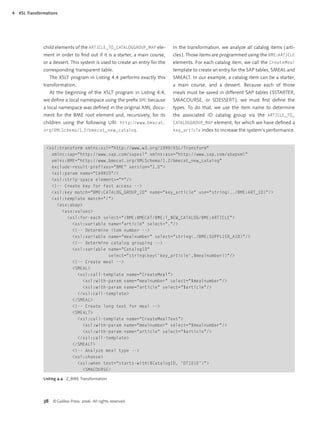
                   The XSLT program in Listing 4.4 performs exactly this       SMEALT. In our example, a catalog item can be a starter,
                transformation.                                                a main course, and a dessert. Because each of those
                   At the beginning of the XSLT program in Listing 4.4,        meals must be saved in different SAP tables ( SSTARTER,
                we define a local namespace using the prefix BME because         SMACOURSE, or SDESSERT ), we must first define the
                a local namespace was defined in the original XML docu-         types. To do that, we use the item name to determine
                ment for the BME root element and, recursively, for its        the associated ID catalog group via the ARTICLE_TO_
                children using the following URI: http://www.bmecat.           CATALOGGROUP_MAP element, for which we have defined a
                org/XMLSchema/1.2/bmecat_new_catalog.                          key_article index to increase the system’s performance.


                 <xsl:transform xmlns:xsl="http://www.w3.org/1999/XSL/Transform"
                   xmlns:sap="http://www.sap.com/sapxsl" xmlns:asx="http://www.sap.com/abapxml"
                   xmlns:BME="http://www.bmecat.org/XMLSchema/1.2/bmecat_new_catalog"
                   exclude-result-prefixes="BME" version="1.0">
                   <xsl:param name="CARRID"/>
                   <xsl:strip-space elements="*"/>
                   <!-- Create key for fast access -->
                   <xsl:key match="BME:CATALOG_GROUP_ID" name="key_article" use="string(../BME:ART_ID)"/>
                   <xsl:template match="/">
                     <asx:abap>
                       <asx:values>
                         <xsl:for-each select="/BME:BMECAT/BME:T_NEW_CATALOG/BME:ARTICLE">
                           <xsl:variable name="article" select="."/>
                           <!-- Determine item number -->
                           <xsl:variable name="mealnumber" select="string(./BME:SUPPLIER_AID)"/>
                           <!-- Determine catalog grouping -->
                           <xsl:variable name="CatalogID"
                                          select="string(key('key_article',$mealnumber))"/>
                           <!-- Create meal -->
                           <SMEAL>
                             <xsl:call-template name="CreateMeal">
                                <xsl:with-param name="mealnumber" select="$mealnumber"/>
                                <xsl:with-param name="article" select="$article"/>
                             </xsl:call-template>
                           </SMEAL>
                           <!-- Create long text for meal -->
                           <SMEALT>
                             <xsl:call-template name="CreateMealText">
                                <xsl:with-param name="mealnumber" select="$mealnumber"/>
                                <xsl:with-param name="article" select="$article"/>
                             </xsl:call-template>
                           </SMEALT>
                           <!-- Analyze meal type -->
                           <xsl:choose>
                             <xsl:when test="starts-with($CatalogID, 'DT1010')">
                                <SMACOURSE>

                Listing 4.4 Z_BME Transformation (cont.)


                38 © Galileo Press 2006. All rights reserved.
Index


A                                Default namespace 46                       H
                                 Deployment descriptors 84
A2A integration 10                                                          Head-body pattern 27
                                 Deserialization 57
Abstract syntax trees 51                                                    HL7 messages 5
                                 Design pattern 26
asXML 36, 61, 105                                                           Home interface 84
                                 Displaying XML documents 104
asXML representation 36                                                     HTTP requests 104
                                 Diversifying development and testing
Attribute value template 34
                                     105
                                 Document type definitions 8                I
B                                DOM 15
                                                                            ICF 104
                                 DTD 17
Base64 37                                                                   if_ixml 14
bindingTemplate 85                                                          if_ixml_attribute 13
BizTalk messages 5               E                                          if_ixml_document 13, 15, 32
BMEcat 5, 107, 108                                                          if_ixml_event 14, 24, 25
                                 E-business standards 100
BMEcat catalog 37                                                           if_ixml_istream 14, 32
                                 ebXML 5, 99
businessEntity 85, 93                                                       if_ixml_node 13, 27, 32, 34
                                 eCl@ss 108
businessService 85                                                          if_ixml_node_collection 34
                                 EDIFACT 7, 8
                                                                            if_ixml_node_filter 27
                                 EJB 84
                                                                            if_ixml_ostream 14, 32
                                 EJB specification
C                                    restrictions 84
                                                                            if_ixml_parser 14, 19
                                                                            if_ixml_renderer 17
CALL TRANSFORMATION 32, 37, 56   Encodings 14
                                                                            if_ixml_stream 14
CDATA sections 25                Enterprise Application Integration 9, 99
                                                                            if_ixml_stream_factory 14
Chained exceptions 36            Enterprise Application Project 90
                                                                            if_serializable_object 10
Character sets 14, 52            Exceptions
                                                                            Interface formats
CIF 5                                Chained 36
                                                                                Proprietary 101
CL_GUI_HTML_VIEWER 104
                                                                            Internet Communication Framework (ICF)
CL_IXML 14
Code generation 11, 50
                                 F                                              11
                                                                            ISO-8859-1 14
Complex transformations 104      Factory pattern 34
                                                                            ISO 4217 52
Content models                   function-available() 45
                                                                            iXML library 13
  Non-deterministic 61
current-group() 46               G
current-grouping-key() 46
                                 Generic object services 104                J
cXML 5, 16, 59, 68, 69, 113
                                 group-adjacent() 46                        J2EE 11, 84
                                 group-by() 46                              J2EE connector architecture 84
D                                group-ending-with() 46                     Java 54, 81
                                 group-starting-with() 46                   JAXP 81
Data integration 9
                                 gXML 5                                         JAXP 1.3 97
Data quality 101
                                                                            JCo 84
Datastore component 26
Default error handler 81


                                                                                                www.sap-press.com   119
Index


        L                                                Result fragment tree 45                 Schemas
                                                         Risk management 102                         modular 96
        Literal result elements 46
                                                         RosettaNet 5                            Serialization 57
        Literal text 62, 77
                                                                                                 Session beans 84, 85
        Logical port 95
                                                                                                 Simple Transformations
        LSMW 50                                          S                                           Sample applications 55
                                                         Safety facades 86                       Simple transformations 103
        M                                                sap:abs() 44                                ABAP structures 58
                                                         sap:acos() 44                               Assertion 64
        Markup 7
                                                         sap:asin() 44                               Attributes 58
        Mass data 14, 27, 55, 101
                                                         sap:atan() 44                               Case distinctions 62, 66
        Message implementation guidelines 8
                                                         sap:call-external 33, 34                    Case distinctions using variables 62
        Middleware 102
                                                         sap:callvalue 34                            Condition 63
        Mime64 9
                                                         sap:callvariable 34                         Conditional transformation 65
        Modular schemas 96
                                                         sap:column 30                               Conditional transformations with
                                                         sap:concat 50                                 variables 73
        N                                                sap:cos() 44                                Data nodes 57
                                                         sap:ends-with() 44                          Data roots 57
        Namespace 20, 21, 23, 45, 96
                                                         sap:escape-uri() 44                         Expressiveness 74
        Namespace axis 45
                                                         sap:exp() 44                                Grouping 69
        Non-deterministic content models 61
                                                         sap:external-function 33, 34, 35            Internal tables 59
        Null namespace 46
                                                         sap:find-first() 44                         Literal contents 77
                                                         sap:find-first-of() 44                      Mappings 72
        O                                                sap:find-last() 44                          Modularization 76
                                                         sap:find-last-not-of() 44                   Namespace declarations 77
        Object identifiers 52
                                                         sap:find-last-of() 44                       Parameters 62
        Object services
                                                         sap:if() 48                                 Precondition 64, 66
            Generic 104
                                                         sap:intersection 45                         Symmetry 57, 79
        Online text repository 45
                                                         sap:let() 45                                Variables 61
        Optional elements 62
                                                         sap:line 30                             SOAP 11, 99, 104
        Outside-in approach 94
                                                         sap:log() 44                            Standard deserialization 72
                                                         sap:log10() 44                          Standard serialization 67
        P                                                sap:lower-case() 44                     STX (Streaming Transformations for XML)
                                                         sap:max() 45                                103
        PARAMETERS 33
                                                         sap:min() 45                            Symmetrical case distinctions 68
        Pattern 65, 67, 72
                                                         sap:node-set() 45
        Payload 8
                                                         sap:otr-string() 45
        Port
                                                         sap:parse-xpath() 51
                                                                                                 T
            logical 95
                                                         sap:resolve-uri() 44                    Tail recursion 52
        Ports 11
                                                         sap:sin() 44                            tModel 85, 93
        Process integration 9
                                                         sap:sqrt() 44                           tt:apply 56, 77
        Proprietary interface formats 101
                                                         sap:string-pad() 44                     tt:assign 62, 74, 75
        Proxy class 95
                                                         sap:tan() 44                            tt:attribute 58
        Proxy object 94
                                                         sap:target 48                           tt:call 56, 74, 77
                                                         sap:timestamp() 45, 52                  tt:clear 62
        R                                                sap:upper-case() 44                     tt:cond 63, 64, 65, 67
        Regression tests 104                             SAP NetWeaver Exchange Infrastructure   tt:cond-var 62, 74
        RELAX NG 81                                          10, 102                             tt:context 61, 76
        Remote interface 84                              SAP XML Toolkit for Java 23, 81, 89     tt:copy 61
        Request-response processes 8, 16, 99             SAX 23                                  tt:d-cond 63, 66, 74
        Resolving release dependencies 102               SAXParserFactory 81                     tt:deserialize 73, 79


        120 © Galileo Press 2006. All rights reserved.
Index


tt:group 69, 72                   V                           xs:include 96
tt:include 56, 77                                             XSF data streams 10
                                  Validation 8, 18
tt:lax 65                                                     xsl:apply-imports 52, 53
                                  Versioning interfaces 101
tt:loop 59, 75                                                xsl:apply-templates 33
tt:namespace 79                                               xsl:for-each-group 42, 46, 53
tt:parameter 56
                                  W                           xsl:function 48
tt:read 62                        W3C XML Schema 8, 100       xsl:import 52, 53
tt:ref 57                           Expressiveness 8          xsl:include 52, 53
tt:root 56, 57                    Web service interface 90    xsl:message 30
tt:s-cond 63, 66                  Web services 11, 84, 93     xsl:output 48
tt:serialize 79                     Calling from ABAP 95      xsl:result 48
tt:skip 63, 74, 77                Webservices Navigator 94    xsl:stylesheet 29
tt:switch 66, 67, 73              Wellformedness 7, 25, 102   xsl:transform 29
tt:switch-var 73, 74              WSDL 11, 92, 94             XSLT 29, 103, 105
tt:template 56, 76                                              ABAP extensions 33
tt:transform 55, 61                                             Calling from ABAP 32
tt:value 56                       X                             Exception handling 35
tt:variable 56, 61, 73                                          Java extensions 54
                                  xCBL 5
tt:with-parameter 76                                            Limits of the SAP processor 45
                                  XML 5
tt:with-root 76                                                 Modularization 52
                                  XML 1.1 97
tt:write 62                                                     Output formatting 48, 50
                                  XML declaration 50
                                                                Platform-independent transformations
                                  XML Encryption 81
                                                                  53
                                  XML library 102
U                                 XML signature 81
                                                                SAP-specific extensions 43
UDDI tool 93                                                    XSLT 2.0 46, 48, 53
                                  XPath 29, 44
Unicode 14, 52                                                XSLT 2.0 compliance 46, 48, 53
                                    XPath 2.0 43
User defined XPath functions 48                               XSLT 2.0 conformity 29
                                    XPath 2.0 conformity 43
UTF-16 14, 15                                                 XSLT Debugger 31
                                  XPath functions
UTF-8 14, 15                        user defined 48


                                                                                  www.sap-press.com   121

46061598 xml-data-exchange-using-abap

  • 2.
    XML Data Exchangeusing ABAP Tobias Trapp Contents 1 Introduction ................................................ 5 3.4 Rendering XML Documents and XML in E-Business ................................ 5 Encodings ............................................. 17 XML in Application Integration ............ 5 3.5 Validating Against DTDs ....................... 17 Exchanging Data and Documents ........ 5 3.6 Pitfalls Regarding Namespaces ............. 20 Structure of this Book ........................... 6 Namespace Support of the System Requirements ........................... 6 XML Library .......................................... 21 Acknowledgements .............................. 6 Identifying Elements with Namespaces .......................................... 23 2 XML Technologies and 3.7 Event-Based Parsing .............................. 23 Data Exchange ........................................... 7 SAX Interface ........................................ 24 2.1 Important Standards of the Pitfalls ................................................... 25 XML Family ........................................... 7 Using Rule Sets ..................................... 25 XML 1.0 ................................................ 7 3.8 Useful Tips ............................................ 26 XML Transformation Using XSLT .......... 7 XML Schema for Data Modeling .......... 8 4 XSL Transformations ................................ 29 XML Framework in E-Business ............. 8 4.1 Integrating XSLT into the 2.2 Data Exchange in Business Processes ... 9 ABAP Workbench ................................. 29 XML in Integration Scenarios ............... 9 4.2 Integrating XSLT in ABAP ...................... 31 Data Exchange with Calling XSLT from ABAP ....................... 32 External Partners ................................... 9 Calling ABAP from XSLT ....................... 32 Conclusion ............................................ 9 Exception Handling in ABAP Calls 2.3 Using XML Technologies in from XSLT .............................................. 35 SAP Systems .......................................... 10 4.3 Transforming ABAP Data ...................... 36 Application Integration ......................... 10 Serializing ABAP Data ........................... 36 Sample Deserialization ......................... 37 3 XML Library ................................................. 13 Realistic Scenarios ................................ 43 3.1 Important Interfaces ............................. 13 4.4 SAP-Specific Extensions ........................ 43 3.2 Data Sources ......................................... 14 Numeric Functions ............................... 44 Encodings ............................................. 14 String Functions .................................... 44 Unicode ................................................ 15 XPath Operators and Path Expressions 3.3 DOM API .............................................. 15 from XPath 2.0 ..................................... 44 Response Scenario for a Commands for Nodesets ...................... 45 cXML Interface ..................................... 16 Other Functions .................................... 45 SAP-Specific Restrictions ...................... 45 www.sap-press.com 1
  • 3.
    Contents 4.5 XSLT 2.0 Support .................................. 46 5.7 Miscellaneous ....................................... 77 Grouping XML Elements ...................... 46 Literal Contents .................................... 77 Definitions of XPath Functions and Namespaces .......................................... 77 Conditional XPath Expressions ............. 46 5.8 Useful Tips ............................................ 79 Several Input and Output Documents ........................................... 48 6 Java Integration ......................................... 81 Output Formatting ............................... 48 6.1 Validation Using JAXP ........................... 81 4.6 Generating Code .................................. 50 6.2 J2EE Infrastructure ................................ 84 Text Templates ...................................... 50 Session Beans ........................................ 84 Abstract Syntax Trees of XPath Restrictions to the Use of Beans .......... 84 Expressions ........................................... 51 ABAP-Java Integration .......................... 84 4.7 Useful Tips ............................................ 52 Web Services ........................................ 84 6.3 Creating a Web Service for 5 Simple Transformations .......................... 55 Validating XML Documents .................. 85 5.1 Basic Structure ...................................... 55 Creating a Session Bean for the Subroutines and Parameters ................. 56 Validation .............................................. 85 5.2 Accessing Data Objects ........................ 56 Handling System Errors ........................ 86 Accessing Elementary Data Objects ..... 56 Using JAXP 1.2 ...................................... 89 Data Roots and Data Nodes ................. 57 Deploying and Testing the Attributes .............................................. 58 Web Service .......................................... 90 Structures .............................................. 58 Registering the Web Service ................. 93 Internal Tables ....................................... 59 6.4 Using Web Services through ABAP ...... 93 XML Representation of ABAP Data ...... 61 Generating a Proxy Object ................... 94 5.3 Variables and Parameters ...................... 61 Creating a Logical Port .......................... 95 Assigning Variables and Parameters ..... 62 ABAP Program for Calling the Case Distinctions Using Variables ......... 62 Web Service .......................................... 95 5.4 Conditional Transformations ................ 62 6.5 Discussing the Solution ........................ 96 Optional Elements and Attributes ........ 62 Preconditions, Conditions, and 7 Real-Life Scenarios ................................... 99 Assertions ............................................. 63 7.1 Designing Technical Processes .............. 99 tt:cond in Detail ................................... 65 Data Exchange in the Conflicting Areas Case Distinction .................................... 66 of B2B and EAI ...................................... 99 Grouping ............................................... 69 Message Services .................................. 99 5.5 Mappings .............................................. 72 Using Established E-Business Mapping Attribute ................................ 72 Standards .............................................. 100 Mapping with Case Distinctions .......... 72 Proprietary Interface Formats ............... 101 Conditional Transformations with Quality of the User Data ...................... 101 Variables ............................................... 73 Further Development and Versioning Structural Mappings ............................. 74 of Interfaces .......................................... 101 5.6 Modular Transformation Programs ....... 76 Risk Management ................................. 102 Subtemplates ........................................ 76 7.2 DP Concept of the Process ................... 102 Including Transformations .................... 77 Using the Strengths and Weaknesses Calling External ST Programs ................ 77 of XML Processes .................................. 102 Choosing the Right Technology ............ 102 2 © Galileo Press 2006. All rights reserved.
  • 4.
    Contents Files as Data Sources ............................ 103 Note on the Design of Communication Protocols .................... 103 the Sample File ..................................... 108 Storing and Displaying XML Part of the SPFLI Flight Data Model ..... 112 Documents ........................................... 104 A.2 Invoicing via cXML ............................... 113 Structure of the Data Transfer Acknowledgement of an Interface ................................................ 104 Invoice Receipt ..................................... 113 7.3 Regression Tests .................................... 105 cXML-Based Sample Invoice ................ 113 On the Probability of our Example ...... 113 A Sample Scenarios ...................................... 107 A.1 Sample Master Data Exchange B Bibliography ................................................ 117 Process .................................................. 107 Catalog of Offerings for Flight Meals ... 107 Index .............................................................. 119 Sample BMEcat Catalog ....................... 108 www.sap-press.com 3
  • 5.
    4 XSL Transformations SinceRelease 6.10 of the SAP Web Application Server ( http://www.w3.org/TR/xpath ). In the following sections, ( SAP Web AS ), XSL Transformations ( XSLT ) have been we’ll assume that you’re familiar with XPath 1.0 and we’ll integrated in ABAP via the CALL TRANSFORMATION com- discuss only those extensions that SAP has implemented mand. When the XSLT processor was implemented, the in the XSLT processor. Some of those extensions are only current XSLT 2.0 specification was still under discussion. available as of SAP Kernel Release 6.20. For this reason, a version was implemented that is based on the “W3C Working Draft,” on April 30, 2002 ( http:// www.w3.org/TR/2002/WD-xslt20-20020430 ). Because 4.1 Integrating XSLT into the ABAP Work- we cannot assume that this working draft is generally well bench known, we’ll compare it with the current version during the course of this chapter: the “W3C Candidate Recom- You can create XSLT programs via Transaction SE80. To do mendation” of November 3, 2005 ( http://www.w3.org/ that, you must go to the package view, then right-click TR/2005/CR-xslt20-20051103 ). on a package to open its context menu and select Cre- The importance of XSLT for data exchange stems from ate · More... · Transformation. An input dialog displays, the fact that it is the most powerful and advanced tech- as shown in Figure 4.1. Then you can edit the program in nology available for the transformation of XML docu- an editor. ments. XML data can be transformed into ABAP data Figure 4.2 shows a sample transformation that structures and vice versa; however, XSLT is not limited to searches all elements of an XML document recursively those types of output. You can also generate HTML docu- and outputs a message for each A element. This exam- ments or plain text files that are made available as load- ple already shows some facts: The root element of the able assets to other applications. transformation is the xsl:transform element. This ele- XSLT is widely used and well documented by a vast ment has the same functionality as the xsl:stylesheet number of resources. Because you can easily integrate statement. Which command you want to use is purely existing XML transformations in ABAP, you can also reuse subjective; however, it has become common practice to existing XSLT-based data exchange solutions in an SAP refer to transformations that format XML documents in a system. readable way as stylesheets, whereas in the data exchange Elements and attributes in the tree structure of an XML context they are called transformations. document are addressed in a specific language: XPath Figure 4.1 Creating XSLT Programs www.sap-press.com 29
  • 6.
    4 XSL Transformations Figure 4.2 Sample Transformation The sap:line() and sap:column() commands deter- <A/> mine the line and column of the current context node in </Level1> the original document. These commands are part of the <A/> http://www.sap.com/sapxsl namespace, which defines </Root> SAP-specific XSLT extensions. Section 4.4 discusses exten- sions in further detail. We’ll use the sap:line() and sap:column() commands in the sample transformation ( see Figure 4.3 ). This trans- formation reads all elements of an XML document and outputs a message via the xsl:message command when- ever an A element was found. The message specifies the position of the element in the input document. You can test the transformation in the same way as you would an ABAP program. To do that, you must create a file with the following contents: <?xml version="1.0" encoding="iso-8859-1"?> <Root> <Level1> Figure 4.3 Output of the Sample Program 30 © Galileo Press 2006. All rights reserved.
  • 7.
    4.2 Integrating XSLTin ABAP Figure 4.4 XSLT Debugger When the XSLT Tester runs the transformation with the Figure 4.4 shows an output of the debugger for the sam- above input, it returns the output shown in Figure 4.3. ple transformation. You can call the XSLT Tester from Transaction SE80 by The output of messages is necessary for testing the highlighting a transaction and clicking on the Test XSLT process and error behavior of a transformation. Because Program button. you can use messages for manual testing, Section 4.2 You can also execute XSLT programs step by step. shows how you can do this via ABAP calls from XSLT.2 Unfortunately, you can only view the messages output via the xsl:message command when you use the XSLT 4.2 Integrating XSLT in ABAP Tester or the XSLT Debugger.1 The debugger can also display the command line that This section describes how to call XSLT programs from is currently executed, the document position, and the ABAP and alternatively, how to call ABAP from XSLT. values of variables. Moreover, you can set breakpoints. We’ll use ABAP syntax as of Release 6.20 here. Lan- guage constructions that are considered “obsolete” are 1 It is a general drawback of the XSLT specification that it doesn’t describe where exactly the messages must be out- put. Consequently, each XSLT processor has its own output 2 The xsl:message command is not very useful here. It often method. Strictly speaking, the SAP implementation also con- makes more sense to store logging information in separate tains ABAP classes that can be used to evaluate the messages elements in the XML output. You can find more useful infor- that have been output; however, we don’t recommend that mation on test outputs and on debugging XSLT programs in you use those classes. the XSLT Cookbook ( Sal Margano: O’Reilly 2005 ). www.sap-press.com 31
  • 8.
    4 XSL Transformations still supported for reasons of downward compatibility, things, this parameter can be used for output formatting however, they should no longer be used because there of XML documents. are better options available. Not only did the upgrade from Release 6.10 to 6.20 involve adding new concepts, Don’t forget exception handling! but it also required the standardization of existing con- The CALL TRANSFORMATION command can trigger ex- cepts. Developers should study these advanced develop- ceptions Since Release 6.40, the common basic class ments so they can reduce the degree of complexity in the CX_TRANSFORMATION_ERROR, is available for XSLT set of commands. programs and simple transformations ( see Chapter 5 ). Even though the listings shown here don’t contain the Calling XSLT from ABAP handling of system errors due to space limitations, this You can call an XSLT program via the CALL TRANSFORMATION is an indispensable component of a robust and defen- command. At this point, we only want to briefly describe sive kind of programming. You will note that especially the general syntax of the call. For further details such as when transforming XML data into ABAP data, the as- exception handling, you should refer to The Official ABAP signment of an alphanumeric value to a numeric ABAP Reference ( Horst Keller: SAP PRESS 2004 ). data type, for instance, triggers an exception that must CALL TRANSFORMATION transformation be handled. [PARAMETERS parameters] SOURCE source The following lines show the structure of the CATCH block RESULT result. that contains a transformation error: DATA: l_rif_ex TYPE REF TO The transformation source can be specified both stati- cx_xslt_runtime_error, cally and dynamically. You can transfer ABAP data objects l_var_text TYPE string, to the transformation via PARAMETERS. Within the trans- l_var_source_line TYPE i, formation, one of the following type specifications can l_var_program_name TYPE syrepid, be used for the parameter: string, xstring, number, l_var_include_name TYPE syrepid. boolean, object, or nodeset. The following section pro- vides examples of how to transfer objects and use meth- CATCH cx_xslt_runtime_error INTO l_rif_ex. ods. To transfer nodesets, you must use an object of the l_var_text = l_rif_ex->get_text( ). if_ixml_node or if_ixml_collection type. This XML * Determine error position library interface was described in detail in Chapter 3. CALL METHOD Both the source and the result of a transformation con- l_rif_ex->get_source_position sist of either ABAP data, which is available in the asXML IMPORTING view in the transformation, or XML documents. source_line = l_var_source_line The CALL TRANSFORMATION command enables you to program_name = l_var_program_name transform ABAP data into ABAP data, XML documents include_name = l_var_include_name. into XML documents, and ABAP data to XML and vice * Log error versa. In the data source ( SOURCE parameter ) and tar- IF l_var_text IS NOT INITIAL. get ( RESULT parameter ), XML documents are available as WRITE: / l_var_text. string, xstrings, or as reference variables of one of the WRITE: / 'The error exists in line:', following types: if_ixml_istream, if_ixml_ostream, l_var_source_line. if_ixml_document, if_ixml_node. You can also trans- ENDIF. fer ABAP data dynamically by using a variable of the type ABAP_TRANS_RESBIND_TAB. Calling ABAP from XSLT Since Release 6.40 the OPTIONS parameter is available To a certain extent, every XSLT processor supports exten- for the CALL TRANSFORMATION command. Among other sion mechanisms. For example, in our case, we can call 32 © Galileo Press 2006. All rights reserved.
  • 9.
    4.2 Integrating XSLTin ABAP ABAP methods and function modules from a transfor- Another useful way of applying the ABAP integration is mation. In one application of ABAP integration, we will the creation of error lists and process tracing. The trans- demonstrate how you can store error messages in a log- formation shown in Listing 4.1 processes an XML docu- ging object. Another typical application is the transforma- ment recursively and logs the occurrence of A elements, tion in the data exchange process that discovers—during including their position, in the source text. the transformation of an XML document—that a system The example in Listing 4.1 clearly illustrates the func- error has occurred, or that the data does not meet the tionality of an XSLT program. An XSLT program consists of data quality requirements agreed upon. Once the trans- a set of templates that are defined via the xsl:template formation has been analyzed and additional error-han- command. The match="A" attribute assigns a template dling mechanisms have been initiated, the logged error rule to the above template. This rule states that the tem- messages are collected in a main memory component. plate can be used for processing the A elements. For this purpose we’ll define an object called Z_CL_ At each point in time, the XSLT processor processes LOGGER that contains a save method including the nodes of a context. At the beginning of the process, the three parameters, I_STRING, I_LINE, and I_COLUMN. This context contains only the document root. For each node, object must possess another attribute that collects the the template rules are analyzed in order to find out which data in an internal table in the main memory, as well as template is appropriate for the node. The identified tem- another method for saving the messages, for example, in plate is then evaluated. If there is more than one template the business application log. This object is transferred to that meets the requirements, the template that meets the the PARAMETERS3 parameter of the CALL TRANSFORMATION requirements most precisely is used. In our case, it means statement. that the first A element is found, and the context of the The SAP-specific extensions, sap:external-function process is newly set with regard to the element found. To and sap:call-external, enable you to integrate ABAP continue the required recursive search for A elements, we in XSLT. At this point, you must understand that a com- use the xsl:apply-templates command. If no other ele- bination of a procedural programming style in ABAP and ment is found, the process terminates. a function-based style in XSLT often results in programs This type of processing is rather general, but not very that can hardly be maintained. And yet the ABAP integra- efficient. Section 4.7 deals with this aspect of process- tion is generally unavoidable, particularly with regard to ing. database access. Other areas of application include the For the integration in ABAP log messages, we define implementation of counters and the access to number an object using a save method. The instance is trans- range objects. ferred to the transformation via PARAMETERS object = l_rcl_log. The <xsl:param name="OBJECT" /> statement <xsl:transform xmlns:xsl="http://www.w3.org/1999/XSL/Transform" xmlns:sap="http://www.sap.com/sapxsl" version="1.0"> <xsl:param name="OBJECT" /> <xsl:template match="A"> <sap:call-external name="OBJECT" method="save"> <sap:callvalue param="I_STRING" select="'A found'" /> <sap:callvalue param="I_LINE" select="sap:line()" /> <sap:callvalue param="I_COLUMN" select="sap:column()" /> </sap:call-external> <xsl:apply-templates select="*"/> </xsl:template> </xsl:transform> Listing 4.1 Transformation z_messages_log 3 The OBJECTS that were originally provided for this purpose have become obsolete since Release 6.20. www.sap-press.com 33
  • 10.
    4 XSL Transformations ensures that the parameter is published within the trans- Similarly, the syntax required for calling class methods formation: is also described in the SAP Library. In addition, you DATA l_rcl_log can call methods dynamically via the method attribute: TYPE REF TO z_cl_logger. method="METHOD_{$index}".4 This procedure is very gen- DATA l_var_input TYPE string. eral, but not robust if the index is encoded in the trans- DATA l_var_output TYPE string. formation instead of being determined at runtime by an ABAP object. CREATE OBJECT l_rcl_log. Compared to the sap:call-external command l_var_input = described earlier, the sap:external-function com- `<R><Level1><A>a</A></Level1> mand has some advantages. This command can also be <A>a</A></R>`. used in XPath expressions. Its syntax is more compact because it corresponds to a function definition at the top CALL TRANSFORMATION z_messages_log level5 of the XSLT program. However, the consequence PARAMETERS object = l_rcl_log of that is that a function value must be returned either SOURCE XML l_var_input as a RETURNING parameter or as an individual EXPORTING RESULT XML l_var_output. parameter. Other EXPORTING parameters are ignored. When you extend the Z_CL_LOGGER class by a prot() A common source of error is that the value of the trans- method that returns a BOOLEAN function value, you can ferred object is not capitalized in the xsl:param state- define the call of this method as a top-level element by ment. The values that are transferred along with the using the sap:external-function command, as shown transformation are translated into the corresponding in the XSLT program in Listing 4.2. ABAP values. In this context, a nodeset is automatically When the call is carried out via the sap:external- transformed into an object that is implemented by the function, the attribute determines whether the method if_ixml_node or if_ixml_node_collection interface call is a constructor ( constructor ), a class method respectively ( see Section 3.1 ). ( class ), or a method of the object ( instance ). When transferring attributes using the sap:callvalue The call of the external function prv:prot corresponds statement, you should determine whether you have to to the convention that the first function argument is the convert the attributes into a string first; otherwise, a name of the externally called object. This convention is nodeset may be transferred, which generally causes a commonly used in Java. type error. If a conversion is impossible, an exception— At this point, you could find it disturbing that the log- CX_XSLT_ABAP_CALL_ERROR—is triggered that must be ging object is still contained in the interface of the CALL absorbed by the surrounding ABAP program. The same TRANSFORMATION call as well as in the xsl:param element holds true when an object call generates an exception. of the transformation. We should therefore use the fac- If the method contains return parameters, you can tory pattern now. We’ll extend the Z_CL_LOGGER class bind those parameters to a variable by using the sap: by a static method, create(), that returns an instance of callvariable command: The <sap:callvariable name= Z_CL_LOGGER. This method is called within a transfor- "variable" param="E_STRING"/> command transfers the mation, and the created object is stored in a variable. The value of the variable variable into the exporting param- logging method is then called via this variable. Listing 4.3 eter, E_STRING . Here, too, an implicit conversion process describes this process. is carried out. If this is not the outcome that we want, we can use the type attribute to specify a conversion that’s 4 The contents of the method attribute are an attribute value described in the SAP Library. This conversion enables you template ( AVT ). The XSLT processor can use the AVT at run- time to determine a value that is contained in curly brackets to bind the return value to an XSLT variable. Please refer ( {} ). With the method attribute, the value is stored in the to the SAP Library for further details such as handling $index variable. 5 Top-level elements are the child elements of xsl:transform CHANGING parameters. and xsl:stylesheet. 34 © Galileo Press 2006. All rights reserved.
  • 11.
    4.2 Integrating XSLTin ABAP <xsl:transform xmlns:xsl="http://www.w3.org/1999/XSL/Transform" xmlns:sap="http://www.sap.com/sapxsl" xmlns:prv="urn:mine" version="1.0"> <xsl:param name="OBJECT" /> <sap:external-function name="prv:prot" method="prot" kind="instance" > <sap:argument param="i_string"/> <sap:argument param="i_line"/> <sap:argument param="i_column" /> <sap:result param="e_return" type="boolean" /> </sap:external-function> <xsl:template match="A"> <xsl:value-of select="prv:prot($OBJECT, 'A found', sap:line(), sap:column())"/> <xsl:apply-templates select="A"/> </xsl:template> </xsl:transform> Listing 4.2 Calling a Method from XSLT In the example in Listing 4.3, the solution may not appear Instead, they can only call objects that encapsulate those to be adequate; however, typically, it can be considered calls. This restriction, however, should not necessarily be good programming to create objects via factory methods, regarded as a weakness as it exemplifies the efficiency of to store references to those objects, and lastly, to access class-based exceptions in ABAP. If an error occurs in a the objects outside of the transformation. deep software layer, it must be logged and then neutral- The sap:external-function command does not sup- ized in the calling layer. If, for instance, an error occurs in port optional parameters. Consequently, you must pro- an ABAP call from XSLT, because a data record is locked in gram different sap:external-function commands for the database or doesn’t exist, often times the transforma- different calls. tion is canceled, which, in turn, causes the calling ABAP program to react. Exception Handling in ABAP Calls from XSLT If there were only function modules available for that, There are ABAP programmers who complain that it is we would have to forward the return codes and error impossible to call function modules directly from XSLT. logs in an additional interface. The concept of class-based <xsl:transform xmlns:xsl="http://www.w3.org/1999/XSL/Transform" xmlns:sap="http://www.sap.com/sapxsl" xmlns:prv="urn:mine" version="1.0"> <sap:external-function name="prv:create" class="Z_CL_LOGGER" method="create" kind="class" > <sap:result param="e_object" type="external" /> </sap:external-function> <sap:external-function name="prv:prot" method="prot" kind="instance" > <sap:argument param="i_string"/> <sap:argument param="i_line"/> <sap:argument param="i_column" /> <sap:result param="e_return" type="boolean" /> </sap:external-function> <xsl:variable name="instance" select="prv:create()"/> <xsl:template match="A"> <xsl:value-of select="prv:prot($instance, 'A found', sap:line(), sap:column())"/> <xsl:apply-templates select="A"/> </xsl:template> </xsl:transform> Listing 4.3 Instantiating an Object from XSLT www.sap-press.com 35
  • 12.
    4 XSL Transformations exceptions, however, represents an elegant way of solv- string TYPE string, ing this kind of problem. When a serious error occurs in numc TYPE n LENGTH 5, an ABAP function, we can report an exception by using packed TYPE p LENGTH 4 the RAISE EXCEPTION command. The transformation can- DECIMALS 2, cels and we’ll catch an exception of the type CX_XSLT_ float TYPE f, ABAP_CALL_ERROR in the CATCH block that follows CALL date TYPE d, TRANSFORMATION. This exception is actually a chained time TYPE t, exception in which you can recognize the original excep- xstring TYPE xstring, tion object by the previous attribute. END OF l_typ_test. DATA: l_str_test TYPE l_test_typ, 4.3 Transforming ABAP Data l_var_output TYPE string. To provide access to ABAP data transformations as sources l_str_test-chars = ' ABC '. and targets, SAP created a serialization format called l_str_test-string = ` ABC `. asXML, which enables you to program the attributes of l_str_test-numc = '01234'. all basic and composite ABAP data types and even classes l_str_test-packed = 123.45. in XML format, and therefore as character strings. When l_str_test-float = 123.45. transforming an XML document into ABAP data struc- l_str_test-date = '20060614'. tures, you must implement an XSLT transformation that l_str_test-time = '1201'. generates an asXML representation. The ABAP data struc- l_str_test-xstring = 'ABCDEFG'. tures are then filled in an implicit conversion step. CALL TRANSFORMATION id SOURCE root = l_str_test Serializing ABAP Data RESULT XML l_var_output. If you want to perform a transformation from an XML document into an ABAP data structure, you must know The result of this transformation is the following XML the target data structure in the asXML representation. If document: you don’t know that representation, you should simply <?xml version="1.0" generate it and analyze it. To do that, we recommend encoding="iso-8859-1"?> that you fill the ABAP target structure with values and <asx:abap then transfer it with the identical transformation to XML. xmlns:asx="http://www.sap.com/abapxml" The following call enables you to do just that: version="1.0"> CALL TRANSFORMATION id <asx:values> SOURCE p_1 = ... p_2 = ... <ROOT> RESULT XML l_var_xml_string. <CHARS>ABC</CHARS> <STRING> ABC </STRING> This identical transformation is integrated in the SAP ker- <NUMC>01234</NUMC> nel and should not be mistaken for the transformation ID <PACKED>123.45</PACKED> that’s contained in the SXSLT package. <FLOAT>1.2345E2</FLOAT> Now we’ll analyze how we can convert basic ABAP <DATE>2006-06-14</DATE> data types to asXML. To do that, you must define a struc- <TIME>12:01:00</TIME> ture that contains the most common basic ABAP data <XSTRING>q83v</XSTRING> types, and then apply the transformation id to them: </ROOT> TYPES: BEGIN OF l_typ_test, </asx:values> chars TYPE c LENGTH 10, </asx:abap> 36 © Galileo Press 2006. All rights reserved.
  • 13.
    4.3 Transforming ABAPData The root element of an asXML document is asx:abap; Sample Deserialization the values for ABAP data types are asx:values. In our As an example, we now want to describe a conversion of example, the only child element of asx:values is the the fictitious master data scenario contained in Section ROOT element, which contains the values of the SOURCE A.1. Figure 4.5 shows a graphical display of the master parameter in the above CALL TRANSFORMATION call. This data. This is a catalog of meals provided by a catering ser- parameter is assigned a structure, root, whose compo- vice for flight meals as a BMEcat catalog.7 nents are the child elements of the XML element ROOT. Our goal is to assign each ARTICLE element an entry The components correspond to the basic data types of from the SMEAL table. The long and short texts from the the l_typ_test structure. associated ARTICLE_DETAILS element are transferred into The basic data types are presented in compliance with this table and the associated SMEALT table. integrated data types of the W3C XML Schema ( http:// The CATALOG_STRUCTURE element provides the struc- www.w3.org/ TR /xmlschema-2/# built-in-datatypes ). ture of the contents of the GROUP_ID element. If the You can see that the implementation of date and time ID begins with the string “DT1010”, then it refers to types complies with ISO 8601, 6 whereas xstrings are main courses, whereas “DT1020” refers to starters and encoded according to Base64 ( http://www.ietf.org/rfc/ “DT1030” to desserts. For each item, you can determine rfc2045.txt ). the assignment to one of the three product groups via the Figure 4.5 Display of a BMEcat XML Document 7 BMEcat was developed by the Fraunhofer Institute IAO, the University of Essen, Germany, and the University of Linz, Aus- tria, with the objective to create a uniform standard for catalog 6 Except that the year must range between 0 and 9999 in ABAP data in electronic procurement processes. Currently, there are and the date of 00000000 is permitted. over 150 different standards available for those processes. www.sap-press.com 37
  • 14.
    4 XSL Transformations child elements of the ARTICLE_TO_CATALOGGROUP_MAP ele- In the transformation, we analyze all catalog items ( arti- ment in order to find out if it is a starter, a main course, cles ). Those items are programmed using the BME:ARTICLE or a dessert. This system is used to create an entry for the elements. For each catalog item, we call the CreateMeal corresponding transparent table. template to create an entry for the SAP tables, SMEAL and The XSLT program in Listing 4.4 performs exactly this SMEALT. In our example, a catalog item can be a starter, transformation. a main course, and a dessert. Because each of those At the beginning of the XSLT program in Listing 4.4, meals must be saved in different SAP tables ( SSTARTER, we define a local namespace using the prefix BME because SMACOURSE, or SDESSERT ), we must first define the a local namespace was defined in the original XML docu- types. To do that, we use the item name to determine ment for the BME root element and, recursively, for its the associated ID catalog group via the ARTICLE_TO_ children using the following URI: http://www.bmecat. CATALOGGROUP_MAP element, for which we have defined a org/XMLSchema/1.2/bmecat_new_catalog. key_article index to increase the system’s performance. <xsl:transform xmlns:xsl="http://www.w3.org/1999/XSL/Transform" xmlns:sap="http://www.sap.com/sapxsl" xmlns:asx="http://www.sap.com/abapxml" xmlns:BME="http://www.bmecat.org/XMLSchema/1.2/bmecat_new_catalog" exclude-result-prefixes="BME" version="1.0"> <xsl:param name="CARRID"/> <xsl:strip-space elements="*"/> <!-- Create key for fast access --> <xsl:key match="BME:CATALOG_GROUP_ID" name="key_article" use="string(../BME:ART_ID)"/> <xsl:template match="/"> <asx:abap> <asx:values> <xsl:for-each select="/BME:BMECAT/BME:T_NEW_CATALOG/BME:ARTICLE"> <xsl:variable name="article" select="."/> <!-- Determine item number --> <xsl:variable name="mealnumber" select="string(./BME:SUPPLIER_AID)"/> <!-- Determine catalog grouping --> <xsl:variable name="CatalogID" select="string(key('key_article',$mealnumber))"/> <!-- Create meal --> <SMEAL> <xsl:call-template name="CreateMeal"> <xsl:with-param name="mealnumber" select="$mealnumber"/> <xsl:with-param name="article" select="$article"/> </xsl:call-template> </SMEAL> <!-- Create long text for meal --> <SMEALT> <xsl:call-template name="CreateMealText"> <xsl:with-param name="mealnumber" select="$mealnumber"/> <xsl:with-param name="article" select="$article"/> </xsl:call-template> </SMEALT> <!-- Analyze meal type --> <xsl:choose> <xsl:when test="starts-with($CatalogID, 'DT1010')"> <SMACOURSE> Listing 4.4 Z_BME Transformation (cont.) 38 © Galileo Press 2006. All rights reserved.
  • 15.
    Index A Default namespace 46 H Deployment descriptors 84 A2A integration 10 Head-body pattern 27 Deserialization 57 Abstract syntax trees 51 HL7 messages 5 Design pattern 26 asXML 36, 61, 105 Home interface 84 Displaying XML documents 104 asXML representation 36 HTTP requests 104 Diversifying development and testing Attribute value template 34 105 Document type definitions 8 I B DOM 15 ICF 104 DTD 17 Base64 37 if_ixml 14 bindingTemplate 85 if_ixml_attribute 13 BizTalk messages 5 E if_ixml_document 13, 15, 32 BMEcat 5, 107, 108 if_ixml_event 14, 24, 25 E-business standards 100 BMEcat catalog 37 if_ixml_istream 14, 32 ebXML 5, 99 businessEntity 85, 93 if_ixml_node 13, 27, 32, 34 eCl@ss 108 businessService 85 if_ixml_node_collection 34 EDIFACT 7, 8 if_ixml_node_filter 27 EJB 84 if_ixml_ostream 14, 32 EJB specification C restrictions 84 if_ixml_parser 14, 19 if_ixml_renderer 17 CALL TRANSFORMATION 32, 37, 56 Encodings 14 if_ixml_stream 14 CDATA sections 25 Enterprise Application Integration 9, 99 if_ixml_stream_factory 14 Chained exceptions 36 Enterprise Application Project 90 if_serializable_object 10 Character sets 14, 52 Exceptions Interface formats CIF 5 Chained 36 Proprietary 101 CL_GUI_HTML_VIEWER 104 Internet Communication Framework (ICF) CL_IXML 14 Code generation 11, 50 F 11 ISO-8859-1 14 Complex transformations 104 Factory pattern 34 ISO 4217 52 Content models function-available() 45 iXML library 13 Non-deterministic 61 current-group() 46 G current-grouping-key() 46 Generic object services 104 J cXML 5, 16, 59, 68, 69, 113 group-adjacent() 46 J2EE 11, 84 group-by() 46 J2EE connector architecture 84 D group-ending-with() 46 Java 54, 81 group-starting-with() 46 JAXP 81 Data integration 9 gXML 5 JAXP 1.3 97 Data quality 101 JCo 84 Datastore component 26 Default error handler 81 www.sap-press.com 119
  • 16.
    Index L Result fragment tree 45 Schemas Risk management 102 modular 96 Literal result elements 46 RosettaNet 5 Serialization 57 Literal text 62, 77 Session beans 84, 85 Logical port 95 Simple Transformations LSMW 50 S Sample applications 55 Safety facades 86 Simple transformations 103 M sap:abs() 44 ABAP structures 58 sap:acos() 44 Assertion 64 Markup 7 sap:asin() 44 Attributes 58 Mass data 14, 27, 55, 101 sap:atan() 44 Case distinctions 62, 66 Message implementation guidelines 8 sap:call-external 33, 34 Case distinctions using variables 62 Middleware 102 sap:callvalue 34 Condition 63 Mime64 9 sap:callvariable 34 Conditional transformation 65 Modular schemas 96 sap:column 30 Conditional transformations with sap:concat 50 variables 73 N sap:cos() 44 Data nodes 57 sap:ends-with() 44 Data roots 57 Namespace 20, 21, 23, 45, 96 sap:escape-uri() 44 Expressiveness 74 Namespace axis 45 sap:exp() 44 Grouping 69 Non-deterministic content models 61 sap:external-function 33, 34, 35 Internal tables 59 Null namespace 46 sap:find-first() 44 Literal contents 77 sap:find-first-of() 44 Mappings 72 O sap:find-last() 44 Modularization 76 sap:find-last-not-of() 44 Namespace declarations 77 Object identifiers 52 sap:find-last-of() 44 Parameters 62 Object services sap:if() 48 Precondition 64, 66 Generic 104 sap:intersection 45 Symmetry 57, 79 Online text repository 45 sap:let() 45 Variables 61 Optional elements 62 sap:line 30 SOAP 11, 99, 104 Outside-in approach 94 sap:log() 44 Standard deserialization 72 sap:log10() 44 Standard serialization 67 P sap:lower-case() 44 STX (Streaming Transformations for XML) sap:max() 45 103 PARAMETERS 33 sap:min() 45 Symmetrical case distinctions 68 Pattern 65, 67, 72 sap:node-set() 45 Payload 8 sap:otr-string() 45 Port sap:parse-xpath() 51 T logical 95 sap:resolve-uri() 44 Tail recursion 52 Ports 11 sap:sin() 44 tModel 85, 93 Process integration 9 sap:sqrt() 44 tt:apply 56, 77 Proprietary interface formats 101 sap:string-pad() 44 tt:assign 62, 74, 75 Proxy class 95 sap:tan() 44 tt:attribute 58 Proxy object 94 sap:target 48 tt:call 56, 74, 77 sap:timestamp() 45, 52 tt:clear 62 R sap:upper-case() 44 tt:cond 63, 64, 65, 67 Regression tests 104 SAP NetWeaver Exchange Infrastructure tt:cond-var 62, 74 RELAX NG 81 10, 102 tt:context 61, 76 Remote interface 84 SAP XML Toolkit for Java 23, 81, 89 tt:copy 61 Request-response processes 8, 16, 99 SAX 23 tt:d-cond 63, 66, 74 Resolving release dependencies 102 SAXParserFactory 81 tt:deserialize 73, 79 120 © Galileo Press 2006. All rights reserved.
  • 17.
    Index tt:group 69, 72 V xs:include 96 tt:include 56, 77 XSF data streams 10 Validation 8, 18 tt:lax 65 xsl:apply-imports 52, 53 Versioning interfaces 101 tt:loop 59, 75 xsl:apply-templates 33 tt:namespace 79 xsl:for-each-group 42, 46, 53 tt:parameter 56 W xsl:function 48 tt:read 62 W3C XML Schema 8, 100 xsl:import 52, 53 tt:ref 57 Expressiveness 8 xsl:include 52, 53 tt:root 56, 57 Web service interface 90 xsl:message 30 tt:s-cond 63, 66 Web services 11, 84, 93 xsl:output 48 tt:serialize 79 Calling from ABAP 95 xsl:result 48 tt:skip 63, 74, 77 Webservices Navigator 94 xsl:stylesheet 29 tt:switch 66, 67, 73 Wellformedness 7, 25, 102 xsl:transform 29 tt:switch-var 73, 74 WSDL 11, 92, 94 XSLT 29, 103, 105 tt:template 56, 76 ABAP extensions 33 tt:transform 55, 61 Calling from ABAP 32 tt:value 56 X Exception handling 35 tt:variable 56, 61, 73 Java extensions 54 xCBL 5 tt:with-parameter 76 Limits of the SAP processor 45 XML 5 tt:with-root 76 Modularization 52 XML 1.1 97 tt:write 62 Output formatting 48, 50 XML declaration 50 Platform-independent transformations XML Encryption 81 53 XML library 102 U XML signature 81 SAP-specific extensions 43 UDDI tool 93 XSLT 2.0 46, 48, 53 XPath 29, 44 Unicode 14, 52 XSLT 2.0 compliance 46, 48, 53 XPath 2.0 43 User defined XPath functions 48 XSLT 2.0 conformity 29 XPath 2.0 conformity 43 UTF-16 14, 15 XSLT Debugger 31 XPath functions UTF-8 14, 15 user defined 48 www.sap-press.com 121