•TOOLS FOR ORAL
PRESENTATION
UNIT-4
1. CHALK
BOARD
► Although we often think of chalkboards in academic or
teaching settings, chalkboards (or dry boards) are also
commonly used in business environments.
► Chalkboards are reusable writing surfaces where text and
drawings are made using sticks of calcium sulfate or
calcium carbonate known as chalk.
► Chalkboards were originally made of smooth, thin sheets of
black or dark grey slate stone. Modern versions are often
green because the color is considered easier for reading.
► This spontaneity allows for fast, simple and easy use by
presenters who may not be familiar or comfortable with
presentation software tools.
2. WHITEBOARD/BLACKBOARD
► An alternative to a blackboard for presentations that uses a
white drawing area and ink pens instead of chalk.
► The glossy surface of the whiteboard allows it to be
erased.
► An "interactive whiteboard" is the electronic equivalent of
the physical whiteboard and may be software in a user's
computer or a stand-alone unit. It allows users in remote
locations to simultaneously view a running application or
view someone's drawings on screen.
► Digital whiteboards may or may not provide application
sharing, in which two or more people are actually working
in the same application at the same time.
3. FLIP
CHART
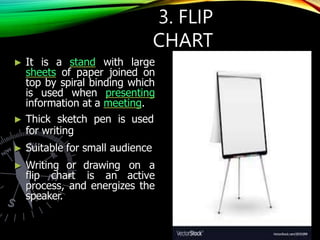
► It is a stand with large
sheets of paper joined on
top by spiral binding which
is used when presenting
information at a meeting.
► Thick sketch pen is used
for writing
► Suitable for small audience
► Writing or drawing on a
flip chart is an active
process, and energizes the
speaker.
4. OVERHEAD
PROJECTOR
► The definition of an overhead projector is a machine that
causes an image from a transparent sheet to be projected
onto a viewing screen.
► Using marker we can write on trasnparent sheets
► An overhead projector is a very basic but reliable tool used
to display content onto a screen or wall for audience to
view.
► Transparencies can be placed onto the base to be viewed
by both the audience and the speaker.
► It consists of a large box containing a cooling fan and an
extremely bright light, with a long arm extended above it.
At the end of the arm is a mirror that catches and redirects
the light towards the screen.
► The device was once a common feature in both classrooms
and business meetings, although it has seen a decline in
use as more sophisticated computer based projectors are
favored.
5. Poster
a) Thick card paper and pen
b) Small Audience
6. POWERPOINT
► The term "PowerPoint presentation" was coined when
Microsoft introduced its software program PowerPoint.
► PowerPoint is commonly used by presenters as a digital aid
when presenting their topic to an audience.
► PowerPoint presentations consist of one or more slides.
► Each slide can contain text, graphics, and other
information.
► You can easily rearrange the slides in a PowerPoint
presentation, delete slides that you don’t need, add new
slides, or modify the contents of existing slides.
► Requirement: PPT software, computer, LCD projector
6.1 POWERPOINT
TOOLS
a) Perspector is a tool used to create 3D
images on PowerPoint presentations.
► Instead of having the same old 2D images
and regular slides, PowerPoint presentation
designers now have a new way of keeping
the audience interested in a presentation.
► 3D graphics definitely capture the attention
of the audience.
6.1 POWERPOINT
TOOLS
b) Pivot Viewer
► It is especially useful if there are huge amounts of data
that need to be captured in the PowerPoint slides.
► As you know, presenting large amount of information in a
table format is not user-friendly or attractive.
► It is difficult for an audience to read and understand the
data.
► It given an option of how to view the data
► This makes a presentation informative as well as fun,
without overwhelming the audience with a flood of
information.
6.1 POWERPOINT
TOOLS
• c) SmartArt
► This tool is used to create diagrams, charts and graphs.
► Instead of merely presenting data in the boring tabular
style, designers go one step further and add the ‘glam’
element to the slides.
► Again, this is a powerful tool but lacks a lot of the
customization we usually like to work with.
6.1 POWERPOINT
TOOLS
6.1 POWERPOINT
TOOLS
d) Wordle
► Many times, people using PowerPoint presentation
come across slides that are simply bursting with
way too much content.
► Sometimes, it is important to include the text,
even though it is plenty.
► They make use of the Wordle tool to the slides.
► Emphasizing the main points
► This tool builds a word cloud based on the text
and acts as a unique backdrop to the slide.
6.1 POWERPOINT
TOOLS
e) Oomfo
► Oomfo is yet another tool that enables to create
charts and graphs, with animation.
► Oomfo stuns the audience with the visuals and
makes it fun for both the user and the viewer.
► In addition, Oomfo makes graphs and charts
interactive.
► It allows 2D images to be converted into 3D
images and enables slicing and rotation of pie
charts to engage the audience.

4.2 tools for presentation.pptx

  • 1.
  • 2.
    1. CHALK BOARD ► Althoughwe often think of chalkboards in academic or teaching settings, chalkboards (or dry boards) are also commonly used in business environments. ► Chalkboards are reusable writing surfaces where text and drawings are made using sticks of calcium sulfate or calcium carbonate known as chalk. ► Chalkboards were originally made of smooth, thin sheets of black or dark grey slate stone. Modern versions are often green because the color is considered easier for reading. ► This spontaneity allows for fast, simple and easy use by presenters who may not be familiar or comfortable with presentation software tools.
  • 3.
    2. WHITEBOARD/BLACKBOARD ► Analternative to a blackboard for presentations that uses a white drawing area and ink pens instead of chalk. ► The glossy surface of the whiteboard allows it to be erased. ► An "interactive whiteboard" is the electronic equivalent of the physical whiteboard and may be software in a user's computer or a stand-alone unit. It allows users in remote locations to simultaneously view a running application or view someone's drawings on screen. ► Digital whiteboards may or may not provide application sharing, in which two or more people are actually working in the same application at the same time.
  • 4.
    3. FLIP CHART ► Itis a stand with large sheets of paper joined on top by spiral binding which is used when presenting information at a meeting. ► Thick sketch pen is used for writing ► Suitable for small audience ► Writing or drawing on a flip chart is an active process, and energizes the speaker.
  • 5.
    4. OVERHEAD PROJECTOR ► Thedefinition of an overhead projector is a machine that causes an image from a transparent sheet to be projected onto a viewing screen. ► Using marker we can write on trasnparent sheets ► An overhead projector is a very basic but reliable tool used to display content onto a screen or wall for audience to view. ► Transparencies can be placed onto the base to be viewed by both the audience and the speaker. ► It consists of a large box containing a cooling fan and an extremely bright light, with a long arm extended above it. At the end of the arm is a mirror that catches and redirects the light towards the screen. ► The device was once a common feature in both classrooms and business meetings, although it has seen a decline in use as more sophisticated computer based projectors are favored.
  • 7.
    5. Poster a) Thickcard paper and pen b) Small Audience
  • 9.
    6. POWERPOINT ► Theterm "PowerPoint presentation" was coined when Microsoft introduced its software program PowerPoint. ► PowerPoint is commonly used by presenters as a digital aid when presenting their topic to an audience. ► PowerPoint presentations consist of one or more slides. ► Each slide can contain text, graphics, and other information. ► You can easily rearrange the slides in a PowerPoint presentation, delete slides that you don’t need, add new slides, or modify the contents of existing slides. ► Requirement: PPT software, computer, LCD projector
  • 10.
    6.1 POWERPOINT TOOLS a) Perspectoris a tool used to create 3D images on PowerPoint presentations. ► Instead of having the same old 2D images and regular slides, PowerPoint presentation designers now have a new way of keeping the audience interested in a presentation. ► 3D graphics definitely capture the attention of the audience.
  • 11.
    6.1 POWERPOINT TOOLS b) PivotViewer ► It is especially useful if there are huge amounts of data that need to be captured in the PowerPoint slides. ► As you know, presenting large amount of information in a table format is not user-friendly or attractive. ► It is difficult for an audience to read and understand the data. ► It given an option of how to view the data ► This makes a presentation informative as well as fun, without overwhelming the audience with a flood of information.
  • 12.
    6.1 POWERPOINT TOOLS • c)SmartArt ► This tool is used to create diagrams, charts and graphs. ► Instead of merely presenting data in the boring tabular style, designers go one step further and add the ‘glam’ element to the slides. ► Again, this is a powerful tool but lacks a lot of the customization we usually like to work with.
  • 13.
  • 14.
    6.1 POWERPOINT TOOLS d) Wordle ►Many times, people using PowerPoint presentation come across slides that are simply bursting with way too much content. ► Sometimes, it is important to include the text, even though it is plenty. ► They make use of the Wordle tool to the slides. ► Emphasizing the main points ► This tool builds a word cloud based on the text and acts as a unique backdrop to the slide.
  • 16.
    6.1 POWERPOINT TOOLS e) Oomfo ►Oomfo is yet another tool that enables to create charts and graphs, with animation. ► Oomfo stuns the audience with the visuals and makes it fun for both the user and the viewer. ► In addition, Oomfo makes graphs and charts interactive. ► It allows 2D images to be converted into 3D images and enables slicing and rotation of pie charts to engage the audience.