4 things you almost
     definitely don’t know
       about WordPress
Filtering page lists and columns

Revision History

Editing images with the media library

Creating dropdown menus
Filtering Page Lists
• Use the screen options tab at the top of
  the page to change what columns are
  displayed
All columns are visible
Selected columns are visible
Revision History
• WordPress keeps copies of each iteration
  of a page or post when it is saved.
• You can restore a past version of a page
  or post by using the revisons list.
Enable revision history box
List of Revisions
Viewing a revision
Restoring a revision
Editing images in WordPress

• Basic image editing tools including:
  – Crop
  – Rotate
  – Resize
  – Flip
Go to the media library
Click the item to be edited
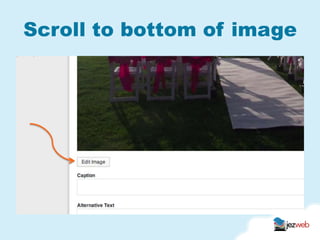
Scroll to bottom of image
Cropping an image
• Dragging a selection box over an image
  will set the area to be cropped
• Once set press save to commit the crop
Drawing a box over image
Creating drop down menus

• Using the menu manager you can indent a
  menu bar item which causes it to be a
  dropdown in most menus
Creating drop down menus

• Using the menu manager you can indent a
  menu bar item which causes it to be a
  dropdown in most menus
• Go to Appearance, Menus
Standard straight menu
Indented item for sub menu
What did we cover
• Filtering page lists and columns

• Revision History

• Editing images with the media library

• Creating dropdown menus
Questions?

4 things you almost definitely dont know about wordpress