Stage 4
Music Video
Planning and
pre-production
YOUR NAME HERE
Visual Planning
Pre-Production: Visual Planning
• This section is concerned with the visual planning of your music video
• You should use this section to develop the sequencing for your video,
establish the relationship between the visuals and the track itself and
create a structure for you to follow when filming
• It is important that you ‘pre-visualise’ the video before you make it; it
will make filming and production a more streamlined process
• The following tasks are part of your visual planning
• Pre-visualisation and concept boards
• Storyboarding
• Shot list
Pre-visualisation/Concept Boards
• Tool for exploring the direction and visuals
• Provides inspiration and information for the “look & feel”
• Presents key moments in your video
• A means to sketch/plan ideas
• Information on colour/lighting
• Defining the “mise-en-scene”
• Include as much here as you like, but keep it relevant to the
production, the following slides have been left blank for you to
approach in your own way, add more as you need to
• Extension suggestion: edit a short sequence of clips that have
inspired or influenced your video [similar to this:
http://io9.com/5941145/this-directors-video-pitch-for-hunger-
games-might-be-better-than-the-real-movie]
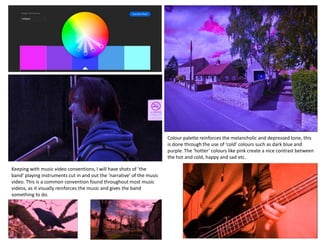
Colour palette reinforces the melancholic and depressed tone, this
is done through the use of ‘cold’ colours such as dark blue and
purple. The ‘hotter’ colours like pink create a nice contrast between
the hot and cold, happy and sad etc.
Keeping with music video conventions, I will have shots of ‘the
band’ playing instruments cut in and out the ‘narrative’ of the music
video. This is a common convention found throughout most music
videos, as it visually reinforces the music and gives the band
something to do.
Structural breakdown
• Breakdown your track into it basic sections [e.g. intro, verse, chorus,
verse, etc] and apply broad visual ideas to each section
• You can use this as the master template for your production, then
add more shots to each section when you develop your full visual
plan
Structural breakdown – 1/3
Section [e.g. verse,
chorus, bridge, etc]
Approx
duration
What happens, visual elements, shots Notes of technical aspects/requirements
Intro 21 sec The world will swiftly turn into a pink
and blue nightmare world
Steady panning shots,
medium/long shots
Verse 1 32 sec The character is walking in this world,
unknown to him
Steady medium tracking shot, from
all angles, over the shoulder,
behind etc.
Chorus 18 sec Character is still walking, however shots
of people playing instruments cut in and
out
Medium tracking shots and over
the shoulder shots
Structural breakdown – 2/3
Section [e.g. verse,
chorus, bridge, etc]
Approx
duration
What happens, visual elements, shots Notes of technical aspects/requirements
Verse 2 31 sec The character has walked/moved to a
different location, this time shots of the
environment and a crow start to cut in
and out throughout more often
Medium tracking shots and over
the shoulder shots, close - ups
Solo/Instrumental 33 sec Shots of instrumentation with cuts to a
high angle shot of the character walking
down a road
To achieve the high angle shot,
place the tripod mounted camera
in the air
Outro/Chorus 8 sec A long shot of the character walking
towards the camera, which as he gets
closer, turns into a medium close-up
Start the shot from a low angle at a
distance and follow up the actor
Storyboarding
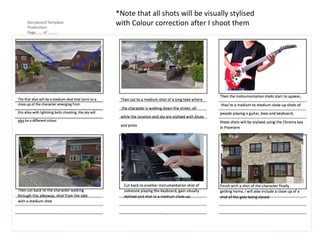
• Your storyboard should bring your idea to life
• Provide an idea of the sequencing of you video
• Provides a basis for production
• Suggested online storyboard creators are:
• https://www.storyboardthat.com
• http://www.pixton.com [very complicated]
• http://www.storyjumper.com [allows you to insert your own images]
• Alternatively, hand draw or photograph your storyboard and scan or
copy to insert it onto your slides
• There are lots of tips collected together on Blackboard!
*Note that all shots will be visually stylised
with Colour correction after I shoot them
Shot List
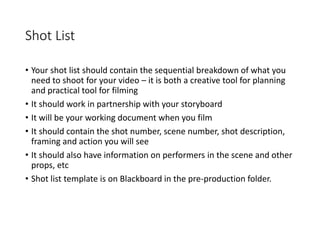
• Your shot list should contain the sequential breakdown of what you
need to shoot for your video – it is both a creative tool for planning
and practical tool for filming
• It should work in partnership with your storyboard
• It will be your working document when you film
• It should contain the shot number, scene number, shot description,
framing and action you will see
• It should also have information on performers in the scene and other
props, etc
• Shot list template is on Blackboard in the pre-production folder.
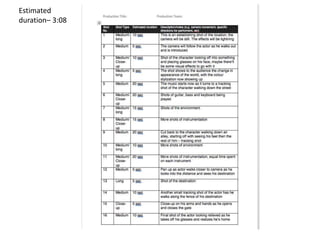
Estimated
duration– 3:08
Task 3.2
Organisational Planning
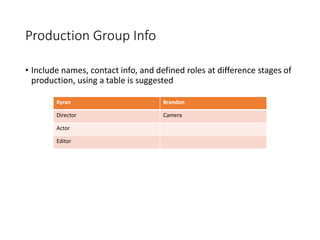
Production Group Info
• Include names, contact info, and defined roles at difference stages of
production, using a table is suggested
Kyran Brandon
Director Camera
Actor
Editor
Location information
• Information and images of your location[s] for filming
• You should have address details, clearance/premissions for filming,
recce photos and floorplans [including camera, equipment and
cast/crew layouts]
• Where possible, have a plan B fallback location option
• Assess each location for any issues and suggest solutions
Location - Pickering (Town)
Plan A: Plan B:
Outgang Rd Westgate
Crossgates Ln Hungate Rd
Ruffa Ln Forest Rd

4. pre production mv 2018

  • 1.
    Stage 4 Music Video Planningand pre-production YOUR NAME HERE
  • 2.
  • 3.
    Pre-Production: Visual Planning •This section is concerned with the visual planning of your music video • You should use this section to develop the sequencing for your video, establish the relationship between the visuals and the track itself and create a structure for you to follow when filming • It is important that you ‘pre-visualise’ the video before you make it; it will make filming and production a more streamlined process • The following tasks are part of your visual planning • Pre-visualisation and concept boards • Storyboarding • Shot list
  • 4.
    Pre-visualisation/Concept Boards • Toolfor exploring the direction and visuals • Provides inspiration and information for the “look & feel” • Presents key moments in your video • A means to sketch/plan ideas • Information on colour/lighting • Defining the “mise-en-scene” • Include as much here as you like, but keep it relevant to the production, the following slides have been left blank for you to approach in your own way, add more as you need to • Extension suggestion: edit a short sequence of clips that have inspired or influenced your video [similar to this: http://io9.com/5941145/this-directors-video-pitch-for-hunger- games-might-be-better-than-the-real-movie]
  • 5.
    Colour palette reinforcesthe melancholic and depressed tone, this is done through the use of ‘cold’ colours such as dark blue and purple. The ‘hotter’ colours like pink create a nice contrast between the hot and cold, happy and sad etc. Keeping with music video conventions, I will have shots of ‘the band’ playing instruments cut in and out the ‘narrative’ of the music video. This is a common convention found throughout most music videos, as it visually reinforces the music and gives the band something to do.
  • 6.
    Structural breakdown • Breakdownyour track into it basic sections [e.g. intro, verse, chorus, verse, etc] and apply broad visual ideas to each section • You can use this as the master template for your production, then add more shots to each section when you develop your full visual plan
  • 7.
    Structural breakdown –1/3 Section [e.g. verse, chorus, bridge, etc] Approx duration What happens, visual elements, shots Notes of technical aspects/requirements Intro 21 sec The world will swiftly turn into a pink and blue nightmare world Steady panning shots, medium/long shots Verse 1 32 sec The character is walking in this world, unknown to him Steady medium tracking shot, from all angles, over the shoulder, behind etc. Chorus 18 sec Character is still walking, however shots of people playing instruments cut in and out Medium tracking shots and over the shoulder shots
  • 8.
    Structural breakdown –2/3 Section [e.g. verse, chorus, bridge, etc] Approx duration What happens, visual elements, shots Notes of technical aspects/requirements Verse 2 31 sec The character has walked/moved to a different location, this time shots of the environment and a crow start to cut in and out throughout more often Medium tracking shots and over the shoulder shots, close - ups Solo/Instrumental 33 sec Shots of instrumentation with cuts to a high angle shot of the character walking down a road To achieve the high angle shot, place the tripod mounted camera in the air Outro/Chorus 8 sec A long shot of the character walking towards the camera, which as he gets closer, turns into a medium close-up Start the shot from a low angle at a distance and follow up the actor
  • 9.
    Storyboarding • Your storyboardshould bring your idea to life • Provide an idea of the sequencing of you video • Provides a basis for production • Suggested online storyboard creators are: • https://www.storyboardthat.com • http://www.pixton.com [very complicated] • http://www.storyjumper.com [allows you to insert your own images] • Alternatively, hand draw or photograph your storyboard and scan or copy to insert it onto your slides • There are lots of tips collected together on Blackboard!
  • 10.
    *Note that allshots will be visually stylised with Colour correction after I shoot them
  • 11.
    Shot List • Yourshot list should contain the sequential breakdown of what you need to shoot for your video – it is both a creative tool for planning and practical tool for filming • It should work in partnership with your storyboard • It will be your working document when you film • It should contain the shot number, scene number, shot description, framing and action you will see • It should also have information on performers in the scene and other props, etc • Shot list template is on Blackboard in the pre-production folder.
  • 12.
  • 13.
  • 14.
    Production Group Info •Include names, contact info, and defined roles at difference stages of production, using a table is suggested Kyran Brandon Director Camera Actor Editor
  • 15.
    Location information • Informationand images of your location[s] for filming • You should have address details, clearance/premissions for filming, recce photos and floorplans [including camera, equipment and cast/crew layouts] • Where possible, have a plan B fallback location option • Assess each location for any issues and suggest solutions Location - Pickering (Town) Plan A: Plan B: Outgang Rd Westgate Crossgates Ln Hungate Rd Ruffa Ln Forest Rd