SYSTEM IMPLEMENTATION AND
SUPPORT
CHAPTER 5
DFC3043 SYSTEM ANALYSIS & DESIGN
LEARNING OUTCOMES
5.1 Understand system development
5.2 Understand testing in a project
5.3 Explain system implementation
 5.4 Understand systems support and security
5.1 Understand System Development
5.1.1 Differentiate system development tools:
a. Modeling
b. Prototyping
c. CASE Tools
5.1.2 Explain the coding process
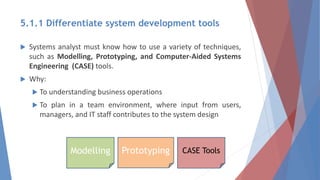
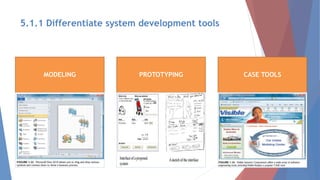
5.1.1 Differentiate system development tools
 Systems analyst must know how to use a variety of techniques,
such as Modelling, Prototyping, and Computer-Aided Systems
Engineering (CASE) tools.
 Why:
 To understanding business operations
 To plan in a team environment, where input from users,
managers, and IT staff contributes to the system design
Modelling Prototyping CASE Tools
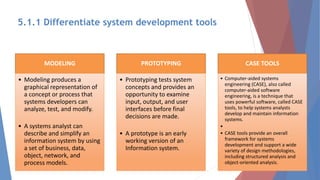
MODELING
• Modeling produces a
graphical representation of
a concept or process that
systems developers can
analyze, test, and modify.
• A systems analyst can
describe and simplify an
information system by using
a set of business, data,
object, network, and
process models.
PROTOTYPING
• Prototyping tests system
concepts and provides an
opportunity to examine
input, output, and user
interfaces before final
decisions are made.
• A prototype is an early
working version of an
Information system.
CASE TOOLS
• Computer-aided systems
engineering (CASE), also called
computer-aided software
engineering, is a technique that
uses powerful software, called CASE
tools, to help systems analysts
develop and maintain information
systems.
•
• CASE tools provide an overall
framework for systems
development and support a wide
variety of design methodologies,
including structured analysis and
object-oriented analysis.
5.1.1 Differentiate system development tools
MODELING PROTOTYPING CASE TOOLS
5.1.1 Differentiate system development tools
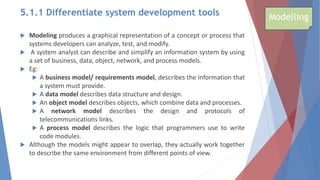
 Modeling produces a graphical representation of a concept or process that
systems developers can analyze, test, and modify.
 A system analyst can describe and simplify an information system by using
a set of business, data, object, network, and process models.
 Eg:
 A business model/ requirements model, describes the information that
a system must provide.
 A data model describes data structure and design.
 An object model describes objects, which combine data and processes.
 A network model describes the design and protocols of
telecommunications links.
 A process model describes the logic that programmers use to write
code modules.
 Although the models might appear to overlap, they actually work together
to describe the same environment from different points of view.
Modelling
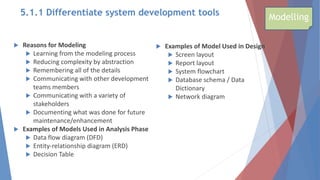
 Reasons for Modeling
 Learning from the modeling process
 Reducing complexity by abstraction
 Remembering all of the details
 Communicating with other development
teams members
 Communicating with a variety of
stakeholders
 Documenting what was done for future
maintenance/enhancement
 Examples of Models Used in Analysis Phase
 Data flow diagram (DFD)
 Entity-relationship diagram (ERD)
 Decision Table
 Examples of Model Used in Design
 Screen layout
 Report layout
 System flowchart
 Database schema / Data
Dictionary
 Network diagram
Modelling
5.1.1 Differentiate system development tools
 Prototyping Purpose:
 To tests system concepts and provides an opportunity to examine input,
output, and user interfaces before final decisions are made.
 A prototype is an early working version of an information system.
 Just as an aircraft manufacturer test a new design in a wind tunnel,
systems analysts construct and study information systems prototypes.
 Advantage:
 A prototype can serve as an initial model that is used as benchmark to
evaluate the finished system, or the prototype itself can develop into the
final version of the system.
 Either way, prototyping speeds up the development process significantly.
 Possible Disadvantage:
 Important decisions might be made too early, before business or IT issues
are understood thoroughly.
 A prototype based on careful fact finding and modelling techniques, however
can be an extremely valuable tool.
Prototyping
5.1.1 Differentiate system development tools
5.1.1 Differentiate system development tools CASE Tools
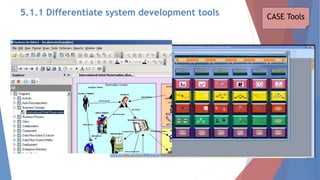
 Computer-aided systems engineering (CASE), also called computer-aided software
engineering
 What:
 A technique that uses powerful software, called CASE Tools
 CASE tools provide an over all framework for systems development and support a wide
variety of design methodologies, including structured analysis and object-oriented
analysis.
 Reason: to help system analyst’s develop and maintain information systems.
 How:
 Because CASE tools make it easier to build an information system, they boost it
productivity and improved the quality of the finished product.
 Traditional CASE tools system developers often use project management tools, such as
Microsoft Project, and special –purpose charting tools, such as Microsoft Visio.
 a system analyst’s can use Visio to create many different types of diagrams,
including block diagrams. Building plans, forms and charts, maps, network
diagrams, and organization charts.
 Example of CASE software are:
 Microsoft Visio
 Rational Rose
 Three leading CASE tool suppliers: Visible Systems Corporation, Telelogic Software, and
Rational Software
CASE Tools
5.1.1 Differentiate system development tools
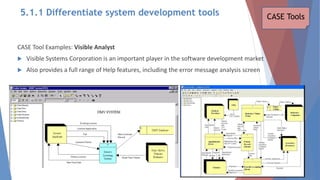
CASE Tool Examples: Visible Analyst
 Visible Systems Corporation is an important player in the software development market
 Also provides a full range of Help features, including the error message analysis screen
CASE Tools
5.1.1 Differentiate system development tools
 CASE Tool Examples: Rational Software
 IBM offers many systems development and modelling products, including a
powerful tool called Rational System Architect
 Stresses modelling and collaboration, and is a suite of tools that can align
processes, information, and technologies
CASE Tools
5.1.1 Differentiate system development tools
SYSTEM DEVELOPMENT –
5.1 2 CODING PROCESS
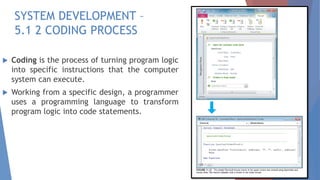
 Coding is the process of turning program logic
into specific instructions that the computer
system can execute.
 Working from a specific design, a programmer
uses a programming language to transform
program logic into code statements.
5.2.1 Explain the importance of software quality assurance
5.2.2 Differentiate the types of software testing:
- Unit testing
- Integration testing
- System testing
5.2.3 Differentiate between program, system, operations and
user documentation
5.2 Understand testing in a project
5.2.1 Explain the importance of software quality assurance.
Introduction:
 The system design specification serves as a blueprint for constructing
the new system
 The initial task is application development
 Before a changeover can occur, the system must be tested and
documented carefully, users must be trained, and existing data must be
converted
 A formal evaluation of the results takes place as part of a final report to
management
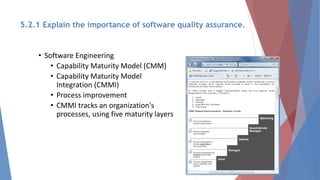
• Software Engineering
• Capability Maturity Model (CMM)
• Capability Maturity Model
Integration (CMMI)
• Process improvement
• CMMI tracks an organization's
processes, using five maturity layers
5.2.1 Explain the importance of software quality assurance.
• International Organization for Standardization (ISO)
– Many firms seek assurance that software systems will meet rigid
quality standards
– ISO 90003:2004
– ISO requires a specific development plan
5.2.1 Explain the importance of software quality assurance.
5.2.2 Differentiate the types of software testing
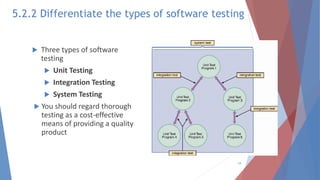
 Three types of software
testing
 Unit Testing
 Integration Testing
 System Testing
 You should regard thorough
testing as a cost-effective
means of providing a quality
product
19
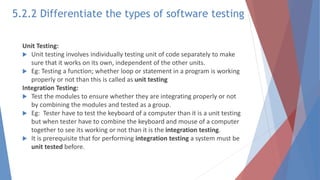
Unit Testing:
 Unit testing involves individually testing unit of code separately to make
sure that it works on its own, independent of the other units.
 Eg: Testing a function; whether loop or statement in a program is working
properly or not than this is called as unit testing
Integration Testing:
 Test the modules to ensure whether they are integrating properly or not
by combining the modules and tested as a group.
 Eg: Tester have to test the keyboard of a computer than it is a unit testing
but when tester have to combine the keyboard and mouse of a computer
together to see its working or not than it is the integration testing.
 It is prerequisite that for performing integration testing a system must be
unit tested before.
5.2.2 Differentiate the types of software testing
System Testing:
 Tester test the complete system as a whole to check whether the system is
properly working or vice versa as per the requirements or not. Testers
always have to concentrate on both functional and non-functional testing
like performance, load, stress, security and recovery testing
 In summary: in system testing the testers test the complete system as a
whole.
 Eg: Test the whole functionality and non functionality of the system
interactions between all module in Laundry Management System as one
single system.
 It is prerequisite that for performing system testing a system must be unit
tested and integration tested before.
5.2.2 Differentiate the types of software testing
5.2.3 Differentiate between program, system,
operations, and user documentation.
 Program Documentation
 System Documentation
 Operations Documentation
 User Documentation
 Systems analysts usually are responsible for preparing
documentation to help users learn the system
22
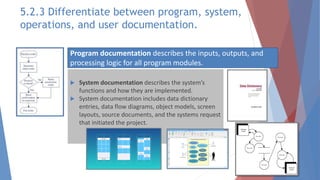
 System documentation describes the system’s
functions and how they are implemented.
 System documentation includes data dictionary
entries, data flow diagrams, object models, screen
layouts, source documents, and the systems request
that initiated the project.
Program documentation describes the inputs, outputs, and
processing logic for all program modules.
5.2.3 Differentiate between program, system,
operations, and user documentation.
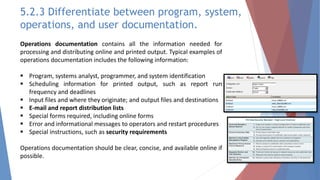
Operations documentation contains all the information needed for
processing and distributing online and printed output. Typical examples of
operations documentation includes the following information:
 Program, systems analyst, programmer, and system identification
 Scheduling information for printed output, such as report run
frequency and deadlines
 Input files and where they originate; and output files and destinations
 E-mail and report distribution lists
 Special forms required, including online forms
 Error and informational messages to operators and restart procedures
 Special instructions, such as security requirements
Operations documentation should be clear, concise, and available online if
possible.
5.2.3 Differentiate between program, system,
operations, and user documentation.
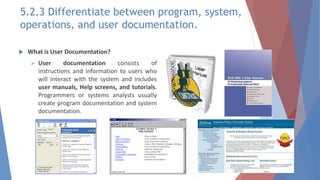
 What is User Documentation?
 User documentation consists of
instructions and information to users who
will interact with the system and includes
user manuals, Help screens, and tutorials.
Programmers or systems analysts usually
create program documentation and system
documentation.
5.2.3 Differentiate between program, system,
operations, and user documentation.
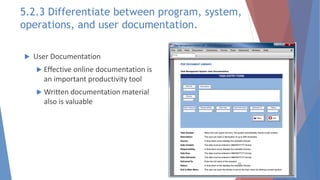
 User Documentation
 Effective online documentation is
an important productivity tool
 Written documentation material
also is valuable
26
5.2.3 Differentiate between program, system,
operations, and user documentation.
5.3 Explain System Implementation
5.3.1 List the main steps in system implementation
5.3.2 Explain system installation and evaluation
5.3.3 Outline system installation and evaluation checklist
5.3 Explain system implementation.
Management Approval
 After system testing is complete, developer team need to
present the results to management
 If system testing produced no technical, economical, or
operational problems, management determines a schedule for
system installation and evaluation
28
5.3.1 List the main steps in system implementation.
 The new system now is ready to go to work. Now, you will carry out the
remaining steps in systems implementation:
1. Prepare a separate operational and test environment
2. Provide training for users, managers, and IT staff
3. Perform data conversion and system changeover
4. Carry out a post-implementation evaluation of the system
5. Present a final report to management
29
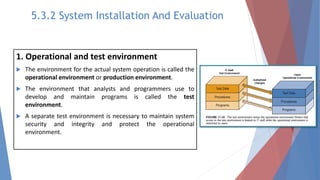
1. Operational and test environment
 The environment for the actual system operation is called the
operational environment or production environment.
 The environment that analysts and programmers use to
develop and maintain programs is called the test
environment.
 A separate test environment is necessary to maintain system
security and integrity and protect the operational
environment.
5.3.2 System Installation And Evaluation
2. Provide training for users, managers, and IT staff
Training Plan - it is essential to provide the right training for the right people at the
right time, specific training topics, identify the objectives, and determine how the
company will provide training. The main choices are to obtain training from vendors,
outside training firms, or use IT staff and other in-house resources.
Vendor Training - Many hardware and software vendors offer training programs free or at a
nominal cost for the products they sell. The training usually is conducted at the vendor’s site
by experienced trainers who provide valuable hands-on experience. Vendor training often
gives the best return on your training dollars because it is focused on products that the
vendor developed. Many vendors offer Web-based training options, including Webinars,
podcasts, and tutorials.
In-house Training - The IT staff and user departments often share responsibility for
developing and conducting training programs for internally developed software. If your
organization has a help desk, the staff might be able to handle internally user training.
5.3.2 System Installation And Evaluation
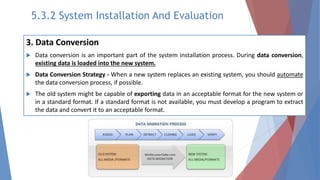
3. Data Conversion
 Data conversion is an important part of the system installation process. During data conversion,
existing data is loaded into the new system.
 Data Conversion Strategy - When a new system replaces an existing system, you should automate
the data conversion process, if possible.
 The old system might be capable of exporting data in an acceptable format for the new system or
in a standard format. If a standard format is not available, you must develop a program to extract
the data and convert it to an acceptable format.
5.3.2 System Installation And Evaluation
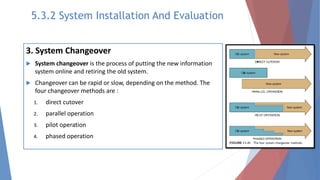
3. System Changeover
 System changeover is the process of putting the new information
system online and retiring the old system.
 Changeover can be rapid or slow, depending on the method. The
four changeover methods are :
1. direct cutover
2. parallel operation
3. pilot operation
4. phased operation
5.3.2 System Installation And Evaluation
System Changeover
34
System Changeover
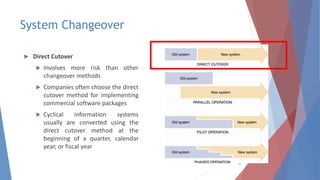
 Direct Cutover
 Involves more risk than other
changeover methods
 Companies often choose the direct
cutover method for implementing
commercial software packages
 Cyclical information systems
usually are converted using the
direct cutover method at the
beginning of a quarter, calendar
year, or fiscal year
35
System Changeover
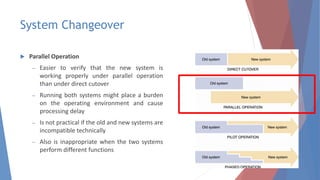
 Parallel Operation
– Easier to verify that the new system is
working properly under parallel operation
than under direct cutover
– Running both systems might place a burden
on the operating environment and cause
processing delay
– Is not practical if the old and new systems are
incompatible technically
– Also is inappropriate when the two systems
perform different functions
36
System Changeover
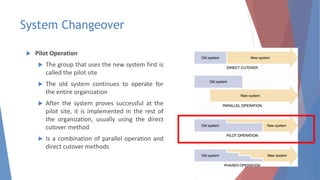
 Pilot Operation
 The group that uses the new system first is
called the pilot site
 The old system continues to operate for
the entire organization
 After the system proves successful at the
pilot site, it is implemented in the rest of
the organization, usually using the direct
cutover method
 Is a combination of parallel operation and
direct cutover methods
37
System Changeover
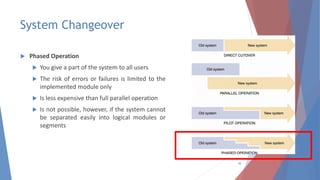
 Phased Operation
 You give a part of the system to all users
 The risk of errors or failures is limited to the
implemented module only
 Is less expensive than full parallel operation
 Is not possible, however, if the system cannot
be separated easily into logical modules or
segments
38
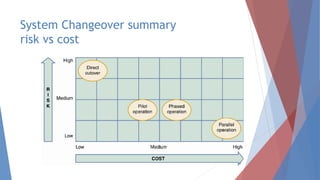
System Changeover summary
risk vs cost
39
4. Post-implementation Evaluation
 A post-implementation evaluation assesses the overall quality of the information system.
 The evaluation verifies that the new system meets specified requirements, complies with
user objectives, and produces the anticipated benefits.
5. Final Report to Management
The final report to management marks the end of systems development work. Your report
should include the following:
• Final versions of all system documentation
• Planned modifications and enhancements to the system that have been identified
• Recap of all systems development costs and schedules
• Comparison of actual costs and schedules to the original estimates
• Post-implementation evaluation, if it has been performed
5.3.2 System Installation And Evaluation
Data Conversion
 Data Conversion Security and Controls
 The developer team must ensure that all system control measures are in
place and operational to protect data from unauthorized access and to
help prevent erroneous input
 Some errors will occur
 It is essential that the new system be loaded with accurate, error-free
data
41
5.4 Understand Systems Support and Security
5.4.1 Explain the system support and security phase
5.4.2 Identify user support:
 User training
 Help desk
5.4.3 Explain various types of maintenance:
 Corrective maintenance
 Adaptive maintenance
 Perfective maintenance
 Preventive maintenance
5.4.4 Identify tools for system maintenance
5.4.5 Explain the system security and backup
5.4.6 Identify three elements of system security
5.4.1 Explain the system support and security phase
 Systems support and security is the final phase in the systems development
life cycle.
 Managing systems support and security involves three main concerns:
1.user expectations
2.system performance
3.security requirements
5.4.2 Identify user support:
User Training
 New employees must be trained on the
company’s information systems.
 The main objective is to show users how
the system can help them perform their
jobs.
 The training could include online support
via e-mail, a special Web site, a revision
to the user guide, a training manual
supplement, or formal training sessions.
Help Desks
To make data more accessible and to empower users,
many IT departments create help desks.
A help desk is a centralized resource staffed by IT
professionals who provide users with the support they
need to do their jobs.
A help desk has three main objectives:
1.Show people how to use system resources more
effectively
2.Provide answers to technical or operational questions
3.Make users more productive by teaching them how to
meet their own information needs
A help desk often is called an information center (IC)
because it is the first place users turn when they need
information or assistance.
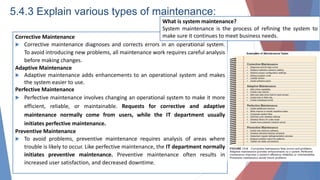
5.4.3 Explain various types of maintenance:
Corrective Maintenance
 Corrective maintenance diagnoses and corrects errors in an operational system.
To avoid introducing new problems, all maintenance work requires careful analysis
before making changes.
Adaptive Maintenance
 Adaptive maintenance adds enhancements to an operational system and makes
the system easier to use.
Perfective Maintenance
 Perfective maintenance involves changing an operational system to make it more
efficient, reliable, or maintainable. Requests for corrective and adaptive
maintenance normally come from users, while the IT department usually
initiates perfective maintenance.
Preventive Maintenance
 To avoid problems, preventive maintenance requires analysis of areas where
trouble is likely to occur. Like perfective maintenance, the IT department normally
initiates preventive maintenance. Preventive maintenance often results in
increased user satisfaction, and decreased downtime.
What is system maintenance?
System maintenance is the process of refining the system to
make sure it continues to meet business needs.
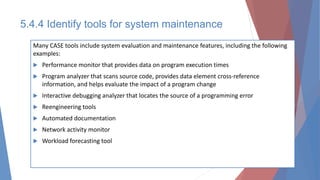
5.4.4 Identify tools for system maintenance
Many CASE tools include system evaluation and maintenance features, including the following
examples:
 Performance monitor that provides data on program execution times
 Program analyzer that scans source code, provides data element cross-reference
information, and helps evaluate the impact of a program change
 Interactive debugging analyzer that locates the source of a programming error
 Reengineering tools
 Automated documentation
 Network activity monitor
 Workload forecasting tool
BACKUP AND RECOVERY
 Every system must provide for data backup and recovery.
 Backup refers to copying data at prescribed intervals, or continuously.
 Recovery involves restoring the data and restarting the system after an interruption.
 An overall backup and recovery plan that prepares for a potential disaster is called a
disaster recovery plan.
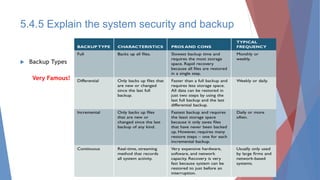
BACKUP TYPES
 Backups can be full, differential, incremental, or continuous.
Backup Policies
 The cornerstone of business data protection is a backup policy, which contains
detailed
 instructions and procedures. An effective backup policy can help a firm continue
5.4.5 Explain the system security and backup
BACKUP TYPES
 Backups can be full, differential, incremental, or continuous.
Backup Policies
 The cornerstone of business data protection is a backup policy, which contains detailed
instructions and procedures.
 An effective backup policy can help a firm continue business operations and survive a
catastrophe.
 The backup policy should specify backup media, backup types, and retention periods.
5.4.5 Explain the system security and backup
 Backup Types
49
Very Famous!
5.4.5 Explain the system security and backup
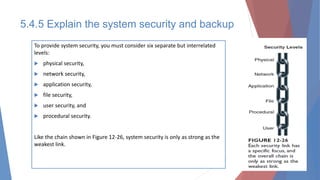
To provide system security, you must consider six separate but interrelated
levels:
 physical security,
 network security,
 application security,
 file security,
 user security, and
 procedural security.
Like the chain shown in Figure 12-26, system security is only as strong as the
weakest link.
5.4.5 Explain the system security and backup
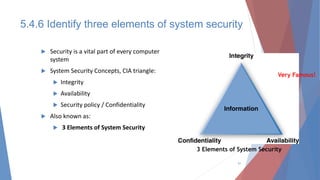
 Security is a vital part of every computer
system
 System Security Concepts, CIA triangle:
 Integrity
 Availability
 Security policy / Confidentiality
 Also known as:
 3 Elements of System Security
51
3 Elements of System Security
Very Famous!
5.4.6 Identify three elements of system security
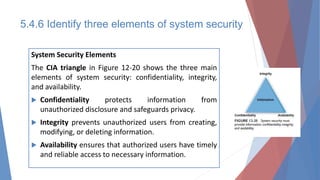
System Security Elements
The CIA triangle in Figure 12-20 shows the three main
elements of system security: confidentiality, integrity,
and availability.
 Confidentiality protects information from
unauthorized disclosure and safeguards privacy.
 Integrity prevents unauthorized users from creating,
modifying, or deleting information.
 Availability ensures that authorized users have timely
and reliable access to necessary information.
SUMMARY
 The systems implementation phase consists of application development, testing, installation,
and evaluation of the new system
 In addition to system documentation, analysts and technical writers also prepare operations
documentation and user documentation
 During the installation process, you establish an operational, or production, environment for
the new information system that is completely separate from the test environment.
 Everyone who interacts with the new information system should receive training appropriate
to his or her role and skills.
 Data conversion often is necessary when installing a new information system. When a new
system replaces a computerized system, you should automate the data conversion process if
possible.
 System changeover is the process of putting the new system into operation.
 A post-implementation evaluation assesses and reports on the quality of the new system and
the work done by the project team.
 The final report to management includes the final system documentation, describes any
future system enhancements that already have been identified, and details the project costs.
The report represents the end of the development effort and the beginning of the new
system’s operational life.

361103834-CHAPTER-5-SYSTEM-IMPLEMENTATION-AND-SUPPORT-pdf.pdf

  • 1.
    SYSTEM IMPLEMENTATION AND SUPPORT CHAPTER5 DFC3043 SYSTEM ANALYSIS & DESIGN
  • 2.
    LEARNING OUTCOMES 5.1 Understandsystem development 5.2 Understand testing in a project 5.3 Explain system implementation  5.4 Understand systems support and security
  • 3.
    5.1 Understand SystemDevelopment 5.1.1 Differentiate system development tools: a. Modeling b. Prototyping c. CASE Tools 5.1.2 Explain the coding process
  • 4.
    5.1.1 Differentiate systemdevelopment tools  Systems analyst must know how to use a variety of techniques, such as Modelling, Prototyping, and Computer-Aided Systems Engineering (CASE) tools.  Why:  To understanding business operations  To plan in a team environment, where input from users, managers, and IT staff contributes to the system design Modelling Prototyping CASE Tools
  • 5.
    MODELING • Modeling producesa graphical representation of a concept or process that systems developers can analyze, test, and modify. • A systems analyst can describe and simplify an information system by using a set of business, data, object, network, and process models. PROTOTYPING • Prototyping tests system concepts and provides an opportunity to examine input, output, and user interfaces before final decisions are made. • A prototype is an early working version of an Information system. CASE TOOLS • Computer-aided systems engineering (CASE), also called computer-aided software engineering, is a technique that uses powerful software, called CASE tools, to help systems analysts develop and maintain information systems. • • CASE tools provide an overall framework for systems development and support a wide variety of design methodologies, including structured analysis and object-oriented analysis. 5.1.1 Differentiate system development tools
  • 6.
    MODELING PROTOTYPING CASETOOLS 5.1.1 Differentiate system development tools
  • 7.
    5.1.1 Differentiate systemdevelopment tools  Modeling produces a graphical representation of a concept or process that systems developers can analyze, test, and modify.  A system analyst can describe and simplify an information system by using a set of business, data, object, network, and process models.  Eg:  A business model/ requirements model, describes the information that a system must provide.  A data model describes data structure and design.  An object model describes objects, which combine data and processes.  A network model describes the design and protocols of telecommunications links.  A process model describes the logic that programmers use to write code modules.  Although the models might appear to overlap, they actually work together to describe the same environment from different points of view. Modelling
  • 8.
     Reasons forModeling  Learning from the modeling process  Reducing complexity by abstraction  Remembering all of the details  Communicating with other development teams members  Communicating with a variety of stakeholders  Documenting what was done for future maintenance/enhancement  Examples of Models Used in Analysis Phase  Data flow diagram (DFD)  Entity-relationship diagram (ERD)  Decision Table  Examples of Model Used in Design  Screen layout  Report layout  System flowchart  Database schema / Data Dictionary  Network diagram Modelling 5.1.1 Differentiate system development tools
  • 9.
     Prototyping Purpose: To tests system concepts and provides an opportunity to examine input, output, and user interfaces before final decisions are made.  A prototype is an early working version of an information system.  Just as an aircraft manufacturer test a new design in a wind tunnel, systems analysts construct and study information systems prototypes.  Advantage:  A prototype can serve as an initial model that is used as benchmark to evaluate the finished system, or the prototype itself can develop into the final version of the system.  Either way, prototyping speeds up the development process significantly.  Possible Disadvantage:  Important decisions might be made too early, before business or IT issues are understood thoroughly.  A prototype based on careful fact finding and modelling techniques, however can be an extremely valuable tool. Prototyping 5.1.1 Differentiate system development tools
  • 10.
    5.1.1 Differentiate systemdevelopment tools CASE Tools
  • 11.
     Computer-aided systemsengineering (CASE), also called computer-aided software engineering  What:  A technique that uses powerful software, called CASE Tools  CASE tools provide an over all framework for systems development and support a wide variety of design methodologies, including structured analysis and object-oriented analysis.  Reason: to help system analyst’s develop and maintain information systems.  How:  Because CASE tools make it easier to build an information system, they boost it productivity and improved the quality of the finished product.  Traditional CASE tools system developers often use project management tools, such as Microsoft Project, and special –purpose charting tools, such as Microsoft Visio.  a system analyst’s can use Visio to create many different types of diagrams, including block diagrams. Building plans, forms and charts, maps, network diagrams, and organization charts.  Example of CASE software are:  Microsoft Visio  Rational Rose  Three leading CASE tool suppliers: Visible Systems Corporation, Telelogic Software, and Rational Software CASE Tools 5.1.1 Differentiate system development tools
  • 12.
    CASE Tool Examples:Visible Analyst  Visible Systems Corporation is an important player in the software development market  Also provides a full range of Help features, including the error message analysis screen CASE Tools 5.1.1 Differentiate system development tools
  • 13.
     CASE ToolExamples: Rational Software  IBM offers many systems development and modelling products, including a powerful tool called Rational System Architect  Stresses modelling and collaboration, and is a suite of tools that can align processes, information, and technologies CASE Tools 5.1.1 Differentiate system development tools
  • 14.
    SYSTEM DEVELOPMENT – 5.12 CODING PROCESS  Coding is the process of turning program logic into specific instructions that the computer system can execute.  Working from a specific design, a programmer uses a programming language to transform program logic into code statements.
  • 15.
    5.2.1 Explain theimportance of software quality assurance 5.2.2 Differentiate the types of software testing: - Unit testing - Integration testing - System testing 5.2.3 Differentiate between program, system, operations and user documentation 5.2 Understand testing in a project
  • 16.
    5.2.1 Explain theimportance of software quality assurance. Introduction:  The system design specification serves as a blueprint for constructing the new system  The initial task is application development  Before a changeover can occur, the system must be tested and documented carefully, users must be trained, and existing data must be converted  A formal evaluation of the results takes place as part of a final report to management
  • 17.
    • Software Engineering •Capability Maturity Model (CMM) • Capability Maturity Model Integration (CMMI) • Process improvement • CMMI tracks an organization's processes, using five maturity layers 5.2.1 Explain the importance of software quality assurance.
  • 18.
    • International Organizationfor Standardization (ISO) – Many firms seek assurance that software systems will meet rigid quality standards – ISO 90003:2004 – ISO requires a specific development plan 5.2.1 Explain the importance of software quality assurance.
  • 19.
    5.2.2 Differentiate thetypes of software testing  Three types of software testing  Unit Testing  Integration Testing  System Testing  You should regard thorough testing as a cost-effective means of providing a quality product 19
  • 20.
    Unit Testing:  Unittesting involves individually testing unit of code separately to make sure that it works on its own, independent of the other units.  Eg: Testing a function; whether loop or statement in a program is working properly or not than this is called as unit testing Integration Testing:  Test the modules to ensure whether they are integrating properly or not by combining the modules and tested as a group.  Eg: Tester have to test the keyboard of a computer than it is a unit testing but when tester have to combine the keyboard and mouse of a computer together to see its working or not than it is the integration testing.  It is prerequisite that for performing integration testing a system must be unit tested before. 5.2.2 Differentiate the types of software testing
  • 21.
    System Testing:  Testertest the complete system as a whole to check whether the system is properly working or vice versa as per the requirements or not. Testers always have to concentrate on both functional and non-functional testing like performance, load, stress, security and recovery testing  In summary: in system testing the testers test the complete system as a whole.  Eg: Test the whole functionality and non functionality of the system interactions between all module in Laundry Management System as one single system.  It is prerequisite that for performing system testing a system must be unit tested and integration tested before. 5.2.2 Differentiate the types of software testing
  • 22.
    5.2.3 Differentiate betweenprogram, system, operations, and user documentation.  Program Documentation  System Documentation  Operations Documentation  User Documentation  Systems analysts usually are responsible for preparing documentation to help users learn the system 22
  • 23.
     System documentationdescribes the system’s functions and how they are implemented.  System documentation includes data dictionary entries, data flow diagrams, object models, screen layouts, source documents, and the systems request that initiated the project. Program documentation describes the inputs, outputs, and processing logic for all program modules. 5.2.3 Differentiate between program, system, operations, and user documentation.
  • 24.
    Operations documentation containsall the information needed for processing and distributing online and printed output. Typical examples of operations documentation includes the following information:  Program, systems analyst, programmer, and system identification  Scheduling information for printed output, such as report run frequency and deadlines  Input files and where they originate; and output files and destinations  E-mail and report distribution lists  Special forms required, including online forms  Error and informational messages to operators and restart procedures  Special instructions, such as security requirements Operations documentation should be clear, concise, and available online if possible. 5.2.3 Differentiate between program, system, operations, and user documentation.
  • 25.
     What isUser Documentation?  User documentation consists of instructions and information to users who will interact with the system and includes user manuals, Help screens, and tutorials. Programmers or systems analysts usually create program documentation and system documentation. 5.2.3 Differentiate between program, system, operations, and user documentation.
  • 26.
     User Documentation Effective online documentation is an important productivity tool  Written documentation material also is valuable 26 5.2.3 Differentiate between program, system, operations, and user documentation.
  • 27.
    5.3 Explain SystemImplementation 5.3.1 List the main steps in system implementation 5.3.2 Explain system installation and evaluation 5.3.3 Outline system installation and evaluation checklist
  • 28.
    5.3 Explain systemimplementation. Management Approval  After system testing is complete, developer team need to present the results to management  If system testing produced no technical, economical, or operational problems, management determines a schedule for system installation and evaluation 28
  • 29.
    5.3.1 List themain steps in system implementation.  The new system now is ready to go to work. Now, you will carry out the remaining steps in systems implementation: 1. Prepare a separate operational and test environment 2. Provide training for users, managers, and IT staff 3. Perform data conversion and system changeover 4. Carry out a post-implementation evaluation of the system 5. Present a final report to management 29
  • 30.
    1. Operational andtest environment  The environment for the actual system operation is called the operational environment or production environment.  The environment that analysts and programmers use to develop and maintain programs is called the test environment.  A separate test environment is necessary to maintain system security and integrity and protect the operational environment. 5.3.2 System Installation And Evaluation
  • 31.
    2. Provide trainingfor users, managers, and IT staff Training Plan - it is essential to provide the right training for the right people at the right time, specific training topics, identify the objectives, and determine how the company will provide training. The main choices are to obtain training from vendors, outside training firms, or use IT staff and other in-house resources. Vendor Training - Many hardware and software vendors offer training programs free or at a nominal cost for the products they sell. The training usually is conducted at the vendor’s site by experienced trainers who provide valuable hands-on experience. Vendor training often gives the best return on your training dollars because it is focused on products that the vendor developed. Many vendors offer Web-based training options, including Webinars, podcasts, and tutorials. In-house Training - The IT staff and user departments often share responsibility for developing and conducting training programs for internally developed software. If your organization has a help desk, the staff might be able to handle internally user training. 5.3.2 System Installation And Evaluation
  • 32.
    3. Data Conversion Data conversion is an important part of the system installation process. During data conversion, existing data is loaded into the new system.  Data Conversion Strategy - When a new system replaces an existing system, you should automate the data conversion process, if possible.  The old system might be capable of exporting data in an acceptable format for the new system or in a standard format. If a standard format is not available, you must develop a program to extract the data and convert it to an acceptable format. 5.3.2 System Installation And Evaluation
  • 33.
    3. System Changeover System changeover is the process of putting the new information system online and retiring the old system.  Changeover can be rapid or slow, depending on the method. The four changeover methods are : 1. direct cutover 2. parallel operation 3. pilot operation 4. phased operation 5.3.2 System Installation And Evaluation
  • 34.
  • 35.
    System Changeover  DirectCutover  Involves more risk than other changeover methods  Companies often choose the direct cutover method for implementing commercial software packages  Cyclical information systems usually are converted using the direct cutover method at the beginning of a quarter, calendar year, or fiscal year 35
  • 36.
    System Changeover  ParallelOperation – Easier to verify that the new system is working properly under parallel operation than under direct cutover – Running both systems might place a burden on the operating environment and cause processing delay – Is not practical if the old and new systems are incompatible technically – Also is inappropriate when the two systems perform different functions 36
  • 37.
    System Changeover  PilotOperation  The group that uses the new system first is called the pilot site  The old system continues to operate for the entire organization  After the system proves successful at the pilot site, it is implemented in the rest of the organization, usually using the direct cutover method  Is a combination of parallel operation and direct cutover methods 37
  • 38.
    System Changeover  PhasedOperation  You give a part of the system to all users  The risk of errors or failures is limited to the implemented module only  Is less expensive than full parallel operation  Is not possible, however, if the system cannot be separated easily into logical modules or segments 38
  • 39.
  • 40.
    4. Post-implementation Evaluation A post-implementation evaluation assesses the overall quality of the information system.  The evaluation verifies that the new system meets specified requirements, complies with user objectives, and produces the anticipated benefits. 5. Final Report to Management The final report to management marks the end of systems development work. Your report should include the following: • Final versions of all system documentation • Planned modifications and enhancements to the system that have been identified • Recap of all systems development costs and schedules • Comparison of actual costs and schedules to the original estimates • Post-implementation evaluation, if it has been performed 5.3.2 System Installation And Evaluation
  • 41.
    Data Conversion  DataConversion Security and Controls  The developer team must ensure that all system control measures are in place and operational to protect data from unauthorized access and to help prevent erroneous input  Some errors will occur  It is essential that the new system be loaded with accurate, error-free data 41
  • 42.
    5.4 Understand SystemsSupport and Security 5.4.1 Explain the system support and security phase 5.4.2 Identify user support:  User training  Help desk 5.4.3 Explain various types of maintenance:  Corrective maintenance  Adaptive maintenance  Perfective maintenance  Preventive maintenance 5.4.4 Identify tools for system maintenance 5.4.5 Explain the system security and backup 5.4.6 Identify three elements of system security
  • 43.
    5.4.1 Explain thesystem support and security phase  Systems support and security is the final phase in the systems development life cycle.  Managing systems support and security involves three main concerns: 1.user expectations 2.system performance 3.security requirements
  • 44.
    5.4.2 Identify usersupport: User Training  New employees must be trained on the company’s information systems.  The main objective is to show users how the system can help them perform their jobs.  The training could include online support via e-mail, a special Web site, a revision to the user guide, a training manual supplement, or formal training sessions. Help Desks To make data more accessible and to empower users, many IT departments create help desks. A help desk is a centralized resource staffed by IT professionals who provide users with the support they need to do their jobs. A help desk has three main objectives: 1.Show people how to use system resources more effectively 2.Provide answers to technical or operational questions 3.Make users more productive by teaching them how to meet their own information needs A help desk often is called an information center (IC) because it is the first place users turn when they need information or assistance.
  • 45.
    5.4.3 Explain varioustypes of maintenance: Corrective Maintenance  Corrective maintenance diagnoses and corrects errors in an operational system. To avoid introducing new problems, all maintenance work requires careful analysis before making changes. Adaptive Maintenance  Adaptive maintenance adds enhancements to an operational system and makes the system easier to use. Perfective Maintenance  Perfective maintenance involves changing an operational system to make it more efficient, reliable, or maintainable. Requests for corrective and adaptive maintenance normally come from users, while the IT department usually initiates perfective maintenance. Preventive Maintenance  To avoid problems, preventive maintenance requires analysis of areas where trouble is likely to occur. Like perfective maintenance, the IT department normally initiates preventive maintenance. Preventive maintenance often results in increased user satisfaction, and decreased downtime. What is system maintenance? System maintenance is the process of refining the system to make sure it continues to meet business needs.
  • 46.
    5.4.4 Identify toolsfor system maintenance Many CASE tools include system evaluation and maintenance features, including the following examples:  Performance monitor that provides data on program execution times  Program analyzer that scans source code, provides data element cross-reference information, and helps evaluate the impact of a program change  Interactive debugging analyzer that locates the source of a programming error  Reengineering tools  Automated documentation  Network activity monitor  Workload forecasting tool
  • 47.
    BACKUP AND RECOVERY Every system must provide for data backup and recovery.  Backup refers to copying data at prescribed intervals, or continuously.  Recovery involves restoring the data and restarting the system after an interruption.  An overall backup and recovery plan that prepares for a potential disaster is called a disaster recovery plan. BACKUP TYPES  Backups can be full, differential, incremental, or continuous. Backup Policies  The cornerstone of business data protection is a backup policy, which contains detailed  instructions and procedures. An effective backup policy can help a firm continue 5.4.5 Explain the system security and backup
  • 48.
    BACKUP TYPES  Backupscan be full, differential, incremental, or continuous. Backup Policies  The cornerstone of business data protection is a backup policy, which contains detailed instructions and procedures.  An effective backup policy can help a firm continue business operations and survive a catastrophe.  The backup policy should specify backup media, backup types, and retention periods. 5.4.5 Explain the system security and backup
  • 49.
     Backup Types 49 VeryFamous! 5.4.5 Explain the system security and backup
  • 50.
    To provide systemsecurity, you must consider six separate but interrelated levels:  physical security,  network security,  application security,  file security,  user security, and  procedural security. Like the chain shown in Figure 12-26, system security is only as strong as the weakest link. 5.4.5 Explain the system security and backup
  • 51.
     Security isa vital part of every computer system  System Security Concepts, CIA triangle:  Integrity  Availability  Security policy / Confidentiality  Also known as:  3 Elements of System Security 51 3 Elements of System Security Very Famous! 5.4.6 Identify three elements of system security
  • 52.
    5.4.6 Identify threeelements of system security System Security Elements The CIA triangle in Figure 12-20 shows the three main elements of system security: confidentiality, integrity, and availability.  Confidentiality protects information from unauthorized disclosure and safeguards privacy.  Integrity prevents unauthorized users from creating, modifying, or deleting information.  Availability ensures that authorized users have timely and reliable access to necessary information.
  • 53.
    SUMMARY  The systemsimplementation phase consists of application development, testing, installation, and evaluation of the new system  In addition to system documentation, analysts and technical writers also prepare operations documentation and user documentation  During the installation process, you establish an operational, or production, environment for the new information system that is completely separate from the test environment.  Everyone who interacts with the new information system should receive training appropriate to his or her role and skills.  Data conversion often is necessary when installing a new information system. When a new system replaces a computerized system, you should automate the data conversion process if possible.  System changeover is the process of putting the new system into operation.  A post-implementation evaluation assesses and reports on the quality of the new system and the work done by the project team.  The final report to management includes the final system documentation, describes any future system enhancements that already have been identified, and details the project costs. The report represents the end of the development effort and the beginning of the new system’s operational life.