Cross Platform Development using the EverythingFlex AIR Library by Rich Tretola
About Me
Topics Windows NativeMenus Dock/SystemTray Icons & Menus ContextMenus Alerts SuperWindow EverythingFlexAIR1.swc
Windows Windows have been a part of traditional desktop applications for many years. If you have ever opened a help window or a preferences window of a desktop application, you have most likely experienced a multi- window application.  AIR has given us the ability to create windows as part of AIR desktop applications as well. Each window is a fully-fledged system window and can act independently of the additional windows; it and can even persist after the main application window has been closed.
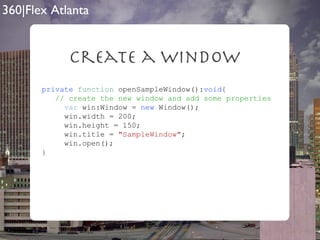
Create a Window private   function  openSampleWindow(): void { // create the new window and add some properties var  win:Window =  new  Window(); win.width = 200; win.height = 150; win.title =  "SampleWindow" ; win.open(); }
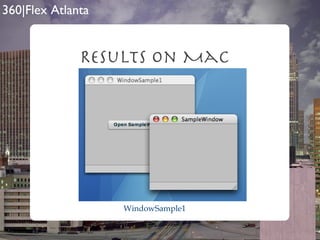
Results on Mac WindowSample1
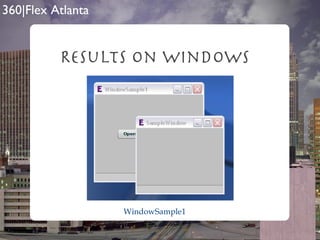
Results on Windows WindowSample1
NativeMenus AIR has also provided the ability to integrate menus into your applications. However, the implementation is different depending on which operating system your application is currently running on.
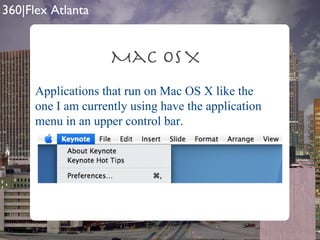
Mac OS X Applications that run on Mac OS X like the one I am currently using have the application menu in an upper control bar.
Windows XP, Vista Windows 2000, XP, Vista, etc include menus within the application window as shown in the screen shot of Flex Builder below.
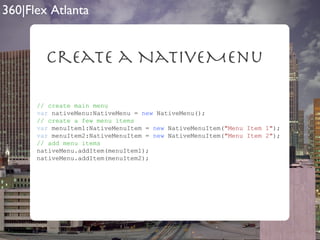
Create a NativeMenu // create main menu var  nativeMenu:NativeMenu =  new  NativeMenu(); // create a few menu items var  menuItem1:NativeMenuItem =  new  NativeMenuItem( "Menu Item 1" ); var  menuItem2:NativeMenuItem =  new  NativeMenuItem( "Menu Item 2" ); // add menu items nativeMenu.addItem(menuItem1); nativeMenu.addItem(menuItem2);
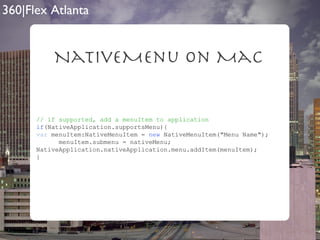
NativeMenu on Mac // if supported, add a menuItem to application if (NativeApplication.supportsMenu){ var  menuItem:NativeMenuItem =  new  NativeMenuItem("Menu Name"); menuItem.submenu = nativeMenu; NativeApplication.nativeApplication.menu.addItem(menuItem); }
Results on Mac WindowSample2
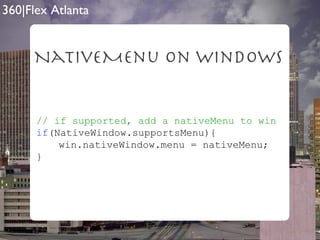
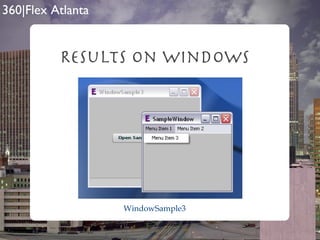
NativeMenu on Windows // if supported, add a nativeMenu to win if (NativeWindow.supportsMenu){ win.nativeWindow.menu = nativeMenu; }
Results on Windows WindowSample3
Dock & SystemTray  Icons The Dock icon on the Mac and the icons that appear in the SystemTray on Windows machines offer insight and alerts to the user of changes within the application.
Set a Dock Or  SystemTray Icon   [ Embed (source= "assets/e16.png" )]   private   var  Icon16:Class;   private   var  bitmap16:Bitmap =  new  Icon16();     [ Embed (source= "assets/e32.png" )]   private   var  Icon32:Class;   private   var  bitmap32:Bitmap =  new  Icon32();     [ Embed (source= "assets/e48.png" )]   private   var  Icon48:Class;   private   var  bitmap48:Bitmap =  new  Icon48();   [ Embed (source= "assets/e128.png" )]   private   var  Icon128:Class;   private   var  bitmap128:Bitmap =  new  Icon128();
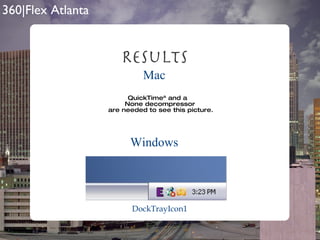
Set a Dock Or  SystemTray Icon private   function  setDockIcon(): void { var  icons:Array = [bitmap16.bitmapData, bitmap32.bitmapData, bitmap48.bitmapData, bitmap128.bitmapData] NativeApplication.nativeApplication.icon.bitmaps = icons; }
ResultS Mac Windows DockTrayIcon1
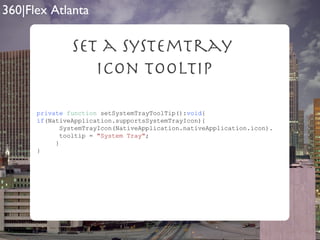
Dock & SystemTray  Tooltips & Menus Only the Windows SystemTray supports icon tooltips. Both Dock & SystemTray icons support menus being attached to them for click and hold on Mac and right click on Windows.
Set a SystemTray  Icon Tooltip private   function  setSystemTrayToolTip(): void { if (NativeApplication.supportsSystemTrayIcon){ SystemTrayIcon(NativeApplication.nativeApplication.icon). tooltip =  "System Tray" ; } }
ResultS Windows DockTrayIcon2
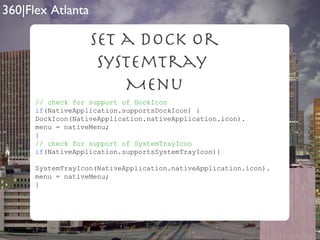
Set a Dock Or SystemTray  Menu // check for support of DockIcon if (NativeApplication.supportsDockIcon) { DockIcon(NativeApplication.nativeApplication.icon). menu = nativeMenu; } // check for support of SystemTrayIcon if (NativeApplication.supportsSystemTrayIcon){ SystemTrayIcon(NativeApplication.nativeApplication.icon). menu = nativeMenu; }

ResultS Mac DockTrayIcon3
ResultS Windows DockTrayIcon3
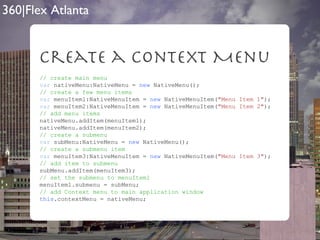
Context Menus AIR gives developers the ability to create custom Context menus which are right-click on Windows and ctrl-click on Mac. Context menus are created in the same manner as NativeMenus.
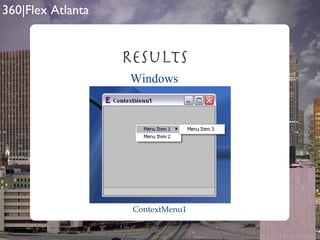
Create a context Menu // create main menu var  nativeMenu:NativeMenu =  new  NativeMenu(); // create a few menu items var  menuItem1:NativeMenuItem =  new  NativeMenuItem( "Menu Item 1" ); var  menuItem2:NativeMenuItem =  new  NativeMenuItem( "Menu Item 2" ); // add menu items nativeMenu.addItem(menuItem1); nativeMenu.addItem(menuItem2);  // create a submenu var  subMenu:NativeMenu =  new  NativeMenu(); // create a submenu item var  menuItem3:NativeMenuItem =  new  NativeMenuItem( "Menu Item 3" ); // add item to submenu subMenu.addItem(menuItem3); // set the submenu to menuItem1 menuItem1.submenu = subMenu; // add Context menu to main application window this .contextMenu = nativeMenu;
ResultS Mac ContextMenu1
ResultS Windows ContextMenu1
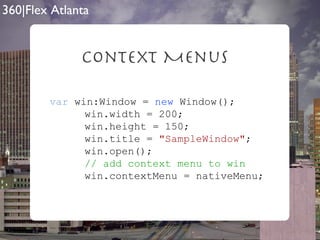
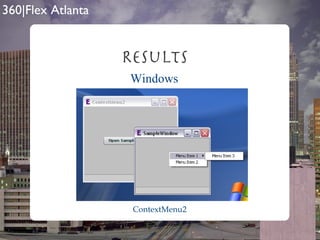
Context Menus Context Menus can also be assigned per Window within AIR applications.
Context Menus var  win:Window =  new  Window();   win.width = 200;   win.height = 150;   win.title =  "SampleWindow" ;   win.open();   // add context menu to win   win.contextMenu = nativeMenu;
ResultS Mac ContextMenu2
ResultS Windows ContextMenu2
Alerts There is a concept of alerting the user that the application needs attention with AIR on Mac by bouncing the dock icon. On Windows, you can set a window in the task bar to blink.
DockIcon Bounce if (NativeApplication.supportsDockIcon){ DockIcon(NativeApplication.nativeApplication.icon). bounce(NotificationType.CRITICAL); } NotificationType can be CRITICAL which will bounce until a user interaction occurs or INFORMATIONAL which will simply bounce once. DockBounce
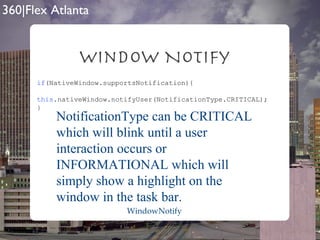
Window Notify if (NativeWindow.supportsNotification){ this .nativeWindow.notifyUser(NotificationType.CRITICAL); } NotificationType can be CRITICAL which will blink until a user interaction occurs or INFORMATIONAL which will simply show a highlight on the window in the task bar. WindowNotify
So? Wouldn’t it be great if all of the functionality that I have just shown you was able to be implemented with just a few lines of code?
Good News! The SuperWindow component part of the EverythingFlexAIR1.swc will let you manage menus, icons, icon menus, alerts, and context menus. Plus even more!!
What is SuperWindow? The SuperWindow component was originally created to solve the job of managing NativeMenus. As previously demonstrated NativeMenus function differently on Mac vs Windows.
managing NativeMenus SuperWindow on Mac can operate in either single or multi menu mode.  The static property MULTI_MENU_MODE can be set to true or false. It is false by default. This is a per application setting.
Menu Properties The NativeMenu is set by setting the SuperWindow’s nm property. The menu will either be created with the name of the accompanying Window’s title property or can accept a custom name by using the menuName property of the SuperWindow class.
MULTI_MENU_MODE = “true” When MULTI_MENU_MODE=”true” the application will be in multi menu mode. In this mode a new menu will be added to the right of the default AIR menus and will only be removed when the accompanying Window is closed.
MULTI_MENU_MODE = “true” SuperWindows1
MULTI_MENU_MODE = “false” When MULTI_MENU_MODE=”false” the application will be in single menu mode. In this mode one menu will be added to the right of the default AIR menus and will be swapped each time a Window gains focus.
MULTI_MENU_MODE = “false” SuperWindows2
On Windows SuperWindows1
SuperWindow allows for the reuse of the supplied NativeMenu as the Dock or SystemTray menu. To accomplish this, you simply set the static SHOW_SYSDOCK_MENU property to true. It is false by default. This is a per application setting. Dock SystemTray Menus
SHOW_SYSDOCK_MENU =”true” SuperWindows3
SuperWindows3 SHOW_SYSDOCK_MENU =”true”
Context Menus SuperWindow also allows for a simple reuse of the supplied NativeMenu as the window’s ContextMenu.  To accomplish this, you simply set the window’s showContextMenu property to true. This is a per window setting.
showContextMenu=”true” SuperWindows4
Add Window Controls SuperWindow will also allow you to automatically add window controls to your NativeMenus which will then show in all of the locations previously covered. To accomplish this, you simply set the window’s addWindowControls property to true. This is a per window setting.
addWindowControls =”true” SuperWindows5
Dock SysTem tray Icons SuperWindow supports per window Dock or SystemTray Icons.  Simply set an Array of bitmapData to the sysDockIconBitmaps property and SuperWindow will construct and manage the Dock or SystemTray Icon setting the icon to the current window. This is a per window setting.
sysDockIconBitmaps SuperWindows6
Alerts Methods SuperWindow supports 3 Alert methods. Native:  the bounce on Mac and the taskbar Window flash on Windows Icon: the icon will change from its current view to a negative view of itself or a supplied altered icon Toast: toast style windows are available as an alert method Native is the default and the alerts are per Window
Alert Types SuperWindow supports both NotificationType.CRITICAL and NotificationType.INFORMATIONAL The default is NotificationType.CRITICAL
Native Alerts SuperWindow supports both NotificationType.CRITICAL and NotificationType.INFORMATIONAL The default is NotificationType.CRITICAL
startAlert() To start a SuperWindow alert, a call to the startAlert() method is necessary.  The startAlert() method accepts one argument of type String which is the message the will display as the Icon toolTip or the message within a toast alert. Ex: startAlert(“Something is happening”);
Toast Alert SuperWindows7
What Else? OK, so we have seen the SuperWindow component, but what else is included in the EverythingFlexAIR1.swc component library?
EverythingFlexAIR1.SWC SuperWindow ContextWindow AlertWindow ConnectionManager UpdateManager
ContextWindow The ContextWindow component was created to easily add the “close”, “minimixe”, “maximize”, and ‘restore” functionality to AIR windows. The functionality of the ContextWindow component is included within the SuperWindow component.
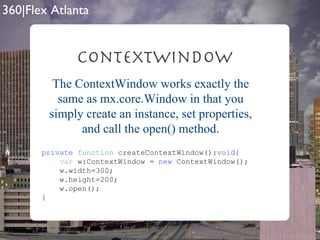
ContextWindow private   function  createContextWindow(): void { var  w:ContextWindow =  new  ContextWindow(); w.width=300; w.height=200; w.open(); } The ContextWindow works exactly the same as mx.core.Window in that you simply create an instance, set properties, and call the open() method.
ContextWindow <?xml version=&quot;1.0&quot; encoding=&quot;utf-8&quot;?> <ContextWindow  xmlns=&quot; com.everythingflex.air.components.* &quot;  layout=&quot; absolute &quot;  xmlns:mx=&quot; http://www.adobe.com/2006/mxml &quot;  width=&quot; 300 &quot; height=&quot; 150 &quot; > <mx:Label  text=&quot; This is a ContextWindow &quot;  horizontalCenter=&quot; 0 &quot; verticalCenter=&quot; 0 &quot;  /> </ContextWindow> You could also create an MXML component from the ContextWindow
ContextWindow ContextWindow1
AlertWindow The AlertWindow component was created to add cross platform “toast” style alerts to AIR applications. The functionality of the AlertWindow component is included within the SuperWindow component.
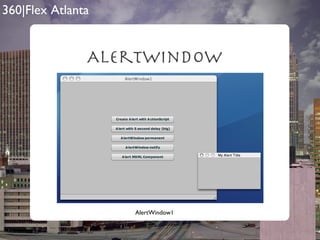
AlertWindow In additional to all of the properties of mx.core.Window, AlertWindow has two optional properties. delayTime:int = 3; the time in which the window will remain on screen before retreating notify:Boolean = true; will cause the AlertWindow to bounce only when delayTime=0
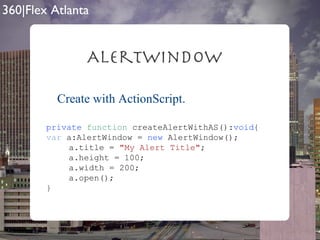
AlertWindow Create with ActionScript. private   function  createAlertWithAS(): void { var  a:AlertWindow =  new  AlertWindow(); a.title =  &quot;My Alert Title&quot; ; a.height = 100; a.width = 200; a.open(); }
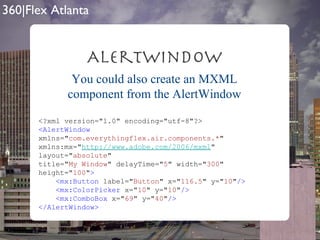
AlertWindow <?xml version=&quot;1.0&quot; encoding=&quot;utf-8&quot;?> <AlertWindow   xmlns=&quot; com.everythingflex.air.components.* &quot; xmlns:mx=&quot; http://www.adobe.com/2006/mxml &quot; layout=&quot; absolute &quot; title=&quot; My Window &quot; delayTime=&quot; 5 &quot; width=&quot; 300 &quot; height=&quot; 100 &quot; > <mx:Button  label=&quot; Button &quot; x=&quot; 116.5 &quot; y=&quot; 10 &quot; /> <mx:ColorPicker  x=&quot; 10 &quot; y=&quot; 10 &quot; /> <mx:ComboBox  x=&quot; 69 &quot; y=&quot; 40 &quot; /> </AlertWindow> You could also create an MXML component from the AlertWindow
AlertWindow AlertWindow1
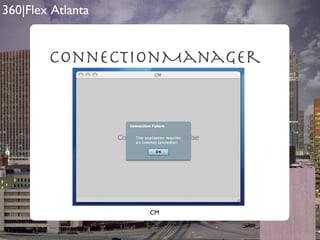
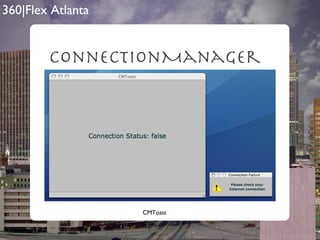
ConnectionManager If your application requires an Internet connection, the ConnectionManager class is the easiest way to create a connection test.
ConnectionManager In ConnectionManager’s constructor can accept 3 optional arguments. showMessage:Boolean = true; will show an Alert window when a connection failure occurs connectionURL:String = “ http://www.google.com ”; the URL that s attempted message:String = “This application requires .....”; the message that is shown to the user in the Alert
ConnectionManager private   var  cm:ConnectionManager =  new  ConnectionManager(); private   var  cm:ConnectionManager =  new  ConnectionManager( true , &quot; http://adobe.com &quot; , &quot;Get Online!&quot; ); Basic Custom Settings
ConnectionManager Properties connectionURL:String the connectionURL currently assigned to the ConnectionManager isConnected:Boolean current connection status alertType:String type of alert to show (native|toast)
ConnectionManager CM
ConnectionManager CMToast
UpdateManager I built this very simple UpdateManager to make it easy to keep your applications up up to date once they have been distributed to your clients.
UpdateManager In UpdateManager’s constructor requires one argument and has an additional optional argument. versionURL:String; URL to the version.xml file autoCheck:Boolean = true; if true, will automatically check for update on instantiation of the UpdateManager
private   var  cm:ConnectionManager =  new  ConnectionManager(); private   var  cm:ConnectionManager =  new  ConnectionManager( true , &quot; http://adobe.com &quot; , &quot;Get Online!&quot; ); Basic Custom Settings UpdateManager
Properties currentVersion:String the current version of the application UpdateManager
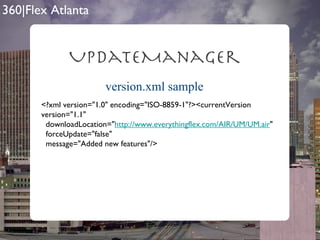
version.xml properties UpdateManager currentVersion: the version of the new AIR file downloadLocation: URL to new AIR file forceUpdate: if true application will update itself without user interaction message: shows in the update Alert (only if forceUpdate is false
version.xml sample UpdateManager <?xml version=&quot;1.0&quot; encoding=&quot;ISO-8859-1&quot;?><currentVersion version=&quot;1.1&quot;  downloadLocation=&quot; http://www.everythingflex.com/AIR/UM/UM.air &quot;  forceUpdate=&quot;false&quot;  message=&quot;Added new features&quot;/>
UM UpdateManager
EverythingFlexAIR1.SWC 100% FREE! http://blog.everythingflex.com/apollo/components-air
Questions & Contact Info [email_address] http://blog.everythingf lex.com [email_address] http://www.InsideRIA .com
Extras startAtLogin=true allowBrowserInvocation localConnection

360 Flex Atlanta

  • 1.
    Cross Platform Developmentusing the EverythingFlex AIR Library by Rich Tretola
  • 2.
  • 3.
    Topics Windows NativeMenusDock/SystemTray Icons & Menus ContextMenus Alerts SuperWindow EverythingFlexAIR1.swc
  • 4.
    Windows Windows havebeen a part of traditional desktop applications for many years. If you have ever opened a help window or a preferences window of a desktop application, you have most likely experienced a multi- window application. AIR has given us the ability to create windows as part of AIR desktop applications as well. Each window is a fully-fledged system window and can act independently of the additional windows; it and can even persist after the main application window has been closed.
  • 5.
    Create a Windowprivate function openSampleWindow(): void { // create the new window and add some properties var win:Window = new Window(); win.width = 200; win.height = 150; win.title = &quot;SampleWindow&quot; ; win.open(); }
  • 6.
    Results on MacWindowSample1
  • 7.
    Results on WindowsWindowSample1
  • 8.
    NativeMenus AIR hasalso provided the ability to integrate menus into your applications. However, the implementation is different depending on which operating system your application is currently running on.
  • 9.
    Mac OS XApplications that run on Mac OS X like the one I am currently using have the application menu in an upper control bar.
  • 10.
    Windows XP, VistaWindows 2000, XP, Vista, etc include menus within the application window as shown in the screen shot of Flex Builder below.
  • 11.
    Create a NativeMenu// create main menu var nativeMenu:NativeMenu = new NativeMenu(); // create a few menu items var menuItem1:NativeMenuItem = new NativeMenuItem( &quot;Menu Item 1&quot; ); var menuItem2:NativeMenuItem = new NativeMenuItem( &quot;Menu Item 2&quot; ); // add menu items nativeMenu.addItem(menuItem1); nativeMenu.addItem(menuItem2);
  • 12.
    NativeMenu on Mac// if supported, add a menuItem to application if (NativeApplication.supportsMenu){ var menuItem:NativeMenuItem = new NativeMenuItem(&quot;Menu Name&quot;); menuItem.submenu = nativeMenu; NativeApplication.nativeApplication.menu.addItem(menuItem); }
  • 13.
    Results on MacWindowSample2
  • 14.
    NativeMenu on Windows// if supported, add a nativeMenu to win if (NativeWindow.supportsMenu){ win.nativeWindow.menu = nativeMenu; }
  • 15.
    Results on WindowsWindowSample3
  • 16.
    Dock & SystemTray Icons The Dock icon on the Mac and the icons that appear in the SystemTray on Windows machines offer insight and alerts to the user of changes within the application.
  • 17.
    Set a DockOr SystemTray Icon [ Embed (source= &quot;assets/e16.png&quot; )] private var Icon16:Class; private var bitmap16:Bitmap = new Icon16(); [ Embed (source= &quot;assets/e32.png&quot; )] private var Icon32:Class; private var bitmap32:Bitmap = new Icon32(); [ Embed (source= &quot;assets/e48.png&quot; )] private var Icon48:Class; private var bitmap48:Bitmap = new Icon48(); [ Embed (source= &quot;assets/e128.png&quot; )] private var Icon128:Class; private var bitmap128:Bitmap = new Icon128();
  • 18.
    Set a DockOr SystemTray Icon private function setDockIcon(): void { var icons:Array = [bitmap16.bitmapData, bitmap32.bitmapData, bitmap48.bitmapData, bitmap128.bitmapData] NativeApplication.nativeApplication.icon.bitmaps = icons; }
  • 19.
    ResultS Mac WindowsDockTrayIcon1
  • 20.
    Dock & SystemTray Tooltips & Menus Only the Windows SystemTray supports icon tooltips. Both Dock & SystemTray icons support menus being attached to them for click and hold on Mac and right click on Windows.
  • 21.
    Set a SystemTray Icon Tooltip private function setSystemTrayToolTip(): void { if (NativeApplication.supportsSystemTrayIcon){ SystemTrayIcon(NativeApplication.nativeApplication.icon). tooltip = &quot;System Tray&quot; ; } }
  • 22.
  • 23.
    Set a DockOr SystemTray Menu // check for support of DockIcon if (NativeApplication.supportsDockIcon) { DockIcon(NativeApplication.nativeApplication.icon). menu = nativeMenu; } // check for support of SystemTrayIcon if (NativeApplication.supportsSystemTrayIcon){ SystemTrayIcon(NativeApplication.nativeApplication.icon). menu = nativeMenu; }
  • 24.
  • 25.
  • 26.
    Context Menus AIRgives developers the ability to create custom Context menus which are right-click on Windows and ctrl-click on Mac. Context menus are created in the same manner as NativeMenus.
  • 27.
    Create a contextMenu // create main menu var nativeMenu:NativeMenu = new NativeMenu(); // create a few menu items var menuItem1:NativeMenuItem = new NativeMenuItem( &quot;Menu Item 1&quot; ); var menuItem2:NativeMenuItem = new NativeMenuItem( &quot;Menu Item 2&quot; ); // add menu items nativeMenu.addItem(menuItem1); nativeMenu.addItem(menuItem2); // create a submenu var subMenu:NativeMenu = new NativeMenu(); // create a submenu item var menuItem3:NativeMenuItem = new NativeMenuItem( &quot;Menu Item 3&quot; ); // add item to submenu subMenu.addItem(menuItem3); // set the submenu to menuItem1 menuItem1.submenu = subMenu; // add Context menu to main application window this .contextMenu = nativeMenu;
  • 28.
  • 29.
  • 30.
    Context Menus ContextMenus can also be assigned per Window within AIR applications.
  • 31.
    Context Menus var win:Window = new Window(); win.width = 200; win.height = 150; win.title = &quot;SampleWindow&quot; ; win.open(); // add context menu to win win.contextMenu = nativeMenu;
  • 32.
  • 33.
  • 34.
    Alerts There isa concept of alerting the user that the application needs attention with AIR on Mac by bouncing the dock icon. On Windows, you can set a window in the task bar to blink.
  • 35.
    DockIcon Bounce if(NativeApplication.supportsDockIcon){ DockIcon(NativeApplication.nativeApplication.icon). bounce(NotificationType.CRITICAL); } NotificationType can be CRITICAL which will bounce until a user interaction occurs or INFORMATIONAL which will simply bounce once. DockBounce
  • 36.
    Window Notify if(NativeWindow.supportsNotification){ this .nativeWindow.notifyUser(NotificationType.CRITICAL); } NotificationType can be CRITICAL which will blink until a user interaction occurs or INFORMATIONAL which will simply show a highlight on the window in the task bar. WindowNotify
  • 37.
    So? Wouldn’t itbe great if all of the functionality that I have just shown you was able to be implemented with just a few lines of code?
  • 38.
    Good News! TheSuperWindow component part of the EverythingFlexAIR1.swc will let you manage menus, icons, icon menus, alerts, and context menus. Plus even more!!
  • 39.
    What is SuperWindow?The SuperWindow component was originally created to solve the job of managing NativeMenus. As previously demonstrated NativeMenus function differently on Mac vs Windows.
  • 40.
    managing NativeMenus SuperWindowon Mac can operate in either single or multi menu mode. The static property MULTI_MENU_MODE can be set to true or false. It is false by default. This is a per application setting.
  • 41.
    Menu Properties TheNativeMenu is set by setting the SuperWindow’s nm property. The menu will either be created with the name of the accompanying Window’s title property or can accept a custom name by using the menuName property of the SuperWindow class.
  • 42.
    MULTI_MENU_MODE = “true”When MULTI_MENU_MODE=”true” the application will be in multi menu mode. In this mode a new menu will be added to the right of the default AIR menus and will only be removed when the accompanying Window is closed.
  • 43.
  • 44.
    MULTI_MENU_MODE = “false”When MULTI_MENU_MODE=”false” the application will be in single menu mode. In this mode one menu will be added to the right of the default AIR menus and will be swapped each time a Window gains focus.
  • 45.
  • 46.
  • 47.
    SuperWindow allows forthe reuse of the supplied NativeMenu as the Dock or SystemTray menu. To accomplish this, you simply set the static SHOW_SYSDOCK_MENU property to true. It is false by default. This is a per application setting. Dock SystemTray Menus
  • 48.
  • 49.
  • 50.
    Context Menus SuperWindowalso allows for a simple reuse of the supplied NativeMenu as the window’s ContextMenu. To accomplish this, you simply set the window’s showContextMenu property to true. This is a per window setting.
  • 51.
  • 52.
  • 53.
    Add Window ControlsSuperWindow will also allow you to automatically add window controls to your NativeMenus which will then show in all of the locations previously covered. To accomplish this, you simply set the window’s addWindowControls property to true. This is a per window setting.
  • 54.
  • 55.
  • 56.
    Dock SysTem trayIcons SuperWindow supports per window Dock or SystemTray Icons. Simply set an Array of bitmapData to the sysDockIconBitmaps property and SuperWindow will construct and manage the Dock or SystemTray Icon setting the icon to the current window. This is a per window setting.
  • 57.
  • 58.
    Alerts Methods SuperWindowsupports 3 Alert methods. Native: the bounce on Mac and the taskbar Window flash on Windows Icon: the icon will change from its current view to a negative view of itself or a supplied altered icon Toast: toast style windows are available as an alert method Native is the default and the alerts are per Window
  • 59.
    Alert Types SuperWindowsupports both NotificationType.CRITICAL and NotificationType.INFORMATIONAL The default is NotificationType.CRITICAL
  • 60.
    Native Alerts SuperWindowsupports both NotificationType.CRITICAL and NotificationType.INFORMATIONAL The default is NotificationType.CRITICAL
  • 61.
    startAlert() To starta SuperWindow alert, a call to the startAlert() method is necessary. The startAlert() method accepts one argument of type String which is the message the will display as the Icon toolTip or the message within a toast alert. Ex: startAlert(“Something is happening”);
  • 62.
  • 63.
    What Else? OK,so we have seen the SuperWindow component, but what else is included in the EverythingFlexAIR1.swc component library?
  • 64.
    EverythingFlexAIR1.SWC SuperWindow ContextWindowAlertWindow ConnectionManager UpdateManager
  • 65.
    ContextWindow The ContextWindowcomponent was created to easily add the “close”, “minimixe”, “maximize”, and ‘restore” functionality to AIR windows. The functionality of the ContextWindow component is included within the SuperWindow component.
  • 66.
    ContextWindow private function createContextWindow(): void { var w:ContextWindow = new ContextWindow(); w.width=300; w.height=200; w.open(); } The ContextWindow works exactly the same as mx.core.Window in that you simply create an instance, set properties, and call the open() method.
  • 67.
    ContextWindow <?xml version=&quot;1.0&quot;encoding=&quot;utf-8&quot;?> <ContextWindow xmlns=&quot; com.everythingflex.air.components.* &quot; layout=&quot; absolute &quot; xmlns:mx=&quot; http://www.adobe.com/2006/mxml &quot; width=&quot; 300 &quot; height=&quot; 150 &quot; > <mx:Label text=&quot; This is a ContextWindow &quot; horizontalCenter=&quot; 0 &quot; verticalCenter=&quot; 0 &quot; /> </ContextWindow> You could also create an MXML component from the ContextWindow
  • 68.
  • 69.
    AlertWindow The AlertWindowcomponent was created to add cross platform “toast” style alerts to AIR applications. The functionality of the AlertWindow component is included within the SuperWindow component.
  • 70.
    AlertWindow In additionalto all of the properties of mx.core.Window, AlertWindow has two optional properties. delayTime:int = 3; the time in which the window will remain on screen before retreating notify:Boolean = true; will cause the AlertWindow to bounce only when delayTime=0
  • 71.
    AlertWindow Create withActionScript. private function createAlertWithAS(): void { var a:AlertWindow = new AlertWindow(); a.title = &quot;My Alert Title&quot; ; a.height = 100; a.width = 200; a.open(); }
  • 72.
    AlertWindow <?xml version=&quot;1.0&quot;encoding=&quot;utf-8&quot;?> <AlertWindow xmlns=&quot; com.everythingflex.air.components.* &quot; xmlns:mx=&quot; http://www.adobe.com/2006/mxml &quot; layout=&quot; absolute &quot; title=&quot; My Window &quot; delayTime=&quot; 5 &quot; width=&quot; 300 &quot; height=&quot; 100 &quot; > <mx:Button label=&quot; Button &quot; x=&quot; 116.5 &quot; y=&quot; 10 &quot; /> <mx:ColorPicker x=&quot; 10 &quot; y=&quot; 10 &quot; /> <mx:ComboBox x=&quot; 69 &quot; y=&quot; 40 &quot; /> </AlertWindow> You could also create an MXML component from the AlertWindow
  • 73.
  • 74.
    ConnectionManager If yourapplication requires an Internet connection, the ConnectionManager class is the easiest way to create a connection test.
  • 75.
    ConnectionManager In ConnectionManager’sconstructor can accept 3 optional arguments. showMessage:Boolean = true; will show an Alert window when a connection failure occurs connectionURL:String = “ http://www.google.com ”; the URL that s attempted message:String = “This application requires .....”; the message that is shown to the user in the Alert
  • 76.
    ConnectionManager private var cm:ConnectionManager = new ConnectionManager(); private var cm:ConnectionManager = new ConnectionManager( true , &quot; http://adobe.com &quot; , &quot;Get Online!&quot; ); Basic Custom Settings
  • 77.
    ConnectionManager Properties connectionURL:Stringthe connectionURL currently assigned to the ConnectionManager isConnected:Boolean current connection status alertType:String type of alert to show (native|toast)
  • 78.
  • 79.
  • 80.
    UpdateManager I builtthis very simple UpdateManager to make it easy to keep your applications up up to date once they have been distributed to your clients.
  • 81.
    UpdateManager In UpdateManager’sconstructor requires one argument and has an additional optional argument. versionURL:String; URL to the version.xml file autoCheck:Boolean = true; if true, will automatically check for update on instantiation of the UpdateManager
  • 82.
    private var cm:ConnectionManager = new ConnectionManager(); private var cm:ConnectionManager = new ConnectionManager( true , &quot; http://adobe.com &quot; , &quot;Get Online!&quot; ); Basic Custom Settings UpdateManager
  • 83.
    Properties currentVersion:String thecurrent version of the application UpdateManager
  • 84.
    version.xml properties UpdateManagercurrentVersion: the version of the new AIR file downloadLocation: URL to new AIR file forceUpdate: if true application will update itself without user interaction message: shows in the update Alert (only if forceUpdate is false
  • 85.
    version.xml sample UpdateManager<?xml version=&quot;1.0&quot; encoding=&quot;ISO-8859-1&quot;?><currentVersion version=&quot;1.1&quot; downloadLocation=&quot; http://www.everythingflex.com/AIR/UM/UM.air &quot; forceUpdate=&quot;false&quot; message=&quot;Added new features&quot;/>
  • 86.
  • 87.
    EverythingFlexAIR1.SWC 100% FREE!http://blog.everythingflex.com/apollo/components-air
  • 88.
    Questions & ContactInfo [email_address] http://blog.everythingf lex.com [email_address] http://www.InsideRIA .com
  • 89.