3D GIS 
Using ESRI 3D Analyst & 
ESRI ArcScene For 
Visualization
Brief: 
Small Cities Block Grant (SCBG) 
Project 
Conceptual Design: 
• Low-Cost 
• In Line With Floodplain Management 
Practices 
• Ongoing… 
Oct-03
GIS As An Animation Tool 
Visualization & Analysis Of Terrain 
Data: 
• ESRI ArcScene 8.3 
• Adobe Photoshop 7.0, Autodesk 3DS 
Max 5.1, Windows Movie Maker 5.1 
• Cortona 4.1 Browser Plug-In 
Oct-03
Presentation Methodology 
• Terrain & Parcels Digitized From 
Hard-Copy 
• Triangulated Irregular Network (TIN) 
Created 
Oct-03
Presentation Methodology 
• Visualization Options Looked At: 
•Drape, Offset, Extrude 
•Simple Fly-By & Path Animation 
•Animation Manager Tools 
• Conceptual Design Presented 
Oct-03
Oct-03 
(GIS Animation Demo)
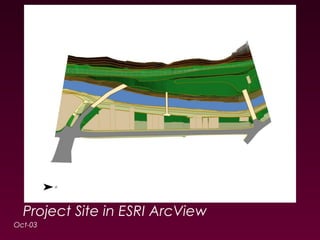
Project Site in ESRI ArcView 
Oct-03
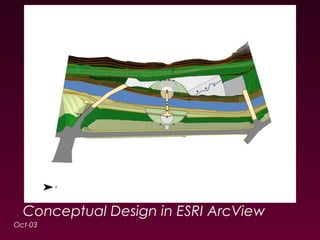
Conceptual Design in ESRI ArcView 
Oct-03
ESRI ArcScene 8.3 Options 
Export: 
• As Animation (*.asa) 
• As Video (*.avi) 
• As 3D-VRML (Virtual Reality Modeling 
Language) World (*.wrl) 
Oct-03
Oct-03 
(VRML and VRMLpad Demo)
ESRI ArcScene 8.3 Output 
Advanced Animation: 
• Autodesk 3DS Max 5.1 - easier for 
creating design models for “aspatial 
clientele” (*.wrl*.max) 
Oct-03
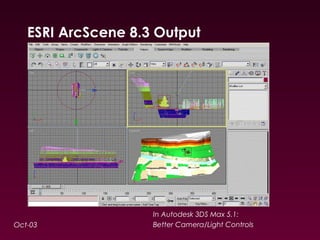
ESRI ArcScene 8.3 Output 
Oct-03 
In Autodesk 3DS Max 5.1: 
Better Camera/Light Controls
ESRI ArcScene 8.3 Output 
Video Touch-Up: 
• Free - Windows Movie Maker 5.1, 
Apple iMovie (*.max*.avi*.wmv) 
Oct-03
ESRI ArcScene 8.3 Options 
End-Notes: 
• Ideal for Terrain Analysis 
•Aspect & Slope (“Flat Land”) 
•Cut/Fill & Area/Volume 
•Steepest Path, Profile Graph 
•Visibility 
• “Snazzy Presentation Tool” 
Oct-03
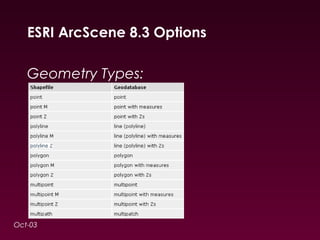
ESRI ArcScene 8.3 Options 
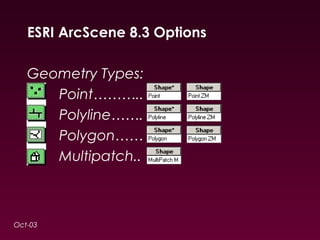
Geometry Types: 
Oct-03
ESRI ArcScene 8.3 Options 
Geometry Types: 
Oct-03 
Point……….. 
Polyline……. 
Polygon…… 
Multipatch..
ArcScene 8.3 Options 
Advanced: 
• Features3D 
•Poly ZM, but no “warping” 
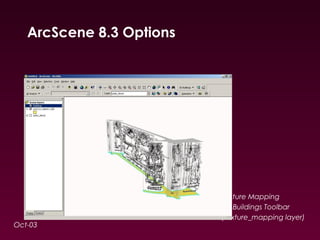
•Texture Mapping 
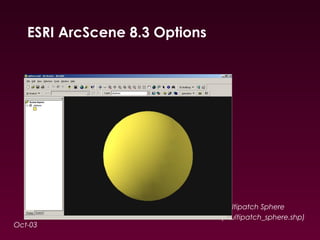
• Multipatch 
•3D Multipart Polygons 
Oct-03
ArcScene 8.3 Options 
Oct-03 
Texture Mapping 
3D Buildings Toolbar 
(texture_mapping layer)
ESRI ArcScene 8.3 Options 
Oct-03 
Multipatch Sphere 
(multipatch_sphere.shp)
Comparisons 
CAD Modeling Software: 
• Autodesk AutoCAD, Bentley 
MicroStation 
• Autodesk 3DS Max, Autodesk Maya 
(*.wrl*.max*.dxf, *.avi) 
Oct-03
Trends 
• ESRI ArcGlobe 9.1 (*.wrl3D 
Objects) 
Oct-03
V i s u a l i z a t i o n 
Oct-03
Site Constraints and Liabilities 
• Entire site in FEMA flood zone - This restricts on 
site construction 
• 3 different bridges serving the same area in a 
span of just 170 meters 
• 3 roads connecting the same points in a span 
of just 60 meters 
Oct-03
Site Constraints and Liabilities 
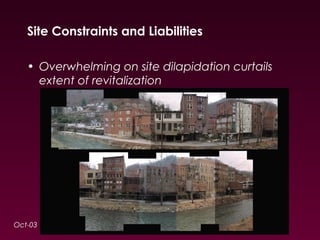
• Overwhelming on site dilapidation curtails 
extent of revitalization 
Oct-03
Site Constraints and Liabilities 
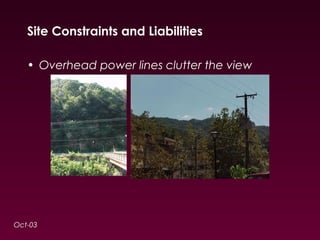
• Overhead power lines clutter the view 
Oct-03
Site Assets 
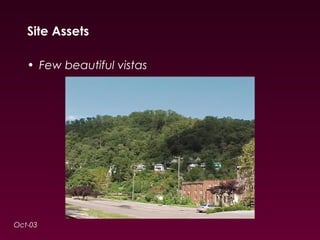
• Few beautiful vistas 
Oct-03
Site Assets 
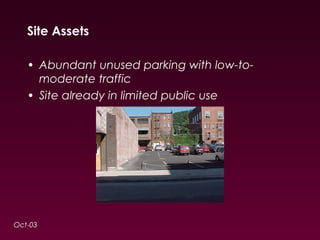
• Abundant unused parking with low-to-moderate 
traffic 
• Site already in limited public use 
Oct-03
Site Issues 
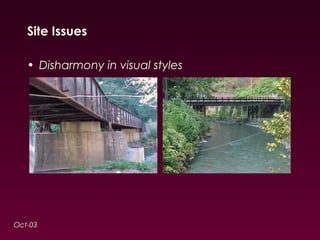
• Disharmony in visual styles 
Oct-03
Site Issues 
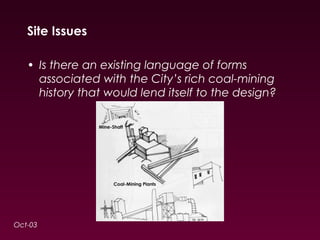
• Is there an existing language of forms 
associated with the City’s rich coal-mining 
history that would lend itself to the design? 
Oct-03
(GIS Animation Sequence 1) 
Oct-03
Search for a Concept: “Why?” 
• We must look for a solution that goes beyond 
solving the City’s short-term needs. 
• Design in the public realm must attempt to 
inspire civic pride and facilitate cultural 
expression 
Oct-03
Search for a Concept: “How and What?” 
• Given the restraints, we propose a concept 
that creates a “theatre” and insulates it from 
the dilapidated surroundings, revitalization of 
which is beyond the scope of this project 
• Final design easy-to-maintain and handicap-accessible 
Oct-03
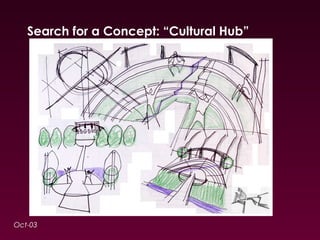
Search for a Concept: “Cultural Hub” 
Oct-03
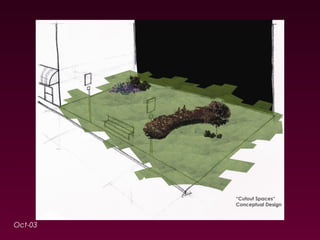
Phase I 
“Cutout Spaces” 
• Debris from demolition cleaned 
• Street-benches 
• Street-lights already in possession of City used 
• Gentle artificial slopes with landscaping as 
suggested 
Oct-03
Oct-03
Phase II 
“Entrance to Site” 
• Simple entrance and paving as suggested 
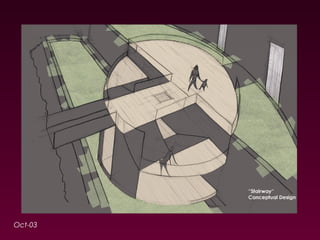
“Stairway” 
• Economical design in wood with a grid-lattice 
covering 
• Mid-landings to also serve as balconies 
Oct-03
Oct-03
Phase II 
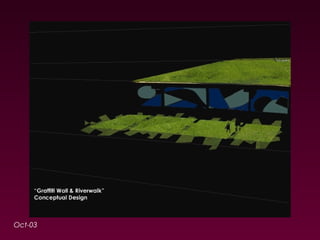
“Graffiti Wall & Riverwalk” 
• Stone-clad Graffiti Wall depicting a collage on 
the City’s rich coal-mining history 
• Spot-lights light-up the collage in the evenings. 
Spot-lights on the ground for an unobstructed 
view of the collage 
• Benches flushed with the wall facing the river 
• Remaining part of the wall between the bridges 
repainted 
Oct-03
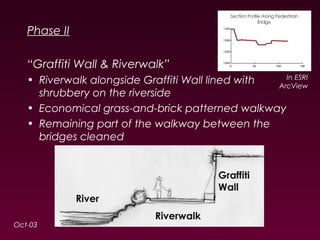
Phase II 
“Graffiti Wall & Riverwalk” 
• Riverwalk alongside Graffiti Wall lined with 
shrubbery on the riverside 
• Economical grass-and-brick patterned walkway 
• Remaining part of the walkway between the 
bridges cleaned 
Oct-03 
In ESRI 
ArcView
Oct-03
Phase II 
“River” 
• Litter on banks cleaned 
• Shrubbery trimmed and diversified 
Oct-03
Phase III 
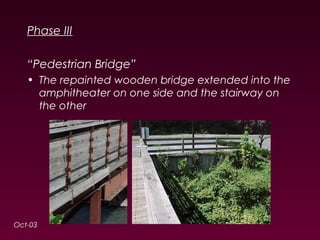
“Pedestrian Bridge” 
• The repainted wooden bridge extended into the 
amphitheater on one side and the stairway on 
the other 
Oct-03
Phase III 
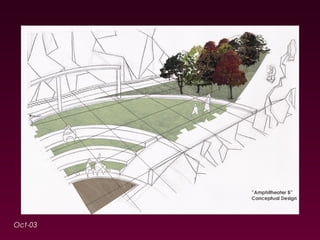
“Amphitheater” 
• This is the primary area of activity 
• Amphitheater sunk 2’ into the ground, as casually 
arranged brick-steps circle a sand-pit, with 
beams as light-posts on the outside edge 
• Hidden storm-water drain flows into the river 
Oct-03
Phase III 
“Amphitheater Ground” 
• River-rock spread on the southern side and stone-pavement 
on the northern side 
• Artificial stream cuts through the pavement and 
connects sunk on sit with the river 
• Spot-lights light-up the cluster of trees near the 
pavement 
• Brick used for economical landscape-edging 
• Sculptures placed on the pavement 
• Overhead power lines rearranged 
Oct-03
Oct-03
Phase III 
“Parking” 
• Street-lights and trees already existing on site 
moved to the new parking-lot near the northern 
edge 
Oct-03
Phase IV 
“Recommendations for Site Maintenance & Site 
Promotion” 
• Submit SCBG 2004 Application while exploring 
other funding possibilities 
• Prepare for necessary deed changes 
• Invite local, regional and state artisans to 
participate in collage and sculpture-making 
• Adopt maintenance ordinance 
• Start a bus-stop on site 
• Organize events and festivals on site 
Oct-03
Phase IV 
“Recommendations for Site Maintenance & Site 
Promotion” 
• Undertake streetscape improvement, in line with 
the City’s historic character 
• If required, seek permission for “Waterway 
Channelization” (dredging) of river segment 
• If required, extend riverwalk and/or parking 
Oct-03
(GIS Animation Sequence 2) 
Oct-03
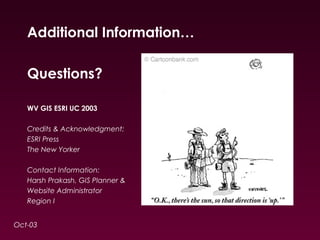
Additional Information… 
Questions? 
WV GIS ESRI UC 2003 
Credits & Acknowledgment: 
ESRI Press 
The New Yorker 
Contact Information: 
Harsh Prakash, GIS Planner & 
Website Administrator 
Region I 
Oct-03

3D GIS - Using ESRI 3D Analyst & ESRI ArcScene for Visualization

  • 1.
    3D GIS UsingESRI 3D Analyst & ESRI ArcScene For Visualization
  • 2.
    Brief: Small CitiesBlock Grant (SCBG) Project Conceptual Design: • Low-Cost • In Line With Floodplain Management Practices • Ongoing… Oct-03
  • 3.
    GIS As AnAnimation Tool Visualization & Analysis Of Terrain Data: • ESRI ArcScene 8.3 • Adobe Photoshop 7.0, Autodesk 3DS Max 5.1, Windows Movie Maker 5.1 • Cortona 4.1 Browser Plug-In Oct-03
  • 4.
    Presentation Methodology •Terrain & Parcels Digitized From Hard-Copy • Triangulated Irregular Network (TIN) Created Oct-03
  • 5.
    Presentation Methodology •Visualization Options Looked At: •Drape, Offset, Extrude •Simple Fly-By & Path Animation •Animation Manager Tools • Conceptual Design Presented Oct-03
  • 6.
  • 7.
    Project Site inESRI ArcView Oct-03
  • 8.
    Conceptual Design inESRI ArcView Oct-03
  • 9.
    ESRI ArcScene 8.3Options Export: • As Animation (*.asa) • As Video (*.avi) • As 3D-VRML (Virtual Reality Modeling Language) World (*.wrl) Oct-03
  • 10.
    Oct-03 (VRML andVRMLpad Demo)
  • 11.
    ESRI ArcScene 8.3Output Advanced Animation: • Autodesk 3DS Max 5.1 - easier for creating design models for “aspatial clientele” (*.wrl*.max) Oct-03
  • 12.
    ESRI ArcScene 8.3Output Oct-03 In Autodesk 3DS Max 5.1: Better Camera/Light Controls
  • 13.
    ESRI ArcScene 8.3Output Video Touch-Up: • Free - Windows Movie Maker 5.1, Apple iMovie (*.max*.avi*.wmv) Oct-03
  • 14.
    ESRI ArcScene 8.3Options End-Notes: • Ideal for Terrain Analysis •Aspect & Slope (“Flat Land”) •Cut/Fill & Area/Volume •Steepest Path, Profile Graph •Visibility • “Snazzy Presentation Tool” Oct-03
  • 15.
    ESRI ArcScene 8.3Options Geometry Types: Oct-03
  • 16.
    ESRI ArcScene 8.3Options Geometry Types: Oct-03 Point……….. Polyline……. Polygon…… Multipatch..
  • 17.
    ArcScene 8.3 Options Advanced: • Features3D •Poly ZM, but no “warping” •Texture Mapping • Multipatch •3D Multipart Polygons Oct-03
  • 18.
    ArcScene 8.3 Options Oct-03 Texture Mapping 3D Buildings Toolbar (texture_mapping layer)
  • 19.
    ESRI ArcScene 8.3Options Oct-03 Multipatch Sphere (multipatch_sphere.shp)
  • 20.
    Comparisons CAD ModelingSoftware: • Autodesk AutoCAD, Bentley MicroStation • Autodesk 3DS Max, Autodesk Maya (*.wrl*.max*.dxf, *.avi) Oct-03
  • 21.
    Trends • ESRIArcGlobe 9.1 (*.wrl3D Objects) Oct-03
  • 22.
    V i su a l i z a t i o n Oct-03
  • 23.
    Site Constraints andLiabilities • Entire site in FEMA flood zone - This restricts on site construction • 3 different bridges serving the same area in a span of just 170 meters • 3 roads connecting the same points in a span of just 60 meters Oct-03
  • 24.
    Site Constraints andLiabilities • Overwhelming on site dilapidation curtails extent of revitalization Oct-03
  • 25.
    Site Constraints andLiabilities • Overhead power lines clutter the view Oct-03
  • 26.
    Site Assets •Few beautiful vistas Oct-03
  • 27.
    Site Assets •Abundant unused parking with low-to-moderate traffic • Site already in limited public use Oct-03
  • 28.
    Site Issues •Disharmony in visual styles Oct-03
  • 29.
    Site Issues •Is there an existing language of forms associated with the City’s rich coal-mining history that would lend itself to the design? Oct-03
  • 30.
  • 31.
    Search for aConcept: “Why?” • We must look for a solution that goes beyond solving the City’s short-term needs. • Design in the public realm must attempt to inspire civic pride and facilitate cultural expression Oct-03
  • 32.
    Search for aConcept: “How and What?” • Given the restraints, we propose a concept that creates a “theatre” and insulates it from the dilapidated surroundings, revitalization of which is beyond the scope of this project • Final design easy-to-maintain and handicap-accessible Oct-03
  • 33.
    Search for aConcept: “Cultural Hub” Oct-03
  • 34.
    Phase I “CutoutSpaces” • Debris from demolition cleaned • Street-benches • Street-lights already in possession of City used • Gentle artificial slopes with landscaping as suggested Oct-03
  • 35.
  • 36.
    Phase II “Entranceto Site” • Simple entrance and paving as suggested “Stairway” • Economical design in wood with a grid-lattice covering • Mid-landings to also serve as balconies Oct-03
  • 37.
  • 38.
    Phase II “GraffitiWall & Riverwalk” • Stone-clad Graffiti Wall depicting a collage on the City’s rich coal-mining history • Spot-lights light-up the collage in the evenings. Spot-lights on the ground for an unobstructed view of the collage • Benches flushed with the wall facing the river • Remaining part of the wall between the bridges repainted Oct-03
  • 39.
    Phase II “GraffitiWall & Riverwalk” • Riverwalk alongside Graffiti Wall lined with shrubbery on the riverside • Economical grass-and-brick patterned walkway • Remaining part of the walkway between the bridges cleaned Oct-03 In ESRI ArcView
  • 40.
  • 41.
    Phase II “River” • Litter on banks cleaned • Shrubbery trimmed and diversified Oct-03
  • 42.
    Phase III “PedestrianBridge” • The repainted wooden bridge extended into the amphitheater on one side and the stairway on the other Oct-03
  • 43.
    Phase III “Amphitheater” • This is the primary area of activity • Amphitheater sunk 2’ into the ground, as casually arranged brick-steps circle a sand-pit, with beams as light-posts on the outside edge • Hidden storm-water drain flows into the river Oct-03
  • 44.
    Phase III “AmphitheaterGround” • River-rock spread on the southern side and stone-pavement on the northern side • Artificial stream cuts through the pavement and connects sunk on sit with the river • Spot-lights light-up the cluster of trees near the pavement • Brick used for economical landscape-edging • Sculptures placed on the pavement • Overhead power lines rearranged Oct-03
  • 45.
  • 46.
    Phase III “Parking” • Street-lights and trees already existing on site moved to the new parking-lot near the northern edge Oct-03
  • 47.
    Phase IV “Recommendationsfor Site Maintenance & Site Promotion” • Submit SCBG 2004 Application while exploring other funding possibilities • Prepare for necessary deed changes • Invite local, regional and state artisans to participate in collage and sculpture-making • Adopt maintenance ordinance • Start a bus-stop on site • Organize events and festivals on site Oct-03
  • 48.
    Phase IV “Recommendationsfor Site Maintenance & Site Promotion” • Undertake streetscape improvement, in line with the City’s historic character • If required, seek permission for “Waterway Channelization” (dredging) of river segment • If required, extend riverwalk and/or parking Oct-03
  • 49.
  • 50.
    Additional Information… Questions? WV GIS ESRI UC 2003 Credits & Acknowledgment: ESRI Press The New Yorker Contact Information: Harsh Prakash, GIS Planner & Website Administrator Region I Oct-03