Microsoft Dynamics
CRM Mobile
BTSS September 26, 2013
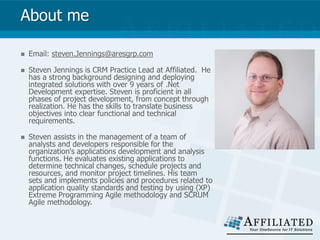
About me
 Email: steven.Jennings@aresgrp.com
 Steven Jennings is CRM Practice Lead at Affiliated. He
has a strong background designing and deploying
integrated solutions with over 9 years of .Net
Development expertise. Steven is proficient in all
phases of project development, from concept through
realization. He has the skills to translate business
objectives into clear functional and technical
requirements.
 Steven assists in the management of a team of
analysts and developers responsible for the
organization's applications development and analysis
functions. He evaluates existing applications to
determine technical changes, schedule projects and
resources, and monitor project timelines. His team
sets and implements policies and procedures related to
application quality standards and testing by using (XP)
Extreme Programming Agile methodology and SCRUM
Agile methodology.
Agenda
 Why use Mobile devices?
 Mobile Options
 Mobile Lite
 CWR Mobility
 MECRM
 Resco
 CRM 2013 Mobility
 DEMO
 Q/A
Delivering CRM on Virtually Any Mobile Device
 Microsoft Dynamics CRM Mobile will deliver customers a fast and
familiar experience, helping sales, customer service, marketing and
management professionals connect with their customers and each
other on multiple mobile devices through a security-enhanced
environment. For instance, sales and marketing representatives will
now be able to quickly capture and convert leads 24/7 and develop
marketing campaigns on the go.
 Using the cloud-based, cross-platform, native mobile client service,
customers will be able to sync their information and sales pipelines
offline, helping them stay connected on the road and on their terms.
 Through the power of xRM, the flexible application development
framework of Microsoft Dynamics CRM, customers will also be able to
easily mobilize their extended CRM applications by having seamless
integration between Microsoft Dynamics CRM Mobile and their existing
Microsoft Dynamics CRM environment.
Mobility Options
 Microsoft Dynamics CRM 2011 Mobile Lite
 URL: https://ORGNAME.crm.dynamics.com/m/
 Advantages
 Cost: Free (this is included in your subscription with Microsoft)
 East to Setup
 Works on all phones
 Nothing to deploy
 Disadvantages
 Limited on Customizations
 No offline capability
 Not an app but a web page
 No system access (camera, GPS, etc)
Mobility Options - Continue
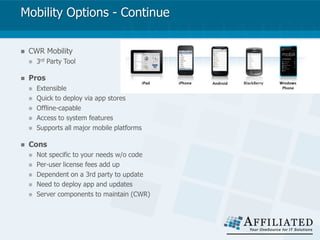
 CWR Mobility
 3rd Party Tool
 Pros
 Extensible
 Quick to deploy via app stores
 Offline-capable
 Access to system features
 Supports all major mobile platforms
 Cons
 Not specific to your needs w/o code
 Per-user license fees add up
 Dependent on a 3rd party to update
 Need to deploy app and updates
 Server components to maintain (CWR)
Mobility Options - Continue
 MECRM
 3rd Party Tool
 Pros
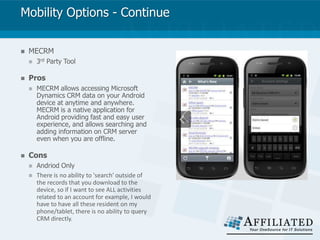
 MECRM allows accessing Microsoft
Dynamics CRM data on your Android
device at anytime and anywhere.
MECRM is a native application for
Android providing fast and easy user
experience, and allows searching and
adding information on CRM server
even when you are offline.
 Cons
 Andriod Only
 There is no ability to 'search' outside of
the records that you download to the
device, so if I want to see ALL activities
related to an account for example, I would
have to have all these resident on my
phone/tablet, there is no ability to query
CRM directly.
Mobility Options - Continue
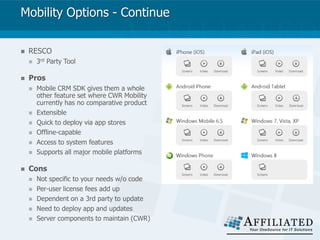
 RESCO
 3rd Party Tool
 Pros
 Mobile CRM SDK gives them a whole
other feature set where CWR Mobility
currently has no comparative product
 Extensible
 Quick to deploy via app stores
 Offline-capable
 Access to system features
 Supports all major mobile platforms
 Cons
 Not specific to your needs w/o code
 Per-user license fees add up
 Dependent on a 3rd party to update
 Need to deploy app and updates
 Server components to maintain (CWR)
CRM 2013 Mobility
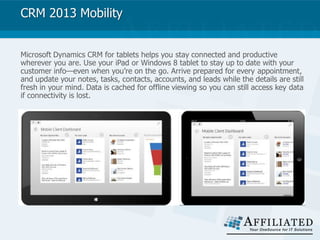
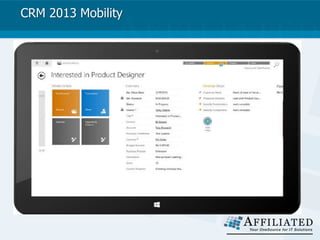
Microsoft Dynamics CRM for tablets helps you stay connected and productive
wherever you are. Use your iPad or Windows 8 tablet to stay up to date with your
customer info—even when you’re on the go. Arrive prepared for every appointment,
and update your notes, tasks, contacts, accounts, and leads while the details are still
fresh in your mind. Data is cached for offline viewing so you can still access key data
if connectivity is lost.
CRM 2013 Mobility
CRM 2013 Mobility
Write Once Deploy Everywhere
 No need to hire a mobile developer to change your mobile solution
every time your business requirements change. Configurations to tailor
the CRM web interface will persist in the tablet application. Leveraging
configuration work that you've already done, Microsoft Dynamics CRM
optimizes your web forms for the tablet layout. Even client-side logic is
supported on the mobile device to deliver rich experiences. Data is
cached for offline viewing.
CRM 2013 Mobility
 Touch-optimized Phone Applications
 Your users are on the go. They have many devices and expect experiences that work
across these various device types. The Microsoft Dynamics CRM phone applications will
complete the mobility story by providing a touch-enabled mobile phone application
experience for Windows 8, Android and iPhones. Phone applications will be launched
following the General Availability of CRM 2013. They will not be available at launch.
 Access Your CRM Data
 View Contact, Account, Lead, Opportunity, Appointment and other relevant information
on your phone. Work Offline and View Social Activity Feeds on Windows Phone.
 Easy Interaction
 Add and modify Contacts, Tasks and Notes as well as other relevant data. Make phone
calls and Map address information using native device capabilities.
 Tailor Your Experience
 A customizable experience, allowing organizations to configure custom
DEMO
Q/A
Thank you
Contact us to learn about our CRM solutions and receive a
free consultation.
http://www.aresgrp.com
Phone: 614-889-6555
Email: info@aresgrp.com
YouTube: http://www.youtube.com/user/AffiliatedITStrategy
LinkedIn: http://www.linkedin.com/company/affiliated-resource-group
Google: https://plus.google.com/110562688561392858225/about

Going Mobile with Microsoft Dynamics CRM - What Are Your Options?

  • 1.
  • 2.
    About me  Email:steven.Jennings@aresgrp.com  Steven Jennings is CRM Practice Lead at Affiliated. He has a strong background designing and deploying integrated solutions with over 9 years of .Net Development expertise. Steven is proficient in all phases of project development, from concept through realization. He has the skills to translate business objectives into clear functional and technical requirements.  Steven assists in the management of a team of analysts and developers responsible for the organization's applications development and analysis functions. He evaluates existing applications to determine technical changes, schedule projects and resources, and monitor project timelines. His team sets and implements policies and procedures related to application quality standards and testing by using (XP) Extreme Programming Agile methodology and SCRUM Agile methodology.
  • 3.
    Agenda  Why useMobile devices?  Mobile Options  Mobile Lite  CWR Mobility  MECRM  Resco  CRM 2013 Mobility  DEMO  Q/A
  • 4.
    Delivering CRM onVirtually Any Mobile Device  Microsoft Dynamics CRM Mobile will deliver customers a fast and familiar experience, helping sales, customer service, marketing and management professionals connect with their customers and each other on multiple mobile devices through a security-enhanced environment. For instance, sales and marketing representatives will now be able to quickly capture and convert leads 24/7 and develop marketing campaigns on the go.  Using the cloud-based, cross-platform, native mobile client service, customers will be able to sync their information and sales pipelines offline, helping them stay connected on the road and on their terms.  Through the power of xRM, the flexible application development framework of Microsoft Dynamics CRM, customers will also be able to easily mobilize their extended CRM applications by having seamless integration between Microsoft Dynamics CRM Mobile and their existing Microsoft Dynamics CRM environment.
  • 5.
    Mobility Options  MicrosoftDynamics CRM 2011 Mobile Lite  URL: https://ORGNAME.crm.dynamics.com/m/  Advantages  Cost: Free (this is included in your subscription with Microsoft)  East to Setup  Works on all phones  Nothing to deploy  Disadvantages  Limited on Customizations  No offline capability  Not an app but a web page  No system access (camera, GPS, etc)
  • 6.
    Mobility Options -Continue  CWR Mobility  3rd Party Tool  Pros  Extensible  Quick to deploy via app stores  Offline-capable  Access to system features  Supports all major mobile platforms  Cons  Not specific to your needs w/o code  Per-user license fees add up  Dependent on a 3rd party to update  Need to deploy app and updates  Server components to maintain (CWR)
  • 7.
    Mobility Options -Continue  MECRM  3rd Party Tool  Pros  MECRM allows accessing Microsoft Dynamics CRM data on your Android device at anytime and anywhere. MECRM is a native application for Android providing fast and easy user experience, and allows searching and adding information on CRM server even when you are offline.  Cons  Andriod Only  There is no ability to 'search' outside of the records that you download to the device, so if I want to see ALL activities related to an account for example, I would have to have all these resident on my phone/tablet, there is no ability to query CRM directly.
  • 8.
    Mobility Options -Continue  RESCO  3rd Party Tool  Pros  Mobile CRM SDK gives them a whole other feature set where CWR Mobility currently has no comparative product  Extensible  Quick to deploy via app stores  Offline-capable  Access to system features  Supports all major mobile platforms  Cons  Not specific to your needs w/o code  Per-user license fees add up  Dependent on a 3rd party to update  Need to deploy app and updates  Server components to maintain (CWR)
  • 9.
    CRM 2013 Mobility MicrosoftDynamics CRM for tablets helps you stay connected and productive wherever you are. Use your iPad or Windows 8 tablet to stay up to date with your customer info—even when you’re on the go. Arrive prepared for every appointment, and update your notes, tasks, contacts, accounts, and leads while the details are still fresh in your mind. Data is cached for offline viewing so you can still access key data if connectivity is lost.
  • 10.
  • 11.
    CRM 2013 Mobility WriteOnce Deploy Everywhere  No need to hire a mobile developer to change your mobile solution every time your business requirements change. Configurations to tailor the CRM web interface will persist in the tablet application. Leveraging configuration work that you've already done, Microsoft Dynamics CRM optimizes your web forms for the tablet layout. Even client-side logic is supported on the mobile device to deliver rich experiences. Data is cached for offline viewing.
  • 12.
    CRM 2013 Mobility Touch-optimized Phone Applications  Your users are on the go. They have many devices and expect experiences that work across these various device types. The Microsoft Dynamics CRM phone applications will complete the mobility story by providing a touch-enabled mobile phone application experience for Windows 8, Android and iPhones. Phone applications will be launched following the General Availability of CRM 2013. They will not be available at launch.  Access Your CRM Data  View Contact, Account, Lead, Opportunity, Appointment and other relevant information on your phone. Work Offline and View Social Activity Feeds on Windows Phone.  Easy Interaction  Add and modify Contacts, Tasks and Notes as well as other relevant data. Make phone calls and Map address information using native device capabilities.  Tailor Your Experience  A customizable experience, allowing organizations to configure custom
  • 13.
  • 14.
  • 15.
    Thank you Contact usto learn about our CRM solutions and receive a free consultation. http://www.aresgrp.com Phone: 614-889-6555 Email: info@aresgrp.com YouTube: http://www.youtube.com/user/AffiliatedITStrategy LinkedIn: http://www.linkedin.com/company/affiliated-resource-group Google: https://plus.google.com/110562688561392858225/about