COMPUTER COMPONENTS
MD. SOHANUR RAHMAN
ID: 1834902135
PROGRAM: CSE (DAY)
BATCH: 49TH (B)
Components
 Input
 CPU
 Output
 ROM
 Memory
 RAM
 Hardware
 Storage
 Software
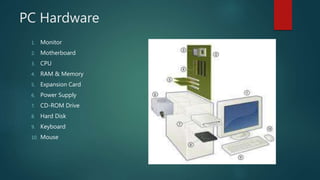
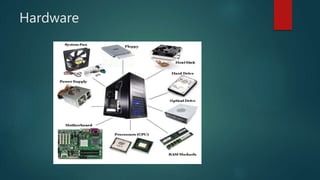
PC Hardware
1. Monitor
2. Motherboard
3. CPU
4. RAM & Memory
5. Expansion Card
6. Power Supply
7. CD-ROM Drive
8. Hard Disk
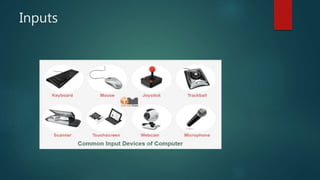
9. Keyboard
10. Mouse
Software
Operating System:
MS Windows, Apple OS , Linux etc
Application:
MS Office, Adobe CS6, Web Browser etc
Games:
World of Warcraft, PUBG, The Sims etc
Hardware
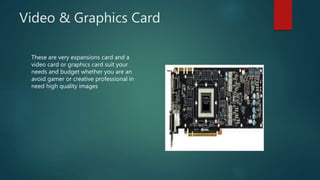
Video & Graphics Card
These are very expansions card and a
video card or graphics card suit your
needs and budget whether you are an
avoid gamer or creative professional in
need high quality images
Inputs
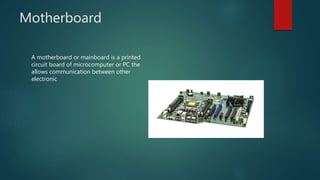
Motherboard
A motherboard or mainboard is a printed
circuit board of microcomputer or PC the
allows communication between other
electronic
CPU
 Central Processing Unit
 The Brain of the computer
 Measured in MHz (Megahertz) and GHz (Gigahertz)
Hertz = Cycles Per Second
Mega = 1,000,000
Giga = 1,000,000,000
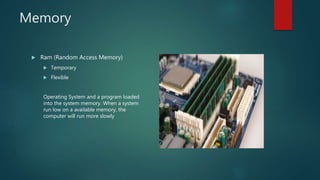
Memory
 Ram (Random Access Memory)
 Temporary
 Flexible
Operating System and a program loaded
into the system memory. When a system
run low on a available memory, the
computer will run more slowly
MEMORY MEASURED IN
Based on bit – 0 or 1 On/Off
Byte = 8 bits
K = Kilobyte = 1000
MB = Megabyte = 1,000,000
GB = Gigabyte = 1,000,000,000
TB = Terabyte = 1,000,000,000,000
PB = Petabyte = 1,000,000,000,000,000
Output Devices
 Monitor
 Printer
 Sound
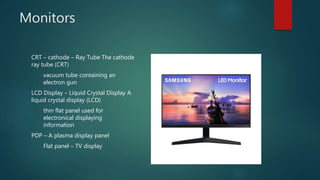
Monitors
CRT – cathode – Ray Tube The cathode
ray tube (CRT)
vacuum tube containing an
electron gun
LCD Display – Liquid Crystal Display A
liquid crystal display (LCD)
thin flat panel used for
electronical displaying
information
PDP – A plasma display panel
Flat panel – TV display
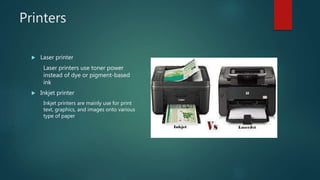
Printers
 Laser printer
Laser printers use toner power
instead of dye or pigment-based
ink
 Inkjet printer
Inkjet printers are mainly use for print
text, graphics, and images onto various
type of paper
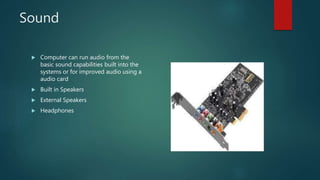
Sound
 Computer can run audio from the
basic sound capabilities built into the
systems or for improved audio using a
audio card
 Built in Speakers
 External Speakers
 Headphones
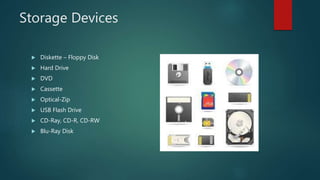
Storage Devices
 Diskette – Floppy Disk
 Hard Drive
 DVD
 Cassette
 Optical-Zip
 USB Flash Drive
 CD-Ray, CD-R, CD-RW
 Blu-Ray Disk
OTHERS TERMS
 Operating Systems
 Max- OS
 PC – DOS (basic) Windows
 Linux (used in computer servers, and open source-free to all, application)
Memory – Write/Read
Writable (RAM)
Readable (ROM)
Read & Write (Hard Drive(
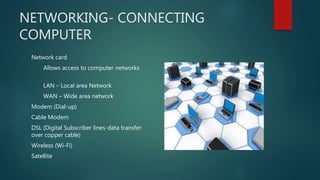
NETWORKING- CONNECTING
COMPUTER
Network card
Allows access to computer networks
LAN – Local area Network
WAN – Wide area network
Modem (Dial-up)
Cable Modem
DSL (Digital Subscriber lines-data transfer
over copper cable)
Wireless (Wi-Fi)
Satellite
REFERENCES
 PPT by MS- Power Point
 Online Content

Computer components

  • 1.
    COMPUTER COMPONENTS MD. SOHANURRAHMAN ID: 1834902135 PROGRAM: CSE (DAY) BATCH: 49TH (B)
  • 2.
    Components  Input  CPU Output  ROM  Memory  RAM  Hardware  Storage  Software
  • 3.
    PC Hardware 1. Monitor 2.Motherboard 3. CPU 4. RAM & Memory 5. Expansion Card 6. Power Supply 7. CD-ROM Drive 8. Hard Disk 9. Keyboard 10. Mouse
  • 4.
    Software Operating System: MS Windows,Apple OS , Linux etc Application: MS Office, Adobe CS6, Web Browser etc Games: World of Warcraft, PUBG, The Sims etc
  • 5.
  • 6.
    Video & GraphicsCard These are very expansions card and a video card or graphics card suit your needs and budget whether you are an avoid gamer or creative professional in need high quality images
  • 7.
  • 8.
    Motherboard A motherboard ormainboard is a printed circuit board of microcomputer or PC the allows communication between other electronic
  • 9.
    CPU  Central ProcessingUnit  The Brain of the computer  Measured in MHz (Megahertz) and GHz (Gigahertz) Hertz = Cycles Per Second Mega = 1,000,000 Giga = 1,000,000,000
  • 10.
    Memory  Ram (RandomAccess Memory)  Temporary  Flexible Operating System and a program loaded into the system memory. When a system run low on a available memory, the computer will run more slowly
  • 11.
    MEMORY MEASURED IN Basedon bit – 0 or 1 On/Off Byte = 8 bits K = Kilobyte = 1000 MB = Megabyte = 1,000,000 GB = Gigabyte = 1,000,000,000 TB = Terabyte = 1,000,000,000,000 PB = Petabyte = 1,000,000,000,000,000
  • 12.
  • 13.
    Monitors CRT – cathode– Ray Tube The cathode ray tube (CRT) vacuum tube containing an electron gun LCD Display – Liquid Crystal Display A liquid crystal display (LCD) thin flat panel used for electronical displaying information PDP – A plasma display panel Flat panel – TV display
  • 14.
    Printers  Laser printer Laserprinters use toner power instead of dye or pigment-based ink  Inkjet printer Inkjet printers are mainly use for print text, graphics, and images onto various type of paper
  • 15.
    Sound  Computer canrun audio from the basic sound capabilities built into the systems or for improved audio using a audio card  Built in Speakers  External Speakers  Headphones
  • 16.
    Storage Devices  Diskette– Floppy Disk  Hard Drive  DVD  Cassette  Optical-Zip  USB Flash Drive  CD-Ray, CD-R, CD-RW  Blu-Ray Disk
  • 17.
    OTHERS TERMS  OperatingSystems  Max- OS  PC – DOS (basic) Windows  Linux (used in computer servers, and open source-free to all, application) Memory – Write/Read Writable (RAM) Readable (ROM) Read & Write (Hard Drive(
  • 18.
    NETWORKING- CONNECTING COMPUTER Network card Allowsaccess to computer networks LAN – Local area Network WAN – Wide area network Modem (Dial-up) Cable Modem DSL (Digital Subscriber lines-data transfer over copper cable) Wireless (Wi-Fi) Satellite
  • 19.
    REFERENCES  PPT byMS- Power Point  Online Content