Download as PDF, PPTX
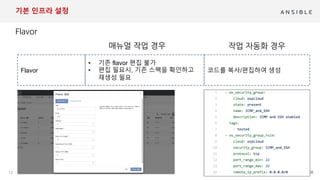
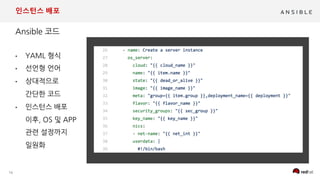
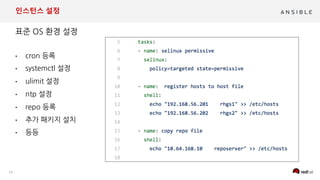
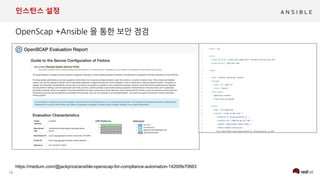
![19
인스턴스 설정
.
controller
Compute
OSD
nodes
eap7-vol
mysql-
vol
Volumes
Service Network :1.1.x.x
Openstack Storage Network :172.3.0.0/24
Nova
CinderGlance
Network
web1
Neutron
was1 db1
web2
1GB
automate
project
ansible_ssh
keypair
ansible user
automate
network
WEB1-2
httpd.conf 자동 설정 변경
mod_jk.conf
workers.properties
httpd 서비스 실행
WAS1
standalone.xml 의 DB연결
module.xml 에서 jdbc 등록
jboss eap 서비스 실행
DB1
my.conf 수정
mariadb 서비스 실행
<datasource jta="false" jndi-
name="java:jboss/postgresDS"
pool-name="postgresDS"
enabled="true" use-java-
context="true" use-
ccm="false">
<connection-
url>jdbc:postgresql://{{
hostvars['director']['dblb']
}}:{{ dbport }}/{{ dbsid|upper
}}</connection-url>
<driver-
class>org.postgresql.Driver</d
river-class>
<driver>postgresql</driver>](https://image.slidesharecdn.com/iaconopenstackansible-20181019-ykim-181022130142/85/2018-10-19-IAC-on-OpenStack-feat-ansible-19-320.jpg)
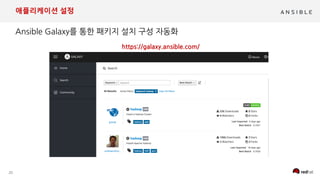


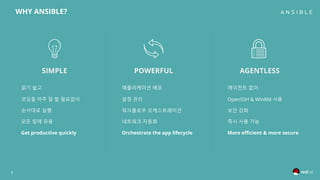
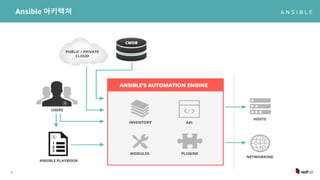
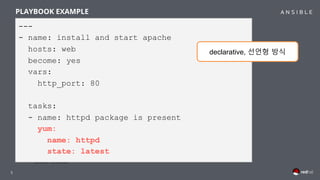
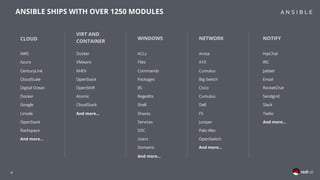
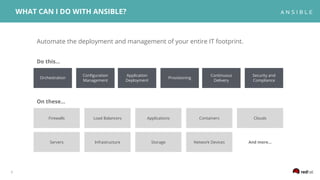
The document discusses the integration of Ansible with OpenStack for Infrastructure as Code (IaC) management, highlighting its features such as agentless application deployment, workflow orchestration, and security enhancements. It includes examples of using playbooks to automate tasks like installing and starting Apache servers, managing cloud infrastructure, and deploying instances efficiently. Additionally, it emphasizes Ansible's extensive module library and its relevance across various cloud services and network devices.


![[OpenInfra Days Korea 2018] Day 2 - E4 - 딥다이브: immutable Kubernetes architecture](https://cdn.slidesharecdn.com/ss_thumbnails/e41530linuxkit-k8s-180704110158-thumbnail.jpg?width=640&height=640&fit=bounds)
![[AWSKRUG 아키텍처 모임] 세일즈부스트 인프라스트럭처 사례 공유](https://cdn.slidesharecdn.com/ss_thumbnails/awskrug20180227-180228005405-thumbnail.jpg?width=640&height=640&fit=bounds)

![[OpenStack Day in Korea 2015] Track 1 - Triple O를 이용한 빠르고 쉬운 OpenStack 설치](https://cdn.slidesharecdn.com/ss_thumbnails/11-150213041431-conversion-gate02-thumbnail.jpg?width=640&height=640&fit=bounds)


![[OpenStack 하반기 스터디] HA using DVR](https://cdn.slidesharecdn.com/ss_thumbnails/openstackteam2dvr20151214-151221115503-thumbnail.jpg?width=640&height=640&fit=bounds)

![[오픈소스컨설팅] Open Stack Ceph, Neutron, HA, Multi-Region](https://cdn.slidesharecdn.com/ss_thumbnails/openstackoscv0-160718105826-thumbnail.jpg?width=640&height=640&fit=bounds)


![[OpenStack Day in Korea] OpenStack Provisioning in 30 minutes](https://cdn.slidesharecdn.com/ss_thumbnails/openstackin30min-140220011147-phpapp02-thumbnail.jpg?width=640&height=640&fit=bounds)
![[2017년 5월 정기세미나] IBM에서 바라보는 OpenStack 이야기](https://cdn.slidesharecdn.com/ss_thumbnails/ibmbmxprivatecloudopenstackcommunity0524final-170530050505-thumbnail.jpg?width=640&height=640&fit=bounds)


![[2018.10.19] Andrew Kong - Tunnel without tunnel (Seminar at OpenStack Korea ...](https://cdn.slidesharecdn.com/ss_thumbnails/tunnelwithouttunnel-181022130534-thumbnail.jpg?width=640&height=640&fit=bounds)
![[OpenInfra Days Korea 2018] Day 2 - E6: "SONA: ONOS SDN Controller 기반 OpenSta...](https://cdn.slidesharecdn.com/ss_thumbnails/e61610sonaonossdncontroller-180705044922-thumbnail.jpg?width=640&height=640&fit=bounds)
![[OpenInfra Days Korea 2018] Day 2 - E3-2: "핸즈온 워크샵: Kubespray, Helm, Armada를 ...](https://cdn.slidesharecdn.com/ss_thumbnails/e31530kubesprayhelmarmada-180705044520-thumbnail.jpg?width=640&height=640&fit=bounds)
![[OpenInfra Days Korea 2018] Day 2 - E5-1: "Invited Talk: Kubicorn - Building ...](https://cdn.slidesharecdn.com/ss_thumbnails/e60955buildingsimplekubernetes-180705043459-thumbnail.jpg?width=640&height=640&fit=bounds)
![[OpenInfra Days Korea 2018] Day 1 - T4-7: "Ceph 스토리지, PaaS로 서비스 운영하기"](https://cdn.slidesharecdn.com/ss_thumbnails/47openinfradaykorea2018hyun-ha-180705032301-thumbnail.jpg?width=640&height=640&fit=bounds)
![[OpenInfra Days Korea 2018] Day 2 - E5: Mesos to Kubernetes, Cloud Native 서비스...](https://cdn.slidesharecdn.com/ss_thumbnails/e60930openinfraday2018dennis-180705030830-thumbnail.jpg?width=640&height=640&fit=bounds)
![[OpenInfra Days Korea 2018] Day 2 - E1: 딥다이브 - OpenStack 생존기](https://cdn.slidesharecdn.com/ss_thumbnails/e11300openinfradaysizingv1-180705030216-thumbnail.jpg?width=640&height=640&fit=bounds)
![[OpenInfra Days Korea 2018] Day 2 - E6 - 마이크로서비스를 위한 Istio & Kubernetes [다운로드...](https://cdn.slidesharecdn.com/ss_thumbnails/e61700microserviceswithistioandkubernetesfinal-180704062831-thumbnail.jpg?width=640&height=640&fit=bounds)
![[OpenInfra Days Korea 2018] Day 2 - E6 - OpenInfra monitoring with Prometheus](https://cdn.slidesharecdn.com/ss_thumbnails/e61520monitoringopeninfrawithprometheusv1-180704062709-thumbnail.jpg?width=640&height=640&fit=bounds)
![[OpenInfra Days Korea 2018] Day 2 - E5: GPU on Kubernetes](https://cdn.slidesharecdn.com/ss_thumbnails/e51610gpuonkubernetesv1-180704062436-thumbnail.jpg?width=640&height=640&fit=bounds)
![[OpenInfra Days Korea 2018] Day 2 - CEPH 운영자를 위한 Object Storage Performance T...](https://cdn.slidesharecdn.com/ss_thumbnails/openinfradayobjectstorageperformancefinal2-180704062033-thumbnail.jpg?width=640&height=640&fit=bounds)
![[OpenInfra Days Korea 2018] Day 2 - E4 - 핸즈온 워크샵: 서버리스가 컨테이너를 만났을 때](https://cdn.slidesharecdn.com/ss_thumbnails/e41300when-180704061740-thumbnail.jpg?width=640&height=640&fit=bounds)
![[OpenInfra Days Korea 2018] (삼성전자) Evolution to Cloud Native](https://cdn.slidesharecdn.com/ss_thumbnails/1130evolutiontocloudnative2-180704060551-thumbnail.jpg?width=640&height=640&fit=bounds)
![[OpenInfra Days Korea 2018] (NetApp) Open Source with NetApp - 전국섭 상무](https://cdn.slidesharecdn.com/ss_thumbnails/1100180628openinfradaynetappkeynotesfinal-180704060407-thumbnail.jpg?width=640&height=640&fit=bounds)
![[OpenInfra Days Korea 2018] (Track 4) - 오픈스택기반 NFV 관리 및 HA (high Availability...](https://cdn.slidesharecdn.com/ss_thumbnails/46openstack-based-nfv-mgmt-and-ha-180704060219-thumbnail.jpg?width=640&height=640&fit=bounds)
![[OpenInfra Days Korea 2018] (Track 4) - FreeIPA와 함께 SSO 구성](https://cdn.slidesharecdn.com/ss_thumbnails/45feeipasso-180704060033-thumbnail.jpg?width=640&height=640&fit=bounds)
![[OpenInfra Days Korea 2018] (Track 4) - Backend.AI: 오픈소스 머신러닝 인프라 프레임워크](https://cdn.slidesharecdn.com/ss_thumbnails/4420180628backend-180704055900-thumbnail.jpg?width=640&height=640&fit=bounds)
![[OpenInfra Days Korea 2018] (Track 4) - Grafana를 이용한 OpenStack 클라우드 성능 모니터링](https://cdn.slidesharecdn.com/ss_thumbnails/42openinfraday201820180626grafana-180704055533-thumbnail.jpg?width=640&height=640&fit=bounds)
![[OpenInfra Days Korea 2018] (Track 3) - CephFS with OpenStack Manila based on...](https://cdn.slidesharecdn.com/ss_thumbnails/36openinfra-2018-naver-cephfs-180704055415-thumbnail.jpg?width=640&height=640&fit=bounds)


![谷歌留痕技术教程[ 𝙩𝙤𝙥 𝟮𝟯𝟯. 𝙘 𝙤𝙢 ]](https://cdn.slidesharecdn.com/ss_thumbnails/top233-260130173900-2eb784f9-thumbnail.jpg?width=640&height=640&fit=bounds)


