저자 직강 + 스터디 그룹 - 4주차
Red Hat OpenStack 17
Nalee Jang,
Senior Consultant of Red Hat Korea
1
The Curriculum
Red
Hat
OpenStack
17
저자
직강
+
스터디
그룹
2
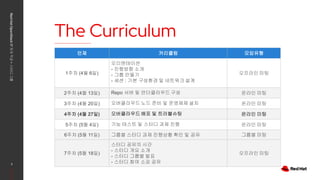
언제 커리큘럼 모임유형
1주차 (4월 6일)
오리엔테이션
- 진행방향 소개
- 그룹 만들기
- 세션 : 기본 구성환경 및 네트워크 설계
오프라인 미팅
2주차 (4월 13일) Repo 서버 및 언더클라우드 구성 온라인 미팅
3주차 (4월 20일) 오버클라우드 노드 준비 및 운영체제 설치 온라인 미팅
4주차 (4월 27일) 오버클라우드 배포 및 트러블슈팅 온라인 미팅
5주차 (5월 4일) 기능 테스트 및 스터디 과제 진행 온라인 미팅
6주차 (5월 11일) 그룹별 스터디 과제 진행상황 확인 및 공유 그룹별 미팅
7주차 (5월 18일)
스터디 공유의 시간
- 스터디 개요 소개
- 스터디 그룹별 발표
- 스터디 참여 소감 공유
오프라인 미팅
Session Agenda
3
OpenStack Korea Community
What we’ll
discuss today
▸ NFS 서버 만들기
▸ 템플릿 파일 준비하기
▸ 오버클라우드 배포
▸ 다음시간 아젠다 소개
오픈스택 설치 프로세스
4
Red Hat OpenStack 17 저자 직강 + 스터디그룹
OpenStack Korea Community
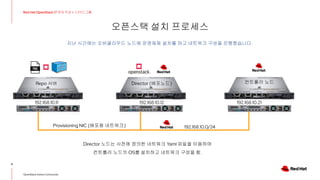
Provisioning NIC (배포용 네트워크)
Director 노드는 사전에 정의한 네트워크 Yaml 파일을 이용하여
컨트롤러 노드의 OS를 설치하고 네트워크 구성을 함.
Director (배포노드)
Repo 서버 컨트롤러 노드
192.168.10.0/24
192.168.10.11 192.168.10.12 192.168.10.21
지난 시간에는 오버클라우드 노드에 운영체제 설치를 하고 네트워크 구성을 진행했습니다.
오픈스택 설치 프로세스
5
Red Hat OpenStack 17 저자 직강 + 스터디그룹
OpenStack Korea Community
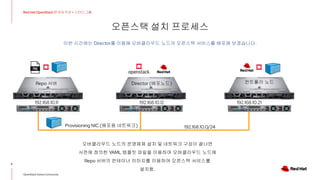
Provisioning NIC (배포용 네트워크)
오버클라우드 노드의 운영체제 설치 및 네트워크 구성이 끝나면
사전에 정의한 YAML 템플릿 파일을 이용하여 오버클라우드 노드에
Repo 서버의 컨테이너 이미지를 이용하여 오픈스택 서비스를
설치함.
Director (배포노드)
Repo 서버 컨트롤러 노드
192.168.10.0/24
192.168.10.11 192.168.10.12 192.168.10.21
이번 시간에는 Director를 이용해 오버클라우드 노드의 오픈스택 서비스를 배포해 보겠습니다.
스토리지 종류 알아보기
6
Red Hat OpenStack 17 저자 직강 + 스터디그룹
OpenStack Korea Community
DELL EMC Unity
DELL EMC VMAX
HP 3Par
Fujitsu ETERNUS
Hitachi VSP
Huawei 18000
IBM DS8900F
Netapp
FC, ISCSI
Fiber Channel
ISCSI Protocol
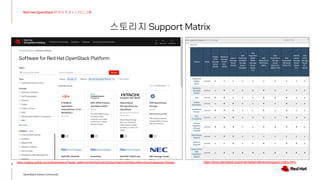
스토리지 Support Matrix
7
Red Hat OpenStack 17 저자 직강 + 스터디그룹
OpenStack Korea Community
https://catalog.redhat.com/software/search?target_platforms=Red%20Hat%20OpenStack%20Platform&functionalCategories=Storage https://docs.openstack.org/cinder/latest/reference/support-matrix.html
8
Red Hat OpenStack 17 저자 직강 + 스터디그룹
NFS 서버 만들기
Repo 서버를 이용하여 NFS 서버 만들기
9
Red Hat OpenStack 17 저자 직강 + 스터디그룹
OpenStack Korea Community
# nfs 서버 설치 및 시작
[root@repo ~]# dnf install nfs-utils
[root@repo ~]# systemctl start nfs-server rpcbind
[root@repo ~]# systemctl enable nfs-server rpcbind
# 공유디렉터리 생성
[root@repo ~]# mkdir -p /osp/cinder /osp/glance
# 생성한 공유디렉터리 NFS 서버에 등록
[root@repo ~]# vi /etc/exports
/osp/cinder *(rw,sync)
/osp/glance *(rw,sync)
# 서비스 재시작
[root@repo ~]# systemctl restart nfs-server
# Firewall에 nfs 서비스 등록
[root@repo ~]# firewall-cmd --add-service mountd --permanent
[root@repo ~]# firewall-cmd --add-service rpc-bind --permanent
[root@repo ~]# firewall-cmd --add-service nfs --permanent
# nfs 디렉터리 확인
[root@repo ~]# showmount -e localhost
Export list for localhost:
/osp/glance *
/osp/cinder *
10
Red Hat OpenStack 17 저자 직강 + 스터디그룹
템플릿 파일 준비하기
템플릿 파일 준비하기
11
Red Hat OpenStack 17 저자 직강 + 스터디그룹
OpenStack Korea Community
[stack@dir ~]$ cd templates/
[stack@dir templates]$ ll
total 60
-rw-r--r--. 1 stack stack 959 Jan 21 00:03 custom-domain.yaml # 도메인명 정의 파일
-rw-r--r--. 1 stack stack 343 Jan 26 12:14 extra-config.yaml # CPU, Mem 가상화율 같은 추가 옵션 설정
-rw-r--r--. 1 stack stack 1371 Jan 20 11:44 network_data.yaml # 오버클라우드에서 사용할 네트워크 종류 설정
-rw-r--r--. 1 stack stack 1009 Jan 26 15:43 network-environment.yaml # neutron 관련 옵션 설정
drwxr-xr-x. 2 stack stack 45 Jan 20 19:34 nic-configs # 컨트롤러 노드와 컴퓨트 노드의 네트워크 인터페이스 정의
-rw-r--r--. 1 stack stack 3627 Mar 8 14:21 overcloud-baremetal-deployed.yaml # 오버클라우드 운영체제 설치 결과
-rw-r--r--. 1 stack stack 1776 Jan 20 19:35 overcloud-baremetal-deploy.yaml # 오버클라우드 운영체제 설치관련 정보
-rw-r--r--. 1 stack stack 2474 Jan 20 11:44 overcloud-networks-deployed.yaml # 오버클라우드 네트워크 생성 결과
-rw-r--r--. 1 stack stack 880 Jan 26 16:02 overcloud-vip-deployed.yaml # 오버클라우드 VIP 생성 결과
-rw-r--r--. 1 stack stack 92 Mar 24 17:14 post_deploy.yaml # 배포시 적용할 파일 설정
-rw-r--r--. 1 stack stack 902 Mar 24 17:09 post-repo.yaml # 배포시 적용할 내용 설정
-rw-r--r--. 1 stack stack 11233 Jan 20 14:08 roles_data.yaml # 오버클라우드 노드별 역할 및 서비스 정의
-rw-r--r--. 1 stack stack 1359 Jan 20 22:11 storage-environment.yaml # Cinder 관련 스토리지 정보 정의
-rw-r--r--. 1 stack stack 214 Jan 26 16:01 vip_data.yaml # 오버클라우드 VIP 정의
[stack@dir templates]$
템플릿 파일 종류
템플릿 파일 준비하기
12
Red Hat OpenStack 17 저자 직강 + 스터디그룹
OpenStack Korea Community
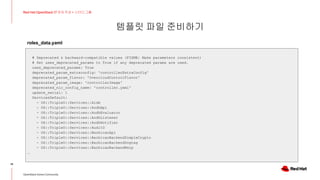
(undercloud) [stack@dir templates]$ cat roles_data.yaml
###############################################################################
# File generated by TripleO
###############################################################################
###############################################################################
# Role: Controller #
###############################################################################
- name: Controller
description: |
Controller role that has all the controler services loaded and handles
Database, Messaging and Network functions.
CountDefault: 1
tags:
- primary
- controller
# Create external Neutron bridge for SNAT (and floating IPs when using
# ML2/OVS without DVR)
- external_bridge
(뒷장에 계속)
roles_data.yaml
템플릿 파일 준비하기
13
Red Hat OpenStack 17 저자 직강 + 스터디그룹
OpenStack Korea Community
networks:
External:
subnet: external_subnet
InternalApi:
subnet: internal_api_subnet
Storage:
subnet: storage_subnet
StorageMgmt:
subnet: storage_mgmt_subnet
Tenant:
subnet: tenant_subnet
# For systems with both IPv4 and IPv6, you may specify a gateway network for
# each, such as ['ControlPlane', 'External']
default_route_networks: ['External']
HostnameFormatDefault: '%stackname%-controller-%index%'
RoleParametersDefault:
OVNCMSOptions: "enable-chassis-as-gw"
(뒷장에 계속)
roles_data.yaml
템플릿 파일 준비하기
14
Red Hat OpenStack 17 저자 직강 + 스터디그룹
OpenStack Korea Community
# Deprecated & backward-compatible values (FIXME: Make parameters consistent)
# Set uses_deprecated_params to True if any deprecated params are used.
uses_deprecated_params: True
deprecated_param_extraconfig: 'controllerExtraConfig'
deprecated_param_flavor: 'OvercloudControlFlavor'
deprecated_param_image: 'controllerImage'
deprecated_nic_config_name: 'controller.yaml'
update_serial: 1
ServicesDefault:
- OS::TripleO::Services::Aide
- OS::TripleO::Services::AodhApi
- OS::TripleO::Services::AodhEvaluator
- OS::TripleO::Services::AodhListener
- OS::TripleO::Services::AodhNotifier
- OS::TripleO::Services::AuditD
- OS::TripleO::Services::BarbicanApi
- OS::TripleO::Services::BarbicanBackendSimpleCrypto
- OS::TripleO::Services::BarbicanBackendDogtag
- OS::TripleO::Services::BarbicanBackendKmip
…
roles_data.yaml
템플릿 파일 준비하기
15
Red Hat OpenStack 17 저자 직강 + 스터디그룹
OpenStack Korea Community
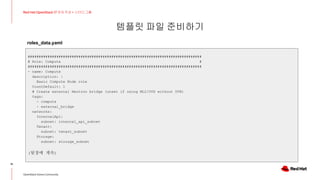
###############################################################################
# Role: Compute #
###############################################################################
- name: Compute
description: |
Basic Compute Node role
CountDefault: 1
# Create external Neutron bridge (unset if using ML2/OVS without DVR)
tags:
- compute
- external_bridge
networks:
InternalApi:
subnet: internal_api_subnet
Tenant:
subnet: tenant_subnet
Storage:
subnet: storage_subnet
(뒷장에 계속)
roles_data.yaml
템플릿 파일 준비하기
16
Red Hat OpenStack 17 저자 직강 + 스터디그룹
OpenStack Korea Community
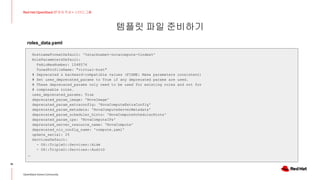
HostnameFormatDefault: '%stackname%-novacompute-%index%'
RoleParametersDefault:
FsAioMaxNumber: 1048576
TunedProfileName: "virtual-host"
# Deprecated & backward-compatible values (FIXME: Make parameters consistent)
# Set uses_deprecated_params to True if any deprecated params are used.
# These deprecated_params only need to be used for existing roles and not for
# composable roles.
uses_deprecated_params: True
deprecated_param_image: 'NovaImage'
deprecated_param_extraconfig: 'NovaComputeExtraConfig'
deprecated_param_metadata: 'NovaComputeServerMetadata'
deprecated_param_scheduler_hints: 'NovaComputeSchedulerHints'
deprecated_param_ips: 'NovaComputeIPs'
deprecated_server_resource_name: 'NovaCompute'
deprecated_nic_config_name: 'compute.yaml'
update_serial: 25
ServicesDefault:
- OS::TripleO::Services::Aide
- OS::TripleO::Services::AuditD
…
roles_data.yaml
템플릿 파일 준비하기
17
Red Hat OpenStack 17 저자 직강 + 스터디그룹
OpenStack Korea Community
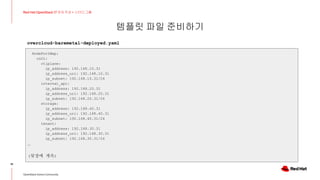
(undercloud) [stack@dir templates]$ cat overcloud-baremetal-deployed.yaml
parameter_defaults:
ComputeCount: 2
ComputeHostnameFormat: '%stackname%-novacompute-%index%'
ControllerCount: 1
ControllerHostnameFormat: '%stackname%-controller-%index%'
DeployedServerPortMap:
cn01-ctlplane:
fixed_ips:
- ip_address: 192.168.10.31
cn02-ctlplane:
fixed_ips:
- ip_address: 192.168.10.32
ctrl01-ctlplane:
fixed_ips:
- ip_address: 192.168.10.21
HostnameMap:
overcloud-controller-0: ctrl01
overcloud-novacompute-0: cn01
overcloud-novacompute-1: cn02
(뒷장에 계속)
overcloud-baremetal-deployed.yaml
템플릿 파일 준비하기
18
Red Hat OpenStack 17 저자 직강 + 스터디그룹
OpenStack Korea Community
NodePortMap:
cn01:
ctlplane:
ip_address: 192.168.10.31
ip_address_uri: 192.168.10.31
ip_subnet: 192.168.10.31/24
internal_api:
ip_address: 192.168.20.31
ip_address_uri: 192.168.20.31
ip_subnet: 192.168.20.31/24
storage:
ip_address: 192.168.40.31
ip_address_uri: 192.168.40.31
ip_subnet: 192.168.40.31/24
tenant:
ip_address: 192.168.30.31
ip_address_uri: 192.168.30.31
ip_subnet: 192.168.30.31/24
…
(뒷장에 계속)
overcloud-baremetal-deployed.yaml
템플릿 파일 준비하기
19
Red Hat OpenStack 17 저자 직강 + 스터디그룹
OpenStack Korea Community
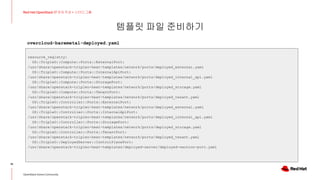
resource_registry:
OS::TripleO::Compute::Ports::ExternalPort:
/usr/share/openstack-tripleo-heat-templates/network/ports/deployed_external.yaml
OS::TripleO::Compute::Ports::InternalApiPort:
/usr/share/openstack-tripleo-heat-templates/network/ports/deployed_internal_api.yaml
OS::TripleO::Compute::Ports::StoragePort:
/usr/share/openstack-tripleo-heat-templates/network/ports/deployed_storage.yaml
OS::TripleO::Compute::Ports::TenantPort:
/usr/share/openstack-tripleo-heat-templates/network/ports/deployed_tenant.yaml
OS::TripleO::Controller::Ports::ExternalPort:
/usr/share/openstack-tripleo-heat-templates/network/ports/deployed_external.yaml
OS::TripleO::Controller::Ports::InternalApiPort:
/usr/share/openstack-tripleo-heat-templates/network/ports/deployed_internal_api.yaml
OS::TripleO::Controller::Ports::StoragePort:
/usr/share/openstack-tripleo-heat-templates/network/ports/deployed_storage.yaml
OS::TripleO::Controller::Ports::TenantPort:
/usr/share/openstack-tripleo-heat-templates/network/ports/deployed_tenant.yaml
OS::TripleO::DeployedServer::ControlPlanePort:
/usr/share/openstack-tripleo-heat-templates/deployed-server/deployed-neutron-port.yaml
overcloud-baremetal-deployed.yaml
템플릿 파일 준비하기
20
Red Hat OpenStack 17 저자 직강 + 스터디그룹
OpenStack Korea Community
(undercloud) [stack@dir templates]$ cat network_data.yaml
#-------------------------------------------------#
- name: InternalApi
name_lower: internal_api
vip: true
mtu: 1500
subnets:
internal_api_subnet:
ip_subnet: 192.168.20.0/24
allocation_pools:
- start: 192.168.20.10
end: 192.168.20.250
vlan: 20
#-------------------------------------------------#
- name: External
name_lower: external
vip: true
mtu: 1500
subnets:
external_subnet:
ip_subnet: 172.168.16.0/24
…
network_data.yaml
(undercloud) [stack@dir templates]$ cat vip_data.yaml
- network: external
dns_name: overcloud
ip_address: 172.168.16.22
- network: internal_api
dns_name: overcloud
ip_address: 192.168.20.22
- network: ctlplane
dns_name: overcloud
ip_address: 192.168.10.22
템플릿 파일 준비하기
21
Red Hat OpenStack 17 저자 직강 + 스터디그룹
OpenStack Korea Community
(undercloud) [stack@dir templates]$cat overcloud-networks-deployed.yaml
parameter_defaults:
DeployedNetworkEnvironment:
net_attributes_map:
external:
network:
dns_domain: external.exp.com.
mtu: 1500
name: external
tags:
- tripleo_network_name=External
- tripleo_net_idx=1
- tripleo_vip=true
subnets:
external_subnet:
cidr: 172.168.16.0/24
dns_nameservers: []
gateway_ip: 172.168.16.1
host_routes: []
ip_version: 4
name: external_subnet
tags:
- tripleo_vlan_id=16
overcloud-networks-deployed.yaml
internal_api:
network:
dns_domain:
internalapi.exp.com.
mtu: 1500
name: internal_api
tags:
-
tripleo_network_name=InternalApi
- tripleo_net_idx=0
- tripleo_vip=true
subnets:
internal_api_subnet:
cidr: 192.168.20.0/24
dns_nameservers: []
gateway_ip: null
host_routes: []
ip_version: 4
name: internal_api_subnet
tags:
- tripleo_vlan_id=20
(뒷장에 계속)
템플릿 파일 준비하기
22
Red Hat OpenStack 17 저자 직강 + 스터디그룹
OpenStack Korea Community
…
tenant:
network:
dns_domain: tenant.exp.com.
mtu: 1500
name: tenant
tags:
- tripleo_network_name=Tenant
- tripleo_net_idx=2
subnets:
tenant_subnet:
cidr: 192.168.30.0/24
dns_nameservers: []
gateway_ip: null
host_routes: []
ip_version: 4
name: tenant_subnet
tags:
- tripleo_vlan_id=30
overcloud-networks-deployed.yaml
net_cidr_map:
external:
- 172.168.16.0/24
internal_api:
- 192.168.20.0/24
storage:
- 192.168.40.0/24
tenant:
- 192.168.30.0/24
net_ip_version_map:
external: 4
internal_api: 4
storage: 4
tenant: 4
resource_registry:
OS::TripleO::Network:
/usr/share/openstack-tripleo-heat-templates/network/deplo
yed_networks.yaml
템플릿 파일 준비하기
23
Red Hat OpenStack 17 저자 직강 + 스터디그룹
OpenStack Korea Community
(undercloud) [stack@dir templates]$ cat overcloud-vip-deployed.yaml
parameter_defaults:
ControlPlaneVipData:
fixed_ips:
- ip_address: 192.168.10.22
name: control_virtual_ip
network:
tags:
- 192.168.10.0/24
subnets:
- ip_version: 4
VipPortMap:
external:
ip_address: 172.168.16.22
ip_address_uri: 172.168.16.22
ip_subnet: 172.168.16.22/24
internal_api:
ip_address: 192.168.20.22
ip_address_uri: 192.168.20.22
ip_subnet: 192.168.20.22/24
resource_registry:
OS::TripleO::Network::Ports::ControlPlaneVipPort: /usr/share/openstack-tripleo-heat-templates/network/ports/deployed_vip_ctlplane.yaml
OS::TripleO::Network::Ports::ExternalVipPort: /usr/share/openstack-tripleo-heat-templates/network/ports/deployed_vip_external.yaml
OS::TripleO::Network::Ports::InternalApiVipPort: /usr/share/openstack-tripleo-heat-templates/network/ports/deployed_vip_internal_api.yaml
overcloud-vip-deployed.yaml
템플릿 파일 준비하기
24
Red Hat OpenStack 17 저자 직강 + 스터디그룹
OpenStack Korea Community
(undercloud) [stack@dir templates]$ cat network-environment.yaml
parameter_defaults:
ControllerNetworkConfigTemplate: '/home/stack/templates/nic-configs/controller.j2'
ComputeNetworkConfigTemplate: '/home/stack/templates/nic-configs/compute.j2'
# ------------- Heat container image Configuration ------------- #
ContainerHeatAllImage: 192.168.10.11:8787/rhosp-rhel9/openstack-heat-all:17.0
ContainerHeatEngineImage: 192.168.10.11:8787/rhosp-rhel9/openstack-heat-engine:17.0
ContainerHeatApiImage: 192.168.10.11:8787/rhosp-rhel9/openstack-heat-api:17.0
# ------------- Neutron Configuration ------------- #
NeutronNetworkType: 'vlan,geneve,flat'
NeutronTunnelTypes: 'geneve'
NeutronBridgeMappings: 'datacentre:br-ex,tenant:br-tenant'
NeutronFlatNetworks: '*'
NeutronNetworkVLANRanges: 'datacentre,tenant'
network-environment.yaml
# ------------- SSH Configuration ------------- #
AdminPassword: 'redhat'
TimeZone: 'Asia/Seoul'
NtpServer: '192.168.10.1'
SshServerOptions:
UseDns: 'no'
PermitRootLogin: 'yes'
PasswordAuthentication: 'yes'
SshFirewallAllowAll: true
DockerInsecureRegistryAddress: '192.168.10.11:8787'
템플릿 파일 준비하기
25
Red Hat OpenStack 17 저자 직강 + 스터디그룹
OpenStack Korea Community
(undercloud) [stack@dir templates]$cat nic-configs/controller.j2
---
network_config:
- type: interface
name: nic1
mtu: {{ ctlplane_mtu }}
dns_servers: {{ ctlplane_dns_nameservers }}
domain: {{ dns_search_domains }}
routes: {{ ctlplane_host_routes }}
use_dhcp: false
addresses:
- ip_netmask: {{ ctlplane_ip }}/{{ ctlplane_subnet_cidr }}
#------------------------------------------------------------------------#
- type: interface
name: nic2
mtu: {{ internal_api_mtu }}
use_dhcp: false
addresses:
- ip_netmask:
{{ internal_api_ip }}/{{ internal_api_cidr }}
#------------------------------------------------------------------------#
- type: ovs_bridge
name: br-ex
(뒷장에 계속)
nic-configs/controller.j2
템플릿 파일 준비하기
26
Red Hat OpenStack 17 저자 직강 + 스터디그룹
OpenStack Korea Community
members:
- type: interface
name: nic3
mtu: {{ external_mtu }}
use_dhcp: false
addresses:
- ip_netmask:
{{ external_ip }}/{{ external_cidr }}
routes: {{ [external_host_routes, [{'default': True, 'next_hop': external_gateway_ip}]] | flatten | unique }}
#----------------------------------------------------------------#
- type: ovs_bridge
name: br-tenant
members:
- type: interface
name: nic4
mtu: {{ tenant_mtu }}
use_dhcp: false
addresses:
- ip_netmask:
{{ tenant_ip }}/{{ tenant_cidr }}
#----------------------------------------------------------------#
nic-configs/controller.j2
- type: interface
name: nic5
use_dhcp: false
mtu: {{ storage_mtu }}
addresses:
- ip_netmask:
{{ storage_ip }}/{{ storage_cidr }}
템플릿 파일 준비하기
27
Red Hat OpenStack 17 저자 직강 + 스터디그룹
OpenStack Korea Community
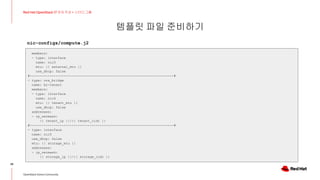
(undercloud) [stack@dir templates]$cat nic-configs/compute.j2
---
network_config:
- type: interface
name: nic1
mtu: {{ ctlplane_mtu }}
dns_servers: {{ ctlplane_dns_nameservers }}
domain: {{ dns_search_domains }}
routes: {{ ctlplane_host_routes }}
use_dhcp: false
addresses:
- ip_netmask: {{ ctlplane_ip }}/{{ ctlplane_subnet_cidr }}
#------------------------------------------------------------------------#
- type: interface
name: nic2
mtu: {{ internal_api_mtu }}
use_dhcp: false
addresses:
- ip_netmask:
{{ internal_api_ip }}/{{ internal_api_cidr }}
#------------------------------------------------------------------------#
- type: ovs_bridge
name: br-ex
(뒷장에 계속)
nic-configs/compute.j2
템플릿 파일 준비하기
28
Red Hat OpenStack 17 저자 직강 + 스터디그룹
OpenStack Korea Community
members:
- type: interface
name: nic3
mtu: {{ external_mtu }}
use_dhcp: false
#------------------------------------------------------------------------#
- type: ovs_bridge
name: br-tenant
members:
- type: interface
name: nic4
mtu: {{ tenant_mtu }}
use_dhcp: false
addresses:
- ip_netmask:
{{ tenant_ip }}/{{ tenant_cidr }}
#------------------------------------------------------------------------#
- type: interface
name: nic5
use_dhcp: false
mtu: {{ storage_mtu }}
addresses:
- ip_netmask:
{{ storage_ip }}/{{ storage_cidr }}
nic-configs/compute.j2
템플릿 파일 준비하기
29
Red Hat OpenStack 17 저자 직강 + 스터디그룹
OpenStack Korea Community
[stack@dir templates]$ vi custom-domain.yaml
parameter_defaults:
# The DNS domain used for the hosts. This must match the overcloud_domain_name configured on the undercloud.
# Type: string
CloudDomain: exp.com
# The DNS name of this cloud. E.g. ci-overcloud.tripleo.org
# Type: string
CloudName: overcloud.exp.com
# The DNS name of this cloud's provisioning network endpoint. E.g. 'ci-overcloud.ctlplane.tripleo.org'.
# Type: string
CloudNameCtlplane: overcloud.ctlplane.exp.com
# The DNS name of this cloud's internal_api endpoint. E.g. 'ci-overcloud.internalapi.tripleo.org'.
# Type: string
CloudNameInternal: overcloud.internalapi.exp.com
# The DNS name of this cloud's storage endpoint. E.g. 'ci-overcloud.storage.tripleo.org'.
# Type: string
CloudNameStorage: overcloud.storage.exp.com
# The DNS name of this cloud's storage_mgmt endpoint. E.g. 'ci-overcloud.storagemgmt.tripleo.org'.
# Type: string
CloudNameStorageManagement: overcloud.storagemgmt.exp.com
custom-domain.yaml
템플릿 파일 준비하기
30
Red Hat OpenStack 17 저자 직강 + 스터디그룹
OpenStack Korea Community
[stack@dir templates]$ cat post_deploy.yaml
resource_registry:
OS::TripleO::NodeExtraConfigPost: /home/stack/templates/post-repo.yaml
[stack@dir templates]$ cat post-repo.yaml
heat_template_version: wallaby
description: >
Extra hostname configuration
resources:
CustomExtraConfig:
type: OS::Heat::SoftwareConfig
properties:
group: script
config:
str_replace:
template: |
#!/bin/sh
echo 'redhat' | passwd --stdin root
(뒷장에 계속)
post_deploy.yaml
템플릿 파일 준비하기
31
Red Hat OpenStack 17 저자 직강 + 스터디그룹
OpenStack Korea Community
# ------------- Yum Repository ------------- #
sudo curl http://192.168.10.11/repo/osp17/osp17.repo > /etc/yum.repos.d/osp17.repo
sudo dnf clean all
sudo dnf repolist
sudo dnf install -y vim tmux bash-completion net-tools sysstat nmap
CustomExtraDeployments:
type: OS::Heat::SoftwareDeploymentGroup
properties:
servers: {get_param: servers}
config: {get_resource: CustomExtraConfig}
actions: ['CREATE','UPDATE']
input_values:
deploy_identifier: {get_param: DeployIdentifier}
[stack@dir templates]$
post-deploy.yaml
템플릿 파일 준비하기
32
Red Hat OpenStack 17 저자 직강 + 스터디그룹
OpenStack Korea Community
[stack@dir templates]$ vi storage-environment.yaml
parameter_defaults:
#### BACKEND SELECTION ####
## Whether to enable iscsi backend for Cinder.
CinderEnableIscsiBackend: false
## Whether to enable rbd (Ceph) backend for Cinder.
CinderEnableRbdBackend: false
## Cinder Backup backend can be either 'ceph', 'swift' or 'nfs'.
## Whether to enable rbd (Ceph) backend for Nova ephemeral storage.
NovaEnableRbdBackend: false
## Glance backend can be either 'rbd' (Ceph), 'swift' or 'file'.
GlanceBackend: file
## Gnocchi backend can be either 'rbd' (Ceph), 'swift' or 'file'.
## Uncomment below if enabling legacy telemetry
# GnocchiBackend: file
(뒷장에 계속)
storage-environment.yaml
템플릿 파일 준비하기
33
Red Hat OpenStack 17 저자 직강 + 스터디그룹
OpenStack Korea Community
#### CINDER NFS SETTINGS ####
CinderEnableNfsBackend: true
## NFS mount options
CinderNfsMountOptions: 'rw,sync'
## NFS mount point, e.g. '192.168.122.1:/export/cinder'
CinderNfsServers: '192.168.40.1:/osp/cinder'
#### GLANCE NFS SETTINGS ####
## Make sure to set `GlanceBackend: file` when enabling NFS
##
## Whether to make Glance 'file' backend a NFS mount
GlanceNfsEnabled: true
## NFS share for image storage, e.g. '192.168.122.1:/export/glance'
## (If using IPv6, use both double- and single-quotes,
## e.g. "'[fdd0::1]:/export/glance'")
GlanceNfsShare: '192.168.40.1:/osp/glance'
## Mount options for the NFS image storage mount point
GlanceNfsOptions: 'intr,context=system_u:object_r:nfs_t:s0'
storage-environment.yaml
템플릿 파일 준비하기
34
Red Hat OpenStack 17 저자 직강 + 스터디그룹
OpenStack Korea Community
[stack@dir templates]$ vi extra-config.yaml
parameter_defaults:
ControllerExtraConfig:
nova::api::allow_resize_to_same_host: 'true'
ComputeParameters:
NovaReservedHostMemory: 4096
NovaComputeExtraConfig:
nova::compute::allow_resize_to_same_host: True
nova::cpu_allocation_ratio: 3.0
nova::ram_allocation_ratio: 1.0
nova::disk_allocation_ratio: 1.0
extra-config.yaml
35
Red Hat OpenStack 17 저자 직강 + 스터디그룹
오버클라우드 배포
오버클라우드 배포
36
Red Hat OpenStack 17 저자 직강 + 스터디그룹
OpenStack Korea Community
[stack@dir ~]$ mkdir /home/stack/deploy_log
[stack@dir ~]$ vi deploy.sh
#!/bin/bash
source /home/stack/stackrc
date=`date "+%Y-%m-%d-%I%M"`
time openstack overcloud deploy 
--templates /usr/share/openstack-tripleo-heat-templates/ 
-r /home/stack/templates/roles_data.yaml 
-n /home/stack/templates/network_data.yaml 
-e /home/stack/templates/overcloud-baremetal-deployed.yaml 
-e /home/stack/templates/overcloud-networks-deployed.yaml 
-e /home/stack/templates/overcloud-vip-deployed.yaml 
-e /home/stack/containers-prepare-parameter.yaml 
-e /home/stack/templates/network-environment.yaml 
-e /home/stack/templates/custom-domain.yaml 
-e /home/stack/templates/firstboot.yaml 
-e /home/stack/templates/storage-environment.yaml 
-e /home/stack/templates/extra-config.yaml 
-e /usr/share/openstack-tripleo-heat-templates/environments/disable-swift.yaml 
-e /usr/share/openstack-tripleo-heat-templates/environments/services/octavia.yaml 
--libvirt-type kvm 
--log-file=/home/stack/deploy_log/overcloud_deploy_${date}.log 
--timeout 240
deploy.sh
오버클라우드 배포
37
Red Hat OpenStack 17 저자 직강 + 스터디그룹
OpenStack Korea Community
[stack@dir ~]$ sh deploy.sh
…
Overcloud configuration completed for stack: overcloud
2023-01-21 00:22:41.379 598476 INFO tripleoclient.v1.overcloud_deploy.DeployOvercloud [-] Overcloud configuration
completed for stack: overcloud
2023-01-21 00:22:41.397 598476 WARNING tripleoclient.utils.safe_write [-] The output file
/home/stack/overcloud-deploy/overcloud/overcloud-deployment_status.yaml will be overriden
Host 172.168.16.22 not found in /home/stack/.ssh/known_hosts
Overcloud Endpoint: http://172.168.16.22:5000
Overcloud Horizon Dashboard URL: http://172.168.16.22:80/dashboard
Overcloud rc file: /home/stack/overcloud-deploy/overcloud/overcloudrc and /home/stack/overcloudrc
Overcloud Deployed successfully
2023-01-21 00:22:41.554 598476 INFO tripleoclient.v1.overcloud_deploy.DeployOvercloud [-] Stopping ephemeral heat.
2023-01-21 00:22:41.595 598476 INFO tripleoclient.heat_launcher [-] Pod does not exist: ephemeral-heat
2023-01-21 00:22:42.453 598476 INFO osc_lib.shell [-] END return value: None
real 18m42.951s
user 3m25.501s
sys 1m15.892s
(undercloud) [stack@dir ~]$
deploy.sh
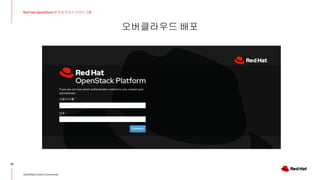
오버클라우드 배포
38
Red Hat OpenStack 17 저자 직강 + 스터디그룹
OpenStack Korea Community
39
Red Hat OpenStack 17 저자 직강 + 스터디그룹
다음시간 아젠다 소개
다음시간 온라인 모임 아젠다 소개
40
Red Hat OpenStack 17 저자 직강 + 스터디그룹
OpenStack Korea Community
미리 보고 오면 좋은 것
스터디 그룹 저자 직강 교재 다음시간까지준비할 것들~!!
★ 오버클라우드 배포 완료하기
★ 교재 147 Page까지 미리 읽어보기
다음 시간에는?
★ 기능 테스트 및 스터디 과제 진행
linkedin.com/company/red-hat
youtube.com/user/RedHatVideos
facebook.com/redhatinc
twitter.com/RedHat
41
Red Hat is the world’s leading provider of enterprise
open source software solutions. Award-winning
support, training, and consulting services make
Red Hat a trusted adviser to the Fortune 500.
Thank you

Red Hat OpenStack 17 저자직강+스터디그룹_4주차

  • 1.
    저자 직강 +스터디 그룹 - 4주차 Red Hat OpenStack 17 Nalee Jang, Senior Consultant of Red Hat Korea 1
  • 2.
    The Curriculum Red Hat OpenStack 17 저자 직강 + 스터디 그룹 2 언제 커리큘럼모임유형 1주차 (4월 6일) 오리엔테이션 - 진행방향 소개 - 그룹 만들기 - 세션 : 기본 구성환경 및 네트워크 설계 오프라인 미팅 2주차 (4월 13일) Repo 서버 및 언더클라우드 구성 온라인 미팅 3주차 (4월 20일) 오버클라우드 노드 준비 및 운영체제 설치 온라인 미팅 4주차 (4월 27일) 오버클라우드 배포 및 트러블슈팅 온라인 미팅 5주차 (5월 4일) 기능 테스트 및 스터디 과제 진행 온라인 미팅 6주차 (5월 11일) 그룹별 스터디 과제 진행상황 확인 및 공유 그룹별 미팅 7주차 (5월 18일) 스터디 공유의 시간 - 스터디 개요 소개 - 스터디 그룹별 발표 - 스터디 참여 소감 공유 오프라인 미팅
  • 3.
    Session Agenda 3 OpenStack KoreaCommunity What we’ll discuss today ▸ NFS 서버 만들기 ▸ 템플릿 파일 준비하기 ▸ 오버클라우드 배포 ▸ 다음시간 아젠다 소개
  • 4.
    오픈스택 설치 프로세스 4 RedHat OpenStack 17 저자 직강 + 스터디그룹 OpenStack Korea Community Provisioning NIC (배포용 네트워크) Director 노드는 사전에 정의한 네트워크 Yaml 파일을 이용하여 컨트롤러 노드의 OS를 설치하고 네트워크 구성을 함. Director (배포노드) Repo 서버 컨트롤러 노드 192.168.10.0/24 192.168.10.11 192.168.10.12 192.168.10.21 지난 시간에는 오버클라우드 노드에 운영체제 설치를 하고 네트워크 구성을 진행했습니다.
  • 5.
    오픈스택 설치 프로세스 5 RedHat OpenStack 17 저자 직강 + 스터디그룹 OpenStack Korea Community Provisioning NIC (배포용 네트워크) 오버클라우드 노드의 운영체제 설치 및 네트워크 구성이 끝나면 사전에 정의한 YAML 템플릿 파일을 이용하여 오버클라우드 노드에 Repo 서버의 컨테이너 이미지를 이용하여 오픈스택 서비스를 설치함. Director (배포노드) Repo 서버 컨트롤러 노드 192.168.10.0/24 192.168.10.11 192.168.10.12 192.168.10.21 이번 시간에는 Director를 이용해 오버클라우드 노드의 오픈스택 서비스를 배포해 보겠습니다.
  • 6.
    스토리지 종류 알아보기 6 RedHat OpenStack 17 저자 직강 + 스터디그룹 OpenStack Korea Community DELL EMC Unity DELL EMC VMAX HP 3Par Fujitsu ETERNUS Hitachi VSP Huawei 18000 IBM DS8900F Netapp FC, ISCSI Fiber Channel ISCSI Protocol
  • 7.
    스토리지 Support Matrix 7 RedHat OpenStack 17 저자 직강 + 스터디그룹 OpenStack Korea Community https://catalog.redhat.com/software/search?target_platforms=Red%20Hat%20OpenStack%20Platform&functionalCategories=Storage https://docs.openstack.org/cinder/latest/reference/support-matrix.html
  • 8.
    8 Red Hat OpenStack17 저자 직강 + 스터디그룹 NFS 서버 만들기
  • 9.
    Repo 서버를 이용하여NFS 서버 만들기 9 Red Hat OpenStack 17 저자 직강 + 스터디그룹 OpenStack Korea Community # nfs 서버 설치 및 시작 [root@repo ~]# dnf install nfs-utils [root@repo ~]# systemctl start nfs-server rpcbind [root@repo ~]# systemctl enable nfs-server rpcbind # 공유디렉터리 생성 [root@repo ~]# mkdir -p /osp/cinder /osp/glance # 생성한 공유디렉터리 NFS 서버에 등록 [root@repo ~]# vi /etc/exports /osp/cinder *(rw,sync) /osp/glance *(rw,sync) # 서비스 재시작 [root@repo ~]# systemctl restart nfs-server # Firewall에 nfs 서비스 등록 [root@repo ~]# firewall-cmd --add-service mountd --permanent [root@repo ~]# firewall-cmd --add-service rpc-bind --permanent [root@repo ~]# firewall-cmd --add-service nfs --permanent # nfs 디렉터리 확인 [root@repo ~]# showmount -e localhost Export list for localhost: /osp/glance * /osp/cinder *
  • 10.
    10 Red Hat OpenStack17 저자 직강 + 스터디그룹 템플릿 파일 준비하기
  • 11.
    템플릿 파일 준비하기 11 RedHat OpenStack 17 저자 직강 + 스터디그룹 OpenStack Korea Community [stack@dir ~]$ cd templates/ [stack@dir templates]$ ll total 60 -rw-r--r--. 1 stack stack 959 Jan 21 00:03 custom-domain.yaml # 도메인명 정의 파일 -rw-r--r--. 1 stack stack 343 Jan 26 12:14 extra-config.yaml # CPU, Mem 가상화율 같은 추가 옵션 설정 -rw-r--r--. 1 stack stack 1371 Jan 20 11:44 network_data.yaml # 오버클라우드에서 사용할 네트워크 종류 설정 -rw-r--r--. 1 stack stack 1009 Jan 26 15:43 network-environment.yaml # neutron 관련 옵션 설정 drwxr-xr-x. 2 stack stack 45 Jan 20 19:34 nic-configs # 컨트롤러 노드와 컴퓨트 노드의 네트워크 인터페이스 정의 -rw-r--r--. 1 stack stack 3627 Mar 8 14:21 overcloud-baremetal-deployed.yaml # 오버클라우드 운영체제 설치 결과 -rw-r--r--. 1 stack stack 1776 Jan 20 19:35 overcloud-baremetal-deploy.yaml # 오버클라우드 운영체제 설치관련 정보 -rw-r--r--. 1 stack stack 2474 Jan 20 11:44 overcloud-networks-deployed.yaml # 오버클라우드 네트워크 생성 결과 -rw-r--r--. 1 stack stack 880 Jan 26 16:02 overcloud-vip-deployed.yaml # 오버클라우드 VIP 생성 결과 -rw-r--r--. 1 stack stack 92 Mar 24 17:14 post_deploy.yaml # 배포시 적용할 파일 설정 -rw-r--r--. 1 stack stack 902 Mar 24 17:09 post-repo.yaml # 배포시 적용할 내용 설정 -rw-r--r--. 1 stack stack 11233 Jan 20 14:08 roles_data.yaml # 오버클라우드 노드별 역할 및 서비스 정의 -rw-r--r--. 1 stack stack 1359 Jan 20 22:11 storage-environment.yaml # Cinder 관련 스토리지 정보 정의 -rw-r--r--. 1 stack stack 214 Jan 26 16:01 vip_data.yaml # 오버클라우드 VIP 정의 [stack@dir templates]$ 템플릿 파일 종류
  • 12.
    템플릿 파일 준비하기 12 RedHat OpenStack 17 저자 직강 + 스터디그룹 OpenStack Korea Community (undercloud) [stack@dir templates]$ cat roles_data.yaml ############################################################################### # File generated by TripleO ############################################################################### ############################################################################### # Role: Controller # ############################################################################### - name: Controller description: | Controller role that has all the controler services loaded and handles Database, Messaging and Network functions. CountDefault: 1 tags: - primary - controller # Create external Neutron bridge for SNAT (and floating IPs when using # ML2/OVS without DVR) - external_bridge (뒷장에 계속) roles_data.yaml
  • 13.
    템플릿 파일 준비하기 13 RedHat OpenStack 17 저자 직강 + 스터디그룹 OpenStack Korea Community networks: External: subnet: external_subnet InternalApi: subnet: internal_api_subnet Storage: subnet: storage_subnet StorageMgmt: subnet: storage_mgmt_subnet Tenant: subnet: tenant_subnet # For systems with both IPv4 and IPv6, you may specify a gateway network for # each, such as ['ControlPlane', 'External'] default_route_networks: ['External'] HostnameFormatDefault: '%stackname%-controller-%index%' RoleParametersDefault: OVNCMSOptions: "enable-chassis-as-gw" (뒷장에 계속) roles_data.yaml
  • 14.
    템플릿 파일 준비하기 14 RedHat OpenStack 17 저자 직강 + 스터디그룹 OpenStack Korea Community # Deprecated & backward-compatible values (FIXME: Make parameters consistent) # Set uses_deprecated_params to True if any deprecated params are used. uses_deprecated_params: True deprecated_param_extraconfig: 'controllerExtraConfig' deprecated_param_flavor: 'OvercloudControlFlavor' deprecated_param_image: 'controllerImage' deprecated_nic_config_name: 'controller.yaml' update_serial: 1 ServicesDefault: - OS::TripleO::Services::Aide - OS::TripleO::Services::AodhApi - OS::TripleO::Services::AodhEvaluator - OS::TripleO::Services::AodhListener - OS::TripleO::Services::AodhNotifier - OS::TripleO::Services::AuditD - OS::TripleO::Services::BarbicanApi - OS::TripleO::Services::BarbicanBackendSimpleCrypto - OS::TripleO::Services::BarbicanBackendDogtag - OS::TripleO::Services::BarbicanBackendKmip … roles_data.yaml
  • 15.
    템플릿 파일 준비하기 15 RedHat OpenStack 17 저자 직강 + 스터디그룹 OpenStack Korea Community ############################################################################### # Role: Compute # ############################################################################### - name: Compute description: | Basic Compute Node role CountDefault: 1 # Create external Neutron bridge (unset if using ML2/OVS without DVR) tags: - compute - external_bridge networks: InternalApi: subnet: internal_api_subnet Tenant: subnet: tenant_subnet Storage: subnet: storage_subnet (뒷장에 계속) roles_data.yaml
  • 16.
    템플릿 파일 준비하기 16 RedHat OpenStack 17 저자 직강 + 스터디그룹 OpenStack Korea Community HostnameFormatDefault: '%stackname%-novacompute-%index%' RoleParametersDefault: FsAioMaxNumber: 1048576 TunedProfileName: "virtual-host" # Deprecated & backward-compatible values (FIXME: Make parameters consistent) # Set uses_deprecated_params to True if any deprecated params are used. # These deprecated_params only need to be used for existing roles and not for # composable roles. uses_deprecated_params: True deprecated_param_image: 'NovaImage' deprecated_param_extraconfig: 'NovaComputeExtraConfig' deprecated_param_metadata: 'NovaComputeServerMetadata' deprecated_param_scheduler_hints: 'NovaComputeSchedulerHints' deprecated_param_ips: 'NovaComputeIPs' deprecated_server_resource_name: 'NovaCompute' deprecated_nic_config_name: 'compute.yaml' update_serial: 25 ServicesDefault: - OS::TripleO::Services::Aide - OS::TripleO::Services::AuditD … roles_data.yaml
  • 17.
    템플릿 파일 준비하기 17 RedHat OpenStack 17 저자 직강 + 스터디그룹 OpenStack Korea Community (undercloud) [stack@dir templates]$ cat overcloud-baremetal-deployed.yaml parameter_defaults: ComputeCount: 2 ComputeHostnameFormat: '%stackname%-novacompute-%index%' ControllerCount: 1 ControllerHostnameFormat: '%stackname%-controller-%index%' DeployedServerPortMap: cn01-ctlplane: fixed_ips: - ip_address: 192.168.10.31 cn02-ctlplane: fixed_ips: - ip_address: 192.168.10.32 ctrl01-ctlplane: fixed_ips: - ip_address: 192.168.10.21 HostnameMap: overcloud-controller-0: ctrl01 overcloud-novacompute-0: cn01 overcloud-novacompute-1: cn02 (뒷장에 계속) overcloud-baremetal-deployed.yaml
  • 18.
    템플릿 파일 준비하기 18 RedHat OpenStack 17 저자 직강 + 스터디그룹 OpenStack Korea Community NodePortMap: cn01: ctlplane: ip_address: 192.168.10.31 ip_address_uri: 192.168.10.31 ip_subnet: 192.168.10.31/24 internal_api: ip_address: 192.168.20.31 ip_address_uri: 192.168.20.31 ip_subnet: 192.168.20.31/24 storage: ip_address: 192.168.40.31 ip_address_uri: 192.168.40.31 ip_subnet: 192.168.40.31/24 tenant: ip_address: 192.168.30.31 ip_address_uri: 192.168.30.31 ip_subnet: 192.168.30.31/24 … (뒷장에 계속) overcloud-baremetal-deployed.yaml
  • 19.
    템플릿 파일 준비하기 19 RedHat OpenStack 17 저자 직강 + 스터디그룹 OpenStack Korea Community resource_registry: OS::TripleO::Compute::Ports::ExternalPort: /usr/share/openstack-tripleo-heat-templates/network/ports/deployed_external.yaml OS::TripleO::Compute::Ports::InternalApiPort: /usr/share/openstack-tripleo-heat-templates/network/ports/deployed_internal_api.yaml OS::TripleO::Compute::Ports::StoragePort: /usr/share/openstack-tripleo-heat-templates/network/ports/deployed_storage.yaml OS::TripleO::Compute::Ports::TenantPort: /usr/share/openstack-tripleo-heat-templates/network/ports/deployed_tenant.yaml OS::TripleO::Controller::Ports::ExternalPort: /usr/share/openstack-tripleo-heat-templates/network/ports/deployed_external.yaml OS::TripleO::Controller::Ports::InternalApiPort: /usr/share/openstack-tripleo-heat-templates/network/ports/deployed_internal_api.yaml OS::TripleO::Controller::Ports::StoragePort: /usr/share/openstack-tripleo-heat-templates/network/ports/deployed_storage.yaml OS::TripleO::Controller::Ports::TenantPort: /usr/share/openstack-tripleo-heat-templates/network/ports/deployed_tenant.yaml OS::TripleO::DeployedServer::ControlPlanePort: /usr/share/openstack-tripleo-heat-templates/deployed-server/deployed-neutron-port.yaml overcloud-baremetal-deployed.yaml
  • 20.
    템플릿 파일 준비하기 20 RedHat OpenStack 17 저자 직강 + 스터디그룹 OpenStack Korea Community (undercloud) [stack@dir templates]$ cat network_data.yaml #-------------------------------------------------# - name: InternalApi name_lower: internal_api vip: true mtu: 1500 subnets: internal_api_subnet: ip_subnet: 192.168.20.0/24 allocation_pools: - start: 192.168.20.10 end: 192.168.20.250 vlan: 20 #-------------------------------------------------# - name: External name_lower: external vip: true mtu: 1500 subnets: external_subnet: ip_subnet: 172.168.16.0/24 … network_data.yaml (undercloud) [stack@dir templates]$ cat vip_data.yaml - network: external dns_name: overcloud ip_address: 172.168.16.22 - network: internal_api dns_name: overcloud ip_address: 192.168.20.22 - network: ctlplane dns_name: overcloud ip_address: 192.168.10.22
  • 21.
    템플릿 파일 준비하기 21 RedHat OpenStack 17 저자 직강 + 스터디그룹 OpenStack Korea Community (undercloud) [stack@dir templates]$cat overcloud-networks-deployed.yaml parameter_defaults: DeployedNetworkEnvironment: net_attributes_map: external: network: dns_domain: external.exp.com. mtu: 1500 name: external tags: - tripleo_network_name=External - tripleo_net_idx=1 - tripleo_vip=true subnets: external_subnet: cidr: 172.168.16.0/24 dns_nameservers: [] gateway_ip: 172.168.16.1 host_routes: [] ip_version: 4 name: external_subnet tags: - tripleo_vlan_id=16 overcloud-networks-deployed.yaml internal_api: network: dns_domain: internalapi.exp.com. mtu: 1500 name: internal_api tags: - tripleo_network_name=InternalApi - tripleo_net_idx=0 - tripleo_vip=true subnets: internal_api_subnet: cidr: 192.168.20.0/24 dns_nameservers: [] gateway_ip: null host_routes: [] ip_version: 4 name: internal_api_subnet tags: - tripleo_vlan_id=20 (뒷장에 계속)
  • 22.
    템플릿 파일 준비하기 22 RedHat OpenStack 17 저자 직강 + 스터디그룹 OpenStack Korea Community … tenant: network: dns_domain: tenant.exp.com. mtu: 1500 name: tenant tags: - tripleo_network_name=Tenant - tripleo_net_idx=2 subnets: tenant_subnet: cidr: 192.168.30.0/24 dns_nameservers: [] gateway_ip: null host_routes: [] ip_version: 4 name: tenant_subnet tags: - tripleo_vlan_id=30 overcloud-networks-deployed.yaml net_cidr_map: external: - 172.168.16.0/24 internal_api: - 192.168.20.0/24 storage: - 192.168.40.0/24 tenant: - 192.168.30.0/24 net_ip_version_map: external: 4 internal_api: 4 storage: 4 tenant: 4 resource_registry: OS::TripleO::Network: /usr/share/openstack-tripleo-heat-templates/network/deplo yed_networks.yaml
  • 23.
    템플릿 파일 준비하기 23 RedHat OpenStack 17 저자 직강 + 스터디그룹 OpenStack Korea Community (undercloud) [stack@dir templates]$ cat overcloud-vip-deployed.yaml parameter_defaults: ControlPlaneVipData: fixed_ips: - ip_address: 192.168.10.22 name: control_virtual_ip network: tags: - 192.168.10.0/24 subnets: - ip_version: 4 VipPortMap: external: ip_address: 172.168.16.22 ip_address_uri: 172.168.16.22 ip_subnet: 172.168.16.22/24 internal_api: ip_address: 192.168.20.22 ip_address_uri: 192.168.20.22 ip_subnet: 192.168.20.22/24 resource_registry: OS::TripleO::Network::Ports::ControlPlaneVipPort: /usr/share/openstack-tripleo-heat-templates/network/ports/deployed_vip_ctlplane.yaml OS::TripleO::Network::Ports::ExternalVipPort: /usr/share/openstack-tripleo-heat-templates/network/ports/deployed_vip_external.yaml OS::TripleO::Network::Ports::InternalApiVipPort: /usr/share/openstack-tripleo-heat-templates/network/ports/deployed_vip_internal_api.yaml overcloud-vip-deployed.yaml
  • 24.
    템플릿 파일 준비하기 24 RedHat OpenStack 17 저자 직강 + 스터디그룹 OpenStack Korea Community (undercloud) [stack@dir templates]$ cat network-environment.yaml parameter_defaults: ControllerNetworkConfigTemplate: '/home/stack/templates/nic-configs/controller.j2' ComputeNetworkConfigTemplate: '/home/stack/templates/nic-configs/compute.j2' # ------------- Heat container image Configuration ------------- # ContainerHeatAllImage: 192.168.10.11:8787/rhosp-rhel9/openstack-heat-all:17.0 ContainerHeatEngineImage: 192.168.10.11:8787/rhosp-rhel9/openstack-heat-engine:17.0 ContainerHeatApiImage: 192.168.10.11:8787/rhosp-rhel9/openstack-heat-api:17.0 # ------------- Neutron Configuration ------------- # NeutronNetworkType: 'vlan,geneve,flat' NeutronTunnelTypes: 'geneve' NeutronBridgeMappings: 'datacentre:br-ex,tenant:br-tenant' NeutronFlatNetworks: '*' NeutronNetworkVLANRanges: 'datacentre,tenant' network-environment.yaml # ------------- SSH Configuration ------------- # AdminPassword: 'redhat' TimeZone: 'Asia/Seoul' NtpServer: '192.168.10.1' SshServerOptions: UseDns: 'no' PermitRootLogin: 'yes' PasswordAuthentication: 'yes' SshFirewallAllowAll: true DockerInsecureRegistryAddress: '192.168.10.11:8787'
  • 25.
    템플릿 파일 준비하기 25 RedHat OpenStack 17 저자 직강 + 스터디그룹 OpenStack Korea Community (undercloud) [stack@dir templates]$cat nic-configs/controller.j2 --- network_config: - type: interface name: nic1 mtu: {{ ctlplane_mtu }} dns_servers: {{ ctlplane_dns_nameservers }} domain: {{ dns_search_domains }} routes: {{ ctlplane_host_routes }} use_dhcp: false addresses: - ip_netmask: {{ ctlplane_ip }}/{{ ctlplane_subnet_cidr }} #------------------------------------------------------------------------# - type: interface name: nic2 mtu: {{ internal_api_mtu }} use_dhcp: false addresses: - ip_netmask: {{ internal_api_ip }}/{{ internal_api_cidr }} #------------------------------------------------------------------------# - type: ovs_bridge name: br-ex (뒷장에 계속) nic-configs/controller.j2
  • 26.
    템플릿 파일 준비하기 26 RedHat OpenStack 17 저자 직강 + 스터디그룹 OpenStack Korea Community members: - type: interface name: nic3 mtu: {{ external_mtu }} use_dhcp: false addresses: - ip_netmask: {{ external_ip }}/{{ external_cidr }} routes: {{ [external_host_routes, [{'default': True, 'next_hop': external_gateway_ip}]] | flatten | unique }} #----------------------------------------------------------------# - type: ovs_bridge name: br-tenant members: - type: interface name: nic4 mtu: {{ tenant_mtu }} use_dhcp: false addresses: - ip_netmask: {{ tenant_ip }}/{{ tenant_cidr }} #----------------------------------------------------------------# nic-configs/controller.j2 - type: interface name: nic5 use_dhcp: false mtu: {{ storage_mtu }} addresses: - ip_netmask: {{ storage_ip }}/{{ storage_cidr }}
  • 27.
    템플릿 파일 준비하기 27 RedHat OpenStack 17 저자 직강 + 스터디그룹 OpenStack Korea Community (undercloud) [stack@dir templates]$cat nic-configs/compute.j2 --- network_config: - type: interface name: nic1 mtu: {{ ctlplane_mtu }} dns_servers: {{ ctlplane_dns_nameservers }} domain: {{ dns_search_domains }} routes: {{ ctlplane_host_routes }} use_dhcp: false addresses: - ip_netmask: {{ ctlplane_ip }}/{{ ctlplane_subnet_cidr }} #------------------------------------------------------------------------# - type: interface name: nic2 mtu: {{ internal_api_mtu }} use_dhcp: false addresses: - ip_netmask: {{ internal_api_ip }}/{{ internal_api_cidr }} #------------------------------------------------------------------------# - type: ovs_bridge name: br-ex (뒷장에 계속) nic-configs/compute.j2
  • 28.
    템플릿 파일 준비하기 28 RedHat OpenStack 17 저자 직강 + 스터디그룹 OpenStack Korea Community members: - type: interface name: nic3 mtu: {{ external_mtu }} use_dhcp: false #------------------------------------------------------------------------# - type: ovs_bridge name: br-tenant members: - type: interface name: nic4 mtu: {{ tenant_mtu }} use_dhcp: false addresses: - ip_netmask: {{ tenant_ip }}/{{ tenant_cidr }} #------------------------------------------------------------------------# - type: interface name: nic5 use_dhcp: false mtu: {{ storage_mtu }} addresses: - ip_netmask: {{ storage_ip }}/{{ storage_cidr }} nic-configs/compute.j2
  • 29.
    템플릿 파일 준비하기 29 RedHat OpenStack 17 저자 직강 + 스터디그룹 OpenStack Korea Community [stack@dir templates]$ vi custom-domain.yaml parameter_defaults: # The DNS domain used for the hosts. This must match the overcloud_domain_name configured on the undercloud. # Type: string CloudDomain: exp.com # The DNS name of this cloud. E.g. ci-overcloud.tripleo.org # Type: string CloudName: overcloud.exp.com # The DNS name of this cloud's provisioning network endpoint. E.g. 'ci-overcloud.ctlplane.tripleo.org'. # Type: string CloudNameCtlplane: overcloud.ctlplane.exp.com # The DNS name of this cloud's internal_api endpoint. E.g. 'ci-overcloud.internalapi.tripleo.org'. # Type: string CloudNameInternal: overcloud.internalapi.exp.com # The DNS name of this cloud's storage endpoint. E.g. 'ci-overcloud.storage.tripleo.org'. # Type: string CloudNameStorage: overcloud.storage.exp.com # The DNS name of this cloud's storage_mgmt endpoint. E.g. 'ci-overcloud.storagemgmt.tripleo.org'. # Type: string CloudNameStorageManagement: overcloud.storagemgmt.exp.com custom-domain.yaml
  • 30.
    템플릿 파일 준비하기 30 RedHat OpenStack 17 저자 직강 + 스터디그룹 OpenStack Korea Community [stack@dir templates]$ cat post_deploy.yaml resource_registry: OS::TripleO::NodeExtraConfigPost: /home/stack/templates/post-repo.yaml [stack@dir templates]$ cat post-repo.yaml heat_template_version: wallaby description: > Extra hostname configuration resources: CustomExtraConfig: type: OS::Heat::SoftwareConfig properties: group: script config: str_replace: template: | #!/bin/sh echo 'redhat' | passwd --stdin root (뒷장에 계속) post_deploy.yaml
  • 31.
    템플릿 파일 준비하기 31 RedHat OpenStack 17 저자 직강 + 스터디그룹 OpenStack Korea Community # ------------- Yum Repository ------------- # sudo curl http://192.168.10.11/repo/osp17/osp17.repo > /etc/yum.repos.d/osp17.repo sudo dnf clean all sudo dnf repolist sudo dnf install -y vim tmux bash-completion net-tools sysstat nmap CustomExtraDeployments: type: OS::Heat::SoftwareDeploymentGroup properties: servers: {get_param: servers} config: {get_resource: CustomExtraConfig} actions: ['CREATE','UPDATE'] input_values: deploy_identifier: {get_param: DeployIdentifier} [stack@dir templates]$ post-deploy.yaml
  • 32.
    템플릿 파일 준비하기 32 RedHat OpenStack 17 저자 직강 + 스터디그룹 OpenStack Korea Community [stack@dir templates]$ vi storage-environment.yaml parameter_defaults: #### BACKEND SELECTION #### ## Whether to enable iscsi backend for Cinder. CinderEnableIscsiBackend: false ## Whether to enable rbd (Ceph) backend for Cinder. CinderEnableRbdBackend: false ## Cinder Backup backend can be either 'ceph', 'swift' or 'nfs'. ## Whether to enable rbd (Ceph) backend for Nova ephemeral storage. NovaEnableRbdBackend: false ## Glance backend can be either 'rbd' (Ceph), 'swift' or 'file'. GlanceBackend: file ## Gnocchi backend can be either 'rbd' (Ceph), 'swift' or 'file'. ## Uncomment below if enabling legacy telemetry # GnocchiBackend: file (뒷장에 계속) storage-environment.yaml
  • 33.
    템플릿 파일 준비하기 33 RedHat OpenStack 17 저자 직강 + 스터디그룹 OpenStack Korea Community #### CINDER NFS SETTINGS #### CinderEnableNfsBackend: true ## NFS mount options CinderNfsMountOptions: 'rw,sync' ## NFS mount point, e.g. '192.168.122.1:/export/cinder' CinderNfsServers: '192.168.40.1:/osp/cinder' #### GLANCE NFS SETTINGS #### ## Make sure to set `GlanceBackend: file` when enabling NFS ## ## Whether to make Glance 'file' backend a NFS mount GlanceNfsEnabled: true ## NFS share for image storage, e.g. '192.168.122.1:/export/glance' ## (If using IPv6, use both double- and single-quotes, ## e.g. "'[fdd0::1]:/export/glance'") GlanceNfsShare: '192.168.40.1:/osp/glance' ## Mount options for the NFS image storage mount point GlanceNfsOptions: 'intr,context=system_u:object_r:nfs_t:s0' storage-environment.yaml
  • 34.
    템플릿 파일 준비하기 34 RedHat OpenStack 17 저자 직강 + 스터디그룹 OpenStack Korea Community [stack@dir templates]$ vi extra-config.yaml parameter_defaults: ControllerExtraConfig: nova::api::allow_resize_to_same_host: 'true' ComputeParameters: NovaReservedHostMemory: 4096 NovaComputeExtraConfig: nova::compute::allow_resize_to_same_host: True nova::cpu_allocation_ratio: 3.0 nova::ram_allocation_ratio: 1.0 nova::disk_allocation_ratio: 1.0 extra-config.yaml
  • 35.
    35 Red Hat OpenStack17 저자 직강 + 스터디그룹 오버클라우드 배포
  • 36.
    오버클라우드 배포 36 Red HatOpenStack 17 저자 직강 + 스터디그룹 OpenStack Korea Community [stack@dir ~]$ mkdir /home/stack/deploy_log [stack@dir ~]$ vi deploy.sh #!/bin/bash source /home/stack/stackrc date=`date "+%Y-%m-%d-%I%M"` time openstack overcloud deploy --templates /usr/share/openstack-tripleo-heat-templates/ -r /home/stack/templates/roles_data.yaml -n /home/stack/templates/network_data.yaml -e /home/stack/templates/overcloud-baremetal-deployed.yaml -e /home/stack/templates/overcloud-networks-deployed.yaml -e /home/stack/templates/overcloud-vip-deployed.yaml -e /home/stack/containers-prepare-parameter.yaml -e /home/stack/templates/network-environment.yaml -e /home/stack/templates/custom-domain.yaml -e /home/stack/templates/firstboot.yaml -e /home/stack/templates/storage-environment.yaml -e /home/stack/templates/extra-config.yaml -e /usr/share/openstack-tripleo-heat-templates/environments/disable-swift.yaml -e /usr/share/openstack-tripleo-heat-templates/environments/services/octavia.yaml --libvirt-type kvm --log-file=/home/stack/deploy_log/overcloud_deploy_${date}.log --timeout 240 deploy.sh
  • 37.
    오버클라우드 배포 37 Red HatOpenStack 17 저자 직강 + 스터디그룹 OpenStack Korea Community [stack@dir ~]$ sh deploy.sh … Overcloud configuration completed for stack: overcloud 2023-01-21 00:22:41.379 598476 INFO tripleoclient.v1.overcloud_deploy.DeployOvercloud [-] Overcloud configuration completed for stack: overcloud 2023-01-21 00:22:41.397 598476 WARNING tripleoclient.utils.safe_write [-] The output file /home/stack/overcloud-deploy/overcloud/overcloud-deployment_status.yaml will be overriden Host 172.168.16.22 not found in /home/stack/.ssh/known_hosts Overcloud Endpoint: http://172.168.16.22:5000 Overcloud Horizon Dashboard URL: http://172.168.16.22:80/dashboard Overcloud rc file: /home/stack/overcloud-deploy/overcloud/overcloudrc and /home/stack/overcloudrc Overcloud Deployed successfully 2023-01-21 00:22:41.554 598476 INFO tripleoclient.v1.overcloud_deploy.DeployOvercloud [-] Stopping ephemeral heat. 2023-01-21 00:22:41.595 598476 INFO tripleoclient.heat_launcher [-] Pod does not exist: ephemeral-heat 2023-01-21 00:22:42.453 598476 INFO osc_lib.shell [-] END return value: None real 18m42.951s user 3m25.501s sys 1m15.892s (undercloud) [stack@dir ~]$ deploy.sh
  • 38.
    오버클라우드 배포 38 Red HatOpenStack 17 저자 직강 + 스터디그룹 OpenStack Korea Community
  • 39.
    39 Red Hat OpenStack17 저자 직강 + 스터디그룹 다음시간 아젠다 소개
  • 40.
    다음시간 온라인 모임아젠다 소개 40 Red Hat OpenStack 17 저자 직강 + 스터디그룹 OpenStack Korea Community 미리 보고 오면 좋은 것 스터디 그룹 저자 직강 교재 다음시간까지준비할 것들~!! ★ 오버클라우드 배포 완료하기 ★ 교재 147 Page까지 미리 읽어보기 다음 시간에는? ★ 기능 테스트 및 스터디 과제 진행
  • 41.
    linkedin.com/company/red-hat youtube.com/user/RedHatVideos facebook.com/redhatinc twitter.com/RedHat 41 Red Hat isthe world’s leading provider of enterprise open source software solutions. Award-winning support, training, and consulting services make Red Hat a trusted adviser to the Fortune 500. Thank you