Welcome to our session!
Michael Zettl Christian Bauer
General Manager CEO
Business Systemhaus AG dox42 GmbH
M.Zettl@bsh-ag.de Christian.Bauer@dox42.com
@MikeAtBSH @ChristianB42
michaelzettl bauer42
What RDLC and Visual Studio made of us…
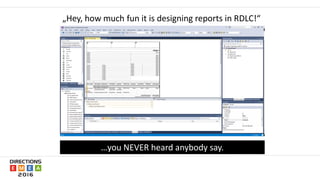
„Hey, how much fun it is designing reports in RDLC!“
…you NEVER heard anybody say.
 Did you also already invest hours
to repair an „exploded“ layout?
 NAV-Reporting now is a highly
specialized skill in NAV-development
 Many NAV-consultants were
„kicked-out“ NAV-Report-Design
 Even some NAV-developers are
„out of the game“ today
 Customers mostly can‘t
design reports any more at all.
What RDLC and Visual Studio made of us
 Upgrading old reports is time-consuming and adds high costs to upgrade-projects
 High upgrade-costs make it more likely for customers to look for other ERP-solutions
 Customers over-estimate what they can do on their own (especially during an upgrade
project)
 Some customers just want to change reports themselves and want to stay flexible
 Are you eager on changing every single formatting during support-tickets for your
customers?
The risk of the new „reporting experience“
Is native Word-Layout the answer?
 No feature before NAV 2015
 Create & Test-process is no fun at all!
 No end-user-friendly dataset
 Changes in dataset still need a developer
 Word-layout will open preview in Word…
 Graphics & diagrams ????
Where‘s the difference – Word Layouting (extract)
Use Excel-Calculations and -Charts in Word
Manipulate & Transform Data with Visual Basic
Show Data from different NAV companies in one document
Embedd existing PDFs, Graphics, Text
Generate Barcodes (1-D, 2-D)
Use easily Frames and Word SmartArt
Change page orientation per page
Define different Header and Footer per page
Insert all graphic formats that Word can import
Print to different trays
Get out of your NAV Reporting depression!
Design Reports in MS Office
Integrate data from various sources
WebService
Database Custom
SharePoint
Office 365 & on prem
MS Dynamics
CRM, NAV, AX
(online & on prem)
A technical view on dox42 NAV Document Creator
The 4 ways to access NAV data with dox42 NAV Document Creator
Table-Data
NAV-Report-Dataset
Page/Query-OData
SQL
Live-Demo
Some real-world Use Cases
• You want to combine data from different data sources
in one document
 Item data from NAV
 Item graphics from SharePoint / Office 365
 Additional item information from
another SQL-database oder Webservice
 Embedd existing Word- and PDF-documents
with additonal data into one PDF
Create easily NAV-documents using data from external data sources!
• Attach additional Datasheets, Handbooks, Maintenance-Instructions to your documents
• Make use of data that is already there, but not yet in NAV!
Embed existing PDF- and Word-snippets in your NAV-Documents!
 Some NAV-Reports already have a lot of „magic“
in it that you don‘t want to rebuild
 Use the existing data an add data from other
external data sources
 Add wonderful Excel-graphics to your Word-
report-layout
Enrich existing NAV-Reports with Excel-graphics and external data
 Some documents have to be adapted manually to a special situation
• Like quotes that have to be adapted to every single situation „by hand“
• This documents are often not generated in NAV and cost a lot of effort for the customer
• Process
 You want to create a sales quote as Word-File,
 enrich this with graphics and text and
 finally send it as PDF attachement of an E-mail
Create documents that are highly adapted to the needs of the
receiving party
 Catalogue-Creation
• You want automatically create customer-specific product catalogues
• directly from your SharePoint Online / Office365-Portal
• include graphics and
• prices from different sources
Create product-catalogues – highly customized to your customer!
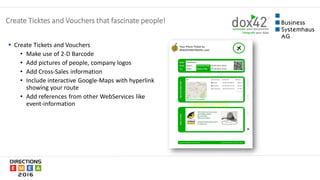
 Create Tickets and Vouchers
• Make use of 2-D Barcode
• Add pictures of people, company logos
• Add Cross-Sales information
• Include interactive Google-Maps with hyperlink
showing your route
• Add references from other WebServices like
event-information
Create Ticktes and Vouchers that fascinate people!
 Create a PowerPoint-presentation of your Sales-Team with graphics
• Load pictures of your Sales-People from SharePoint
• Load sales-data from NAV and put it into an Excel graphic
Automate PowerPoint-generation based on NAV data!
 Display KPIs/information on Info-Screens to your staff
 Show your employees important information they need to be productive and informed
Display KPIs on your Info-Screens with PowerPoint-automation
Thank You!
Himmelkronstr. 18 | 95445 Bayreuth | GERMANY
Telefon: +49 921 - 5950 | Telefax: + 49 921 - 59595
https://www.bsh-ag.de | info@bsh-ag.de
Vegagasse 5/2 | 1190 Vienna | AUSTRIA
http://www.dox42.com | info@dox42.com
Feature-Comparison
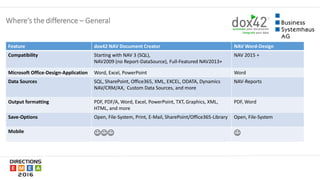
Where‘s the difference – General
Feature dox42 NAV Document Creator NAV Word-Design
Compatibility Starting with NAV 3 (SQL),
NAV2009 (no Report-DataSource), Full-Featured NAV2013+
NAV 2015 +
Microsoft Office-Design-Application Word, Excel, PowerPoint Word
Data Sources SQL, SharePoint, Office365, XML, EXCEL, ODATA, Dynamics
NAV/CRM/AX, Custom Data Sources, and more
NAV-Reports
Output formatting PDF, PDF/A, Word, Excel, PowerPoint, TXT, Graphics, XML,
HTML, and more
PDF, Word
Save-Options Open, File-System, Print, E-Mail, SharePoint/Office365-Library Open, File-System
Mobile  
Additional Ressources
YouTube-Videos
https://www.youtube.com/watch?v=CzqnS9xXG10 https://www.youtube.com/watch?v=ba4i_aB878s
Product-Landing-Page
https://www.bsh-ag.de/produkt/dynamics-
nav/module-fuer-dynamics-nav/dox42-nav-
document-creator-english/
http://www.dox42.com/Modules/dox42-
Dynamics-NAV
dox42 Landing-Page
http://www.dox42.com/

dox42 NAV Document Creator (in English)

  • 2.
    Welcome to oursession! Michael Zettl Christian Bauer General Manager CEO Business Systemhaus AG dox42 GmbH M.Zettl@bsh-ag.de Christian.Bauer@dox42.com @MikeAtBSH @ChristianB42 michaelzettl bauer42
  • 3.
    What RDLC andVisual Studio made of us…
  • 4.
    „Hey, how muchfun it is designing reports in RDLC!“ …you NEVER heard anybody say.
  • 5.
     Did youalso already invest hours to repair an „exploded“ layout?  NAV-Reporting now is a highly specialized skill in NAV-development  Many NAV-consultants were „kicked-out“ NAV-Report-Design  Even some NAV-developers are „out of the game“ today  Customers mostly can‘t design reports any more at all. What RDLC and Visual Studio made of us
  • 6.
     Upgrading oldreports is time-consuming and adds high costs to upgrade-projects  High upgrade-costs make it more likely for customers to look for other ERP-solutions  Customers over-estimate what they can do on their own (especially during an upgrade project)  Some customers just want to change reports themselves and want to stay flexible  Are you eager on changing every single formatting during support-tickets for your customers? The risk of the new „reporting experience“
  • 7.
    Is native Word-Layoutthe answer?  No feature before NAV 2015  Create & Test-process is no fun at all!  No end-user-friendly dataset  Changes in dataset still need a developer  Word-layout will open preview in Word…  Graphics & diagrams ????
  • 8.
    Where‘s the difference– Word Layouting (extract) Use Excel-Calculations and -Charts in Word Manipulate & Transform Data with Visual Basic Show Data from different NAV companies in one document Embedd existing PDFs, Graphics, Text Generate Barcodes (1-D, 2-D) Use easily Frames and Word SmartArt Change page orientation per page Define different Header and Footer per page Insert all graphic formats that Word can import Print to different trays
  • 9.
    Get out ofyour NAV Reporting depression!
  • 10.
  • 11.
    Integrate data fromvarious sources WebService Database Custom SharePoint Office 365 & on prem MS Dynamics CRM, NAV, AX (online & on prem)
  • 12.
    A technical viewon dox42 NAV Document Creator
  • 13.
    The 4 waysto access NAV data with dox42 NAV Document Creator Table-Data NAV-Report-Dataset Page/Query-OData SQL
  • 14.
  • 15.
  • 16.
    • You wantto combine data from different data sources in one document  Item data from NAV  Item graphics from SharePoint / Office 365  Additional item information from another SQL-database oder Webservice  Embedd existing Word- and PDF-documents with additonal data into one PDF Create easily NAV-documents using data from external data sources!
  • 17.
    • Attach additionalDatasheets, Handbooks, Maintenance-Instructions to your documents • Make use of data that is already there, but not yet in NAV! Embed existing PDF- and Word-snippets in your NAV-Documents!
  • 18.
     Some NAV-Reportsalready have a lot of „magic“ in it that you don‘t want to rebuild  Use the existing data an add data from other external data sources  Add wonderful Excel-graphics to your Word- report-layout Enrich existing NAV-Reports with Excel-graphics and external data
  • 19.
     Some documentshave to be adapted manually to a special situation • Like quotes that have to be adapted to every single situation „by hand“ • This documents are often not generated in NAV and cost a lot of effort for the customer • Process  You want to create a sales quote as Word-File,  enrich this with graphics and text and  finally send it as PDF attachement of an E-mail Create documents that are highly adapted to the needs of the receiving party
  • 20.
     Catalogue-Creation • Youwant automatically create customer-specific product catalogues • directly from your SharePoint Online / Office365-Portal • include graphics and • prices from different sources Create product-catalogues – highly customized to your customer!
  • 21.
     Create Ticketsand Vouchers • Make use of 2-D Barcode • Add pictures of people, company logos • Add Cross-Sales information • Include interactive Google-Maps with hyperlink showing your route • Add references from other WebServices like event-information Create Ticktes and Vouchers that fascinate people!
  • 22.
     Create aPowerPoint-presentation of your Sales-Team with graphics • Load pictures of your Sales-People from SharePoint • Load sales-data from NAV and put it into an Excel graphic Automate PowerPoint-generation based on NAV data!
  • 23.
     Display KPIs/informationon Info-Screens to your staff  Show your employees important information they need to be productive and informed Display KPIs on your Info-Screens with PowerPoint-automation
  • 25.
    Thank You! Himmelkronstr. 18| 95445 Bayreuth | GERMANY Telefon: +49 921 - 5950 | Telefax: + 49 921 - 59595 https://www.bsh-ag.de | info@bsh-ag.de Vegagasse 5/2 | 1190 Vienna | AUSTRIA http://www.dox42.com | info@dox42.com
  • 26.
  • 27.
    Where‘s the difference– General Feature dox42 NAV Document Creator NAV Word-Design Compatibility Starting with NAV 3 (SQL), NAV2009 (no Report-DataSource), Full-Featured NAV2013+ NAV 2015 + Microsoft Office-Design-Application Word, Excel, PowerPoint Word Data Sources SQL, SharePoint, Office365, XML, EXCEL, ODATA, Dynamics NAV/CRM/AX, Custom Data Sources, and more NAV-Reports Output formatting PDF, PDF/A, Word, Excel, PowerPoint, TXT, Graphics, XML, HTML, and more PDF, Word Save-Options Open, File-System, Print, E-Mail, SharePoint/Office365-Library Open, File-System Mobile  
  • 28.
  • 29.
  • 30.
  • 31.