Optimizing public
facing SharePoint sites
Gunnar Peipman
IIS/ASP.NET MVP
http://weblogs.asp.net/gunnarpeipman/
me@gunnarpeipman.com
About me
 Name: Gunnar Peipman
 From: Tallinn, Estonia
 MVP: ASP.NET MVP for 4
years
 Job: developer, architect
and consultant
 Community: ENETA,
speaker, blogger
 Hobbies: new technology,
heavy metal, beers,
national cuisines, travelling
 Happy boyfriend, father,
step father and owner of
funny white rabbit 
Agenda
 Characteristics of public facing sites
 Why SharePoint Publishing Infrastructure?
 Caching files
 Output cache
 Using CDN-s
Session objectives
After this session you should understand:
 performance problems of public facing
sites
 how caching works in SharePoint
 how to plan and configure caching
 how to measure cache
Characteristics
 Accessible by anonymous users
 Harder to estimate server load
 Mostly one-way communication
(this is what MS thinks)
 Different needs (design, SEO)
 Different publishing process
SharePoint Publishing Infrastructure
 Targeted to public web sites and corporate
in-house portals
 Perfect fit for corporate information
publishing
 Publishing workflows
 Different optimization options
Caching files
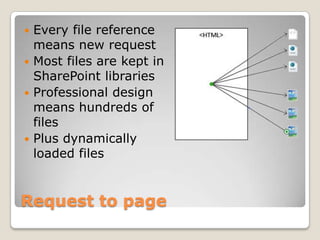
Request to page
 Every file reference
means new request
 Most files are kept in
SharePoint libraries
 Professional design
means hundreds of
files
 Plus dynamically
loaded files
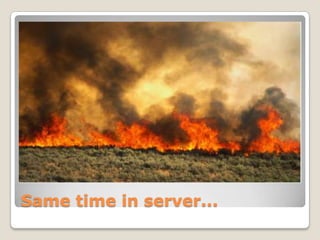
Same time in server...
What is BLOB cache?
 Files from doc libraries are cached to
front-end servers
 Perfect fit if per page load many requests
are made to server
 Perfect fit also for large files
 Support for e-tags
 You save:
◦ Some database connections and queries
◦ Loading files to database server memory
◦ Moving files from db server to web server
◦ Some traffic
How to optimize
 Keep blobs on separate physical disk
 Every front-end server must have its own
blobs folder or disk
 If disk crashes or you delete files from
blob cache you must reset blob cache
 Blob cache may slow down your site for a
moment when files are copied to disk
 When measuring start from second
request
Output cache
Caching pages
 Built on ASP.NET caching
 Output cache is served from memory
 Possible to define cache profiles
 Profiles can be assigned to page layouts
 Code-based policies
 Possible to define non-cached areas
(called also donut hole caching)
Don’t over-cache!
Again: Output cache uses server memory!
 Morning:
 Noon:
 Afternoon:
 Evening:
How to measure cache?
 Use ASP.NET and SharePoint performance
counters
 Make sure counters are not updated too
often – it puts markable load on server
 Measuring must be long enough to see
how cache is actually used
 No app-pool recycle or iisreset
 If ~85% of requests are served from
cache you are okay
Output cache
Data from real-life scenario
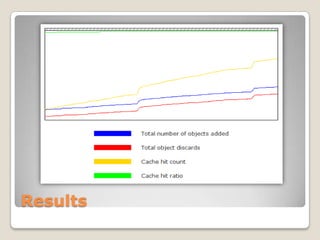
About measuring process
 Performance counters on production
 Interval 15 seconds
 Counters:
◦ Total number of objects added
◦ Total object discards
◦ Cache hit count
◦ Cache hit ratio
 Duration: 12h (work hours fully covered)
 No interruptions
Results
Content Delivery
Networks (CDN)
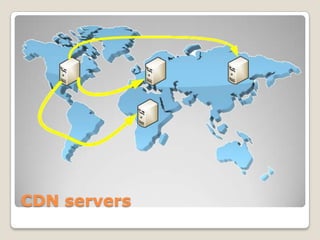
CDN servers
Using CDN-s
 Files are hosted on other servers
 Users get files from closest servers
 Many popular JS libs are available in
Google and MS CDN servers
 You can build your own CDN using
Windows Azure services
 Point of trouble: wider internet outage
Q&A
Thank you!

Optimizing public facing SharePoint sites

  • 1.
    Optimizing public facing SharePointsites Gunnar Peipman IIS/ASP.NET MVP http://weblogs.asp.net/gunnarpeipman/ me@gunnarpeipman.com
  • 2.
    About me  Name:Gunnar Peipman  From: Tallinn, Estonia  MVP: ASP.NET MVP for 4 years  Job: developer, architect and consultant  Community: ENETA, speaker, blogger  Hobbies: new technology, heavy metal, beers, national cuisines, travelling  Happy boyfriend, father, step father and owner of funny white rabbit 
  • 3.
    Agenda  Characteristics ofpublic facing sites  Why SharePoint Publishing Infrastructure?  Caching files  Output cache  Using CDN-s
  • 4.
    Session objectives After thissession you should understand:  performance problems of public facing sites  how caching works in SharePoint  how to plan and configure caching  how to measure cache
  • 5.
    Characteristics  Accessible byanonymous users  Harder to estimate server load  Mostly one-way communication (this is what MS thinks)  Different needs (design, SEO)  Different publishing process
  • 6.
    SharePoint Publishing Infrastructure Targeted to public web sites and corporate in-house portals  Perfect fit for corporate information publishing  Publishing workflows  Different optimization options
  • 7.
  • 8.
    Request to page Every file reference means new request  Most files are kept in SharePoint libraries  Professional design means hundreds of files  Plus dynamically loaded files
  • 9.
    Same time inserver...
  • 10.
    What is BLOBcache?  Files from doc libraries are cached to front-end servers  Perfect fit if per page load many requests are made to server  Perfect fit also for large files  Support for e-tags  You save: ◦ Some database connections and queries ◦ Loading files to database server memory ◦ Moving files from db server to web server ◦ Some traffic
  • 11.
    How to optimize Keep blobs on separate physical disk  Every front-end server must have its own blobs folder or disk  If disk crashes or you delete files from blob cache you must reset blob cache  Blob cache may slow down your site for a moment when files are copied to disk  When measuring start from second request
  • 12.
  • 13.
    Caching pages  Builton ASP.NET caching  Output cache is served from memory  Possible to define cache profiles  Profiles can be assigned to page layouts  Code-based policies  Possible to define non-cached areas (called also donut hole caching)
  • 14.
    Don’t over-cache! Again: Outputcache uses server memory!  Morning:  Noon:  Afternoon:  Evening:
  • 15.
    How to measurecache?  Use ASP.NET and SharePoint performance counters  Make sure counters are not updated too often – it puts markable load on server  Measuring must be long enough to see how cache is actually used  No app-pool recycle or iisreset  If ~85% of requests are served from cache you are okay
  • 16.
    Output cache Data fromreal-life scenario
  • 17.
    About measuring process Performance counters on production  Interval 15 seconds  Counters: ◦ Total number of objects added ◦ Total object discards ◦ Cache hit count ◦ Cache hit ratio  Duration: 12h (work hours fully covered)  No interruptions
  • 18.
  • 19.
  • 20.
  • 21.
    Using CDN-s  Filesare hosted on other servers  Users get files from closest servers  Many popular JS libs are available in Google and MS CDN servers  You can build your own CDN using Windows Azure services  Point of trouble: wider internet outage
  • 22.
  • 23.