www.seavus.com
With Hangfire
Background Processing
Nov. 2016
Aleksandar Bozinovski
Agenda
• Why background processing
• Options for ASP.NET applications
• Hangfire architecture
• Types of tasks
• IoC Containers
• Hosting
• Dashboard
• Demo
Page 2
Why Background Processing?
• Lengthy operations like updating lot of
records in DB
• Checking every 2 hours for new data or files
• Invoice generation at the end of every billing
period
• Monthly Reporting
• Rebuild data, indexes or search-optimized
index after data change
• Automatic subscription renewal
• Regular Mailings
• Send an email due to an action
• Background service provisioning
Page 3
Types of Background Tasks
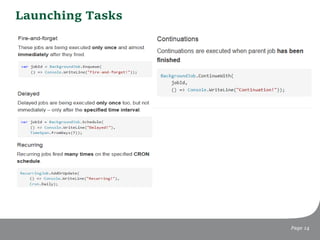
• Fire & Forget
• Lengthy operations like updating lot of records in DB
• Send an email due to an action
• Delayed
• Automatic subscription renewal
• Rebuild data, indexes or search-optimized index after data
change
• Periodic & Scheduled
• Checking every 2 hours for new data or files
• Invoice generation at the end of every billing period
• Monthly Reporting
• Regular Mailings
• Background service provisioning
Page 4
Background Processing Must be…
• Reliable
• The task must be executed. Users must gets their emails
even if the network is not available at the moment.
• For some cases, the system must be able to re-execute the
task. The invoice will be generated as soon as the database
is online.
• Main application logic is unaffected of the background
processing issues. Users will submit changes in the system
unaware that we haven’t updated search-optimized index.
• Transparent
• Monitoring. As soon as the database is not accessible, we
need to know.
• How many invoices we have left to be sent?
• Log and audit. What happened with that invoice from last
month?
Page 5
Background Processing Must be…
• Distributed
• Add more processes or servers to increase processing
power.
• Very often required for cloud solutions.
• Resilient
• Servers crash, network fails...
• Should be able to recover after crash.
• Extensible
• Processing logic can be very complex. Processes can depend
on one another.
• Sometimes we have bug in the code. We need to deploy
new version and resume the work.
Page 6
Options We Have
• Threads/TPL
• Difficult to work with
• Nightmare to debug
• Unreliable in ASP.NET
• QueueBackgroundWorkItem
• ASP.NET specific, added in version 4.5.2
• Handles App Pool recycle better than threads or TPL
• Still not reliable
Page 7
HostingEnvironment.QueueBackgroundWorkItem(ct => SendMailAsync(user.Email));
Task.Run(() => SendMailAsync(User.Identity.Name));
Options We Have
• FluentScheduler
• https://github.com/fluentscheduler/FluentScheduler
• Quartz Enterprise Scheduler .NET
• .NET port of the popular Java job scheduling framework
• http://www.quartz-scheduler.net/
Page 8
Schedule<MyTask>().ToRunNow().AndEvery(2).Seconds();
ITrigger trigger = TriggerBuilder.Create()
.WithDailyTimeIntervalSchedule
(s =>
s.WithIntervalInHours(24)
.OnEveryDay()
.StartingDailyAt(TimeOfDay.HourAndMinuteOfDay(0, 0))
)
.Build();
Enter Hangfire
Page 9
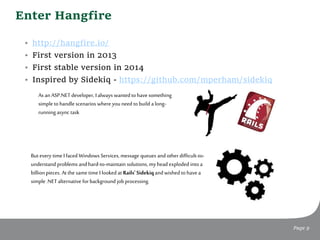
• http://hangfire.io/
• First version in 2013
• First stable version in 2014
• Inspired by Sidekiq - https://github.com/mperham/sidekiq
As an ASP.NET developer, Ialways wanted tohave something
simple tohandle scenarios where you need tobuild along-
running async task
But every time Ifaced Windows Services, message queues andother difficult-to-
understand problems andhard-to-maintain solutions, my head exploded intoa
billion pieces. At the same time Ilooked at Rails' Sidekiqandwished tohave a
simple .NET alternative forbackground job processing.
Enter Hangfire
Page 10
Hangfire Architecture
Page 11
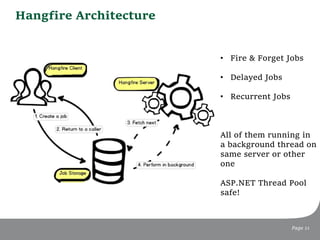
• Fire & Forget Jobs
• Delayed Jobs
• Recurrent Jobs
All of them running in
a background thread on
same server or other
one
ASP.NET Thread Pool
safe!
Persisting jobs
Page 12
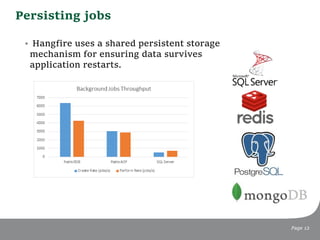
• Hangfire uses a shared persistent storage
mechanism for ensuring data survives
application restarts.
IoC
Page 13
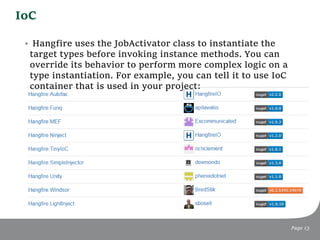
• Hangfire uses the JobActivator class to instantiate the
target types before invoking instance methods. You can
override its behavior to perform more complex logic on a
type instantiation. For example, you can tell it to use IoC
container that is used in your project:
Launching Tasks
Page 14
Batches – Pro Version
Page 15
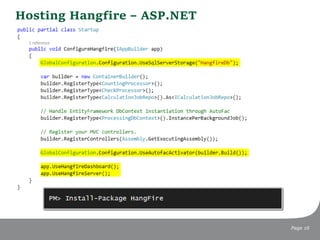
Hosting Hangfire – ASP.NET
Page 16
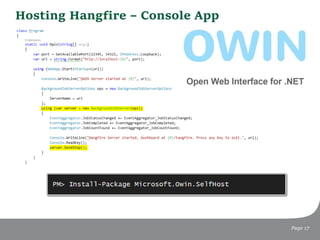
Hosting Hangfire – Console App
Page 17
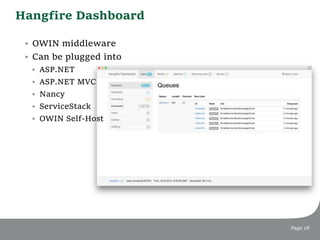
Hangfire Dashboard
Page 18
• OWIN middleware
• Can be plugged into
• ASP.NET
• ASP.NET MVC
• Nancy
• ServiceStack
• OWIN Self-Host
Hangfire Dashboard Features
Page 19
• Realtime Graph
• Queues
• History and details
• Automatic and manual
retries
Demo
Page 20
Best practices
Page 21
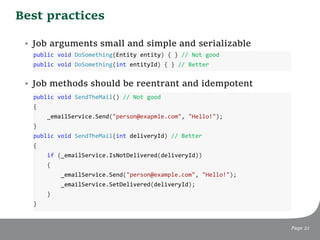
• Job arguments small and simple and serializable
• Job methods should be reentrant and idempotent
public void DoSomething(Entity entity) { } // Not good
public void DoSomething(int entityId) { } // Better
public void SendTheMail() // Not good
{
_emailService.Send("person@exapmle.com", "Hello!");
}
public void SendTheMail(int deliveryId) // Better
{
if (_emailService.IsNotDelivered(deliveryId))
{
_emailService.Send("person@example.com", "Hello!");
_emailService.SetDelivered(deliveryId);
}
}
Best practices
Page 22
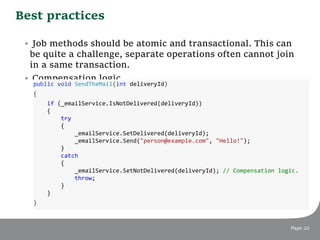
• Job methods should be atomic and transactional. This can
be quite a challenge, separate operations often cannot join
in a same transaction.
• Compensation logic.
public void SendTheMail(int deliveryId)
{
if (_emailService.IsNotDelivered(deliveryId))
{
try
{
_emailService.SetDelivered(deliveryId);
_emailService.Send("person@example.com", "Hello!");
}
catch
{
_emailService.SetNotDelivered(deliveryId); // Compensation logic.
throw;
}
}
}
Demo
Page 23
www.seavus.co
Thank You

Background processing with hangfire

  • 1.
  • 2.
    Agenda • Why backgroundprocessing • Options for ASP.NET applications • Hangfire architecture • Types of tasks • IoC Containers • Hosting • Dashboard • Demo Page 2
  • 3.
    Why Background Processing? •Lengthy operations like updating lot of records in DB • Checking every 2 hours for new data or files • Invoice generation at the end of every billing period • Monthly Reporting • Rebuild data, indexes or search-optimized index after data change • Automatic subscription renewal • Regular Mailings • Send an email due to an action • Background service provisioning Page 3
  • 4.
    Types of BackgroundTasks • Fire & Forget • Lengthy operations like updating lot of records in DB • Send an email due to an action • Delayed • Automatic subscription renewal • Rebuild data, indexes or search-optimized index after data change • Periodic & Scheduled • Checking every 2 hours for new data or files • Invoice generation at the end of every billing period • Monthly Reporting • Regular Mailings • Background service provisioning Page 4
  • 5.
    Background Processing Mustbe… • Reliable • The task must be executed. Users must gets their emails even if the network is not available at the moment. • For some cases, the system must be able to re-execute the task. The invoice will be generated as soon as the database is online. • Main application logic is unaffected of the background processing issues. Users will submit changes in the system unaware that we haven’t updated search-optimized index. • Transparent • Monitoring. As soon as the database is not accessible, we need to know. • How many invoices we have left to be sent? • Log and audit. What happened with that invoice from last month? Page 5
  • 6.
    Background Processing Mustbe… • Distributed • Add more processes or servers to increase processing power. • Very often required for cloud solutions. • Resilient • Servers crash, network fails... • Should be able to recover after crash. • Extensible • Processing logic can be very complex. Processes can depend on one another. • Sometimes we have bug in the code. We need to deploy new version and resume the work. Page 6
  • 7.
    Options We Have •Threads/TPL • Difficult to work with • Nightmare to debug • Unreliable in ASP.NET • QueueBackgroundWorkItem • ASP.NET specific, added in version 4.5.2 • Handles App Pool recycle better than threads or TPL • Still not reliable Page 7 HostingEnvironment.QueueBackgroundWorkItem(ct => SendMailAsync(user.Email)); Task.Run(() => SendMailAsync(User.Identity.Name));
  • 8.
    Options We Have •FluentScheduler • https://github.com/fluentscheduler/FluentScheduler • Quartz Enterprise Scheduler .NET • .NET port of the popular Java job scheduling framework • http://www.quartz-scheduler.net/ Page 8 Schedule<MyTask>().ToRunNow().AndEvery(2).Seconds(); ITrigger trigger = TriggerBuilder.Create() .WithDailyTimeIntervalSchedule (s => s.WithIntervalInHours(24) .OnEveryDay() .StartingDailyAt(TimeOfDay.HourAndMinuteOfDay(0, 0)) ) .Build();
  • 9.
    Enter Hangfire Page 9 •http://hangfire.io/ • First version in 2013 • First stable version in 2014 • Inspired by Sidekiq - https://github.com/mperham/sidekiq As an ASP.NET developer, Ialways wanted tohave something simple tohandle scenarios where you need tobuild along- running async task But every time Ifaced Windows Services, message queues andother difficult-to- understand problems andhard-to-maintain solutions, my head exploded intoa billion pieces. At the same time Ilooked at Rails' Sidekiqandwished tohave a simple .NET alternative forbackground job processing.
  • 10.
  • 11.
    Hangfire Architecture Page 11 •Fire & Forget Jobs • Delayed Jobs • Recurrent Jobs All of them running in a background thread on same server or other one ASP.NET Thread Pool safe!
  • 12.
    Persisting jobs Page 12 •Hangfire uses a shared persistent storage mechanism for ensuring data survives application restarts.
  • 13.
    IoC Page 13 • Hangfireuses the JobActivator class to instantiate the target types before invoking instance methods. You can override its behavior to perform more complex logic on a type instantiation. For example, you can tell it to use IoC container that is used in your project:
  • 14.
  • 15.
    Batches – ProVersion Page 15
  • 16.
    Hosting Hangfire –ASP.NET Page 16
  • 17.
    Hosting Hangfire –Console App Page 17
  • 18.
    Hangfire Dashboard Page 18 •OWIN middleware • Can be plugged into • ASP.NET • ASP.NET MVC • Nancy • ServiceStack • OWIN Self-Host
  • 19.
    Hangfire Dashboard Features Page19 • Realtime Graph • Queues • History and details • Automatic and manual retries
  • 20.
  • 21.
    Best practices Page 21 •Job arguments small and simple and serializable • Job methods should be reentrant and idempotent public void DoSomething(Entity entity) { } // Not good public void DoSomething(int entityId) { } // Better public void SendTheMail() // Not good { _emailService.Send("person@exapmle.com", "Hello!"); } public void SendTheMail(int deliveryId) // Better { if (_emailService.IsNotDelivered(deliveryId)) { _emailService.Send("person@example.com", "Hello!"); _emailService.SetDelivered(deliveryId); } }
  • 22.
    Best practices Page 22 •Job methods should be atomic and transactional. This can be quite a challenge, separate operations often cannot join in a same transaction. • Compensation logic. public void SendTheMail(int deliveryId) { if (_emailService.IsNotDelivered(deliveryId)) { try { _emailService.SetDelivered(deliveryId); _emailService.Send("person@example.com", "Hello!"); } catch { _emailService.SetNotDelivered(deliveryId); // Compensation logic. throw; } } }
  • 23.
  • 24.

Editor's Notes

  • #13 RDB = Point in time snapshot AOF = Append Only File
  • #22 Idempotence = Operation that can be applied multiple times without changing the result beyond the initial application.  Reentrancy = Subroutine is called reentrant if it can be interrupted in the middle of its execution, and then be safely called again ("re-entered") before its previous invocations complete execution.