
We will be starting momentarily.
For Audio Please Dial:
Conference Call 888.481.3032
Passcode 75892620#
Press *6 to mute phone on/off


                                Hum
Hum works the way minds work, Hum
works for the environment.


                     Hum
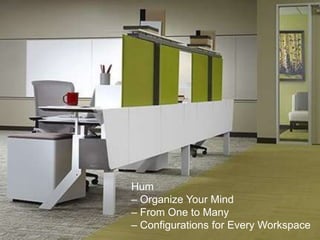
Hum
– Organize Your Mind
– From One to Many
– Configurations for Every Workspace
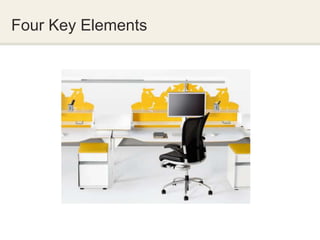
Four Key Elements
Four Key Elements


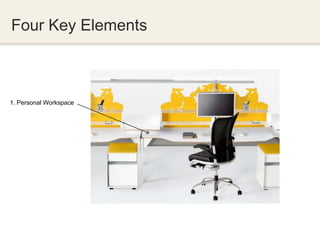
1. Personal Workspace
Four Key Elements


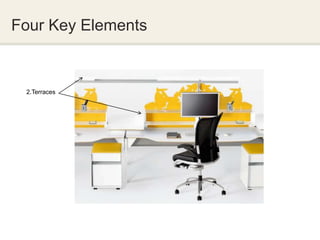
 2.Terraces
Four Key Elements


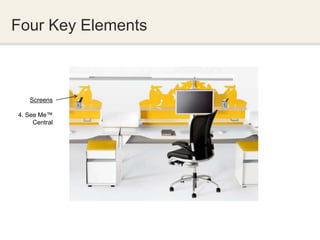
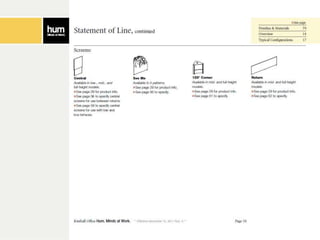
    Screens

4. See Me™
     Central
Four Key Elements


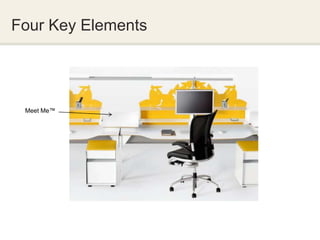
 Meet Me™
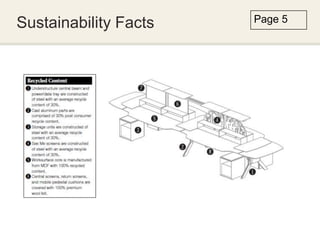
Sustainability Facts   Page 5
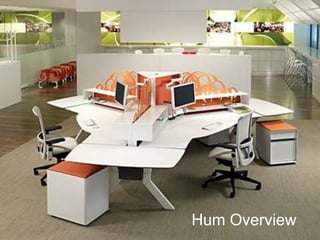
Hum Overview
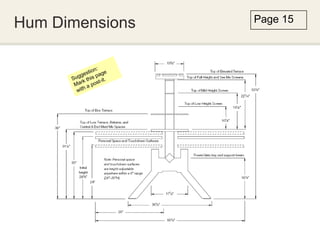
Hum Dimensions   Page 15
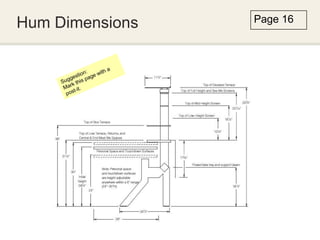
Hum Dimensions   Page 16
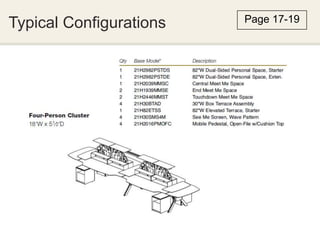
Typical Configurations   Page 17-19
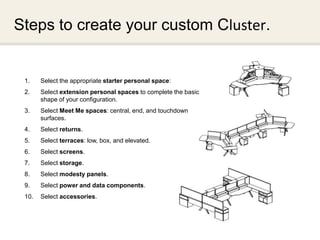
Steps to create your custom Cluster.


 1.    Select the appropriate starter personal space:
 2.    Select extension personal spaces to complete the basic
       shape of your configuration.
 3.    Select Meet Me spaces: central, end, and touchdown
       surfaces.
 4.    Select returns.
 5.    Select terraces: low, box, and elevated.
 6.    Select screens.
 7.    Select storage.
 8.    Select modesty panels.
 9.    Select power and data components.
 10.   Select accessories.
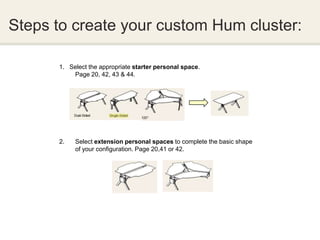
Steps to create your custom Hum cluster:

      1. Select the appropriate starter personal space.
          Page 20, 42, 43 & 44.


      2.   Select extension personal spaces to complete the basic shape
           of your configuration. Page 20,41 or 42.
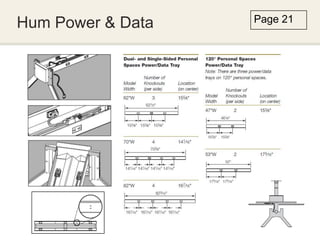
Hum Power & Data   Page 21
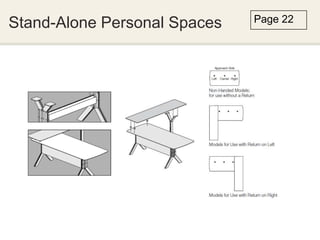
Stand-Alone Personal Spaces   Page 22
Steps to create your custom Hum cluster:

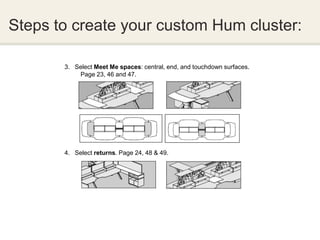
       3. Select Meet Me spaces: central, end, and touchdown surfaces.
           Page 23, 46 and 47.


       4. Select returns. Page 24, 48 & 49.
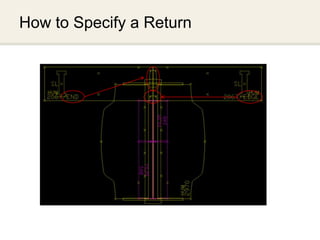
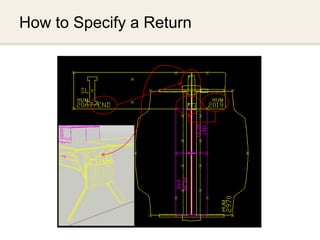
How to Specify a Return
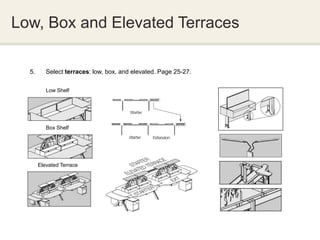
Low, Box and Elevated Terraces

  5.      Select terraces: low, box, and elevated. Page 25-27.

          Low Shelf


          Box Shelf


       Elevated Terrace
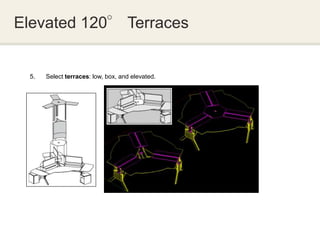
Elevated 120° Terraces


  5.   Select terraces: low, box, and elevated.
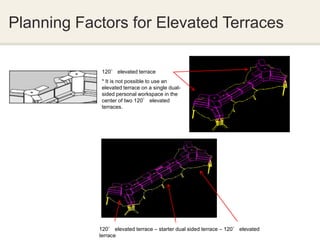
Planning Factors for Elevated Terraces

             120° elevated terrace
             * It is not possible to use an
             elevated terrace on a single dual-
             sided personal workspace in the
             center of two 120° elevated
             terraces.


            120° elevated terrace – starter dual sided terrace – 120° elevated
            terrace
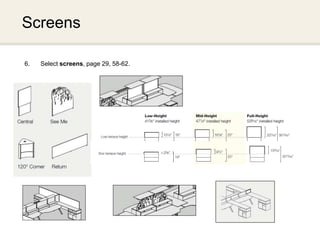
Screens

6.   Select screens, page 29, 58-62.


.


                                       INTERWORKS
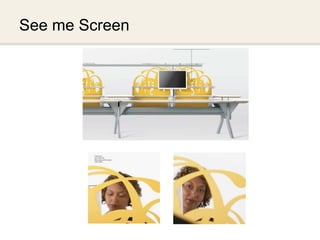
See me Screen
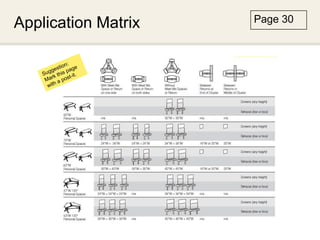
Application Matrix   Page 30


                      INTERWORKS
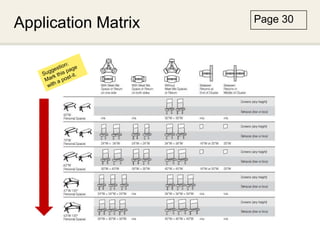
Application Matrix   Page 30


                      INTERWORKS
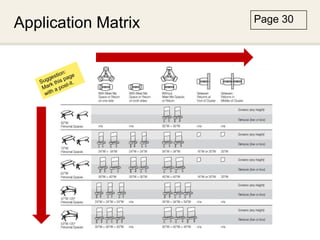
Application Matrix   Page 30


                      INTERWORKS
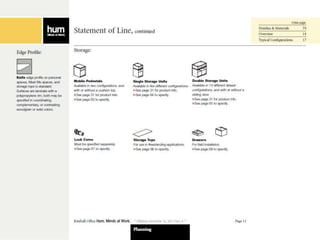
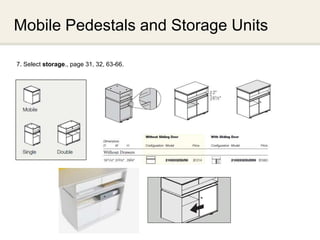
Mobile Pedestals and Storage Units

7. Select storage., page 31, 32, 63-66.


                                          INTERWORKS
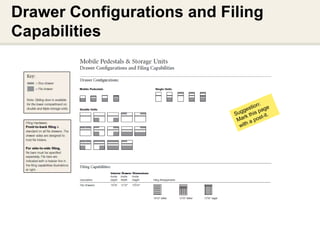
Drawer Configurations and Filing
Capabilities


                               INTERWORKS
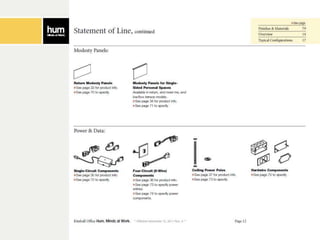
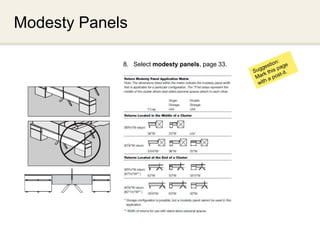
Modesty Panels

             8. Select modesty panels, page 33.


                                                  INTERWORKS
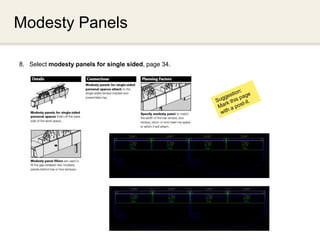
Modesty Panels

8. Select modesty panels for single sided, page 34.


                                                      INTERWORKS
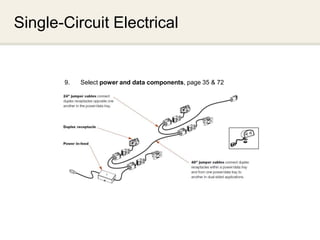
Single-Circuit Electrical


       9.   Select power and data components, page 35 & 72


                                                             INTERWORKS
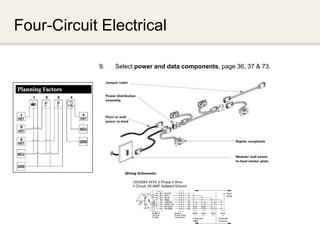
Four-Circuit Electrical

            9.   Select power and data components, page 36, 37 & 73.


                                                                INTERWORKS
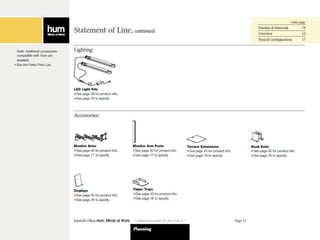
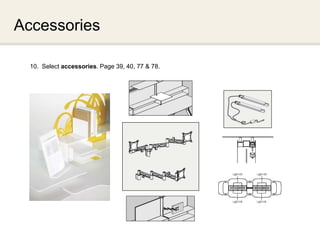
Accessories

  10. Select accessories. Page 39, 40, 77 & 78.


                                                  INTERWORKS
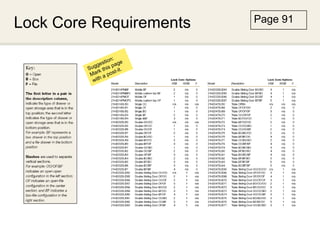
Lock Core Requirements   Page 91


                          INTERWORKS
Kimball Office
   Resources
      Dealer Sales Manager
            Sales Specialist

  Customer Care/ By Design
             800.482.1818

   Product Technical Support
              800.481.6696

  Regional Product Specifier

              Alibia de Vente
            Market Education
             770.265.4006 or
 Alibia.devente@kimball.com
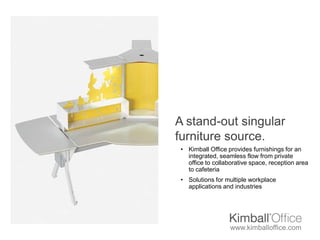
A stand-out singular
furniture source.
 • Kimball Office provides furnishings for an
   integrated, seamless flow from private
   office to collaborative space, reception area
   to cafeteria
 • Solutions for multiple workplace
   applications and industries


                   www.kimballoffice.com
This author of this presentation is Alibia de Vente,
as part of the Market Education team of Kimball
Office. If you have any questions/ comments
please email alibia.devente@kimball.com


                     www.kimballoffice.com
                     Hum

2012 Hum Specification Presentation

  • 1.
    We will bestarting momentarily. For Audio Please Dial: Conference Call 888.481.3032 Passcode 75892620# Press *6 to mute phone on/off Hum
  • 2.
    Hum works theway minds work, Hum works for the environment. Hum
  • 3.
    Hum – Organize YourMind – From One to Many – Configurations for Every Workspace
  • 4.
  • 5.
    Four Key Elements 1.Personal Workspace
  • 6.
  • 7.
    Four Key Elements Screens 4. See Me™ Central
  • 8.
  • 9.
  • 16.
  • 17.
  • 18.
  • 19.
  • 20.
    Steps to createyour custom Cluster. 1. Select the appropriate starter personal space: 2. Select extension personal spaces to complete the basic shape of your configuration. 3. Select Meet Me spaces: central, end, and touchdown surfaces. 4. Select returns. 5. Select terraces: low, box, and elevated. 6. Select screens. 7. Select storage. 8. Select modesty panels. 9. Select power and data components. 10. Select accessories.
  • 21.
    Steps to createyour custom Hum cluster: 1. Select the appropriate starter personal space. Page 20, 42, 43 & 44. 2. Select extension personal spaces to complete the basic shape of your configuration. Page 20,41 or 42.
  • 22.
    Hum Power &Data Page 21
  • 23.
  • 24.
    Steps to createyour custom Hum cluster: 3. Select Meet Me spaces: central, end, and touchdown surfaces. Page 23, 46 and 47. 4. Select returns. Page 24, 48 & 49.
  • 25.
  • 26.
  • 27.
    Low, Box andElevated Terraces 5. Select terraces: low, box, and elevated. Page 25-27. Low Shelf Box Shelf Elevated Terrace
  • 28.
    Elevated 120° Terraces 5. Select terraces: low, box, and elevated.
  • 29.
    Planning Factors forElevated Terraces 120° elevated terrace * It is not possible to use an elevated terrace on a single dual- sided personal workspace in the center of two 120° elevated terraces. 120° elevated terrace – starter dual sided terrace – 120° elevated terrace
  • 30.
    Screens 6. Select screens, page 29, 58-62. . INTERWORKS
  • 31.
  • 32.
    Application Matrix Page 30 INTERWORKS
  • 33.
    Application Matrix Page 30 INTERWORKS
  • 34.
    Application Matrix Page 30 INTERWORKS
  • 35.
    Mobile Pedestals andStorage Units 7. Select storage., page 31, 32, 63-66. INTERWORKS
  • 36.
    Drawer Configurations andFiling Capabilities INTERWORKS
  • 37.
    Modesty Panels 8. Select modesty panels, page 33. INTERWORKS
  • 38.
    Modesty Panels 8. Selectmodesty panels for single sided, page 34. INTERWORKS
  • 39.
    Single-Circuit Electrical 9. Select power and data components, page 35 & 72 INTERWORKS
  • 40.
    Four-Circuit Electrical 9. Select power and data components, page 36, 37 & 73. INTERWORKS
  • 41.
    Accessories 10.Select accessories. Page 39, 40, 77 & 78. INTERWORKS
  • 42.
    Lock Core Requirements Page 91 INTERWORKS
  • 43.
    Kimball Office Resources Dealer Sales Manager Sales Specialist Customer Care/ By Design 800.482.1818 Product Technical Support 800.481.6696 Regional Product Specifier Alibia de Vente Market Education 770.265.4006 or Alibia.devente@kimball.com
  • 44.
    A stand-out singular furnituresource. • Kimball Office provides furnishings for an integrated, seamless flow from private office to collaborative space, reception area to cafeteria • Solutions for multiple workplace applications and industries www.kimballoffice.com
  • 45.
    This author ofthis presentation is Alibia de Vente, as part of the Market Education team of Kimball Office. If you have any questions/ comments please email alibia.devente@kimball.com www.kimballoffice.com Hum

Editor's Notes

  • #3 All images are taken from public sources of content provided by Kimball Office. The sources of content include assembly instructions, pricelists and website references.
  • #5 Four Key Elements, page 3.
  • #6 Four Key Elements, page 3.Personal Workspace is required. Surface is cut towards the user. Surfaces are adjustable during installation for a variety of needs.
  • #7 Four Key Elements, page 3.The low shelf terrace or box terrace is required.- Terraces create an importance of what you are working on that is important. Upper terrace is optional. Each side size can differ based on use. A low shelf can be used in combination to a box shelf either in the left or right position. Terraces must span entire surface minus and returns or meet me’s.
  • #8 Four Key Elements, page 3.See Me™ screens are available is 4 fun organic shapes like terrain, foliage, wave and gem. You may request the neonet as a special from customer care. Central screens are covered in felt in either a low, mid and full-height option for privacy. Screens are not required however when specified they match the width of the terrace.
  • #9 Four Key Elements, page 3.Meet Me spaces are for creating collaboration in the work environment. Meet Me spaces can also support technology. In lieu of a meet me space you may want to consider a return.
  • #10 Sustainability Facts, page 4.- Hum is recyclable at the end of life.- Meets USGBC LEED indoor air quality requirements.- Powder coat process is virtually VOC free and nearly 0% waste.
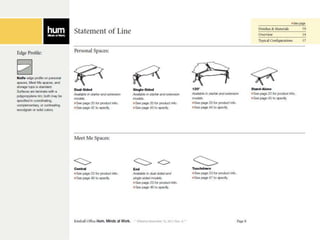
  • #11 Statement of Line, page 8.
  • #12 Statement of Line, page 9.
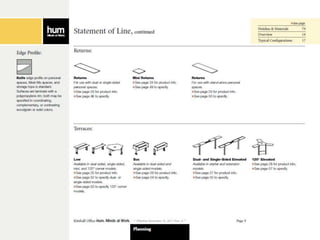
  • #13 Statement of Line, page 10.
  • #14 Statement of Line, page 11.
  • #15 Statement of Line, page 12.
  • #16 Statement of Line, page 13.
  • #17 Overview, page 12.- Surfaces have a knife profile.
  • #18 Hum Dimensions, page 13.The support outlined is for a dual and 120° stations.Worksurface heights can be adjusted anywhere between 24” and 30”. Initial height is set at 28 ¾”. Worksurface adjustments can be made with a 5mm Allen wrench.*This page is marked with a post-it as it is a critical page as a specification reference.
  • #19 Hum Dimensions, page 14.Notice the floor support. Single-sided units cannot connect to dual or 120° stations. *This page is marked with a post-it as it is a critical page as a specification reference.
  • #20 Typical Configurations, page 15.- The average cost of a typical cluster is comparative to a cluster of typical workstations. - Do remember that options and finishes can effect cost.
  • #21 Follow these steps to create your custom dual-sided , 120⁰ or single-sided cluster.
  • #22 Steps to create your custom cluster:Personal Workspaces dual and single sided are available in 62”, 70” & 82”. 120° personal workspaces are available 62” and 72”.Extension surfaces are available in the same dimensions. You cannot connect a single sided unit to dual or 120° however dual and 120° can be connected.
  • #23 Hum Power & Data, page 21. The number of electrical/ data ports depend on the width of your personal workspace. The number of ports facing the user is the same facing the floor. Electrical is simply laid into the trough. Cables can be tied to the structure with cable ties. Cords are routed within the layers of the workstation.
  • #24 Stand-Alone Personal Spaces, page 22. Options include a return left or right. Grommets can be position left, right or center. This is a private office solution given the very contemporary aesthetic of this product.
  • #25 Steps to create your custom cluster:You cannot place a Meet Me and Return in the same position.3. Central and End Meet Me spaces mount at 31 1/8”. Touchdown Meet Me spaces mount at the same height as personal spaces to provide a collaboration space at the end of a cluster. Adjustable to 24” to 30” similar to a personal workspace.4. Returns mount at the same height as Meet Me surfaces and are placed in the same position.
  • #26 How to Specify a Return Return sizes do not have to match as shown. You may use a 67” on one side with an 82” on the other or a mini return. Bracket specification should be a edge and end at the end of a cluster. A mini-return ships with an edge bracket. A return must be used on both sides to cover the center support where electrical and data are located. Having a return, central or end meet me changes the width of the low or low box terrace.
  • #27 How to specify a Return Return sizes do not have to match as shown. You may use a 67” on one side with an 82” on the other or a mini return. Bracket specification should be a edge and end at the end of a cluster. A mini-return ships with an edge bracket. A return must be used on both sides to cover the center support where electrical and data are located. Having a return, central or end meet me changes the width of the low or low box terrace.
  • #28 Low, Box and Elevated Terrace, page 25-27.- Terrace sizes are 24,30,34 and 40. The size used will vary based on personal workspace.- Single or dual-sided low terrace.- Single-sided mini low terrace is used when a modesty is not used.
  • #29 Elevated 120° Terrace, page 23.Low shelf is required. Elevated terrace comes with screen that is spray adhered onto steel.
  • #32 There is a science behind the screen ratio in contrast to the visible background. Creating a specific design can be accommodated however there are design parameters.
  • #44 Kimball Office Resources- On kimballoffice.com we offer a comprehensive information regarding products and services by our organization. If you do not know your regional product specifier that introduction can be made for you. A copy of today’s presentation and support materials will be provided after this web conference as follow-up.