WEB 2.0
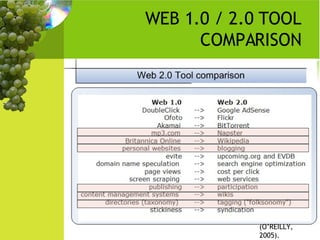
WEB 1.0 / 2.0 TOOL COMPARISON (O’REILLY, 2005).
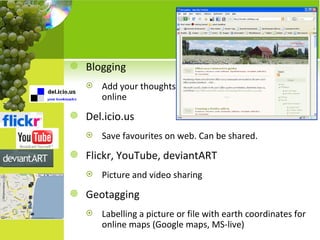
Blogging Add your thoughts online Del.icio.us Save favourites on web. Can be shared. Flickr, YouTube, deviantART Picture and video sharing Geotagging Labelling a picture or file with earth coordinates for online maps (Google maps, MS-live)
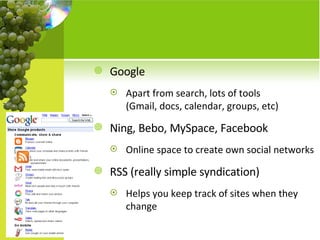
Google Apart from search, lots of tools  (Gmail, docs, calendar, groups, etc) Ning, Bebo, MySpace, Facebook Online space to create own social networks RSS (really simple syndication) Helps you keep track of sites when they change
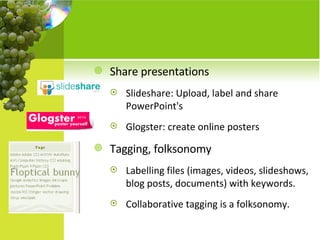
Share presentations  Slideshare: Upload, label and share PowerPoint's Glogster: create online posters Tagging, folksonomy Labelling files (images, videos, slideshows, blog posts, documents) with keywords.  Collaborative tagging is a folksonomy.
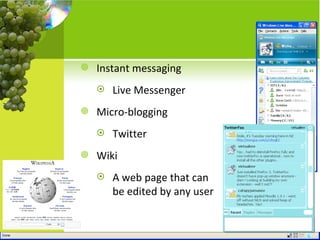
Instant messaging Live Messenger Micro-blogging Twitter Wiki A web page that can be edited by any user
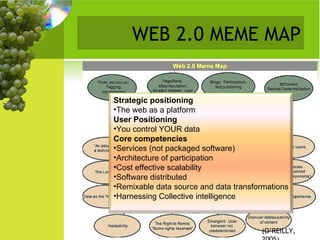
WEB 2.0 MEME MAP (O’REILLY, 2005). Strategic positioning The web as a platform User Positioning You control YOUR data Core competencies Services (not packaged software) Architecture of participation Cost effective scalability Software distributed Remixable data source and data transformations Harnessing Collective intelligence
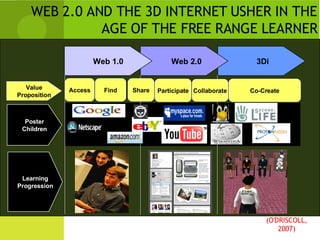
WEB 2.0 AND THE 3D INTERNET USHER IN THE AGE OF THE FREE RANGE LEARNER 3Di  Web 2.0 (O'DRISCOLL, 2007) Web 1.0 Access Participate Value Proposition Poster Children Find Share Collaborate Co-Create Learning Progression
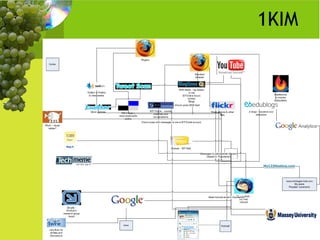
VIRTUALMV eitOnline (Moodle @ eit) email EIT, Google ( [email_address] ), yahoo (flickr), Telecom (xtra, yahoo) MSN EIT colleagues, Massey University research group, family Del.icio.us Twitter (virtualmv) Flickr  Glogster  ( http://virtualmv.glogster.com/Web-20---personal-issues/  ) Web site ( http://www.virtualmv.com ) Blog ( http://virtualmv.edublogs.org )  also a personal one with blogger.com Second Life (vmv)
1KIM
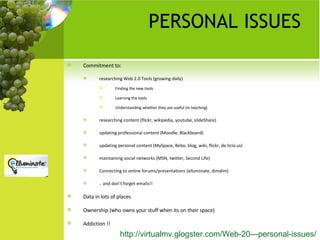
PERSONAL ISSUES Commitment to: researching Web 2.0 Tools (growing daily)  Finding the new tools Learning the tools  Understanding whether they are useful (in teaching) researching content (flickr, wikipedia, youtube, slideShare) updating professional content (Moodle, Blackboard) updating personal content (MySpace, Bebo, blog, wiki, flickr, de.licio.us) maintaining social networks (MSN, twitter, Second Life) Connecting to online forums/presentations (elluminate, dimdim) .. and don’t forget emails!! Data in lots of places Ownership (who owns your stuff when its on their space) Addiction !! http://virtualmv.glogster.com/Web-20---personal-issues/
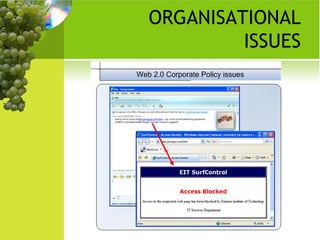
ORGANISATIONAL ISSUES
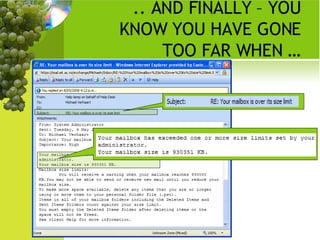
.. AND FINALLY – YOU KNOW YOU HAVE GONE TOO FAR WHEN …
REFERENCES O'Driscoll , T. (2007)  Welcome to the Era of the Free Range Learner: How Web 2.0 and the 3D Internet are Changing the Game in Learning . [PowerPoint slides]. eLearn 2008 keynote  presentation.  Retrieved June 21, 2008, from  eLearn web site  http://www.aace.org/conf/eLearn/2007%20eLearn%201019307%20Part%202.ppt   O’Reilly, T. (2005).  What is Web 2.0.  Retrieved April 27, 2008, from  http://www.oreillynet.com/pub/a/oreilly/tim/news/2005/09/30/what-is-web-20.html   Michael Verhaart, EIT Hawkes Bay,  URL:  http://www.virtualmv.com Blog:  http://virtualmv.edublogs.org

2008 Verhaart Naccq Web2 0m

  • 1.
  • 2.
    WEB 1.0 /2.0 TOOL COMPARISON (O’REILLY, 2005).
  • 3.
    Blogging Add yourthoughts online Del.icio.us Save favourites on web. Can be shared. Flickr, YouTube, deviantART Picture and video sharing Geotagging Labelling a picture or file with earth coordinates for online maps (Google maps, MS-live)
  • 4.
    Google Apart fromsearch, lots of tools (Gmail, docs, calendar, groups, etc) Ning, Bebo, MySpace, Facebook Online space to create own social networks RSS (really simple syndication) Helps you keep track of sites when they change
  • 5.
    Share presentations Slideshare: Upload, label and share PowerPoint's Glogster: create online posters Tagging, folksonomy Labelling files (images, videos, slideshows, blog posts, documents) with keywords. Collaborative tagging is a folksonomy.
  • 6.
    Instant messaging LiveMessenger Micro-blogging Twitter Wiki A web page that can be edited by any user
  • 7.
    WEB 2.0 MEMEMAP (O’REILLY, 2005). Strategic positioning The web as a platform User Positioning You control YOUR data Core competencies Services (not packaged software) Architecture of participation Cost effective scalability Software distributed Remixable data source and data transformations Harnessing Collective intelligence
  • 8.
    WEB 2.0 ANDTHE 3D INTERNET USHER IN THE AGE OF THE FREE RANGE LEARNER 3Di Web 2.0 (O'DRISCOLL, 2007) Web 1.0 Access Participate Value Proposition Poster Children Find Share Collaborate Co-Create Learning Progression
  • 9.
    VIRTUALMV eitOnline (Moodle@ eit) email EIT, Google ( [email_address] ), yahoo (flickr), Telecom (xtra, yahoo) MSN EIT colleagues, Massey University research group, family Del.icio.us Twitter (virtualmv) Flickr Glogster ( http://virtualmv.glogster.com/Web-20---personal-issues/ ) Web site ( http://www.virtualmv.com ) Blog ( http://virtualmv.edublogs.org ) also a personal one with blogger.com Second Life (vmv)
  • 10.
  • 11.
    PERSONAL ISSUES Commitmentto: researching Web 2.0 Tools (growing daily) Finding the new tools Learning the tools Understanding whether they are useful (in teaching) researching content (flickr, wikipedia, youtube, slideShare) updating professional content (Moodle, Blackboard) updating personal content (MySpace, Bebo, blog, wiki, flickr, de.licio.us) maintaining social networks (MSN, twitter, Second Life) Connecting to online forums/presentations (elluminate, dimdim) .. and don’t forget emails!! Data in lots of places Ownership (who owns your stuff when its on their space) Addiction !! http://virtualmv.glogster.com/Web-20---personal-issues/
  • 12.
  • 13.
    .. AND FINALLY– YOU KNOW YOU HAVE GONE TOO FAR WHEN …
  • 14.
    REFERENCES O'Driscoll ,T. (2007) Welcome to the Era of the Free Range Learner: How Web 2.0 and the 3D Internet are Changing the Game in Learning . [PowerPoint slides]. eLearn 2008 keynote presentation. Retrieved June 21, 2008, from eLearn web site http://www.aace.org/conf/eLearn/2007%20eLearn%201019307%20Part%202.ppt O’Reilly, T. (2005). What is Web 2.0. Retrieved April 27, 2008, from http://www.oreillynet.com/pub/a/oreilly/tim/news/2005/09/30/what-is-web-20.html Michael Verhaart, EIT Hawkes Bay, URL: http://www.virtualmv.com Blog: http://virtualmv.edublogs.org