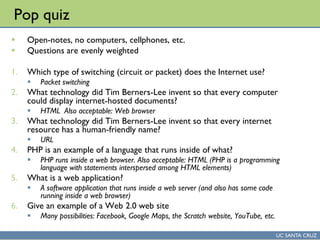
Historical evolution of programming languages
Computer Programming Technology
Dr. L.T.M. Muungo, PhD
UC SANTA CRUZ
The Computer & Social Science Disciplines
The Computer Sciences The Social Sciences
UC SANTA CRUZ
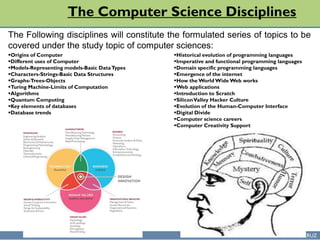
The Computer Science Disciplines
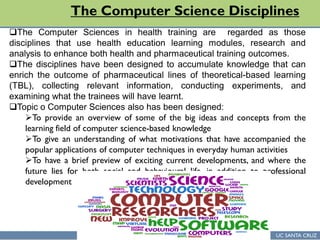
The Computer Sciences in health training are regarded as those
disciplines that use health education learning modules, research and
analysis to enhance both health and pharmaceutical training outcomes.
The disciplines have been designed to accumulate knowledge that can
enrich the outcome of pharmaceutical lines of theoretical-based learning
(TBL), collecting relevant information, conducting experiments, and
examining what the trainees will have learnt.
Topic o Computer Sciences also has been designed:
To provide an overview of some of the big ideas and concepts from the
learning field of computer science-based knowledge
To give an understanding of what motivations that have accompanied the
popular applications of computer techniques in everyday human activities
To have a brief preview of exciting current developments, and where the
future lies for both social and behavioural life, in addition to professional
development
UC SANTA CRUZ
The Computer Science Disciplines
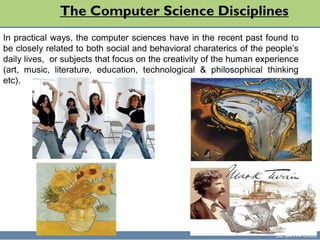
In practical ways, the computer sciences have in the recent past found to
be closely related to both social and behavioral charaterics of the people’s
daily lives, or subjects that focus on the creativity of the human experience
(art, music, literature, education, technological & philosophical thinking
etc).
UC SANTA CRUZ
The Computer Science Disciplines
Where the humanities are more concerned with current happenings, the
computer science disciplines learning should provide a wider and long-term
activity-related solutions to daily human lives using the following ways:
Computation
Data processing
Device control
Command and control
Tool for individual expression
Computational media
Communications
Sensors
UC SANTA CRUZ
The Computer Science Disciplines
The Following disciplines will constitute the formulated series of topics to be
covered under the study topic of computer sciences:
Origins of Computer
Different uses of Computer
Models-Representing models-Basic DataTypes
Characters-Strings-Basic Data Structures
Graphs-Trees-Objects
Turing Machine-Limits of Computation
Algorithms
Quantum Computing
Key elements of databases
Database trends
Historical evolution of programming languages
Imperative and functional programming languages
Domain specific programming languages
Emergence of the internet
How the World Wide Web works
Web applications
Introduction to Scratch
SiliconValley Hacker Culture
Evolution of the Human-Computer Interface
Digital Divide
Computer science careers
Computer Creativity Support
UC SANTA CRUZ
The Social Science Disciplines
UC SANTA CRUZ
The Social Science Disciplines
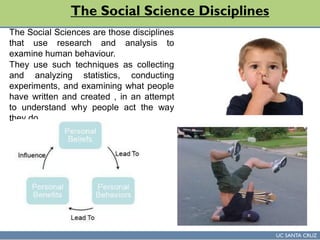
The Social Sciences are those disciplines
that use research and analysis to
examine human behaviour.
They use such techniques as collecting
and analyzing statistics, conducting
experiments, and examining what people
have written and created , in an attempt
to understand why people act the way
they do.
UC SANTA CRUZ
The Social Science Disciplines
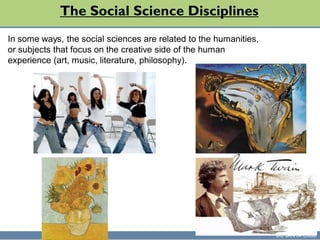
In some ways, the social sciences are related to the humanities,
or subjects that focus on the creative side of the human
experience (art, music, literature, philosophy).
UC SANTA CRUZ
The Social Science Disciplines
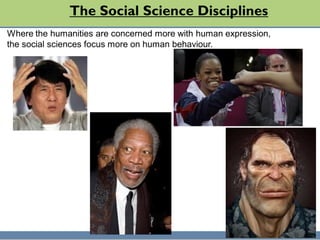
Where the humanities are concerned more with human expression,
the social sciences focus more on human behaviour.
UC SANTA CRUZ
The Social Science Disciplines
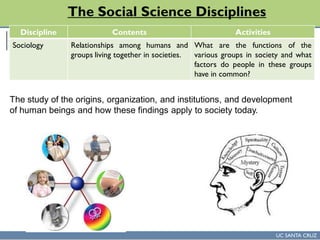
The study of the origins, organization, and institutions, and development
of human beings and how these findings apply to society today.
Discipline Contents Activities
Sociology Relationships among humans and
groups living together in societies.
What are the functions of the
various groups in society and what
factors do people in these groups
have in common?
UC SANTA CRUZ
The Social Science Disciplines
Anthropology
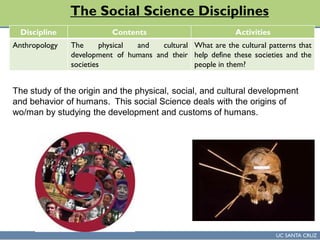
The study of the origin and the physical, social, and cultural development
and behavior of humans. This social Science deals with the origins of
wo/man by studying the development and customs of humans.
Discipline Contents Activities
Anthropology The physical and cultural
development of humans and their
societies
What are the cultural patterns that
help define these societies and the
people in them?
UC SANTA CRUZ
The Social Science Disciplines
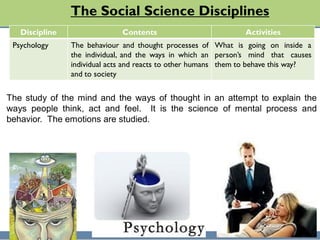
The study of the mind and the ways of thought in an attempt to explain the
ways people think, act and feel. It is the science of mental process and
behavior. The emotions are studied.
Discipline Contents Activities
Psychology The behaviour and thought processes of
the individual, and the ways in which an
individual acts and reacts to other humans
and to society
What is going on inside a
person’s mind that causes
them to behave this way?
UC SANTA CRUZ
The Social Science Disciplines
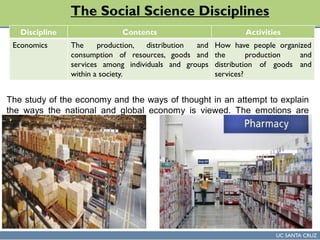
The study of the economy and the ways of thought in an attempt to explain
the ways the national and global economy is viewed. The emotions are
studied.
Discipline Contents Activities
Economics The production, distribution and
consumption of resources, goods and
services among individuals and groups
within a society.
How have people organized
the production and
distribution of goods and
services?
UC SANTA CRUZ
The Social Science Disciplines
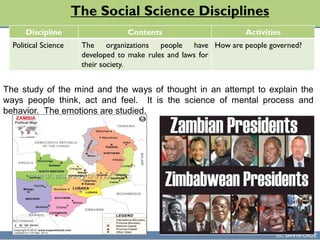
The study of the mind and the ways of thought in an attempt to explain the
ways people think, act and feel. It is the science of mental process and
behavior. The emotions are studied.
Discipline Contents Activities
Political Science The organizations people have
developed to make rules and laws for
their society.
How are people governed?
UC SANTA CRUZ
The Social Science Disciplines
Discipline Contents Activities
Geography The distribution of the features of the
physical environment and of the
people who use those features
How has society been shaped
by the use of the land and its
resources?
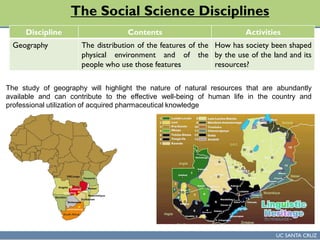
The study of geography will highlight the nature of natural resources that are abundantly
available and can contribute to the effective well-being of human life in the country and
professional utilization of acquired pharmaceutical knowledge
UC SANTA CRUZ
Any Questions
UC SANTA CRUZ
Theoretical-Based Learning (TBL)
UC SANTA CRUZ
Class learning goals
 To provide an overview of the Historical evolution of
programming languages
 To give an understanding of what Imperative and functional
programming languages
 Provide an Understanding of Domain specific programming
languages of Context Free Art
 To provide an overview of some of the Basics of
internetworking
 To give an Overview of the Creativity in Computer Knowledge
& Skills
Topics Outline
Imperative and functional programming languages
Domain specific programming languages Context Free Art
Emergence of the internet - Basics of internetworking
How theWorld WideWeb works
Web applications. JavaScript. Web 2.0:
The dynamic, read-write web
Introduction to Scratch
Introduction to Scratch (continued)
SiliconValley Hacker Culture
Evolution of the Human-Computer Interface
Digital Divide.: Use of computers in the developing world.
Computer science careers. Computer science at UNZA for Pharmacy
Can Computers be Creative
Assignments
Practical-based Learning Sessions
Study Questions Homework
UC SANTA CRUZ
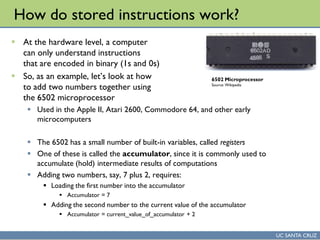
How do stored instructions work?
 At the hardware level, a computer
can only understand instructions
that are encoded in binary (1s and 0s)
 So, as an example, let’s look at how
to add two numbers together using
the 6502 microprocessor
 Used in the Apple II, Atari 2600, Commodore 64, and other early
microcomputers
 The 6502 has a small number of built-in variables, called registers
 One of these is called the accumulator, since it is commonly used to
accumulate (hold) intermediate results of computations
 Adding two numbers, say, 7 plus 2, requires:
 Loading the first number into the accumulator
 Accumulator = 7
 Adding the second number to the current value of the accumulator
 Accumulator = current_value_of_accumulator + 2
6502 Microprocessor
Source: Wikipedia
UC SANTA CRUZ
Adding two numbers on the 6502
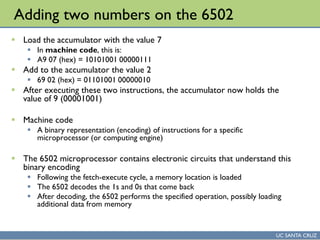
 Load the accumulator with the value 7
 In machine code, this is:
 A9 07 (hex) = 10101001 00000111
 Add to the accumulator the value 2
 69 02 (hex) = 01101001 00000010
 After executing these two instructions, the accumulator now holds the
value of 9 (00001001)
 Machine code
 A binary representation (encoding) of instructions for a specific
microprocessor (or computing engine)
 The 6502 microprocessor contains electronic circuits that understand this
binary encoding
 Following the fetch-execute cycle, a memory location is loaded
 The 6502 decodes the 1s and 0s that come back
 After decoding, the 6502 performs the specified operation, possibly loading
additional data from memory
UC SANTA CRUZ
The problem with machine code
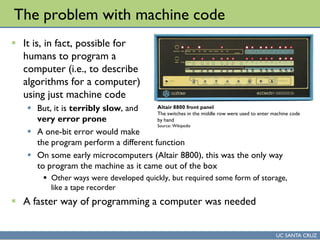
 It is, in fact, possible for
humans to program a
computer (i.e., to describe
algorithms for a computer)
using just machine code
 But, it is terribly slow, and
very error prone
 A one-bit error would make
the program perform a different function
 On some early microcomputers (Altair 8800), this was the only way
to program the machine as it came out of the box
 Other ways were developed quickly, but required some form of storage,
like a tape recorder
 A faster way of programming a computer was needed
Altair 8800 front panel
The switches in the middle row were used to enter machine code
by hand
Source: Wikipedia
UC SANTA CRUZ
Solution 1: Assembly language
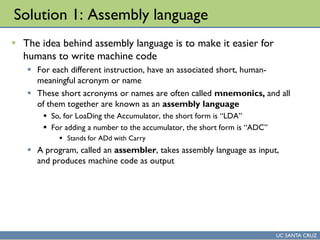
 The idea behind assembly language is to make it easier for
humans to write machine code
 For each different instruction, have an associated short, human-
meaningful acronym or name
 These short acronyms or names are often called mnemonics, and all
of them together are known as an assembly language
 So, for LoaDing the Accumulator, the short form is “LDA”
 For adding a number to the accumulator, the short form is “ADC”
 Stands for ADd with Carry
 A program, called an assembler, takes assembly language as input,
and produces machine code as output
UC SANTA CRUZ
Adding two numbers in 6502 assembly
 Let’s revisit adding two numbers together on the 6502
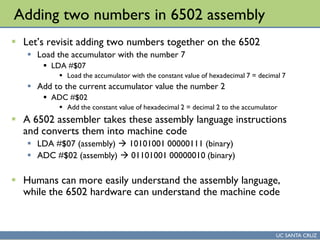
 Load the accumulator with the number 7
 LDA #$07
 Load the accumulator with the constant value of hexadecimal 7 = decimal 7
 Add to the current accumulator value the number 2
 ADC #$02
 Add the constant value of hexadecimal 2 = decimal 2 to the accumulator
 A 6502 assembler takes these assembly language instructions
and converts them into machine code
 LDA #$07 (assembly)  10101001 00000111 (binary)
 ADC #$02 (assembly)  01101001 00000010 (binary)
 Humans can more easily understand the assembly language,
while the 6502 hardware can understand the machine code
UC SANTA CRUZ
History of assembly language
 Assembly languages appear to have emerged in the 1950s
 An IBM users group, called SHARE, was formed in 1955
 SHARE members were instrumental in contributing to an
assembler for the IBM 704 machine
 However, there might have been earlier examples
 Even doing a little bit of machine code programming would make you
yearn for a way of automating it
UC SANTA CRUZ
The problem with assembly language
 Assembly language has several problems
 While faster than machine code, it is still slow to write
 It is hard to understand another person’s assembly language program
 Hence, large assembly language programs are hard to maintain
 It is challenging to maintain and use large collections of pre-made assembly
language algorithms (functions, procedures)
 Macros, assembly language codes that expand to multiple basic operations
helped, but were insufficient
 So, assembly language programs are hard to scale, and don’t support reuse
 Writing an algorithm in assembly language requires programmers to break
it down into very elementary steps
 For example, the 6502 doesn’t have floating point mathematics built into the
microprocessor
 So, in assembly language, you need to write (or reuse) a routine for adding,
multiplying, dividing, etc. floating point numbers
 See: http://www.6502.org/source/floats/wozfp1.txt for an example
 This is called programming at a low level of abstraction
UC SANTA CRUZ
Benefits of assembly language
 Zowie, it is fast
 A programmer who deeply understands the microprocessor and the
computer architecture can write very fast and efficient code
 This can be important for sections of an algorithm that are executed
very frequently, and hence small speed improvements have a big
impact
 Compact
 Assembly language code typically uses memory in an efficient way
 For this reason, is sometimes used for embedded computing, where
the available memory is low
 Hardware drivers
 Since it is so low-level assembly can be useful for interacting directly
with hardware devices connected to a computer (since this hardware
is also very low-level)
UC SANTA CRUZ
Programming languages
 The underlying idea of programming languages is:
 To make it possible to write algorithms in a human-friendly notation
 To have this notation allow thinking at a higher level of abstraction
than assembly/machine language supports
 So, for example
 In a programming language, to add 2 + 7, we might write:
 sum = 2 + 7
 The variable named “sum” takes the value of 2 plus 7
 Much easier to understand than LDA/ADC
 Allows the desired logical operation (i.e., the addition) to be directly
expressed, instead of broken down into two separate operations
UC SANTA CRUZ
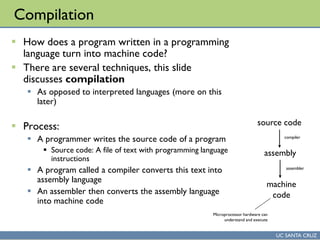
Compilation
 How does a program written in a programming
language turn into machine code?
 There are several techniques, this slide
discusses compilation
 As opposed to interpreted languages (more on this
later)
 Process:
 A programmer writes the source code of a program
 Source code: A file of text with programming language
instructions
 A program called a compiler converts this text into
assembly language
 An assembler then converts the assembly language
into machine code
source code
assembly
machine
code
compiler
assembler
Microprocessor hardware can
understand and execute
UC SANTA CRUZ
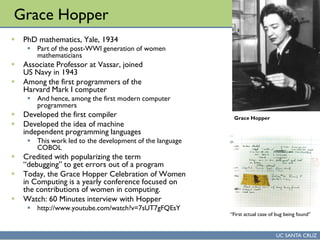
Grace Hopper
 PhD mathematics, Yale, 1934
 Part of the post-WWI generation of women
mathematicians
 Associate Professor at Vassar, joined
US Navy in 1943
 Among the first programmers of the
Harvard Mark I computer
 And hence, among the first modern computer
programmers
 Developed the first compiler
 Developed the idea of machine
independent programming languages
 This work led to the development of the language
COBOL
 Credited with popularizing the term
“debugging” to get errors out of a program
 Today, the Grace Hopper Celebration of Women
in Computing is a yearly conference focused on
the contributions of women in computing.
 Watch: 60 Minutes interview with Hopper
 http://www.youtube.com/watch?v=7sUT7gFQEsY
Grace Hopper
“First actual case of bug being found”
UC SANTA CRUZ
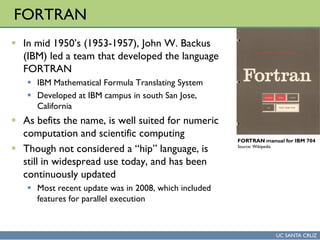
FORTRAN
 In mid 1950’s (1953-1957), John W. Backus
(IBM) led a team that developed the language
FORTRAN
 IBM Mathematical Formula Translating System
 Developed at IBM campus in south San Jose,
California
 As befits the name, is well suited for numeric
computation and scientific computing
 Though not considered a “hip” language, is
still in widespread use today, and has been
continuously updated
 Most recent update was in 2008, which included
features for parallel execution
FORTRAN manual for IBM 704
Source: Wikipedia
UC SANTA CRUZ
FORTRAN (cont’d)
 Major factors in its adoption:
 Speed: had to overcome bias of assembly language programmers that compiled
code is much slower than assembly language code
 As a result, first FORTRAN compiler focused on code optimization
 That is, ensuring that the assembly language code generated by the compiler runs
quickly
 Efficiency: FORTRAN code typically has 1 statement for every 20 statements
in an assembly language program
 Programmers could write FORTRAN code more quickly than assembly
 Portability: FORTRAN code written on one computer could be executed on a
different type of computer, with different machine code
 John Backus, in a 1979 interview in Think, IBM Employee magazine:
 “Much of my work has come from being lazy. I didn't like writing programs, and so,
when I was working on the IBM 701, writing programs for computing missile
trajectories, I started work on a programming system to make it easier to write
programs.”
UC SANTA CRUZ
LISP, COBOL
 The two other influential early programming languages from
the 1950s were LISP and COBOL
 LISP (1958)
 LISt Processor, invented by John McCarthy
 Commonly used in artificial intelligence programming, but has
widespread utility
 Variants in use today: Scheme, Common Lisp
 COBOL (1959)
 COmmon Business-Oriented Language
 Widely used for business information technology applications
 In declining use today, but still used, and the language was updated in
2002
Imperative and functional programming languages
UC SANTA CRUZ
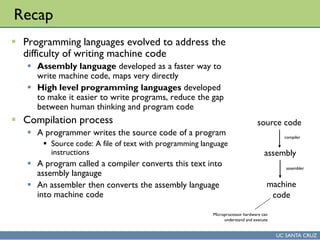
Recap
 Programming languages evolved to address the
difficulty of writing machine code
 Assembly language developed as a faster way to
write machine code, maps very directly
 High level programming languages developed
to make it easier to write programs, reduce the gap
between human thinking and program code
 Compilation process
 A programmer writes the source code of a program
 Source code: A file of text with programming language
instructions
 A program called a compiler converts this text into
assembly langauge
 An assembler then converts the assembly language
into machine code
source code
assembly
machine
code
compiler
assembler
Microprocessor hardware can
understand and execute
UC SANTA CRUZ
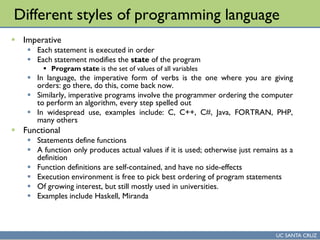
Different styles of programming language
 Imperative
 Each statement is executed in order
 Each statement modifies the state of the program
 Program state is the set of values of all variables
 In language, the imperative form of verbs is the one where you are giving
orders: go there, do this, come back now.
 Similarly, imperative programs involve the programmer ordering the computer
to perform an algorithm, every step spelled out
 In widespread use, examples include: C, C++, C#, Java, FORTRAN, PHP,
many others
 Functional
 Statements define functions
 A function only produces actual values if it is used; otherwise just remains as a
definition
 Function definitions are self-contained, and have no side-effects
 Execution environment is free to pick best ordering of program statements
 Of growing interest, but still mostly used in universities.
 Examples include Haskell, Miranda
UC SANTA CRUZ
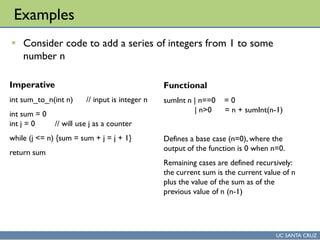
Examples
 Consider code to add a series of integers from 1 to some
number n
Imperative
int sum_to_n(int n) // input is integer n
int sum = 0
int j = 0 // will use j as a counter
while (j <= n) {sum = sum + j = j + 1}
return sum
Functional
sumInt n | n==0 = 0
| n>0 = n + sumInt(n-1)
Defines a base case (n=0), where the
output of the function is 0 when n=0.
Remaining cases are defined recursively:
the current sum is the current value of n
plus the value of the sum as of the
previous value of n (n-1)
UC SANTA CRUZ
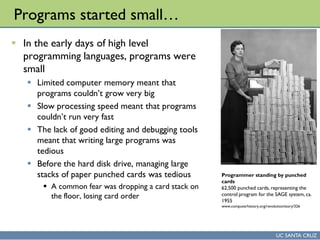
Programs started small…
 In the early days of high level
programming languages, programs were
small
 Limited computer memory meant that
programs couldn’t grow very big
 Slow processing speed meant that programs
couldn’t run very fast
 The lack of good editing and debugging tools
meant that writing large programs was
tedious
 Before the hard disk drive, managing large
stacks of paper punched cards was tedious
 A common fear was dropping a card stack on
the floor, losing card order
Programmer standing by punched
cards
62,500 punched cards, representing the
control program for the SAGE system, ca.
1955
www.computerhistory.org/revolution/story/326
UC SANTA CRUZ
… but got larger
 Over time, the desire to make computer programs have more
functionality led to larger and larger programs.
 This created a problem of how to structure the software
 That is, how do you clump together related statements inside a large
program?
 Evolutionary path
 Unstructured code
 Use of IF and GOTO to control flow of software
 Partially structured code
 Subroutines/procedures, but also use of GOTO
 Procedural code, block structuring
 Use of GOTO deprecated, all code inside procedures, basic blocks
 Data may or may not be co-located with code that operates on it
 Object-oriented
 Cluster code and associated data together into objects
UC SANTA CRUZ
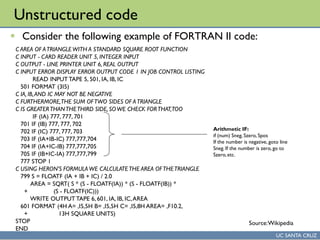
Unstructured code
 Consider the following example of FORTRAN II code:
C AREA OF ATRIANGLEWITH A STANDARD SQUARE ROOT FUNCTION
C INPUT - CARD READER UNIT 5, INTEGER INPUT
C OUTPUT - LINE PRINTER UNIT 6, REAL OUTPUT
C INPUT ERROR DISPLAY ERROR OUTPUT CODE 1 IN JOB CONTROL LISTING
READ INPUT TAPE 5, 501, IA, IB, IC
501 FORMAT (3I5)
C IA, IB,AND IC MAY NOT BE NEGATIVE
C FURTHERMORE,THE SUM OFTWO SIDES OF ATRIANGLE
C IS GREATERTHANTHETHIRD SIDE, SOWE CHECK FORTHAT,TOO
IF (IA) 777, 777, 701
701 IF (IB) 777, 777, 702
702 IF (IC) 777, 777, 703
703 IF (IA+IB-IC) 777,777,704
704 IF (IA+IC-IB) 777,777,705
705 IF (IB+IC-IA) 777,777,799
777 STOP 1
C USING HERON'S FORMULA WE CALCULATETHE AREA OFTHETRIANGLE
799 S = FLOATF (IA + IB + IC) / 2.0
AREA = SQRT( S * (S - FLOATF(IA)) * (S - FLOATF(IB)) *
+ (S - FLOATF(IC)))
WRITE OUTPUT TAPE 6, 601, IA, IB, IC,AREA
601 FORMAT (4H A= ,I5,5H B= ,I5,5H C= ,I5,8H AREA= ,F10.2,
+ 13H SQUARE UNITS)
STOP
END
Arithmetic IF:
if (num) Sneg, Szero, Spos
If the number is negative, goto line
Sneg. If the number is zero, go to
Szero,etc.
Source:Wikipedia
UC SANTA CRUZ
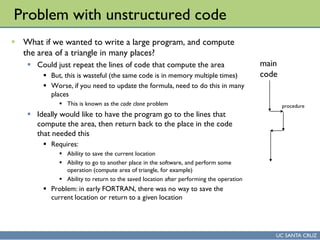
Problem with unstructured code
 What if we wanted to write a large program, and compute
the area of a triangle in many places?
 Could just repeat the lines of code that compute the area
 But, this is wasteful (the same code is in memory multiple times)
 Worse, if you need to update the formula, need to do this in many
places
 This is known as the code clone problem
 Ideally would like to have the program go to the lines that
compute the area, then return back to the place in the code
that needed this
 Requires:
 Ability to save the current location
 Ability to go to another place in the software, and perform some
operation (compute area of triangle, for example)
 Ability to return to the saved location after performing the operation
 Problem: in early FORTRAN, there was no way to save the
current location or return to a given location
main
code
procedure
UC SANTA CRUZ
Procedures
 The first main way to structure code was to introduce
procedures
 These are sections of code that perform a distinct operation
 Many places in the software can ask a procedure to perform its
operation
 Within a procedure, can have variables whose values are local to the
procedure
 I.e., can have a variable named j in the main program, an one named j in
the procedure – the procedure’s j is different from main’s j
 A major advance
 A large piece of software can be subdivided into multiple procedures
 Each procedure can focus on doing one thing well
 Related procedures can be clustered together in a large program
 Makes software easier to understand and easier to write
 Allowed software to grow larger
UC SANTA CRUZ
Example of procedural code
 Here is the area of a triangle again, in the language C
int main(int argc, char *argv[])
{
int a, b, c;
printf(“nSideA: ");
scanf("%d",&a);
printf(“nSide B: ");
scanf("%d",&b);
printf(“nSide C: ");
scanf("%d",&c);
printf(“nThe area of the triangle is: %fn", area(a,b, c));
return(0);
}
float area( int a, int b, int c )
{ int s; float y;
s = (a + b + c)/2;
y = sqrt( s * (s - a)*(s - b)*(s - c) );
return( y );
}
Here is the procedure for computing the
area of a triangle.Though called only once,
it could be called from many places in the
code, and could easily be reused in another
program.
Note that variables a, b, c in the procedure
are different variables (but, since they are
passed to the procedure,the same values)
as the variables a,b,c in the main program.
Here is where the procedure
is called
UC SANTA CRUZ
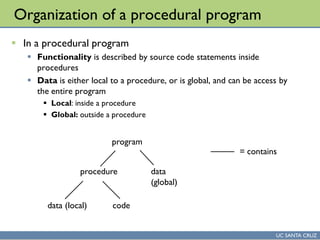
Organization of a procedural program
 In a procedural program
 Functionality is described by source code statements inside
procedures
 Data is either local to a procedure, or is global, and can be access by
the entire program
 Local: inside a procedure
 Global: outside a procedure
program
procedure
data (local) code
data
(global)
= contains
UC SANTA CRUZ
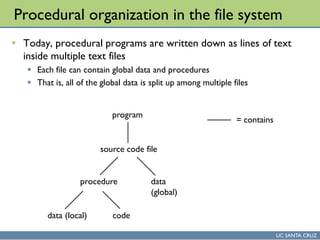
Procedural organization in the file system
 Today, procedural programs are written down as lines of text
inside multiple text files
 Each file can contain global data and procedures
 That is, all of the global data is split up among multiple files
program
source code file
procedure
data (local) code
data
(global)
= contains
UC SANTA CRUZ
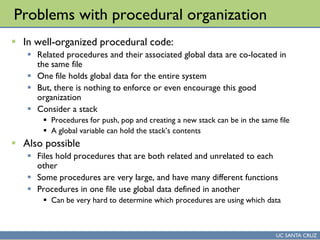
Problems with procedural organization
 In well-organized procedural code:
 Related procedures and their associated global data are co-located in
the same file
 One file holds global data for the entire system
 But, there is nothing to enforce or even encourage this good
organization
 Consider a stack
 Procedures for push, pop and creating a new stack can be in the same file
 A global variable can hold the stack’s contents
 Also possible
 Files hold procedures that are both related and unrelated to each
other
 Some procedures are very large, and have many different functions
 Procedures in one file use global data defined in another
 Can be very hard to determine which procedures are using which data
UC SANTA CRUZ
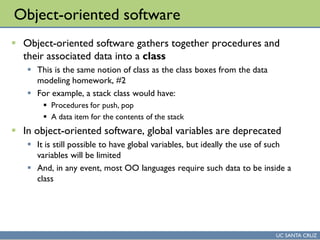
Object-oriented software
 Object-oriented software gathers together procedures and
their associated data into a class
 This is the same notion of class as the class boxes from the data
modeling homework, #2
 For example, a stack class would have:
 Procedures for push, pop
 A data item for the contents of the stack
 In object-oriented software, global variables are deprecated
 It is still possible to have global variables, but ideally the use of such
variables will be limited
 And, in any event, most OO languages require such data to be inside a
class
UC SANTA CRUZ
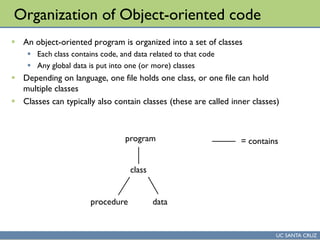
Organization of Object-oriented code
 An object-oriented program is organized into a set of classes
 Each class contains code, and data related to that code
 Any global data is put into one (or more) classes
 Depending on language, one file holds one class, or one file can hold
multiple classes
 Classes can typically also contain classes (these are called inner classes)
program
class
procedure data
= contains
UC SANTA CRUZ
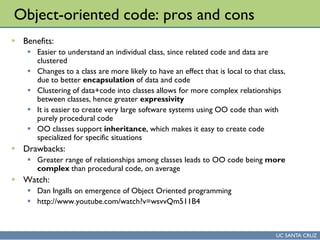
Object-oriented code: pros and cons
 Benefits:
 Easier to understand an individual class, since related code and data are
clustered
 Changes to a class are more likely to have an effect that is local to that class,
due to better encapsulation of data and code
 Clustering of data+code into classes allows for more complex relationships
between classes, hence greater expressivity
 It is easier to create very large software systems using OO code than with
purely procedural code
 OO classes support inheritance, which makes it easy to create code
specialized for specific situations
 Drawbacks:
 Greater range of relationships among classes leads to OO code being more
complex than procedural code, on average
 Watch:
 Dan Ingalls on emergence of Object Oriented programming
 http://www.youtube.com/watch?v=wsvvQm511B4
UC SANTA CRUZ
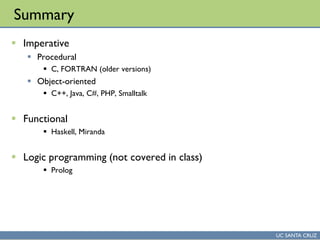
Summary
 Imperative
 Procedural
 C, FORTRAN (older versions)
 Object-oriented
 C++, Java, C#, PHP, Smalltalk
 Functional
 Haskell, Miranda
 Logic programming (not covered in class)
 Prolog
Domain specific programming languages
Context Free Art
UC SANTA CRUZ
Recap: Compilation
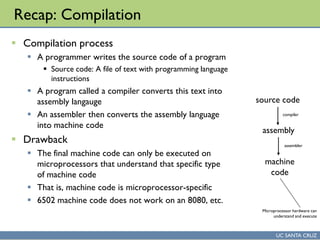
 Compilation process
 A programmer writes the source code of a program
 Source code: A file of text with programming language
instructions
 A program called a compiler converts this text into
assembly langauge
 An assembler then converts the assembly language
into machine code
 Drawback
 The final machine code can only be executed on
microprocessors that understand that specific type
of machine code
 That is, machine code is microprocessor-specific
 6502 machine code does not work on an 8080, etc.
source code
assembly
machine
code
compiler
assembler
Microprocessor hardware can
understand and execute
UC SANTA CRUZ
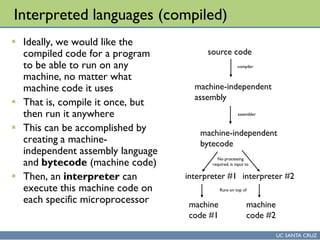
Interpreted languages (compiled)
 Ideally, we would like the
compiled code for a program
to be able to run on any
machine, no matter what
machine code it uses
 That is, compile it once, but
then run it anywhere
 This can be accomplished by
creating a machine-
independent assembly language
and bytecode (machine code)
 Then, an interpreter can
execute this machine code on
each specific microprocessor
source code
machine-independent
assembly
machine
code #2
compiler
assembler
machine-independent
bytecode
interpreter #2
No processing
required, is input to
Runs on top of
machine
code #1
interpreter #1
UC SANTA CRUZ
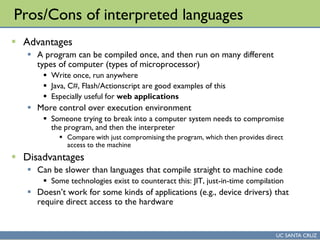
Pros/Cons of interpreted languages
 Advantages
 A program can be compiled once, and then run on many different
types of computer (types of microprocessor)
 Write once, run anywhere
 Java, C#, Flash/Actionscript are good examples of this
 Especially useful for web applications
 More control over execution environment
 Someone trying to break into a computer system needs to compromise
the program, and then the interpreter
 Compare with just compromising the program, which then provides direct
access to the machine
 Disadvantages
 Can be slower than languages that compile straight to machine code
 Some technologies exist to counteract this: JIT, just-in-time compilation
 Doesn’t work for some kinds of applications (e.g., device drivers) that
require direct access to the hardware
UC SANTA CRUZ
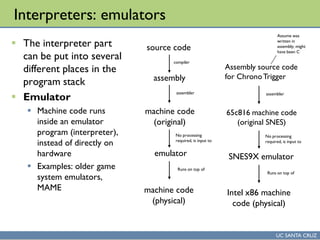
Interpreters: emulators
 The interpreter part
can be put into several
different places in the
program stack
 Emulator
 Machine code runs
inside an emulator
program (interpreter),
instead of directly on
hardware
 Examples: older game
system emulators,
MAME
source code
assembly
machine code
(original)
compiler
assembler
emulator
machine code
(physical)
No processing
required, is input to
Runs on top of
Assembly source code
for ChronoTrigger
65c816 machine code
(original SNES)
assembler
SNES9X emulator
Intel x86 machine
code (physical)
No processing
required, is input to
Runs on top of
Assume was
written in
assembly; might
have been C
UC SANTA CRUZ
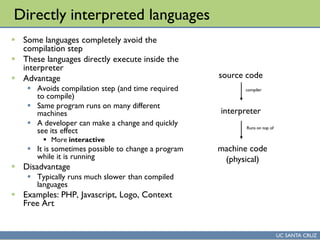
Directly interpreted languages
 Some languages completely avoid the
compilation step
 These languages directly execute inside the
interpreter
 Advantage
 Avoids compilation step (and time required
to compile)
 Same program runs on many different
machines
 A developer can make a change and quickly
see its effect
 More interactive
 It is sometimes possible to change a program
while it is running
 Disadvantage
 Typically runs much slower than compiled
languages
 Examples: PHP, Javascript, Logo, Context
Free Art
source code
compiler
interpreter
machine code
(physical)
Runs on top of
UC SANTA CRUZ
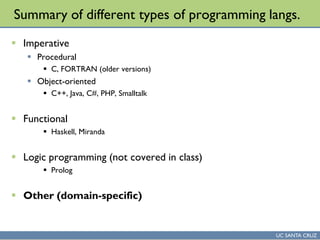
Summary of different types of programming langs.
 Imperative
 Procedural
 C, FORTRAN (older versions)
 Object-oriented
 C++, Java, C#, PHP, Smalltalk
 Functional
 Haskell, Miranda
 Logic programming (not covered in class)
 Prolog
 Other (domain-specific)
UC SANTA CRUZ
Domain specific programming languages
 Most programming languages we have examined so far are
called general purpose langauges
 That is, they are designed so they are flexible enough to be capable of
solving a wide range of problems
 The general idea is that most computational problems can be solved
by writing a program in a general purpose language
 Sometimes solving a specific problem in a general purpose
language is awkward
 That is, it can be done, but it requires a lot of code to accomplish a
conceptually simple task
 In this case, sometimes it is possible to create a new programming
language dedicated to just one type of task
 Such a language is not expected to be useful for solving a wide range
of problems: it solves one problem, and does this well
 Such languages are known as domain-specific
UC SANTA CRUZ
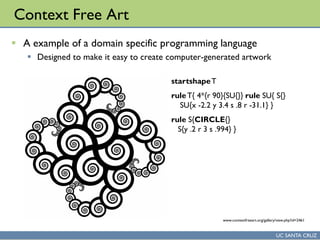
Context Free Art
 A example of a domain specific programming language
 Designed to make it easy to create computer-generated artwork
startshapeT
ruleT{ 4*{r 90}{SU{}} rule SU{ S{}
SU{x -2.2 y 3.4 s .8 r -31.1} }
rule S{CIRCLE{}
S{y .2 r 3 s .994} }
www.contextfreeart.org/gallery/view.php?id=2461
UC SANTA CRUZ
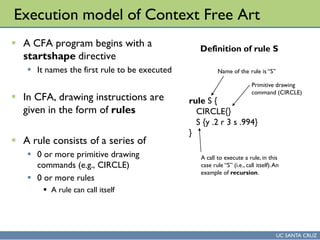
Execution model of Context Free Art
 A CFA program begins with a
startshape directive
 It names the first rule to be executed
 In CFA, drawing instructions are
given in the form of rules
 A rule consists of a series of
 0 or more primitive drawing
commands (e.g., CIRCLE)
 0 or more rules
 A rule can call itself
rule S {
CIRCLE{}
S {y .2 r 3 s .994}
}
Name of the rule is “S”
Primitive drawing
command (CIRCLE)
A call to execute a rule, in this
case rule “S” (i.e., call itself).An
example of recursion.
Definition of rule S
UC SANTA CRUZ
Random Rule Selection
 For each rule, there can be one definition, or more than one
definition
 How they are executed varies by each case
 One definition for a rule, R
 When another rule calls R, the one definition is executed
 More than one definition for a rule R: R1, R2, … Rn
 When another rule calls R, one of the definitions is picked at random
 This is the main way randomness is added into CFA programs
 That is, use of multiple rules allows each picture to be different
UC SANTA CRUZ
Example of multiple rule selection
startshape SIX
rule SIX { FOUR { }}
rule FOUR {
THREE { }
FOUR { x 1 r 5 s 0.4 alpha -0.0009 }
}
rule FOUR {
THREE { }
FOUR { y 1 r -5 s 0.4 alpha -0.0009 hue 0.7 sat 0.9 b 1 skew 1.5 0 }
}
ruleTHREE {
TWO { }
THREE { flip 32 s 0.99 alpha -0.0009 hue 0.7 sat 0.9 b 1 skew 2 0}
}
ruleTHREE {
TWO { }
THREE { flip -32 s 0.99 alpha -0.0009 hue 0.9 sat 0.9 b 1 }
}
…
Two examples of rule FOUR –
CFA will pick one of these two
when the rule FOUR is called
(see rules SIX and FOUR)
Either-or
Two examples of ruleTHREE –
CFA will pick one of these two
when the ruleTHREE is called
(see rule FOUR)
UC SANTA CRUZ
What do all those letter and numbers mean?
 Consider this primitive shape
 CIRCLE {x 1 y 2 r 45}
 This means
 Add 1 to the current x position
 Add 2 to the current y position
 Rotate by 45 degrees
 Now draw a circle
 By shifting each drawn shape away from the current position,
each shape ends up in a different location
 Without these position shifts, all shapes would just overwrite each
other
UC SANTA CRUZ
Primitive shapes
 Square
 A unit square
 SQUARE{}
 Circle
 A unit circle – diameter is the same as the side of a square
 CIRCLE{}
 Triangle
 Unit triangle. Same side length as squares
 TRIANGLE{}
 Defined in terms of path operations
 Not covered in class, can draw arcs, splines, etc.
 http://www.contextfreeart.org/mediawiki/index.php/Paths
UC SANTA CRUZ
Any Questions
UC SANTA CRUZ
Study Questions
 Will be an assignment working with Context Free Art
 Described in class today
 Context Free Art is a domain specific programming language for creating
computer-generated artwork
 www.contextfreeart.org
 Program is freely available, PC/Mac/Linux
 Standalone version works in PC labs (BE 109)
 In the assignment, you will
1. Take an existing context free art program and modify some of the numbers
in it, and then describe the impact on the final artworks generated
2. In the same program, you will add a few new lines to the program, and then
describe the impact on the final artworks
3. For extra credit, you can write a context free art program that is completely
new (from scratch), describe how it works, and give an example of some
artwork
Emergence of the internet -
Basics of internetworking
UC SANTA CRUZ
Lecture overview
 This lecture involved watching part of Nerds 2.0.1, episode 1
 http://www.youtube.com/watch?v=Fi97PlMeal4
 http://www.youtube.com/watch?v=d6DGbEFJnRo
 http://www.youtube.com/watch?v=9vmZTQloseo
 These videos give an overview of the emergence of the Internet
 Following the video, the lecture involved an on-board
presentation of the following concepts:
 Packet switching
 Circuit switching
 IP address
 The role of routers in the Internet
How the World Wide Web works
UC SANTA CRUZ
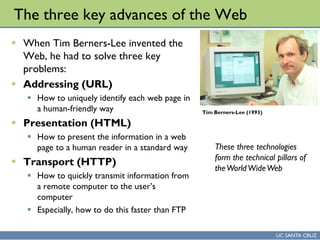
The three key advances of the Web
 When Tim Berners-Lee invented the
Web, he had to solve three key
problems:
 Addressing (URL)
 How to uniquely identify each web page in
a human-friendly way
 Presentation (HTML)
 How to present the information in a web
page to a human reader in a standard way
 Transport (HTTP)
 How to quickly transmit information from
a remote computer to the user’s
computer
 Especially, how to do this faster than FTP
Tim Berners-Lee (1993)
These three technologies
form the technical pillars of
theWorldWideWeb
UC SANTA CRUZ
Development context of the web
 When the web was under development, 1989-1990, there
was no one dominant internet information system
 A collection of systems, including Usenet News, FTP, Gopher
 Many different types of machines
 PCs and Macs were not typically connected to the Internet
 Most users of the Internet were academics on Unix workstations
 But, many other kinds of computers existed as well: mainframes, DEC
workstations, NeXT machines, etc.
 In general, was a challenge to access information uniformly from all
computers
 A given information system might be accessible from some, but not all
types of computer
UC SANTA CRUZ
Addressing the internet, circa 1989/1990
 Before the web, there was no uniform way to describe a
specific information resource
 One might say, “Go to the FTP server at ftp.ucsc.edu, login
anonymously, then get file /games/rogue.tar”
 Worked OK for humans, but,
 Hard for computers to understand
 Not very compact – what if you wanted to make a list of these?
 Or, what if you wanted to embed them in a link in a document?
 Ideally, one might want a way of identifying internet resources
that includes:
 The way to access it (i.e., which protocol? FTP? Gopher? Etc.)
 The name of the machine that has the resource (i.e., a domain name
like ftp.ucsc.edu)
 The local name of the resource – i.e., once you get to a given machine
with a given protocol, what identifier (name) should be used to
retrieve the resource?
UC SANTA CRUZ
URL
 Uniform Resource Locator
 Uniform: the same format is used in a standard way for identifying all
resources on the Internet
 Resource: a specific chunk of information available on the internet,
or, a specific computational process (e.g., “current temperature”) on
the internet
 Locator: contains all of the information necessary to retrieve a web
resource
 A URL should contain, within itself, all of the information
necessary to identify and retrieve a specific resource on the
internet
UC SANTA CRUZ
Significance of the URL
 Any web resource can be retrieved using a URL
 That is, URLs work at Internet scale
 Most hypertext systems prior to the Web did not work at Internet scale:
required a significant shift in thinking
 Provides a standard way of writing down internet identifiers
 Extensible syntax: not limited to just protocols and information systems
available when URLs were invented
 Has room to grow well into the future
 Compact representation
 Easy to write down and share with other humans
 Easy to embed within computer documents (such as links in HTML)
 Could easily map to file system paths, but was not required to exactly
map to file system paths.
 The web was not intended to be a wide area network file system
 In retrospect, URLs have a kind of obvious, inevitable quality. This was not
obvious at the time, and several other schemes existed prior to URLs that
lacked some of the qualities above.
UC SANTA CRUZ
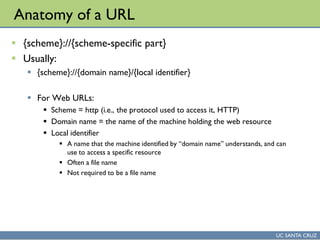
Anatomy of a URL
 {scheme}://{scheme-specific part}
 Usually:
 {scheme}://{domain name}/{local identifier}
 For Web URLs:
 Scheme = http (i.e., the protocol used to access it, HTTP)
 Domain name = the name of the machine holding the web resource
 Local identifier
 A name that the machine identified by “domain name” understands, and can
use to access a specific resource
 Often a file name
 Not required to be a file name
UC SANTA CRUZ
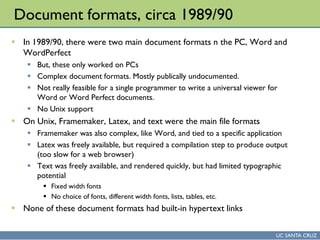
Document formats, circa 1989/90
 In 1989/90, there were two main document formats n the PC, Word and
WordPerfect
 But, these only worked on PCs
 Complex document formats. Mostly publically undocumented.
 Not really feasible for a single programmer to write a universal viewer for
Word or Word Perfect documents.
 No Unix support
 On Unix, Framemaker, Latex, and text were the main file formats
 Framemaker was also complex, like Word, and tied to a specific application
 Latex was freely available, but required a compilation step to produce output
(too slow for a web browser)
 Text was freely available, and rendered quickly, but had limited typographic
potential
 Fixed width fonts
 No choice of fonts, different width fonts, lists, tables, etc.
 None of these document formats had built-in hypertext links
UC SANTA CRUZ
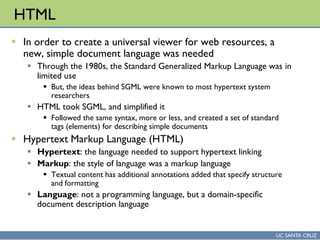
HTML
 In order to create a universal viewer for web resources, a
new, simple document language was needed
 Through the 1980s, the Standard Generalized Markup Language was in
limited use
 But, the ideas behind SGML were known to most hypertext system
researchers
 HTML took SGML, and simplified it
 Followed the same syntax, more or less, and created a set of standard
tags (elements) for describing simple documents
 Hypertext Markup Language (HTML)
 Hypertext: the language needed to support hypertext linking
 Markup: the style of language was a markup language
 Textual content has additional annotations added that specify structure
and formatting
 Language: not a programming language, but a domain-specific
document description language
UC SANTA CRUZ
Significance of HTML
 A simple document format that is
 (relatively) easy render to a screen
 Can be edited using simple text editors
 Is more-or-less human-readable
 Relatively space efficient
 An open standard
 The document format is not owned and controlled by a single for-profit
company
 Prevents lock-in to a standard where a company might start charging high
licensing fees for its use
 Implementation of HTML has grown to the point where it is
supported by most general purpose computers
 Writing a document in HTML means that you don’t have to worry
whether people will be able to view it on their computer
UC SANTA CRUZ
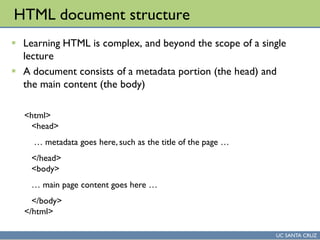
HTML document structure
 Learning HTML is complex, and beyond the scope of a single
lecture
 A document consists of a metadata portion (the head) and
the main content (the body)
<html>
<head>
… metadata goes here, such as the title of the page …
</head>
<body>
… main page content goes here …
</body>
</html>
UC SANTA CRUZ
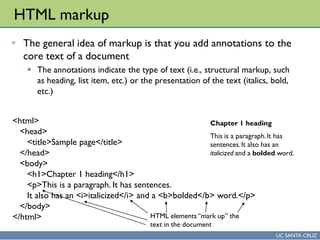
HTML markup
 The general idea of markup is that you add annotations to the
core text of a document
 The annotations indicate the type of text (i.e., structural markup, such
as heading, list item, etc.) or the presentation of the text (italics, bold,
etc.)
<html>
<head>
<title>Sample page</title>
</head>
<body>
<h1>Chapter 1 heading</h1>
<p>This is a paragraph. It has sentences.
It also has an <i>italicized</i> and a <b>bolded</b> word.</p>
</body>
</html> HTML elements “mark up” the
text in the document
Chapter 1 heading
This is a paragraph.It has
sentences.It also has an
italicized and a bolded word.
UC SANTA CRUZ
HTTP
 Hypertext Transfer Protocol (HTTP)
 An Internet protocol that is used by Web browsers to
retrieve information (web pages, images, etc.) from a remote
web server
 Key qualities
 Much faster than FTP for retrieving Internet resources
 Extensible design, permitted web to grow to large scale
 See example
 http://upload.wikimedia.org/wikipedia/commons/c/c6/Http_request_tel
net_ubuntu.png
UC SANTA CRUZ
Study Questions
 Will be an assignment working with Context Free Art
 Described in class today
 Context Free Art is a domain specific programming language for creating
computer-generated artwork
 www.contextfreeart.org
 Program is freely available, PC/Mac/Linux
 Standalone version works in PC labs (BE 109)
 In the assignment, you will
1. Take an existing context free art program and modify some of the numbers
in it, and then describe the impact on the final artworks generated
2. In the same program, you will add a few new lines to an existing rule, and
then describe the impact on the final artworks
3. In the same program, you will add a new duplicate rule, then describe the
impact
4. For extra credit, you can write a context free art program that is completely
new (from scratch), describe how it works, and give an example of some
artwork
Web applications. JavaScript.
Web 2.0: The dynamic, read-write web
UC SANTA CRUZ
Any Questions
UC SANTA CRUZ
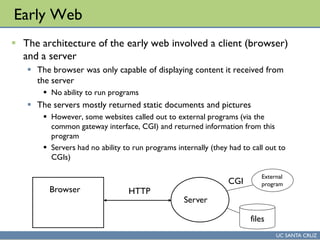
Early Web
 The architecture of the early web involved a client (browser)
and a server
 The browser was only capable of displaying content it received from
the server
 No ability to run programs
 The servers mostly returned static documents and pictures
 However, some websites called out to external programs (via the
common gateway interface, CGI) and returned information from this
program
 Servers had no ability to run programs internally (they had to call out to
CGIs)
Browser HTTP
Server
files
External
programCGI
UC SANTA CRUZ
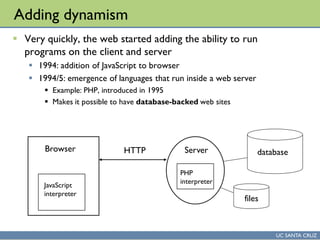
Adding dynamism
 Very quickly, the web started adding the ability to run
programs on the client and server
 1994: addition of JavaScript to browser
 1994/5: emergence of languages that run inside a web server
 Example: PHP, introduced in 1995
 Makes it possible to have database-backed web sites
Browser HTTP Server
files
JavaScript
interpreter
PHP
interpreter
database
UC SANTA CRUZ
Web applications
 A web application (or webapp) is a program that is
written to run inside a web server
 A web application also typically has aspects which are written in
JavaScript and intended to run inside the browser
 Most large websites today are web applications
 Facebook, Google, etc.
 Advantages of web applications over static sites
 Site content comes from a database, and hence can be reused in
many places in a site
 The site can adapt itself to a particular visitor
 The site can be interactive
UC SANTA CRUZ
Web 2.0
 A general term used to indicate websites or web technologies
that have several of the following characteristics:
 User-contributed content
 High degrees of interactivity
 Support for collaboration among users of the site
 Commenting and tagging capability
 Ease of embedding content in and from the site
 Google Maps was an early example
 Was a revelation to many that the web could support panning over a
map by simply grabbing the map image
UC SANTA CRUZ
Web 2.0 trends
 Applications moving to the web
 Google Docs is one example
 Complete word processor, spreadsheet, presentation software
 All are web applications
 Unlike traditional web applications, most of the code is in JavaScript,
running on the client
 Greater interactivity
 Flash is now installed in most web browsers
 Flash permits websites to have programs with high degrees of
graphical content and interactivity
 Flash opened the window for web-based games to emerge
UC SANTA CRUZ
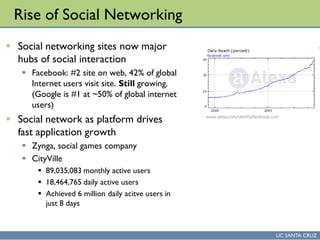
Rise of Social Networking
 Social networking sites now major
hubs of social interaction
 Facebook: #2 site on web, 42% of global
Internet users visit site. Still growing.
(Google is #1 at ~50% of global internet
users)
 Social network as platform drives
fast application growth
 Zynga, social games company
 CityVille
 89,035,083 monthly active users
 18,464,765 daily active users
 Achieved 6 million daily acitve users in
just 8 days
www.alexa.com/siteinfo/facebook.com
Introduction to Scratch
UC SANTA CRUZ
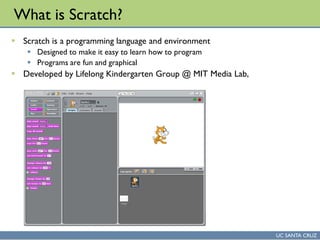
What is Scratch?
 Scratch is a programming language and environment
 Designed to make it easy to learn how to program
 Programs are fun and graphical
 Developed by Lifelong Kindergarten Group @ MIT Media Lab,
UC SANTA CRUZ
Benefits of Scratch
 Can make a wide range of content
 Interactive stories
 Animations
 Games
 Music and art
 Share content
 Easily share Scratch creations on the Scratch website
 Over 1.7 million projects shared so far
 Easy to learn
 No need to memorize language syntax
 Programming language elements are visible on-screen
 Drag-and-drop to use programming language elements
 Designed for use by kids 8/9 years old on up
 Software is free to use
UC SANTA CRUZ
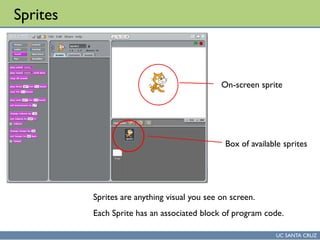
Sprites
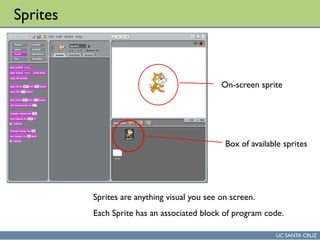
Sprites are anything visual you see on screen.
Each Sprite has an associated block of program code.
Box of available sprites
On-screen sprite
UC SANTA CRUZ
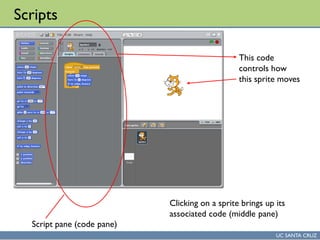
Scripts
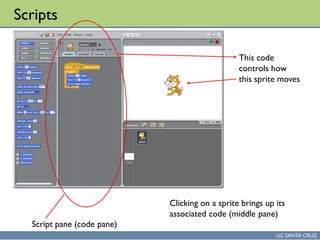
Clicking on a sprite brings up its
associated code (middle pane)
Script pane (code pane)
This code
controls how
this sprite moves
UC SANTA CRUZ
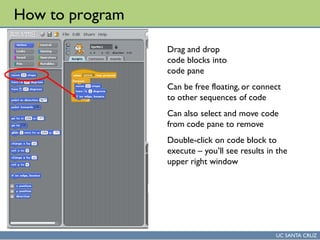
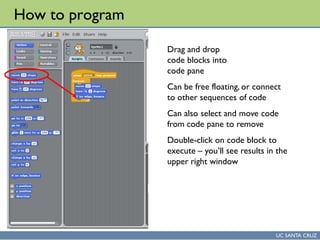
How to program
Drag and drop
code blocks into
code pane
Can be free floating, or connect
to other sequences of code
Can also select and move code
from code pane to remove
Double-click on code block to
execute – you’ll see results in the
upper right window
UC SANTA CRUZ
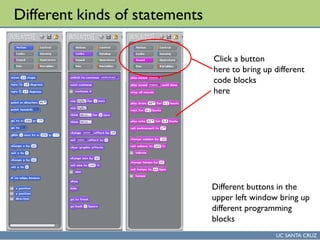
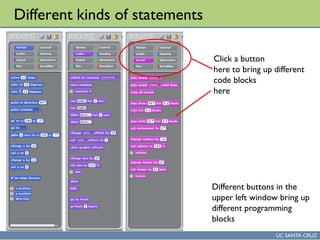
Different kinds of statements
Different buttons in the
upper left window bring up
different programming
blocks
Click a button
here to bring up different
code blocks
here
UC SANTA CRUZ
Downloading Scratch
 Scratch is freely available, and works on Windows, Macintosh,
and Ubuntu Linux
 scratch.mit.edu
 Main website for Scratch
 http://scratch.mit.edu/download
 URL for downloading Scratch
 Video tutorials
 http://info.scratch.mit.edu/Video_Tutorials
UC SANTA CRUZ
Any Questions
Silicon Valley Hacker Culture
Introduction to Scratch (continued)
UC SANTA CRUZ
Silicon Valley Hacker Culture
 Going back to at least 1975 (and drawing inspiration from the
60s counter culture movement) Silicon Valley has hosted a
culture of people hacking with technology
 Hacking – playing around with technology, in ways that
sometimes were, and sometimes were not aligned with its
original purpose
 Homebrew Computer Club (1975-1986)
 A club for early personal computer enthusiasts
 The Apple I computer emerged out of this club
UC SANTA CRUZ
Silicon Valley Hacker Culture Today
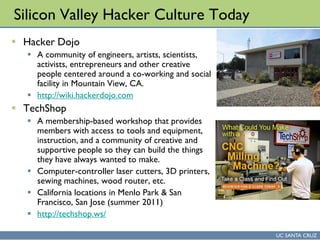
 Hacker Dojo
 A community of engineers, artists, scientists,
activists, entrepreneurs and other creative
people centered around a co-working and social
facility in Mountain View, CA.
 http://wiki.hackerdojo.com
 TechShop
 A membership-based workshop that provides
members with access to tools and equipment,
instruction, and a community of creative and
supportive people so they can build the things
they have always wanted to make.
 Computer-controller laser cutters, 3D printers,
sewing machines, wood router, etc.
 California locations in Menlo Park & San
Francisco, San Jose (summer 2011)
 http://techshop.ws/
UC SANTA CRUZ
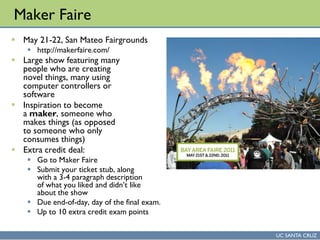
Maker Faire
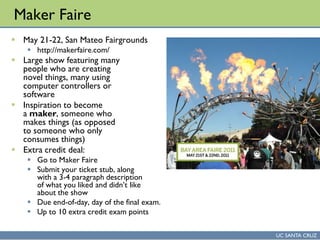
 May 21-22, San Mateo Fairgrounds
 http://makerfaire.com/
 Large show featuring many
people who are creating
novel things, many using
computer controllers or
software
 Inspiration to become
a maker, someone who
makes things (as opposed
to someone who only
consumes things)
 Extra credit deal:
 Go to Maker Faire
 Submit your ticket stub, along
with a 3-4 paragraph description
of what you liked and didn’t like
about the show
 Due end-of-day, day of the final exam.
 Up to 10 extra credit exam points
UC SANTA CRUZ
Sprites
Sprites are anything visual you see on screen.
Each Sprite has an associated block of program code.
Box of available sprites
On-screen sprite
UC SANTA CRUZ
Scripts
Clicking on a sprite brings up its
associated code (middle pane)
Script pane (code pane)
This code
controls how
this sprite moves
UC SANTA CRUZ
How to program
Drag and drop
code blocks into
code pane
Can be free floating, or connect
to other sequences of code
Can also select and move code
from code pane to remove
Double-click on code block to
execute – you’ll see results in the
upper right window
UC SANTA CRUZ
Different kinds of statements
Different buttons in the
upper left window bring up
different programming
blocks
Click a button
here to bring up different
code blocks
here
UC SANTA CRUZ
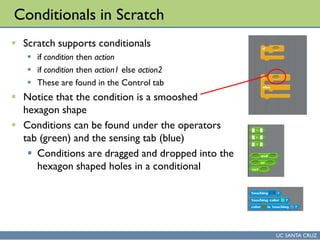
Conditionals in Scratch
 Scratch supports conditionals
 if condition then action
 if condition then action1 else action2
 These are found in the Control tab
 Notice that the condition is a smooshed
hexagon shape
 Conditions can be found under the operators
tab (green) and the sensing tab (blue)
 Conditions are dragged and dropped into the
hexagon shaped holes in a conditional
UC SANTA CRUZ
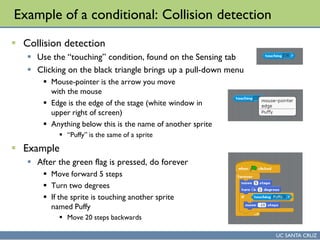
Example of a conditional: Collision detection
 Collision detection
 Use the “touching” condition, found on the Sensing tab
 Clicking on the black triangle brings up a pull-down menu
 Mouse-pointer is the arrow you move
with the mouse
 Edge is the edge of the stage (white window in
upper right of screen)
 Anything below this is the name of another sprite
 “Puffy” is the same of a sprite
 Example
 After the green flag is pressed, do forever
 Move forward 5 steps
 Turn two degrees
 If the sprite is touching another sprite
named Puffy
 Move 20 steps backwards
UC SANTA CRUZ
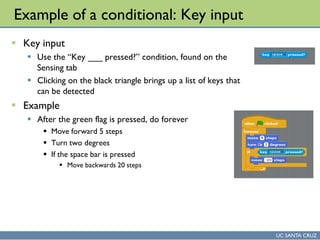
Example of a conditional: Key input
 Key input
 Use the “Key ___ pressed?” condition, found on the
Sensing tab
 Clicking on the black triangle brings up a list of keys that
can be detected
 Example
 After the green flag is pressed, do forever
 Move forward 5 steps
 Turn two degrees
 If the space bar is pressed
 Move backwards 20 steps
UC SANTA CRUZ
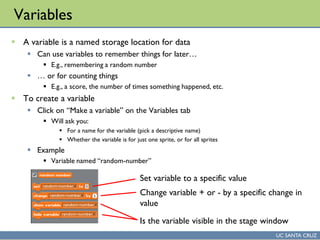
Variables
 A variable is a named storage location for data
 Can use variables to remember things for later…
 E.g., remembering a random number
 … or for counting things
 E.g., a score, the number of times something happened, etc.
 To create a variable
 Click on “Make a variable” on the Variables tab
 Will ask you:
 For a name for the variable (pick a descriptive name)
 Whether the variable is for just one sprite, or for all sprites
 Example
 Variable named “random-number”
Set variable to a specific value
Change variable + or - by a specific change in
value
Is the variable visible in the stage window
UC SANTA CRUZ
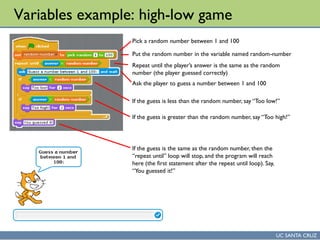
Variables example: high-low game
Pick a random number between 1 and 100
Put the random number in the variable named random-number
Repeat until the player’s answer is the same as the random
number (the player guessed correctly)
Ask the player to guess a number between 1 and 100
If the guess is less than the random number, say “Too low!”
If the guess is greater than the random number, say “Too high!”
If the guess is the same as the random number, then the
“repeat until” loop will stop, and the program will reach
here (the first statement after the repeat until loop). Say,
“You guessed it!”
UC SANTA CRUZ
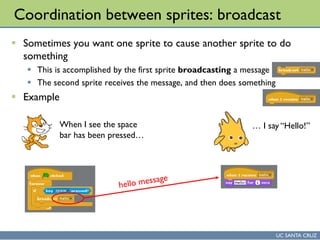
Coordination between sprites: broadcast
 Sometimes you want one sprite to cause another sprite to do
something
 This is accomplished by the first sprite broadcasting a message
 The second sprite receives the message, and then does something
 Example
When I see the space
bar has been pressed…
… I say “Hello!”
UC SANTA CRUZ
Any Questions
Evolution of the Human-Computer Interface
UC SANTA CRUZ
Maker Faire
 May 21-22, San Mateo Fairgrounds
 http://makerfaire.com/
 Large show featuring many
people who are creating
novel things, many using
computer controllers or
software
 Inspiration to become
a maker, someone who
makes things (as opposed
to someone who only
consumes things)
 Extra credit deal:
 Go to Maker Faire
 Submit your ticket stub, along
with a 3-4 paragraph description
of what you liked and didn’t like
about the show
 Due end-of-day, day of the final exam.
 Up to 10 extra credit exam points
UC SANTA CRUZ
How do people interact with computers?
 In the early days of computing, it was fairly miraculous that a computer
would work at all
 As a result, many people were expected to work hard to ensure the
computer could perform a given task
 That is, the computer’s needs were dominant, and humans catered to the
needs of the machine.
 As the price of computing dropped, a broader population of people
started using computers
 This trend became particularly strong in the 1980s with the advent of personal
computing
 Instead of highly trained people using a computer, anyone, trained or not,
might be using a computer
 Brought to the foreground the question: how should people interact
with computers?
UC SANTA CRUZ
NLS/Augment
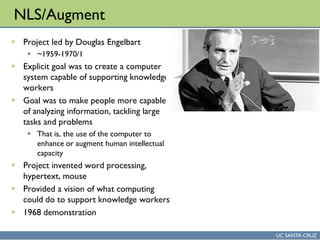
 Project led by Douglas Engelbart
 ~1959-1970/1
 Explicit goal was to create a computer
system capable of supporting knowledge
workers
 Goal was to make people more capable
of analyzing information, tackling large
tasks and problems
 That is, the use of the computer to
enhance or augment human intellectual
capacity
 Project invented word processing,
hypertext, mouse
 Provided a vision of what computing
could do to support knowledge workers
 1968 demonstration
UC SANTA CRUZ
Xerox Alto
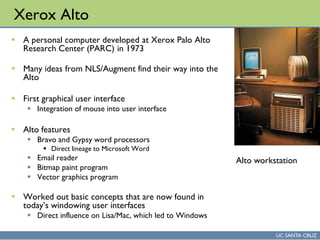
 A personal computer developed at Xerox Palo Alto
Research Center (PARC) in 1973
 Many ideas from NLS/Augment find their way into the
Alto
 First graphical user interface
 Integration of mouse into user interface
 Alto features
 Bravo and Gypsy word processors
 Direct lineage to Microsoft Word
 Email reader
 Bitmap paint program
 Vector graphics program
 Worked out basic concepts that are now found in
today’s windowing user interfaces
 Direct influence on Lisa/Mac, which led to Windows
Alto workstation
UC SANTA CRUZ
Macintosh
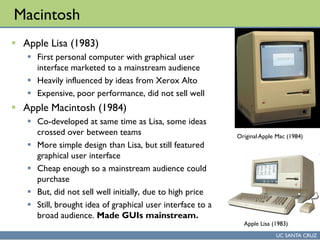
 Apple Lisa (1983)
 First personal computer with graphical user
interface marketed to a mainstream audience
 Heavily influenced by ideas from Xerox Alto
 Expensive, poor performance, did not sell well
 Apple Macintosh (1984)
 Co-developed at same time as Lisa, some ideas
crossed over between teams
 More simple design than Lisa, but still featured
graphical user interface
 Cheap enough so a mainstream audience could
purchase
 But, did not sell well initially, due to high price
 Still, brought idea of graphical user interface to a
broad audience. Made GUIs mainstream.
Original Apple Mac (1984)
Apple Lisa (1983)
UC SANTA CRUZ
Microsoft Windows
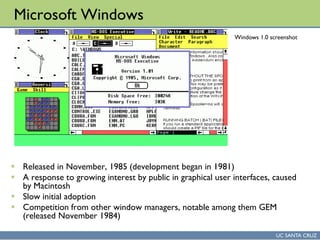
 Released in November, 1985 (development began in 1981)
 A response to growing interest by public in graphical user interfaces, caused
by Macintosh
 Slow initial adoption
 Competition from other window managers, notable among them GEM
(released November 1984)
Windows 1.0 screenshot
UC SANTA CRUZ
Mobile computing – notable waypoints
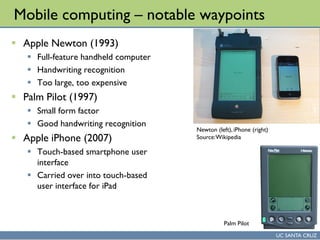
 Apple Newton (1993)
 Full-feature handheld computer
 Handwriting recognition
 Too large, too expensive
 Palm Pilot (1997)
 Small form factor
 Good handwriting recognition
 Apple iPhone (2007)
 Touch-based smartphone user
interface
 Carried over into touch-based
user interface for iPad
Newton (left), iPhone (right)
Source:Wikipedia
Palm Pilot
UC SANTA CRUZ
Any Questions
Digital Divide. Use of computers in the developing world.
UC SANTA CRUZ
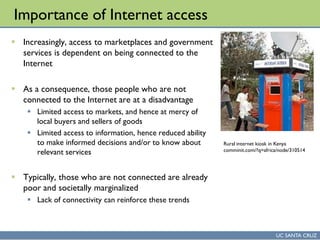
Importance of Internet access
 Increasingly, access to marketplaces and government
services is dependent on being connected to the
Internet
 As a consequence, those people who are not
connected to the Internet are at a disadvantage
 Limited access to markets, and hence at mercy of
local buyers and sellers of goods
 Limited access to information, hence reduced ability
to make informed decisions and/or to know about
relevant services
 Typically, those who are not connected are already
poor and societally marginalized
 Lack of connectivity can reinforce these trends
Rural internet kiosk in Kenya
comminit.com/?q=africa/node/310514
UC SANTA CRUZ
Digital Divide
 Digital Divide
 As a general term, is used in many different contexts to refer to
differences in adoption and use of the Internet between various
groups
 So, for example, one can talk about the digital divide between various
groups in the United States (rich vs poor, white vs minority, etc.)
 Global Digital Divide
 Used to describe the difference in use of information technology
between different regions of the world
UC SANTA CRUZ
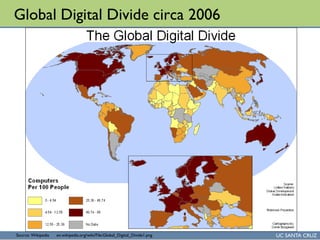
Global Digital Divide circa 2006
Source: Wikipedia en.wikipedia.org/wiki/File:Global_Digital_Divide1.png
UC SANTA CRUZ
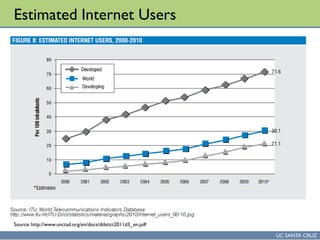
Estimated Internet Users
Source:http://www.unctad.org/en/docs/dtlstict2011d3_en.pdf
UC SANTA CRUZ
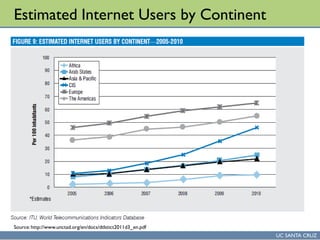
Estimated Internet Users by Continent
Source:http://www.unctad.org/en/docs/dtlstict2011d3_en.pdf
UC SANTA CRUZ
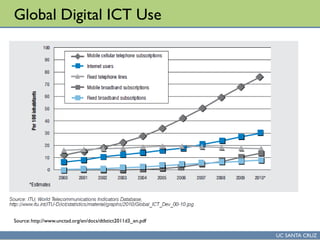
Global Digital ICT Use
Source:http://www.unctad.org/en/docs/dtlstict2011d3_en.pdf
UC SANTA CRUZ
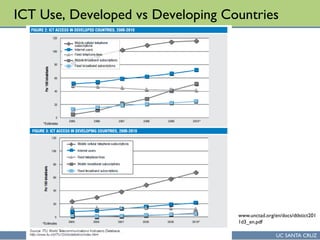
ICT Use, Developed vs Developing Countries
www.unctad.org/en/docs/dtlstict201
1d3_en.pdf
UC SANTA CRUZ
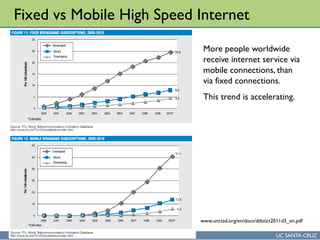
Fixed vs Mobile High Speed Internet
www.unctad.org/en/docs/dtlstict2011d3_en.pdf
More people worldwide
receive internet service via
mobile connections, than
via fixed connections.
This trend is accelerating.
UC SANTA CRUZ
Impacts of mobile telephony in Africa
 In Ghana, farmers in Tamale can find out prices of corn and
tomatoes in Accra, over 400 kilometers away.
 In Niger an average trip to a market located 65 kilometers
away can take 2–4 hours roundtrip, as compared to a two-
minute call
 The call represents a 50% cost savings
 Mobile phones allow information to be obtained immediately, instead
of waiting for weekly newspapers or broadcasts
 In Niger, day laborers can call acquaintances in Benin about
job opportunities to see if it worthwhile to make the US $40
trip there to seek work.
 Mobile phones reduce costs of seeking labor
 Source: Mobile Phones and Economic Development in Africa, Jenny C. Aker, Isaac M. Mbiti, Journal of Economic
Perspectives, Vol.. 24, No. 3, Summer 2010, pages 207-232, http://pubs.aeaweb.org/doi/pdf/10.1257/jep.24.3.207
UC SANTA CRUZ
Projects to improve ICT access
 One laptop per child
 Ambitious effort to get laptop computers into the hands of children
 Similar to goals of Scratch, to broadly introduce people to
computational thinking
 Drishtee
 India based company that provides Internet access and classes to
remote villages
UC SANTA CRUZ
Any Questions
Computer science careers. Computer science at UNZA for
Pharmacy
UC SANTA CRUZ
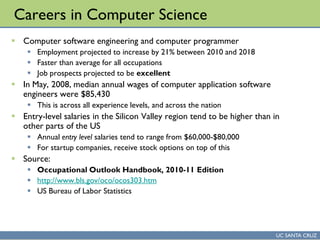
Careers in Computer Science
 Computer software engineering and computer programmer
 Employment projected to increase by 21% between 2010 and 2018
 Faster than average for all occupations
 Job prospects projected to be excellent
 In May, 2008, median annual wages of computer application software
engineers were $85,430
 This is across all experience levels, and across the nation
 Entry-level salaries in the Silicon Valley region tend to be higher than in
other parts of the US
 Annual entry level salaries tend to range from $60,000-$80,000
 For startup companies, receive stock options on top of this
 Source:
 Occupational Outlook Handbook, 2010-11 Edition
 http://www.bls.gov/oco/ocos303.htm
 US Bureau of Labor Statistics
UC SANTA CRUZ
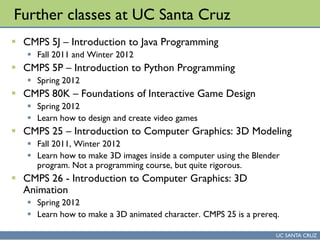
Further classes at UC Santa Cruz
 CMPS 5J – Introduction to Java Programming
 Fall 2011 and Winter 2012
 CMPS 5P – Introduction to Python Programming
 Spring 2012
 CMPS 80K – Foundations of Interactive Game Design
 Spring 2012
 Learn how to design and create video games
 CMPS 25 – Introduction to Computer Graphics: 3D Modeling
 Fall 2011, Winter 2012
 Learn how to make 3D images inside a computer using the Blender
program. Not a programming course, but quite rigorous.
 CMPS 26 - Introduction to Computer Graphics: 3D
Animation
 Spring 2012
 Learn how to make a 3D animated character. CMPS 25 is a prereq.
UC SANTA CRUZ
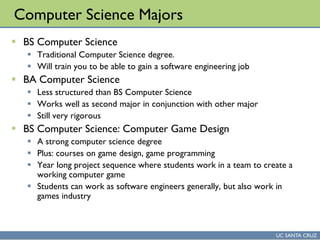
Computer Science Majors
 BS Computer Science
 Traditional Computer Science degree.
 Will train you to be able to gain a software engineering job
 BA Computer Science
 Less structured than BS Computer Science
 Works well as second major in conjunction with other major
 Still very rigorous
 BS Computer Science: Computer Game Design
 A strong computer science degree
 Plus: courses on game design, game programming
 Year long project sequence where students work in a team to create a
working computer game
 Students can work as software engineers generally, but also work in
games industry
UC SANTA CRUZ
Any Questions
creativity support & computational creativity
UC SANTA CRUZ
Announcements
 Prof. Munkonge is in Hawaii
 You have a midterm exam on Monday,
May 23!
UC SANTA CRUZ
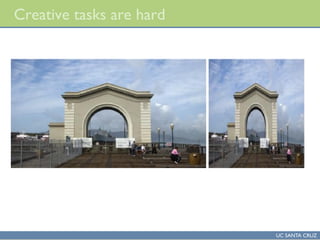
Creative tasks are hard
UC SANTA CRUZ
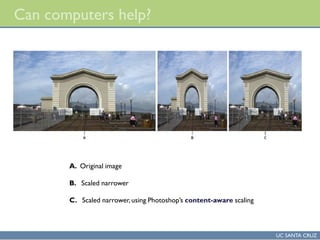
Can computers help?
A. Original image
B. Scaled narrower
C. Scaled narrower, using Photoshop’s content-aware scaling
UC SANTA CRUZ
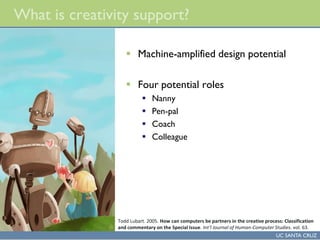
What is creativity support?
 Machine-amplified design potential
 Four potential roles
 Nanny
 Pen-pal
 Coach
 Colleague
Todd Lubart. 2005. How can computers be partners in the creative process: Classification
and commentary on the Special Issue. Int’l Journal of Human-Computer Studies. vol. 63.
UC SANTA CRUZ
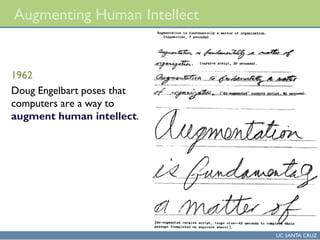
Augmenting Human Intellect
1962
Doug Engelbart poses that
computers are a way to
augment human intellect.
UC SANTA CRUZ
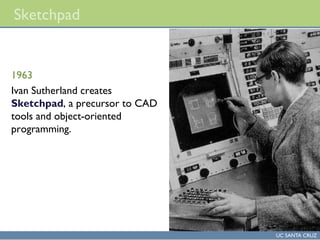
Sketchpad
1963
Ivan Sutherland creates
Sketchpad, a precursor to CAD
tools and object-oriented
programming.
UC SANTA CRUZ
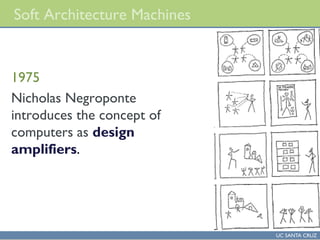
Soft Architecture Machines
1975
Nicholas Negroponte
introduces the concept of
computers as design
amplifiers.
UC SANTA CRUZ
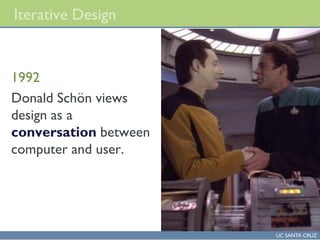
Iterative Design
1992
Donald Schön views
design as a
conversation between
computer and user.
UC SANTA CRUZ
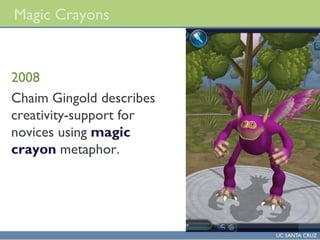
Magic Crayons
2008
Chaim Gingold describes
creativity-support for
novices using magic
crayon metaphor.
UC SANTA CRUZ
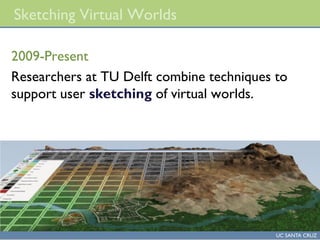
Sketching Virtual Worlds
2009-Present
Researchers at TU Delft combine techniques to
support user sketching of virtual worlds.
UC SANTA CRUZ
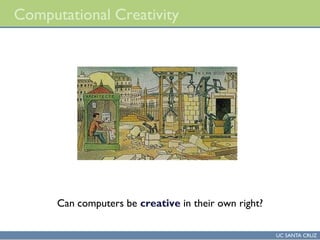
Computational Creativity
Can computers be creative in their own right?
UC SANTA CRUZ
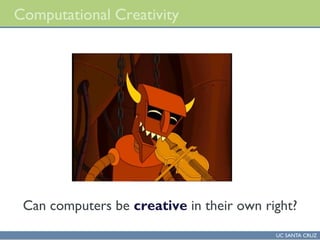
Computational Creativity
Can computers be creative in their own right?
UC SANTA CRUZ
What Is Creativity?
Margaret Boden discusses context
for creativity: to whom must it be
novel?
UC SANTA CRUZ
What Is Creativity?
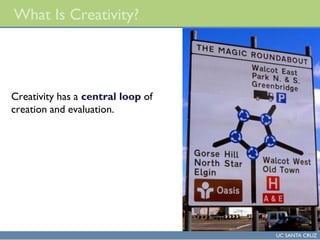
Creativity has a central loop of
creation and evaluation.
UC SANTA CRUZ
Who Gets the Credit?
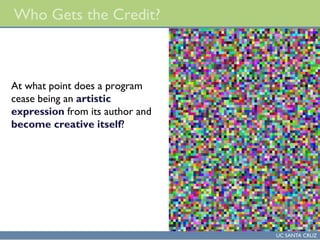
At what point does a program
cease being an artistic
expression from its author and
become creative itself?
UC SANTA CRUZ
Evaluating Creativity
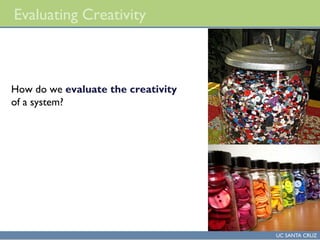
How do we evaluate the creativity
of a system?
UC SANTA CRUZ
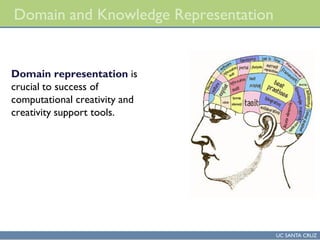
Domain and Knowledge Representation
Domain representation is
crucial to success of
computational creativity and
creativity support tools.
UC SANTA CRUZ
Experiments in Musical Intelligence
Ultimately, the computer is just a
tool with which we extend our
minds. The music our
algorithms compose are just as
much ours as the music created by
the greatest of our personal human
inspirations.
- David Cope
UC SANTA CRUZ
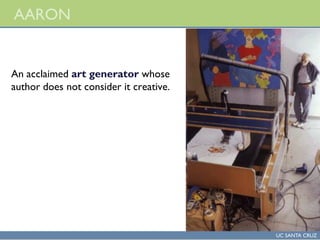
AARON
An acclaimed art generator whose
author does not consider it creative.
UC SANTA CRUZ
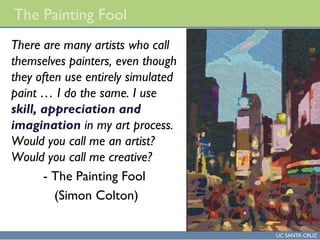
The Painting Fool
There are many artists who call
themselves painters, even though
they often use entirely simulated
paint … I do the same. I use
skill, appreciation and
imagination in my art process.
Would you call me an artist?
Would you call me creative?
- The Painting Fool
(Simon Colton)
UC SANTA CRUZ
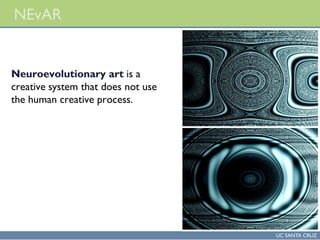
NEvAR
Neuroevolutionary art is a
creative system that does not use
the human creative process.
UC SANTA CRUZ
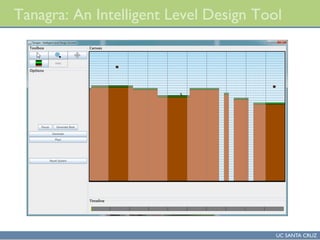
Tanagra: An Intelligent Level Design Tool
UC SANTA CRUZ
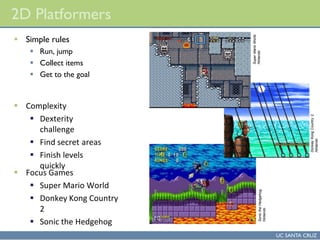
2D Platformers
 Simple rules
 Run, jump
 Collect items
 Get to the goal
SuperMarioWorld,
Nintendo
DonkeyKongCountry2,
Nintendo
SonictheHedgehog,
Nintendo
 Complexity
 Dexterity
challenge
 Find secret areas
 Finish levels
quickly
 Focus Games
 Super Mario World
 Donkey Kong Country
2
 Sonic the Hedgehog
UC SANTA CRUZ
Level Components
 Platforms
 Player runs along them.
 Obstacles
 Cause damage to player.
 Collectible Items
 Provide reward to player.
 Triggers
 Cause change in level.
 Movement Aids
 Help player through the level.
SuperMarioWorld,
Nintendo
SonictheHedgehog2,
SEGA
Yoshi’sIslandDS,
Nintendo
NewSuperMarioBros.,
Nintendo
Yoshi’sIslandDS,
Nintendo
UC SANTA CRUZ
Why Rhythm?
 Foundation of challenge in dexterity games
 Long sequences without pause
 Long and complex patterns
 Reduced time to complete a challenge
Source: Victor Nicollet, “Difficulty in Dexterity-Based Platform Games”, GameDev.net
Super Mario World 2,
Nintendo
UC SANTA CRUZ
Rhythm Groups
 Rhythm is that of player performing actions
 Identify challenging areas of a level
 Transitions are place where player can rest
Super Mario World,
Nintendo
UC SANTA CRUZ
Tanagra Demo
UC SANTA CRUZ
Further Reading
 The New Media Reader
 Edited by Noah Wardrip-Fruin and Nick Montfort
 Designerly Ways of Knowing
 Nigel Cross
 Experiments in Musical Intelligence
 David Cope
UC SANTA CRUZ
Discussion and Questions
Gillian Smith
gsmith@soe.ucsc.edu
http://users.soe.ucsc.edu/~gsmith
UC SANTA CRUZ
Assignment
UC SANTA CRUZ
Homework #1
 Will be an assignment working with Context Free Art
 Described in class today
 Context Free Art is a domain specific programming language for creating
computer-generated artwork
 www.contextfreeart.org
 Program is freely available, PC/Mac/Linux
 Standalone version works in PC labs (BE 109)
 In the assignment, you will
1. Take an existing context free art program and modify some of the numbers
in it, and then describe the impact on the final artworks generated
2. In the same program, you will add a few new lines to an existing rule, and
then describe the impact on the final artworks
3. In the same program, you will add a new duplicate rule, then describe the
impact
4. For extra credit, you can write a context free art program that is completely
new (from scratch), describe how it works, and give an example of some
artwork
UC SANTA CRUZ
Homework #2
 To be posted online later today
 Two parts
 A skills-building part that builds up capability through a series of
assignments
 An open-ended creative part
 Do something interesting using Scratch
UC SANTA CRUZ
Pop quiz
 Open-notes, no computers, cellphones, etc.
 Questions are evenly weighted
1. Which type of switching (circuit or packet) does the Internet use?
 Packet switching
2. What technology did Tim Berners-Lee invent so that every computer
could display internet-hosted documents?
 HTML Also acceptable: Web browser
3. What technology did Tim Berners-Lee invent so that every internet
resource has a human-friendly name?
 URL
4. PHP is an example of a language that runs inside of what?
 PHP runs inside a web browser. Also acceptable: HTML (PHP is a programming
language with statements interspersed among HTML elements)
5. What is a web application?
 A software application that runs inside a web server (and also has some code
running inside a web browser)
6. Give an example of a Web 2.0 web site
 Many possibilities: Facebook, Google Maps, the Scratch website, YouTube, etc.
UC SANTA CRUZ
Practical-Based Learning (PBL)
 Referred to ‘Computer Basic Course PBL Outline’
MicrosoftWord
Microsoft PowerPoint
Microsoft Excel
UC SANTA CRUZ
Study Questions for Tests & Examination
UC SANTA CRUZ
Potential Exam Topics
 As pharmacy training programme students, you are expected to
be able to assess complex material and make judgments
concerning its relative importance.
 That said, it can be helpful to have some input from the
lecturer to help focus studying activity.
 The following are questions/topics that are likely, but not
guaranteed to appear on the exam.
 Anything covered in class or in the
assigned readings may
appear, even if not explicitly
mentioned today.
UC SANTA CRUZ
Review of Study Questions
 Recall that all of the review questions are also review
questions for the end final exam
 What does “generation of dialog” mean in the context of a
computer-based dialog system?
 Having a computer generate human-understandable spoken language
through the execution of an algorithm
 From Marilyn Walker lecture
 Noah Wardrip-Fruin lecture:
 Are computer games a linear, or non-linear experience?
 Non-linear – there are many paths, many ways to experience a computer
game
 What was the topic of Noah’s lecture?
 Computer-based interactive fictions; stories where the user/player can
interact with the story, and change the way it progresses
UC SANTA CRUZ
Define the Following Terms
 Hardware
 accumulator
 Machine code
 mnemonics assembler
 Macros
 Zowie
 Compact compilation
 FORTRAN compiler
 LISP
 COBOL
Data encapsulation
Expressivity
bytecode
Emulator
URL
HTML
Scratch
Hacker Dojo
Metaphor
Neuroevolutionary art
UC SANTA CRUZ
Study Questions
 Open-notes, no computers, cellphones, etc.
 Questions are evenly weighted
1. Which type of switching (circuit or packet) does the Internet use?
 Packet switching
2. What technology did Tim Berners-Lee invent so that every computer
could display internet-hosted documents?
 HTML Also acceptable: Web browser
3. What technology did Tim Berners-Lee invent so that every internet
resource has a human-friendly name?
 URL
4. PHP is an example of a language that runs inside of what?
 PHP runs inside a web browser. Also acceptable: HTML (PHP is a programming
language with statements interspersed among HTML elements)
5. What is a web application?
 A software application that runs inside a web server (and also has some code
running inside a web browser)
6. Give an example of a Web 2.0 web site
 Many possibilities: Facebook, Google Maps, the Scratch website, YouTube, etc.
UC SANTA CRUZ
Study Questions
 What is machine code?
 What is assembly language? What is a mnemonic?
 How is assembly language converted into machine code?
What is the name of the program that does this?
 Can computer hardware directly execute machine code?
Assembly language?
 What are the problems with machine code?
 What are the pros and cons of assembly language?
 What does a compiler do?
 Who was Grace Hopper? What are some of her “firsts”?
 What were the three major early high-level programming
languages developed in the 1950s?
UC SANTA CRUZ
Study Questions
 What are the four different styles of programming language discussed in
lecture?
 Imperative, functional, logic programming, domain-specific
 Be able to give the name of an imperative language, a functional language,
and a domain-specific language
 What style of programming language is Context Free Art? Scratch?
 What is a procedure (in procedural programming languages)?
 What are some of the benefits of procedures?
 What is the difference between local and global data in a procedural
programming language?
 What are some problems that emerge in procedural code that is not well-
organized?
 How does object-oriented software differ from procedural software?
 What are some benefits of object-oriented software?
UC SANTA CRUZ
Study Questions
 What is the difference between compiled and interpreted
software?
 Are Context Free Art and Scratch compiled or interpreted?
 What are the advantages and disadvantages of interpreted
code?
 What is an emulator? What is the relationship between
emulators and interpreters?
 What is a directly interpreted language? How does this differ
from languages that are compiled, then interpreted?
 What is a domain specific programming language?
UC SANTA CRUZ
Study Questions
 What is packet switching? How does it differ from circuit
switching?
 How is a message sent when using packet switching?
 Why can the packets in a message arrive out of order when
sent using packet switching?
 What is an IP address?
 What is the relationship between a domain name like
www.ucsc.edu and an IP address?
 What is an IMP? Be able to name one of the original 4 nodes
on the Internet
 Note: see readings in the “resources” area of eCommons on
Networking and World Wide Web
UC SANTA CRUZ
Study Questions
 What is a URL? What does it mean to be a resource locator?
 In a URL, what is a local identifier?
 What is HTML? Why was it necessary to invent HTML?
 What is a markup language? What is being marked up?
 Know the broad structure of an HTML document (body, head, html tags, and
which goes inside what)
 What is HTTP?
 What is a web application?
 What is a database-backed web site
 One that has some portion of its content stored in a database. The server
interacts with this database, and creates web pages using contents from the
database.
 Be able to draw the architectural diagram (boxes and arrows diagram) of
the web once dynamism was added (i.e., the architecture of a web
application)
 What are advantages of web applications over static web sites?
UC SANTA CRUZ
Study Questions
 What are some of the characteristics of Web 2.0 websites?
 Be able to give an example of a Web 2.0 site
 Be able to provide a current Web 2.0 trend
 What did Tim Berners-Lee invent?
 In Scratch, what is a sprite?
 In Scratch, does each sprite have its own separate code?
 Be able to identify the contributions made by NLS/Augment,
and the Xerox Alto
UC SANTA CRUZ
END OF 2nd SET OF LECTURES
UC SANTA CRUZ
THANK YOU FOR YOUR ATTENTION

2 computer programming technology

  • 1.
    Historical evolution ofprogramming languages Computer Programming Technology Dr. L.T.M. Muungo, PhD
  • 2.
    UC SANTA CRUZ TheComputer & Social Science Disciplines The Computer Sciences The Social Sciences
  • 3.
    UC SANTA CRUZ TheComputer Science Disciplines The Computer Sciences in health training are regarded as those disciplines that use health education learning modules, research and analysis to enhance both health and pharmaceutical training outcomes. The disciplines have been designed to accumulate knowledge that can enrich the outcome of pharmaceutical lines of theoretical-based learning (TBL), collecting relevant information, conducting experiments, and examining what the trainees will have learnt. Topic o Computer Sciences also has been designed: To provide an overview of some of the big ideas and concepts from the learning field of computer science-based knowledge To give an understanding of what motivations that have accompanied the popular applications of computer techniques in everyday human activities To have a brief preview of exciting current developments, and where the future lies for both social and behavioural life, in addition to professional development
  • 4.
    UC SANTA CRUZ TheComputer Science Disciplines In practical ways, the computer sciences have in the recent past found to be closely related to both social and behavioral charaterics of the people’s daily lives, or subjects that focus on the creativity of the human experience (art, music, literature, education, technological & philosophical thinking etc).
  • 5.
    UC SANTA CRUZ TheComputer Science Disciplines Where the humanities are more concerned with current happenings, the computer science disciplines learning should provide a wider and long-term activity-related solutions to daily human lives using the following ways: Computation Data processing Device control Command and control Tool for individual expression Computational media Communications Sensors
  • 6.
    UC SANTA CRUZ TheComputer Science Disciplines The Following disciplines will constitute the formulated series of topics to be covered under the study topic of computer sciences: Origins of Computer Different uses of Computer Models-Representing models-Basic DataTypes Characters-Strings-Basic Data Structures Graphs-Trees-Objects Turing Machine-Limits of Computation Algorithms Quantum Computing Key elements of databases Database trends Historical evolution of programming languages Imperative and functional programming languages Domain specific programming languages Emergence of the internet How the World Wide Web works Web applications Introduction to Scratch SiliconValley Hacker Culture Evolution of the Human-Computer Interface Digital Divide Computer science careers Computer Creativity Support
  • 7.
    UC SANTA CRUZ TheSocial Science Disciplines
  • 8.
    UC SANTA CRUZ TheSocial Science Disciplines The Social Sciences are those disciplines that use research and analysis to examine human behaviour. They use such techniques as collecting and analyzing statistics, conducting experiments, and examining what people have written and created , in an attempt to understand why people act the way they do.
  • 9.
    UC SANTA CRUZ TheSocial Science Disciplines In some ways, the social sciences are related to the humanities, or subjects that focus on the creative side of the human experience (art, music, literature, philosophy).
  • 10.
    UC SANTA CRUZ TheSocial Science Disciplines Where the humanities are concerned more with human expression, the social sciences focus more on human behaviour.
  • 11.
    UC SANTA CRUZ TheSocial Science Disciplines The study of the origins, organization, and institutions, and development of human beings and how these findings apply to society today. Discipline Contents Activities Sociology Relationships among humans and groups living together in societies. What are the functions of the various groups in society and what factors do people in these groups have in common?
  • 12.
    UC SANTA CRUZ TheSocial Science Disciplines Anthropology The study of the origin and the physical, social, and cultural development and behavior of humans. This social Science deals with the origins of wo/man by studying the development and customs of humans. Discipline Contents Activities Anthropology The physical and cultural development of humans and their societies What are the cultural patterns that help define these societies and the people in them?
  • 13.
    UC SANTA CRUZ TheSocial Science Disciplines The study of the mind and the ways of thought in an attempt to explain the ways people think, act and feel. It is the science of mental process and behavior. The emotions are studied. Discipline Contents Activities Psychology The behaviour and thought processes of the individual, and the ways in which an individual acts and reacts to other humans and to society What is going on inside a person’s mind that causes them to behave this way?
  • 14.
    UC SANTA CRUZ TheSocial Science Disciplines The study of the economy and the ways of thought in an attempt to explain the ways the national and global economy is viewed. The emotions are studied. Discipline Contents Activities Economics The production, distribution and consumption of resources, goods and services among individuals and groups within a society. How have people organized the production and distribution of goods and services?
  • 15.
    UC SANTA CRUZ TheSocial Science Disciplines The study of the mind and the ways of thought in an attempt to explain the ways people think, act and feel. It is the science of mental process and behavior. The emotions are studied. Discipline Contents Activities Political Science The organizations people have developed to make rules and laws for their society. How are people governed?
  • 16.
    UC SANTA CRUZ TheSocial Science Disciplines Discipline Contents Activities Geography The distribution of the features of the physical environment and of the people who use those features How has society been shaped by the use of the land and its resources? The study of geography will highlight the nature of natural resources that are abundantly available and can contribute to the effective well-being of human life in the country and professional utilization of acquired pharmaceutical knowledge
  • 17.
  • 18.
  • 19.
    UC SANTA CRUZ Classlearning goals  To provide an overview of the Historical evolution of programming languages  To give an understanding of what Imperative and functional programming languages  Provide an Understanding of Domain specific programming languages of Context Free Art  To provide an overview of some of the Basics of internetworking  To give an Overview of the Creativity in Computer Knowledge & Skills
  • 20.
    Topics Outline Imperative andfunctional programming languages Domain specific programming languages Context Free Art Emergence of the internet - Basics of internetworking How theWorld WideWeb works Web applications. JavaScript. Web 2.0: The dynamic, read-write web Introduction to Scratch Introduction to Scratch (continued) SiliconValley Hacker Culture Evolution of the Human-Computer Interface Digital Divide.: Use of computers in the developing world. Computer science careers. Computer science at UNZA for Pharmacy Can Computers be Creative Assignments Practical-based Learning Sessions Study Questions Homework
  • 21.
    UC SANTA CRUZ Howdo stored instructions work?  At the hardware level, a computer can only understand instructions that are encoded in binary (1s and 0s)  So, as an example, let’s look at how to add two numbers together using the 6502 microprocessor  Used in the Apple II, Atari 2600, Commodore 64, and other early microcomputers  The 6502 has a small number of built-in variables, called registers  One of these is called the accumulator, since it is commonly used to accumulate (hold) intermediate results of computations  Adding two numbers, say, 7 plus 2, requires:  Loading the first number into the accumulator  Accumulator = 7  Adding the second number to the current value of the accumulator  Accumulator = current_value_of_accumulator + 2 6502 Microprocessor Source: Wikipedia
  • 22.
    UC SANTA CRUZ Addingtwo numbers on the 6502  Load the accumulator with the value 7  In machine code, this is:  A9 07 (hex) = 10101001 00000111  Add to the accumulator the value 2  69 02 (hex) = 01101001 00000010  After executing these two instructions, the accumulator now holds the value of 9 (00001001)  Machine code  A binary representation (encoding) of instructions for a specific microprocessor (or computing engine)  The 6502 microprocessor contains electronic circuits that understand this binary encoding  Following the fetch-execute cycle, a memory location is loaded  The 6502 decodes the 1s and 0s that come back  After decoding, the 6502 performs the specified operation, possibly loading additional data from memory
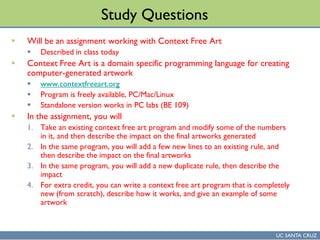
  • 23.
    UC SANTA CRUZ Theproblem with machine code  It is, in fact, possible for humans to program a computer (i.e., to describe algorithms for a computer) using just machine code  But, it is terribly slow, and very error prone  A one-bit error would make the program perform a different function  On some early microcomputers (Altair 8800), this was the only way to program the machine as it came out of the box  Other ways were developed quickly, but required some form of storage, like a tape recorder  A faster way of programming a computer was needed Altair 8800 front panel The switches in the middle row were used to enter machine code by hand Source: Wikipedia
  • 24.
    UC SANTA CRUZ Solution1: Assembly language  The idea behind assembly language is to make it easier for humans to write machine code  For each different instruction, have an associated short, human- meaningful acronym or name  These short acronyms or names are often called mnemonics, and all of them together are known as an assembly language  So, for LoaDing the Accumulator, the short form is “LDA”  For adding a number to the accumulator, the short form is “ADC”  Stands for ADd with Carry  A program, called an assembler, takes assembly language as input, and produces machine code as output
  • 25.
    UC SANTA CRUZ Addingtwo numbers in 6502 assembly  Let’s revisit adding two numbers together on the 6502  Load the accumulator with the number 7  LDA #$07  Load the accumulator with the constant value of hexadecimal 7 = decimal 7  Add to the current accumulator value the number 2  ADC #$02  Add the constant value of hexadecimal 2 = decimal 2 to the accumulator  A 6502 assembler takes these assembly language instructions and converts them into machine code  LDA #$07 (assembly)  10101001 00000111 (binary)  ADC #$02 (assembly)  01101001 00000010 (binary)  Humans can more easily understand the assembly language, while the 6502 hardware can understand the machine code
  • 26.
    UC SANTA CRUZ Historyof assembly language  Assembly languages appear to have emerged in the 1950s  An IBM users group, called SHARE, was formed in 1955  SHARE members were instrumental in contributing to an assembler for the IBM 704 machine  However, there might have been earlier examples  Even doing a little bit of machine code programming would make you yearn for a way of automating it
  • 27.
    UC SANTA CRUZ Theproblem with assembly language  Assembly language has several problems  While faster than machine code, it is still slow to write  It is hard to understand another person’s assembly language program  Hence, large assembly language programs are hard to maintain  It is challenging to maintain and use large collections of pre-made assembly language algorithms (functions, procedures)  Macros, assembly language codes that expand to multiple basic operations helped, but were insufficient  So, assembly language programs are hard to scale, and don’t support reuse  Writing an algorithm in assembly language requires programmers to break it down into very elementary steps  For example, the 6502 doesn’t have floating point mathematics built into the microprocessor  So, in assembly language, you need to write (or reuse) a routine for adding, multiplying, dividing, etc. floating point numbers  See: http://www.6502.org/source/floats/wozfp1.txt for an example  This is called programming at a low level of abstraction
  • 28.
    UC SANTA CRUZ Benefitsof assembly language  Zowie, it is fast  A programmer who deeply understands the microprocessor and the computer architecture can write very fast and efficient code  This can be important for sections of an algorithm that are executed very frequently, and hence small speed improvements have a big impact  Compact  Assembly language code typically uses memory in an efficient way  For this reason, is sometimes used for embedded computing, where the available memory is low  Hardware drivers  Since it is so low-level assembly can be useful for interacting directly with hardware devices connected to a computer (since this hardware is also very low-level)
  • 29.
    UC SANTA CRUZ Programminglanguages  The underlying idea of programming languages is:  To make it possible to write algorithms in a human-friendly notation  To have this notation allow thinking at a higher level of abstraction than assembly/machine language supports  So, for example  In a programming language, to add 2 + 7, we might write:  sum = 2 + 7  The variable named “sum” takes the value of 2 plus 7  Much easier to understand than LDA/ADC  Allows the desired logical operation (i.e., the addition) to be directly expressed, instead of broken down into two separate operations
  • 30.
    UC SANTA CRUZ Compilation How does a program written in a programming language turn into machine code?  There are several techniques, this slide discusses compilation  As opposed to interpreted languages (more on this later)  Process:  A programmer writes the source code of a program  Source code: A file of text with programming language instructions  A program called a compiler converts this text into assembly language  An assembler then converts the assembly language into machine code source code assembly machine code compiler assembler Microprocessor hardware can understand and execute
  • 31.
    UC SANTA CRUZ GraceHopper  PhD mathematics, Yale, 1934  Part of the post-WWI generation of women mathematicians  Associate Professor at Vassar, joined US Navy in 1943  Among the first programmers of the Harvard Mark I computer  And hence, among the first modern computer programmers  Developed the first compiler  Developed the idea of machine independent programming languages  This work led to the development of the language COBOL  Credited with popularizing the term “debugging” to get errors out of a program  Today, the Grace Hopper Celebration of Women in Computing is a yearly conference focused on the contributions of women in computing.  Watch: 60 Minutes interview with Hopper  http://www.youtube.com/watch?v=7sUT7gFQEsY Grace Hopper “First actual case of bug being found”
  • 32.
    UC SANTA CRUZ FORTRAN In mid 1950’s (1953-1957), John W. Backus (IBM) led a team that developed the language FORTRAN  IBM Mathematical Formula Translating System  Developed at IBM campus in south San Jose, California  As befits the name, is well suited for numeric computation and scientific computing  Though not considered a “hip” language, is still in widespread use today, and has been continuously updated  Most recent update was in 2008, which included features for parallel execution FORTRAN manual for IBM 704 Source: Wikipedia
  • 33.
    UC SANTA CRUZ FORTRAN(cont’d)  Major factors in its adoption:  Speed: had to overcome bias of assembly language programmers that compiled code is much slower than assembly language code  As a result, first FORTRAN compiler focused on code optimization  That is, ensuring that the assembly language code generated by the compiler runs quickly  Efficiency: FORTRAN code typically has 1 statement for every 20 statements in an assembly language program  Programmers could write FORTRAN code more quickly than assembly  Portability: FORTRAN code written on one computer could be executed on a different type of computer, with different machine code  John Backus, in a 1979 interview in Think, IBM Employee magazine:  “Much of my work has come from being lazy. I didn't like writing programs, and so, when I was working on the IBM 701, writing programs for computing missile trajectories, I started work on a programming system to make it easier to write programs.”
  • 34.
    UC SANTA CRUZ LISP,COBOL  The two other influential early programming languages from the 1950s were LISP and COBOL  LISP (1958)  LISt Processor, invented by John McCarthy  Commonly used in artificial intelligence programming, but has widespread utility  Variants in use today: Scheme, Common Lisp  COBOL (1959)  COmmon Business-Oriented Language  Widely used for business information technology applications  In declining use today, but still used, and the language was updated in 2002
  • 35.
    Imperative and functionalprogramming languages
  • 36.
    UC SANTA CRUZ Recap Programming languages evolved to address the difficulty of writing machine code  Assembly language developed as a faster way to write machine code, maps very directly  High level programming languages developed to make it easier to write programs, reduce the gap between human thinking and program code  Compilation process  A programmer writes the source code of a program  Source code: A file of text with programming language instructions  A program called a compiler converts this text into assembly langauge  An assembler then converts the assembly language into machine code source code assembly machine code compiler assembler Microprocessor hardware can understand and execute
  • 37.
    UC SANTA CRUZ Differentstyles of programming language  Imperative  Each statement is executed in order  Each statement modifies the state of the program  Program state is the set of values of all variables  In language, the imperative form of verbs is the one where you are giving orders: go there, do this, come back now.  Similarly, imperative programs involve the programmer ordering the computer to perform an algorithm, every step spelled out  In widespread use, examples include: C, C++, C#, Java, FORTRAN, PHP, many others  Functional  Statements define functions  A function only produces actual values if it is used; otherwise just remains as a definition  Function definitions are self-contained, and have no side-effects  Execution environment is free to pick best ordering of program statements  Of growing interest, but still mostly used in universities.  Examples include Haskell, Miranda
  • 38.
    UC SANTA CRUZ Examples Consider code to add a series of integers from 1 to some number n Imperative int sum_to_n(int n) // input is integer n int sum = 0 int j = 0 // will use j as a counter while (j <= n) {sum = sum + j = j + 1} return sum Functional sumInt n | n==0 = 0 | n>0 = n + sumInt(n-1) Defines a base case (n=0), where the output of the function is 0 when n=0. Remaining cases are defined recursively: the current sum is the current value of n plus the value of the sum as of the previous value of n (n-1)
  • 39.
    UC SANTA CRUZ Programsstarted small…  In the early days of high level programming languages, programs were small  Limited computer memory meant that programs couldn’t grow very big  Slow processing speed meant that programs couldn’t run very fast  The lack of good editing and debugging tools meant that writing large programs was tedious  Before the hard disk drive, managing large stacks of paper punched cards was tedious  A common fear was dropping a card stack on the floor, losing card order Programmer standing by punched cards 62,500 punched cards, representing the control program for the SAGE system, ca. 1955 www.computerhistory.org/revolution/story/326
  • 40.
    UC SANTA CRUZ …but got larger  Over time, the desire to make computer programs have more functionality led to larger and larger programs.  This created a problem of how to structure the software  That is, how do you clump together related statements inside a large program?  Evolutionary path  Unstructured code  Use of IF and GOTO to control flow of software  Partially structured code  Subroutines/procedures, but also use of GOTO  Procedural code, block structuring  Use of GOTO deprecated, all code inside procedures, basic blocks  Data may or may not be co-located with code that operates on it  Object-oriented  Cluster code and associated data together into objects
  • 41.
    UC SANTA CRUZ Unstructuredcode  Consider the following example of FORTRAN II code: C AREA OF ATRIANGLEWITH A STANDARD SQUARE ROOT FUNCTION C INPUT - CARD READER UNIT 5, INTEGER INPUT C OUTPUT - LINE PRINTER UNIT 6, REAL OUTPUT C INPUT ERROR DISPLAY ERROR OUTPUT CODE 1 IN JOB CONTROL LISTING READ INPUT TAPE 5, 501, IA, IB, IC 501 FORMAT (3I5) C IA, IB,AND IC MAY NOT BE NEGATIVE C FURTHERMORE,THE SUM OFTWO SIDES OF ATRIANGLE C IS GREATERTHANTHETHIRD SIDE, SOWE CHECK FORTHAT,TOO IF (IA) 777, 777, 701 701 IF (IB) 777, 777, 702 702 IF (IC) 777, 777, 703 703 IF (IA+IB-IC) 777,777,704 704 IF (IA+IC-IB) 777,777,705 705 IF (IB+IC-IA) 777,777,799 777 STOP 1 C USING HERON'S FORMULA WE CALCULATETHE AREA OFTHETRIANGLE 799 S = FLOATF (IA + IB + IC) / 2.0 AREA = SQRT( S * (S - FLOATF(IA)) * (S - FLOATF(IB)) * + (S - FLOATF(IC))) WRITE OUTPUT TAPE 6, 601, IA, IB, IC,AREA 601 FORMAT (4H A= ,I5,5H B= ,I5,5H C= ,I5,8H AREA= ,F10.2, + 13H SQUARE UNITS) STOP END Arithmetic IF: if (num) Sneg, Szero, Spos If the number is negative, goto line Sneg. If the number is zero, go to Szero,etc. Source:Wikipedia
  • 42.
    UC SANTA CRUZ Problemwith unstructured code  What if we wanted to write a large program, and compute the area of a triangle in many places?  Could just repeat the lines of code that compute the area  But, this is wasteful (the same code is in memory multiple times)  Worse, if you need to update the formula, need to do this in many places  This is known as the code clone problem  Ideally would like to have the program go to the lines that compute the area, then return back to the place in the code that needed this  Requires:  Ability to save the current location  Ability to go to another place in the software, and perform some operation (compute area of triangle, for example)  Ability to return to the saved location after performing the operation  Problem: in early FORTRAN, there was no way to save the current location or return to a given location main code procedure
  • 43.
    UC SANTA CRUZ Procedures The first main way to structure code was to introduce procedures  These are sections of code that perform a distinct operation  Many places in the software can ask a procedure to perform its operation  Within a procedure, can have variables whose values are local to the procedure  I.e., can have a variable named j in the main program, an one named j in the procedure – the procedure’s j is different from main’s j  A major advance  A large piece of software can be subdivided into multiple procedures  Each procedure can focus on doing one thing well  Related procedures can be clustered together in a large program  Makes software easier to understand and easier to write  Allowed software to grow larger
  • 44.
    UC SANTA CRUZ Exampleof procedural code  Here is the area of a triangle again, in the language C int main(int argc, char *argv[]) { int a, b, c; printf(“nSideA: "); scanf("%d",&a); printf(“nSide B: "); scanf("%d",&b); printf(“nSide C: "); scanf("%d",&c); printf(“nThe area of the triangle is: %fn", area(a,b, c)); return(0); } float area( int a, int b, int c ) { int s; float y; s = (a + b + c)/2; y = sqrt( s * (s - a)*(s - b)*(s - c) ); return( y ); } Here is the procedure for computing the area of a triangle.Though called only once, it could be called from many places in the code, and could easily be reused in another program. Note that variables a, b, c in the procedure are different variables (but, since they are passed to the procedure,the same values) as the variables a,b,c in the main program. Here is where the procedure is called
  • 45.
    UC SANTA CRUZ Organizationof a procedural program  In a procedural program  Functionality is described by source code statements inside procedures  Data is either local to a procedure, or is global, and can be access by the entire program  Local: inside a procedure  Global: outside a procedure program procedure data (local) code data (global) = contains
  • 46.
    UC SANTA CRUZ Proceduralorganization in the file system  Today, procedural programs are written down as lines of text inside multiple text files  Each file can contain global data and procedures  That is, all of the global data is split up among multiple files program source code file procedure data (local) code data (global) = contains
  • 47.
    UC SANTA CRUZ Problemswith procedural organization  In well-organized procedural code:  Related procedures and their associated global data are co-located in the same file  One file holds global data for the entire system  But, there is nothing to enforce or even encourage this good organization  Consider a stack  Procedures for push, pop and creating a new stack can be in the same file  A global variable can hold the stack’s contents  Also possible  Files hold procedures that are both related and unrelated to each other  Some procedures are very large, and have many different functions  Procedures in one file use global data defined in another  Can be very hard to determine which procedures are using which data
  • 48.
    UC SANTA CRUZ Object-orientedsoftware  Object-oriented software gathers together procedures and their associated data into a class  This is the same notion of class as the class boxes from the data modeling homework, #2  For example, a stack class would have:  Procedures for push, pop  A data item for the contents of the stack  In object-oriented software, global variables are deprecated  It is still possible to have global variables, but ideally the use of such variables will be limited  And, in any event, most OO languages require such data to be inside a class
  • 49.
    UC SANTA CRUZ Organizationof Object-oriented code  An object-oriented program is organized into a set of classes  Each class contains code, and data related to that code  Any global data is put into one (or more) classes  Depending on language, one file holds one class, or one file can hold multiple classes  Classes can typically also contain classes (these are called inner classes) program class procedure data = contains
  • 50.
    UC SANTA CRUZ Object-orientedcode: pros and cons  Benefits:  Easier to understand an individual class, since related code and data are clustered  Changes to a class are more likely to have an effect that is local to that class, due to better encapsulation of data and code  Clustering of data+code into classes allows for more complex relationships between classes, hence greater expressivity  It is easier to create very large software systems using OO code than with purely procedural code  OO classes support inheritance, which makes it easy to create code specialized for specific situations  Drawbacks:  Greater range of relationships among classes leads to OO code being more complex than procedural code, on average  Watch:  Dan Ingalls on emergence of Object Oriented programming  http://www.youtube.com/watch?v=wsvvQm511B4
  • 51.
    UC SANTA CRUZ Summary Imperative  Procedural  C, FORTRAN (older versions)  Object-oriented  C++, Java, C#, PHP, Smalltalk  Functional  Haskell, Miranda  Logic programming (not covered in class)  Prolog
  • 52.
    Domain specific programminglanguages Context Free Art
  • 53.
    UC SANTA CRUZ Recap:Compilation  Compilation process  A programmer writes the source code of a program  Source code: A file of text with programming language instructions  A program called a compiler converts this text into assembly langauge  An assembler then converts the assembly language into machine code  Drawback  The final machine code can only be executed on microprocessors that understand that specific type of machine code  That is, machine code is microprocessor-specific  6502 machine code does not work on an 8080, etc. source code assembly machine code compiler assembler Microprocessor hardware can understand and execute
  • 54.
    UC SANTA CRUZ Interpretedlanguages (compiled)  Ideally, we would like the compiled code for a program to be able to run on any machine, no matter what machine code it uses  That is, compile it once, but then run it anywhere  This can be accomplished by creating a machine- independent assembly language and bytecode (machine code)  Then, an interpreter can execute this machine code on each specific microprocessor source code machine-independent assembly machine code #2 compiler assembler machine-independent bytecode interpreter #2 No processing required, is input to Runs on top of machine code #1 interpreter #1
  • 55.
    UC SANTA CRUZ Pros/Consof interpreted languages  Advantages  A program can be compiled once, and then run on many different types of computer (types of microprocessor)  Write once, run anywhere  Java, C#, Flash/Actionscript are good examples of this  Especially useful for web applications  More control over execution environment  Someone trying to break into a computer system needs to compromise the program, and then the interpreter  Compare with just compromising the program, which then provides direct access to the machine  Disadvantages  Can be slower than languages that compile straight to machine code  Some technologies exist to counteract this: JIT, just-in-time compilation  Doesn’t work for some kinds of applications (e.g., device drivers) that require direct access to the hardware
  • 56.
    UC SANTA CRUZ Interpreters:emulators  The interpreter part can be put into several different places in the program stack  Emulator  Machine code runs inside an emulator program (interpreter), instead of directly on hardware  Examples: older game system emulators, MAME source code assembly machine code (original) compiler assembler emulator machine code (physical) No processing required, is input to Runs on top of Assembly source code for ChronoTrigger 65c816 machine code (original SNES) assembler SNES9X emulator Intel x86 machine code (physical) No processing required, is input to Runs on top of Assume was written in assembly; might have been C
  • 57.
    UC SANTA CRUZ Directlyinterpreted languages  Some languages completely avoid the compilation step  These languages directly execute inside the interpreter  Advantage  Avoids compilation step (and time required to compile)  Same program runs on many different machines  A developer can make a change and quickly see its effect  More interactive  It is sometimes possible to change a program while it is running  Disadvantage  Typically runs much slower than compiled languages  Examples: PHP, Javascript, Logo, Context Free Art source code compiler interpreter machine code (physical) Runs on top of
  • 58.
    UC SANTA CRUZ Summaryof different types of programming langs.  Imperative  Procedural  C, FORTRAN (older versions)  Object-oriented  C++, Java, C#, PHP, Smalltalk  Functional  Haskell, Miranda  Logic programming (not covered in class)  Prolog  Other (domain-specific)
  • 59.
    UC SANTA CRUZ Domainspecific programming languages  Most programming languages we have examined so far are called general purpose langauges  That is, they are designed so they are flexible enough to be capable of solving a wide range of problems  The general idea is that most computational problems can be solved by writing a program in a general purpose language  Sometimes solving a specific problem in a general purpose language is awkward  That is, it can be done, but it requires a lot of code to accomplish a conceptually simple task  In this case, sometimes it is possible to create a new programming language dedicated to just one type of task  Such a language is not expected to be useful for solving a wide range of problems: it solves one problem, and does this well  Such languages are known as domain-specific
  • 60.
    UC SANTA CRUZ ContextFree Art  A example of a domain specific programming language  Designed to make it easy to create computer-generated artwork startshapeT ruleT{ 4*{r 90}{SU{}} rule SU{ S{} SU{x -2.2 y 3.4 s .8 r -31.1} } rule S{CIRCLE{} S{y .2 r 3 s .994} } www.contextfreeart.org/gallery/view.php?id=2461
  • 61.
    UC SANTA CRUZ Executionmodel of Context Free Art  A CFA program begins with a startshape directive  It names the first rule to be executed  In CFA, drawing instructions are given in the form of rules  A rule consists of a series of  0 or more primitive drawing commands (e.g., CIRCLE)  0 or more rules  A rule can call itself rule S { CIRCLE{} S {y .2 r 3 s .994} } Name of the rule is “S” Primitive drawing command (CIRCLE) A call to execute a rule, in this case rule “S” (i.e., call itself).An example of recursion. Definition of rule S
  • 62.
    UC SANTA CRUZ RandomRule Selection  For each rule, there can be one definition, or more than one definition  How they are executed varies by each case  One definition for a rule, R  When another rule calls R, the one definition is executed  More than one definition for a rule R: R1, R2, … Rn  When another rule calls R, one of the definitions is picked at random  This is the main way randomness is added into CFA programs  That is, use of multiple rules allows each picture to be different
  • 63.
    UC SANTA CRUZ Exampleof multiple rule selection startshape SIX rule SIX { FOUR { }} rule FOUR { THREE { } FOUR { x 1 r 5 s 0.4 alpha -0.0009 } } rule FOUR { THREE { } FOUR { y 1 r -5 s 0.4 alpha -0.0009 hue 0.7 sat 0.9 b 1 skew 1.5 0 } } ruleTHREE { TWO { } THREE { flip 32 s 0.99 alpha -0.0009 hue 0.7 sat 0.9 b 1 skew 2 0} } ruleTHREE { TWO { } THREE { flip -32 s 0.99 alpha -0.0009 hue 0.9 sat 0.9 b 1 } } … Two examples of rule FOUR – CFA will pick one of these two when the rule FOUR is called (see rules SIX and FOUR) Either-or Two examples of ruleTHREE – CFA will pick one of these two when the ruleTHREE is called (see rule FOUR)
  • 64.
    UC SANTA CRUZ Whatdo all those letter and numbers mean?  Consider this primitive shape  CIRCLE {x 1 y 2 r 45}  This means  Add 1 to the current x position  Add 2 to the current y position  Rotate by 45 degrees  Now draw a circle  By shifting each drawn shape away from the current position, each shape ends up in a different location  Without these position shifts, all shapes would just overwrite each other
  • 65.
    UC SANTA CRUZ Primitiveshapes  Square  A unit square  SQUARE{}  Circle  A unit circle – diameter is the same as the side of a square  CIRCLE{}  Triangle  Unit triangle. Same side length as squares  TRIANGLE{}  Defined in terms of path operations  Not covered in class, can draw arcs, splines, etc.  http://www.contextfreeart.org/mediawiki/index.php/Paths
  • 66.
  • 67.
    UC SANTA CRUZ StudyQuestions  Will be an assignment working with Context Free Art  Described in class today  Context Free Art is a domain specific programming language for creating computer-generated artwork  www.contextfreeart.org  Program is freely available, PC/Mac/Linux  Standalone version works in PC labs (BE 109)  In the assignment, you will 1. Take an existing context free art program and modify some of the numbers in it, and then describe the impact on the final artworks generated 2. In the same program, you will add a few new lines to the program, and then describe the impact on the final artworks 3. For extra credit, you can write a context free art program that is completely new (from scratch), describe how it works, and give an example of some artwork
  • 68.
    Emergence of theinternet - Basics of internetworking
  • 69.
    UC SANTA CRUZ Lectureoverview  This lecture involved watching part of Nerds 2.0.1, episode 1  http://www.youtube.com/watch?v=Fi97PlMeal4  http://www.youtube.com/watch?v=d6DGbEFJnRo  http://www.youtube.com/watch?v=9vmZTQloseo  These videos give an overview of the emergence of the Internet  Following the video, the lecture involved an on-board presentation of the following concepts:  Packet switching  Circuit switching  IP address  The role of routers in the Internet
  • 70.
    How the WorldWide Web works
  • 71.
    UC SANTA CRUZ Thethree key advances of the Web  When Tim Berners-Lee invented the Web, he had to solve three key problems:  Addressing (URL)  How to uniquely identify each web page in a human-friendly way  Presentation (HTML)  How to present the information in a web page to a human reader in a standard way  Transport (HTTP)  How to quickly transmit information from a remote computer to the user’s computer  Especially, how to do this faster than FTP Tim Berners-Lee (1993) These three technologies form the technical pillars of theWorldWideWeb
  • 72.
    UC SANTA CRUZ Developmentcontext of the web  When the web was under development, 1989-1990, there was no one dominant internet information system  A collection of systems, including Usenet News, FTP, Gopher  Many different types of machines  PCs and Macs were not typically connected to the Internet  Most users of the Internet were academics on Unix workstations  But, many other kinds of computers existed as well: mainframes, DEC workstations, NeXT machines, etc.  In general, was a challenge to access information uniformly from all computers  A given information system might be accessible from some, but not all types of computer
  • 73.
    UC SANTA CRUZ Addressingthe internet, circa 1989/1990  Before the web, there was no uniform way to describe a specific information resource  One might say, “Go to the FTP server at ftp.ucsc.edu, login anonymously, then get file /games/rogue.tar”  Worked OK for humans, but,  Hard for computers to understand  Not very compact – what if you wanted to make a list of these?  Or, what if you wanted to embed them in a link in a document?  Ideally, one might want a way of identifying internet resources that includes:  The way to access it (i.e., which protocol? FTP? Gopher? Etc.)  The name of the machine that has the resource (i.e., a domain name like ftp.ucsc.edu)  The local name of the resource – i.e., once you get to a given machine with a given protocol, what identifier (name) should be used to retrieve the resource?
  • 74.
    UC SANTA CRUZ URL Uniform Resource Locator  Uniform: the same format is used in a standard way for identifying all resources on the Internet  Resource: a specific chunk of information available on the internet, or, a specific computational process (e.g., “current temperature”) on the internet  Locator: contains all of the information necessary to retrieve a web resource  A URL should contain, within itself, all of the information necessary to identify and retrieve a specific resource on the internet
  • 75.
    UC SANTA CRUZ Significanceof the URL  Any web resource can be retrieved using a URL  That is, URLs work at Internet scale  Most hypertext systems prior to the Web did not work at Internet scale: required a significant shift in thinking  Provides a standard way of writing down internet identifiers  Extensible syntax: not limited to just protocols and information systems available when URLs were invented  Has room to grow well into the future  Compact representation  Easy to write down and share with other humans  Easy to embed within computer documents (such as links in HTML)  Could easily map to file system paths, but was not required to exactly map to file system paths.  The web was not intended to be a wide area network file system  In retrospect, URLs have a kind of obvious, inevitable quality. This was not obvious at the time, and several other schemes existed prior to URLs that lacked some of the qualities above.
  • 76.
    UC SANTA CRUZ Anatomyof a URL  {scheme}://{scheme-specific part}  Usually:  {scheme}://{domain name}/{local identifier}  For Web URLs:  Scheme = http (i.e., the protocol used to access it, HTTP)  Domain name = the name of the machine holding the web resource  Local identifier  A name that the machine identified by “domain name” understands, and can use to access a specific resource  Often a file name  Not required to be a file name
  • 77.
    UC SANTA CRUZ Documentformats, circa 1989/90  In 1989/90, there were two main document formats n the PC, Word and WordPerfect  But, these only worked on PCs  Complex document formats. Mostly publically undocumented.  Not really feasible for a single programmer to write a universal viewer for Word or Word Perfect documents.  No Unix support  On Unix, Framemaker, Latex, and text were the main file formats  Framemaker was also complex, like Word, and tied to a specific application  Latex was freely available, but required a compilation step to produce output (too slow for a web browser)  Text was freely available, and rendered quickly, but had limited typographic potential  Fixed width fonts  No choice of fonts, different width fonts, lists, tables, etc.  None of these document formats had built-in hypertext links
  • 78.
    UC SANTA CRUZ HTML In order to create a universal viewer for web resources, a new, simple document language was needed  Through the 1980s, the Standard Generalized Markup Language was in limited use  But, the ideas behind SGML were known to most hypertext system researchers  HTML took SGML, and simplified it  Followed the same syntax, more or less, and created a set of standard tags (elements) for describing simple documents  Hypertext Markup Language (HTML)  Hypertext: the language needed to support hypertext linking  Markup: the style of language was a markup language  Textual content has additional annotations added that specify structure and formatting  Language: not a programming language, but a domain-specific document description language
  • 79.
    UC SANTA CRUZ Significanceof HTML  A simple document format that is  (relatively) easy render to a screen  Can be edited using simple text editors  Is more-or-less human-readable  Relatively space efficient  An open standard  The document format is not owned and controlled by a single for-profit company  Prevents lock-in to a standard where a company might start charging high licensing fees for its use  Implementation of HTML has grown to the point where it is supported by most general purpose computers  Writing a document in HTML means that you don’t have to worry whether people will be able to view it on their computer
  • 80.
    UC SANTA CRUZ HTMLdocument structure  Learning HTML is complex, and beyond the scope of a single lecture  A document consists of a metadata portion (the head) and the main content (the body) <html> <head> … metadata goes here, such as the title of the page … </head> <body> … main page content goes here … </body> </html>
  • 81.
    UC SANTA CRUZ HTMLmarkup  The general idea of markup is that you add annotations to the core text of a document  The annotations indicate the type of text (i.e., structural markup, such as heading, list item, etc.) or the presentation of the text (italics, bold, etc.) <html> <head> <title>Sample page</title> </head> <body> <h1>Chapter 1 heading</h1> <p>This is a paragraph. It has sentences. It also has an <i>italicized</i> and a <b>bolded</b> word.</p> </body> </html> HTML elements “mark up” the text in the document Chapter 1 heading This is a paragraph.It has sentences.It also has an italicized and a bolded word.
  • 82.
    UC SANTA CRUZ HTTP Hypertext Transfer Protocol (HTTP)  An Internet protocol that is used by Web browsers to retrieve information (web pages, images, etc.) from a remote web server  Key qualities  Much faster than FTP for retrieving Internet resources  Extensible design, permitted web to grow to large scale  See example  http://upload.wikimedia.org/wikipedia/commons/c/c6/Http_request_tel net_ubuntu.png
  • 83.
    UC SANTA CRUZ StudyQuestions  Will be an assignment working with Context Free Art  Described in class today  Context Free Art is a domain specific programming language for creating computer-generated artwork  www.contextfreeart.org  Program is freely available, PC/Mac/Linux  Standalone version works in PC labs (BE 109)  In the assignment, you will 1. Take an existing context free art program and modify some of the numbers in it, and then describe the impact on the final artworks generated 2. In the same program, you will add a few new lines to an existing rule, and then describe the impact on the final artworks 3. In the same program, you will add a new duplicate rule, then describe the impact 4. For extra credit, you can write a context free art program that is completely new (from scratch), describe how it works, and give an example of some artwork
  • 84.
    Web applications. JavaScript. Web2.0: The dynamic, read-write web
  • 85.
  • 86.
    UC SANTA CRUZ EarlyWeb  The architecture of the early web involved a client (browser) and a server  The browser was only capable of displaying content it received from the server  No ability to run programs  The servers mostly returned static documents and pictures  However, some websites called out to external programs (via the common gateway interface, CGI) and returned information from this program  Servers had no ability to run programs internally (they had to call out to CGIs) Browser HTTP Server files External programCGI
  • 87.
    UC SANTA CRUZ Addingdynamism  Very quickly, the web started adding the ability to run programs on the client and server  1994: addition of JavaScript to browser  1994/5: emergence of languages that run inside a web server  Example: PHP, introduced in 1995  Makes it possible to have database-backed web sites Browser HTTP Server files JavaScript interpreter PHP interpreter database
  • 88.
    UC SANTA CRUZ Webapplications  A web application (or webapp) is a program that is written to run inside a web server  A web application also typically has aspects which are written in JavaScript and intended to run inside the browser  Most large websites today are web applications  Facebook, Google, etc.  Advantages of web applications over static sites  Site content comes from a database, and hence can be reused in many places in a site  The site can adapt itself to a particular visitor  The site can be interactive
  • 89.
    UC SANTA CRUZ Web2.0  A general term used to indicate websites or web technologies that have several of the following characteristics:  User-contributed content  High degrees of interactivity  Support for collaboration among users of the site  Commenting and tagging capability  Ease of embedding content in and from the site  Google Maps was an early example  Was a revelation to many that the web could support panning over a map by simply grabbing the map image
  • 90.
    UC SANTA CRUZ Web2.0 trends  Applications moving to the web  Google Docs is one example  Complete word processor, spreadsheet, presentation software  All are web applications  Unlike traditional web applications, most of the code is in JavaScript, running on the client  Greater interactivity  Flash is now installed in most web browsers  Flash permits websites to have programs with high degrees of graphical content and interactivity  Flash opened the window for web-based games to emerge
  • 91.
    UC SANTA CRUZ Riseof Social Networking  Social networking sites now major hubs of social interaction  Facebook: #2 site on web, 42% of global Internet users visit site. Still growing. (Google is #1 at ~50% of global internet users)  Social network as platform drives fast application growth  Zynga, social games company  CityVille  89,035,083 monthly active users  18,464,765 daily active users  Achieved 6 million daily acitve users in just 8 days www.alexa.com/siteinfo/facebook.com
  • 92.
  • 93.
    UC SANTA CRUZ Whatis Scratch?  Scratch is a programming language and environment  Designed to make it easy to learn how to program  Programs are fun and graphical  Developed by Lifelong Kindergarten Group @ MIT Media Lab,
  • 94.
    UC SANTA CRUZ Benefitsof Scratch  Can make a wide range of content  Interactive stories  Animations  Games  Music and art  Share content  Easily share Scratch creations on the Scratch website  Over 1.7 million projects shared so far  Easy to learn  No need to memorize language syntax  Programming language elements are visible on-screen  Drag-and-drop to use programming language elements  Designed for use by kids 8/9 years old on up  Software is free to use
  • 95.
    UC SANTA CRUZ Sprites Spritesare anything visual you see on screen. Each Sprite has an associated block of program code. Box of available sprites On-screen sprite
  • 96.
    UC SANTA CRUZ Scripts Clickingon a sprite brings up its associated code (middle pane) Script pane (code pane) This code controls how this sprite moves
  • 97.
    UC SANTA CRUZ Howto program Drag and drop code blocks into code pane Can be free floating, or connect to other sequences of code Can also select and move code from code pane to remove Double-click on code block to execute – you’ll see results in the upper right window
  • 98.
    UC SANTA CRUZ Differentkinds of statements Different buttons in the upper left window bring up different programming blocks Click a button here to bring up different code blocks here
  • 99.
    UC SANTA CRUZ DownloadingScratch  Scratch is freely available, and works on Windows, Macintosh, and Ubuntu Linux  scratch.mit.edu  Main website for Scratch  http://scratch.mit.edu/download  URL for downloading Scratch  Video tutorials  http://info.scratch.mit.edu/Video_Tutorials
  • 100.
  • 101.
    Silicon Valley HackerCulture Introduction to Scratch (continued)
  • 102.
    UC SANTA CRUZ SiliconValley Hacker Culture  Going back to at least 1975 (and drawing inspiration from the 60s counter culture movement) Silicon Valley has hosted a culture of people hacking with technology  Hacking – playing around with technology, in ways that sometimes were, and sometimes were not aligned with its original purpose  Homebrew Computer Club (1975-1986)  A club for early personal computer enthusiasts  The Apple I computer emerged out of this club
  • 103.
    UC SANTA CRUZ SiliconValley Hacker Culture Today  Hacker Dojo  A community of engineers, artists, scientists, activists, entrepreneurs and other creative people centered around a co-working and social facility in Mountain View, CA.  http://wiki.hackerdojo.com  TechShop  A membership-based workshop that provides members with access to tools and equipment, instruction, and a community of creative and supportive people so they can build the things they have always wanted to make.  Computer-controller laser cutters, 3D printers, sewing machines, wood router, etc.  California locations in Menlo Park & San Francisco, San Jose (summer 2011)  http://techshop.ws/
  • 104.
    UC SANTA CRUZ MakerFaire  May 21-22, San Mateo Fairgrounds  http://makerfaire.com/  Large show featuring many people who are creating novel things, many using computer controllers or software  Inspiration to become a maker, someone who makes things (as opposed to someone who only consumes things)  Extra credit deal:  Go to Maker Faire  Submit your ticket stub, along with a 3-4 paragraph description of what you liked and didn’t like about the show  Due end-of-day, day of the final exam.  Up to 10 extra credit exam points
  • 105.
    UC SANTA CRUZ Sprites Spritesare anything visual you see on screen. Each Sprite has an associated block of program code. Box of available sprites On-screen sprite
  • 106.
    UC SANTA CRUZ Scripts Clickingon a sprite brings up its associated code (middle pane) Script pane (code pane) This code controls how this sprite moves
  • 107.
    UC SANTA CRUZ Howto program Drag and drop code blocks into code pane Can be free floating, or connect to other sequences of code Can also select and move code from code pane to remove Double-click on code block to execute – you’ll see results in the upper right window
  • 108.
    UC SANTA CRUZ Differentkinds of statements Different buttons in the upper left window bring up different programming blocks Click a button here to bring up different code blocks here
  • 109.
    UC SANTA CRUZ Conditionalsin Scratch  Scratch supports conditionals  if condition then action  if condition then action1 else action2  These are found in the Control tab  Notice that the condition is a smooshed hexagon shape  Conditions can be found under the operators tab (green) and the sensing tab (blue)  Conditions are dragged and dropped into the hexagon shaped holes in a conditional
  • 110.
    UC SANTA CRUZ Exampleof a conditional: Collision detection  Collision detection  Use the “touching” condition, found on the Sensing tab  Clicking on the black triangle brings up a pull-down menu  Mouse-pointer is the arrow you move with the mouse  Edge is the edge of the stage (white window in upper right of screen)  Anything below this is the name of another sprite  “Puffy” is the same of a sprite  Example  After the green flag is pressed, do forever  Move forward 5 steps  Turn two degrees  If the sprite is touching another sprite named Puffy  Move 20 steps backwards
  • 111.
    UC SANTA CRUZ Exampleof a conditional: Key input  Key input  Use the “Key ___ pressed?” condition, found on the Sensing tab  Clicking on the black triangle brings up a list of keys that can be detected  Example  After the green flag is pressed, do forever  Move forward 5 steps  Turn two degrees  If the space bar is pressed  Move backwards 20 steps
  • 112.
    UC SANTA CRUZ Variables A variable is a named storage location for data  Can use variables to remember things for later…  E.g., remembering a random number  … or for counting things  E.g., a score, the number of times something happened, etc.  To create a variable  Click on “Make a variable” on the Variables tab  Will ask you:  For a name for the variable (pick a descriptive name)  Whether the variable is for just one sprite, or for all sprites  Example  Variable named “random-number” Set variable to a specific value Change variable + or - by a specific change in value Is the variable visible in the stage window
  • 113.
    UC SANTA CRUZ Variablesexample: high-low game Pick a random number between 1 and 100 Put the random number in the variable named random-number Repeat until the player’s answer is the same as the random number (the player guessed correctly) Ask the player to guess a number between 1 and 100 If the guess is less than the random number, say “Too low!” If the guess is greater than the random number, say “Too high!” If the guess is the same as the random number, then the “repeat until” loop will stop, and the program will reach here (the first statement after the repeat until loop). Say, “You guessed it!”
  • 114.
    UC SANTA CRUZ Coordinationbetween sprites: broadcast  Sometimes you want one sprite to cause another sprite to do something  This is accomplished by the first sprite broadcasting a message  The second sprite receives the message, and then does something  Example When I see the space bar has been pressed… … I say “Hello!”
  • 115.
  • 116.
    Evolution of theHuman-Computer Interface
  • 117.
    UC SANTA CRUZ MakerFaire  May 21-22, San Mateo Fairgrounds  http://makerfaire.com/  Large show featuring many people who are creating novel things, many using computer controllers or software  Inspiration to become a maker, someone who makes things (as opposed to someone who only consumes things)  Extra credit deal:  Go to Maker Faire  Submit your ticket stub, along with a 3-4 paragraph description of what you liked and didn’t like about the show  Due end-of-day, day of the final exam.  Up to 10 extra credit exam points
  • 118.
    UC SANTA CRUZ Howdo people interact with computers?  In the early days of computing, it was fairly miraculous that a computer would work at all  As a result, many people were expected to work hard to ensure the computer could perform a given task  That is, the computer’s needs were dominant, and humans catered to the needs of the machine.  As the price of computing dropped, a broader population of people started using computers  This trend became particularly strong in the 1980s with the advent of personal computing  Instead of highly trained people using a computer, anyone, trained or not, might be using a computer  Brought to the foreground the question: how should people interact with computers?
  • 119.
    UC SANTA CRUZ NLS/Augment Project led by Douglas Engelbart  ~1959-1970/1  Explicit goal was to create a computer system capable of supporting knowledge workers  Goal was to make people more capable of analyzing information, tackling large tasks and problems  That is, the use of the computer to enhance or augment human intellectual capacity  Project invented word processing, hypertext, mouse  Provided a vision of what computing could do to support knowledge workers  1968 demonstration
  • 120.
    UC SANTA CRUZ XeroxAlto  A personal computer developed at Xerox Palo Alto Research Center (PARC) in 1973  Many ideas from NLS/Augment find their way into the Alto  First graphical user interface  Integration of mouse into user interface  Alto features  Bravo and Gypsy word processors  Direct lineage to Microsoft Word  Email reader  Bitmap paint program  Vector graphics program  Worked out basic concepts that are now found in today’s windowing user interfaces  Direct influence on Lisa/Mac, which led to Windows Alto workstation
  • 121.
    UC SANTA CRUZ Macintosh Apple Lisa (1983)  First personal computer with graphical user interface marketed to a mainstream audience  Heavily influenced by ideas from Xerox Alto  Expensive, poor performance, did not sell well  Apple Macintosh (1984)  Co-developed at same time as Lisa, some ideas crossed over between teams  More simple design than Lisa, but still featured graphical user interface  Cheap enough so a mainstream audience could purchase  But, did not sell well initially, due to high price  Still, brought idea of graphical user interface to a broad audience. Made GUIs mainstream. Original Apple Mac (1984) Apple Lisa (1983)
  • 122.
    UC SANTA CRUZ MicrosoftWindows  Released in November, 1985 (development began in 1981)  A response to growing interest by public in graphical user interfaces, caused by Macintosh  Slow initial adoption  Competition from other window managers, notable among them GEM (released November 1984) Windows 1.0 screenshot
  • 123.
    UC SANTA CRUZ Mobilecomputing – notable waypoints  Apple Newton (1993)  Full-feature handheld computer  Handwriting recognition  Too large, too expensive  Palm Pilot (1997)  Small form factor  Good handwriting recognition  Apple iPhone (2007)  Touch-based smartphone user interface  Carried over into touch-based user interface for iPad Newton (left), iPhone (right) Source:Wikipedia Palm Pilot
  • 124.
  • 125.
    Digital Divide. Useof computers in the developing world.
  • 126.
    UC SANTA CRUZ Importanceof Internet access  Increasingly, access to marketplaces and government services is dependent on being connected to the Internet  As a consequence, those people who are not connected to the Internet are at a disadvantage  Limited access to markets, and hence at mercy of local buyers and sellers of goods  Limited access to information, hence reduced ability to make informed decisions and/or to know about relevant services  Typically, those who are not connected are already poor and societally marginalized  Lack of connectivity can reinforce these trends Rural internet kiosk in Kenya comminit.com/?q=africa/node/310514
  • 127.
    UC SANTA CRUZ DigitalDivide  Digital Divide  As a general term, is used in many different contexts to refer to differences in adoption and use of the Internet between various groups  So, for example, one can talk about the digital divide between various groups in the United States (rich vs poor, white vs minority, etc.)  Global Digital Divide  Used to describe the difference in use of information technology between different regions of the world
  • 128.
    UC SANTA CRUZ GlobalDigital Divide circa 2006 Source: Wikipedia en.wikipedia.org/wiki/File:Global_Digital_Divide1.png
  • 129.
    UC SANTA CRUZ EstimatedInternet Users Source:http://www.unctad.org/en/docs/dtlstict2011d3_en.pdf
  • 130.
    UC SANTA CRUZ EstimatedInternet Users by Continent Source:http://www.unctad.org/en/docs/dtlstict2011d3_en.pdf
  • 131.
    UC SANTA CRUZ GlobalDigital ICT Use Source:http://www.unctad.org/en/docs/dtlstict2011d3_en.pdf
  • 132.
    UC SANTA CRUZ ICTUse, Developed vs Developing Countries www.unctad.org/en/docs/dtlstict201 1d3_en.pdf
  • 133.
    UC SANTA CRUZ Fixedvs Mobile High Speed Internet www.unctad.org/en/docs/dtlstict2011d3_en.pdf More people worldwide receive internet service via mobile connections, than via fixed connections. This trend is accelerating.
  • 134.
    UC SANTA CRUZ Impactsof mobile telephony in Africa  In Ghana, farmers in Tamale can find out prices of corn and tomatoes in Accra, over 400 kilometers away.  In Niger an average trip to a market located 65 kilometers away can take 2–4 hours roundtrip, as compared to a two- minute call  The call represents a 50% cost savings  Mobile phones allow information to be obtained immediately, instead of waiting for weekly newspapers or broadcasts  In Niger, day laborers can call acquaintances in Benin about job opportunities to see if it worthwhile to make the US $40 trip there to seek work.  Mobile phones reduce costs of seeking labor  Source: Mobile Phones and Economic Development in Africa, Jenny C. Aker, Isaac M. Mbiti, Journal of Economic Perspectives, Vol.. 24, No. 3, Summer 2010, pages 207-232, http://pubs.aeaweb.org/doi/pdf/10.1257/jep.24.3.207
  • 135.
    UC SANTA CRUZ Projectsto improve ICT access  One laptop per child  Ambitious effort to get laptop computers into the hands of children  Similar to goals of Scratch, to broadly introduce people to computational thinking  Drishtee  India based company that provides Internet access and classes to remote villages
  • 136.
  • 137.
    Computer science careers.Computer science at UNZA for Pharmacy
  • 138.
    UC SANTA CRUZ Careersin Computer Science  Computer software engineering and computer programmer  Employment projected to increase by 21% between 2010 and 2018  Faster than average for all occupations  Job prospects projected to be excellent  In May, 2008, median annual wages of computer application software engineers were $85,430  This is across all experience levels, and across the nation  Entry-level salaries in the Silicon Valley region tend to be higher than in other parts of the US  Annual entry level salaries tend to range from $60,000-$80,000  For startup companies, receive stock options on top of this  Source:  Occupational Outlook Handbook, 2010-11 Edition  http://www.bls.gov/oco/ocos303.htm  US Bureau of Labor Statistics
  • 139.
    UC SANTA CRUZ Furtherclasses at UC Santa Cruz  CMPS 5J – Introduction to Java Programming  Fall 2011 and Winter 2012  CMPS 5P – Introduction to Python Programming  Spring 2012  CMPS 80K – Foundations of Interactive Game Design  Spring 2012  Learn how to design and create video games  CMPS 25 – Introduction to Computer Graphics: 3D Modeling  Fall 2011, Winter 2012  Learn how to make 3D images inside a computer using the Blender program. Not a programming course, but quite rigorous.  CMPS 26 - Introduction to Computer Graphics: 3D Animation  Spring 2012  Learn how to make a 3D animated character. CMPS 25 is a prereq.
  • 140.
    UC SANTA CRUZ ComputerScience Majors  BS Computer Science  Traditional Computer Science degree.  Will train you to be able to gain a software engineering job  BA Computer Science  Less structured than BS Computer Science  Works well as second major in conjunction with other major  Still very rigorous  BS Computer Science: Computer Game Design  A strong computer science degree  Plus: courses on game design, game programming  Year long project sequence where students work in a team to create a working computer game  Students can work as software engineers generally, but also work in games industry
  • 141.
  • 142.
    creativity support &computational creativity
  • 143.
    UC SANTA CRUZ Announcements Prof. Munkonge is in Hawaii  You have a midterm exam on Monday, May 23!
  • 144.
    UC SANTA CRUZ Creativetasks are hard
  • 145.
    UC SANTA CRUZ Cancomputers help? A. Original image B. Scaled narrower C. Scaled narrower, using Photoshop’s content-aware scaling
  • 146.
    UC SANTA CRUZ Whatis creativity support?  Machine-amplified design potential  Four potential roles  Nanny  Pen-pal  Coach  Colleague Todd Lubart. 2005. How can computers be partners in the creative process: Classification and commentary on the Special Issue. Int’l Journal of Human-Computer Studies. vol. 63.
  • 147.
    UC SANTA CRUZ AugmentingHuman Intellect 1962 Doug Engelbart poses that computers are a way to augment human intellect.
  • 148.
    UC SANTA CRUZ Sketchpad 1963 IvanSutherland creates Sketchpad, a precursor to CAD tools and object-oriented programming.
  • 149.
    UC SANTA CRUZ SoftArchitecture Machines 1975 Nicholas Negroponte introduces the concept of computers as design amplifiers.
  • 150.
    UC SANTA CRUZ IterativeDesign 1992 Donald Schön views design as a conversation between computer and user.
  • 151.
    UC SANTA CRUZ MagicCrayons 2008 Chaim Gingold describes creativity-support for novices using magic crayon metaphor.
  • 152.
    UC SANTA CRUZ SketchingVirtual Worlds 2009-Present Researchers at TU Delft combine techniques to support user sketching of virtual worlds.
  • 153.
    UC SANTA CRUZ ComputationalCreativity Can computers be creative in their own right?
  • 154.
    UC SANTA CRUZ ComputationalCreativity Can computers be creative in their own right?
  • 155.
    UC SANTA CRUZ WhatIs Creativity? Margaret Boden discusses context for creativity: to whom must it be novel?
  • 156.
    UC SANTA CRUZ WhatIs Creativity? Creativity has a central loop of creation and evaluation.
  • 157.
    UC SANTA CRUZ WhoGets the Credit? At what point does a program cease being an artistic expression from its author and become creative itself?
  • 158.
    UC SANTA CRUZ EvaluatingCreativity How do we evaluate the creativity of a system?
  • 159.
    UC SANTA CRUZ Domainand Knowledge Representation Domain representation is crucial to success of computational creativity and creativity support tools.
  • 160.
    UC SANTA CRUZ Experimentsin Musical Intelligence Ultimately, the computer is just a tool with which we extend our minds. The music our algorithms compose are just as much ours as the music created by the greatest of our personal human inspirations. - David Cope
  • 161.
    UC SANTA CRUZ AARON Anacclaimed art generator whose author does not consider it creative.
  • 162.
    UC SANTA CRUZ ThePainting Fool There are many artists who call themselves painters, even though they often use entirely simulated paint … I do the same. I use skill, appreciation and imagination in my art process. Would you call me an artist? Would you call me creative? - The Painting Fool (Simon Colton)
  • 163.
    UC SANTA CRUZ NEvAR Neuroevolutionaryart is a creative system that does not use the human creative process.
  • 164.
    UC SANTA CRUZ Tanagra:An Intelligent Level Design Tool
  • 165.
    UC SANTA CRUZ 2DPlatformers  Simple rules  Run, jump  Collect items  Get to the goal SuperMarioWorld, Nintendo DonkeyKongCountry2, Nintendo SonictheHedgehog, Nintendo  Complexity  Dexterity challenge  Find secret areas  Finish levels quickly  Focus Games  Super Mario World  Donkey Kong Country 2  Sonic the Hedgehog
  • 166.
    UC SANTA CRUZ LevelComponents  Platforms  Player runs along them.  Obstacles  Cause damage to player.  Collectible Items  Provide reward to player.  Triggers  Cause change in level.  Movement Aids  Help player through the level. SuperMarioWorld, Nintendo SonictheHedgehog2, SEGA Yoshi’sIslandDS, Nintendo NewSuperMarioBros., Nintendo Yoshi’sIslandDS, Nintendo
  • 167.
    UC SANTA CRUZ WhyRhythm?  Foundation of challenge in dexterity games  Long sequences without pause  Long and complex patterns  Reduced time to complete a challenge Source: Victor Nicollet, “Difficulty in Dexterity-Based Platform Games”, GameDev.net Super Mario World 2, Nintendo
  • 168.
    UC SANTA CRUZ RhythmGroups  Rhythm is that of player performing actions  Identify challenging areas of a level  Transitions are place where player can rest Super Mario World, Nintendo
  • 169.
  • 170.
    UC SANTA CRUZ FurtherReading  The New Media Reader  Edited by Noah Wardrip-Fruin and Nick Montfort  Designerly Ways of Knowing  Nigel Cross  Experiments in Musical Intelligence  David Cope
  • 171.
    UC SANTA CRUZ Discussionand Questions Gillian Smith gsmith@soe.ucsc.edu http://users.soe.ucsc.edu/~gsmith
  • 172.
  • 173.
    UC SANTA CRUZ Homework#1  Will be an assignment working with Context Free Art  Described in class today  Context Free Art is a domain specific programming language for creating computer-generated artwork  www.contextfreeart.org  Program is freely available, PC/Mac/Linux  Standalone version works in PC labs (BE 109)  In the assignment, you will 1. Take an existing context free art program and modify some of the numbers in it, and then describe the impact on the final artworks generated 2. In the same program, you will add a few new lines to an existing rule, and then describe the impact on the final artworks 3. In the same program, you will add a new duplicate rule, then describe the impact 4. For extra credit, you can write a context free art program that is completely new (from scratch), describe how it works, and give an example of some artwork
  • 174.
    UC SANTA CRUZ Homework#2  To be posted online later today  Two parts  A skills-building part that builds up capability through a series of assignments  An open-ended creative part  Do something interesting using Scratch
  • 175.
    UC SANTA CRUZ Popquiz  Open-notes, no computers, cellphones, etc.  Questions are evenly weighted 1. Which type of switching (circuit or packet) does the Internet use?  Packet switching 2. What technology did Tim Berners-Lee invent so that every computer could display internet-hosted documents?  HTML Also acceptable: Web browser 3. What technology did Tim Berners-Lee invent so that every internet resource has a human-friendly name?  URL 4. PHP is an example of a language that runs inside of what?  PHP runs inside a web browser. Also acceptable: HTML (PHP is a programming language with statements interspersed among HTML elements) 5. What is a web application?  A software application that runs inside a web server (and also has some code running inside a web browser) 6. Give an example of a Web 2.0 web site  Many possibilities: Facebook, Google Maps, the Scratch website, YouTube, etc.
  • 176.
    UC SANTA CRUZ Practical-BasedLearning (PBL)  Referred to ‘Computer Basic Course PBL Outline’ MicrosoftWord Microsoft PowerPoint Microsoft Excel
  • 177.
    UC SANTA CRUZ StudyQuestions for Tests & Examination
  • 178.
    UC SANTA CRUZ PotentialExam Topics  As pharmacy training programme students, you are expected to be able to assess complex material and make judgments concerning its relative importance.  That said, it can be helpful to have some input from the lecturer to help focus studying activity.  The following are questions/topics that are likely, but not guaranteed to appear on the exam.  Anything covered in class or in the assigned readings may appear, even if not explicitly mentioned today.
  • 179.
    UC SANTA CRUZ Reviewof Study Questions  Recall that all of the review questions are also review questions for the end final exam  What does “generation of dialog” mean in the context of a computer-based dialog system?  Having a computer generate human-understandable spoken language through the execution of an algorithm  From Marilyn Walker lecture  Noah Wardrip-Fruin lecture:  Are computer games a linear, or non-linear experience?  Non-linear – there are many paths, many ways to experience a computer game  What was the topic of Noah’s lecture?  Computer-based interactive fictions; stories where the user/player can interact with the story, and change the way it progresses
  • 180.
    UC SANTA CRUZ Definethe Following Terms  Hardware  accumulator  Machine code  mnemonics assembler  Macros  Zowie  Compact compilation  FORTRAN compiler  LISP  COBOL Data encapsulation Expressivity bytecode Emulator URL HTML Scratch Hacker Dojo Metaphor Neuroevolutionary art
  • 181.
    UC SANTA CRUZ StudyQuestions  Open-notes, no computers, cellphones, etc.  Questions are evenly weighted 1. Which type of switching (circuit or packet) does the Internet use?  Packet switching 2. What technology did Tim Berners-Lee invent so that every computer could display internet-hosted documents?  HTML Also acceptable: Web browser 3. What technology did Tim Berners-Lee invent so that every internet resource has a human-friendly name?  URL 4. PHP is an example of a language that runs inside of what?  PHP runs inside a web browser. Also acceptable: HTML (PHP is a programming language with statements interspersed among HTML elements) 5. What is a web application?  A software application that runs inside a web server (and also has some code running inside a web browser) 6. Give an example of a Web 2.0 web site  Many possibilities: Facebook, Google Maps, the Scratch website, YouTube, etc.
  • 182.
    UC SANTA CRUZ StudyQuestions  What is machine code?  What is assembly language? What is a mnemonic?  How is assembly language converted into machine code? What is the name of the program that does this?  Can computer hardware directly execute machine code? Assembly language?  What are the problems with machine code?  What are the pros and cons of assembly language?  What does a compiler do?  Who was Grace Hopper? What are some of her “firsts”?  What were the three major early high-level programming languages developed in the 1950s?
  • 183.
    UC SANTA CRUZ StudyQuestions  What are the four different styles of programming language discussed in lecture?  Imperative, functional, logic programming, domain-specific  Be able to give the name of an imperative language, a functional language, and a domain-specific language  What style of programming language is Context Free Art? Scratch?  What is a procedure (in procedural programming languages)?  What are some of the benefits of procedures?  What is the difference between local and global data in a procedural programming language?  What are some problems that emerge in procedural code that is not well- organized?  How does object-oriented software differ from procedural software?  What are some benefits of object-oriented software?
  • 184.
    UC SANTA CRUZ StudyQuestions  What is the difference between compiled and interpreted software?  Are Context Free Art and Scratch compiled or interpreted?  What are the advantages and disadvantages of interpreted code?  What is an emulator? What is the relationship between emulators and interpreters?  What is a directly interpreted language? How does this differ from languages that are compiled, then interpreted?  What is a domain specific programming language?
  • 185.
    UC SANTA CRUZ StudyQuestions  What is packet switching? How does it differ from circuit switching?  How is a message sent when using packet switching?  Why can the packets in a message arrive out of order when sent using packet switching?  What is an IP address?  What is the relationship between a domain name like www.ucsc.edu and an IP address?  What is an IMP? Be able to name one of the original 4 nodes on the Internet  Note: see readings in the “resources” area of eCommons on Networking and World Wide Web
  • 186.
    UC SANTA CRUZ StudyQuestions  What is a URL? What does it mean to be a resource locator?  In a URL, what is a local identifier?  What is HTML? Why was it necessary to invent HTML?  What is a markup language? What is being marked up?  Know the broad structure of an HTML document (body, head, html tags, and which goes inside what)  What is HTTP?  What is a web application?  What is a database-backed web site  One that has some portion of its content stored in a database. The server interacts with this database, and creates web pages using contents from the database.  Be able to draw the architectural diagram (boxes and arrows diagram) of the web once dynamism was added (i.e., the architecture of a web application)  What are advantages of web applications over static web sites?
  • 187.
    UC SANTA CRUZ StudyQuestions  What are some of the characteristics of Web 2.0 websites?  Be able to give an example of a Web 2.0 site  Be able to provide a current Web 2.0 trend  What did Tim Berners-Lee invent?  In Scratch, what is a sprite?  In Scratch, does each sprite have its own separate code?  Be able to identify the contributions made by NLS/Augment, and the Xerox Alto
  • 188.
    UC SANTA CRUZ ENDOF 2nd SET OF LECTURES
  • 189.
    UC SANTA CRUZ THANKYOU FOR YOUR ATTENTION