20CS307- COMPUTER ARCHITECTURE
UNIT – I
BASIC STRUCTURE OF COMPUTERS
Bus Structures,
System Software
Contents…
• Functional Units
• Memory
• Basic Operational Concepts
• Bus Structures
• System Software
• Performance
• Von Neumann Architecture
• Harvard Architecture
Introduction
Bus Structures
 There are many ways to connect different parts inside a computer
together.
 A group of lines that servers as a connecting path for several
devices is called a bus.
 Address
 Data
 Control
Single-Bus
Speed Issues
• Different devices have different transfer / operate speed.
• If the speed of bus is bounded by the slowest device connected to it,
the efficiency will be very low.
• How to solve this?
• A common approach – use buffers.
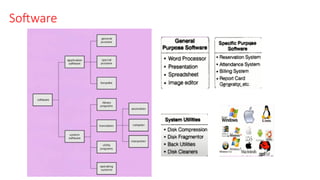
Software
Hardware : Hardware is a physical parts of the computer systems the parts
we can touch and see. E.g Mother board, Keyboard, Monitor, Hard disk,
Mouse etc.
Software: Software is a collection of instructions that can be run on a
computer. The instruction tell the computer what to do. Software is a
bunch of code.
System Software:
1. Operating System Software: Windows, Linux, Unix, DOS
2. Language Translator: It is another System Software which converts the
high level language to machine understanding language.
3. Utility Software: Antivirus, File Management System, Disk Management
tools, Compression tools, Disk cleanup tool.
Control Unit: It is a component of a computers CPU that directs the
operation of the processor.
Compiler: Compiler is a computer program that
translates written in a high level language to
lower level language ( Assembly Language to
Machine Language).
Interpreter: Program executes directly and it
executes the program line by line.
Assembler: Assembler is used to convert
Assembly Language to Machine Code.
Performance
• In each field, every one is attracted by the performance of that field.
• When we choose among different computer, performance is an
important attribute.
Response Time:
• Response Time is the time between the start and completion of the
task is also referred as Execution Time
Defining Performance
• To Maximize the performance of computers we have to minimize the
response time (or) execution time for some task
1
Performance R = ………………………………………….
Execution Time R
• This means that for two computers R & S, If the performance of R is
greater than the performance of S.
• Performance R > Performance S
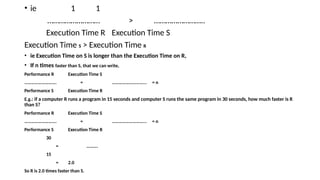
• ie 1 1
……………………… > ……………………..
Execution Time R Execution Time S
Execution Time S > Execution Time R
• ie Execution Time on S is longer than the Execution Time on R,
• If n times faster than S, that we can write,
Performance R Execution Time S
………………………. = ………………………... = n
Performance S Execution Time R
E.g.: if a computer R runs a program in 15 seconds and computer S runs the same program in 30 seconds, how much faster is R
than S?
Performance R Execution Time S
………………………. = ………………………... = n
Performance S Execution Time R
30
= ……….
15
= 2.0
So R is 2.0 times faster than S.
CPU Execution Time : CPU Execution Time is the time that CPU spends
computing for particular task.
User CPU Time : User CPU Time is the time spent in the os performing task on
behalf of programs.
CPU Clock Cycle for a program
CPU Execution Time for a Program = ………………………………………………..
Clock Rate
E.g: Computer A runs a program in 12 seconds with a 3 GHZ clock. We have to
design a computer B such that it can run the same program in 9 seconds.
• Determine the Clock rate of B
• Assume that due to increase in clock rate, cpu design of computer B is
affected and it requires 1.2 times as many clock cycle as computer A for
execution this program. What clock rate should we tell the designer to target.
Clock Rate A = 3GHZ = 3 x10 Cycles / Second
CPU Time A = 12 Seconds
CPU Time B = 9 Seconds
THANK YOU…

2. Bus Structures, Software, Performance.pptx

  • 1.
    20CS307- COMPUTER ARCHITECTURE UNIT– I BASIC STRUCTURE OF COMPUTERS Bus Structures, System Software
  • 2.
    Contents… • Functional Units •Memory • Basic Operational Concepts • Bus Structures • System Software • Performance • Von Neumann Architecture • Harvard Architecture
  • 3.
    Introduction Bus Structures  Thereare many ways to connect different parts inside a computer together.  A group of lines that servers as a connecting path for several devices is called a bus.  Address  Data  Control
  • 4.
  • 5.
    Speed Issues • Differentdevices have different transfer / operate speed. • If the speed of bus is bounded by the slowest device connected to it, the efficiency will be very low. • How to solve this? • A common approach – use buffers.
  • 6.
  • 7.
    Hardware : Hardwareis a physical parts of the computer systems the parts we can touch and see. E.g Mother board, Keyboard, Monitor, Hard disk, Mouse etc. Software: Software is a collection of instructions that can be run on a computer. The instruction tell the computer what to do. Software is a bunch of code. System Software: 1. Operating System Software: Windows, Linux, Unix, DOS 2. Language Translator: It is another System Software which converts the high level language to machine understanding language. 3. Utility Software: Antivirus, File Management System, Disk Management tools, Compression tools, Disk cleanup tool. Control Unit: It is a component of a computers CPU that directs the operation of the processor.
  • 8.
    Compiler: Compiler isa computer program that translates written in a high level language to lower level language ( Assembly Language to Machine Language). Interpreter: Program executes directly and it executes the program line by line. Assembler: Assembler is used to convert Assembly Language to Machine Code.
  • 9.
    Performance • In eachfield, every one is attracted by the performance of that field. • When we choose among different computer, performance is an important attribute. Response Time: • Response Time is the time between the start and completion of the task is also referred as Execution Time
  • 10.
    Defining Performance • ToMaximize the performance of computers we have to minimize the response time (or) execution time for some task 1 Performance R = …………………………………………. Execution Time R • This means that for two computers R & S, If the performance of R is greater than the performance of S. • Performance R > Performance S
  • 11.
    • ie 11 ……………………… > …………………….. Execution Time R Execution Time S Execution Time S > Execution Time R • ie Execution Time on S is longer than the Execution Time on R, • If n times faster than S, that we can write, Performance R Execution Time S ………………………. = ………………………... = n Performance S Execution Time R E.g.: if a computer R runs a program in 15 seconds and computer S runs the same program in 30 seconds, how much faster is R than S? Performance R Execution Time S ………………………. = ………………………... = n Performance S Execution Time R 30 = ………. 15 = 2.0 So R is 2.0 times faster than S.
  • 12.
    CPU Execution Time: CPU Execution Time is the time that CPU spends computing for particular task. User CPU Time : User CPU Time is the time spent in the os performing task on behalf of programs. CPU Clock Cycle for a program CPU Execution Time for a Program = ……………………………………………….. Clock Rate E.g: Computer A runs a program in 12 seconds with a 3 GHZ clock. We have to design a computer B such that it can run the same program in 9 seconds. • Determine the Clock rate of B • Assume that due to increase in clock rate, cpu design of computer B is affected and it requires 1.2 times as many clock cycle as computer A for execution this program. What clock rate should we tell the designer to target.
  • 13.
    Clock Rate A= 3GHZ = 3 x10 Cycles / Second CPU Time A = 12 Seconds CPU Time B = 9 Seconds
  • 14.