CSC-390
Computer Graphics
Spring 2021/2022
Lecture 1
Introduction to the
Course
Yomna Hassan
Misr International University
About the course
- The course is dependant on the data structures course. So we are
relying on the fact that you have the background for simple
programming tasks (Including Loops, conditions, arrays, structures…)
- The course focus on teaching 3rd year students about various concepts
related to creation and rendering of interactive (involving human input)
2D and 3D objects on computers.
Communication
- Feel free to send emails if you have any questions (response will be within 2 days)
- For Lectures and Labs: It is always encouraged to ask questions, especially about WHY
any step is happening. Don’t Memorize.
- Office hours for Lectures:
- Sunday and Monday in between lectures (Online or at the university)
- Tuesday 9 am to10am or 8:30 pm to 9:30
- Please send an email before any of these slots by at least one day to confirm
attendance.
Course Structure
- Weekly : 3 hrs lectures (online “access from laptop”), 2 hrs Lab (in-person)
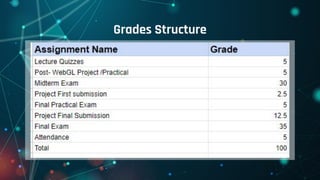
- Course grade distribution will be:30% midterm, 35% final, 12.5% project ,12.5%
Classwork (quizzes, in class activities) ,5% attendance, 5% participation (40% are
after midterm , 60 % after final)
- submissions include:
- Midterm and Final Exams (if still within the university system, it will be online)
- Final Project (2 submissions)
- Bi-Weekly online quizzes in lectures
- Group exercises within lecture
- In Lab exercises
- Lab assignments
Grades Structure
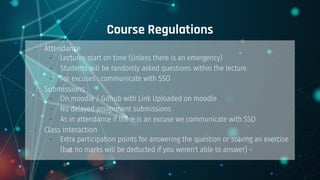
Course Regulations
- Attendance
- Lectures start on time (Unless there is an emergency)
- Students will be randomly asked questions within the lecture
- For excuses : communicate with SSO
- Submissions :
- On moodle / Github with Link Uploaded on moodle
- No delayed assignment submissions
- As in attendance if there is an excuse we communicate with SSO
- Class interaction
- Extra participation points for answering the question or solving an exercise
(but no marks will be deducted if you weren't able to answer)
Resources
1- Learning Three.js : programming 3D animations and visualizations for the web with HTML5 and
WebGL
Or
Three.js essentials : create and animate beautiful 3D graphics with this fast-paced tutorial
2- WebGL/Threejs/ JS programming focused reference: http://math.hws.edu/graphicsbook/ (Chapters:
1,2,5,6,7, Appendix A if you have problems with JS)
3- Javascript: http://web.cs.iastate.edu/~smkautz/cs336f18/js/tutorial/js_notes/
4- Threejs official : https://discoverthreejs.com/
5- Advanced Graphics:
https://www.cs.unm.edu/~angel/BOOK/INTERACTIVE_COMPUTER_GRAPHICS/SEVENTH_EDITION/
Programming resources
Survey
- Javascript background
- Graphics background
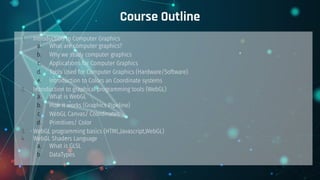
Course Outline
1. Introduction to Computer Graphics
a. What are computer graphics?
b. Why we study computer graphics
c. Applications for Computer Graphics
d. Tools Used for Computer Graphics (Hardware/Software)
e. Introduction to Colors an Coordinate systems
2. Introduction to graphical programming tools (WebGL)
a. What is WebGL
b. How it works (Graphics Pipeline)
c. WebGL Canvas/ Coordinates
d. Primitives/ Color
3. WebGL programming basics (HTML,Javascript,WebGL)
4. WebGL Shaders Language
a. What is GLSL
b. DataTypes
Course Outline (Cont’d)
5.. Developing 2D Graphics (WebGL):
a. Drawing
b. Animation (Movement, Timers, rendering)
c. User Input (types of input/events)
6. Developing 3D Graphics (ThreeJS):
a. Drawing (Scene, Mesh)
b. Animation
c. User Input
d. Camera and Projection (Synthetic Camera, Parallel, Perspective,depth buffer)
e. Lighting (Light Sources, Models, Shading, Material)
f. Textures
Division of Course per Week
11 weeks of lectures (7 before midterm, 4 after midterm)
Week 1 introduction to computer graphics + software and hardware pipeline
Week 2 webgl basics and pipeline + basic program and different between canvas and webgl
Week 3 shaders and variables-
Week 4 image formation , 2d transformations and animation
Week 5 animation, input
Week 6 introduction to 3d graphics and threejs
Extra week for : including Discussion, Q&A
Cont’d
Week 7 3d transformations and input
Week 8 camera and curves
Week 9 textures and lighting
Week 10 (any missing parts and revisions )
Week 11 Advanced Topics - VR
Lab Content (10 weeks)
Lab 1 - introduction to webgl.
The aim of this lab is to give the students an introduction about the WebGl library. This includes
getting used to the sublime IDE. Introducing the students to JS and html. The difference
between webgl and 2d as a canvas rendering context.
Lab 2 - introduction to shaders and 2D drawing.
The aim of this lab is to introduce the structure of basic 2D shapes. What are vertices and
fragments. What is the functionality of shaders and how do they work and transfer data
between the code, browser and the GPU.
Lab 3 - variables (uniform , varying and attribute), 2D transformations
Identifying the different variable types within webgl and the difference in their usage.
Implementation of the main 3 transformations used in computer graphics (translation, rotation,
scaling).
Lab Content (10 weeks)
Lab 4 - 2D animation
Following the implementation off 2D transformations. We teach the students how to perform the
transformations through time. We introduce the event listener concept and how we synchronize
between the page refresh and the animation function.
Lab 5 - WebGl input.
We familiarize the students with the concert of using input within the canvas tag. We will
introduce using both the keyboard and the mouse as methods of input in order to control 2d
drawn objects.
Lab 6 - introduction to ThreeJS
Familiarize the student if the relation between ThreeJS and WebGL. How to setup the library. What
is a Scene? What is the difference between 2D and 3D coordinates ? Try and test some of the
standard 3d models available
Lab Content (10 weeks)
Lab 7 - 3D transformation and animation
Following the 2D animation lab. We introduce the students to the the concept of 3D animation and how to manipulate multiple
objects in relation to the origin or in relation to other objects
Lab 8 - user input in ThreeJS
We familiarize the students with the basic concepts of moving object using user input. We include an introduction to moving the
camera (viewing concept ) in preparation to the following lab.
Lab 9 - Camera and Curves
This lab shows the implementation of the viewing concept. How we can visualize the same 3D model from multiple views. We also
show how we can move the camera (or any object) on a curve that is predefined using spline.
Lab 10 - Textures and Lighting
This lab introduces the concept of texture mapping. How we can make various objects look like certain materials. We also include
an introduction to lighting models available in ThreeJS and how various lighting techniques affect the objects shape
Evaluation Criteria of project submissions
1-Inclusion of all studied subjects
2- percentage of completion
3- code running or not running
Plagiarism
No plagiarism is tolerated
Penality: Losing mark of submission
Extra Resources for projects
https://www.tug.org/pracjourn/2007-4/walden/color.pdf
https://threejs.org/
https://www.0to255.com/0ff
https://keycode.info/
http://blog.cjgammon.com/threejs-geometry
https://www.youtube.com/playlist?list=PLRtjMdoYXLf6mvjC
mrltvsD0j12ZQDMfE
https://www.youtube.com/watch?v=1TeMXIWRrqE
Questions

1Computer Graphics new-L1-Introduction to Computer Graphics.pdf

  • 1.
    CSC-390 Computer Graphics Spring 2021/2022 Lecture1 Introduction to the Course Yomna Hassan Misr International University
  • 2.
    About the course -The course is dependant on the data structures course. So we are relying on the fact that you have the background for simple programming tasks (Including Loops, conditions, arrays, structures…) - The course focus on teaching 3rd year students about various concepts related to creation and rendering of interactive (involving human input) 2D and 3D objects on computers.
  • 3.
    Communication - Feel freeto send emails if you have any questions (response will be within 2 days) - For Lectures and Labs: It is always encouraged to ask questions, especially about WHY any step is happening. Don’t Memorize. - Office hours for Lectures: - Sunday and Monday in between lectures (Online or at the university) - Tuesday 9 am to10am or 8:30 pm to 9:30 - Please send an email before any of these slots by at least one day to confirm attendance.
  • 4.
    Course Structure - Weekly: 3 hrs lectures (online “access from laptop”), 2 hrs Lab (in-person) - Course grade distribution will be:30% midterm, 35% final, 12.5% project ,12.5% Classwork (quizzes, in class activities) ,5% attendance, 5% participation (40% are after midterm , 60 % after final) - submissions include: - Midterm and Final Exams (if still within the university system, it will be online) - Final Project (2 submissions) - Bi-Weekly online quizzes in lectures - Group exercises within lecture - In Lab exercises - Lab assignments
  • 5.
  • 6.
    Course Regulations - Attendance -Lectures start on time (Unless there is an emergency) - Students will be randomly asked questions within the lecture - For excuses : communicate with SSO - Submissions : - On moodle / Github with Link Uploaded on moodle - No delayed assignment submissions - As in attendance if there is an excuse we communicate with SSO - Class interaction - Extra participation points for answering the question or solving an exercise (but no marks will be deducted if you weren't able to answer)
  • 7.
    Resources 1- Learning Three.js: programming 3D animations and visualizations for the web with HTML5 and WebGL Or Three.js essentials : create and animate beautiful 3D graphics with this fast-paced tutorial 2- WebGL/Threejs/ JS programming focused reference: http://math.hws.edu/graphicsbook/ (Chapters: 1,2,5,6,7, Appendix A if you have problems with JS) 3- Javascript: http://web.cs.iastate.edu/~smkautz/cs336f18/js/tutorial/js_notes/ 4- Threejs official : https://discoverthreejs.com/ 5- Advanced Graphics: https://www.cs.unm.edu/~angel/BOOK/INTERACTIVE_COMPUTER_GRAPHICS/SEVENTH_EDITION/
  • 8.
  • 9.
  • 10.
    Course Outline 1. Introductionto Computer Graphics a. What are computer graphics? b. Why we study computer graphics c. Applications for Computer Graphics d. Tools Used for Computer Graphics (Hardware/Software) e. Introduction to Colors an Coordinate systems 2. Introduction to graphical programming tools (WebGL) a. What is WebGL b. How it works (Graphics Pipeline) c. WebGL Canvas/ Coordinates d. Primitives/ Color 3. WebGL programming basics (HTML,Javascript,WebGL) 4. WebGL Shaders Language a. What is GLSL b. DataTypes
  • 11.
    Course Outline (Cont’d) 5..Developing 2D Graphics (WebGL): a. Drawing b. Animation (Movement, Timers, rendering) c. User Input (types of input/events) 6. Developing 3D Graphics (ThreeJS): a. Drawing (Scene, Mesh) b. Animation c. User Input d. Camera and Projection (Synthetic Camera, Parallel, Perspective,depth buffer) e. Lighting (Light Sources, Models, Shading, Material) f. Textures
  • 12.
    Division of Courseper Week 11 weeks of lectures (7 before midterm, 4 after midterm) Week 1 introduction to computer graphics + software and hardware pipeline Week 2 webgl basics and pipeline + basic program and different between canvas and webgl Week 3 shaders and variables- Week 4 image formation , 2d transformations and animation Week 5 animation, input Week 6 introduction to 3d graphics and threejs Extra week for : including Discussion, Q&A
  • 13.
    Cont’d Week 7 3dtransformations and input Week 8 camera and curves Week 9 textures and lighting Week 10 (any missing parts and revisions ) Week 11 Advanced Topics - VR
  • 14.
    Lab Content (10weeks) Lab 1 - introduction to webgl. The aim of this lab is to give the students an introduction about the WebGl library. This includes getting used to the sublime IDE. Introducing the students to JS and html. The difference between webgl and 2d as a canvas rendering context. Lab 2 - introduction to shaders and 2D drawing. The aim of this lab is to introduce the structure of basic 2D shapes. What are vertices and fragments. What is the functionality of shaders and how do they work and transfer data between the code, browser and the GPU. Lab 3 - variables (uniform , varying and attribute), 2D transformations Identifying the different variable types within webgl and the difference in their usage. Implementation of the main 3 transformations used in computer graphics (translation, rotation, scaling).
  • 15.
    Lab Content (10weeks) Lab 4 - 2D animation Following the implementation off 2D transformations. We teach the students how to perform the transformations through time. We introduce the event listener concept and how we synchronize between the page refresh and the animation function. Lab 5 - WebGl input. We familiarize the students with the concert of using input within the canvas tag. We will introduce using both the keyboard and the mouse as methods of input in order to control 2d drawn objects. Lab 6 - introduction to ThreeJS Familiarize the student if the relation between ThreeJS and WebGL. How to setup the library. What is a Scene? What is the difference between 2D and 3D coordinates ? Try and test some of the standard 3d models available
  • 16.
    Lab Content (10weeks) Lab 7 - 3D transformation and animation Following the 2D animation lab. We introduce the students to the the concept of 3D animation and how to manipulate multiple objects in relation to the origin or in relation to other objects Lab 8 - user input in ThreeJS We familiarize the students with the basic concepts of moving object using user input. We include an introduction to moving the camera (viewing concept ) in preparation to the following lab. Lab 9 - Camera and Curves This lab shows the implementation of the viewing concept. How we can visualize the same 3D model from multiple views. We also show how we can move the camera (or any object) on a curve that is predefined using spline. Lab 10 - Textures and Lighting This lab introduces the concept of texture mapping. How we can make various objects look like certain materials. We also include an introduction to lighting models available in ThreeJS and how various lighting techniques affect the objects shape
  • 17.
    Evaluation Criteria ofproject submissions 1-Inclusion of all studied subjects 2- percentage of completion 3- code running or not running
  • 18.
    Plagiarism No plagiarism istolerated Penality: Losing mark of submission
  • 19.
    Extra Resources forprojects https://www.tug.org/pracjourn/2007-4/walden/color.pdf https://threejs.org/ https://www.0to255.com/0ff https://keycode.info/ http://blog.cjgammon.com/threejs-geometry https://www.youtube.com/playlist?list=PLRtjMdoYXLf6mvjC mrltvsD0j12ZQDMfE https://www.youtube.com/watch?v=1TeMXIWRrqE
  • 20.