Computer Graphics
An Introduction
What’s this course all about?
04/08/13 Lecture 1 2
We will cover…
Graphics programming and algorithms
Graphics data structures
Colour
Applied geometry, modelling and rendering
Computer Graphics is about animation (films)
04/08/13 Lecture 1 3
Major driving force now
Games are very important in Computer Graphics
04/08/13 Lecture 1 4
Medical Imaging is another driving force
04/08/13 Lecture 1 5
Computer Aided Design too
04/08/13 Lecture 1 6
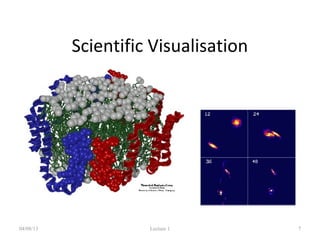
Scientific Visualisation
04/08/13 Lecture 1 7
To view below and
above our visual range
First Lecture
• The graphics processes
– What we will cover on this course
• Some definitions
– Fundamental units we use in these processes
• First Practical
04/08/13 Lecture 1 8
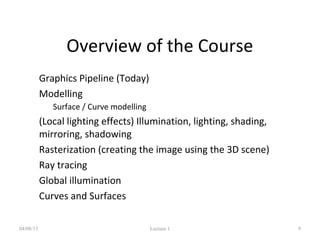
Overview of the Course
• Graphics Pipeline (Today)
• Modelling
– Surface / Curve modelling
• (Local lighting effects) Illumination, lighting, shading,
mirroring, shadowing
• Rasterization (creating the image using the 3D scene)
• Ray tracing
• Global illumination
• Curves and Surfaces
04/08/13 Lecture 1 9
Graphics/Rendering Pipeline
• Graphics processes generally execute
sequentially
• Pipelining the process means dividing it
into stages
• Especially when rendering in real-time,
different hardware resources are assigned
for each stage
04/08/13 Lecture 1 10
Graphics / Rendering Pipeline
• There are three stages
– Application Stage
– Geometry Stage
– Rasterization Stage
04/08/13 Lecture 1 11
Application stage
• Entirely done in software by the CPU
• Read Data
– the world geometry database,
– User’s input by mice, trackballs, trackers, or sensing
gloves
• In response to the user’s input, the application
stage change the view or scene
04/08/13 Lecture 1 12
Geometry Stage
04/08/13 Lecture 1 13
Model Transformation
Modeling: shapes
Shading: reflection and lighting
Transformation: viewing
Hidden Surface Elimination
Rasterization
Stage
Rasterization Stage
04/08/13 Lecture 1 14
Rasterization and Sampling
Texture Mapping
Image Composition
Intensity and Colour Quantization
Geometry Stage
Framebuffer/Display
An example thro’ the pipeline…
04/08/13 Lecture 1 15
The scene we are trying to represent:
Images courtesy of Picture Inc.
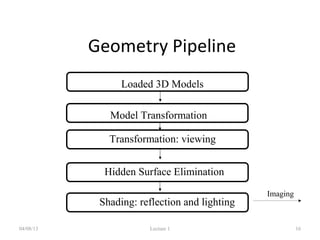
Geometry Pipeline
04/08/13 Lecture 1 16
Model Transformation
Loaded 3D Models
Shading: reflection and lighting
Transformation: viewing
Hidden Surface Elimination
Imaging
Pipeline
Preparing Shape Models
04/08/13 Lecture 1 17
Designed by polygons, parametric curves/surfaces,
implicit surfaces and etc.
Defined in its own coordinate system
Model Transformation
04/08/13 Lecture 1 18
Objects put into the scene by applying translation, scaling and
rotation
Linear transformation called homogeneous transformation is used
The location of all the vertices are updated by this transformation
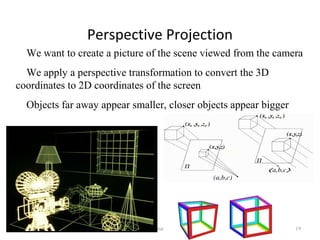
Perspective Projection
04/08/13 Lecture 1 19
We want to create a picture of the scene viewed from the camera
We apply a perspective transformation to convert the 3D
coordinates to 2D coordinates of the screen
Objects far away appear smaller, closer objects appear bigger
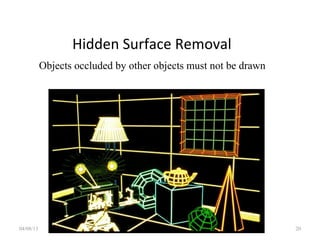
Hidden Surface Removal
04/08/13 Lecture 1 20
Objects occluded by other objects must not be drawn
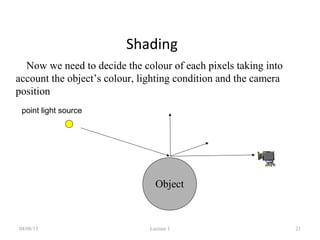
Shading
04/08/13 Lecture 1 21
Now we need to decide the colour of each pixels taking into
account the object’s colour, lighting condition and the camera
position
Object
point light source
Shading : Constant Shading - Ambient
04/08/13 Lecture 1 22
Objects colours by its own colour
Shading – Flat Shading
04/08/13 Lecture 1 23
Objects coloured based on its own colour and the lighting condition
One colour for one face
Gouraud shading, no specular highlights
04/08/13 Lecture 1 24
Lighting calculation per vertex
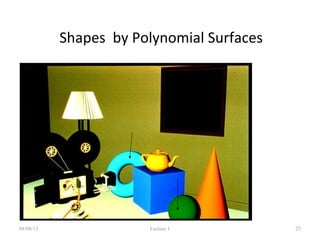
Shapes by Polynomial Surfaces
04/08/13 Lecture 1 25
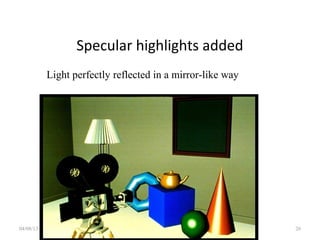
Specular highlights added
04/08/13 Lecture 1 26
Light perfectly reflected in a mirror-like way
Phong shading
04/08/13 Lecture 1 27
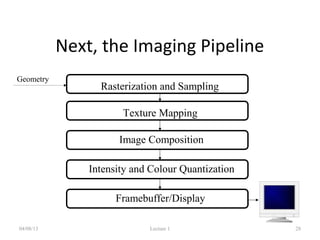
Next, the Imaging Pipeline
04/08/13 Lecture 1 28
Rasterization and Sampling
Texture Mapping
Image Composition
Intensity and Colour Quantization
Geometry
Framebuffer/Display
Pipeline
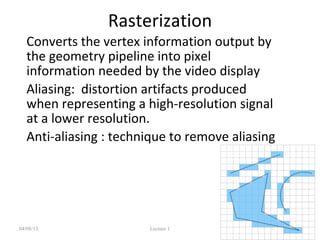
Rasterization
• Converts the vertex information output by
the geometry pipeline into pixel
information needed by the video display
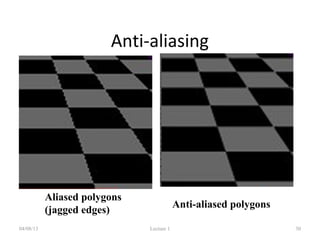
• Aliasing: distortion artifacts produced
when representing a high-resolution signal
at a lower resolution.
• Anti-aliasing : technique to remove aliasing
04/08/13 Lecture 1 29
Anti-aliasing
04/08/13 Lecture 1 30
Aliased polygons
(jagged edges)
Anti-aliased polygons
04/08/13 Lecture 1 31
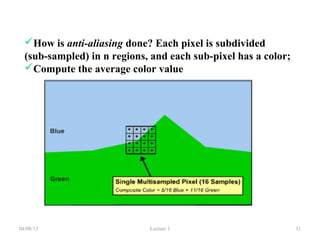
How is anti-aliasing done? Each pixel is subdivided
(sub-sampled) in n regions, and each sub-pixel has a color;
Compute the average color value
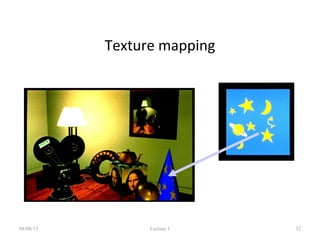
Texture mapping
04/08/13 Lecture 1 32
Other covered topics:
Reflections, shadows & Bump mapping
04/08/13 Lecture 1 33
Other covered topics:
Global Illumination
04/08/13 Lecture 1 34
Polynomial Curves, Surfaces
Graphics Definitions
• Point
– a location in space, 2D or 3D
– sometimes denotes one pixel
• Line
– straight path connecting two points
– infinitesimal width, consistent density
– beginning and end on points
04/08/13 Lecture 1 36
Graphics Definitions• Vertex
– point in 3D
• Edge
– line in 3D connecting two vertices
• Polygon/Face/Facet
– arbitrary shape formed by connected vertices
– fundamental unit of 3D computer graphics
• Mesh
– set of connected polygons forming a surface (or object)
– :04/08/13 Lecture 1 37
Graphics Definitions
• Rendering : process of generating an image
from the model
• Framebuffer : a video output device that
drives a video display from a memory
containing the color for every pixel
04/08/13 Lecture 1 38
Course support resources
• Graphics course website
• http://www.inf.ed.ac.uk/teaching/courses/
cg
– lecture material,
– lecture log with general summary and
recommended reading,
– Links to support material for lectures and
projects,
– Practical description and resources04/08/13 Lecture 1 39
First Practical
• Write a program that renders an image of a teapot
and outputs it into an image file
• I prepared a demo program to load a 3D model and
draw the edges
• You update it so that the surface appears shaded
• See the course website for the details
04/08/13 Lecture 1 40
Some notifications
• 16 lectures in total
• I need to visit Japan in the beginning of
October so no lecture on 5th
October
• Need to attend conferences on 16th
and 26th
of
November so no lectures there
Summary
• The course is about algorithms, not
applications
• Lots of mathematics
• Graphics execution is a pipelined approach
• Basic definitions presented
• Some support resources indicated
04/08/13 Lecture 1 42

Introduction graphics

  • 1.
  • 2.
    What’s this courseall about? 04/08/13 Lecture 1 2 We will cover… Graphics programming and algorithms Graphics data structures Colour Applied geometry, modelling and rendering
  • 3.
    Computer Graphics isabout animation (films) 04/08/13 Lecture 1 3 Major driving force now
  • 4.
    Games are veryimportant in Computer Graphics 04/08/13 Lecture 1 4
  • 5.
    Medical Imaging isanother driving force 04/08/13 Lecture 1 5
  • 6.
    Computer Aided Designtoo 04/08/13 Lecture 1 6
  • 7.
    Scientific Visualisation 04/08/13 Lecture1 7 To view below and above our visual range
  • 8.
    First Lecture • Thegraphics processes – What we will cover on this course • Some definitions – Fundamental units we use in these processes • First Practical 04/08/13 Lecture 1 8
  • 9.
    Overview of theCourse • Graphics Pipeline (Today) • Modelling – Surface / Curve modelling • (Local lighting effects) Illumination, lighting, shading, mirroring, shadowing • Rasterization (creating the image using the 3D scene) • Ray tracing • Global illumination • Curves and Surfaces 04/08/13 Lecture 1 9
  • 10.
    Graphics/Rendering Pipeline • Graphicsprocesses generally execute sequentially • Pipelining the process means dividing it into stages • Especially when rendering in real-time, different hardware resources are assigned for each stage 04/08/13 Lecture 1 10
  • 11.
    Graphics / RenderingPipeline • There are three stages – Application Stage – Geometry Stage – Rasterization Stage 04/08/13 Lecture 1 11
  • 12.
    Application stage • Entirelydone in software by the CPU • Read Data – the world geometry database, – User’s input by mice, trackballs, trackers, or sensing gloves • In response to the user’s input, the application stage change the view or scene 04/08/13 Lecture 1 12
  • 13.
    Geometry Stage 04/08/13 Lecture1 13 Model Transformation Modeling: shapes Shading: reflection and lighting Transformation: viewing Hidden Surface Elimination Rasterization Stage
  • 14.
    Rasterization Stage 04/08/13 Lecture1 14 Rasterization and Sampling Texture Mapping Image Composition Intensity and Colour Quantization Geometry Stage Framebuffer/Display
  • 15.
    An example thro’the pipeline… 04/08/13 Lecture 1 15 The scene we are trying to represent: Images courtesy of Picture Inc.
  • 16.
    Geometry Pipeline 04/08/13 Lecture1 16 Model Transformation Loaded 3D Models Shading: reflection and lighting Transformation: viewing Hidden Surface Elimination Imaging Pipeline
  • 17.
    Preparing Shape Models 04/08/13Lecture 1 17 Designed by polygons, parametric curves/surfaces, implicit surfaces and etc. Defined in its own coordinate system
  • 18.
    Model Transformation 04/08/13 Lecture1 18 Objects put into the scene by applying translation, scaling and rotation Linear transformation called homogeneous transformation is used The location of all the vertices are updated by this transformation
  • 19.
    Perspective Projection 04/08/13 Lecture1 19 We want to create a picture of the scene viewed from the camera We apply a perspective transformation to convert the 3D coordinates to 2D coordinates of the screen Objects far away appear smaller, closer objects appear bigger
  • 20.
    Hidden Surface Removal 04/08/13Lecture 1 20 Objects occluded by other objects must not be drawn
  • 21.
    Shading 04/08/13 Lecture 121 Now we need to decide the colour of each pixels taking into account the object’s colour, lighting condition and the camera position Object point light source
  • 22.
    Shading : ConstantShading - Ambient 04/08/13 Lecture 1 22 Objects colours by its own colour
  • 23.
    Shading – FlatShading 04/08/13 Lecture 1 23 Objects coloured based on its own colour and the lighting condition One colour for one face
  • 24.
    Gouraud shading, nospecular highlights 04/08/13 Lecture 1 24 Lighting calculation per vertex
  • 25.
    Shapes by PolynomialSurfaces 04/08/13 Lecture 1 25
  • 26.
    Specular highlights added 04/08/13Lecture 1 26 Light perfectly reflected in a mirror-like way
  • 27.
  • 28.
    Next, the ImagingPipeline 04/08/13 Lecture 1 28 Rasterization and Sampling Texture Mapping Image Composition Intensity and Colour Quantization Geometry Framebuffer/Display Pipeline
  • 29.
    Rasterization • Converts thevertex information output by the geometry pipeline into pixel information needed by the video display • Aliasing: distortion artifacts produced when representing a high-resolution signal at a lower resolution. • Anti-aliasing : technique to remove aliasing 04/08/13 Lecture 1 29
  • 30.
    Anti-aliasing 04/08/13 Lecture 130 Aliased polygons (jagged edges) Anti-aliased polygons
  • 31.
    04/08/13 Lecture 131 How is anti-aliasing done? Each pixel is subdivided (sub-sampled) in n regions, and each sub-pixel has a color; Compute the average color value
  • 32.
  • 33.
    Other covered topics: Reflections,shadows & Bump mapping 04/08/13 Lecture 1 33
  • 34.
    Other covered topics: GlobalIllumination 04/08/13 Lecture 1 34
  • 35.
  • 36.
    Graphics Definitions • Point –a location in space, 2D or 3D – sometimes denotes one pixel • Line – straight path connecting two points – infinitesimal width, consistent density – beginning and end on points 04/08/13 Lecture 1 36
  • 37.
    Graphics Definitions• Vertex –point in 3D • Edge – line in 3D connecting two vertices • Polygon/Face/Facet – arbitrary shape formed by connected vertices – fundamental unit of 3D computer graphics • Mesh – set of connected polygons forming a surface (or object) – :04/08/13 Lecture 1 37
  • 38.
    Graphics Definitions • Rendering: process of generating an image from the model • Framebuffer : a video output device that drives a video display from a memory containing the color for every pixel 04/08/13 Lecture 1 38
  • 39.
    Course support resources •Graphics course website • http://www.inf.ed.ac.uk/teaching/courses/ cg – lecture material, – lecture log with general summary and recommended reading, – Links to support material for lectures and projects, – Practical description and resources04/08/13 Lecture 1 39
  • 40.
    First Practical • Writea program that renders an image of a teapot and outputs it into an image file • I prepared a demo program to load a 3D model and draw the edges • You update it so that the surface appears shaded • See the course website for the details 04/08/13 Lecture 1 40
  • 41.
    Some notifications • 16lectures in total • I need to visit Japan in the beginning of October so no lecture on 5th October • Need to attend conferences on 16th and 26th of November so no lectures there
  • 42.
    Summary • The courseis about algorithms, not applications • Lots of mathematics • Graphics execution is a pipelined approach • Basic definitions presented • Some support resources indicated 04/08/13 Lecture 1 42