CHAPTER 1
INTRODUCTION TO WIRELESS
COMMUNICATIONS
Reference: Jorge Olenewa, Guide to Wireless Communications, 3rd edition,
ISBN-13: 9781111307318, 2013 © Cengage Learning 2014
Department of Computer Engineering, Faculty of Engineering
Prince of Songkla University, Phuket Campus
Objectives
2
 Describe how wireless communications
technologies are used today
 List various applications of wireless
communications technology
 Outline the advantages and disadvantages of
wireless communications technology
 List several types of wireless technologies and
their purposes
242-306 Mobile and Wireless Computing
History of Wireless Networks
 Progress of transmission:
 fire and smoke used by Indians ==> messenger on
horseback ==> telephone line ==> networks
 Traditional networks (LAN, MAN, WAN) have
provided great convenience:
 in office, hotel room, or home
 But you cannot utilize the service unless you are
physically connected to a LAN or a telephone line.
 ALOHANET by University of Hawaii:
 7 campuses over 4 islands; star-like structure
centered at the Oahu island in 70’s.
3
242-306 Mobile and Wireless Computing
History of Wireless Networks
 In 80’s, amateur radio hobbyists built TNC
(terminal node controller) to interface “hams”
radio equipment and their computers.
4
242-306 Mobile and Wireless Computing
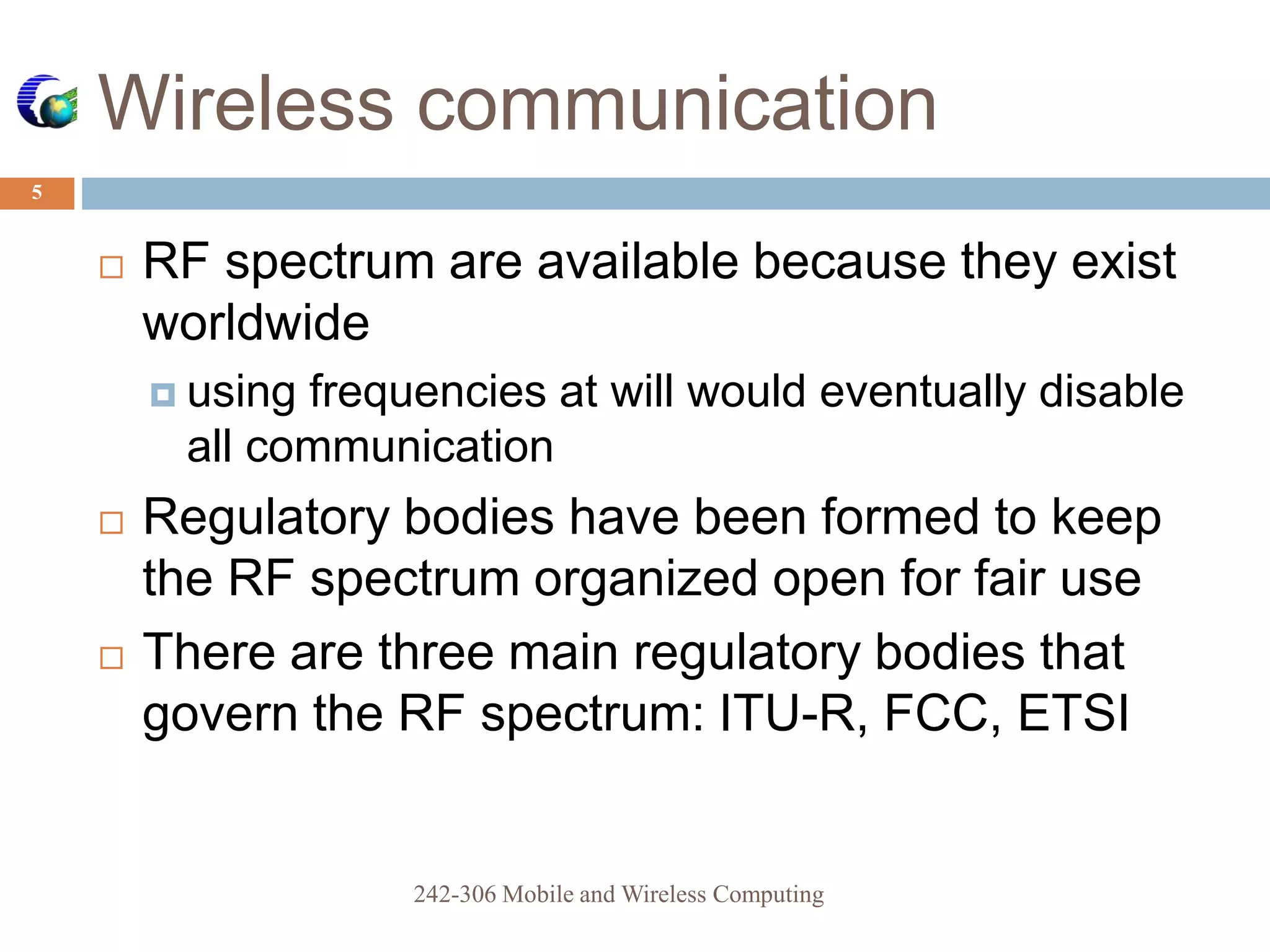
 RF spectrum are available because they exist
worldwide
 using frequencies at will would eventually disable
all communication
 Regulatory bodies have been formed to keep
the RF spectrum organized open for fair use
 There are three main regulatory bodies that
govern the RF spectrum: ITU-R, FCC, ETSI
Wireless communication
5
242-306 Mobile and Wireless Computing
Progress of Wireless
Communication
 In 1985, FCC authorized the use of ISM bands
for Industrial, Scientific, and Medical for
commercial development.
 ISM is very attractive to vendors because NO
obtaining FCC license is required.
 In 90’s, small-size computers started to appear.
 laptop, palmtop, PDA
 Wireless LAN products populate
6
242-306 Mobile and Wireless Computing
ISM Band defined by ITU-R
7
242-306 Mobile and Wireless Computing
Frequency range Bandwidth Center frequency Availability
6.765 MHz 6.795 MHz 30 kHz 6.780 MHz
Subject to local
acceptance
13.553 MHz 13.567 MHz 14 kHz 13.560 MHz
26.957 MHz 27.283 MHz 326 kHz 27.120 MHz Worldwide
40.660 MHz 40.700 MHz 40 kHz 40.680 MHz
433.050 MHz 434.790 MHz 1.84 MHz 433.920 MHz
Region 1 only and
subject to local
acceptance
902.000 MHz 928.000 MHz 26 MHz 915.000 MHz
Region 2 only (with
some exceptions)
2.400 GHz 2.500 GHz 100 MHz 2.450 GHz
5.725 GHz 5.875 GHz 150 MHz 5.800 GHz Worldwide
24.000 GHz 24.250 GHz 250 MHz 24.125 GHz
61.000 GHz 61.500 GHz 500 MHz 61.250 GHz
Subject to local
acceptance
122.000 GHz 123.000 GHz 1 GHz 122.500 GHz
244.000 GHz 246.000 GHz 2 GHz 245.000 GHz
How Wireless Technology is Used
8
 Wireless: describes all types of devices and
technologies not connected by a wire
 Wireless communications: transmission of digital
data without the use of wires
 Various forms of wireless data communications:
 Bluetooth
 WirelessHD
 WiGig
 Satellite
 Cellular
 Wi-Fi-based wireless LANs
 Fixed broadband wireless communications
242-306 Mobile and Wireless Computing
A Wireless World
9
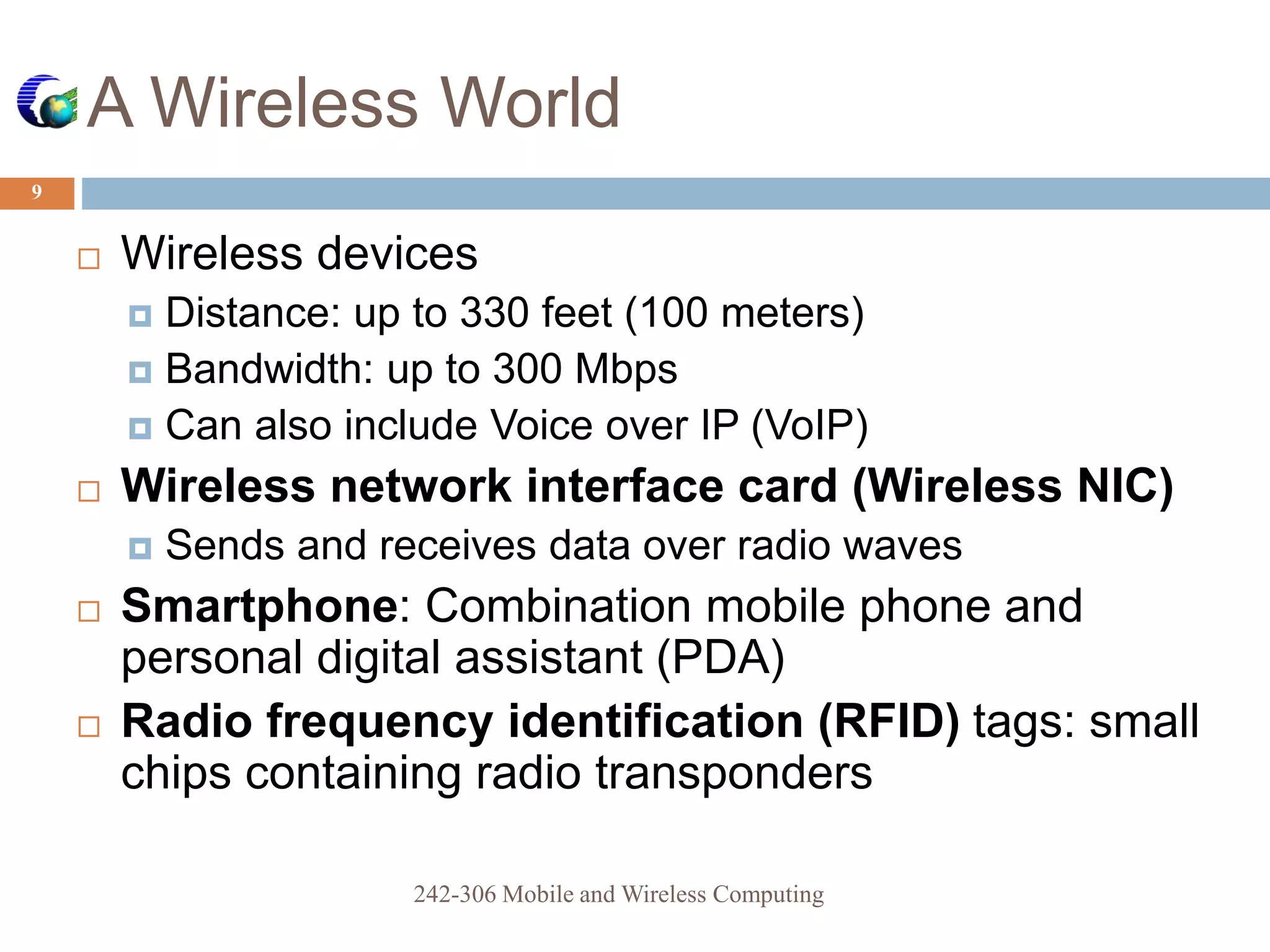
 Wireless devices
 Distance: up to 330 feet (100 meters)
 Bandwidth: up to 300 Mbps
 Can also include Voice over IP (VoIP)
 Wireless network interface card (Wireless NIC)
 Sends and receives data over radio waves
 Smartphone: Combination mobile phone and
personal digital assistant (PDA)
 Radio frequency identification (RFID) tags: small
chips containing radio transponders
242-306 Mobile and Wireless Computing
10
Figure 1-1 Home wireless network (WLAN)
242-306 Mobile and Wireless Computing
Bluetooth and Other Short-Range
Wireless Technologies
11
 Bluetooth
 Wireless standard designed for very short ranges
 Typically a few inches to 33 feet (10 meters)
 Main purpose is to eliminate cables between devices
 Bluetooth communicates using small, low-power
transceivers called radio modules
 Link manager
 Special software that helps identify other Bluetooth
devices, create a link between them, and send and
receive digital data
242-306 Mobile and Wireless Computing
12
Figure 1-2 Two examples of Bluetooth headsets: mono (left) and stereo (right)
242-306 Mobile and Wireless Computing
Bluetooth and Other Short-Range
Wireless Technologies
13
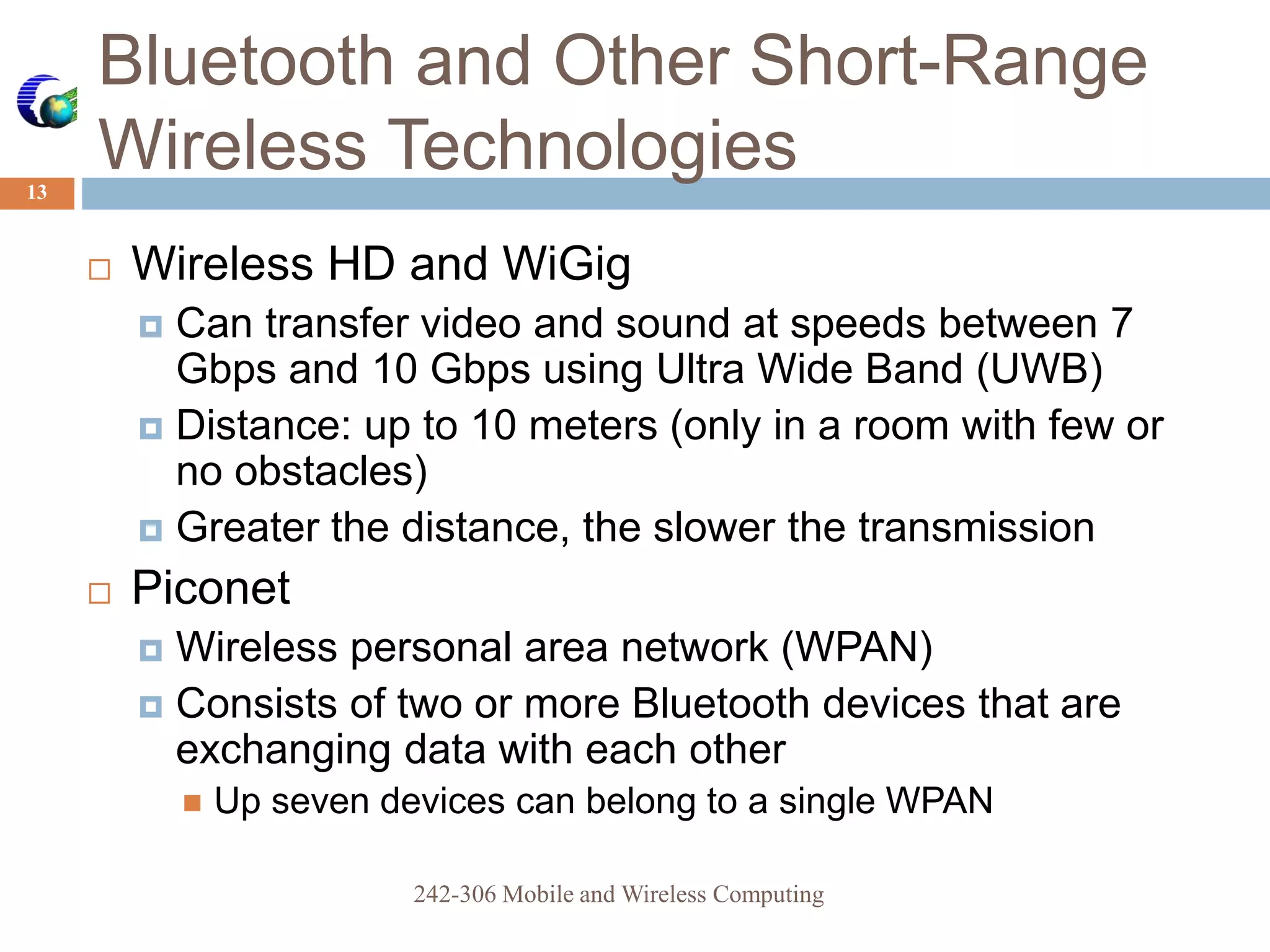
 Wireless HD and WiGig
 Can transfer video and sound at speeds between 7
Gbps and 10 Gbps using Ultra Wide Band (UWB)
 Distance: up to 10 meters (only in a room with few or
no obstacles)
 Greater the distance, the slower the transmission
 Piconet
 Wireless personal area network (WPAN)
 Consists of two or more Bluetooth devices that are
exchanging data with each other
 Up seven devices can belong to a single WPAN
242-306 Mobile and Wireless Computing
14
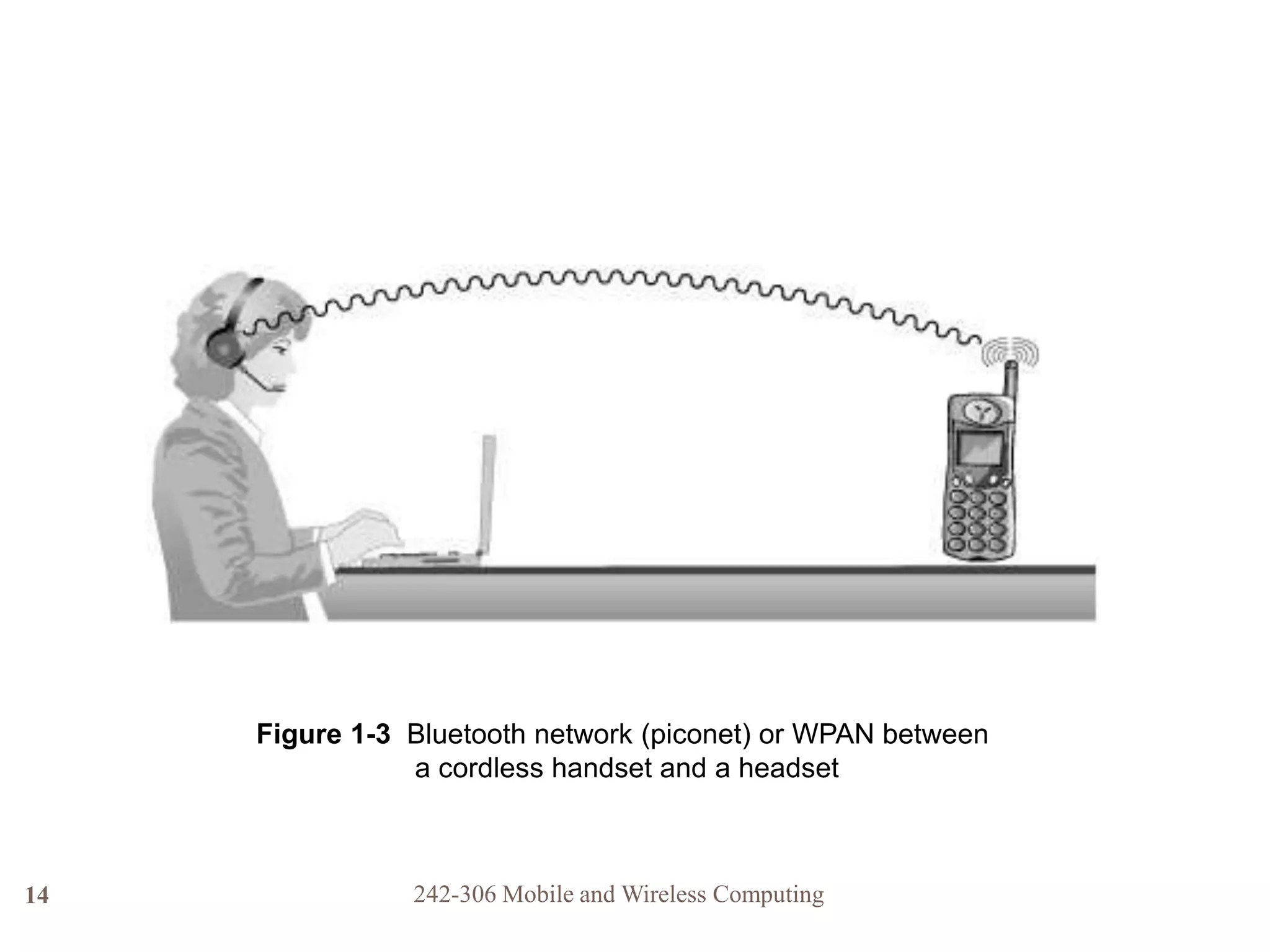
Figure 1-3 Bluetooth network (piconet) or WPAN between
a cordless handset and a headset
242-306 Mobile and Wireless Computing
Satellite Networks
15
 Used to transmit data over very long distance
 Repeater
 Located in the satellite itself
 “Repeats” the same signal to another location
down on the surface
 Used to transmit data from one earth station to
another
 Transmission time can be up to 250 milliseconds
242-306 Mobile and Wireless Computing
16
Figure 1-5 Satellite repeating a signal to another Earth station
242-306 Mobile and Wireless Computing
Cellular Networks
17
 Modern cellular telephone network
 Built around the concept of low-power transmitters
 With each “cell” handling a number of users
 Transmission towers are spread throughout a
geographical area
 The same radio frequency channels can be reused
by another tower
 Located a few miles away to avoid interference
 Maximizes the use of a limited range of frequency
channels
242-306 Mobile and Wireless Computing
18
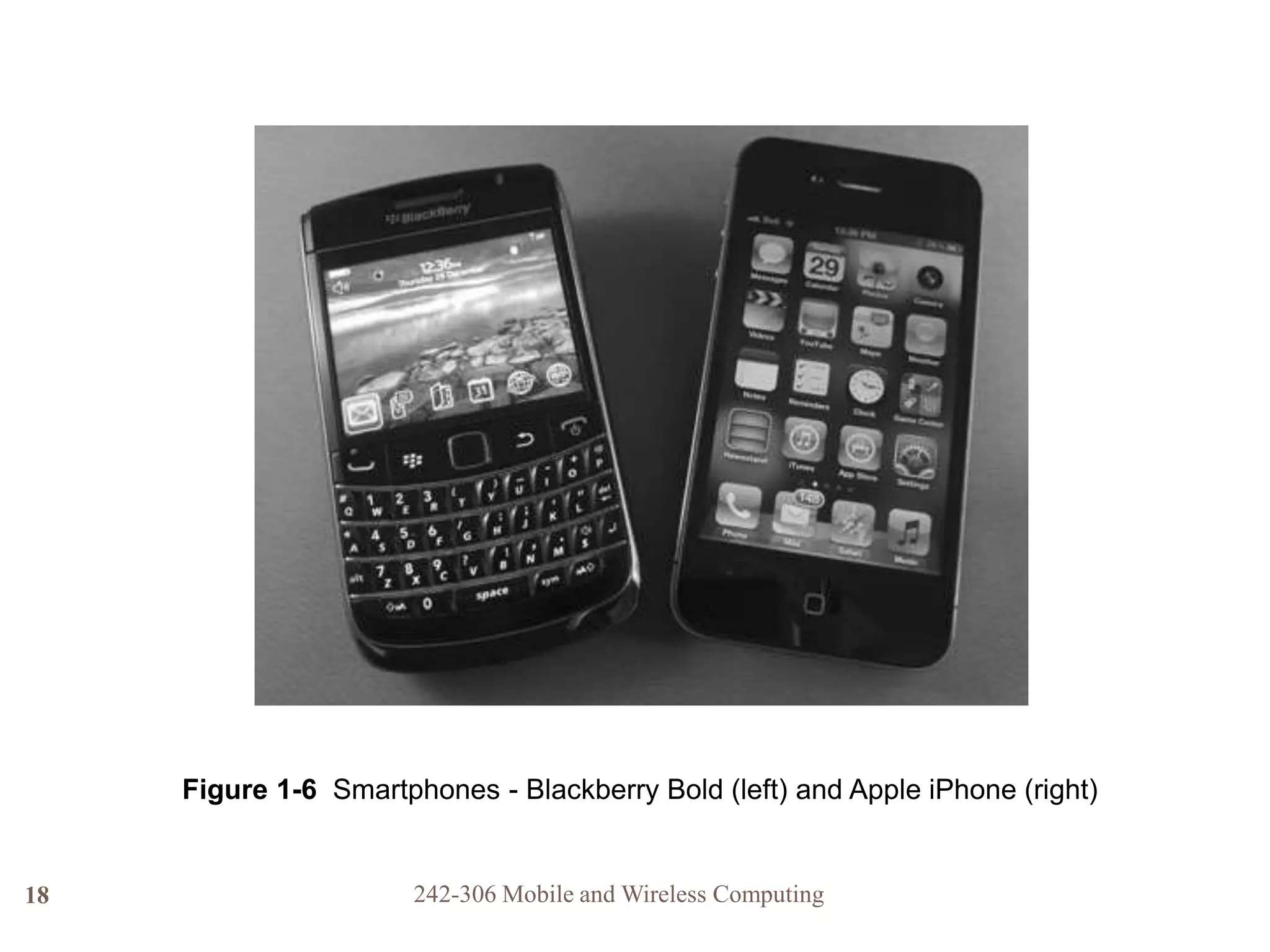
Figure 1-6 Smartphones - Blackberry Bold (left) and Apple iPhone (right)
242-306 Mobile and Wireless Computing
Cellular Networks
19
 4G (fourth generation) technology
 Uses 100% digital transmission for both voice and
data
 Transmission speed
 Over 150 Mbps when stationary
 45 Mbps for slow-moving pedestrians
 20 Mbps in a fast moving vehicle
 3G (third generation) technology
 Has a theoretical maximum data transmission rate
of up to 21 Mbps
 Realistic speeds are between 3 to 11 Mbps
242-306 Mobile and Wireless Computing
20
Figure 1-7 Digital cellular network
242-306 Mobile and Wireless Computing
Wireless Local Area Networks
21
 Wireless Local Area Network (WLAN)
 Extension of a wired LAN
 Connecting to it through a device called a wireless
access point
 Access point (AP or wireless AP)
 Relays data signals among all of the devices on the
wired network
 Each computer on the WLAN has a wireless
network interface card (NIC)
 Has an antenna built into it
242-306 Mobile and Wireless Computing
22
Figure 1-8 Clockwise from top left: a) access point with built-in antennas,
b) USB Wireless NIC, c) PCMCIA, and d) PCI Wireless NICs
Wireless Local Area Networks
23
 Institute of Electrical and Electronic Engineers
(IEEE) standards
 Established a series WLAN standards
 Most recent IEEE 802.11n-2009 (more commonly
known as IEEE 802.11n)
 Provides for transmission speeds of up to 600 Mbps and
covers distances up to 375 feet
242-306 Mobile and Wireless Computing
24
Figure 1-10 Office WLAN
242-306 Mobile and Wireless Computing
Fixed Broadband Wire
25
 Integrated Services Digital Networks (ISDN)
 Transmits at up to 256 Kbps over regular phone lines
 T1 lines
 Transmit at 1.544 Mbps
 Very costly option
 Cable modems
 Generally only available in residential areas
 Digital subscriber lines (DSL)
 Use either regular or special telephone lines
 Speed is dependent on distance between FPE’s main
office and nearest telephone switching office
242-306 Mobile and Wireless Computing
Fixed Broadband Wireless
26
 Wireless metropolitan area network (WMAN)
 Covers a distance of up to 25 miles
 Based on the IEEE 802.16 WIMAX Fixed
Broadband Wireless standard
 Uses radio waves and small custom antennas on
the roof of each building in WMAN
 Transmission speeds
 75 Mbps at distances of up to 4 miles (6.4 km)
 17 to 50 Mbps at distances over 6 miles (10 km)
 Newer versions of IEEE 802.16m standard will be
able to achieve average speeds up to 100 Mbps
242-306 Mobile and Wireless Computing
27
Figure 1-11 IEEE 802.16 wireless metropolitan area network (WMAN)
242-306 Mobile and Wireless Computing
 Free-space optical
communication (FSO) is an
optical communication
technology.
 FSO uses light propagating
in free space to transmit data
for telecommunications or
computer networking.
 The technology is useful
where the physical
connections are impractical
due to high costs or other
considerations.
Fixed Broadband Wireless
28
242-306 Mobile and Wireless Computing
Photograph courtesy of MRV Communications
The Wireless Landscape
29
 Wireless communications
 Has become a standard means of communication
for people in many occupations and circumstances
Figure 1-14 Wireless communications
242-306 Mobile and Wireless Computing
30
Table 1-1 Wireless data communications technologies
242-306 Mobile and Wireless Computing
31
Figure 1-15 Comparing wireless communications technologies
242-306 Mobile and Wireless Computing
The Wireless Landscape
32
 Speeds of wireless networks vary greatly
depending on:
 Number of users connected
 Amount of data traffic
 Amount of interference present at the time
 Other factors that will be discussed in later chapters
 Job market will increase for:
 Wireless engineers
 Wireless local area network managers
 Wireless technical support personnel
242-306 Mobile and Wireless Computing
Digital Convergence
33
 Digital convergence
 Refers to the power of digital devices to combine
voice, video, and text-processing capabilities
 As well as to be connected to business and home
networks and to the Internet
 Same concept applies to the development of VoIP
networks
 Use the same protocols and media that once only
carried data
 Wireless technologies are used to fulfill many
daily activities
242-306 Mobile and Wireless Computing
Wireless Applications
34
 Main areas
 Education
 Home entertainment and Home control systems
 Health Care
 Government and Military
 Office environments
 Event management
 Travel
 Construction and warehouse management
 Environmental research
 Industrial control
242-306 Mobile and Wireless Computing
Education
35
 Ideal application for colleges and schools
 Instructors can create classroom resources in
their home or school office and easily connect
to campus network in the classroom
 It frees students from having to go to a
specific computer lab or the library
 To get on the school’s computer network
 Wireless technology translates into a cost
savings for colleges
 Traditional classrooms become computer labs
without the expense of additional wiring
242-306 Mobile and Wireless Computing
Home Entertainment
36
 Wireless communication
 Enables people to download, distribute, and
control all forms of digital entertainment from
anywhere in the house
 Examples:
 Wireless speakers, media players, game consoles,
DVD players, televisions, digital video recorders
(DVRs), and multimedia personal computers
242-306 Mobile and Wireless Computing
Home Control Systems
37
 Manufacturers are creating wireless systems
that enable us to:
 Control lights, heating, ventilation, air
conditioning, drapes, alarms, door locks, and
home appliances
 Can control from locations throughout the house
or even from smartphones or tablets outside the
home
 Several systems use the ZigBee Alliance
communications protocols and the IEEE
802.15.4 standard
242-306 Mobile and Wireless Computing
Health Care
38
 Administering correct medication in a hospital setting
 A major concern for the health care industry
 Wireless point-of-care computer systems
 Allow medical staff to access and update patient records
immediately
 Many hospitals use portable devices with barcode
scanners or RFID and a wireless connection
 Patients may have a barcoded or RFID-enabled armband
that can be scanned to access records
 System immediately verifies correct medication
242-306 Mobile and Wireless Computing
Government
39
 Wireless communication
 Lets residents, city employees, contractors, and utility
staff collect and transmit data to central databases
 Examples:
 Building inspectors can update permit data while at the
construction site
 City employees can locate and monitor municipal vehicles
 Delivers broadband connectivity to schools, libraries, and
government buildings
 Provides free Internet access to residents and attracts
visitors and businesspeople
242-306 Mobile and Wireless Computing
Military
40
 Latest devices allow military personnel in the
field to:
 Use voice and the Internet
 Receive and transmit full-motion video
 Maneuver remote control survey drones
 Use digital battlefield maps
 Many other applications
242-306 Mobile and Wireless Computing
Office Environments
41
 Employees in all lines of work no longer have to
be away from the data they need
 To help them make decisions
 Wireless technologies allow businesses to
create an office where the traditional
infrastructure doesn’t exist
 During office renovations or reorganization
 Employees can move to another location and be
connected immediately
242-306 Mobile and Wireless Computing
Event Management
42
 Wireless networks
 Help identify a stolen or counterfeit ticket
 Can also give a real-time look at traffic flow
 Use to determine where staff might be needed
 In-progress game statistics are available to any fan
in the stadium with a wireless device
242-306 Mobile and Wireless Computing
Travel
43
 Wireless global positioning systems (GPS)
 Tie into emergency roadside assistance services
 OnStar roadside assistance is an example
 Satellite radio
 Transmits over 150 music and talk stations
 Airport terminals are offering wireless
technologies to passengers
 Airplanes themselves are being equipped with
wireless data access
 City transit systems are also “going wireless”
242-306 Mobile and Wireless Computing
Construction
44
 Wireless communications
 Send information from the job site to the main office
 Tardy subcontractor or problems with materials
 Alert when maintenance operations need to be
performed on equipment
 Bulldozers and earth graders are being turned into
“smart” equipment
 Exact location of dig coordinates can be transmitted to a
terminal on the bulldozer
 Track engine hours and equipment location
242-306 Mobile and Wireless Computing
Warehouse Management
45
 Implementing wireless technology is key for
many warehouse operations
 Warehouse management system (WMS)
software
 Used to manage all of the activities from receiving
through shipping
 In the near future
 Most of the bar code functions, including inventory
counting, will be replaced by RFID tags
 Will eliminate the need for printing and affixing labels
242-306 Mobile and Wireless Computing
Environmental Research
46
 Scientists are now using small, battery- or
solar-cell-powered WLAN sensors
 In places that were previously difficult to access
and monitor
 Considered a major breakthrough in many
scientific fields
 Has helped collect data that used to be very difficult or
impossible to collect and record
242-306 Mobile and Wireless Computing
Industrial Control
47
 Motes
 Remote sensors
 Can connect to a WLAN
 Then collect data and transmit it to a central location
 Manufacturing managers can monitor equipment
from an office
 Problems can be detected instantly
 Technicians in a control room can monitor status
of every machine or device
 Dispatch a technician when necessary
242-306 Mobile and Wireless Computing
Wireless Advantages and Disadvantages
48
 As with any new technology, wireless
communications offers both advantages and
disadvantages
242-306 Mobile and Wireless Computing
Advantages of Wireless
Networking
49
 Mobility
 Freedom to move about without being tethered by wires
 Permits many industries to shift toward an increasingly
mobile workforce
 Creating “flatter” organizations with fewer management
levels between top executives and regular employees
 Easier and less expensive installation
 Installing network cabling in older buildings can be a
difficult, slow, and costly task
 Makes it easier for any office to be modified with new
cubicles or furniture
242-306 Mobile and Wireless Computing
Advantages of Wireless
Networking
50
 Increased reliability
 Network cable failures may be the most common
source of network problems
 Disaster recovery
 In the event of a disaster, managers can quickly
relocate the office
 Some planners keep laptop computers with wireless
NICs and access points in reserve
 Future Applications
 Every day, a new application for wireless data
transmission is thought of or implemented
242-306 Mobile and Wireless Computing
Disadvantages of Wireless Networking
51
 Radio signal interference
 The potential for two signals to interfere exists
 Solution: locate source of interference and eliminate it
 Security
 It is possible for an intruder to be lurking outdoors with a
notebook computer and wireless NIC
 With the intent of intercepting the signals from a nearby
wireless network
 Some wireless technologies can provide added levels of
security
 Network managers can limit access
242-306 Mobile and Wireless Computing
Disadvantages of Wireless Networking
52
 Health risks
 High levels of RF can produce biological damage
through heating effects
 Wireless devices emit low levels of RF while being used
 No clear picture of the biological effects of this type of
radiation has been found to date
 Science today does not yet permit anyone to draw a
definitive conclusion on the safety of wireless
mobile devices
 Be aware of the possibility and monitor ongoing scientific
research
242-306 Mobile and Wireless Computing
Summary
53
 Wireless communications have become
commonplace
 Wireless networks and devices are found in all
circles of life today
 Wireless wide area networks will enable
companies of all sizes to interconnect their offices
 Without the high cost charged by telephone carriers for
their landline connections
 WLAN applications are found in a wide variety of
industries and organizations
242-306 Mobile and Wireless Computing
Summary
54
 Remote sensors capable of communicating
using wireless technologies
 Used in large manufacturing facilities to monitor
equipment and for scientific research
 Wireless communication advantages
 Mobility
 Easier and less expensive installation
 Increased network reliability
 Support for disaster recovery
242-306 Mobile and Wireless Computing
Summary
55
 Wireless communication disadvantages
 Radio signal interference
 Security issues
 Health risks
242-306 Mobile and Wireless Computing
 Describe all wireless technologies
that you are using in more
details?
 Technology specification
 How do you use them
Homework
56
242-306 Mobile and Wireless Computing

16120816.ppt

  • 1.
    CHAPTER 1 INTRODUCTION TOWIRELESS COMMUNICATIONS Reference: Jorge Olenewa, Guide to Wireless Communications, 3rd edition, ISBN-13: 9781111307318, 2013 © Cengage Learning 2014 Department of Computer Engineering, Faculty of Engineering Prince of Songkla University, Phuket Campus
  • 2.
    Objectives 2  Describe howwireless communications technologies are used today  List various applications of wireless communications technology  Outline the advantages and disadvantages of wireless communications technology  List several types of wireless technologies and their purposes 242-306 Mobile and Wireless Computing
  • 3.
    History of WirelessNetworks  Progress of transmission:  fire and smoke used by Indians ==> messenger on horseback ==> telephone line ==> networks  Traditional networks (LAN, MAN, WAN) have provided great convenience:  in office, hotel room, or home  But you cannot utilize the service unless you are physically connected to a LAN or a telephone line.  ALOHANET by University of Hawaii:  7 campuses over 4 islands; star-like structure centered at the Oahu island in 70’s. 3 242-306 Mobile and Wireless Computing
  • 4.
    History of WirelessNetworks  In 80’s, amateur radio hobbyists built TNC (terminal node controller) to interface “hams” radio equipment and their computers. 4 242-306 Mobile and Wireless Computing
  • 5.
     RF spectrumare available because they exist worldwide  using frequencies at will would eventually disable all communication  Regulatory bodies have been formed to keep the RF spectrum organized open for fair use  There are three main regulatory bodies that govern the RF spectrum: ITU-R, FCC, ETSI Wireless communication 5 242-306 Mobile and Wireless Computing
  • 6.
    Progress of Wireless Communication In 1985, FCC authorized the use of ISM bands for Industrial, Scientific, and Medical for commercial development.  ISM is very attractive to vendors because NO obtaining FCC license is required.  In 90’s, small-size computers started to appear.  laptop, palmtop, PDA  Wireless LAN products populate 6 242-306 Mobile and Wireless Computing
  • 7.
    ISM Band definedby ITU-R 7 242-306 Mobile and Wireless Computing Frequency range Bandwidth Center frequency Availability 6.765 MHz 6.795 MHz 30 kHz 6.780 MHz Subject to local acceptance 13.553 MHz 13.567 MHz 14 kHz 13.560 MHz 26.957 MHz 27.283 MHz 326 kHz 27.120 MHz Worldwide 40.660 MHz 40.700 MHz 40 kHz 40.680 MHz 433.050 MHz 434.790 MHz 1.84 MHz 433.920 MHz Region 1 only and subject to local acceptance 902.000 MHz 928.000 MHz 26 MHz 915.000 MHz Region 2 only (with some exceptions) 2.400 GHz 2.500 GHz 100 MHz 2.450 GHz 5.725 GHz 5.875 GHz 150 MHz 5.800 GHz Worldwide 24.000 GHz 24.250 GHz 250 MHz 24.125 GHz 61.000 GHz 61.500 GHz 500 MHz 61.250 GHz Subject to local acceptance 122.000 GHz 123.000 GHz 1 GHz 122.500 GHz 244.000 GHz 246.000 GHz 2 GHz 245.000 GHz
  • 8.
    How Wireless Technologyis Used 8  Wireless: describes all types of devices and technologies not connected by a wire  Wireless communications: transmission of digital data without the use of wires  Various forms of wireless data communications:  Bluetooth  WirelessHD  WiGig  Satellite  Cellular  Wi-Fi-based wireless LANs  Fixed broadband wireless communications 242-306 Mobile and Wireless Computing
  • 9.
    A Wireless World 9 Wireless devices  Distance: up to 330 feet (100 meters)  Bandwidth: up to 300 Mbps  Can also include Voice over IP (VoIP)  Wireless network interface card (Wireless NIC)  Sends and receives data over radio waves  Smartphone: Combination mobile phone and personal digital assistant (PDA)  Radio frequency identification (RFID) tags: small chips containing radio transponders 242-306 Mobile and Wireless Computing
  • 10.
    10 Figure 1-1 Homewireless network (WLAN) 242-306 Mobile and Wireless Computing
  • 11.
    Bluetooth and OtherShort-Range Wireless Technologies 11  Bluetooth  Wireless standard designed for very short ranges  Typically a few inches to 33 feet (10 meters)  Main purpose is to eliminate cables between devices  Bluetooth communicates using small, low-power transceivers called radio modules  Link manager  Special software that helps identify other Bluetooth devices, create a link between them, and send and receive digital data 242-306 Mobile and Wireless Computing
  • 12.
    12 Figure 1-2 Twoexamples of Bluetooth headsets: mono (left) and stereo (right) 242-306 Mobile and Wireless Computing
  • 13.
    Bluetooth and OtherShort-Range Wireless Technologies 13  Wireless HD and WiGig  Can transfer video and sound at speeds between 7 Gbps and 10 Gbps using Ultra Wide Band (UWB)  Distance: up to 10 meters (only in a room with few or no obstacles)  Greater the distance, the slower the transmission  Piconet  Wireless personal area network (WPAN)  Consists of two or more Bluetooth devices that are exchanging data with each other  Up seven devices can belong to a single WPAN 242-306 Mobile and Wireless Computing
  • 14.
    14 Figure 1-3 Bluetoothnetwork (piconet) or WPAN between a cordless handset and a headset 242-306 Mobile and Wireless Computing
  • 15.
    Satellite Networks 15  Usedto transmit data over very long distance  Repeater  Located in the satellite itself  “Repeats” the same signal to another location down on the surface  Used to transmit data from one earth station to another  Transmission time can be up to 250 milliseconds 242-306 Mobile and Wireless Computing
  • 16.
    16 Figure 1-5 Satelliterepeating a signal to another Earth station 242-306 Mobile and Wireless Computing
  • 17.
    Cellular Networks 17  Moderncellular telephone network  Built around the concept of low-power transmitters  With each “cell” handling a number of users  Transmission towers are spread throughout a geographical area  The same radio frequency channels can be reused by another tower  Located a few miles away to avoid interference  Maximizes the use of a limited range of frequency channels 242-306 Mobile and Wireless Computing
  • 18.
    18 Figure 1-6 Smartphones- Blackberry Bold (left) and Apple iPhone (right) 242-306 Mobile and Wireless Computing
  • 19.
    Cellular Networks 19  4G(fourth generation) technology  Uses 100% digital transmission for both voice and data  Transmission speed  Over 150 Mbps when stationary  45 Mbps for slow-moving pedestrians  20 Mbps in a fast moving vehicle  3G (third generation) technology  Has a theoretical maximum data transmission rate of up to 21 Mbps  Realistic speeds are between 3 to 11 Mbps 242-306 Mobile and Wireless Computing
  • 20.
    20 Figure 1-7 Digitalcellular network 242-306 Mobile and Wireless Computing
  • 21.
    Wireless Local AreaNetworks 21  Wireless Local Area Network (WLAN)  Extension of a wired LAN  Connecting to it through a device called a wireless access point  Access point (AP or wireless AP)  Relays data signals among all of the devices on the wired network  Each computer on the WLAN has a wireless network interface card (NIC)  Has an antenna built into it 242-306 Mobile and Wireless Computing
  • 22.
    242-306 Mobile andWireless Computing 22 Figure 1-8 Clockwise from top left: a) access point with built-in antennas, b) USB Wireless NIC, c) PCMCIA, and d) PCI Wireless NICs
  • 23.
    Wireless Local AreaNetworks 23  Institute of Electrical and Electronic Engineers (IEEE) standards  Established a series WLAN standards  Most recent IEEE 802.11n-2009 (more commonly known as IEEE 802.11n)  Provides for transmission speeds of up to 600 Mbps and covers distances up to 375 feet 242-306 Mobile and Wireless Computing
  • 24.
    24 Figure 1-10 OfficeWLAN 242-306 Mobile and Wireless Computing
  • 25.
    Fixed Broadband Wire 25 Integrated Services Digital Networks (ISDN)  Transmits at up to 256 Kbps over regular phone lines  T1 lines  Transmit at 1.544 Mbps  Very costly option  Cable modems  Generally only available in residential areas  Digital subscriber lines (DSL)  Use either regular or special telephone lines  Speed is dependent on distance between FPE’s main office and nearest telephone switching office 242-306 Mobile and Wireless Computing
  • 26.
    Fixed Broadband Wireless 26 Wireless metropolitan area network (WMAN)  Covers a distance of up to 25 miles  Based on the IEEE 802.16 WIMAX Fixed Broadband Wireless standard  Uses radio waves and small custom antennas on the roof of each building in WMAN  Transmission speeds  75 Mbps at distances of up to 4 miles (6.4 km)  17 to 50 Mbps at distances over 6 miles (10 km)  Newer versions of IEEE 802.16m standard will be able to achieve average speeds up to 100 Mbps 242-306 Mobile and Wireless Computing
  • 27.
    27 Figure 1-11 IEEE802.16 wireless metropolitan area network (WMAN) 242-306 Mobile and Wireless Computing
  • 28.
     Free-space optical communication(FSO) is an optical communication technology.  FSO uses light propagating in free space to transmit data for telecommunications or computer networking.  The technology is useful where the physical connections are impractical due to high costs or other considerations. Fixed Broadband Wireless 28 242-306 Mobile and Wireless Computing Photograph courtesy of MRV Communications
  • 29.
    The Wireless Landscape 29 Wireless communications  Has become a standard means of communication for people in many occupations and circumstances Figure 1-14 Wireless communications 242-306 Mobile and Wireless Computing
  • 30.
    30 Table 1-1 Wirelessdata communications technologies 242-306 Mobile and Wireless Computing
  • 31.
    31 Figure 1-15 Comparingwireless communications technologies 242-306 Mobile and Wireless Computing
  • 32.
    The Wireless Landscape 32 Speeds of wireless networks vary greatly depending on:  Number of users connected  Amount of data traffic  Amount of interference present at the time  Other factors that will be discussed in later chapters  Job market will increase for:  Wireless engineers  Wireless local area network managers  Wireless technical support personnel 242-306 Mobile and Wireless Computing
  • 33.
    Digital Convergence 33  Digitalconvergence  Refers to the power of digital devices to combine voice, video, and text-processing capabilities  As well as to be connected to business and home networks and to the Internet  Same concept applies to the development of VoIP networks  Use the same protocols and media that once only carried data  Wireless technologies are used to fulfill many daily activities 242-306 Mobile and Wireless Computing
  • 34.
    Wireless Applications 34  Mainareas  Education  Home entertainment and Home control systems  Health Care  Government and Military  Office environments  Event management  Travel  Construction and warehouse management  Environmental research  Industrial control 242-306 Mobile and Wireless Computing
  • 35.
    Education 35  Ideal applicationfor colleges and schools  Instructors can create classroom resources in their home or school office and easily connect to campus network in the classroom  It frees students from having to go to a specific computer lab or the library  To get on the school’s computer network  Wireless technology translates into a cost savings for colleges  Traditional classrooms become computer labs without the expense of additional wiring 242-306 Mobile and Wireless Computing
  • 36.
    Home Entertainment 36  Wirelesscommunication  Enables people to download, distribute, and control all forms of digital entertainment from anywhere in the house  Examples:  Wireless speakers, media players, game consoles, DVD players, televisions, digital video recorders (DVRs), and multimedia personal computers 242-306 Mobile and Wireless Computing
  • 37.
    Home Control Systems 37 Manufacturers are creating wireless systems that enable us to:  Control lights, heating, ventilation, air conditioning, drapes, alarms, door locks, and home appliances  Can control from locations throughout the house or even from smartphones or tablets outside the home  Several systems use the ZigBee Alliance communications protocols and the IEEE 802.15.4 standard 242-306 Mobile and Wireless Computing
  • 38.
    Health Care 38  Administeringcorrect medication in a hospital setting  A major concern for the health care industry  Wireless point-of-care computer systems  Allow medical staff to access and update patient records immediately  Many hospitals use portable devices with barcode scanners or RFID and a wireless connection  Patients may have a barcoded or RFID-enabled armband that can be scanned to access records  System immediately verifies correct medication 242-306 Mobile and Wireless Computing
  • 39.
    Government 39  Wireless communication Lets residents, city employees, contractors, and utility staff collect and transmit data to central databases  Examples:  Building inspectors can update permit data while at the construction site  City employees can locate and monitor municipal vehicles  Delivers broadband connectivity to schools, libraries, and government buildings  Provides free Internet access to residents and attracts visitors and businesspeople 242-306 Mobile and Wireless Computing
  • 40.
    Military 40  Latest devicesallow military personnel in the field to:  Use voice and the Internet  Receive and transmit full-motion video  Maneuver remote control survey drones  Use digital battlefield maps  Many other applications 242-306 Mobile and Wireless Computing
  • 41.
    Office Environments 41  Employeesin all lines of work no longer have to be away from the data they need  To help them make decisions  Wireless technologies allow businesses to create an office where the traditional infrastructure doesn’t exist  During office renovations or reorganization  Employees can move to another location and be connected immediately 242-306 Mobile and Wireless Computing
  • 42.
    Event Management 42  Wirelessnetworks  Help identify a stolen or counterfeit ticket  Can also give a real-time look at traffic flow  Use to determine where staff might be needed  In-progress game statistics are available to any fan in the stadium with a wireless device 242-306 Mobile and Wireless Computing
  • 43.
    Travel 43  Wireless globalpositioning systems (GPS)  Tie into emergency roadside assistance services  OnStar roadside assistance is an example  Satellite radio  Transmits over 150 music and talk stations  Airport terminals are offering wireless technologies to passengers  Airplanes themselves are being equipped with wireless data access  City transit systems are also “going wireless” 242-306 Mobile and Wireless Computing
  • 44.
    Construction 44  Wireless communications Send information from the job site to the main office  Tardy subcontractor or problems with materials  Alert when maintenance operations need to be performed on equipment  Bulldozers and earth graders are being turned into “smart” equipment  Exact location of dig coordinates can be transmitted to a terminal on the bulldozer  Track engine hours and equipment location 242-306 Mobile and Wireless Computing
  • 45.
    Warehouse Management 45  Implementingwireless technology is key for many warehouse operations  Warehouse management system (WMS) software  Used to manage all of the activities from receiving through shipping  In the near future  Most of the bar code functions, including inventory counting, will be replaced by RFID tags  Will eliminate the need for printing and affixing labels 242-306 Mobile and Wireless Computing
  • 46.
    Environmental Research 46  Scientistsare now using small, battery- or solar-cell-powered WLAN sensors  In places that were previously difficult to access and monitor  Considered a major breakthrough in many scientific fields  Has helped collect data that used to be very difficult or impossible to collect and record 242-306 Mobile and Wireless Computing
  • 47.
    Industrial Control 47  Motes Remote sensors  Can connect to a WLAN  Then collect data and transmit it to a central location  Manufacturing managers can monitor equipment from an office  Problems can be detected instantly  Technicians in a control room can monitor status of every machine or device  Dispatch a technician when necessary 242-306 Mobile and Wireless Computing
  • 48.
    Wireless Advantages andDisadvantages 48  As with any new technology, wireless communications offers both advantages and disadvantages 242-306 Mobile and Wireless Computing
  • 49.
    Advantages of Wireless Networking 49 Mobility  Freedom to move about without being tethered by wires  Permits many industries to shift toward an increasingly mobile workforce  Creating “flatter” organizations with fewer management levels between top executives and regular employees  Easier and less expensive installation  Installing network cabling in older buildings can be a difficult, slow, and costly task  Makes it easier for any office to be modified with new cubicles or furniture 242-306 Mobile and Wireless Computing
  • 50.
    Advantages of Wireless Networking 50 Increased reliability  Network cable failures may be the most common source of network problems  Disaster recovery  In the event of a disaster, managers can quickly relocate the office  Some planners keep laptop computers with wireless NICs and access points in reserve  Future Applications  Every day, a new application for wireless data transmission is thought of or implemented 242-306 Mobile and Wireless Computing
  • 51.
    Disadvantages of WirelessNetworking 51  Radio signal interference  The potential for two signals to interfere exists  Solution: locate source of interference and eliminate it  Security  It is possible for an intruder to be lurking outdoors with a notebook computer and wireless NIC  With the intent of intercepting the signals from a nearby wireless network  Some wireless technologies can provide added levels of security  Network managers can limit access 242-306 Mobile and Wireless Computing
  • 52.
    Disadvantages of WirelessNetworking 52  Health risks  High levels of RF can produce biological damage through heating effects  Wireless devices emit low levels of RF while being used  No clear picture of the biological effects of this type of radiation has been found to date  Science today does not yet permit anyone to draw a definitive conclusion on the safety of wireless mobile devices  Be aware of the possibility and monitor ongoing scientific research 242-306 Mobile and Wireless Computing
  • 53.
    Summary 53  Wireless communicationshave become commonplace  Wireless networks and devices are found in all circles of life today  Wireless wide area networks will enable companies of all sizes to interconnect their offices  Without the high cost charged by telephone carriers for their landline connections  WLAN applications are found in a wide variety of industries and organizations 242-306 Mobile and Wireless Computing
  • 54.
    Summary 54  Remote sensorscapable of communicating using wireless technologies  Used in large manufacturing facilities to monitor equipment and for scientific research  Wireless communication advantages  Mobility  Easier and less expensive installation  Increased network reliability  Support for disaster recovery 242-306 Mobile and Wireless Computing
  • 55.
    Summary 55  Wireless communicationdisadvantages  Radio signal interference  Security issues  Health risks 242-306 Mobile and Wireless Computing
  • 56.
     Describe allwireless technologies that you are using in more details?  Technology specification  How do you use them Homework 56 242-306 Mobile and Wireless Computing