Group Presentation CSE - 103
1
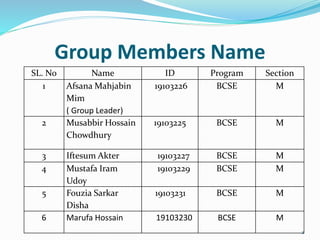
Group Members Name
SL. No Name ID Program Section
1 Afsana Mahjabin
Mim
( Group Leader)
19103226 BCSE M
2 Musabbir Hossain
Chowdhury
19103225 BCSE M
3 Iftesum Akter 19103227 BCSE M
4 Mustafa Iram
Udoy
19103229 BCSE M
5 Fouzia Sarkar
Disha
19103231 BCSE M
6 Marufa Hossain 19103230 BCSE M
2
INTRODUCTION
 NETWORKING: Networking is the process of
Exchange information & ideas among individuals.
 When 2 or more computer are connected to each
other in a such of manners & data transfer (passing)
one computer to another this is called networking.
 WIRELESS NETWORKING: Wireless networks are
computer networks that are not connected by cables
of any kind. Using this technology we can establish
network which is more flexible, intangible and easy to
access.
RF signal is used to signal connection.
3
RF Signal:
 Radio frequency signal.
 RANGE: 30kHz to 300 GHz.
 This signal is Fall under the category of EM waves.
 This signal is invisible and used to send messages
from one devices to another.
 USES: FM radio station use RF signal to broadcast
signals. The frequency is used as the station name (
Like Dhaka FM 90.4)
4
Requirement to create Wireless
Network
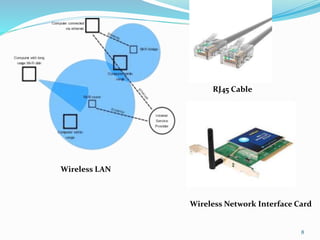
 Network Interface Card (NIC) used for wireless
networks.
 NIC used antenna unlike the RJ45 cable.
 Access Point for Generating signal and establish
connection between devices.
 Devices which has wireless signal adapter.
5
Types of Wireless Network
Based on size Wireless Networks are divided into 4
categories
 Wireless LAN,
 Wireless MAN,
 Wireless WAN,
 Wireless PAN.
6
Wireless LAN (Local Area Network)
 This is a network where two or more computers are
connected that covers only a limited area.
The NIC is used in this connection where has a small
range to cover.
 we often call dis peer to peer network.
 This is also called Ad Hoc Network which is being set
up for temporary purposes.
7
8
Wireless LAN
RJ45 Cable
Wireless Network Interface Card
Wireless LAN (Local Area
Network)
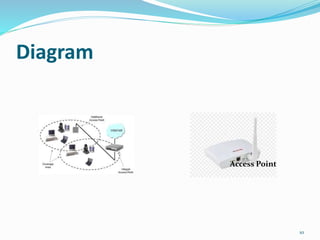
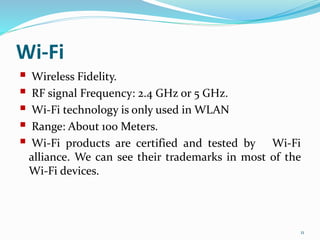
 Unlike Switch in a wired network, A special device is
used in WLAN, which is called Access point.
 WLAN which uses access point are called BSS(Basic
Service Net).
 This act as a coordinator between different devices.
9
Diagram
10
Access Point
Wi-Fi
 Wireless Fidelity.
 RF signal Frequency: 2.4 GHz or 5 GHz.
 Wi-Fi technology is only used in WLAN
 Range: About 100 Meters.
 Wi-Fi products are certified and tested by Wi-Fi
alliance. We can see their trademarks in most of the
Wi-Fi devices.
11
WMAN(Wireless Metropolitan
Area Network)
 Collected unit of many WLANs located at various.
 It uses WIMAX (Worldwide Interoperability for
Microwaves Access) which is controlled by WIMAX
Forum.
 Maximum Speed 1 Gbits/sec
 IEEE 802.16
12
WWAN(Wireless Wide Area
Network)
 WWAN is a very large network which is a spread over
a very large area. It connects many city together.
Mobile phone use WWAN to make communication
possible.
 The technology in WWAN are subdivided in many
generations
 2G, 3G and 4G.
 The communication system which has used before the
emergence of 2G is called 1G used in 1980.
This technology used in most of the Analog devices.
13
2G
Examples of 2nd generation technologies are:
o GPRS (General Packer Radio Services).
o EDGE ( Enhanced Data rates for GSM Evolution)
14
3G
Examples of 3rd generation technologies are:
 CDMA (Code Division Multiple Access)
 UMTS (Universal Mobile Telecommunication System)
 HSPA (High Speed Packet Access)
 HSPA+ ( Evolved High Speed Packet Access)
15
4G
High Speed Network accessibility can be achieved in this
technology. The examples of 4th Generations
technologies are:
 LTE ( Long Term Evolutions)
 VOLTE ( Voice Over Long Term Evolutions)
16
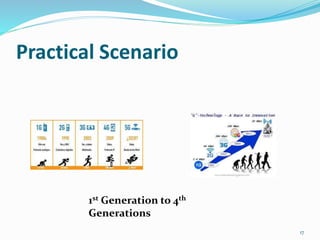
Practical Scenario
17
1st Generation to 4th
Generations
WPAN (Wireless Personal Area
Network)
 The Wireless Networks that are used in smaller
distances are known as WPAN.
 The communication between a mobile phone and its
Bluetooth headset is a typical example of WPAN.
 Two kinds of Wireless technologies are used for
WPAN.
 Bluetooth and Infrared Data Association.
18
BLUETOOTH
 It is used to connect devices in personal area without
using cables.
 Use ISM band 2.4 GHz
 Speed up to 721Kbps
 Range 10 to 100 meters
19
Security Options in Wireless
Network
Data can be easily hacked in wireless network without
using proper security. The RF signal can be intercepted
by Antenna.
Three commonly used security system:
1. Wired Equivalent Privacy (WEP)
2. Wi-Fi Protected Access (WPA)
3. Wi-Fi Protected Access II (WPA2)
20
WEP
 Security standard released in 1997
 The Encryption Algorithm used in WEP was easily
breakable by Hackers
 Encryption refers to the technique of converting data
in a such way that it’s understood only by the sender
and receiver.
21
WPA
 Released in 2003
 Invented by Wi-Fi Alliance
 Required Firmware up gradation instead of changing
any hardware component
 Uses TKIP (Temporary Key Integrity Protocol)
Algorithm.
 Better Security than WEP
22
WPA2
 Released in 2004
 Advanced security Features are available.
 Advanced Encryption Standards (AES) Algorithm is
used for better Security
23
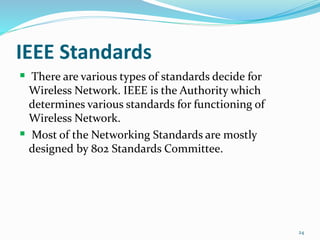
IEEE Standards
 There are various types of standards decide for
Wireless Network. IEEE is the Authority which
determines various standards for functioning of
Wireless Network.
 Most of the Networking Standards are mostly
designed by 802 Standards Committee.
24
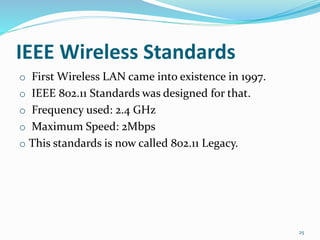
IEEE Wireless Standards
o First Wireless LAN came into existence in 1997.
o IEEE 802.11 Standards was designed for that.
o Frequency used: 2.4 GHz
o Maximum Speed: 2Mbps
o This standards is now called 802.11 Legacy.
25
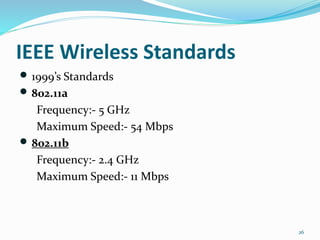
IEEE Wireless Standards
 1999’s Standards
 802.11a
Frequency:- 5 GHz
Maximum Speed:- 54 Mbps
 802.11b
Frequency:- 2.4 GHz
Maximum Speed:- 11 Mbps
26
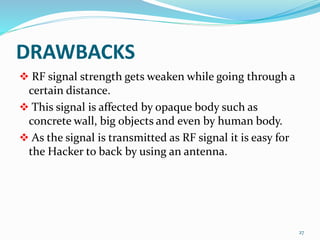
DRAWBACKS
 RF signal strength gets weaken while going through a
certain distance.
 This signal is affected by opaque body such as
concrete wall, big objects and even by human body.
 As the signal is transmitted as RF signal it is easy for
the Hacker to back by using an antenna.
27
Why we use Wireless Network?
 It is helpful for portable devices such as laptops,
mobiles, tablets etc.
 Establish a network connection is easy.
 Introducing a new device in the Network is easy.
 Security system is more featured in Wireless network.
28
29
30

Wireless Netwok.pptx

  • 1.
  • 2.
    Group Members Name SL.No Name ID Program Section 1 Afsana Mahjabin Mim ( Group Leader) 19103226 BCSE M 2 Musabbir Hossain Chowdhury 19103225 BCSE M 3 Iftesum Akter 19103227 BCSE M 4 Mustafa Iram Udoy 19103229 BCSE M 5 Fouzia Sarkar Disha 19103231 BCSE M 6 Marufa Hossain 19103230 BCSE M 2
  • 3.
    INTRODUCTION  NETWORKING: Networkingis the process of Exchange information & ideas among individuals.  When 2 or more computer are connected to each other in a such of manners & data transfer (passing) one computer to another this is called networking.  WIRELESS NETWORKING: Wireless networks are computer networks that are not connected by cables of any kind. Using this technology we can establish network which is more flexible, intangible and easy to access. RF signal is used to signal connection. 3
  • 4.
    RF Signal:  Radiofrequency signal.  RANGE: 30kHz to 300 GHz.  This signal is Fall under the category of EM waves.  This signal is invisible and used to send messages from one devices to another.  USES: FM radio station use RF signal to broadcast signals. The frequency is used as the station name ( Like Dhaka FM 90.4) 4
  • 5.
    Requirement to createWireless Network  Network Interface Card (NIC) used for wireless networks.  NIC used antenna unlike the RJ45 cable.  Access Point for Generating signal and establish connection between devices.  Devices which has wireless signal adapter. 5
  • 6.
    Types of WirelessNetwork Based on size Wireless Networks are divided into 4 categories  Wireless LAN,  Wireless MAN,  Wireless WAN,  Wireless PAN. 6
  • 7.
    Wireless LAN (LocalArea Network)  This is a network where two or more computers are connected that covers only a limited area. The NIC is used in this connection where has a small range to cover.  we often call dis peer to peer network.  This is also called Ad Hoc Network which is being set up for temporary purposes. 7
  • 8.
    8 Wireless LAN RJ45 Cable WirelessNetwork Interface Card
  • 9.
    Wireless LAN (LocalArea Network)  Unlike Switch in a wired network, A special device is used in WLAN, which is called Access point.  WLAN which uses access point are called BSS(Basic Service Net).  This act as a coordinator between different devices. 9
  • 10.
  • 11.
    Wi-Fi  Wireless Fidelity. RF signal Frequency: 2.4 GHz or 5 GHz.  Wi-Fi technology is only used in WLAN  Range: About 100 Meters.  Wi-Fi products are certified and tested by Wi-Fi alliance. We can see their trademarks in most of the Wi-Fi devices. 11
  • 12.
    WMAN(Wireless Metropolitan Area Network) Collected unit of many WLANs located at various.  It uses WIMAX (Worldwide Interoperability for Microwaves Access) which is controlled by WIMAX Forum.  Maximum Speed 1 Gbits/sec  IEEE 802.16 12
  • 13.
    WWAN(Wireless Wide Area Network) WWAN is a very large network which is a spread over a very large area. It connects many city together. Mobile phone use WWAN to make communication possible.  The technology in WWAN are subdivided in many generations  2G, 3G and 4G.  The communication system which has used before the emergence of 2G is called 1G used in 1980. This technology used in most of the Analog devices. 13
  • 14.
    2G Examples of 2ndgeneration technologies are: o GPRS (General Packer Radio Services). o EDGE ( Enhanced Data rates for GSM Evolution) 14
  • 15.
    3G Examples of 3rdgeneration technologies are:  CDMA (Code Division Multiple Access)  UMTS (Universal Mobile Telecommunication System)  HSPA (High Speed Packet Access)  HSPA+ ( Evolved High Speed Packet Access) 15
  • 16.
    4G High Speed Networkaccessibility can be achieved in this technology. The examples of 4th Generations technologies are:  LTE ( Long Term Evolutions)  VOLTE ( Voice Over Long Term Evolutions) 16
  • 17.
  • 18.
    WPAN (Wireless PersonalArea Network)  The Wireless Networks that are used in smaller distances are known as WPAN.  The communication between a mobile phone and its Bluetooth headset is a typical example of WPAN.  Two kinds of Wireless technologies are used for WPAN.  Bluetooth and Infrared Data Association. 18
  • 19.
    BLUETOOTH  It isused to connect devices in personal area without using cables.  Use ISM band 2.4 GHz  Speed up to 721Kbps  Range 10 to 100 meters 19
  • 20.
    Security Options inWireless Network Data can be easily hacked in wireless network without using proper security. The RF signal can be intercepted by Antenna. Three commonly used security system: 1. Wired Equivalent Privacy (WEP) 2. Wi-Fi Protected Access (WPA) 3. Wi-Fi Protected Access II (WPA2) 20
  • 21.
    WEP  Security standardreleased in 1997  The Encryption Algorithm used in WEP was easily breakable by Hackers  Encryption refers to the technique of converting data in a such way that it’s understood only by the sender and receiver. 21
  • 22.
    WPA  Released in2003  Invented by Wi-Fi Alliance  Required Firmware up gradation instead of changing any hardware component  Uses TKIP (Temporary Key Integrity Protocol) Algorithm.  Better Security than WEP 22
  • 23.
    WPA2  Released in2004  Advanced security Features are available.  Advanced Encryption Standards (AES) Algorithm is used for better Security 23
  • 24.
    IEEE Standards  Thereare various types of standards decide for Wireless Network. IEEE is the Authority which determines various standards for functioning of Wireless Network.  Most of the Networking Standards are mostly designed by 802 Standards Committee. 24
  • 25.
    IEEE Wireless Standards oFirst Wireless LAN came into existence in 1997. o IEEE 802.11 Standards was designed for that. o Frequency used: 2.4 GHz o Maximum Speed: 2Mbps o This standards is now called 802.11 Legacy. 25
  • 26.
    IEEE Wireless Standards 1999’s Standards  802.11a Frequency:- 5 GHz Maximum Speed:- 54 Mbps  802.11b Frequency:- 2.4 GHz Maximum Speed:- 11 Mbps 26
  • 27.
    DRAWBACKS  RF signalstrength gets weaken while going through a certain distance.  This signal is affected by opaque body such as concrete wall, big objects and even by human body.  As the signal is transmitted as RF signal it is easy for the Hacker to back by using an antenna. 27
  • 28.
    Why we useWireless Network?  It is helpful for portable devices such as laptops, mobiles, tablets etc.  Establish a network connection is easy.  Introducing a new device in the Network is easy.  Security system is more featured in Wireless network. 28
  • 29.
  • 30.