Application Software
LESSON 14
BY: MANOLO L. GIRON
ZAMBALES NATIONAL HIGH SCHOOL
LEARNING OUTCOMES
At the end of this topic, students should be able to:
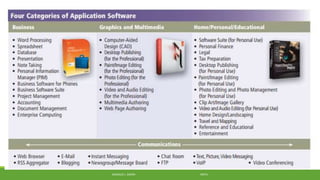
1. Identify the four categories of application software.
2. Explain the software application in different variety of form.
MANOLO L. GIRON RMTU
Application software form variety
1. packaged
2. custom
3. Web application
4. open source
5. shareware
6. freeware
7. public domain
MANOLO L. GIRON RMTU
Packaged software
mass-produced
copyrighted retail software that meets the needs of a wide
variety of users
not just a single user or company.
available in retail stores or on the Web.
MANOLO L. GIRON RMTU
Custom software
performs functions specific to a business or industry.
Sometimes a company cannot find packaged software that meets
its unique requirements.
the company may use programmers to develop tailor-made custom
software.
MANOLO L. GIRON RMTU
Web application
is a Web site that allows users to access and interact with software
from any computer or device that is connected to the Internet.
Types of Web applications include e-mail, word processing, and
game programs.
MANOLO L. GIRON RMTU
Open source software
is software provided for use, modification, and redistribution.
This software has no restrictions from the copyright holder
regarding modification of the software’s internal instructions and its
redistribution.
Open source software usually can be downloaded from the
Internet, often at no cost.
MANOLO L. GIRON RMTU
Shareware
is copyrighted software that is distributed at no cost for a trial
period.
To use a shareware program beyond that period, you send payment
to the program developer.
MANOLO L. GIRON RMTU
Freeware
is copyrighted software provided at no cost to a user by an
individual or a company that retains all rights to the
software.
MANOLO L. GIRON RMTU
Public-domain software
has been donated for public use and has no copyright restrictions.
Anyone can copy or distribute public-domain software to others at
no cost.
MANOLO L. GIRON RMTU
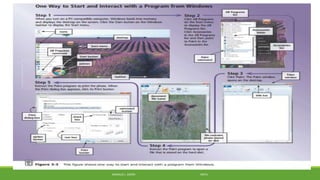
The Role of System Software
serves as the interface between the user, the application software,
and the computer’s hardware.
 it coordinates all the activities of the computer.
includes starting application software and transferring data among
input and output devices and memory.
To use application software, such as a word processing program,
your computer must be running system software — specifically, an
operating system.
MANOLO L. GIRON RMTU
References
Discovering Computers FUNDAMENTALS Your Interactive Guide to the Digital World, Shelly
Cashman Series by Gary B. Shelly and Misty E. Vermaat
Contributing Authors
Jeffrey J. Quasney
Susan L. Sebok
Steven M. Freund
MANOLO L. GIRON RMTU

14. application software

  • 1.
    Application Software LESSON 14 BY:MANOLO L. GIRON ZAMBALES NATIONAL HIGH SCHOOL
  • 2.
    LEARNING OUTCOMES At theend of this topic, students should be able to: 1. Identify the four categories of application software. 2. Explain the software application in different variety of form. MANOLO L. GIRON RMTU
  • 3.
    Application software formvariety 1. packaged 2. custom 3. Web application 4. open source 5. shareware 6. freeware 7. public domain MANOLO L. GIRON RMTU
  • 4.
    Packaged software mass-produced copyrighted retailsoftware that meets the needs of a wide variety of users not just a single user or company. available in retail stores or on the Web. MANOLO L. GIRON RMTU
  • 5.
    Custom software performs functionsspecific to a business or industry. Sometimes a company cannot find packaged software that meets its unique requirements. the company may use programmers to develop tailor-made custom software. MANOLO L. GIRON RMTU
  • 6.
    Web application is aWeb site that allows users to access and interact with software from any computer or device that is connected to the Internet. Types of Web applications include e-mail, word processing, and game programs. MANOLO L. GIRON RMTU
  • 7.
    Open source software issoftware provided for use, modification, and redistribution. This software has no restrictions from the copyright holder regarding modification of the software’s internal instructions and its redistribution. Open source software usually can be downloaded from the Internet, often at no cost. MANOLO L. GIRON RMTU
  • 8.
    Shareware is copyrighted softwarethat is distributed at no cost for a trial period. To use a shareware program beyond that period, you send payment to the program developer. MANOLO L. GIRON RMTU
  • 9.
    Freeware is copyrighted softwareprovided at no cost to a user by an individual or a company that retains all rights to the software. MANOLO L. GIRON RMTU
  • 10.
    Public-domain software has beendonated for public use and has no copyright restrictions. Anyone can copy or distribute public-domain software to others at no cost. MANOLO L. GIRON RMTU
  • 11.
  • 12.
    The Role ofSystem Software serves as the interface between the user, the application software, and the computer’s hardware.  it coordinates all the activities of the computer. includes starting application software and transferring data among input and output devices and memory. To use application software, such as a word processing program, your computer must be running system software — specifically, an operating system. MANOLO L. GIRON RMTU
  • 13.
  • 14.
    References Discovering Computers FUNDAMENTALSYour Interactive Guide to the Digital World, Shelly Cashman Series by Gary B. Shelly and Misty E. Vermaat Contributing Authors Jeffrey J. Quasney Susan L. Sebok Steven M. Freund MANOLO L. GIRON RMTU